
If live webinars are like catching a show at a specific time, on-demand webinars are your personal time machine, letting you access valuable content whenever it suits you best.
In fact, as a part of the online training industry for over a decade now, I’ve seen how conflicting schedules or time zones cause people to miss important webinars.
That’s where an on-demand webinar works so well.
This flexible format is reshaping sales, education, and marketing by making learning accessible anytime, anywhere.
Based on my experiences, here’s a detailed guide that covers the essentials of webinars on-demand, from what they are, how to create one, and why they’re so impactful.
Let’s understand more about this format.
What Is an On-Demand Webinar?
On-demand webinars are pre-recorded presentations that viewers can access anytime, offering flexibility compared to live sessions. They’re perfect for busy professionals who can’t attend events in real-time.
Think of it as your favorite show on a streaming platform—watch it whenever it suits you!
For instance, a marketing team might create a webinar on-demand to give a product demo or launch. Viewers can join the session days, even weeks later, and still get all the insights without missing a beat.
On-demand webinars are great for delivering consistent messaging, whether training employees or educating potential clients about your brand.
How to Create an On-Demand Webinar
Want to make your webinars available anytime, anywhere?
On-demand webinars are like having your content ready to entertain and educate on your audience’s schedule. Here’s how you can set up an on-demand webinar on WebinarNinja in just a few steps – whether you are repurposing a live session or planning your first on-demand experience after hosting a webinar.
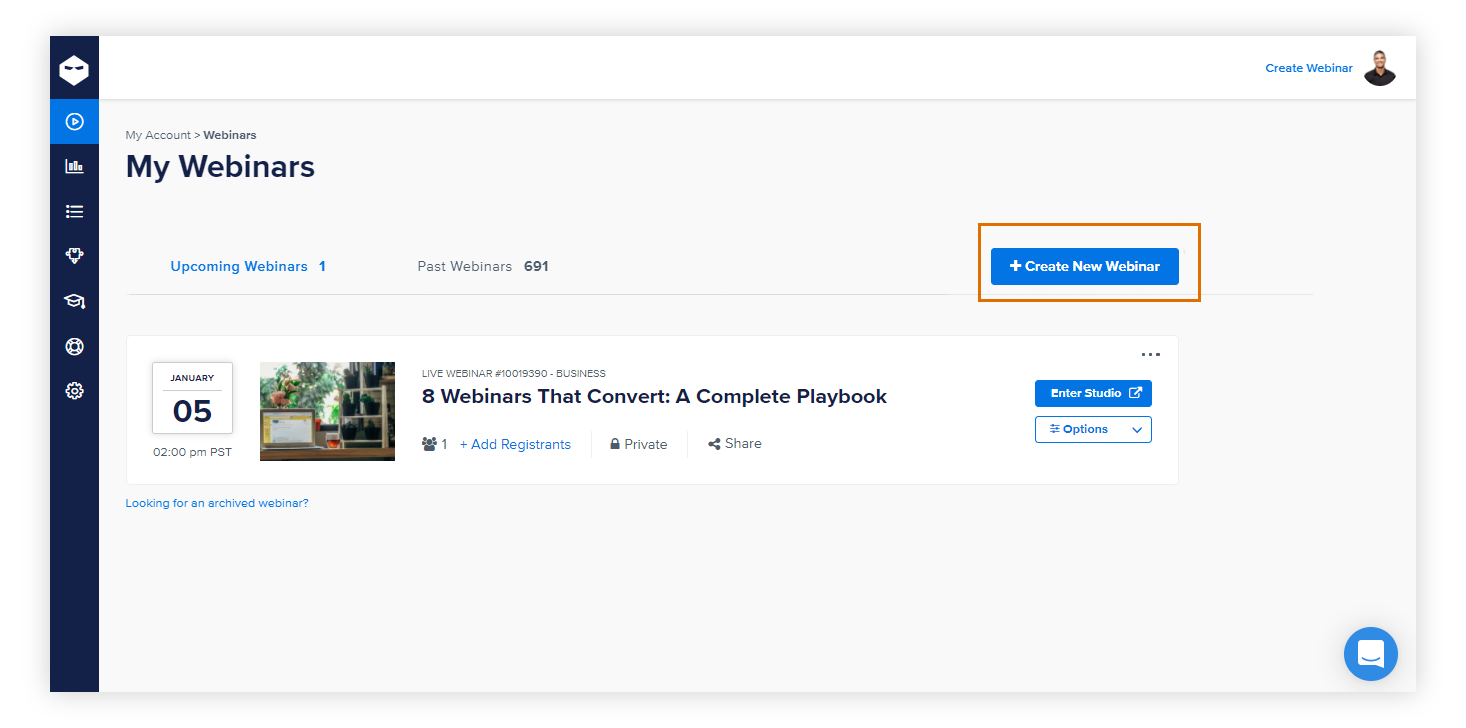
Step 1: Log in to Your Account
Log in to your WebinarNinja account. You’ll land on your dashboard, where the magic begins. Go to the “My Webinars” section and select “Create Webinar.”
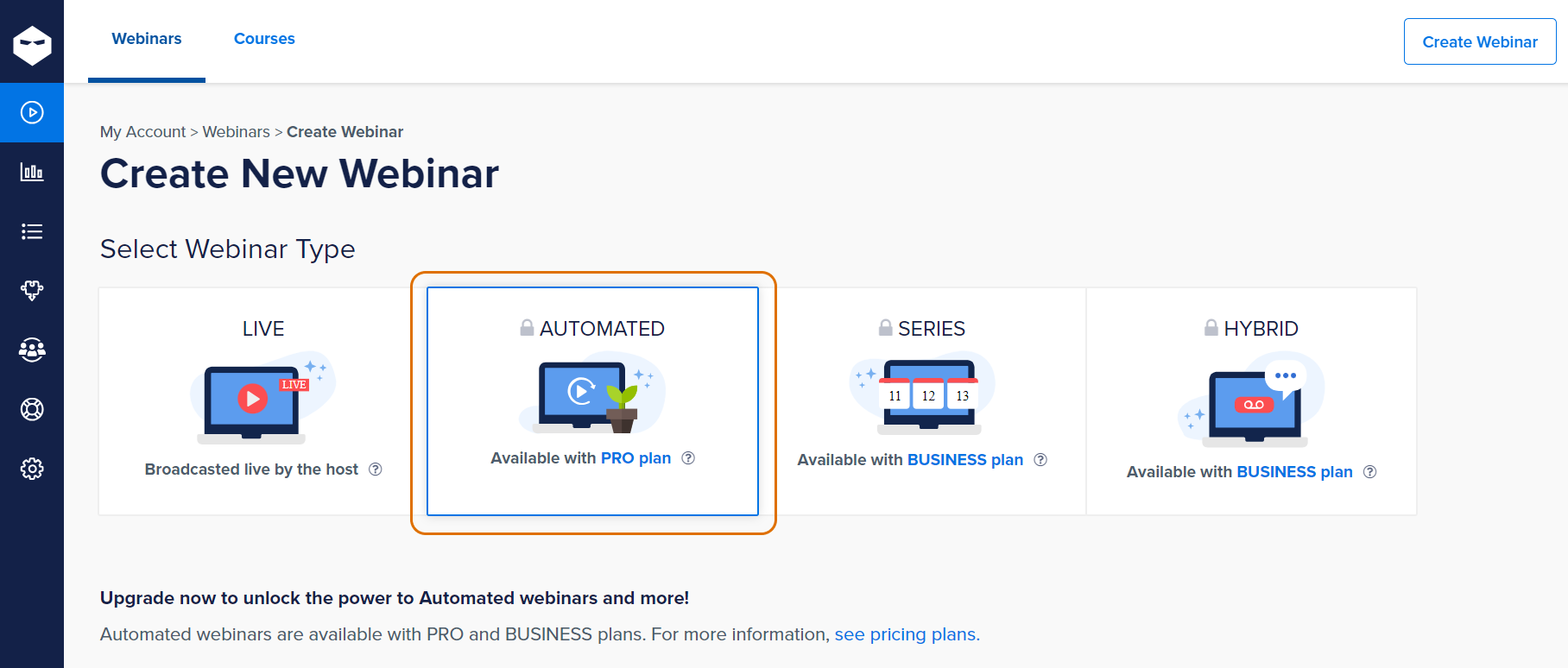
Step 2: Choose Your Webinar Type
You’ll see several options:
- Live: Hosted live by you.
- Automated: Runs on a schedule.
- Series: Bundles multiple webinars.
- Hybrid: A mix of live and recorded elements.
Select Automated Webinars from this tab.
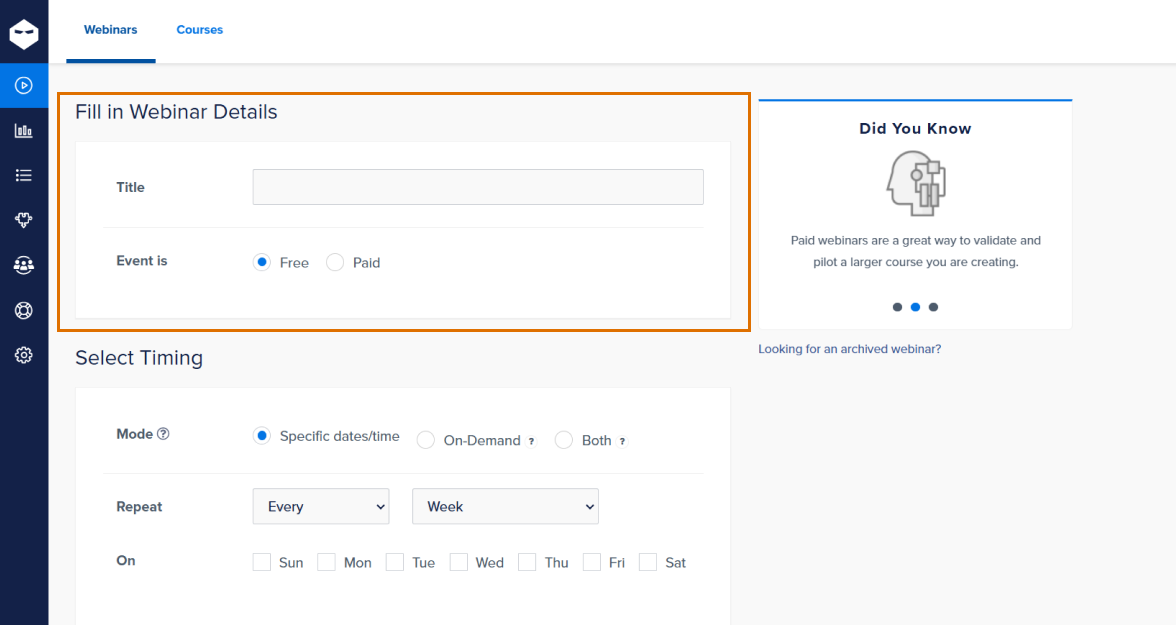
Step 3: Fill In Your Webinar Details
- Add a catchy “Title” that grabs attention.
- Choose whether the webinar is Free or Paid. If it’s a paid one, add the price in USD.
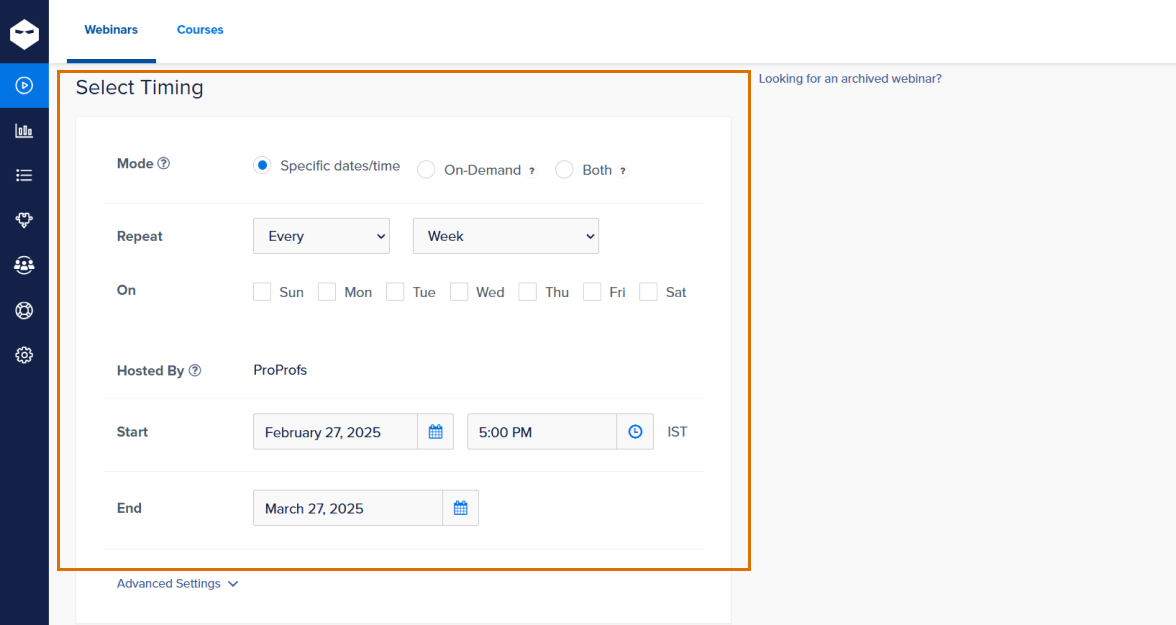
Step 4: Select Webinar Timing
- In the mode section, select On-Demand. If you want to include live or scheduled options as well, you can pick Both.
- Enter your host details (your name or business, e.g., ProProfs).
- Add the start and end dates of your on-demand webinar.
You can also click on Advanced Settings and select the number of available dates/times on the registration page. Besides, you can also remove specific dates from the schedule.
Step 5: Upload Your Video
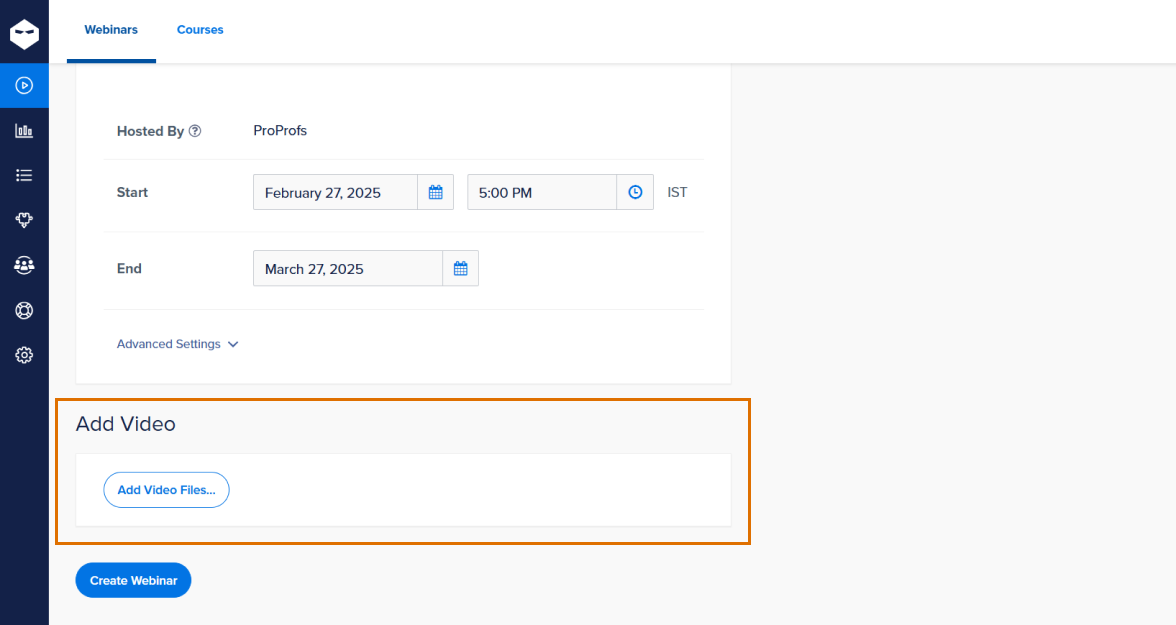
- Click “Add Video” to upload your pre-recorded webinar file.
Ensure the video format is supported and ready to stream flawlessly.
Step 6: Review and Create
- Double-check all the settings and details.
- Once happy, hit “Create Webinar” to create your on-demand webinar!

Post this, you can reach out to Settings and make changes to your webinar registration page, thank you page, and email drips.
And that’s it—you’ve created an on-demand webinar! Now, your audience can binge on your content like their favorite Netflix series. 🎉
Common On-Demand Webinar Challenges (And How to Fix Them)
On-demand webinars look simple on the surface. Record once, upload, promote, and let people watch whenever they want. In practice, a few technical and experience-related hurdles can quietly hurt results. The good news is that most of these issues are predictable and fixable if you plan for them early.
Below are the challenges people run into most often, plus practical ways to prevent them.
1. Video and Audio Problems During Upload
Your webinar can be brilliant, but if the file refuses to upload cleanly or plays poorly after upload, viewers will not stick around. Upload issues are common when the file is heavy, exported in the wrong format, or recorded without basic quality checks.
What usually goes wrong
- Unsupported formats: Some platforms accept only a narrow set of file types. A file that plays fine on your laptop may fail on upload.
- Large file sizes: Long recordings at high resolution can take hours to process and may time out on slower connections.
- Audio and video out of sync: This often happens when you record on one tool and edit on another without matching frame rates.
- Blurry screen shares or unreadable slides: If your screen recording is low resolution, small text becomes painful to read on playback.
How to fix or prevent it
- Export in widely supported formats like MP4 with H.264 encoding unless your platform says otherwise.
- Keep file sizes reasonable. If your raw file is huge, compress it before uploading. Most video editors have a “web optimized” export setting that reduces size without wrecking clarity.
- Match frame rates across tools. If you record at 30 fps, export at the same. This avoids lip-sync drift.
- Do a short test upload first. Upload a 2-minute sample to confirm the platform handles your file correctly.
- Record slides at a readable scale. Use larger fonts, thicker pointers, and avoid tiny UI elements. Your viewers may be watching on phones.
2. Playback Quality and Buffering for Viewers
A key promise of on-demand webinars is convenience. Buffering ruins that promise fast. If playback stalls, drops in quality, or fails on certain devices, you lose both attention and trust.
What usually goes wrong
- Slow loading or buffering for users with average internet connections.
- Resolution too high for streaming on mobile networks.
- Playback glitches on some browsers if the platform is not fully optimized.
- Lack of adaptive streaming on certain plans which can cause uneven viewing.
How to fix or prevent it
- Choose a balanced resolution. 1080p looks great, but 720p is often the smarter choice for training and demos. It streams more smoothly for more people.
- Test on multiple devices. Watch your webinar on desktop, tablet, and phone. Try at least two browsers.
- Use platform features that support adaptive playback or low-bandwidth modes if they are available.
- Trim unnecessary length. Shorter webinars reduce buffering risk and keep performance steady.
- Add a quick note for viewers suggesting wired or stable Wi-Fi if your content is heavy on visuals.
3. Registration and Access Friction
On-demand still needs a clean entry point. If registration feels annoying or access feels unreliable, people abandon before they even start watching.
What usually goes wrong
- Registration forms asking for too much. Every extra field is a potential drop-off.
- Confusing confirmation pages. Viewers are not sure what to do next.
- Emails landing in spam or promotions tabs. Users never receive the access link.
- Login or access links expiring faster than expected.
- Too many clicks before playback. On-demand should feel instant.
How to fix or prevent it
- Reduce form fields to the minimum. Name and email are usually enough unless your funnel demands more.
- Make the confirmation page blunt and clear. Tell them exactly what happens next. Example: “Check your email for the access link. It should arrive in 2 minutes.”
- Send a backup email automatically after a short delay, in case the first one is missed.
- Use simple subject lines that look legitimate and specific, not salesy.
- Test the flow end-to-end from a fresh email ID to catch broken links or confusing steps.
4. Engagement Drop-Offs in On-Demand Viewing
Engagement is the hardest part of on-demand webinars. Since there is no live energy, no social pressure, and no “start time,” viewers leave the moment it feels slow or generic.
What usually causes drop-offs
- Long introductions. People click to learn, not to hear a five-minute preamble.
- Slow pacing or repetition. Viewers feel they can “watch later” and never return.
- No sense of progress. Without a live agenda, time feels vague.
- One-way delivery. A recorded webinar can feel passive if nothing invites participation.
- Content that sounds like a brochure. Viewers bail the moment it feels like a pure pitch.
How to fix or prevent it
- Front-load value in the first two minutes. Start with a problem, promise a clear outcome, and show what they will learn.
- Use chapter-style structure. Even a simple on-screen slide like “Part 2: Fixing X” helps viewers stay oriented.
- Add interaction points. Use polls, quick reflection prompts, or short “pause and try this” moments if your platform supports them.
- Trim the fat. Edit out filler, repeated points, and long transitions. Tightness beats length.
- Place CTAs like checkpoints, not interruptions. A soft CTA after a key insight works better than a sudden sales detour.
- Aim for 20 to 40 minutes unless the topic truly needs more depth.
5. Platform Limitations and Quiet “Gotchas”
Not all on-demand webinar platforms the same way. Some limit your flexibility unless you upgrade, and those limits can shape your results.
What you might run into
- Limited customization options for registration pages on basic plans.
- Restricted automation and email sequences unless you are on higher tiers.
- Surface-level analytics that show views but not where people drop off.
- Embedding or white-label limits if you want to host on your own site.
- Caps on storage, attendee numbers, or replay availability.
How to fix or prevent it
- Check plan limits before building your whole funnel. It is better to know early than to rebuild later.
- Match the platform to your goal. If you need sales automation, prioritize that. If you need training depth, focus on analytics and accessibility.
- Run a small pilot webinar first. This quickly reveals what the platform can and cannot do in real conditions.
- Keep a backup option. If a tool blocks a key feature, you should know your alternative.
6. Keeping an On-Demand Webinar Evergreen
A recorded webinar ages like any content. Products change, stats go stale, and audience expectations shift. If you leave a webinar untouched for a year, it stops converting even if the topic is still relevant.
What usually goes wrong
- Outdated references or screenshots. Viewers notice quickly.
- Old data or trends that no longer feel credible.
- Openers that feel time-bound like “this year” or “recently.”
- Mismatched CTAs if your offer, pricing, or product has changed.
How to fix or prevent it
- Schedule light refreshes every quarter. You do not need to re-record the whole thing. Sometimes updating your intro, a few slides, and your CTA is enough.
- Swap in updated examples without changing your core structure.
- Use timeless language when possible. Say “right now” or “currently” only when it is truly necessary.
- Track drop-off analytics over time. A steady decline often signals the content is aging.
Retitle or reframe if needed. A fresh angle can revive a strong webinar without new footage.
Best Use Cases of On-Demand Webinars
Here are some of the best use cases for on-demand webinars, along with relevant examples to illustrate their effectiveness:
1. Customer Education
On-demand webinars help businesses educate customers about their products or services, providing in-depth tutorials or troubleshooting guides.
Example: A software company like Adobe offers pre-recorded webinars on using Photoshop for beginners, enabling users to learn at their own pace while exploring the tool’s features.
2. Lead Generation
Businesses use on-demand webinars to capture leads by requiring registration for access, turning viewers into potential customers.
Example: HubSpot hosts on-demand marketing strategy webinars, asking viewers to provide their contact details to access the recordings and building a database for follow-ups.
3. Employee Training
Organizations create on-demand webinars to train employees on new tools, processes, or compliance regulations without disrupting their schedules.
Example: A pharmaceutical company uses on-demand webinars to train employees on updated FDA compliance guidelines, ensuring everyone has access to the same content.
4. Product Demos
Companies use on-demand webinars to showcase their products, demonstrating value and functionality to potential customers.
Example: Tesla creates an on-demand webinar showcasing the features of a new electric vehicle model, targeting tech-savvy customers interested in innovation.
5. Continuing Education
From free on-demand webinars to paid ones, professionals use them to earn certifications, learn new skills, or stay updated in their fields.
Example: A company may provide on-demand webinars on data science topics, allowing learners to gain insights from industry experts at their convenience.
6. Event Extensions
On-demand webinars extend the life of live events by allowing attendees and absentees to revisit the content.
Example: A conference like Dreamforce uploads keynote sessions and breakout sessions as on-demand webinars, enabling attendees to catch up on missed talks.
7. Sales Enablement
Sales teams share on-demand webinars with prospects to answer common questions and move them further down the sales funnel.
Example: A CRM provider creates an on-demand webinar explaining how their platform can increase sales team efficiency, sending it to warm leads as part of their outreach.
8. Thought Leadership
Businesses use on-demand webinars to position themselves as industry experts by sharing insights and trends.
Example: McKinsey & Company hosts on-demand webinars about emerging market trends, establishing their authority among professionals and decision-makers.
9. Community Engagement
On-demand webinars foster a sense of community by sharing knowledge and sparking conversations on shared interests.
Example: A non-profit creates an on-demand webinar on environmental conservation, encouraging viewers to join their initiatives and participate in forums.
10. Market Research
Organizations analyze viewer engagement with on-demand webinars to gauge interest in specific topics or features.
Example: A gaming company uploads an on-demand webinar about an upcoming release and monitors views and feedback to refine its marketing strategy.
What Are the Benefits of On-Demand Webinars?
On-demand webinars have surely changed the way we share and consume knowledge. They provide unmatched convenience and long-term value, making them an essential tool for businesses, educators, and professionals.
Here are some of their key benefits:
1. Flexible Viewing Options for Maximum Convenience
On-demand webinars give viewers the freedom to access content on their own schedule, removing the pressure of attending live sessions. This flexibility makes it easy for people with busy or unpredictable routines to stay engaged without missing out.
For example, imagine a marketing professional swamped with campaign deadlines. They can catch up on a webinar about industry trends during their lunch break or after work hours, ensuring they don’t miss valuable insights due to scheduling conflicts.
2. Wider Audience Reach Across Time Zones
On-demand webinars eliminate time zone barriers, making content accessible to anyone, anywhere. Creators can reach a global audience without worrying about scheduling conflicts, ensuring the message gets across to everyone equally.
For instance, a SaaS company hosting a webinar for their global clients allows participants from Tokyo to New York to watch at a convenient time, creating a seamless experience for everyone involved.
3. Increased Engagement Through Replays and Reviews
One major advantage of on-demand webinars is the option to revisit content as needed. Viewers can pause, rewind, and replay sections, allowing them to better absorb complex or detailed information without feeling rushed.
Take a student enrolled in an online coding workshop: they can revisit the webinar recording multiple times, mastering complex topics that may have been too quick to grasp during a live session.
4. Evergreen Lead Generation for Long-Term Impact
On-demand webinars continue to generate leads long after the live event ends. By requiring sign-ups for access, businesses can keep attracting potential customers, turning a one-time effort into a lasting marketing resource.
For example, a consulting firm offering a recorded session on business scaling strategies collects fresh contact information each time someone signs up—even months after the live event, ensuring ongoing audience growth.
5. Reduced Pressure for Live Attendance and Participation
On-demand webinars remove the stress of needing to attend live. Viewers can engage with the content when it’s most convenient, creating a more relaxed and accessible experience for everyone.
Consider an HR manager juggling interviews who can’t attend a live webinar on employee retention. With on-demand access, they can view it later, allowing them to stay informed without added stress.
6. Cost-Effective Content Delivery for Continuous Use
On-demand webinars are a cost-efficient solution for businesses. Once created, the content can be reused indefinitely, maximizing value without additional costs. This scalability makes them an excellent long-term investment.
You can also create free on-demand webinars to showcase your expertise initially, and monetize them later.
For instance, a fitness coach records a detailed session on effective home workouts. Instead of repeating the webinar, they monetize the same content by sharing it with new subscribers over time.
7. Detailed Analytics for Understanding Viewer Behavior
On-demand platforms provide detailed analytics to help creators understand their audience. Metrics like viewer engagement, drop-off rates, and popular sections allow for fine-tuning future content to meet audience needs.

For example, an online educator notices a consistent drop-off during a lengthy introduction. Armed with this data, they optimize future content to capture attention right from the start.
What Are the Best Practices For Creating On-Demand Webinars?
Creating on-demand webinars is an excellent way to engage your audience at their convenience. Here are some best practices to ensure they’re effective and impactful:
1. Plan With Your Audience in Mind to Ensure Relevance
Start by really understanding what your audience needs. What challenges are they facing? What topics are they excited about?
A well-targeted webinar topic not only grabs their attention but also keeps them engaged throughout the webinar. When the content speaks to their needs, they’re more likely to stick around and take action.
2. Choose the Right Format to Match Your Goals
Not every webinar is a slideshow marathon. Maybe your audience would love a Q&A session, a product demo, or even an expert panel discussion.
Picking the right format ensures your webinar doesn’t just inform but also resonates with viewers in a way that fits the topic and purpose.
3. Keep the Content Concise to Hold Attention
Long webinars can lead to yawns and click-aways.
Try to keep your sessions between 20–40 minutes, max. If you have a lot to share, break it into shorter chapters or segments. This not only makes the content easier to digest but also keeps viewers engaged from start to finish.
4. Invest in High-quality Production to Build Credibility
Your visuals, audio, and overall quality speak volumes about your professionalism.
Nobody wants to watch a pixelated screen with crackly sound. When your webinar looks polished, it builds trust with your audience and shows them you take their time seriously.
5. Pre-record With Purpose to Maintain Engagement
Just because it’s on-demand doesn’t mean it should feel lifeless. Keep your tone conversational and dynamic to make it feel fresh and engaging.
Don’t forget to update your content periodically to reflect current trends, accurate stats, or product updates—it shows you care about staying relevant.
6. Add Closed Captions and Transcripts to Improve Accessibility
Closed captions aren’t just a nice-to-have—they’re essential for accessibility. They make your webinars available to viewers with hearing impairments and improve your content’s search engine visibility.
Bonus: Transcripts let people quickly skim the webinar content before committing to watching.
7. Incorporate Calls-to-Action (CTAs) to Drive Engagement
What’s the point of a great webinar if viewers don’t take the next step?
Strategically place webinar CTAs, like “Download the Guide” or “Start a Free Trial,” to encourage action. Just keep it subtle and natural so it doesn’t feel intrusive during the viewing experience.
8. Optimize for Mobile to Expand Reach
Your viewers are likely tuning in from all sorts of devices—especially their phones. Test your webinar on mobile devices to ensure everything works seamlessly. A mobile-friendly experience means your audience can enjoy your webinar anytime, anywhere.
9. Promote Your Webinar Effectively to Attract Viewers
If no one knows about your webinar, it doesn’t matter how amazing it is. Spread the word using email campaigns, social media posts, and even your website. Be clear about the benefits and takeaways to draw people in—it’s all about making them want to watch.
10. Track Performance to Refine Future Webinars
Once your webinar is live, it’s time to put on your analytics hat. Look at metrics like viewership, engagement rates, and drop-off points. These insights are gold when it comes to fine-tuning future webinars to suit your audience’s preferences and expectations better.
What Are the Future Trends in On-Demand Webinars?
The future of on-demand webinars is evolving as technology and user expectations grow. Here are some key trends and clear examples of how they’re shaping the future:
1. AI-Powered Personalization
AI is transforming on-demand webinars by customizing content to fit individual preferences. Platforms are leveraging AI to analyze viewer behavior and suggest relevant webinars based on past activity.
For example, an AI system might recommend a series of marketing-focused webinars to a user who previously watched sessions on social media strategies.
2. Interactive Features
To bridge the gap between live and recorded content, interactive elements like polls, quizzes, and Q&A are becoming integral to on-demand webinars. These features engage viewers in real-time, even during playback.
For example, WebinarNinja allows participants to engage with polls or submit questions during a recorded webinar, creating a dynamic experience.
3. Mobile-Optimized Webinars
With the increase in mobile device usage, optimizing on-demand webinars for smaller screens is essential. Mobile-friendly layouts and responsive design ensure seamless viewing experiences.
For example, a business professional could watch an entire webinar series on their smartphone during a commute without any interruptions or quality loss.
4. Data-Driven Insights
Analytics are becoming indispensable for webinar hosts to refine their content. Detailed reports on viewer engagement, watch times, and drop-off points help improve future webinars.
For example, hosts can identify the most engaging parts of a recorded webinar and focus on those topics in future sessions.
5. Gamification of Webinars
Adding gamified elements, such as leaderboards and point systems, keeps viewers entertained and motivated to complete webinars. Gamification is particularly effective for training and educational webinars.
For example, a company hosting employee training sessions could use a point system to reward participants for completing modules in a recorded webinar.
6. Multi-Language Support
On-demand webinars are increasingly catering to global audiences by including subtitles, translations, and language-specific content options. This trend makes recorded sessions more inclusive.
For example, an organization could offer the same on-demand webinar in English, Spanish, and Mandarin to reach diverse demographics.
7. Evergreen Webinar Strategies
Businesses are repurposing webinars into evergreen content that remains relevant for extended periods. Automated scheduling features make it easy to deliver these sessions as if they were live.

For example, WebinarNinja allows companies to schedule replays of recorded webinars at set times, giving the illusion of a live event and encouraging more viewers to join.
8. Hybrid Event Integration
The integration of live and on-demand content is gaining traction, especially for hybrid events. Recorded webinars from live sessions are made available immediately for attendees who missed them.
For example, after a live webinar concludes, attendees receive access to the recording with added timestamps and highlights for quick reference.
9. Immersive Technologies (AR/VR)
Virtual and augmented reality technologies are starting to enhance on-demand webinars. These tools create engaging, immersive experiences, making recorded webinars feel more interactive.
For example, a viewer could explore a virtual exhibition while watching a recorded webinar about a product launch.
10. Monetization Options
On-demand webinars are being transformed into revenue-generating assets. Businesses are adopting models like pay-per-view or subscription access to monetize their content effectively.
For example, organizations offering niche expertise can charge a one-time fee or subscription for access to premium recorded webinars.
Ready to Create On-Demand Webinars?
On-demand webinars are a powerful way to connect with your audience at their convenience, driving engagement and extending your reach. By offering value through easily accessible content, you can nurture leads, boost sales, and establish your expertise effectively.
A good webinar tool, like WebinarNinja, simplifies this process with features like automated recordings, audience analytics, and built-in marketing tools. It helps you create polished on-demand webinars that captivate viewers and deliver results, all with minimal effort.
With its user-friendly setup and powerful functionality, hosting professional, high-quality webinars has never been easier. Start creating impactful webinars today!
Want to host a webinar for free?
Use WebinarNinja to teach, improve marketing, and grow your sales.



![10 Free Webinar Software in 2026 [A Detailed Comparison]](https://webinarninja.com/blog/wp-content/uploads/2024/06/Feature_WN_10-Free-Webinar-Software-in-2024-a-Detailed-Comparison.png)