

There is a specific kind of frustration that hits about 90 minutes after your webinar ends.
You spent three weeks promoting it. You wrote the emails, posted on LinkedIn, designed the slides, and rehearsed the transitions. Not just this, you also showed up on time, delivered the content well, and answered the questions. And then you looked at the numbers: 200 registrations. 44 attendees. One person clicked the offer. Nobody bought.
This is what happens when you treat webinar marketing as a synonym for webinar promotion. Promotion is one piece. Marketing is the entire system: audience targeting, the registration page, the five-email pre-event sequence, the live session structure, and the 72-hour follow-up, where most of the actual revenue is generated.
This guide is the system. Not a checklist you will scan and forget, but the architecture you build once and run repeatedly, improving it with data from every event.
What Is Webinar Marketing?
Most brands get this wrong in the same way. They treat webinar marketing as event promotion: two emails, one LinkedIn post, done. The webinar becomes the strategy.
That is like building a storefront and assuming foot traffic handles itself.
The data makes this concrete. Research by Content Marketing Institute and MarketingProfs found that 51% of B2B marketers say webinars produce the best results of any content channel, ranking second only to in-person events.
At the same time, registration-to-attendance rates vary widely, averaging closer to 40 to 50% for smaller, less-optimized events — meaning a significant share of people who expressed interest never show up. Both figures point to the same conclusion: the session itself is one variable in a larger system, and the variables around it determine whether the channel performs.
| The four components of a complete webinar marketing system:
Pre-event: Attracting the right audience and converting them to confirmed registrants |
How to Build a Webinar Marketing Strategy
A webinar marketing strategy is not a campaign plan. It is a repeatable system you run each time, one you iterate on rather than rebuild from scratch. Four decisions made upfront determine the quality of everything that follows.
Here’s a quick video to help you get started:
Now, let’s understand everything in detail, as you read along:
Start With One Goal
The most common mistake is running an event that tries to do everything at once: generate leads, nurture prospects, demonstrate the product, and build awareness. Events with no clear primary goal convert poorly at every goal.
Pick one:
- Lead generation: attract new contacts who have never engaged with your brand
- Pipeline acceleration: move existing prospects who know you but have not committed
- Customer success: onboard, educate, or upsell existing customers
- Direct revenue: present an offer and close sales during or immediately after the session
Your goal determines your topic, your audience definition, your offer, your follow-up sequence, and how you measure success.
Define Your Audience at the Symptom Level
Buyer personas are too vague for a single webinar. You need to know the specific symptom that would make someone register right now.
Weak: ‘Marketing managers at mid-market SaaS companies.’
Strong: ‘Marketing managers who are being asked to double lead volume without increasing headcount and have tried paid ads without success.’
That level of specificity is what turns a vague topic into a session people feel compelled to attend. It is also what drives lead generation webinar performance, since the leads who arrive with a precise problem are significantly easier to convert downstream.
Choose a Topic That Promises a Specific Outcome
Your topic is your biggest webinar promotion lever. It determines email click-through rate, registration page conversion, and show-up rate on the day.
| Anatomy of a high-converting webinar topic:
Specific outcome, not subject: not ‘Email Marketing’ but ‘How to Write Emails That Book 10 Sales Calls Per Week’ |
Pick the Format That Matches Your Goal
Using the wrong format is costly. It means more preparation for a worse outcome. The four main formats serve different purposes:
| Format | Best For | Audience Scale | Automation |
| Live Webinar | Lead gen, product launches, high-trust sales | Up to 1,000 attendees | None: fully real-time |
| Automated Webinar | Evergreen lead gen, scalable demos, nurture | Unlimited attendees | Full: runs 24/7 |
| Hybrid Webinar | Scaled events with live interaction | Unlimited attendees | Partial: pre-recorded plus live chat |
| Webinar Series | Courses, multi-session onboarding, education | Up to 1,000 per session | Single registration covers all sessions |
Want to host a webinar for free?
Use WebinarNinja to generate leads, improve marketing, and grow your sales.
How to Market a Webinar: The Pre-Event Promotion Playbook
This is where registrations are won or lost. The promotion period runs from the moment your registration page is live to the moment your session starts, and most of the leverage sits in the first two weeks.
Build Your Registration Page Before Promoting Anything
This sounds obvious and is consistently ignored. Pages go live late, with placeholder copy, and teams start promoting before testing the confirmation email sequence.
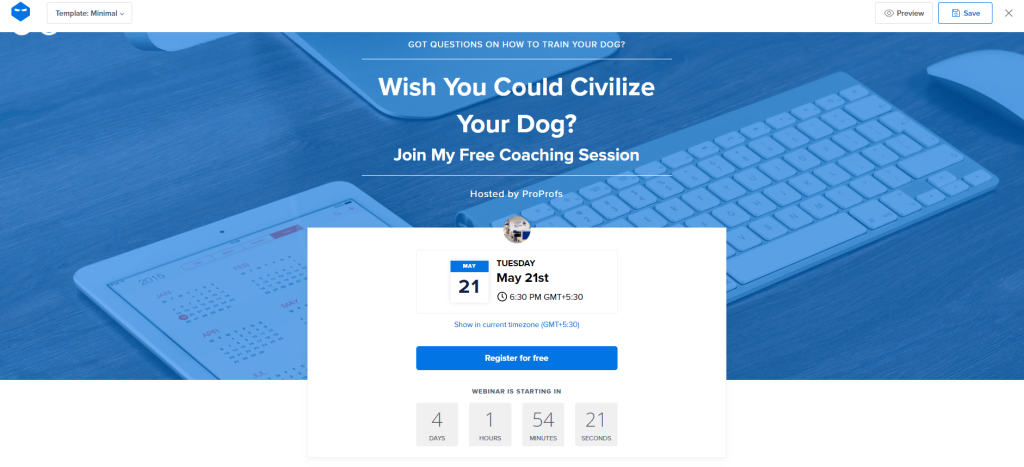
A registration page that converts has six elements. For reference on what the best ones look like, the webinar landing page examples guide covers the layout choices that move registration rates most reliably.
- A headline that states the outcome, not the topic
- A subheadline that names exactly who this is for
- Three to five bullets stating what the attendee will know or be able to do after the session
- Date, time, and duration visible above the fold, no scrolling required
- One CTA button, not two
- Social proof if you have it: previous attendee count, testimonials, speaker credentials
Test the page yourself before sending a single email. Register as a test attendee, confirm the email sequence fires, and verify the join link works on mobile.
Promote for Three Weeks, Not Three Days
The optimal promotional window for a B2B webinar is 21 days. Shorter than 7 days produces registrations, but the show-up rate tanks because people have not had time to block their calendar. Longer than 6 weeks inflates no-show rates as registrants forget.
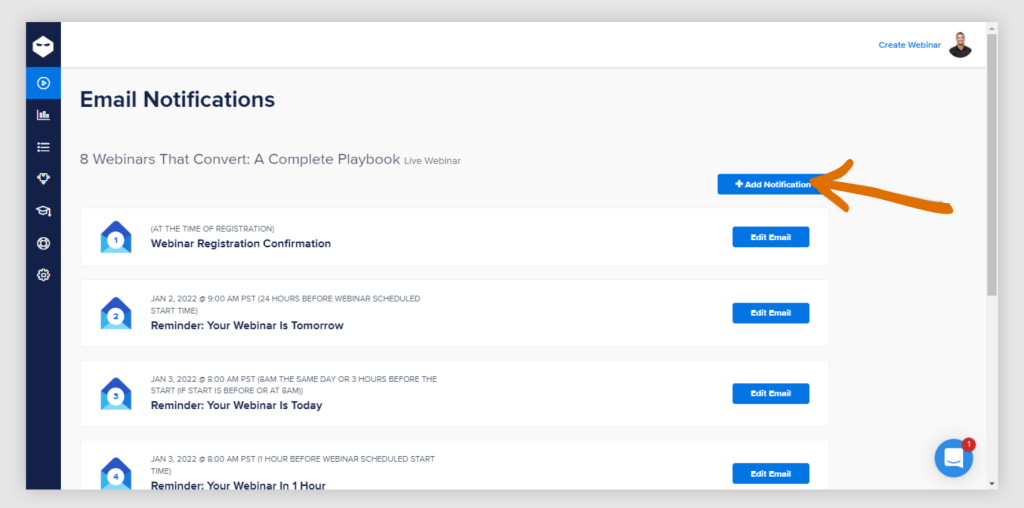
According to HubSpot’s webinar marketing data, email is the top promotional channel for webinars, driving up to 57% of all registrations.
| Timing | Email Angle | Goal |
| Day 1 (3 weeks out) | Announcement: what is coming and why it matters now | Initial registrations from your warmest list |
| Day 7 (2 weeks out) | Problem-focused: agitate the pain your webinar solves | Convert fence-sitters from week one |
| Day 14 (1 week out) | Speaker or proof: credentials, past results | Credibility push for skeptics |
| Day 19 (48 hrs out) | Last chance with urgency and recap of the outcome | Final registration surge |
| Day 21 (day of) | Reminder: 2 hours before and 15 minutes before | Maximize show-up rate |
Run Four Promotion Channels Simultaneously
Email reaches the people already in your world. Filling a room beyond your existing list requires running at least three other channels at the same time.
- LinkedIn: organic posts from the host’s personal profile outperform company pages by 3 to 5x. Post three times across the three weeks: announce the registration page, share a ‘why I am doing this’ post, and send a day-before reminder.
- Partnerships: one co-host or cross-promotional partner can add 30 to 50 percent more registrations to any event. Find a brand with an adjacent audience and offer to split the session.
- Retargeting ads: use pixel tracking to retarget people who visited your registration page but did not complete signup. These are your highest-intent prospects. A retargeting ad with a clear outcome statement converts at 2 to 4x the rate of cold traffic. Most dedicated webinar platforms support pixel tracking natively, and if you are still evaluating the best webinar platforms, this feature makes that setup straightforward.
- Existing community: if you have a Slack group, Discord community, or online forum, these are your fastest registrations. People who already trust you do not need convincing; they need a reason to show up.
Optimize Your Thank-You Page
Most platforms drop registrants on a generic confirmation screen. That is a conversion opportunity left untouched. Use the thank-you page to ask registrants to add the event to their calendar (this alone reduces no-show rate by 15 to 25 percent), invite them to share the link with a colleague, and offer a piece of pre-event content that warms them up before the session.
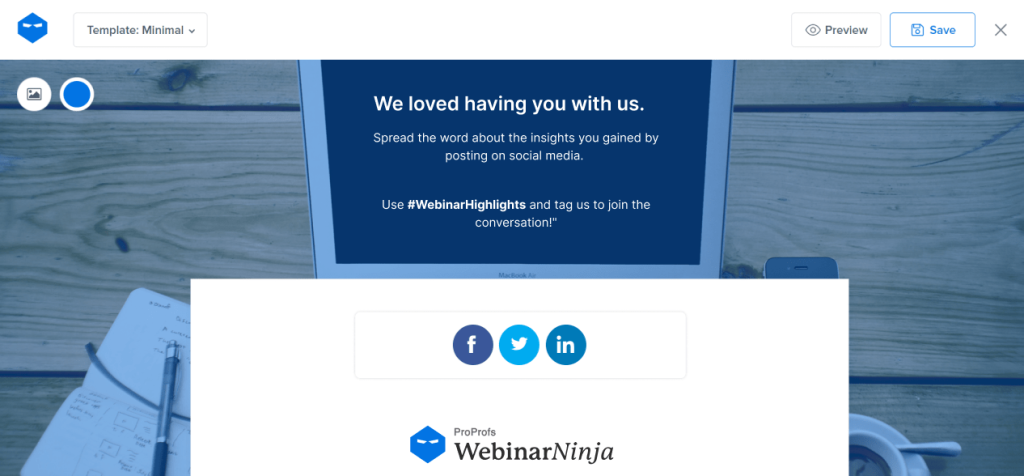
Platforms like WebinarNinja handle the registration page, email sequence, and reminder automation from a single dashboard, which means the entire pre-event system described above can be configured once and reused for every subsequent webinar without rebuilding it from scratch.
On Event Day: Converting Registrants Into Attendees
According to MarketingCharts reporting on 2025 webinar benchmarks, the registration-to-attendance conversion rate across B2B webinars is approximately 60% — but the average sits closer to 40 to 50% when smaller, less-optimized events are included. The difference between average and above-average show-up rates comes down to three specific practices.
Send Two-Day Reminders
Send the first reminder 2 hours before the session starts. Send the second 15 minutes before. Keep both under 100 words: a single sentence about what they will leave with and the direct join link. Two reminders, not one, is the cheapest show-up rate improvement available to any webinar host.
Open the Room Ten Minutes Early
Early arrivals are your most engaged attendees. Open the room 10 minutes before the scheduled start and be present in the chat. Greet people, run a pre-session poll, ask where they are joining from. Attendees who interact before the session starts are significantly more likely to stay through the offer. This is also where you set the conversational tone that makes the Q&A valuable later.
Structure the Session for Conversion, Not Just Education
The most common live-session mistake is building a webinar that is 100 percent content and 0 percent transition to action. The audience learns something valuable, feels good, and closes the tab.
According to Demand Gen Report’s B2B webinar research, 44% of B2B buyers spend 30 or more minutes engaged with webinar content when the session is structured well — but engagement tools like polling and live Q&A are what hold attention past the 20-minute mark. Structure and interactivity drive this.
- Open with the problem (5 min): name the specific symptom that made them register
- Build authority quickly (5 min): one specific proof point, a result, a customer story, or a data point
- Deliver the content (35 min): your core framework or methodology, genuinely useful
- Transition intentionally (5 min): bridge from ‘here is what to do’ to ‘here is how to do it faster with the right support’
- Present one offer (5 min): one, not two, not a menu; display a clickable CTA at the exact moment you present it
- Q&A (10 min): answer real questions; this is where undecided attendees make decisions, do not cut it short
The sweet spot for lead-generation webinars is 55 to 65 minutes. Longer sessions see a drop-off after the 55-minute mark. If your content runs long, cut content, not the Q&A. The Q&A is where conversions are made.
Want to host a webinar for free?
Use WebinarNinja to generate leads, improve marketing, and grow your sales.
Post-Event Follow-Up: Where Webinar Revenue Actually Comes From
The data is consistent: the majority of webinar-driven conversions happen in the 48 to 72 hours after the live session. The event creates intent; the follow-up closes it. This is the section most hosts skip entirely.
Within 1 Hour: Send the Replay to Everyone
Send the recording link within one hour of your session ending, to attendees and no-shows separately, with different subject lines and different hooks. Platforms that support instant replay availability make this straightforward: the recording is ready within seconds of the session ending, so there is no reason to wait 24 hours.
Attendees get: ‘Here is the recording, plus the one resource I promised.’ No-shows get: ‘You missed it; here is the 8-minute version of what happened.’ Both get the link. The framing is different because the audiences are in different psychological places.
No-show follow-up emails convert at 10 to 20 percent when they include a specific replay hook and a clear CTA. These are warm leads who registered with intent. Not following up is leaving quantifiable revenue on the table.
48 Hours: The Value-Add Email
Do not make your offer again at 48 hours. Send something useful: a checklist summarizing your framework, a case study from a customer who solved the same problem, or a short follow-up on the most-asked Q&A question. This re-engages the undecided and adds a second credibility proof point before the close.
72 Hours: The Offer Email
This is your conversion email. One offer, presented clearly, with a deadline. Three elements are required: what they get (stated specifically), why now (a real reason the offer expires), and what happens next (one link, one action).
The 72-hour offer email outperforms the live session offer in most cases. The audience has had time to sit with the problem. They are warmer at 72 hours than they were at the end of the session, particularly if the value-add email landed well.
Segment, Sync, and Learn
Tag your post-event data: who attended, who watched the replay, who clicked the offer. Send attendees who clicked the offer a shorter, more direct follow-up. Re-enroll no-shows who never opened the replay email into a different nurture sequence.
Sync this data to your CRM using your platform’s native integrations, or route it through a Marketing ETL tool if you need to combine webinar data with numbers from other channels.
A Complete Webinar Marketing Plan: What It Looks Like End to End
Here is a condensed webinar marketing plan for a B2B SaaS company targeting marketing directors at companies with 50 to 500 employees.
| Sample Webinar Marketing Plan
GOAL: 200 registrations, 120 attendees, 20 free trial signups within 72 hours |
Case Study:
Take a look at how the Pacific Worlds Institute used webinars to reach remote learners, boost engagement, and make their educational programs more flexible, all while keeping things simple and effective with WebinarNinja.
Webinar Marketing Best Practices That Move the Numbers
The difference between a webinar that generates 3 customers and one that generates 30 is rarely the content. It is the system around it. These practices consistently move conversion metrics across industries and audience sizes.
Treat Every Webinar as a Data Source
Track six metrics after every event: registration page conversion rate, email-to-registration rate, show-up rate, drop-off timestamp within the session, offer click rate, and 72-hour post-event conversion rate.
The drop-off timestamp is the most underused metric; it shows exactly where to improve the session before the next event. For a deeper breakdown of what each metric means and how to benchmark it, the webinar statistics resource covers industry benchmarks across all six.
As Jay Baer, marketing strategist and founder of Convince & Convert, has put it: ‘The best webinars are not events — they are the beginning of a relationship.’ The post-event sequence is where that relationship either starts or stalls.
Convert Every Live Session Into an Evergreen Asset
Once your live event ends, turn the recording into an automated webinar that runs on schedule or on demand. The content that took weeks to prepare continues generating leads without a presenter present.
Most programs see 40 to 60 percent of their total webinar leads come from automated replays running after the original live event. For the full mechanics of how evergreen webinars work and when to use them, that guide covers setup from start to finish.
Follow Up With No-Shows Separately
A no-show registered intentionally. Send them a dedicated sequence: acknowledge they missed it, offer a specific replay hook rather than a generic link, and give them a slightly extended window on the offer. Structured no-show sequences regularly convert at 10-20%.
Co-Host to Double Reach Without Doubling Effort
One co-hosted webinar with a complementary brand can add 30 to 50 percent more registrations. The key is audience complementarity: their audience has the same problem your webinar solves but does not know you yet. One partnership email to each audience typically outperforms three weeks of solo promotion to your own list.
Repurpose Every Webinar Into Five Assets
- The replay, hosted as an on-demand automated webinar
- A blog post summarizing the key framework from the session
- Three to five short clips for LinkedIn and social channels
- A lead magnet PDF of the slides or framework checklist
- A nurture email sequence for prospects who could not attend
Webinar marketing does not end when you click ‘End Session.’ The best programs consistently produce more content from their webinars than from their content team.
Hide Attendee Count Until You Have a Number Worth Showing
A registration page showing ’11 people registered’ actively works against you. Most webinar platforms let you suppress the attendee count until you hit a threshold you are comfortable displaying. A small, high-quality audience is still a high-quality audience.
Do not torpedo credibility with a number that signals low interest before the event even starts.
Want to host a webinar for free?
Use WebinarNinja to generate leads, improve marketing, and grow your sales.
Build the System Once, Then Let It Work Forever
Every webinar marketing strategy eventually faces the same fork: keep rebuilding each event from scratch, or build the system once and iterate on what works.
The businesses generating a consistent pipeline from webinars have chosen the second path. They have a registration page template, a promotion calendar, an email sequence that fires on schedule, an analytics review within 48 hours of every event, and a growing library of automated replays generating leads in the background while the team prepares the next live session.
The content matters. But the infrastructure around it is what converts a one-time event into a repeatable revenue engine.
If you are looking for a platform that handles the infrastructure end-to-end, WebinarNinja is built for exactly this. It covers live webinars, automated webinars, webinar series, and hybrid formats from one account, with built-in registration pages, email sequences, engagement tools, and post-event analytics all under one roof.
Build the system. Run the event. Iterate on the data. The results follow.
Frequently Asked Questions
What is a webinar marketing strategy?
A webinar marketing strategy is a repeatable system built around each webinar event. It covers four phases: pre-event promotion, registration optimization, live engagement, and post-event follow-up. A strong strategy defines one clear primary goal, targets a specific audience symptom, uses a structured multi-channel promotion plan running for at least 21 days, and includes a post-event conversion sequence that runs for at least 72 hours.
What are the best practices for webinar marketing?
The highest-impact best practices are: starting promotion three weeks out, sending five emails across the promotional window (not one), running LinkedIn and retargeting in parallel with email, using a specific outcome as your topic rather than a subject area, opening the room 10 minutes early with a pre-session poll, making one clear offer during the session, and following up with attendees and no-shows separately over 72 hours. The complete webinar best practices guide covers each of these in depth, including platform-specific setup steps.
What is the best webinar length for lead generation?
The sweet spot for lead generation webinars is 55 to 65 minutes. This allows 35 to 40 minutes of content, 10 to 15 minutes of Q&A, and 5 minutes to present the offer. Sessions longer than 75 minutes see measurable drop-off after the 55-minute mark. If your content naturally runs 90 minutes, break it into a two-part webinar series: you get two registration events and two follow-up sequences from the same material.
What is an evergreen webinar, and how does it fit into webinar marketing?
An evergreen webinar is a pre-recorded session that runs on a repeating schedule or on demand, 24 hours a day, without a live presenter. It fits into webinar marketing as the compound layer of the strategy: once a live session has been validated for conversion, converting it to an automated format lets it continue generating leads indefinitely. Most programs running evergreen webinars see them account for 40 to 60 percent of total webinar-sourced leads. Setting one up typically takes under an hour on most modern webinar platforms.
How do you increase webinar attendance rate?
The three most reliable levers for attendance rate are: send both a 2-hour and a 15-minute automated reminder on event day (not just one), add a calendar link to your thank-you page immediately after registration, and open the room 10 minutes early to create social presence before the session officially begins. Each of these individually moves the number; all three together consistently push attendance rates above the 57% industry average.
How do you generate leads with webinars?
Webinar lead generation works best as a system: a specific audience symptom drives topic selection, the registration page is optimized around a promised outcome, promotion runs across email, LinkedIn, and retargeting simultaneously for three weeks, the live session includes one direct offer with a clickable CTA, and the post-event follow-up runs for 72 hours with segmented sequences for attendees and no-shows separately. The process is repeatable and gets measurably more efficient from the second event onward.
What is the best time to host a webinar?
Tuesday through Thursday are consistently the highest-attendance days for B2B webinars. Mid-morning slots (10 AM to 11 AM) and early afternoon slots (1 PM to 2 PM) in the registrant's time zone outperform early morning and late afternoon. Wednesday at 11 AM generates the highest average attendance rate in most B2B benchmark studies. Avoid Mondays, Fridays, and any day adjacent to a major public holiday in your primary audience geography.
Should I use live or automated webinars for marketing?
Use live webinars for lead generation events, product launches, and any session where two-way interaction creates the conversion. Use automated webinars for evergreen lead generation, scalable product demos, and nurture sequences that run without presenter time. Most effective programs run both: live events to build audience trust and generate initial pipeline, automated webinars to extend the reach of proven content.
How do you measure webinar marketing ROI?
Measure webinar marketing ROI across six metrics: registration page conversion rate, email-to-registration rate, show-up rate, in-session offer click rate, post-event replay engagement rate, and 72-hour post-event conversion rate. For pipeline measurement, track qualified pipeline value per attendee rather than total registrations: 100 high-intent attendees generating $150,000 in pipeline outperforms 500 low-intent attendees generating $42,000. Running these numbers across three to four events gives you reliable predictive data for future webinar spend.
Want to host a webinar for free?
Use WebinarNinja to teach, improve marketing, and grow your sales.