

Most webinar hosts don’t have an engagement problem.
They have a drop-off problem. Registrants show up, watch for 10 minutes, and quietly leave. By the 20-minute mark, the average webinar has lost nearly a third of its live audience. Webinar engagement strategies are the specific pre-event, live, and post-event tactics that prevent this and turn passive viewers into participants who actually do something after the session ends.
After building and analyzing dozens of live and automated webinar programs (across SaaS demos, coaching cohorts, and lead generation events), the gap between a 20% participation rate and a 60% one almost always comes down to three things: what you do before, what you do in the first 10 minutes, and what you do in the 48 hours after.
A Content Marketing Institute research report found that 87% of marketers say interactive content captures attention more effectively than static content.
In this guide, you’ll get specific strategies for each phase, and where WebinarNinja’s built-in tools handle the heavy lifting for you.
Why Does Webinar Engagement Directly Affect Your ROI?
The data makes this concrete. According to Content Marketing Institute data, 51% of B2B marketers say webinars produce the best results of any content channel, ranking second only to in-person events, and that advantage depends heavily on how actively attendees participate. The same research found that the most engaging format is one that teaches attendees something specific, reinforcing that passive presentations consistently underperform interactive sessions on every downstream metric.
The ROI impact runs across three stages:
- Pre-webinar engagement (reminder sequences, pre-event surveys) determines how many registrants actually show up.
- Live engagement (polls, Q&A, chat) determines how much of your content they retain and whether they trust you enough to take the next step.
- Post-webinar engagement (follow-up sequences, replay access) determines how many of the people who didn’t convert on the day eventually do.
Skip any one of these stages, and your conversion rate reflects it. Treat all three as a connected system, and your webinar stops being a content event and becomes a lead-generation engine.
What Should You Do Before Your Webinar to Maximize Attendance and Engagement?
Engaging your audience before a webinar ensures high attendance and participation.
According to MarketingProfs’ B2B Webinar Benchmarks report, the average B2B webinar registration-to-attendee conversion rate is 57%, and programs that use structured pre-event sequences with personalized outreach consistently outperform those that don’t across every attendance metric.
Here are some major pre-webinar engagement strategies:
1. Promotional Campaigns
- Email Marketing: Send a series of emails leading up to the event, highlighting the value and benefits of attending the webinar.
- Social Media Promotion: Use platforms like LinkedIn, Twitter, and Facebook to create buzz. Share posts, stories, and ads to reach a broader audience.
- Blog Posts: Write articles related to the webinar topic to attract interest and provide value upfront.
Pro Tip: Create a unique hashtag for your webinar to track and encourage social media engagement.
2. Registration Page Optimization
- Compelling Landing Page: Create an engaging and informative landing page with clear call-to-actions (CTAs).
- Registration Incentives: Offer incentives for early registration, such as downloadable content or entry into a prize draw.
Pro Tip: Use A/B testing on your registration page to find the most effective layout and messaging.
3. Engaging Content Previews
- Teaser Videos: Share short videos that give a sneak peek into what the webinar will cover.
- Infographics and Whitepapers: Provide valuable content related to the webinar topic to build anticipation.
Pro Tip: Include a call-to-action at the end of each teaser video directing viewers to register for the webinar.
4. Interactive Pre-Webinar Activities
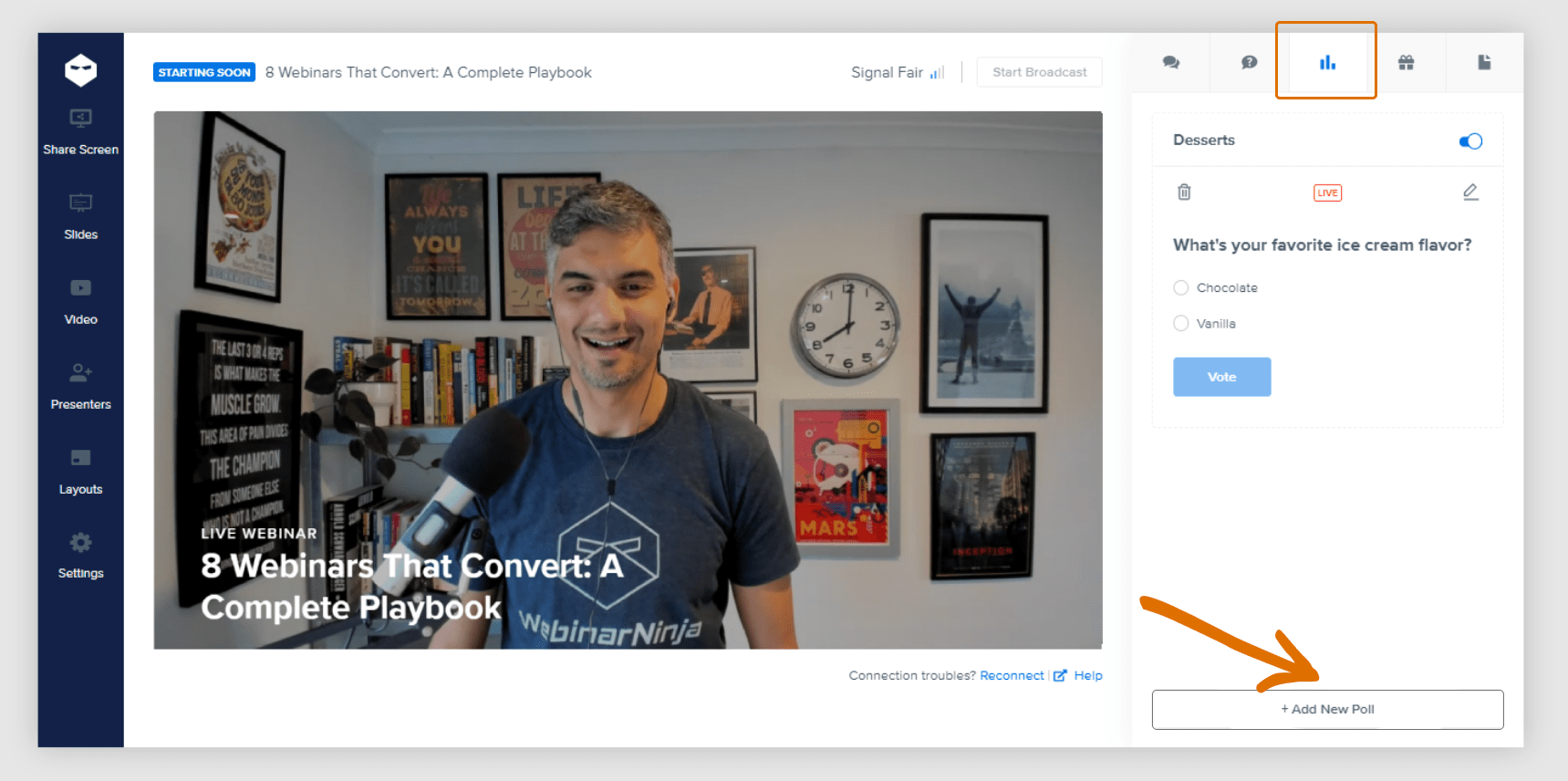
- Surveys and Polls: Ask potential attendees for their input on what they would like to learn or discuss during the webinar.
- Social Media Q&A: Host Q&A sessions on social media to interact with your audience and answer their questions about the upcoming webinar.
Pro Tip: Use the data to tailor your webinar content to your audience’s interests.
5. Reminder Campaigns
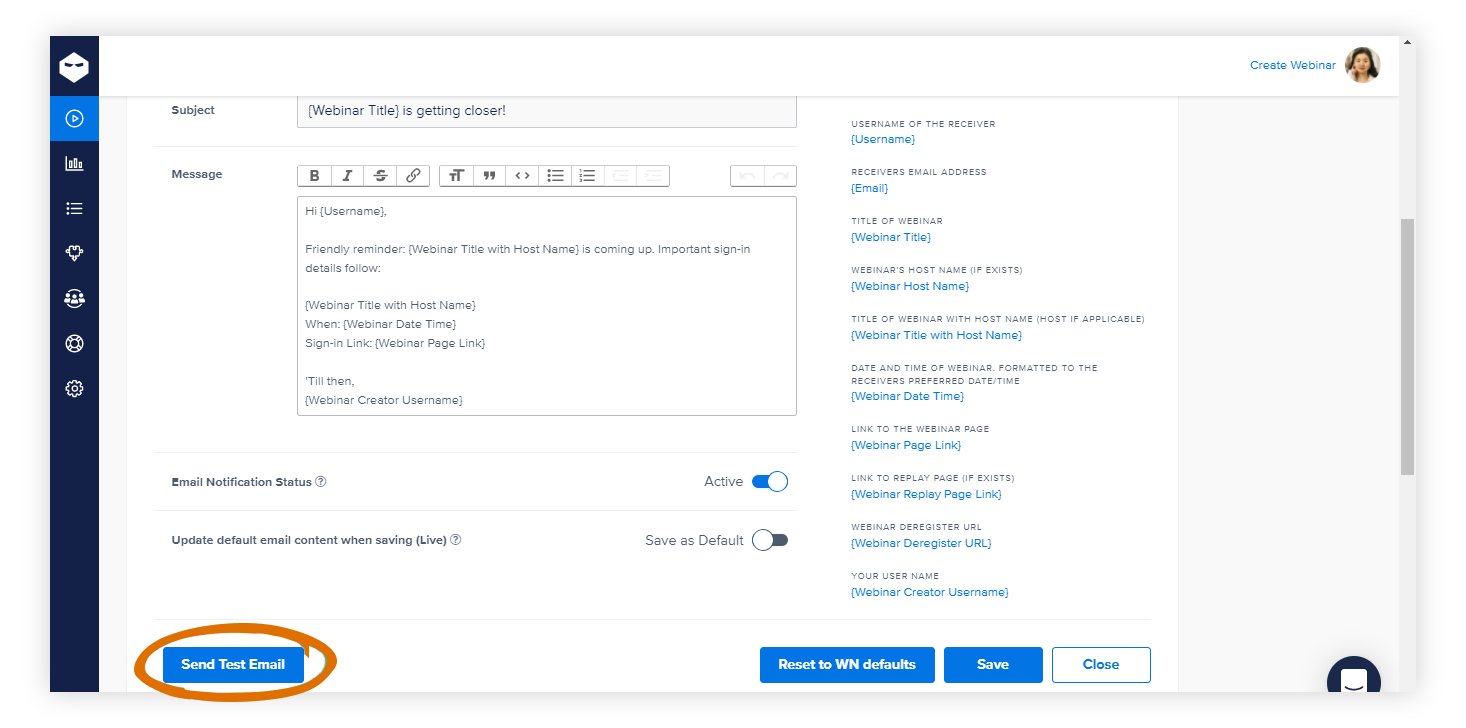
- Email Reminders: Send reminder emails at intervals (e.g., one week, one day, and one hour before the event) to keep the webinar top of mind. You can use email integrations like MailChimp for this. However, if you are using webinar tools like WebinarNinja, they contain built-in webinar email reminder features.
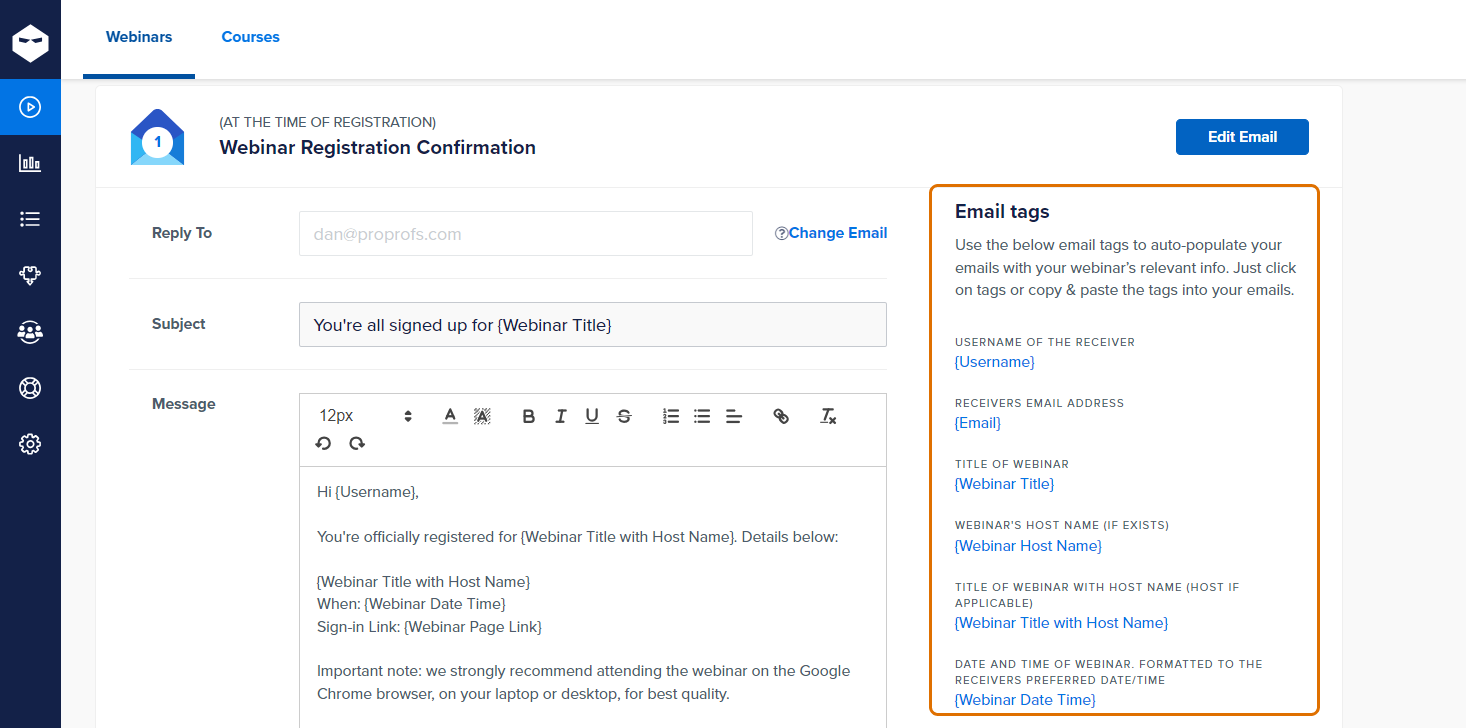
- Calendar Invites: Encourage registrants to add the event to their calendars to avoid scheduling conflicts.
Pro Tip: Include a countdown timer in reminder emails to create a sense of urgency.
WebinarNinja does this automatically. Set up your webinar once, and WebinarNinja sends confirmation emails, 24-hour reminders, and 15-minute-before nudges to every registrant, without you touching a single email. See how automated emails work →
6. Collaborations & Partnerships
- Guest Speakers: Promote any guest speakers or industry experts who will be participating.
- Partner Promotions: Collaborate with industry partners or influencers to co-promote the event to a wider audience.
Pro Tip: Feature short video interviews or quotes from guest speakers in your promotional content to add credibility and interest.
How Do You Keep Attendees Engaged During a Live Webinar?
The most crucial time period to generate engagement in your webinars is the first 10-15 minutes when the webinar is played in front of the audience.
Video and interactive content are widely understood to support stronger message retention than static text alone, which is why passive slide decks consistently underperform live, participatory sessions.
This is when attendees are most attentive and receptive, making it the ideal time to capture their interest, outline key points, and encourage interactive participation.
Here are some key webinar engagement strategies to do so.
1. Interactive Polls and Q&A
Interactive polls and Q&A sessions engage participants by allowing them to voice their opinions and ask questions in real time. These activities make the webinar more dynamic and participatory, providing immediate feedback and fostering a sense of involvement.
How to Achieve Success:
- Prepare Relevant Questions: Design polls and questions that directly relate to the webinar topic, ensuring they are thought-provoking and engaging.
- Use a Variety of Question Types: Mix question types such as multiple-choice, rating scales, and open-ended questions to maintain interest and capture diverse responses.
- Integrate into the Presentation: Strategically place polls at key points to break up the content and re-engage participants.
- Encourage Participation: Announce upcoming polls and Q&A sessions to build anticipation and ensure high participation rates.
- Follow-up on Responses: Analyze poll results and address questions in real time, providing immediate feedback and validation to participants.
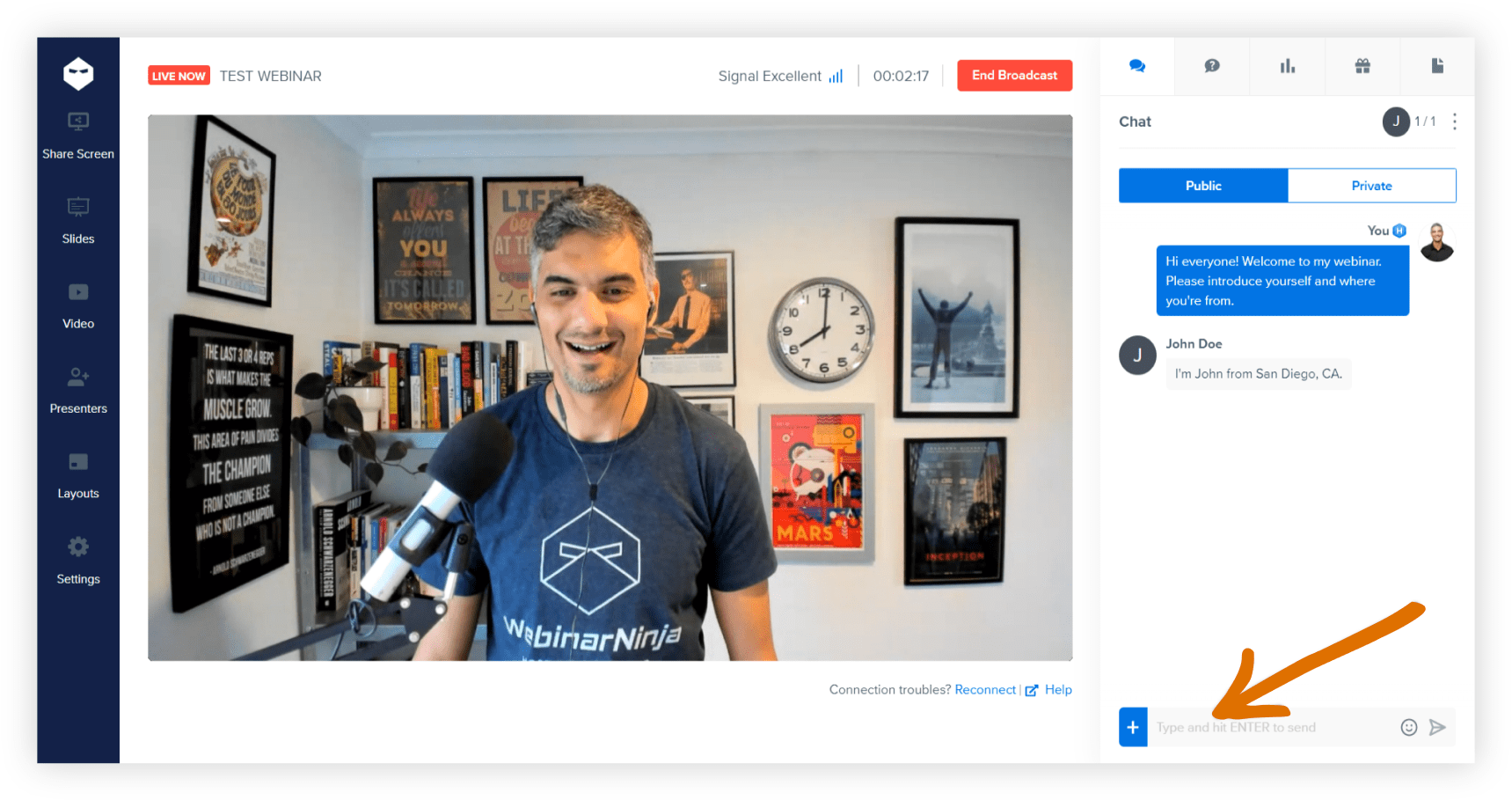
Run polls, Q&A, and live chat without switching tabs. Use tools like WebinarNinja, which puts every interactive tool: polls, upvoted Q&A, live chat, and timed offers on a single dashboard while you’re presenting.
2. Chat Functionality
Chat functionality allows real-time communication between participants and presenters. It enables instant feedback, questions, and discussions, creating a lively and interactive environment that can significantly enhance engagement and connectivity.
How to Achieve Success:
- Designate a Moderator: Assign a moderator to manage the chat and ensure that questions and comments are addressed promptly and appropriately.
- Encourage Active Participation: Prompt attendees to use the chat function for questions, comments, and discussions, making them feel involved.
- Respond Promptly: Address chat questions and comments in real-time or during dedicated Q&A sessions to keep the conversation flowing.
- Create Chat Rules: Establish guidelines for respectful and relevant discussions to maintain a productive and positive environment.
- Use Emojis and GIFs: Encourage the use of emojis and GIFs to make the chat more lively and engaging, adding a fun element to the interactions.
3. Visual and Dynamic Content
Visual and dynamic content includes high-quality graphics, videos, and animations that enhance the presentation and keep participants engaged. This type of content makes information more accessible and memorable by appealing to different learning styles.
How to Achieve Success:
- Use High-Quality Graphics: Incorporate visually appealing images, infographics, and videos to make your content more engaging and easier to understand.
- Interactive Slides: To keep participants actively engaged, use interactive elements in your slides, such as clickable links or embedded polls.
- Consistent Branding: Maintain a consistent visual style that reflects your brand, ensuring a professional and cohesive presentation.
- Engaging Animations: Use animations to highlight key points and transitions without overwhelming the audience or detracting from the message.
- Storytelling with Visuals: Use visuals to tell a story and make complex information more accessible and easier to understand.
4. Interactive Activities
Interactive activities such as games, quizzes, and hands-on tasks make webinars more engaging and fun. These activities encourage active participation and can help reinforce learning by applying concepts in practical ways.
How to Achieve Success:
- Gamify Elements: Integrate games or quizzes to make learning fun and engaging.
- Hands-On Tasks: Give participants tasks or challenges related to the webinar topic, providing practical application and deeper learning opportunities.
- Collaborative Tools: Use whiteboards or documents for group activities, fostering teamwork and collaboration.
- Live Demonstrations: Perform live demos where participants can follow along, providing a hands-on learning experience.
- Role-Playing: Use role-playing scenarios to illustrate points and engage participants in interactive and experiential learning.
5. Storytelling
Storytelling uses narratives to make content more engaging and relatable. By sharing stories, presenters can connect with the audience emotionally, making complex information more memorable and easier to understand.
How to Achieve Success:
- Relatable Stories: Share stories that are relatable and relevant to your audience, ensuring they can connect with the content on a personal level.
- Personal Touch: Include personal anecdotes to create a connection with the audience, making the presentation more engaging and authentic.
- Clear Structure: Structure your stories with a clear beginning, middle, and end to ensure they are easy to follow and impactful.
- Emotional Appeal: Use emotional elements to make stories more impactful, connecting with the audience on a deeper level.
- Visual Aids: Complement stories with visual aids to enhance understanding and make the narrative more vivid and memorable.
6. Guest Speakers
Guest speakers bring expert knowledge and fresh perspectives to webinars. Their insights can enhance the credibility and depth of the content, making the webinar more engaging and informative for participants.
How to Achieve Success:
- Select Relevant Experts: Choose guest speakers who are knowledgeable and relevant to the topic, ensuring they can add value and credibility.
- Prepare Speakers: Ensure guest speakers are well-prepared and aligned with the webinar objectives, providing them with necessary information and guidelines.
- Engage Early: Introduce guest speakers early in the webinar to capture attention and set the stage for their contributions.
- Facilitate Interaction: Allow time for interaction between the audience and the guest speakers, providing opportunities for questions and discussions.
- Promote Guest Speakers: Highlight the credentials and achievements of guest speakers to build anticipation and enhance their impact.
7. Offer Rewards and Incentives
Offering rewards and incentives can significantly boost participant engagement by creating an interactive and rewarding experience. Here are some effective strategies to consider:
How to Achieve Success
- Early Bird Rewards: Encourage early registrations by offering exclusive rewards to the first few attendees. This can create a buzz around your webinar and increase early sign-ups. This can create a buzz around your webinar and increase early sign-ups—an important step in building momentum in your webinar funnel.
- Participation Incentives: Provide incentives for active participation. This could be in the form of digital certificates, exclusive content, or discounts on future events or products for those who actively engage in polls, quizzes, or discussions.
- Contests and Giveaways: Integrate contests or giveaways during your webinar. Participants can enter by answering questions related to the webinar content, encouraging them to pay attention and engage more deeply.
- Completion Bonuses: Offer a reward for attendees who stay until the end of the webinar. This could be a free ebook, a discount code, or access to additional resources, motivating attendees to remain engaged throughout the session.
- Feedback Rewards: After the webinar, offer incentives for completing feedback surveys. This encourages engagement and provides valuable insights for improving future webinars.
8. Call to Action
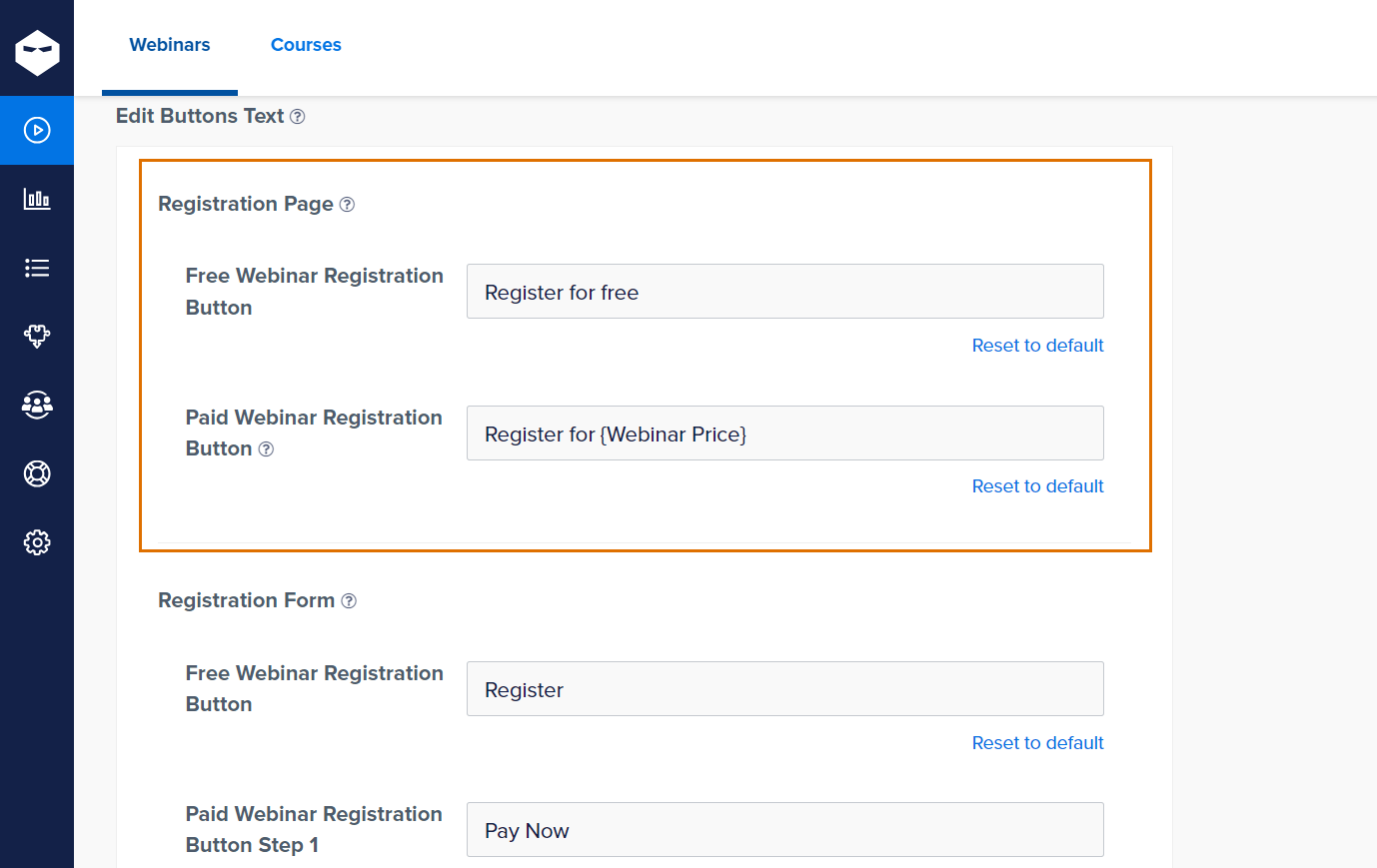
A call to action (CTA) motivates participants to take specific steps after the webinar. Whether it’s signing up for a newsletter, downloading resources, or participating in future events, a well-crafted CTA can drive engagement and achieve the desired outcomes.
How to Achieve Success:
- Clear and Specific: Make your call to action clear and specific, ensuring participants know exactly what to do next.
- Actionable Steps: Provide actionable steps for participants to follow, making it easy for them to take the desired action.
- Incentives: Offer incentives or rewards for taking action, such as discounts, coupon codes, exclusive content, or entry into a prize draw.
- Follow-Up: Plan a follow-up strategy to reinforce the call to action, such as sending reminder emails or providing additional resources.
- Visibility: Ensure the call to action is prominently displayed and mentioned multiple times throughout the webinar, reinforcing its importance.
By incorporating these strategies and tips, you can significantly enhance engagement and interaction during your webinars, ensuring a more dynamic and impactful experience for all participants.
What Should You Do After a Webinar to Convert Attendees Into Leads?
According to a Harvard Business Review study of 2,241 U.S. companies, leads contacted within the first hour of showing interest are 7x more likely to convert than those followed up with after 24 hours, making your post-webinar email timing one of the most leveraged decisions you can make.
Here are the major post-webinar engagement strategies to help you get better attention from your audience:
1. Send Follow-Up Emails
- Thank You Email: Send an immediate thank-you email to all attendees, expressing appreciation for their participation.
- Content Sharing: Provide links to the webinar recording, slides, and any additional resources or materials.
- Survey/Feedback: Include a survey to gather feedback on the webinar’s content and delivery.
Pro Tip: Personalize the webinar follow-up emails by addressing attendees by name and mentioning specific interactions or questions they had during the webinar.
Your 3-Email Post-Webinar Follow-Up Sequence
Most webinar hosts send one “thanks for attending” email and stop there. That’s leaving 70% of your conversion potential on the table. Here’s the exact sequence to run:
Email 1 — Send within 2 hours of ending
Subject: “The replay is ready — [First Name]” Content: Thank them, share the replay link, and include the one most-cited resource or tool from your session. Keep it under 150 words. This email has the highest open rate of the three — don’t waste it on a long recap.
Email 2 — Send 48 hours after the session
Subject: “One thing most [audience type] miss about [topic]” Content: Share one insight or tip that you didn’t cover live. This demonstrates ongoing value and re-engages people who didn’t open Email 1. Include a soft CTA — a free trial link, a booking link, or a resource download.
Email 3 — Send 5 days after the session
Subject: “Did [topic] work for you?” Content: Ask a single question about whether they’ve applied anything. Include 2–3 links to related content. This is your segmentation email — people who click go into a higher-priority nurture sequence.
WebinarNinja’s automated email sequences handle all three of these for every attendee automatically, segmenting by whether they attended live or just registered.
2. Analyze Webinar Data
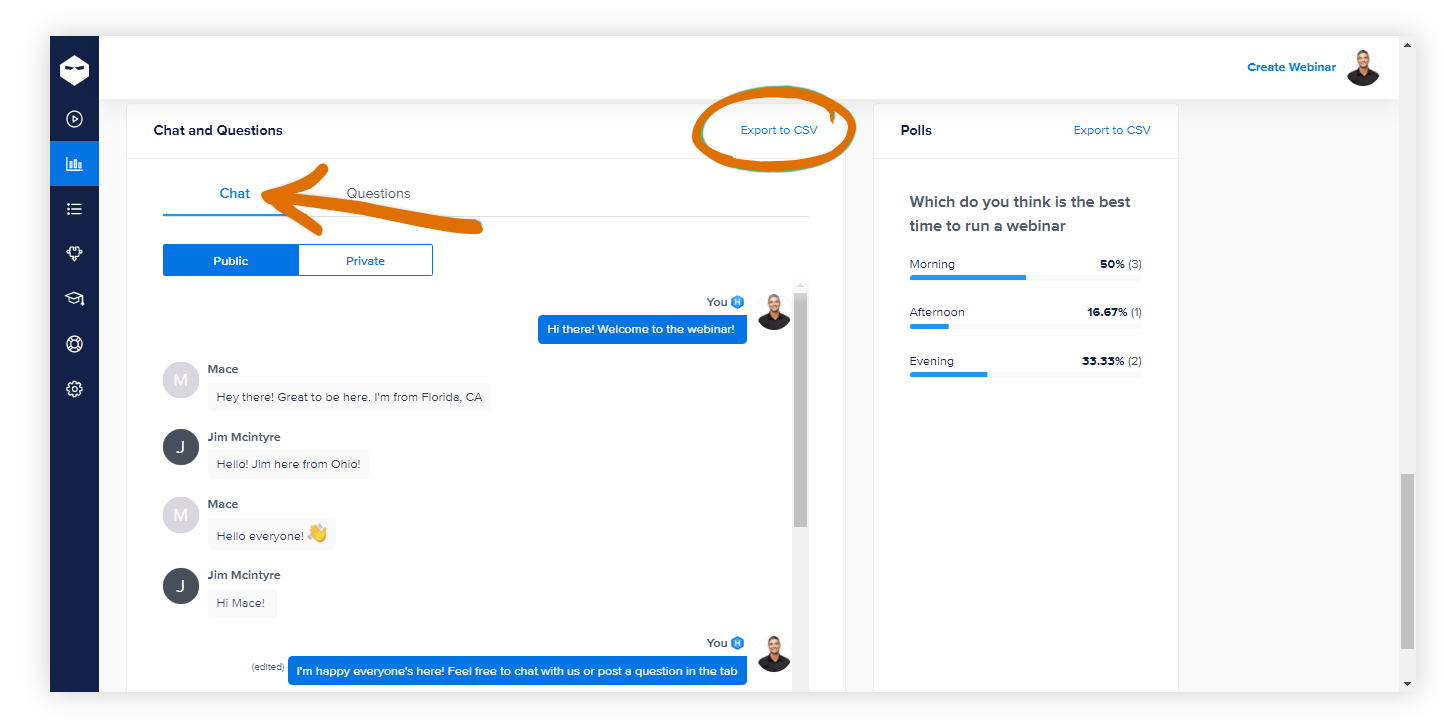
- Attendance Data: Review who attended, how long they stayed, and their engagement levels.
- Polls and Q&A: Analyze responses to polls and questions asked during the webinar to understand participant interests.
Pro Tip: Use analytics tools to segment attendees based on their engagement and tailor your follow-up strategies accordingly.
3. Create Follow-Up Content
- Blog Posts: Write a blog summarizing key points and insights from the webinar.
- Infographics: Develop infographics highlighting important data or takeaways.
- Social Media Posts: Share snippets, quotes, and visual content from the webinar on social media platforms.
Pro Tip: Include a call-to-action in each piece of content, encouraging readers to watch the webinar recording or sign up for future events.
4. Engage on Social Media
- Share Highlights: Post highlights and key moments from the webinar on social media.
- Hashtags: Use event-specific hashtags to continue the conversation and engage with attendees online.
- Respond to Comments: Engage with participants who comment or ask questions on social media.
Pro Tip: Create a dedicated social media thread or event page where attendees can discuss the webinar and network with each other.
5. Personalized Follow-Up
- Individual Outreach: Send personalized emails to high-potential leads or participants who asked specific questions during the webinar.
- Offer Consultations: Provide an option for attendees to schedule a one-on-one consultation or demo.
Pro Tip: Reference specific questions or comments from the webinar in your personalized follow-up to show that you were paying attention and value their input.
6. Host a Q&A Session
- Live Q&A: Schedule a follow-up live Q&A session to address any remaining questions and dive deeper into the topic.
- AMA (Ask Me Anything): Host an AMA session on social media or community forums.
Pro Tip: Promote the follow-up Q&A session during the webinar and in your follow-up emails to maximize attendance and engagement.
7. Webinar Repurposing
- Create On-Demand Webinars: Make the webinar available on-demand for those who missed it.
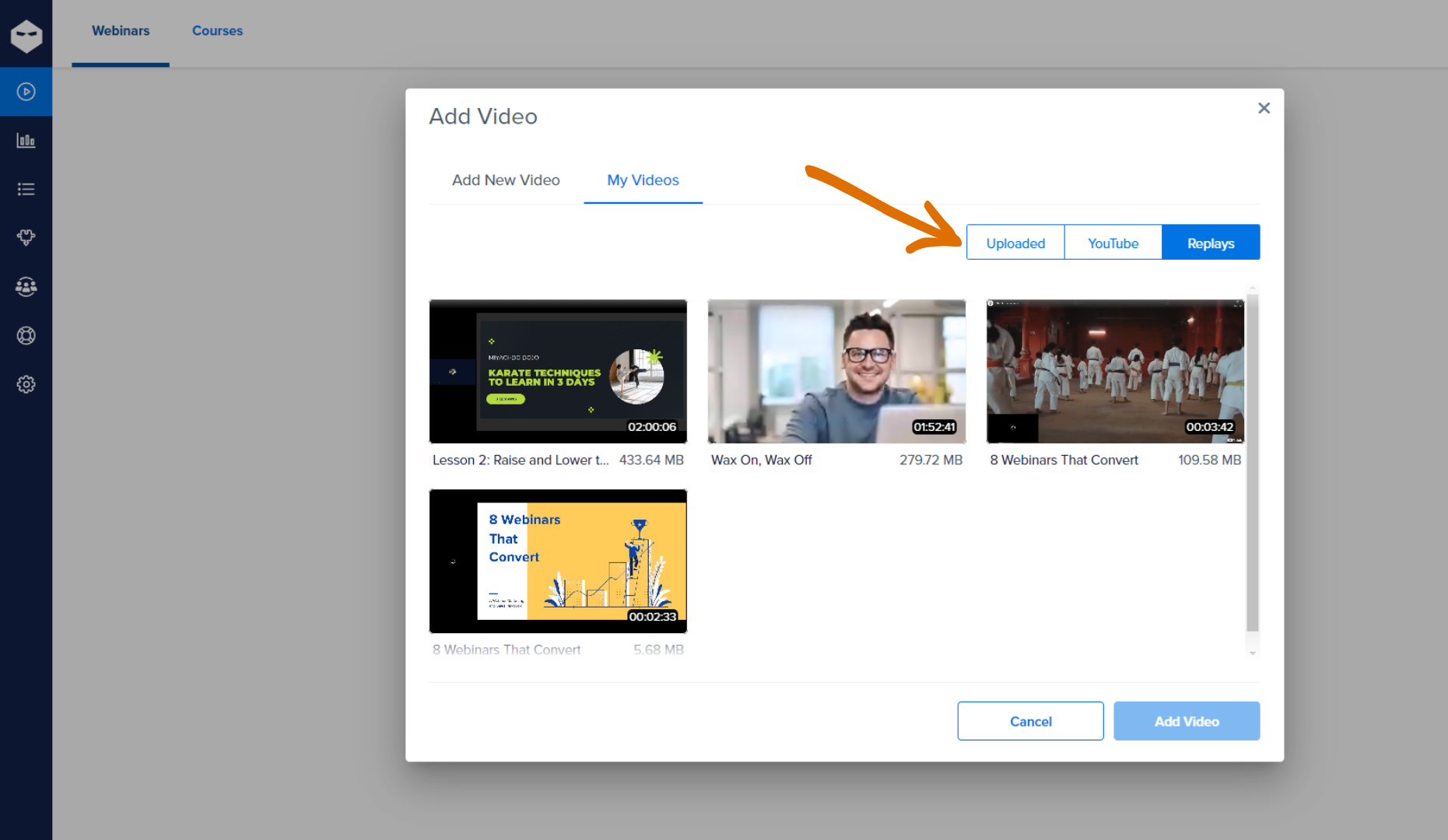
- Micro-Learning Content: Break down the webinar into smaller segments or micro-learning videos for easy consumption.
Pro Tip: Create a landing page for the on-demand webinar with a lead capture form to continue generating leads from the content.
8. Nurture Leads
- Email Campaigns: Incorporate attendees into an email nurturing campaign tailored to their interests and engagement level.
- Content Recommendations: Provide personalized content recommendations based on the webinar topic and attendee interests.
Pro Tip: Use dynamic content in your email campaigns to personalize the experience further and keep your audience engaged.
9. Update CRM
- Lead Scoring: Update your CRM with data from the webinar to adjust lead scores and follow-up priorities.
- Segmentation: Segment attendees based on their behavior and interests for more targeted webinar marketing efforts.
Pro Tip: Integrate your webinar platform with your CRM to automate data updates and ensure seamless lead management.
10. Monitor and Report
- Track Metrics: Monitor key metrics such as email open rates, click-through rates, and engagement levels post-webinar.
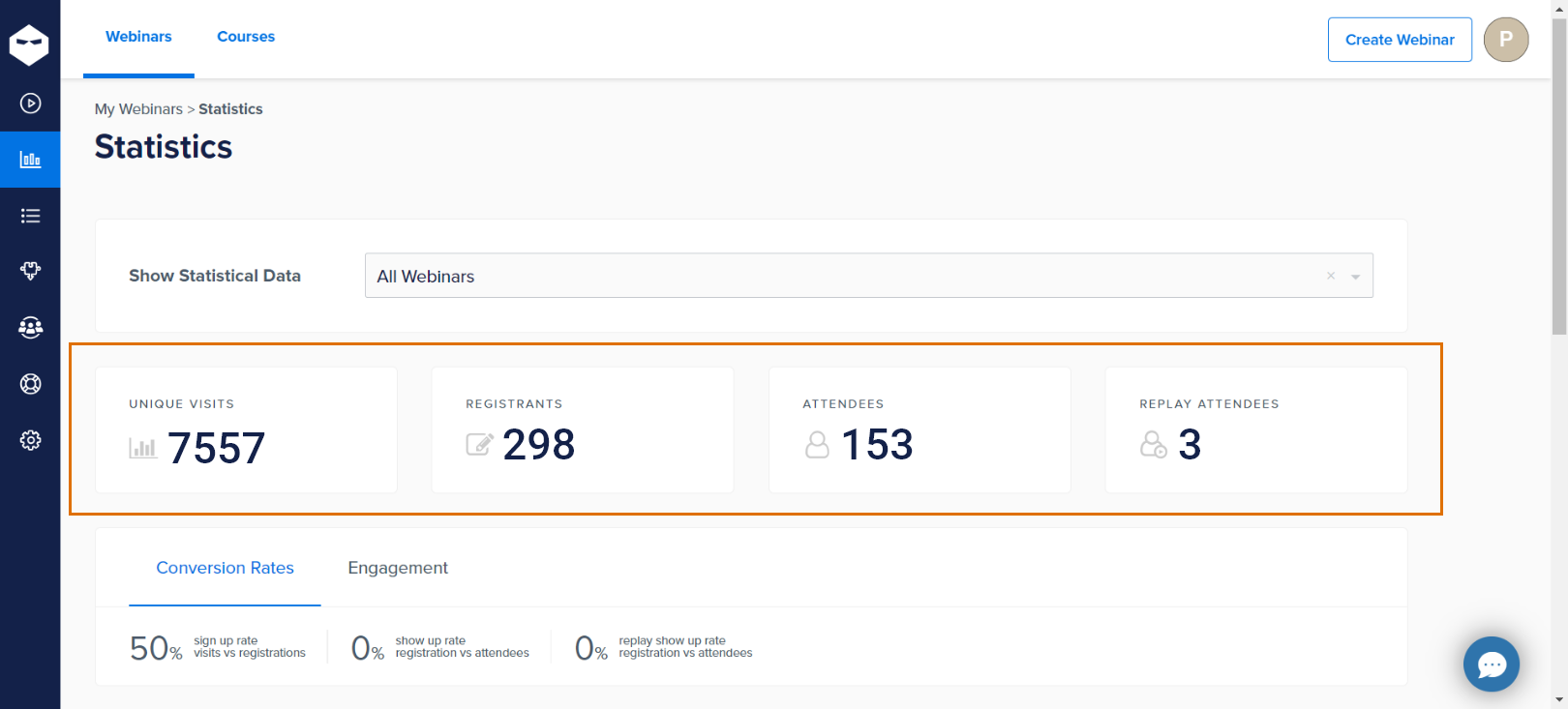
- Report Insights: Generate reports to share insights with your team and inform future webinar strategies.
Pro Tip: Schedule a debrief meeting with your team to discuss the webinar’s performance and brainstorm ideas for improvement based on the data collected.
What Are the Best Webinar Engagement Tools?
The engagement strategies in this guide only work when your platform has the right features built in. Relying on multiple disconnected tools, a webinar platform here, a survey tool there, a separate email sequence tool, creates friction that kills execution. Here’s what to look for, and whether WebinarNinja has it natively:
| Engagement Tool | What It Does | Built into WebinarNinja? |
| Live polls | Gather real-time audience opinion, break passive watching | ✅ Yes |
| Q&A with upvoting | Let attendees submit and prioritize questions | ✅ Yes |
| Live chat | Enable real-time two-way conversation between host and attendees during the session | ✅ Yes |
| Offers / CTAs | Display a clickable offer or CTA at any point in the webinar | ✅ Yes |
| Automated email sequences | Pre-session reminders + post-session follow-ups without manual work | ✅ Yes |
| Replay / recording | Share the session with non-attendees and replay viewers | ✅ Yes (available seconds after ending) |
| Attendance & engagement analytics | See who attended, when they dropped off, what they clicked | ✅ Yes |
| Built-in landing/registration pages | Capture leads without a separate page builder | ✅ Yes |
| Handouts | Share downloadable resources during the session | ✅ Yes |
| Facebook Pixel tracking | Retarget attendees and no-shows with ads | ✅ Yes |
Most webinar platforms give you 3–4 of these and charge extra for the rest. WebinarNinja includes all of them in a single plan, which means you spend less time managing integrations and more time running webinars.
What Are the Biggest Challenges With Webinar Engagement, and How Do You Fix Them?
- Lack of Interactivity: If the webinar is primarily a one-way presentation without opportunities for participants to interact, ask questions, or engage in discussions, attendees may lose interest.
- Poor Content Quality: If the content is not relevant, valuable, or well-prepared, attendees may not find it worth their time to engage actively.
- Technical Issues: Problems with the webinar platform, such as audio/video glitches, connectivity issues, or difficult-to-navigate interfaces, can frustrate participants and reduce engagement. Make sure the technical aspects are all sorted out.
- Inadequate Promotion: If the webinar does not get adequate promotion, it may not attract enough attendees. A low turnout can lead to a lack of energy and interaction.
- Unclear Objectives: If the webinar’s goals and objectives are not clearly defined and communicated, attendees may not understand the purpose or how it benefits them, leading to disengagement.
- Boring Delivery Style: Monotonous or overly technical presentations without variety or engaging delivery methods (such as storytelling, visual aids, or interactive polls) can bore participants.
- Timing Issues: Hosting the webinar at inconvenient times for the target audience can lead to low attendance and engagement. Time zones and work schedules should be considered.
- Lack of Personalization: Generic content that does not address the specific needs or interests of the audience can result in a lack of connection and engagement.
- Insufficient Follow-Up: Failure to follow up with attendees after the webinar with additional resources, recordings, or opportunities for further engagement can lead to a missed opportunity for ongoing interaction.
- Overly Long Sessions: Too-long webinars without breaks or engaging activities can lead to participant fatigue and reduced attention.
Addressing these issues involves planning engaging content, ensuring technical reliability, promoting effectively, and continuously interacting with the audience before, during, and after the webinar.
How Much Does Running an Engaging Webinar Actually Cost?
Creating an engaging webinar doesn’t have to blow your budget—but you do need to plan for the right tools and touches. The good news? Many effective engagement strategies are low-cost or even free, especially if you’re savvy with the platforms you use.
Webinar software is usually the biggest expense, with plans ranging from free (with limitations) to $50–$200/month for most platforms. These often include key features like polls, Q&A, and analytics. If you’re serious about engagement, look for tools that offer live chat, automated email sequences, pre- and post-webinar surveys, and built-in audience analytics.
Other potential costs to consider:
- Design tools, for slides or visuals (like Canva Pro – ~$10–$15/month)
- Email marketing software, if not bundled with your webinar platform
- Freelance help for moderation or technical support (typically $25–$50/hour)
- Incentives or giveaways to boost participation (budget $50–$100 for digital gift cards or branded merch)
Pro Tip: The most cost-effective setup is a platform that bundles everything: landing pages, automated emails, polls, Q&A, recording, and analytics, so you’re not paying for five separate tools. WebinarNinja starts with a free trial and paid plans starting at $0.30/attendee/month, replacing what would otherwise cost $200–$400/month across multiple tools.
Check out this short video for the best benefits of webinars for coaches, trainers, marketers, and educators:
How Have Real Businesses Improved Webinar Engagement? (Case Studies)
1. How SEO Expert Kate Toon Uses Webinar Engagement Strategies to Grow Her Online Courses

2. How Relayer Benefits Maintained Sales During the Pandemic with Smart Webinar Engagement Strategies
Boost Your Webinar Success With Smart Webinar Engagement Strategies
The webinars that generate leads and build loyal audiences all have one thing in common: they treat engagement as a system, not an add-on. You set it up before the session with the right reminder sequence. Then you activate it in the first 10 minutes with a poll or a direct question. You extend it for 5 days after with a follow-up sequence that keeps the conversation going.
Pick one phase: pre-webinar, live, or post-webinar, and apply one strategy from this guide to your next session. Measure it. Then add the next one.
If you want a platform that handles the mechanics, reminder emails, polls, Q&A, recording, replay, automated follow-ups, and engagement analytics, without requiring five separate subscriptions, WebinarNinja was built for exactly that. 30,000+ businesses use it, and you can get started for free.
Frequently Asked Questions
What are webinar engagement strategies?
Webinar engagement strategies are the pre-event, live, and post-event tactics that move attendees from passive viewers to active participants. They include reminder email sequences, interactive tools like polls and Q&A, and follow-up sequences designed to convert attendee interest into a specific action, a trial signup, a call, or a purchase.
Why is webinar engagement important?
Webinar engagement directly determines whether attendees remember your content, trust your brand, and take action after the session. Engaged attendees are significantly more likely to convert into leads or customers than passive viewers. Without engagement, even a well-produced webinar becomes a forgettable broadcast with no measurable return.
What is a good webinar engagement rate?
A good webinar engagement rate is 50–60% of live attendees actively participating through polls, chat, or Q&A at some point during the session. Industry benchmarks put average engagement around 30–40%, so consistently hitting 50%+ puts you in the top tier of webinar performers across most industries.
What are the best webinar engagement activities to run during a live session?
The most effective live engagement activities are polls launched in the first 5 minutes, open Q&A with audience upvoting, live chat with direct host acknowledgment, and a timed offer or resource drop mid-session. These create participation moments every 8–10 minutes, preventing the passive drop-off that kills most webinars by the 20-minute mark.
How do I improve webinar engagement for a small audience?
A small audience is actually an engagement advantage; use it. Call attendees by name in chat, ask direct questions, and run a live hot-seat or open discussion instead of a formal presentation. Smaller sessions consistently outperform large webinars on participation rate because the intimacy makes people feel seen rather than anonymous.
What webinar engagement tools do I need?
You need live polls, a Q&A feature with upvoting, real-time chat, automated pre-session reminder emails, and post-session analytics that show where attendees dropped off. WebinarNinja includes all of these natively in a single platform, so you run polls, moderate Q&A, and trigger follow-up sequences without juggling separate tools or third-party integrations.
How do I engage attendees before a webinar?
Send a 3-touch reminder sequence: one email a week out with a teaser or agenda, one the day before with a reason to attend live, and one 15 minutes before the session starts. Add a pre-webinar survey question in the registration form; it primes attendees to think about the topic before they join.
What should I do in the first 10 minutes of a webinar to maximize engagement?
Launch a poll within the first 3 minutes, before you present a single slide. Then ask one direct question to the chat and acknowledge 2–3 responses by name. This signals to attendees that the session is interactive, not a lecture, and sets a participation norm that carries through the rest of the webinar.
How do I improve webinar engagement for automated or pre-recorded webinars?
Automated webinars can match live engagement rates when they include timed polls, chat simulations, and mid-session CTAs triggered at specific timestamps. WebinarNinja's automated webinar feature lets you place interactive elements at exact points in the recording, so attendees experience the same participation moments as a live session, on their own schedule.
What are the most effective post-webinar engagement strategies?
The most effective post-webinar strategy is a 3-email follow-up sequence: send the replay within 2 hours, a value-add insight at 48 hours, and a segmentation question at 5 days. WebinarNinja automates this entire sequence and segments by whether each person attended live or only registered, so every follow-up is relevant.
How do I measure webinar engagement?
Measure webinar engagement through four metrics: live attendance rate (registrants who showed up), participation rate (attendees who used polls, chat, or Q&A), average watch time, and post-webinar action rate (replay views, link clicks, or form fills). Together, these give you a complete picture of where your audience was engaged and where they checked out.
Can WebinarNinja help improve webinar engagement?
Yes. WebinarNinja is built specifically for engagement; every plan includes live polls, upvoted Q&A, real-time chat, timed offer buttons, automated reminder and follow-up emails, and session analytics. Over 30,000 businesses use it to run webinars that convert, and you can get started for free without needing any third-party tools.
Want to host a webinar for free?
Use WebinarNinja to teach, improve marketing, and grow your sales.