
Every minute your sales rep spends calling a no-show, your competitor is already on the phone with the attendee who asked three questions, clicked your pricing CTA, and stayed until the last slide.
That gap is not a talent problem. It is a webinar lead scoring problem.
According to a study by HubSpot in 2025, only 25% of generated leads ever qualify as MQLs (Marketing Qualified Leads), yet nearly every webinar team pursues 100% of registrants. That math destroys sales morale and poisons pipeline quality.
This guide gives you the exact fix: a four-layer scoring model with point values you can use today, threshold definitions that align sales and marketing, and a real case study showing what this looks like when it works.
What Is Webinar Lead Scoring?
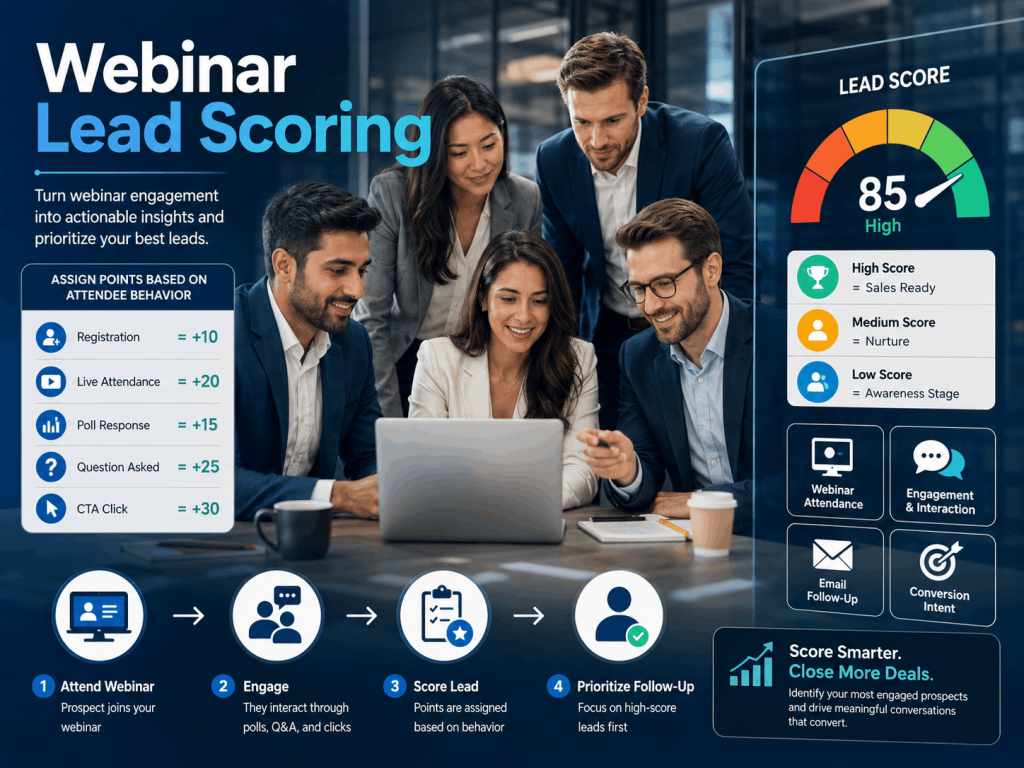
Think of it as converting behavior into buying intent. Someone who registers has shown mild curiosity. Someone who attends live, stays for 45 of 60 minutes, answers your poll, asks a question about pricing, and clicks your offer slide has shown something far closer to purchase intent, and their score should reflect that difference.
The core inputs for webinar lead scoring fall into two categories:
- Demographic fit signals: job title, company size, industry, and geography. These tell you whether the person can buy from you.
- Behavioral engagement signals: registration, attendance, duration watched, poll responses, Q&A participation, CTA clicks, and post-webinar actions. These tell you whether the person wants to buy from you.
Both categories matter. A CEO who attended 90% of your webinar but runs a two-person business in the wrong industry is a different lead from a VP of Marketing at a 500-person SaaS company who dropped off after 12 minutes. A strong scoring model captures both dimensions and produces a score that reflects true opportunity value.
Why Does Webinar Lead Scoring Matter for B2B Teams?
Most B2B marketing teams waste between 60% and 75% of their webinar follow-up effort on people who will never buy. Webinar lead scoring eliminates that waste by directing sales attention toward proven intent signals rather than volume metrics.
Here is why this matters in concrete terms.
Webinars produce the highest-quality pipeline of any digital event channel.
According to 2026 benchmark data from Data-Mania, Webinars achieve a 30% MQL-to-SQL (Sales Qualified Leads) conversion rate, strong by B2B standards, and one of the highest-quality sources of behavioral data available to any channel
That 30% only materializes when you have a qualification system in place. Without scoring, webinar leads get treated the same as cold outbound contacts, and the conversion rate collapses.
Speed compounds the value of scoring.
Research cited by Martal in 2026 found that companies following up with high-intent leads within the first hour achieve a 53% SQL conversion rate, compared to just 17% for follow-ups made after 24 hours. Scoring tells you who to call first.
Without it, you spend the first 24 hours deciding who to contact, and by the time you reach the hot lead, your competitor already has.
Webinars generate behavioral data that no other channel produces.
A whitepaper download tells you someone clicked a button. A webinar tells you they stayed for 47 minutes, asked about your Salesforce integration, voted in your poll that they plan to invest in this category within 90 days, and clicked your demo CTA. That is a buying signal stack, not a form fill. Webinar lead scoring is the system that converts that stack into a prioritized pipeline.
Tools like WebinarNinja are built to capture exactly this kind of individual-level engagement data automatically across live webinars, automated sessions, and hybrid formats. The raw signals are already there waiting inside your platform. The scoring model is simply the framework that makes them actionable.
How Does Webinar Lead Scoring Work? (The Four-Layer Model)
A working webinar lead scoring model operates across four layers. Each layer adds precision. Miss a layer, and your scores will mislead your sales team.
Layer 1: What Is Demographic Fit Scoring?
Before a single attendee joins your webinar, you can already assign a base score based on who they are. Profile scoring uses registration form data to evaluate fit against your ICP.
What to score:
- Job title and seniority: Decision-makers (VP, Director, C-suite) score highest. Individual contributors score lower unless your product sells bottom-up.
- Company size: Match to your ICP. If your product fits companies with 50 to 500 employees, a 10-person startup, and a 10,000-person enterprise both score lower than a 200-person company.
- Industry: Score industries where you have case studies and wins. Apply negative points for industries where you have no track record.
- Geography: Score regions where your sales team can close business. Discount geographies they cannot service.
Typical point values for profile scoring:
| Attribute | Signal | Points |
| Job title: VP / Director / C-suite | Decision-making authority | +15 |
| Job title: Manager | Influencer role | +10 |
| Job title: Individual contributor | Limited authority | +5 |
| Company size: ICP match | Right-fit buyer | +15 |
| Company size: outside ICP | Weak fit | 0 |
| Industry: core vertical | High conversion history | +15 |
| Industry: adjacent | Possible fit | +5 |
| Industry: no fit | Low conversion history | -10 |
Profile scoring sets a baseline but is not sufficient on its own. A perfectly-fit VP who registers and never shows up is not a qualified lead. That is where behavioral scoring takes over.
What to do right now: Pull your last three closed-won deals from your CRM. Note the job title, company size, and industry for each. Those three data points are your ICP baseline. Use them to set the point values in the profile scoring table above before your next webinar.
Layer 2: What Are Pre-Webinar Registration Signals Worth?
Registration is a weak signal, but not worthless. The way someone registers tells you something about intent.
What to score:
- Time of registration: Early registrants (7 or more days out) often have higher intent than last-minute sign-ups. They saw your promotion, thought about it, and committed.
- Source of registration: Direct website visitors score higher than social media click-throughs. An organic search registrant who found your webinar by searching for the topic has already demonstrated active interest.
- Registration form completeness: If your form asks optional qualifying questions (“What is your biggest challenge with X?” or “Are you planning to invest in this category in the next 6 months?”) and the lead fills them in, that is a signal worth scoring.
- Repeat registration: A lead who has registered for two or more of your webinars scores significantly higher than a first-timer.
Typical point values for registration behavior:
| Behavior | Signal | Points |
| Registered 7+ days in advance | High intent | +8 |
| Registered 1 to 6 days in advance | Moderate intent | +5 |
| Registered day-of | Low intent | +2 |
| Completed the optional qualifying question | Active engagement | +10 |
| Second or more webinar registrations | Repeat engagement | +15 |
| Registered via organic search | High-intent source | +10 |
What to do right now: Add at least one optional qualifying question to your next webinar registration form. Keep it to one question so completion rates stay high.
A prompt like “What is your biggest challenge with [topic] right now?” takes 30 seconds to add and gives you BANT data before the webinar even starts.
Layer 3: Which In-Session Signals Carry the Most Weight?
This is where webinar lead scoring earns its keep. In-session behavior is the most reliable predictor of purchase intent because it requires active attention, not just a passive click.
According to TwentyThree research in 2025, webinars have an average attendance rate of 61.7%, but that figure only holds when engagement is high. Passive viewers convert at a fraction of the rate of actively engaged attendees. Your scoring model needs to reflect that gap.
What to score:
- Attendance modality: Live webinar attendance signals significantly higher intent than on-demand viewing. Someone who blocked calendar time and showed up live is more committed than someone who watched a replay at 1.5x speed.
- Attendance duration: The percentage of the webinar watched is one of the strongest individual signals in your model. An attendee who stays for 85% or more of the session has invested real time and attention.
- Poll participation: Every poll response is both an engagement signal and a data point. If you design your polls strategically (asking about budget, timeline, or current tools), a response is worth scoring heavily.
- Q&A questions asked: This is one of the most powerful buying signals in any webinar. Someone who types a question is actively engaged. If the question is product-related (“Does this integrate with HubSpot?”), it is a near-explicit purchase signal.
- CTA and offer clicks: If you display an offer slide, a demo CTA, a free trial link, or a consultation booking, a click is the strongest single action in your entire scoring model.
- Chat participation: Active chat engagement signals attention and continued interest throughout the session.
- Handout downloads: Downloading supplementary material during the session indicates the attendee plans to use the information after the event.
Typical point values for in-session engagement:
| Behavior | Signal | Points |
| Attended live | High-intent presence | +20 |
| Watched on-demand replay | Moderate interest | +10 |
| Attended 75%+ of sessions | Deep engagement | +25 |
| Attended 50 to 74% of sessions | Moderate engagement | +15 |
| Attended less than 25% | Passive or distracted | +5 |
| Answered a poll | Active participation | +10 per poll |
| Asked a Q&A question | High intent | +15 |
| Asked a product or pricing question | Explicit purchase signal | +25 |
| Clicked in-session CTA or offer | Strongest buying signal | +30 |
| Downloaded a handout | Practical interest | +10 |
| Participated in chat | Active engagement | +8 |
To qualify webinar leads effectively, your scoring model should treat a live attendee who watched 80% or more of the session, asked a question, and clicked your CTA as a near-certain SQL. Their combined score from these signals alone should cross your MQL threshold.
What to do right now: Open your webinar platform’s analytics dashboard and check whether it tracks attendance at the individual level with duration data, not just a yes/no attendance flag. If it only shows who attended, you are missing your highest-value scoring signal. Most modern platforms, including those built for automated and series webinars, capture duration, poll responses, and offer clicks per attendee by default.
Layer 4: What Post-Webinar Actions Should You Score?
The scoring window does not close when the webinar ends. Post-webinar behavior within 48 to 72 hours of your session carries rich intent signals that most teams ignore entirely.
What to score:
- Email open and click rates: Did the lead open your follow-up email? Did they click a link? These signals continued the interest that the webinar sparked.
- Replay views: A registrant who did not attend live but watched the full replay is still a lead worth scoring. Give them partial credit for attendance plus duration.
- Website behavior: Did the lead visit your pricing page, features page, or case studies after the webinar? Integrate your webinar platform with your CRM to capture this cross-channel behavior automatically.
- Demo or consultation bookings: The ultimate post-webinar signal. Score this at the maximum value and route directly to sales without delay.
- Content downloads: Downloading related guides, case studies, or blog posts after the webinar signals active research and continued intent.
Typical point values for post-webinar actions:
| Behavior | Signal | Points |
| Opened follow-up email | Continued interest | +5 |
| Clicked link in follow-up email | Active engagement | +15 |
| Watched webinar replay | Catching up | +12 |
| Visited pricing page post-webinar | Strong purchase intent | +20 |
| Downloaded related content | Research stage | +10 |
| Booked a demo or consultation | Explicit sales readiness | +40 |
| Responded to follow-up email | High intent | +20 |
What to do right now: Set up a UTM-tagged follow-up email that links to your pricing page and a demo booking page. When a lead clicks through to either page after your webinar, that behavior flows back into your CRM as a scored event.
Tools with built-in email automation, such as platforms supporting hybrid webinar formats with native follow-up sequences, can trigger these emails automatically within minutes of the session ending.
Before we move forward, check out this quick video on how you can make your webinar leads buy from your:
How to Qualify Webinar Leads: Setting Your MQL and SQL Thresholds
Knowing how to qualify webinar leads requires more than a scoring model. It requires defined thresholds that tell your team exactly when a lead moves from the webinar marketing lane to the sales lane.
Here is the framework used by high-performing B2B teams.
Step 1: Define Your Score Tiers
Set four buckets based on the cumulative score from all four layers.
| Score Range | Classification | Action |
| 0 to 30 | Cold Lead | Add to long-term nurture sequence |
| 31 to 60 | Marketing Qualified Lead (MQL) | Trigger marketing automation; invite to next webinar |
| 61 to 90 | Hot MQL | Priority nurture; sales alert within 48 hours |
| 91+ | Sales Qualified Lead (SQL) | Immediate sales routing; follow up within 1 hour |
These thresholds are a starting point. Calibrate them against your actual conversion data after your first three to five webinars and adjust accordingly.
Step 2: Build a BANT Overlay
Lead scoring tells you how engaged a prospect is. It does not tell you whether they have the budget, authority, need, and timeline (BANT) to actually buy. Overlay your score with a BANT checkpoint before marking any lead as SQL.
The smartest way to collect BANT data without a sales call is to embed qualifying questions into your registration form and in-session polls. Use these as a guide:
- Budget: “Which best describes your budget range for a solution like this?” (poll, during session)
- Authority: “What is your role in purchasing decisions for tools like this?” (registration form)
- Need: “What is your biggest challenge with [topic] right now?” (registration form)
- Timeline: “Are you planning to invest in this category in the next 90 days?” (poll, during session)
A lead who scores 65 points and answers the timeline poll with “yes, within the next quarter” is a stronger SQL than a lead who scores 85 points but skips every poll and registers with a generic job title.
What to do right now: Write your two BANT poll questions before your next webinar. Place the timeline question at the 20-minute mark and the authority question at the 40-minute mark, when session engagement is typically highest and attendees are most invested.
Step 3: Apply Negative Scoring
Not all signals are positive. Some behaviors should reduce a lead’s score, a practice scoring teams call negative scoring or score degradation.
Signals that should subtract points:
| Behavior | Points |
| Registered but never attended and never watched replay | -15 |
| Unsubscribed from follow-up emails | -30 |
| Job title clearly outside your ICP | -20 |
| Bounced email address | -25 |
| Previously marked “not interested” by sales | -50 |
Negative scoring prevents score inflation from people who signed up out of curiosity but have no purchase intent. Without it, your MQL bucket fills with tire-kickers and your sales team starts ignoring every scored lead list you send them.
Step 4: Align Sales and Marketing on One Definition
The most common reason webinar lead qualification fails is not the scoring model. It is misalignment between what marketing considers a qualified lead and what sales is willing to act on. Before your next webinar, get both teams to agree on three things:
- What score equals an MQL? Marketing owns this lead until that threshold is crossed.
- What score or BANT combination equals an SQL? Sales picks up at this point and commits to the agreed follow-up SLA.
- What are the SLAs for each tier? For SQLs: follow up within 1 hour. For Hot MQLs: within 24 hours. For MQLs: within 72 hours via automated sequence.
Document this agreement in writing and revisit it after every three webinars. Adjust thresholds based on actual conversion data, not gut feel.
What to do right now: Schedule a 30-minute “lead definition” session with your top sales rep before your next webinar. Bring the four-layer scoring rubric and the tier table above. Walk through one hypothetical attendee profile together, agree on which tier they land in, and write it down. That single conversation eliminates weeks of post-webinar follow-up friction.
Real-World Webinar Lead Scoring in Action: Sales Market Fit Case Study
Before walking through the common mistakes, here is what this system looks like when it works.
Gavin Tye, founder of Sales Market Fit, a B2B SaaS sales consultancy based in Queensland, Australia, was struggling to connect with his ideal clients (founders) through LinkedIn outreach. His messages were not resonating, and he needed a scalable way to attract and qualify high-intent prospects without a large sales team.
Check how he shifted gears and achieved 200% growth in qualified leads, with one session bringing in $20,000-$25,000
What Are the Most Common Mistakes in Webinar Lead Qualification?
Even experienced marketing teams make predictable mistakes when they first build a webinar lead qualification system. Here are the six most costly ones and exactly how to fix each.
Mistake 1: Treating Every Registrant as a Lead
This is the most expensive mistake in webinar marketing. A registration is an expression of mild curiosity. According to research by ActualTech Media, 27% of webinar registrants provide inaccurate information on registration forms. Treat a registrant as a lead, and your sales team is chasing data that is partially fictional.
The fix: Set a minimum threshold of attending the webinar, live or replay, before any lead scoring begins. A no-show earns zero engagement points and goes into a re-engagement sequence, not the sales pipeline.
Mistake 2: Scoring All Attendance the Same Way
Forty-five minutes of live attention is not the same as a 10-minute replay watch. Scoring both as “attended” misses the signal buried in engagement depth.
The fix: Score attendance by duration bucket: less than 25%, 25 to 50%, 50 to 75%, and 75% or more. Score live attendance higher than on-demand viewing. The difference in conversion rate between these buckets is significant enough to change which leads get routed to sales.
Mistake 3: Ignoring In-Session Q&A Data
Most webinar platforms capture Q&A data, but most marketing teams export it to a spreadsheet and never connect it to their CRM or lead scoring model. A question asked in session, especially a product-specific or pricing question, is one of the highest-intent signals a prospect will ever produce before a sales call.
The fix: Export Q&A data after every webinar. Tag each question by type: product, pricing, integration, competitive. Route leads who asked product or pricing questions directly to sales regardless of their total score. Platforms with built-in Q&A and reporting features timestamp each question and attribute it to the individual attendee, giving you a clean, exportable intent log for every session.
Mistake 4: Letting Follow-Up Slip Past 24 Hours
Research from Martal in 2026 shows that following up within one hour of a webinar ending yields a 53% SQL conversion rate. Waiting 24 hours drops that rate to 17%. Every hour of delay is a pipeline you are handing to a competitor.
The fix: Set up automated follow-up emails to trigger within 15 minutes of the webinar ending for all attendees. For SQLs, trigger an immediate sales alert with the lead’s engagement summary attached so the rep can open the call with context, not a cold introduction.
Mistake 5: Setting Up a Scoring Model Once and Never Revisiting It
Lead scoring is not a one-time configuration. Your audience evolves. Your product positioning evolves. The signals that predicted conversion in Q1 may tell a different story in Q3.
The fix: Audit your scoring model every quarter. Pull closed-won deals from the past 90 days and trace them back to their webinar engagement data. If high-scoring leads are consistently not converting, your weights are wrong. If unexpected low-scorers are closing, you are missing a signal. Adjust point values to match what actually predicts a close, not what you assumed at setup.
The WebinarNinja free courses library includes guidance on building and optimizing webinar funnels over time as your strategy matures.
Mistake 6: Skipping Negative Scoring
A lead who registered six weeks ago, never attended, unsubscribed from your follow-up sequence, and has a job title of “student” should not appear in your active pipeline. Without negative scoring, they do, and your MQL list slowly becomes a list your sales team learns to ignore.
The fix: Build negative score rules into your model from day one for no-shows, unsubscribes, role mismatches, and previously disqualified leads. Set a floor threshold below which a lead automatically moves to a suppression list.
How to Build a Webinar Lead Scoring System: Step-by-Step
Here is how to go from zero to a functioning webinar lead qualification system in few steps.
Step 1: Define Your Ideal Customer Profile
Before you assign a single point value, write down the three to five attributes that describe your best customers: the ones who close fastest, pay the most, and renew every year. Common ICP attributes include industry, company size, job title, budget range, and tech stack. Every profile scoring decision in your model flows from this document.
Step 2: Set Up Your Platform to Capture the Right Data
Your scoring model is only as good as the data feeding it. Confirm your webinar platform captures attendance duration at the individual level, poll responses mapped to individual attendees, Q&A questions attributed to attendees by name, CTA and offer click events, and replay views per individual. If any of these are missing, your model has a data gap before it even starts.
Read the guide to webinar lead generation on the WebinarNinja blog to understand how each of these signals connects to real pipeline outcomes, with examples from consulting, SaaS, and financial services businesses.
Step 3: Build Your Scoring Rubric
Using the four-layer model above, assign point values to every action and attribute. Start simple and add nuance after your first few webinars. A working starter model covers: profile scoring (demographic fit), registration behavior (source, timing, form completion), in-session engagement (attendance, duration, polls, Q&A, CTA clicks), and post-webinar actions (email behavior, site visits, demo bookings).
Step 4: Set Your MQL and SQL Thresholds
Set a score threshold for each tier based on your model’s maximum possible score. A common starting point is setting the SQL threshold at 60 to 70% of the maximum possible score, MQL at 35 to 50%, and Cold below 35%. After your first three webinars, compare scored leads against actual conversions and recalibrate.
Step 5: Integrate Your Platform with Your CRM
Score calculation should happen automatically inside your CRM, not in a manually updated spreadsheet. Connect your webinar platform to HubSpot, Salesforce, Marketo, or whichever system your sales team uses. Tools that offer native CRM and email integrations push attendance duration, poll data, and engagement signals directly into lead records without requiring manual exports after each session.
Step 6: Build Automated Follow-Up Sequences by Score Tier
Create a distinct follow-up sequence for each tier. SQLs get an immediate sales alert and a personalized email from a rep within one hour. Hot MQLs get a high-value follow-up email within 24 hours. MQLs enter an automated nurture sequence with an invitation to your next webinar. Cold leads go into a long-term re-engagement drip.
Step 7: Train Your Sales Team on Reading Webinar Scores
A score is only useful if your sales team knows what it means and what to do with it. Train reps to open the lead record and review the engagement summary before calling: what questions the attendee asked, which polls they answered, and which pages they visited after the session. “I saw you asked about our Salesforce integration during the webinar” opens a sales conversation in a fundamentally different way than a cold hello.
Step 8: Recalibrate Every Quarter
Run a quarterly audit. Pull closed-won deals from the last 90 days and trace them back to their webinar data. Which behaviors did your best-converting leads share? High attendance duration? Pricing questions in Q&A? Demo CTA clicks? Weight those signals more heavily in your next model iteration.
How Does Webinar Lead Scoring Compare to Other Demand Gen Channels?
Webinar lead scoring produces better pipeline intelligence than almost any other B2B channel, because webinars generate richer behavioral data than almost any other channel. The table below uses 2026 benchmark data from Data-Mania.
| Channel | Data Available for Scoring | MQL-to-SQL Conversion Rate |
| SEO/Content | Page visits, time on page, content downloads | 51% |
| Email Marketing | Opens, clicks, link behavior | 46% |
| Webinars | Attendance, duration, polls, Q&A, CTA clicks | 30% |
| PPC / Paid Social | Click-through, landing page visit | 26% |
| Events / Trade Shows | Badge scan, booth visit | 24% |
| Cold Outbound | Open rates, reply rates | 13 to 15% |
Webinars sit in a uniquely powerful position: they generate a level of behavioral intelligence that email and SEO cannot produce. A webinar scoring model also enriches every downstream channel.
When you know which attendees crossed the SQL threshold, you can personalize your email sequences, sharpen your retargeting ad audiences, and equip reps with session-specific context that makes every subsequent touchpoint more relevant.
What Results Can You Expect From Webinar Lead Scoring?
Set realistic expectations for your first three to six months.
Month 1 to 2 (Setup):
Your primary deliverables are a calibrated scoring rubric and a working CRM integration. Conversion rates may not move yet because you are collecting baseline data.
Month 3 to 4 (Calibration):
You have enough closed-deal data to compare against scores. Recalibrate. Sales teams typically report a 20 to 30% reduction in time spent on unqualified leads by this point, because the most obvious no-match contacts have been filtered out.
Month 5 to 6 (Optimization):
With two calibration cycles complete, your MQL-to-SQL conversion rate should approach the 25 to 35% range for webinar-sourced leads. The leads that do reach sales close faster because reps enter the conversation knowing exactly what the prospect cares about, what they asked, and what they clicked.
If you want to build this kind of funnel from the ground up, the free grow your business with webinars course walks through the full engine, from registration page to follow-up sequence, before you configure any scoring model.
Start Turning Webinar Attendance Into Qualified Pipeline
The gap between a webinar that generates revenue and one that generates a list of names is not your content. It is your qualification system.
Webinar lead scoring gives your sales team a prioritized, evidence-based view of every attendee’s intent. It removes the guesswork from follow-up, eliminates wasted calls on cold registrants, and ensures the attendee who asked about pricing gets a call before your competitor dials them.
Start with your next event. Build the four-layer model. Set your point values. Define your MQL and SQL thresholds. Connect your platform to your CRM. Train your sales team on how to read the scores. Recalibrate after three webinars.
That is the complete system. It works because every decision in it is grounded in behavioral evidence, not assumptions about who might be interested.
Tools like WebinarNinja are built to support exactly this kind of lead generation and qualification workflow, with automated webinars that run 24/7 and feed real engagement signals into your CRM while your sales team focuses on closing the leads already in the pipeline.
Frequently Asked Questions
How do you qualify webinar leads effectively?
To qualify webinar leads effectively, use a four-layer scoring model that combines demographic fit (job title, company size, industry), registration behavior (timing, source, form completeness), in-session engagement (attendance duration, polls, Q&A, CTA clicks), and post-webinar actions (email clicks, pricing page visits, demo bookings). Set defined score thresholds that separate cold leads, MQLs, and SQLs, then align sales and marketing on follow-up timelines for each tier before the next event.
What is the difference between a webinar MQL and SQL?
A webinar MQL (Marketing Qualified Lead) is an attendee who has engaged enough to warrant continued marketing attention, typically scoring above a threshold that reflects meaningful participation. A webinar SQL (Sales Qualified Lead) is an MQL who has additionally demonstrated explicit purchase intent, such as asking a pricing question, clicking a demo CTA, or confirming budget and timeline in a poll response. Marketing owns MQLs; sales owns SQLs.
What webinar behaviors predict the highest purchase intent?
The strongest purchase-intent signals in a webinar are, in order: clicking an in-session offer or CTA, asking a product or pricing question in Q&A, attending live and staying for 75% or more of the session, completing optional qualifying poll questions, and booking a demo within 48 hours of the webinar. These behaviors, combined with a strong ICP demographic fit, consistently produce the highest-converting webinar leads.
How many points should webinar registration be worth?
Registration alone should be worth 2 to 8 points, depending on timing and source, a small fraction of your total possible score. Registration signals mild curiosity but no real commitment. The highest-value scoring happens in-session. Overweighting registration inflates your MQL count with people who signed up but have no genuine purchase intent.
How soon should you follow up on webinar leads?
Follow up with SQL-tier webinar leads within one hour of the webinar ending. Research from Martal in 2026 shows that companies that contact high-intent leads within the first hour achieve a 53% SQL conversion rate, compared to just 17% for follow-ups after 24 hours. For MQL-tier leads, a personalized automated email within 15 minutes of the webinar ending is best practice, followed by a second touchpoint within 48 hours.
Should you score live attendees differently than on-demand viewers?
Yes. Live attendees demonstrate higher intent because they committed calendar time to attend in real time. An on-demand viewer earns partial credit, as they showed enough interest to seek out the replay, but they missed the in-session engagement signals such as live poll responses, real-time Q&A, and CTA clicks that generate the most scoring value. Score modality separately to reflect the real intent difference between the two groups.
How often should you update your webinar lead scoring model?
Recalibrate your webinar lead scoring model at a minimum every quarter. Compare your highest-scoring leads against closed-won deals to check for alignment. If leads scoring above your SQL threshold are not converting at the expected rate, either your scoring weights are off or your follow-up process is the bottleneck. Quarterly reviews prevent the model from drifting out of sync with real buyer behavior as your audience and product evolve.
What is a good MQL-to-SQL conversion rate for webinar leads?
According to 2026 benchmark data from Data-Mania, webinars achieve an average MQL-to-SQL conversion rate of 30%, compared to the overall B2B average of 13 to 26%. High-performing teams with structured lead scoring and fast follow-up protocols can push that rate to 35 to 40%. If your webinar-sourced leads are converting below 15%, the most common causes are overvalued registration scores, missing negative scoring rules, or follow-up that is arriving too late.
Can automated webinars be used for lead scoring?
Yes. Automated webinars generate the same engagement signals as live webinars and are particularly effective for evergreen lead scoring because they run 24/7 without requiring a live host. Every viewer's attendance duration, poll responses, and CTA clicks are captured per individual and feed directly into your scoring model. This makes automated webinars a scalable lead qualification engine that builds a pipeline continuously.
What should you do with webinar leads who score below your MQL threshold?
Low-scoring webinar leads, including registrants who did not attend and attendees who engaged minimally, should enter a long-term nurture sequence rather than a sales pipeline. Send them the webinar replay, invite them to your next event, and continue delivering relevant content. Re-score them as they engage with nurture material. Many low-scoring webinar leads become high-scoring MQLs two to four months later after returning for additional sessions.
How do you use webinar poll questions to qualify leads?
Design poll questions specifically to capture BANT signals. Ask about timeline ("Are you planning to invest in this solution in the next 90 days?"), current tools ("Which platform are you currently using?"), and decision authority ("What is your role in the purchasing decision?"). Every response feeds your webinar lead qualification process and creates personalization data for follow-up. A poll response that signals immediate need and decision-making authority can move a lead from MQL to SQL on its own, regardless of their attendance duration.
Want to host a webinar for free?
Use WebinarNinja to teach, improve marketing, and grow your sales.