
You spend two weeks crafting the perfect webinar. Then the morning of the event, your inbox fills up: “I can’t get in.” “My IT blocked the install.” Your attendees never made it past the waiting room.
The problem isn’t your content. It’s your platform. When attendees are on locked-down corporate machines, friction at the door means they’re gone. That’s why browser-based webinar software isn’t a convenience. It’s a strategic requirement.
In this guide, I’ll walk you through the 10 best browser-based webinar software options available today. You’ll know exactly which platform fits your audience size, use case, and budget. And you’ll know which one will stop the “I can’t join” problem from costing you leads and credibility.
What Is Browser-Based Webinar Software?
Browser-based webinar software is a platform that runs entirely within a standard web browser, requiring no software installation from either the host or attendees. Participants simply click a link and join the session directly using Chrome, Firefox, Safari, or Edge without downloading any application, plugin, or desktop client.
This is distinct from traditional webinar software that requires hosts and attendees to install a dedicated desktop app before accessing the event. Browser-based platforms use WebRTC (Web Real-Time Communication) technology to deliver real-time audio, video, and screen sharing through the browser itself, making the experience seamless across devices and operating systems.
Why Does Your Business Need Browser-Based Webinar Software?
The case for going browser-based goes well beyond convenience. For most professional use cases, it’s the difference between attendees showing up and not. Here are three specific problems browser-based webinar tools solve:
- Corporate It Restrictions: Consultants and financial firms frequently work with clients on machines that block unauthorized software installs. A download-required platform locks these attendees out entirely. A browser-based platform lets them join in one click.
- Attendee Drop-Off Before The Session Even Starts: When someone clicks your webinar link and hits a “please install” screen, a significant portion will simply close the tab. Browser-based tools remove this friction entirely, which directly improves your show-up rate.
- Cross-Device Compatibility: Whether your attendees are on a MacBook, a Windows machine, a Chromebook, or an iPad, a browser-based platform works without OS version concerns or technical support tickets.
How Does Browser-Based Webinar Technology Work?
Browser-based webinar platforms operate using WebRTC, a technology built directly into modern browsers that enables real-time audio, video, and data communication without requiring plugins or software. Unlike traditional desktop webinar tools that depend on proprietary applications, WebRTC works at the browser level, which means the entire session experience from joining to interacting to watching the replay happens inside a single browser tab.
When a host sets up a session, the platform uses WebRTC to establish secure, low-latency connections between all participants. Audio and video are captured by the host’s microphone and camera, compressed, and streamed through the platform’s servers to every attendee’s browser in real time.
The same technology handles screen sharing, participant video feeds, and any interactive elements like polls or chat. There is no handoff to a separate application at any point.
Here is how the full process works from start to finish:
- The host logs into the platform dashboard and creates a new webinar session, setting the date, format, and registration details
- The platform generates a unique join link that is sent to registered attendees via automated email reminders
- Attendees click the link at the scheduled time and are taken directly to a browser-based session room, with no prompts to download or install anything
- WebRTC establishes secure, encrypted connections and begins streaming the host’s audio and video to all attendees in real time
- Engagement tools including polls, Q&A, group chat, hand raises, and file handouts run as native web features within the same browser window
- When the session ends, the recording is automatically saved to the platform’s cloud storage and is accessible to the host and attendees via the same browser interface, usually within minutes
The entire experience, for both the person running the session and the people attending it, requires nothing beyond an internet connection and an up-to-date browser.
10 Best Browser-Based Webinar Software Options This Year
The 10 platforms below cover the full range of use cases, from solo consultants running intimate client sessions to enterprise marketing teams running large-scale lead generation webinars. Each has been selected based on browser-based functionality, engagement features, ease of use, integration capabilities, and pricing transparency.
| Tool | Best For | Pricing |
|---|---|---|
| WebinarNinja | Automated lead-generation and marketing-focused webinars | $0.30/attendee/month |
| Livestorm | Marketing teams needing deep CRM integrations | Starts at $79/month |
| Demio | Conversion-focused marketing webinars | Starts at $42/month |
| BigMarker | Large-scale virtual events and automation | Starts at $79/month |
| Crowdcast | Creators and community builders | Starts at $49/month |
| ClickMeeting | Educators and training professionals | Starts at $26/month |
| Zoho Webinar | Small businesses on a budget | Starts at $8/month |
| GoToWebinar | Large enterprise events | Starts at $59/month |
| LiveWebinar | Flexible multi-platform broadcasting | Starts at $12/month |
| Airmeet | B2B networking and virtual summits | Starts at $99/month |
1. WebinarNinja – Best for Automated Lead-Generation Webinars and Marketing
WebinarNinja is a fully browser-based webinar platform that runs 100% in-browser for both hosts and attendees, no downloads, ever. Built on WebRTC, it delivers real-time HD video with zero lag, and supports four webinar formats: live, automated, hybrid, and series. Used by 30,000+ businesses including AppSumo, Podia, and Baremetrics, WebinarNinja has powered over 3 million webinars and captured more than 10 million leads.
Running webinars for client-facing training sessions, WebinarNinja is genuinely one of the cleanest platforms I use day-to-day. What sold me immediately was the zero-download setup. I share a link, my clients click it, and they’re in. No “please install this app” screen, no confused emails from attendees who couldn’t join.
The registration pages are quick to build, the automated email reminders go out without me touching anything, and the polls and Q&A tools keep sessions from feeling like a one-way broadcast. When I need to run an evergreen session for leads, the automated webinar feature handles it while I focus on other work.
Pros:
- Capture higher-intent leads with branded registration pages and custom forms that improve sign-ups and data quality
- Keep webinar attendees engaged with chat, polls, Q&A, and handouts that encourage real-time action
- Run automated webinars around the clock so your lead-generation engine keeps working beyond live sessions
- Move prospects through your funnel faster with CRM sync and automated email follow-ups
- Turn audience interest into a measurable pipeline with timed offers and conversion-focused webinar experiences
- Track registrations, attendance, clicks, and buyer intent to improve campaigns and accelerate conversions
Cons:
- No on-premise or downloadable version available
- Dark mode support is not available on the web
Pricing:
A FREE 14-day trial is available. Paid starts at $0.30/attendee/month (includes CourseNinja worth $1200).
Let’s see how one founder turned webinars into a consistent lead generation engine and closed high-ticket deals using WebinarNinja.

2. Livestorm – Best for Virtual Events for Enterprise Needs
Livestorm is a browser-based video engagement platform built specifically for marketing teams that run lead generation webinars, product demos, and recurring online events. Every feature, from registration to replay, is accessible directly in the browser without any downloads.
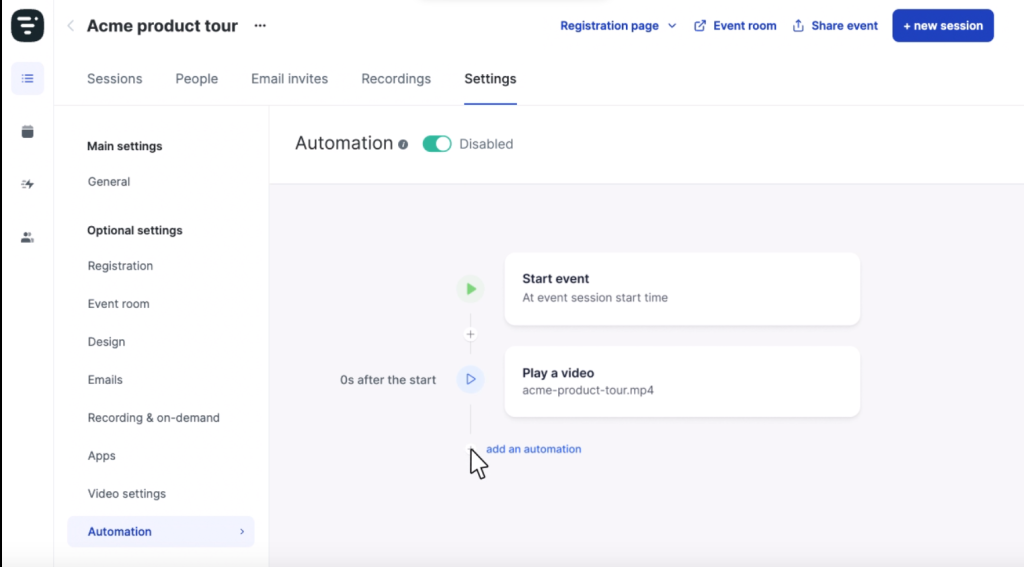
I tested Livestorm during a product demo series for a SaaS client, and the experience was clean from start to finish. The unlimited team member access meant our entire marketing team could collaborate inside one account without per-seat licensing headaches.
The native HubSpot integration pulled registrant data straight into the CRM, which eliminated the usual post-webinar copy-paste work. The free plan is genuinely usable for small tests, though the 30-minute session cap becomes a real limitation if you’re running anything substantive.
Pros:
- Fully browser-based with no downloads required for hosts or attendees on any device
- Native integrations with HubSpot, Salesforce, and other CRM tools sync data without Zapier workarounds
- Built-in email automation handles reminders, follow-ups, and calendar invites from within the platform
- Supports live, on-demand, and recurring webinar formats with unlimited replay storage
Cons:
- CRM integrations and advanced automation features are locked behind higher-tier pricing plans
- The visual quality of the webinar room feels functional but less polished than some competitors
Pricing:
Starts at $79/month for 100 active contacts
3. Demio – Best for Webinar Engagement Analytics
Demio is a browser-based webinar platform designed specifically for marketers who run webinars as demand generation tools. It focuses on individual-level engagement tracking, in-event CTAs, and lead scoring rather than general-purpose hosting.
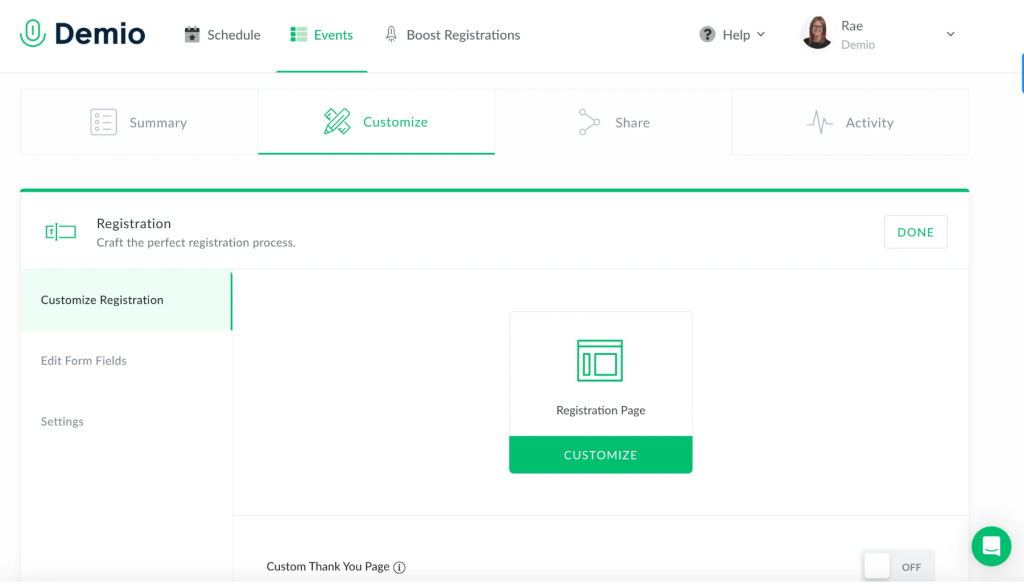
After running three lead generation webinars on Demio for a B2B client, what stood out most was how clearly the platform was built for marketers, not just meeting hosts. The in-event CTA feature lets us push a sign-up button directly to attendees at the right moment in the presentation without interrupting the session.
The individual engagement tracking showed us exactly who clicked, who stayed until the end, and who submitted a question, which made follow-up segmentation genuinely useful rather than just theoretical.
Pros:
- Runs entirely in the browser, attendees join with a single click, no app required
- In-event CTAs allow hosts to push clickable action buttons to attendees during the live session
- Individual engagement tracking and lead scoring help marketers prioritize follow-up by actual attendee behavior
- Integrates natively with Salesforce, HubSpot, and Pipedrive for real-time lead data sync
Cons:
- There is no free plan; the 14-day trial is the only no-cost access option
- Audio and video stability can be inconsistent for presenters with weaker internet connections
Pricing:
Starts at $42/month (annual billing) for 50 attendees.
4. BigMarker – Best for Hosting Virtual Marketing Events
BigMarker is a browser-based webinar and virtual events platform built for organizations that need to scale. It supports live, pre-recorded, and evergreen webinars, and can accommodate audiences ranging from a few dozen to tens of thousands of attendees.
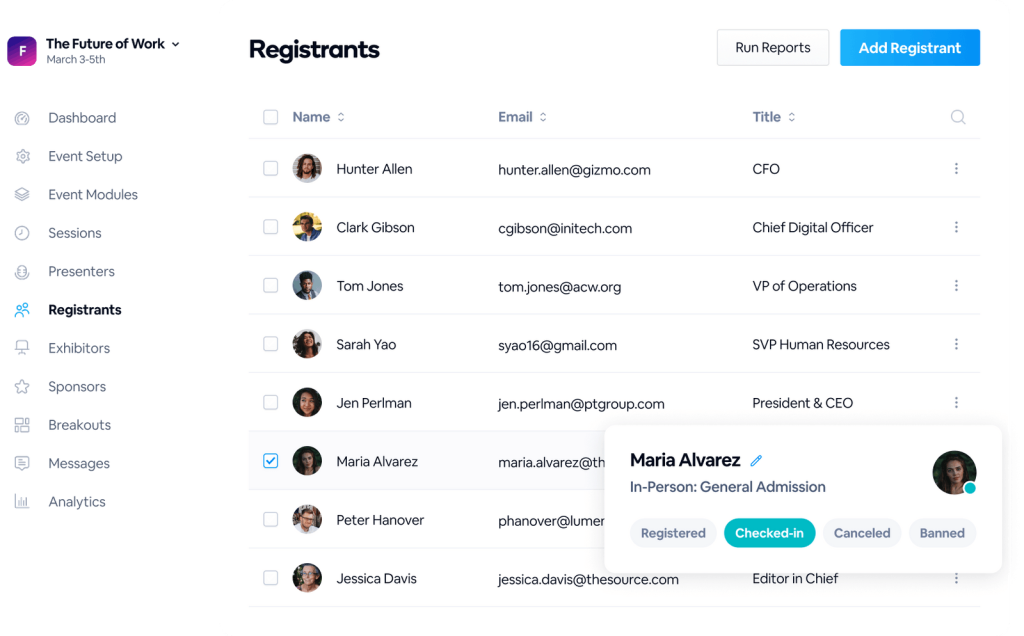
When a conference client needed a platform to host a 2,000-attendee virtual summit with simultaneous breakout sessions, BigMarker handled it without falling apart. The automated webinar engine meant we could run pre-recorded sessions on a rolling schedule, freeing up the team from monitoring every session live.
The CRM sync with Salesforce worked reliably throughout, and the engagement dashboard gave the client’s team clear visibility into who was most active across the entire event.
Pros:
- Fully browser-based and supports attendee counts from small webinars to enterprise events with 50,000+ participants
- Automated webinar features allow teams to run evergreen content on schedules without requiring live hosting
- Advanced engagement tools include reactions, chat, Q&A with upvoting, polls, and CTA popups during live sessions
- Built-in email automation, custom registration with conditional logic, and full-service ticketing are included
Cons:
- Pricing is not publicly listed for most plans and requires a custom quote, making budget planning more difficult
- The interface has a steeper learning curve than simpler browser-based alternatives, particularly for first-time users
Pricing:
Starts at $79/month (entry-level; enterprise pricing by custom quote)
5. Crowdcast – Best for Browser-based Live Video Events
Crowdcast is a lightweight, browser-based webinar platform built for creators, online educators, and community builders who prioritize interaction and simplicity over enterprise feature sets. It supports simultaneous streaming to YouTube, Facebook, and other platforms while hosting an interactive session.
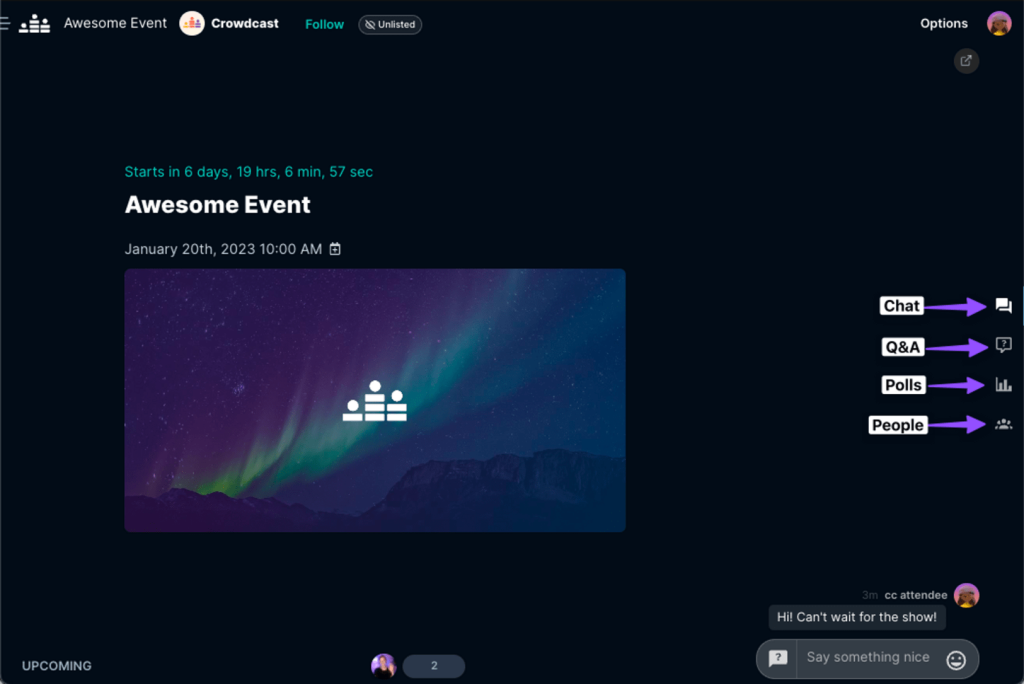
Setting up a weekly Q&A series for a content creator client, Crowdcast was the easiest platform in the bunch to get running fast.
The single-page event setup took about ten minutes, and the ability to simulcast to YouTube at the same time meant the client could reach their existing audience there while keeping the interactive session on Crowdcast itself. The one-click registration with email or social login reduced friction for returning attendees significantly.
Pros:
- Fully browser-based with no downloads required, both hosts and attendees join via a simple link
- Multistreaming capability allows simultaneous broadcasting to YouTube, Facebook, Twitch, or Periscope
- One-click registration using email or social login reduces sign-up friction for attendees
- Replay recordings are available instantly after the event ends, with shareable links
Cons:
- Lacks native integrations with major CRM and marketing automation tools, limiting B2B lead generation use
- Some users have reported reliability issues during high-attendance sessions
Pricing:
Starts at $49/month for 100 live attendees.
6. ClickMeeting – Best for Meetings and Conferences
ClickMeeting is a browser-based webinar platform with a strong focus on education and professional training. It includes a built-in virtual classroom environment with features designed to support knowledge transfer, including interactive whiteboards, tests, and attendance tracking.
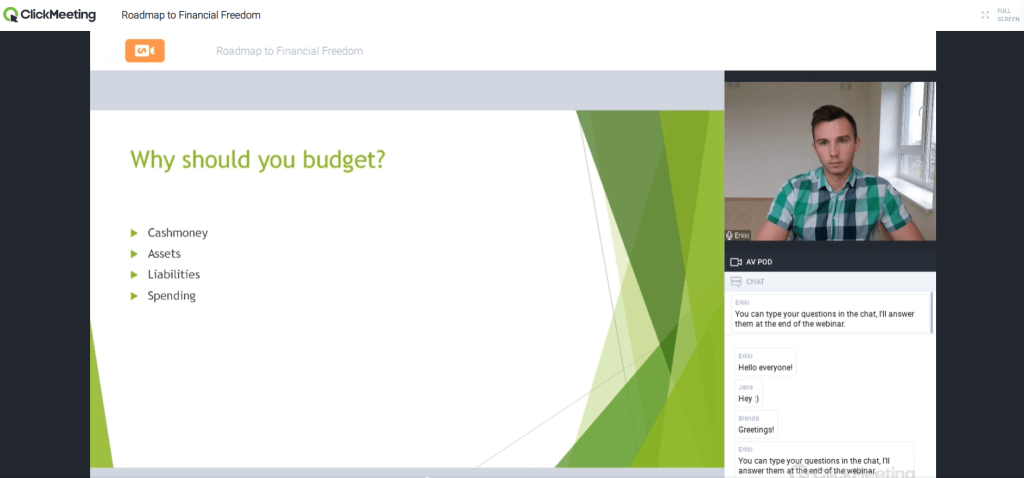
When a corporate training team needed to replace in-person onboarding sessions with virtual ones, ClickMeeting handled the transition cleanly.
The attendance tracking and post-session reporting gave the HR team the data they needed to verify participation, and the ability to run automated webinars meant the onboarding content could run on demand for new hires joining at different times throughout the quarter.
Pros:
- Runs fully in the browser, no software installation is required for trainers or participants
- Built-in attendance tracking and post-event reporting provide structured data for training compliance and HR records
- Supports automated webinars, allowing training content to run on demand without a live host
- Breakout rooms are available for small group discussions and collaborative exercises within sessions
Cons:
- Advanced features like breakout rooms and whiteboards are locked behind premium plans
- The interface feels dated compared to more modern browser-based webinar platforms
Pricing:
Starts at $26/month (annual billing).
7. Zoho Webinar – Best Budget-Friendly Browser-Based Webinar Tool
Zoho Webinar is a cost-effective, browser-based webinar solution built within the broader Zoho ecosystem. It’s best suited for small businesses and solo professionals who need basic webinar functionality without a large platform investment.
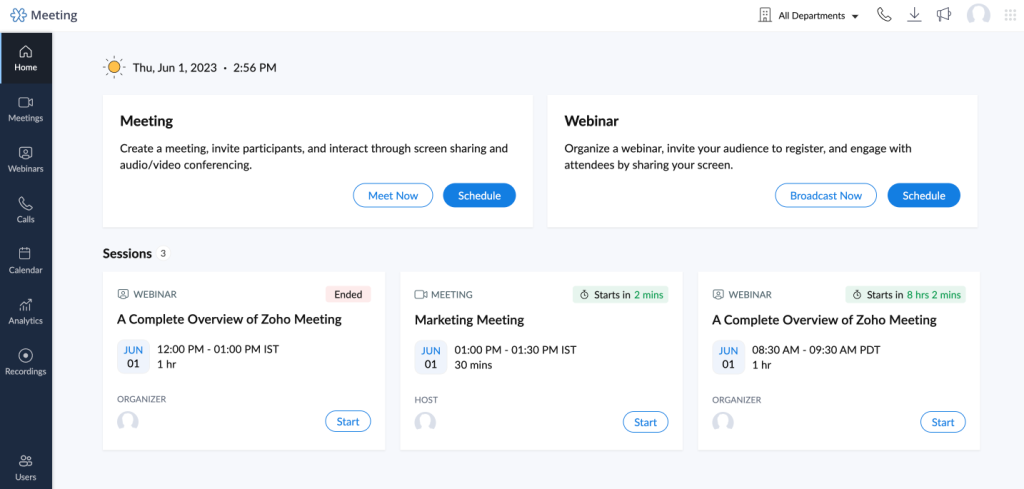
A small consulting firm running monthly client education webinars on Zoho Webinar, the value for the price point was genuinely hard to argue with. For teams already inside the Zoho CRM and marketing ecosystem, the data sync between webinar registrants and contact records was seamless.
The interface is not as polished as Livestorm or Demio, but for a team running straightforward webinars without complex automation needs, it covered the bases reliably.
Pros:
- Fully browser-based and requires no downloads for hosts or attendees
- Deeply integrated with Zoho CRM, Zoho Campaigns, and other Zoho tools, ideal for teams in that ecosystem
- Includes registration pages, email reminders, polls, Q&A, and basic analytics at a significantly lower price point
- Supports both live and on-demand webinar formats
Cons:
- Engagement features are more basic than dedicated webinar tools like Demio or WebinarNinja
- Integration options outside the Zoho ecosystem are limited, which constrains teams using non-Zoho CRMs
Pricing:
Starts at $8/month (annual billing).
8. GoToWebinar – Best for Large Enterprise Events
GoToWebinar is one of the longest-standing webinar platforms on the market, supporting large-scale corporate communications, employee training, and marketing events. It has expanded its browser compatibility over the years, though some functionality still works best via its desktop app.
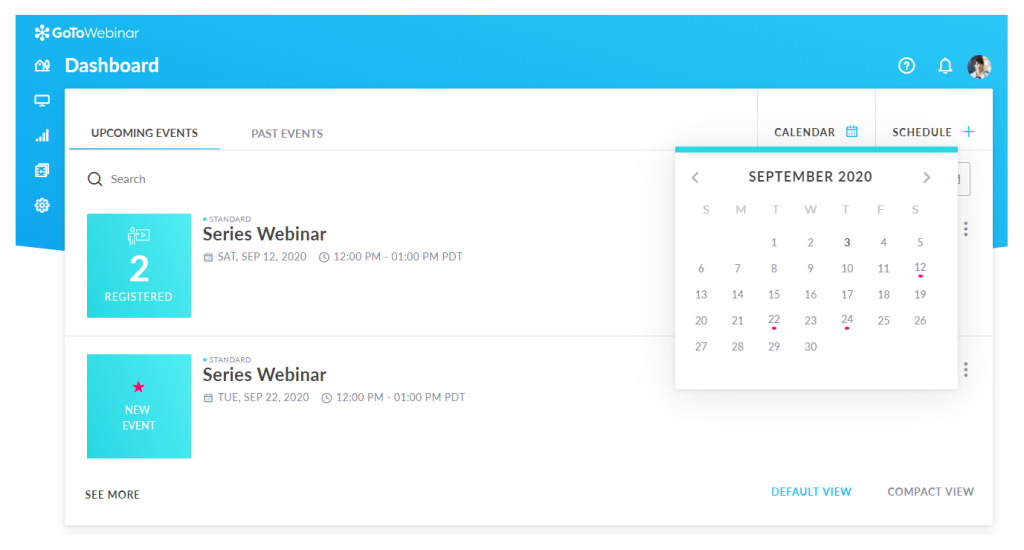
Working with an enterprise HR team running company-wide training events for 5,000+ employees, GoToWebinar’s infrastructure held up reliably at scale. The pre-built reporting dashboards gave the team instant access to attendance and engagement metrics without custom configuration.
For large organizations that value stability and compliance over design flair, GoToWebinar remains a reliable choice.
Pros:
- Supports very large attendee counts, making it suitable for company-wide or industry-scale events
- Pre-built analytics dashboards provide structured reporting on attendance, engagement, and poll results
- Simulive events allow teams to pre-produce polished content and deliver it with audience interaction features
- Integrates with HubSpot, Salesforce, Marketo, and Zapier for marketing and CRM workflows
Cons:
- The interface is less modern and intuitive than many newer browser-based competitors
- Full browser-based functionality is not consistent across all features, some capabilities still prefer the desktop app
Pricing:
Starts at $59/month (annual billing).
9. LiveWebinar – Best for Multi-Platform Flexibility
LiveWebinar is a browser-based platform built on HTML5 that runs on virtually any browser, operating system, smart TV, or mobile device. It’s designed for teams that need flexible broadcasting options alongside standard webinar functionality.
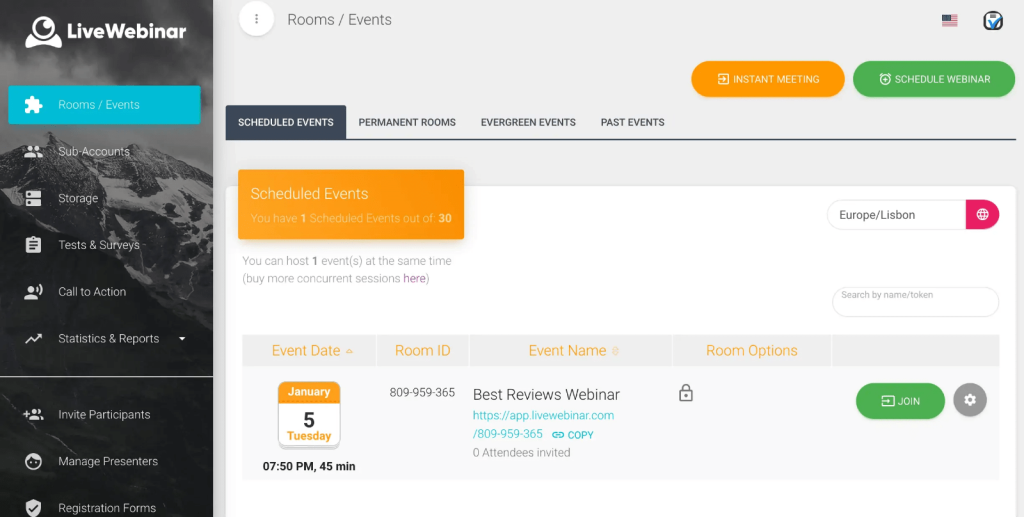
Testing LiveWebinar for a media client that needed to run sessions across desktops, mobile devices, and smart TVs simultaneously, it handled the cross-device challenge better than most platforms in this category.
The HTML5-based architecture meant attendees didn’t need to worry about browser version compatibility issues, and the social media broadcasting feature allowed the team to stream the session live to multiple platforms in parallel.
Pros:
- Runs on HTML5, supporting all browsers, mobile devices, smart TVs, and conferencing systems with no downloads
- Built-in social media broadcasting streams sessions simultaneously to YouTube, Facebook, and other platforms
- Includes screen sharing, whiteboard tools, storage, and recording features within the browser interface
- Supports white-label configuration for agencies and businesses that need branded webinar environments
Cons:
- The user interface is more complex than simpler browser-based alternatives, with a steeper learning curve
- Built-in marketing automation features are limited compared to Demio or Livestorm
Pricing:
Starts at $12.36/month (annual billing).
10. Airmeet – Best for B2B Networking and Virtual Summits
Airmeet is a browser-based virtual events and webinar platform built for B2B teams that use webinars as community and networking tools. It includes virtual networking tables, speed networking, and social lounge features alongside standard webinar functionality.
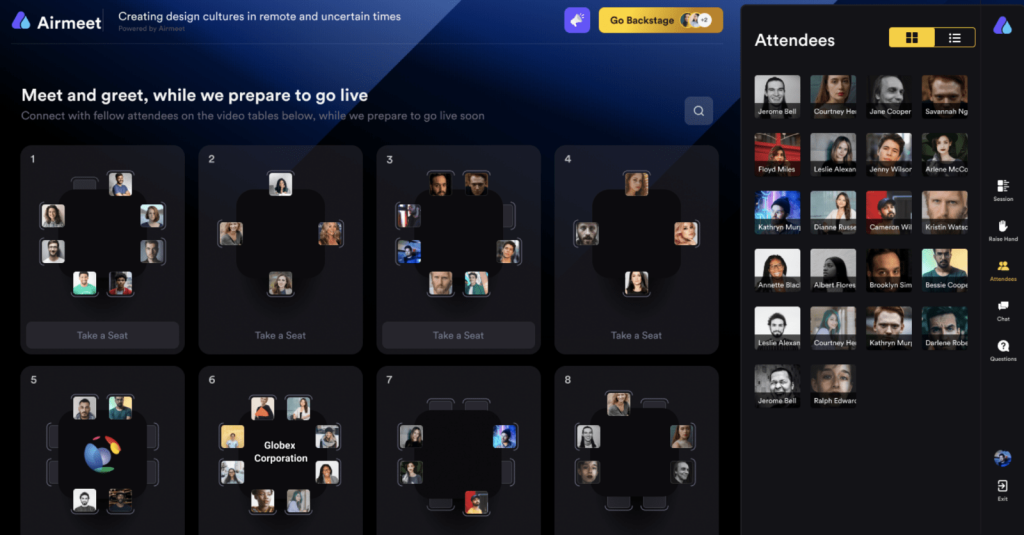
Running a virtual industry summit for a B2B SaaS client, Airmeet was selected specifically for the networking functionality that standard webinar platforms don’t offer.
The social lounge allowed attendees to self-select into conversations with peers, which replicated hallway networking from in-person events better than any other platform tested.
Pros:
- Fully browser-based, with social lounge and networking table features accessible without any downloads
- Virtual networking tables allow attendees to self-select into small group conversations during or between sessions
- Supports large-scale multi-session summits and conference formats alongside standard webinars
- Integrates with HubSpot, Salesforce, and marketing automation tools for post-event lead nurturing
Cons:
- Priced at a premium tier that may not be justified for teams running simple webinars without networking needs
- The breadth of features adds complexity, teams running single-session webinars may find it over-engineered
Pricing:
Starts at $99/month.
Evaluation Criteria
Every tool in this list was evaluated using the same framework. I didn’t pick platforms based on brand recognition or popularity alone. I looked at what actually matters when you’re choosing a browser-based webinar platform for real business use. Here’s exactly how I assessed each one:
- User Reviews and Ratings: I pulled direct feedback from G2, Capterra, and Product Hunt, paying attention to patterns across ratings rather than individual opinions. I specifically looked for recurring mentions of reliability, ease of joining for attendees, and support responsiveness since those three things tend to define whether a webinar platform actually works in practice.
- Core Features and Functionality: For a browser-based webinar platform, I evaluated whether the tool truly requires zero downloads for both hosts and attendees, what webinar formats are supported (live, automated, hybrid, on-demand), and how robust the in-session engagement features are. Platforms that buried key features behind add-ons or integrations scored lower than those that included them natively.
- Ease of Use: I looked at how quickly a first-time user could set up and launch a webinar, how intuitive the attendee join experience is, and whether the platform’s interface creates unnecessary friction for either side of the session. For client-facing and marketing use cases especially, a complicated setup is a dealbreaker.
- Customer Support: I assessed the quality and availability of support across plan tiers, including live chat, documentation, onboarding resources, and response times. For teams running high-stakes sessions like sales demos or compliance training, the ability to get help fast matters more than most people think until they need it.
- Value for Money: I compared what each platform includes at its entry-level price against what you actually need to run effective webinars. Some platforms advertise low starting prices but lock critical features like automation, CRM sync, or recording behind higher tiers. I factored that into the assessment rather than just listing the headline price.
- Personal Experience and Expert Perspective: Where I’ve used these platforms directly for client work, I’ve shared that experience in the tool descriptions. For platforms I evaluated rather than operated, I cross-referenced findings with input from webinar professionals and marketing teams who use these tools regularly. The goal throughout was to give you an honest read on how each platform performs in real conditions, not ideal ones.
My Top 3 Picks for the Best Browser-Based Webinar Software
After testing and evaluating all 10 platforms on this list, these are the three I’d point most people toward without hesitation. Each one excels in a specific area, but all three deliver on the core promise: a webinar experience that your attendees can actually get into without friction.
1. WebinarNinja
WebinarNinja is the platform I keep coming back to for client-facing work, and it’s the one I’d recommend most confidently as a starting point. It runs 100% in the browser for both hosts and attendees, supports four webinar formats including live, automated, hybrid, and series, and includes built-in registration pages, email sequences, engagement tools, and analytics without requiring a stack of third-party integrations. The setup is fast, the attendee experience is frictionless, and the automated webinar feature alone has saved me hours I’d otherwise spend hosting the same session repeatedly.
2. Livestorm
Livestorm is the strongest choice for marketing teams that run webinars as part of a larger demand generation operation. What separates it from the pack is the depth of its CRM integrations: native connectors with HubSpot and Salesforce mean attendee and engagement data flows directly into your existing systems without a Zapier workaround. The unlimited team member access across paid plans is also a genuine differentiator for larger teams where seat-based pricing adds up fast.
3. BigMarker
BigMarker earns its spot for teams operating at a scale where most other platforms start to strain. It handles everything from standard marketing webinars to multi-session virtual summits with thousands of attendees, and its automated webinar engine makes it possible to run evergreen content on a schedule without a live host. The engagement toolkit is among the most comprehensive on this list, and its integrations with enterprise CRMs including Salesforce, Marketo, and Pardot make it viable for organizations with complex marketing stacks.
How Do You Choose the Right Browser-Based Webinar Software for Your Needs?
Not every browser-based platform is built for the same audience or use case. Here are the criteria that should drive your decision:
1. Attendee Experience Priority
If your audience is primarily external (clients, prospects, customers), choose a platform that offers single-click access with zero installation requirements. WebinarNinja and Livestorm are built with this as a core principle.
2. Engagement Feature Depth
If you run interactive training or education sessions, look for platforms with polls, Q&A, hand-raise features, whiteboards, and breakout rooms. ClickMeeting and BigMarker perform well here.
3. Marketing And CRM Integration
For teams using webinars as lead generation tools, the platform’s ability to sync registrant and engagement data to your CRM in real time matters significantly, especially when you’re looking beyond the basics of hosting a webinar and into long-term pipeline impact. Demio, Livestorm, and WebinarNinja all offer strong native integrations.
4. Audience Size And Scalability
A solo coach running 50-person sessions has fundamentally different needs than an enterprise team hosting 5,000-person town halls. Match your platform to your actual audience size.
5. Budget And Long-Term Cost
Per-attendee and per-active-contact pricing models can scale unexpectedly. Flat-rate plans offer more predictable costs. Factor in whether key features (automation, CRM sync, recording) are available at your target price point.
6. Technical Support And Reliability
For client-facing sessions, reliability is non-negotiable. Check platform status histories and user reviews on G2 and Capterra before committing to any paid plan.
Browser-Based Webinar Software vs. Desktop App Platforms: What Is the Difference?
Browser-based webinar software runs entirely within a web browser using WebRTC technology, requiring no software installation from hosts or attendees. Desktop app platforms require users to download and install dedicated software before accessing any session.
| Attendee setup | Click link, join instantly | Download app, install, launch |
|---|---|---|
| Corporate IT compatibility | High, works through standard browser | Lower, often blocked by IT policies |
| Device flexibility | Works on any OS and device | May require specific OS versions |
| Attendee drop-off risk | Low | Higher due to install friction |
| Update management | Automatic (handled by platform) | Requires user-side updates |
| Offline functionality | None, requires internet | Sometimes partial offline access |
Switch to Browser-Based Webinar Software and Stop Losing Attendees at the Door
The best webinar content in the world doesn’t help if your attendees never make it in. That single “please install” prompt is often the last screen a portion of your audience ever sees. Browser-based webinar software eliminates that problem entirely, and when your clients, prospects, and students can join in one click, you spend less time on technical support and more time on what actually matters: the session itself.
The shift to browser-based platforms isn’t just about ease of use. It’s about removing a structural barrier that costs businesses real attendance, real leads, and real revenue every week. Once you’ve hosted a session where every registrant made it in without a single “I can’t join” email, it becomes very hard to go back.
If you’re starting your search, WebinarNinja is worth putting at the top of your list. It handles everything from live and automated webinars to on-demand sessions and series, all without asking your attendees to install a thing. The setup takes minutes, the engagement tools are built in, and the analytics give you everything you need to improve each session. The experience your attendees have before the webinar even starts matters. Make it a good one.
Frequently Asked Questions
Which Browser-Based Webinar Platform Is Best for Small Businesses?
Zoho Webinar and WebinarNinja are both strong options for small businesses. Zoho Webinar offers the lowest entry price and integrates well for teams already in the Zoho ecosystem. WebinarNinja provides more webinar-specific features including automated webinars, hybrid sessions, and built-in marketing tools at a mid-range price point that scales predictably.
Can Attendees Join Browser-Based Webinars from Mobile Devices?
Yes. Browser-based webinar platforms that use WebRTC are compatible with mobile browsers on iOS and Android devices. Attendees can join from a smartphone or tablet without downloading an app. According to webinar benchmark data, approximately 31% of webinar attendees join from mobile devices, making mobile browser compatibility a meaningful accessibility factor.
Does Browser-Based Webinar Software Work on Corporate Networks with Firewall Restrictions?
Most browser-based webinar platforms are designed to work over standard HTTPS traffic, which passes through most corporate firewalls without issues. Some platforms that allow mature content (such as Crowdcast) may be flagged by security filters in corporate environments. For business-focused sessions, choosing a platform built specifically for B2B audiences minimizes this risk.
What Engagement Features Are Available in Browser-Based Webinar Tools?
Browser-based webinar platforms support a wide range of engagement features accessible directly in the browser, including live polls, Q&A sessions, group chat, private chat, hand-raise functionality, downloadable handouts, and in-session CTAs. Some platforms also include breakout rooms, whiteboards, and emoji reactions, all running natively in the browser without additional tools.
How Does WebRTC Technology Make Browser-Based Webinars Possible?
WebRTC (Web Real-Time Communication) is an open-source technology built into modern browsers that enables peer-to-peer audio, video, and data transmission without plugins or downloads. Browser-based webinar platforms build on WebRTC to deliver real-time, low-latency video sessions directly in the browser, handling the underlying infrastructure so neither hosts nor attendees need any additional software.
Is Browser-Based Webinar Software Secure Enough for Financial and Healthcare Teams?
Yes, with the right platform. Enterprise-grade browser-based webinar platforms offer HTTPS encryption, GDPR compliance, SSO, and role-based access controls. Financial services teams should verify that their chosen platform supports data residency requirements and offers an audit trail. Platforms like GoToWebinar and WebinarNinja explicitly address these compliance needs in their enterprise plans.
Want to host a webinar for free?
Use WebinarNinja to teach, improve marketing, and grow your sales.