
Most training sessions don’t fail because the content is bad. They fail before the session even starts, because the platform made registration confusing, the reminder never went out, or the recording took three days to arrive in an inbox half the audience has already stopped checking.
I’ve spent years helping corporate trainers, HR managers, and L&D professionals find the best webinar software for training for their teams. And the pattern I keep seeing is the same: teams pick a platform that looks good on a features page, run a few sessions, and then quietly discover that the logistics are eating more time than the actual training design. Manually chasing registrations. Downloading and re-uploading recordings. Rebuilding the same reminder email before every session. None of that is why you got into training.
By the end of this guide, you’ll know exactly which platform fits your training format, whether that’s live, on-demand, multi-session, or hybrid, what features actually separate a purpose-built training platform from a generic video tool, and how to make a confident decision without spending another month testing platforms that almost work. WebinarNinja is the first tool on this list, and by the time you finish reading, you’ll understand exactly why.
What Is Webinar Software for Training?
Webinar software for training is a dedicated platform that lets organizations host live, recorded, or automated instructional sessions for employees, clients, or learners, complete with registration, engagement tools, recording, and follow-up automation built in.
Unlike general video conferencing tools, training-focused webinar platforms include features like on-demand replay libraries, multi-session series, attendance certificates, and CRM integrations, all designed to make learning repeatable and measurable.
Why Do Training Teams Need Dedicated Webinar Software?
Dedicated webinar software for training solves three specific problems that general meeting tools cannot: inconsistent attendance, no scalable content reuse, and zero post-session engagement automation. Training teams need a platform that turns a single live session into a reusable, trackable learning asset.
Here is what happens when you use the wrong tool for training delivery:
- Registration Chaos: No branded registration page means you’re manually managing invite lists and chasing attendees.
- Zero Replay Automation: Participants in different time zones never receive the recording automatically. You send it manually or it doesn’t get sent at all.
- No Follow-Through: Without automated follow-up emails, post-session surveys, and attendance reports, measuring learning impact is guesswork.
- Series Sessions Break Apart: Multi-week training programs require separate meetings, separate links, and separate reminders, adding hours of admin every week.
- Engagement Disappears: Video conference tools lack in-session polls, hand raises, and Q&A moderation that keep learners active during longer instructional content.
A purpose-built training and communication platform eliminates all five of these problems. It handles logistics so you can focus on content delivery.
What Are the Best Webinar Software for Training Options This Year?
Here are the 10 best webinar software for training platforms, selected for their ability to support repeatable, scalable, and engaging learning delivery.
| Tool | Best For | Pricing |
| WebinarNinja | Improving Marketing, Growing Sales, and Teaching Better | Starts at $0.30/attendee/month (includes CourseNinja worth $1200). |
| GoTo Webinar | Enterprise compliance training with large attendee capacity | Starts at $49/user/month |
| Adobe Connect | Immersive virtual classrooms with custom room layouts | Starts at $190/year/host |
| Zoom Webinars | Teams already on Zoom that need basic training broadcasts | Starts at $79/month/host |
| Livestorm | Browser-based training with no downloads required | Starts at $79/month |
| ClickMeeting | Mid-size training teams needing monetization and funnels | Starts at $30/month |
| Demio | Simple, clean training webinars for smaller teams | Starts at $49/month |
| Webex Webinars | Enterprise training requiring multilingual support | Custom pricing |
| BigMarker | Marketing-led training and demand generation | Custom pricing |
| ON24 | Data-heavy enterprise training with deep analytics | Custom pricing |
1. WebinarNinja – Best Webinar Software to Improve Marketing, Grow Sales, and Teach Better
What I use WebinarNinja for right now is exactly what most training teams are trying to build: a system that handles the full training lifecycle, from registrant signup to post-session replay delivery, without requiring a separate email tool, a separate landing page builder, or a separate analytics dashboard.
The moment I set up our first training series on WebinarNinja, the difference was immediate. One registration link, automatic reminders at 24 hours and 1 hour before the session, and the replay lands in every registrant’s inbox automatically, regardless of whether they attended. For onboarding webinars that run the same content every week, the automated webinar format is a genuine time-saver: record once, run forever, keep your calendar clear. The series feature is what sets it apart for multi-week training programs. Learners register once and get access to every session in the sequence, with a single consistent link that never changes.
The engagement tools, chat, Q&A, polls, and handouts, are built for instructional delivery, not just presentations. And the webinar analytics show you attendance time, engagement rate, and click-through on in-session offers, which gives HR and L&D managers the data they need to prove training effectiveness.
Pros:
- Supports four webinar formats (live, automated, series, hybrid), the only platform at this price point that covers all four
- Built-in registration pages, email reminders, and recording and replay delivery require no third-party tools
- Series webinars allow single registration for multi-session training programs, eliminating admin overhead
- Real-time analytics track attendance duration, poll responses, and CTA clicks per attendee
- Integrates natively with HubSpot, Mailchimp, ConvertKit, and Zapier for CRM-connected training funnels
Cons:
- No on-premise or downloadable version available.
- Dark mode support is not available on the web.
Pricing:
A FREE 14-day trial is available. Paid starts at $0.30/attendee/month (includes CourseNinja worth $1200).
2. GoTo Webinar – Best for Hosting Large-Scale Webinars With Meeting Software/pre-Recorded Events
GoTo Webinar is a professional-grade webinar platform built for organizations that need reliability, capacity, and structured event management for large-scale training sessions, particularly compliance and regulatory programs.
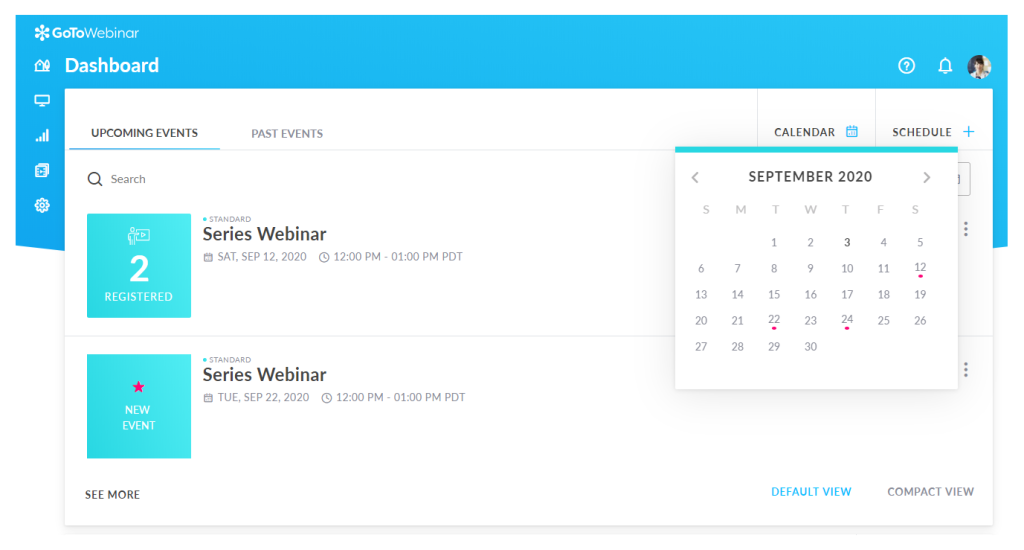
When I ran a compliance training series for a financial services team using GoTo Webinar, the sheer stability of the platform stood out. Sessions with 500-plus attendees ran without a hiccup. The automated email workflows are baked in, no Zapier required, and the handout delivery feature made distributing policy documents during the session seamless. For regulated industries where attendance records matter, the detailed attendee export is genuinely useful.
That said, GoTo Webinar’s interface felt dated compared to newer platforms, and the registration page customization was limited to basic color and logo changes. For a marketing-forward training program where brand experience matters, it showed its age.
Pros:
- Supports up to 3,000 attendees, ideal for enterprise-wide all-hands and compliance sessions
- Automated email workflows for registration confirmation, reminders, and follow-ups built natively
- Handout delivery feature lets hosts distribute documents, PDFs, and resources during sessions
- Detailed attendance and engagement reports with exportable data for compliance record-keeping
Cons:
- Registration page design options are limited and difficult to brand for customer-facing training
- No hybrid webinar format. Cannot combine pre-recorded video with a live host
Pricing:
Starts at $49/user/month.
3. Adobe Connect – Best for Adobe Suite Users
Adobe Connect is a virtual classroom and webinar platform that gives instructors complete control over the training room layout, content pods, and interactive elements, making it the go-to choice for organizations that need a structured, customizable learning environment.
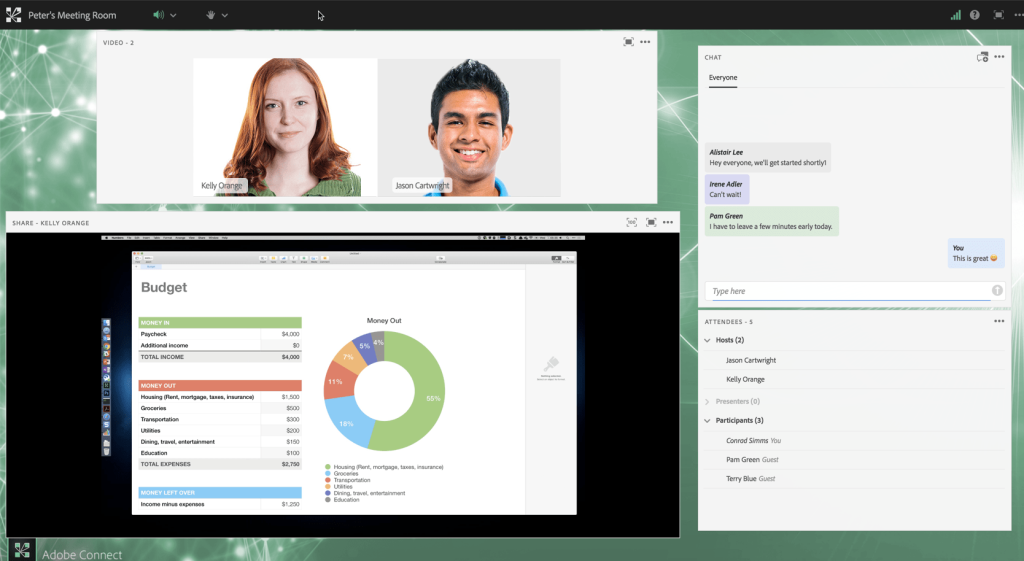
After testing Adobe Connect for a leadership development program, the pod-based room customization was unlike anything else I’d used. You can build a virtual classroom with a video pod, a content pod, a whiteboard, a chat pod, and a notes pod, all arranged exactly how you want, and save that layout as a template for every future session. For recurring training where the format never changes, this is a real efficiency gain.
The learning curve, however, was steep. Setting up the room initially took longer than expected, and participants without fast connections occasionally ran into performance issues during content-heavy sessions.
Pros:
- Fully customizable virtual room layouts with drag-and-drop pod arrangement for structured classroom delivery
- Persistent rooms save your layout and content for recurring training, no rebuilding each session
- Breakout rooms support small-group discussion and skills practice within a larger session
- Deep integration with Adobe Learning Manager and Adobe Marketo Engage for enterprise L&D workflows
Cons:
- Steep learning curve for new hosts. Setup time is significantly higher than other platforms on this list
- Performance can degrade for participants on slower connections during content-heavy sessions
Pricing:
Starts at $190/user/month.
4. Zoom Webinars – Best for Online Meetings/breakout Rooms
Zoom Webinars is the webinar add-on to the Zoom ecosystem, providing one-to-many broadcast capability for teams that already live in Zoom for their day-to-day communication and want to run basic training sessions without switching platforms.
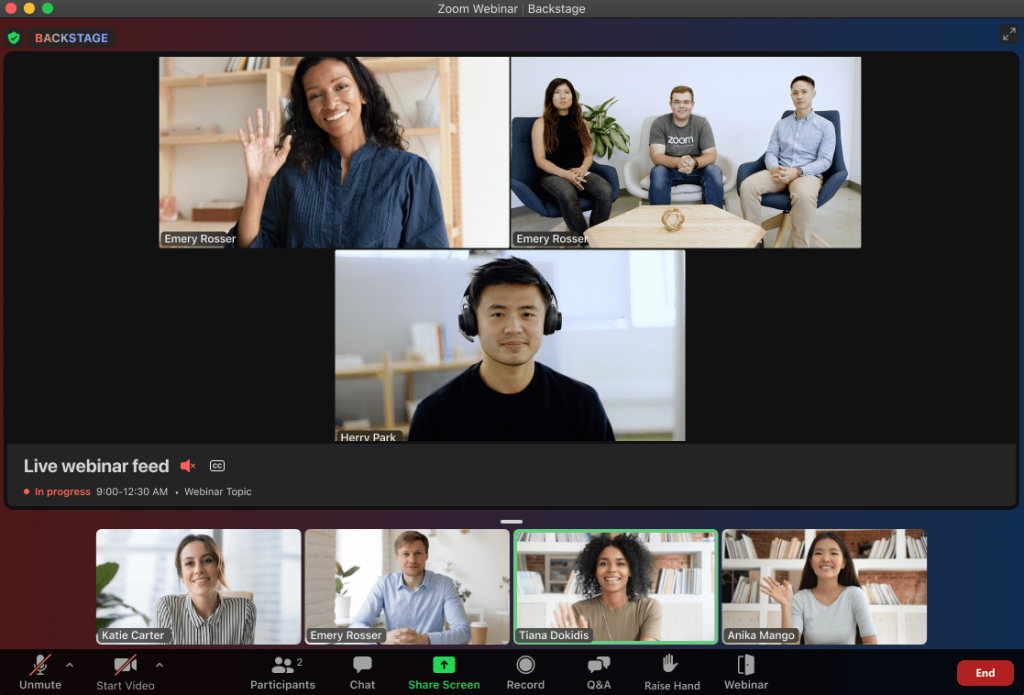
When I supported an onboarding team that was already on Zoom Enterprise, extending their setup to Zoom Webinars was the path of least resistance. The interface was already familiar to everyone, the SSO integration meant no new logins, and the recording went straight to their existing Zoom cloud storage. For a team running quarterly all-hands training with no lead capture or replay automation requirements, it covered the basics.
The cracks showed quickly once we tried to build anything more sophisticated. Setting up automated reminders required integrating with an external email tool. Replay distribution was manual. And the registration page, compared to platforms built specifically for webinars, was bare and difficult to brand.
Pros:
- Native integration with the Zoom ecosystem means no additional logins, SSO works seamlessly
- Familiar interface reduces adoption friction for teams already using Zoom daily
- Supports up to 50,000 attendees with enterprise plans, the highest raw capacity on this list
- AI Companion (on Zoom One plans) assists with event planning and post-session summaries
Cons:
- No built-in automated email reminder sequence. Requires third-party email tool integration
- Registration page customization is limited compared to purpose-built webinar platforms
Pricing:
Starts at $79/month/host (webinar add-on, base Zoom license required).
5. Livestorm – Best for Virtual Events for Enterprise Needs
Livestorm is a browser-based webinar platform that requires no download for attendees, making it ideal for external training sessions, customer onboarding programs, and compliance webinars where the audience is not technical and friction at the join stage kills attendance.
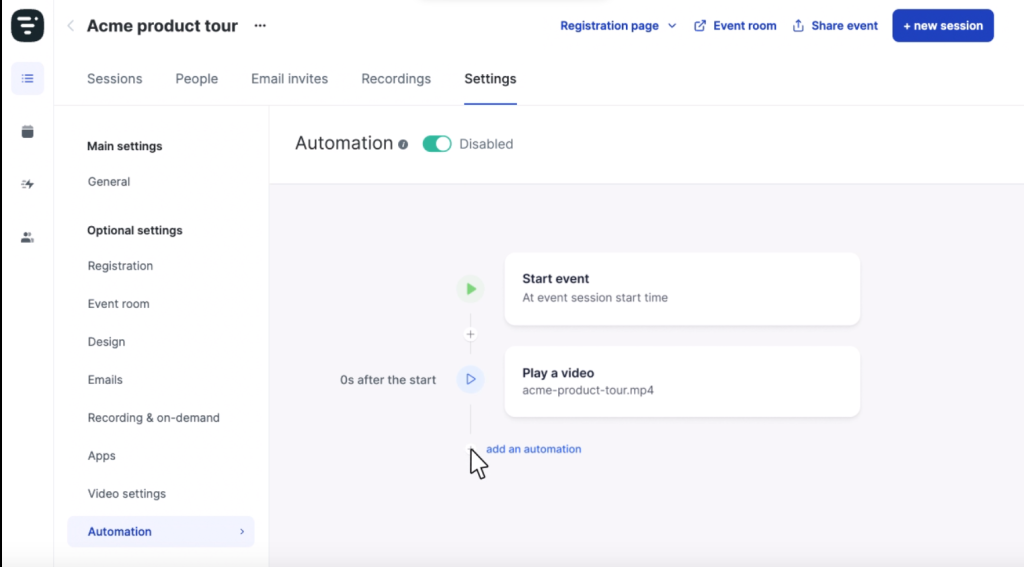
Running a customer onboarding training with Livestorm was the first time I didn’t spend the first ten minutes of a session troubleshooting download errors and browser permissions. The join-from-browser experience is genuinely seamless. The automated email sequences, registration confirmation, reminder, and replay, are well-designed and require no external tools.
The analytics are good for a mid-market platform, but the pricing jumps steeply once you move beyond the base plan, making it less attractive for teams running high-frequency training.
Pros:
- Fully browser-based. No download required for attendees on any device
- Automated email sequences for registration, reminders, and replay delivery built in natively
- Integration with HubSpot, Salesforce, Marketo, and Pipedrive for training-connected CRM workflows
- Detailed engagement analytics including time-in-session, poll responses, and drop-off points
Cons:
- Pricing scales steeply. The base plan limits registrants, making it expensive for high-frequency training programs
- No native support for multi-session training series. Series-style programs require manual configuration
Pricing:
Starts at $79/month.
6. ClickMeeting – Best for Meetings and Conferences
ClickMeeting is a flexible webinar platform built for teams that run regular training sessions and want the ability to monetize select programs, offering paid registration for premium workshops, certifications, or expert-led courses without adding a separate payment tool.
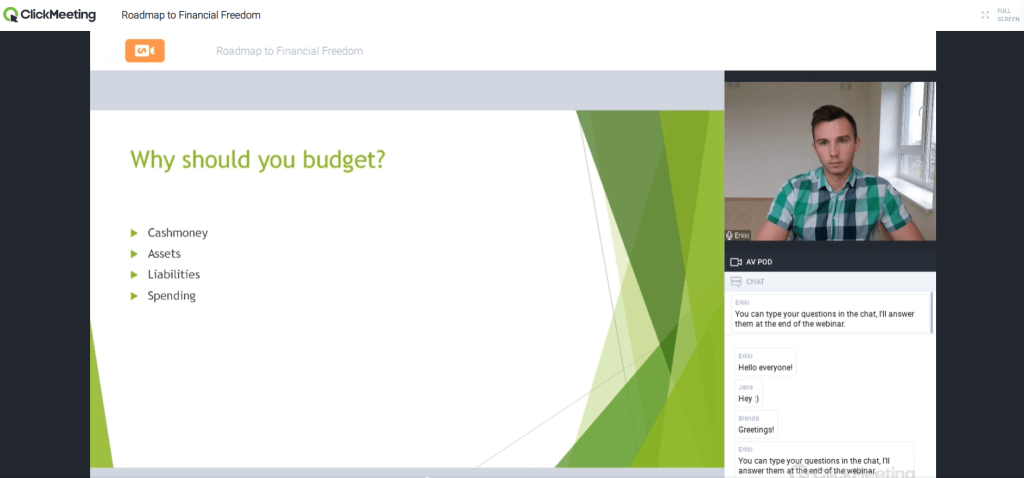
Testing ClickMeeting for a professional development program that included both free compliance sessions and paid certification workshops revealed its core strength: the same platform handled both without any configuration gymnastics. The paid registration feature connected directly with PayPal and Stripe, and the customizable registration forms captured the additional attendee data we needed for certification records.
For teams running more than 200 attendees, the platform held up well. The interface felt slightly dated in places, and the automated email setup required more steps than competitors, but the overall reliability was solid.
Pros:
- Paid registration support with Stripe and PayPal integration, ideal for fee-based training programs
- Handles up to 1,000 participants in webinar mode with consistent audio and video quality
- Customizable webinar room, waiting area, and event layout for branded training experiences
- Supports screen sharing, polls, Q&A, and whiteboard for interactive instructional delivery
Cons:
- Automated email setup is more complex and less intuitive than platforms like WebinarNinja or Livestorm
- Interface design feels dated compared to modern alternatives
Pricing:
Starts at $30/month.
7. Demio – Best for Large Meetings & Virtual Events
Demio is a streamlined webinar platform focused on delivering a clean, easy-to-use experience for both hosts and attendees, making it a strong choice for trainers and coaches who want to run professional-looking sessions without a technical setup overhead.
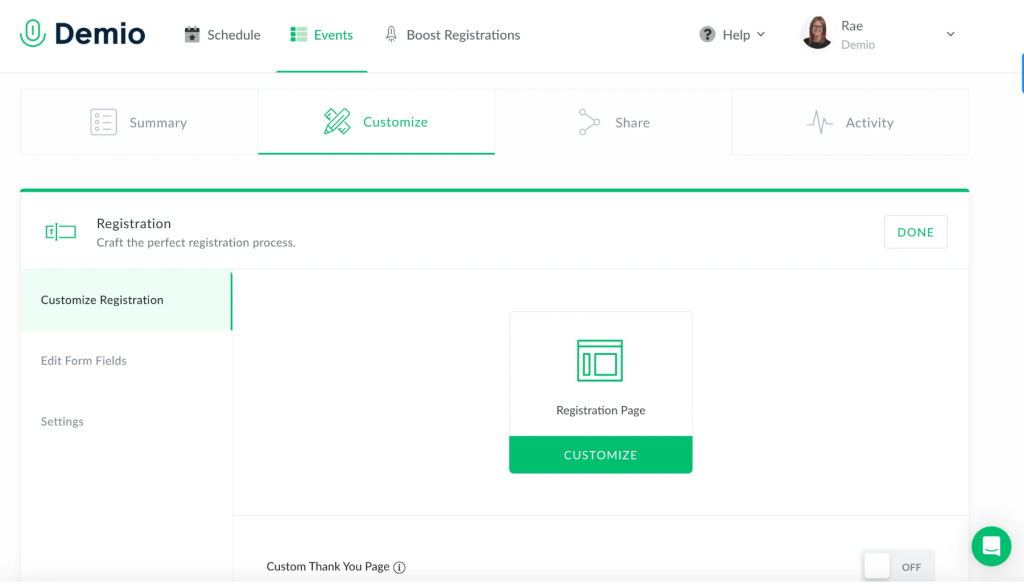
Running product training webinars for a SaaS onboarding team using Demio was refreshingly straightforward. The interface stripped away everything that wasn’t essential. Registration pages looked polished out of the box, sessions launched without technical issues, and the browser-based join experience for attendees reduced drop-off noticeably. For small-to-mid training programs (under 150 attendees), it delivered everything we needed.
Demio’s sliding-scale pricing becomes expensive at larger attendee counts, and it lacks the series format that multi-week training programs require.
Pros:
- Minimalist, modern interface reduces host learning curve significantly
- Polished, branded registration pages require no design experience to set up
- Polls, Q&A, and featured action tools built in for live engagement
- Good integration with HubSpot, Drip, and ActiveCampaign for post-training follow-up
Cons:
- Pricing scales with attendee count, making it expensive for sessions over 150 people
- No multi-session series format. Training programs requiring sequential sessions need manual setup
Pricing:
Starts at $49/month.
8. Webex Webinars – Best for Large Meetings & Virtual Events
Webex Webinars is Cisco’s enterprise webinar platform, offering real-time AI-powered translation in 100+ languages, end-to-end encryption, and capacity for hundreds of thousands of attendees, making it the clear choice for multinational organizations running global compliance or safety training programs.
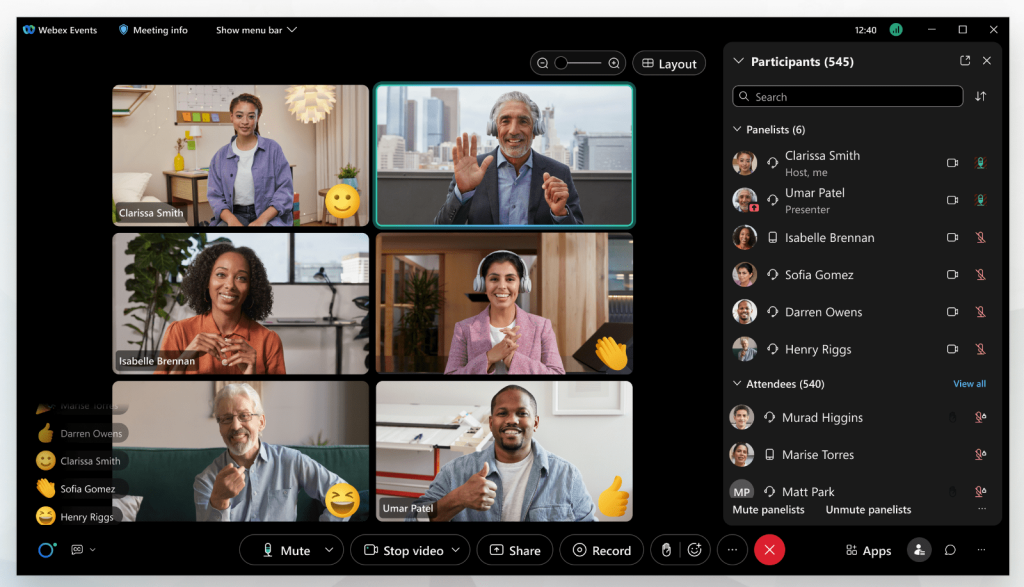
When I supported a training program that needed to reach teams across eight countries with different primary languages, Webex Webinars was the only platform on this list that handled real-time multilingual translation natively. The AI-powered noise cancellation also made a noticeable difference in session quality for participants dialing in from locations with variable audio environments.
The pricing is enterprise-level, and smaller teams will find better value elsewhere. The setup requires more IT involvement than self-serve platforms.
Pros:
- Real-time AI translation in 100+ languages, the most robust multilingual support on this list
- AI-powered background noise cancellation and voice enhancement for clean session audio
- Enterprise-grade security including end-to-end encryption and compliance certifications
- Integration with Microsoft tools, Salesforce, and enterprise SSO systems
Cons:
- Custom pricing with no transparent self-serve tiers. Requires vendor engagement to start
- Setup complexity is higher than self-serve platforms. IT involvement typically required
Pricing:
Custom pricing (enterprise-focused).
9. BigMarker – Best for Hosting Virtual Marketing Events
BigMarker is a full-featured webinar and virtual event platform built for organizations that use training webinars as a demand generation channel, combining instructional delivery with automated marketing funnels, CRM integration, and lead scoring in one platform.
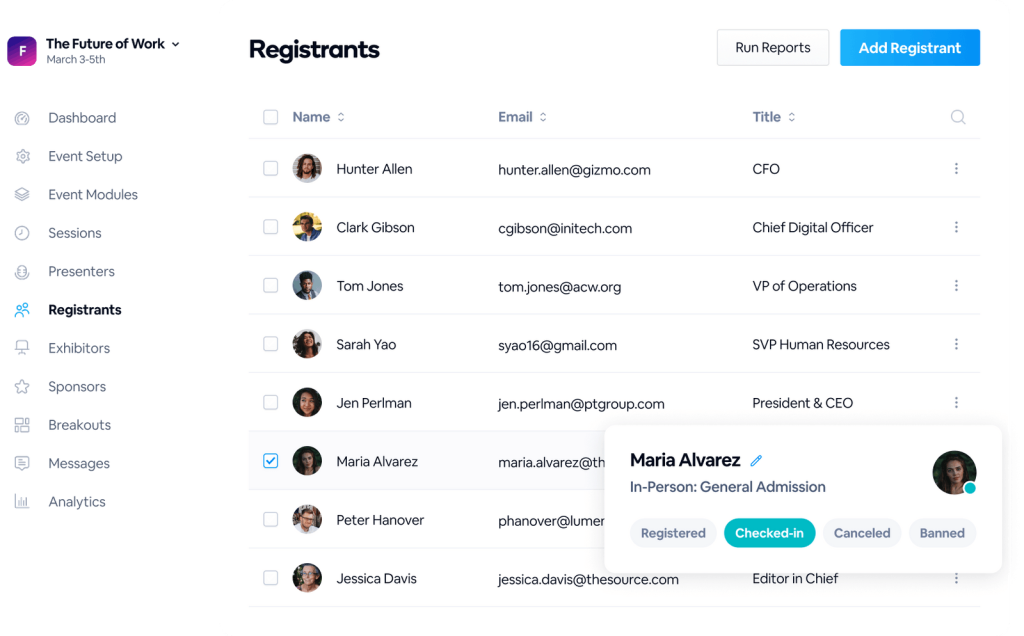
During a B2B training program that doubled as a top-of-funnel demand generation campaign, BigMarker stood out for its depth of automation. Custom landing pages were high-quality, the CTA tools during the session converted attendees to demo requests in real time, and the attendee data flowed directly into Salesforce without any manual intervention.
For L&D teams that report to marketing or have a commercial mandate tied to training, this platform offers a level of sophistication that standalone training tools don’t match. The trade-off is pricing opacity. BigMarker does not publish rates publicly, and the cost reflects enterprise positioning.
Pros:
- Advanced automated webinar marketing including sequenced follow-up emails and lead scoring
- High-quality, fully customizable landing pages rivaling standalone page builders
- Native CRM integration with Salesforce, HubSpot, and Marketo for commercial training funnels
- Supports all session formats: live, automated, hybrid, series, and summit-style multi-day events
Cons:
- No transparent public pricing. Requires a sales conversation before you can evaluate cost
- Overkill for teams running internal employee training without a commercial objective
Pricing:
Custom pricing.
10. ON24 – Best for Enterprise Training With Deep Content Analytics
ON24 is an enterprise-grade webinar and content experience platform built for large organizations that need to measure every dimension of training engagement, from session attendance to content interaction, resource downloads, and downstream conversion events.
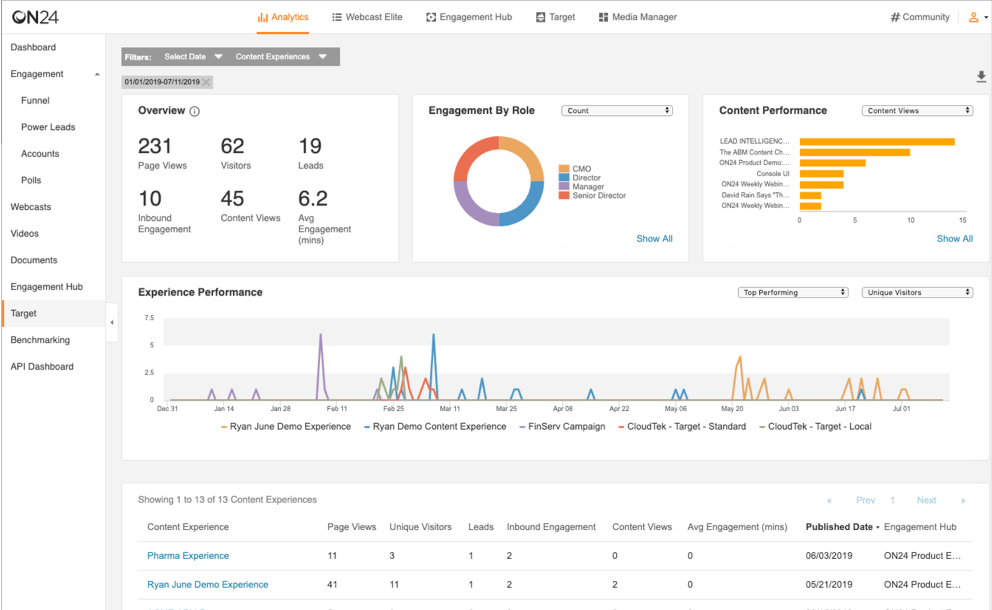
Managing a global product training rollout on ON24 revealed a level of analytics depth that no other platform on this list comes close to. Every attendee action, which slides they lingered on, which polls they responded to, which resources they downloaded, how long they stayed in the session, was captured and exportable.
ON24 is priced and positioned for enterprise. Its complexity and cost make it the wrong choice for small teams or anyone running fewer than 20 training sessions per year.
Pros:
- The most comprehensive engagement analytics on this list. Tracks every attendee interaction within a session
- Content experience hubs allow training assets (sessions, recordings, documents) to be organized in branded portals
- Supports large-scale live events, on-demand content libraries, and hybrid delivery
- AI-powered content recommendations and personalization for training audiences
Cons:
- No self-serve pricing. Enterprise sales process required before you can access the platform
- Extremely high cost relative to SMB alternatives. Not suitable for small teams or infrequent training programs
Pricing:
Custom pricing (enterprise).
How Should You Choose the Right Webinar Software for Training?
Choosing the right best webinar software for training comes down to four criteria: your training format requirements, your team size and frequency, your technical capacity, and your budget. Work through these four steps in order and you’ll have a clear answer by the end.
Step 1: Identify the Training Formats You Actually Need
Start here because format determines everything else. If you only run live sessions, most tools on this list will serve you adequately. But if you need automated sessions (record once, run on a schedule), series programs (a single registration link covering a full multi-week curriculum), or hybrid formats (a pre-recorded video combined with a live host in the chat), you need a platform that handles all four formats natively.
WebinarNinja is the only option at an SMB price point that covers all four without requiring workarounds or third-party tools. Understanding the differences between live vs automated webinars before you commit to a platform can save you weeks of reconfiguration later.
Step 2: Match the Platform to Your Audience Size
Attendee capacity is rarely the dealbreaker it looks like on paper, but it does matter at the extremes. For sessions under 500 attendees, which covers the large majority of corporate training programs, any platform on this list is adequate in capacity.
For enterprise all-hands sessions over 1,000 attendees, GoTo Webinar, Webex, or Zoom Webinars are the appropriate tier. Buying a 3,000-seat plan when you train 40 people at a time adds unnecessary cost. Buy for where you are now, not where you hope to be in three years.
Step 3: Decide Whether You Need Marketing Automation or Just Training Delivery
This is the question most training teams skip, and it costs them. If your training webinars are internal (employees, partners, customers you already have), a training-first platform like WebinarNinja or Adobe Connect gives you exactly what you need.
If your training sessions also serve as a lead generation channel, with external audiences you are actively trying to convert, BigMarker or ON24 add the commercial automation layer that training-only platforms don’t offer. Being clear on this distinction upfront prevents you from paying for marketing features you’ll never use, or discovering six months in that your platform can’t support the revenue goals tied to your training program.
Step 4: Set Your Budget Ceiling Before You Compare Pricing
Most SMBs and growing training teams run well within $15 to $50 per month. WebinarNinja ($14.42/month), ClickMeeting ($30/month), and Demio ($49/month) all sit in this range and cover the core features most training programs need. GoTo Webinar, Livestorm, and Zoom add-ons push toward $80 to $100 per month.
Adobe Connect, Webex, BigMarker, and ON24 are enterprise-tier and require either a significant budget or a procurement process. Set your ceiling before you talk to a vendor. It is easy to convince yourself you need the next tier up when you’re in a demo.
What Are the Key Features of the Best Webinar Software for Training?
The best webinar software for training includes seven capabilities that separate purpose-built platforms from general video conferencing tools. Here is what each feature actually does and why it matters for training delivery specifically.
1. Multiple Session Formats
A training platform should support live sessions (real-time delivery with audience interaction), automated sessions (pre-recorded content that runs on a fixed schedule or on-demand), series webinars (a multi-week curriculum under one registration link), and hybrid sessions (a pre-recorded video playing while a live host manages the chat).
Most general tools support only live. The ability to mix and match formats is what makes a platform genuinely useful for building scalable learning programs rather than one-off events. You can explore all four webinar formats in detail to decide which combination fits your training program before you commit to a platform.
2. Branded Registration Pages With Automated Reminders
A registration page is not just a sign-up form. It is the first impression your training program makes on a learner. Purpose-built platforms include a fully branded registration page, an automated confirmation email, and reminder emails triggered at set intervals before each session.
This removes the single biggest source of low attendance: learners who registered but forgot. You can see webinar landing page examples to understand what a high-converting training registration page looks like before you build yours.
3. Post-Session Recording and Replay Delivery
Every training session should produce a usable recording that reaches all registrants automatically, not just the people who attended live. Purpose-built platforms handle this end to end: the session records automatically, the file is processed and hosted, and a replay link goes out to your full registrant list within a defined window.
No manual downloading, re-uploading, or email drafting required. This is the feature most Zoom-based training teams spend the most time working around. A proper webinar recording workflow turns a single session into a permanent on-demand learning asset.
4. In-Session Engagement Tools
Training sessions longer than 20 minutes need active engagement mechanisms to prevent drop-off. The right platform includes live polls for knowledge checks mid-session, Q&A moderation so questions are collected and answered without derailing the flow, hand-raise for signaling participation without enabling microphone chaos, in-session chat for real-time commentary, and downloadable handouts for reference materials.
These are not nice-to-haves. For instructional content, they are the difference between a session learners remember and one they half-watch while answering emails. If you want to go deeper on keeping people engaged during training, this guide on interactive webinar strategies covers what actually works.
5. Attendance Analytics and Reporting
Training teams need more than a headcount. A purpose-built platform tracks time-in-session per attendee, engagement rate (poll responses, chat activity, Q&A participation), drop-off points in the session timeline, and attendance export formats compatible with HR or LMS systems.
This data is what lets you make the case internally that training is working. Without it, you are reporting on inputs (sessions delivered) rather than outcomes (learners engaged). WebinarNinja’s reports and analytics dashboard gives you all of this in one place without a separate analytics tool.
6. CRM and Marketing Tool Integration
Every training registration is a data point. A purpose-built platform passes that data to your CRM automatically: who registered, who attended, how long they stayed, which polls they answered. This is what enables post-training follow-up sequences, training completion tracking in Salesforce or HubSpot, and the ability to link training engagement to downstream outcomes.
Native integrations with CRMs like BIGContacts, HubSpot, Salesforce, ActiveCampaign, Mailchimp, and ConvertKit are table stakes. If the platform only offers Zapier, factor in the additional setup cost and fragility.
7. Attendee Privacy Controls
This is one of the most underrated requirements in training contexts. Many organizations need to hide the attendee list from other participants, suppress the public attendee count (especially early in a program’s launch), and restrict participant microphone and camera access by default.
This matters for compliance training, sensitive HR programs, and external-facing sessions where learner privacy is a genuine concern. Most meeting tools expose this information by default. Purpose-built webinar platforms give the host explicit control over every visibility setting before the session goes live.
Which Industries Use Webinar Software for Training Most?
Webinar software for training serves eight primary industries, each with specific platform requirements:
- Corporate L&D And HR: Employee onboarding, compliance training, skills development programs. Requires series format, attendance tracking, and CRM integration.
- Healthcare And Medical Education: CME credit programs, physician training, compliance sessions. Requires attendance certificates, secure recording, and large audience support.
- Financial Services: Advisor training, compliance updates, investor education. Requires attendee privacy controls and CRM-connected follow-up.
- Real Estate: Agent training, first-time buyer education, industry updates. Requires low-friction attendee access and automated replay.
- Technology And Saas: Product onboarding, feature release training, customer success. Requires automated and series formats for scalable delivery. If you run product demos alongside your training sessions, this guide on customer onboarding explains how to structure both without doubling your workload.
- Professional Coaching And Consulting: Leadership programs, skills workshops, masterclasses. Requires paid registration and engagement-rich formats.
- Legal And Compliance: CLE credit delivery, policy training, attorney education. Requires certification and attendance record export.
- Education: Student courses, parent programs, professional development for teachers. Requires series format and low-friction join experience.
My Top 3 Picks for The Best Webinar Software
1. WebinarNinja
WebinarNinja covers all four webinar formats, including built-in registration, reminders, replay automation, and engagement tools at an SMB-friendly price. It is the only platform under $20/month that runs live, automated, series, and hybrid training without third-party tool dependencies.
2. GoTo Webinar
GoTo Webinar is reliable for large-audience compliance and regulatory training, with built-in email workflows and attendance export that regulated industries require.
3. Adobe Connect
Adobe Connect is the right choice when training delivery requires a structured, customizable room layout with persistent content, breakout rooms, and deep interactivity.
Stop Losing Learners to the Wrong Platform: Run Better Training Webinars Starting Today
Picking the wrong platform costs more than the subscription fee. It costs your team’s time, your learners’ attention, and your organization’s confidence in training as a real business function.
The pattern I’ve seen consistently: teams start with Zoom because it’s familiar, hit a wall when they try to build anything repeatable or trackable, and spend months managing workarounds before making the switch to a purpose-built platform.
If you are running more than two training sessions per month, need automated follow-up, or are building a multi-session program, you need a dedicated webinar software for training, not a meeting tool with a webinar add-on. The difference in setup time, learner experience, and admin overhead is substantial.
For most training teams, whether you’re onboarding employees, delivering compliance programs, or running coaching certifications, WebinarNinja gives you all four session formats, built-in webinar marketing automation, and a price point that doesn’t require a budget approval cycle. It handles the logistics so you can focus on what actually matters: delivering training that sticks.
Frequently Asked Questions
What is the best webinar software for training small teams?
WebinarNinja is the best webinar software for training small teams because it includes live, automated, series, and hybrid formats along with built-in registration pages, automated email reminders, and replay delivery, all starting at $14.42 per month. Small teams get enterprise-level training infrastructure without the enterprise price.
How is webinar software different from a learning management system?
Webinar software delivers live or pre-recorded training sessions in real time with audience interaction, while an LMS (Learning Management System) manages course libraries, progress tracking, and certifications asynchronously. Many organizations use both: webinar software for live delivery, and an LMS for self-paced course management. Platforms like WebinarNinja integrate with LMS tools via Zapier.
Can webinar software be used for employee onboarding programs?
Yes. The best webinar software for training supports automated and series formats specifically suited for onboarding. A new hire registers once and gets access to every session in the onboarding sequence automatically, with reminders and recordings delivered without manual intervention. WebinarNinja's series format is built for exactly this use case.
What is the best free webinar software for training?
Most platforms offer free trials rather than functional free plans. WebinarNinja includes a free plan for up to 5 attendees, useful for testing the platform but not for live training programs. Zoom offers a free tier but lacks webinar-specific features. For any training program with more than five attendees, a paid plan starting at $14 to $30 per month is necessary.
Does webinar software support multi-session training programs?
Yes, but not all platforms do it well. WebinarNinja's series webinar format allows a single registration link to cover an entire multi-week program, with individual session reminders sent automatically before each date. GoTo Webinar supports recurring events. Zoom and Demio require manual setup for each session in a series, adding significant admin overhead.
What engagement features should training webinar software include?
Training webinar software should include live polls (for knowledge checks), Q&A moderation (for structured questions), hand-raise (for participation signaling), downloadable handouts (for reference materials), and in-session chat. These features keep learners active during longer sessions and give hosts real-time feedback on comprehension. All platforms on this list include these tools to varying degrees.
How do you track training completion in webinar software?
Most webinar platforms track time-in-session per attendee and export attendance reports. For formal training completion records required in regulated industries, look for platforms that include attendance certificates or export formats compatible with your LMS or HRIS system. GoTo Webinar and Webex Webinars have strong attendance record functionality for compliance-driven training programs.
Is WebinarNinja good for corporate training?
WebinarNinja is purpose-built for training delivery. It supports all four webinar formats, includes built-in CRM integrations with HubSpot and Mailchimp, and handles the full training session lifecycle from registration to replay delivery without requiring external tools. More than 30,000 businesses use WebinarNinja for training, coaching, and onboarding programs.
Want to host a webinar for free?
Use WebinarNinja to teach, improve marketing, and grow your sales.