

If you have ever hosted a webinar and watched the attendee count quietly melt away by the halfway mark, you already know the problem. People do not stay for a presentation; they stay for a conversation. The right interactive webinar software makes that conversation feel natural, not forced.
According to Demand Sage’s Benchmarks Report, the average webinar attendance rate sits at 44%. Closing that gap between registration and real engagement is exactly what interactive features accomplish.
This guide breaks down the 10 best interactive webinar platforms, evaluating each on engagement tools, ease of use, pricing, and real-world performance.
What Are Interactive Webinar Platforms?
Interactive webinar platforms are software tools that enable hosts to run live or automated online sessions with real-time audience participation, including polls, Q&A, live chat, breakout rooms, and engagement analytics.
The best ones go beyond one-way broadcasting, whether you are running a small coaching call or a full virtual event with interactive software features like expo halls and multi-track sessions. They turn passive viewers into active participants, thereby improving retention, lead generation, and conversion rates.
Currently, 73% of B2B marketers rate webinars as their top source of high-quality leads and polls alone can generate increase engagement by 140% in your webinars.
Here’s a sneak peek at some of these tools:
| Platform | Best For | Key Interactive Features | Starting Price |
|---|---|---|---|
| WebinarNinja | All-in-one simplicity + engagement features | Polls, Q&A, chat, offers, hybrid, series | $0.30/attendee/month, includes CourseNinja |
| Zoom Webinars | Scale and brand recognition | Q&A, polls, reactions, AI catch-up | $66.67/mo |
| Demio | Data-driven marketers | Polls, handouts, featured CTAs, Demio AI | $63/mo |
| Livestorm | Browser-based B2B teams | Chat, polls, Q&A, engagement scoring | $99/mo |
| BigMarker | Virtual conferences and summits | Virtual lobby, expo halls, multi-track | Custom (contact sales) |
| GoToWebinar | Established enterprise teams | Polls, Q&A, handouts, engagement dashboard | $49/mo |
| ON24 | Enterprise demand generation | Interactive widgets, lead scoring, deep analytics | Custom (contact sales) |
| Cisco Webex Webinars | Large-scale enterprise events | Breakout rooms, Q&A, live translation | Custom (contact sales) |
| EasyWebinar | Creators and bloggers | EasyCast simulcast, chat, polls, replay | $66/mo (annual) |
| WebinarJam | Sales and high-conversion events | Replica Replay, panic button, JamSession | $79/mo (annual) |
10 Best Interactive Webinar Platforms For High-Converting Sessions
Picking the right interactive webinar platforms can mean the difference between a session people remember and one they close five minutes in.
The tools below are hand-picked for their ability to drive real audience participation, whether you are hosting a 50-person coaching call or a 5,000-attendee product launch.
1. WebinarNinja
Best All-in-One Platform to Improve Marketing, Grow Sales, and Teach Better
I have used WebinarNinja for running live product demos, and I will say this right up front: the moment that changed my perception was during a 300-person Q&A session. I was mid-presentation when I noticed an attendee typing a particularly sharp question in the chat. Within seconds, three other people had reacted with a fire emoji.
I pinned the question, ran a quick poll to gauge how many people had the same concern, and turned what could have been a dry product walkthrough into a live conversation. The whole interaction took under two minutes, and the replay showed a clear spike in engagement precisely at that moment.
The built-in marketing engine handles registration pages, email sequences, and custom thank-you pages. What I liked most was that everything from running a poll to displaying a timed sales offer to switching a webinar from live to automated happened inside one dashboard. I did not have to tab between tools or patch together third-party integrations to run a professional session.
The analytics are clean and actionable: attendance rates, engagement scores, conversion data, and poll results all appear in one report. Arguably one of the best interactive webinar platforms I have ever used.
Pros
- Live, automated, hybrid, and series webinars in one platform: WebinarNinja supports every major webinar format under a single subscription, so you can repurpose a live session into an automated evergreen webinar without switching platforms or rebuilding your setup from scratch.
- Real-time engagement tools, including polls, Q&A, and timed offers: You can launch a poll mid-session, collect responses in real time, and share the results with attendees instantly. The timed offer widget lets you display a product link or call to action at exactly the moment in the presentation where conversion intent is highest.
- Unlimited co-presenters and registrants on all paid plans: Unlike competitors that charge extra for additional hosts, WebinarNinja allows unlimited co-presenters. This makes it practical for panel webinars, team-hosted training sessions, and large multi-speaker events.
- No-download, browser-based experience for attendees: Attendees click one link and join from any device. No app installation, no Zoom prompt, no confusion. This significantly reduces drop-off between registration and actual attendance.
- Robust built-in email automation: Customizable confirmation emails, reminder sequences, and post-event follow-ups are all built in. You can segment follow-up emails based on whether an attendee joined live, watched the replay, or did not attend at all.
Cons
- No on-premise or downloadable version available for the tool.
- It does not support dark mode on the web.
Pricing: A FREE 14-day trial is available. Paid starts at $0.30/attendee/month (includes CourseNinja worth $1200).
Case Study
Watch how Sales Market Fit experienced 200% growth in qualified leads with WebinarNinja, with one session bringing in $20,000-$25,000
2. Zoom Webinars
Best for Scaling and Universal Familiarity
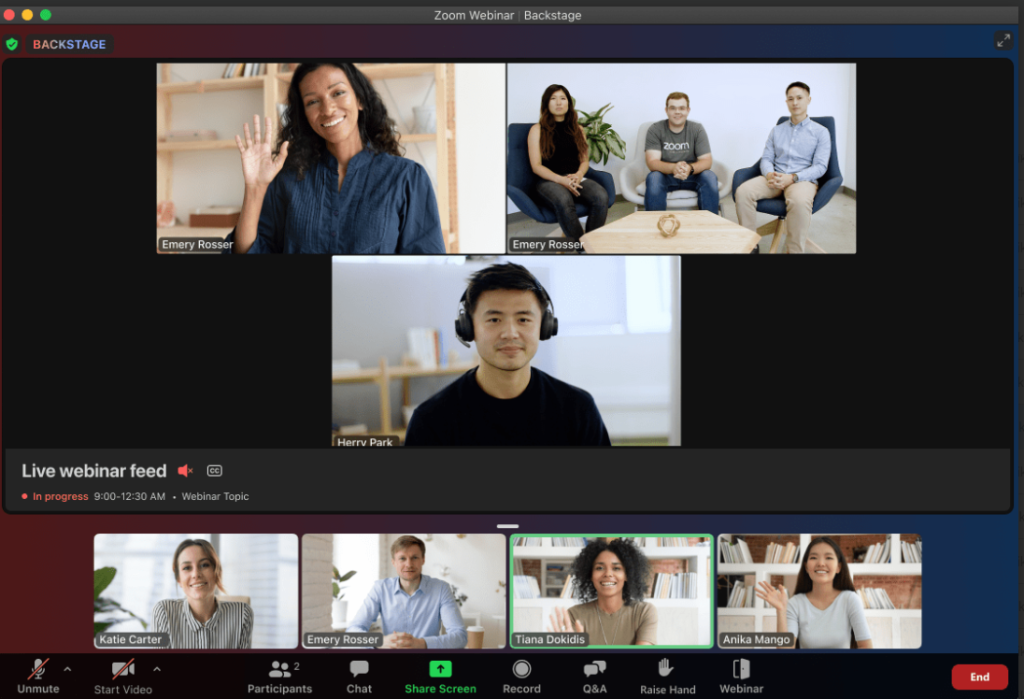
Ask almost anyone on a B2B team to name a webinar tool and Zoom is the first word out of their mouth.
That familiarity is a genuine competitive advantage. When you send an attendee a Zoom link, there is no explanation needed, no troubleshooting email, no “what app do I download?” message the morning of the event. They know what to do.
Zoom Webinars is an add-on to the standard Zoom Workplace Pro subscription, and it unlocks a mode where viewers are muted participants watching a broadcast. The interactive layer includes live Q&A with upvoting, polls, emoji reactions, raised hands, and chat.
The platform handles up to 100 panelists per event and supports streaming to YouTube and Facebook simultaneously.
Pros
- AI-generated catch-up summaries for late attendees: Zoom’s AI Companion creates a real-time summary of missed content, which attendees can access privately without interrupting the speaker. This dramatically reduces “sorry I was late, can you recap?” moments.
- Q&A with attendee upvoting: Attendees can upvote questions from other audience members, which lets the most popular questions surface to the top. Hosts can prioritize answers based on audience consensus rather than the order questions arrived.
- Support for up to 100 panelists and 10,000+ attendees: Zoom scales to genuinely large event sizes. For enterprise-level all-hands meetings, product launches, or multi-speaker conferences, the headroom is there without any special configuration.
- Live streaming to YouTube and Facebook simultaneously: Built-in simulcast expands reach beyond registered attendees. A single live session can reach thousands of additional viewers who discover the stream on social media.
- Broad device and OS compatibility with zero learning curve for attendees: Since virtually everyone already has Zoom installed, attendance rates are higher simply because the friction of joining is near-zero.
Cons
- Requires a separate Zoom Workplace Pro subscription as a base.
- Very limited built-in marketing and landing page tools.
Pricing: Starts at $66.67/month for up to 300 attendees.
3. Demio
Best for Data-Driven B2B Marketers
A colleague of mine who runs demand generation for a mid-size SaaS company switched to Demio after spending two years wrestling with GoToWebinar’s UI. Her words, not mine: “The first time I ran a Demio webinar, I spent the entire time actually talking to my audience instead of clicking around trying to find where the polls lived.” That is a more telling endorsement than any feature list.
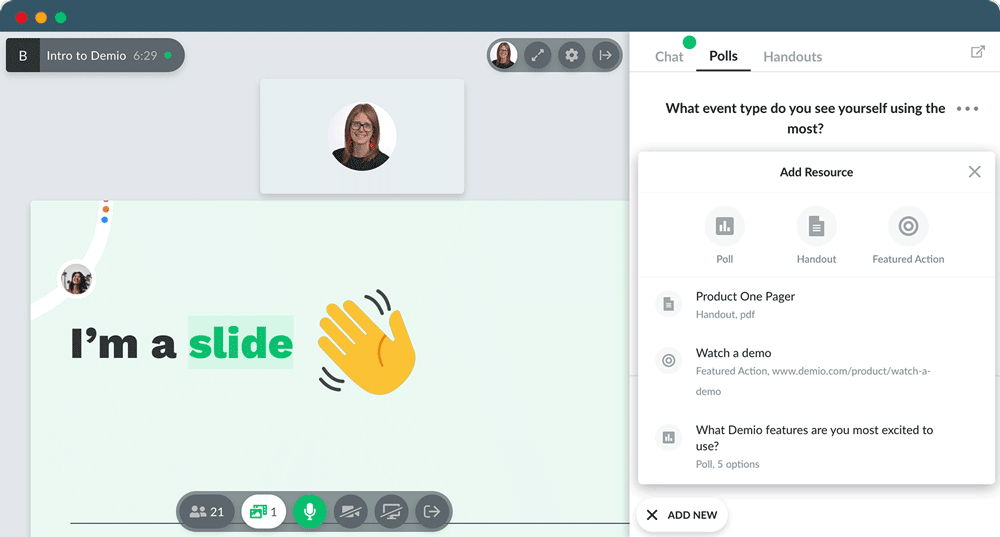
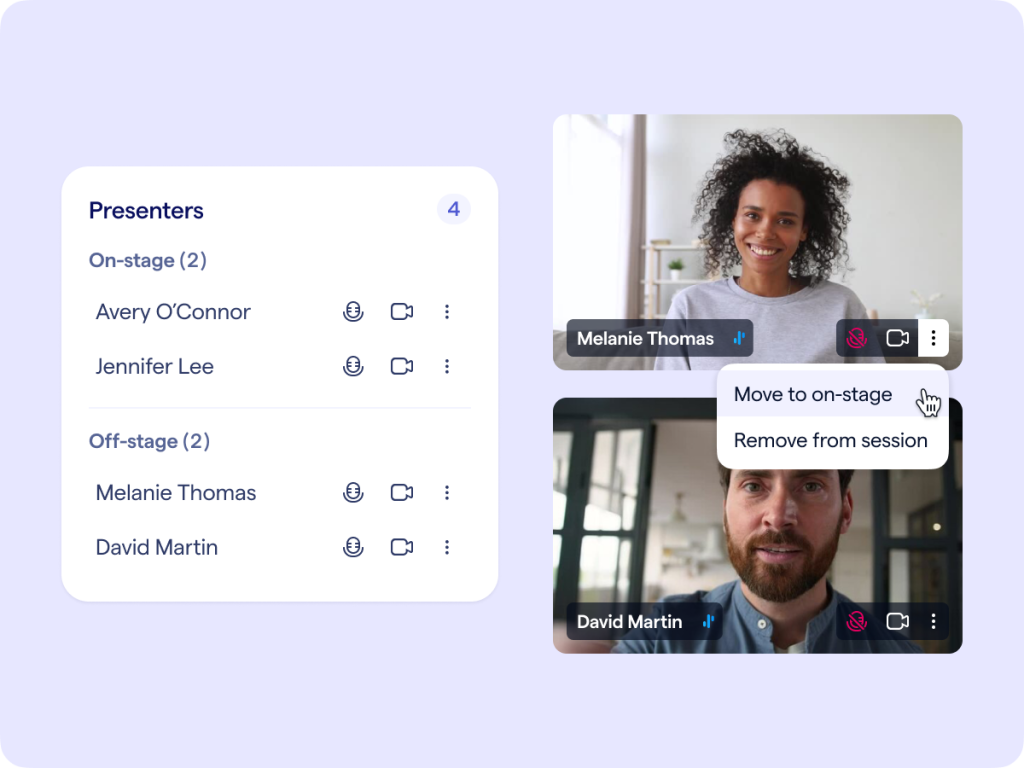
The platform runs entirely in the browser with no downloads required, and the interactive tools, including real-time polls, attendee handouts, a featured call-to-action button, and the ability to bring specific audience members on stage, are accessible from a single clean interface.
The engagement analytics report tells you not just who attended, but how engaged each individual was: how long they stayed, which polls they answered, whether they clicked a CTA, and when they dropped off.
Pros
- Featured CTA button for timed, synchronized audience action: Hosts can push a call-to-action link to every attendee’s screen at any point during the webinar. This is one of Demio’s most unique interactive features and is particularly effective during pricing reveals, bonus offers, or final pitches.
- Per-attendee engagement scoring for post-event sales prioritization: After each event, Demio generates a ranked list of attendees ordered by engagement score. Sales teams can immediately start with the most engaged prospects without manually reviewing attendance logs.
- No-download browser-based experience for attendees and hosts: Every attendee joins on mobile or desktop with a single click. This reduces no-show rates by eliminating the technical barrier of software installation.
- Deep native integrations with HubSpot, Salesforce, Marketo, and other CRMs: Webinar data including who attended, what they clicked, and how engaged they were flows directly into your CRM in real time, enabling automated lead scoring and follow-up sequences without manual exports.
- Automated and on-demand webinar formats with interactive elements preserved: Automated Demio webinars simulate the live experience by running polls and chat responses on a schedule, so evergreen content still feels interactive to new attendees.
Cons
- No free plan available and base pricing is higher than most competitors
- Branding customization requires a premium plan upgrade.
Pricing: Start at $63/month (billed annually).
4. Livestorm
Best for Attendee Scoring Capabilities
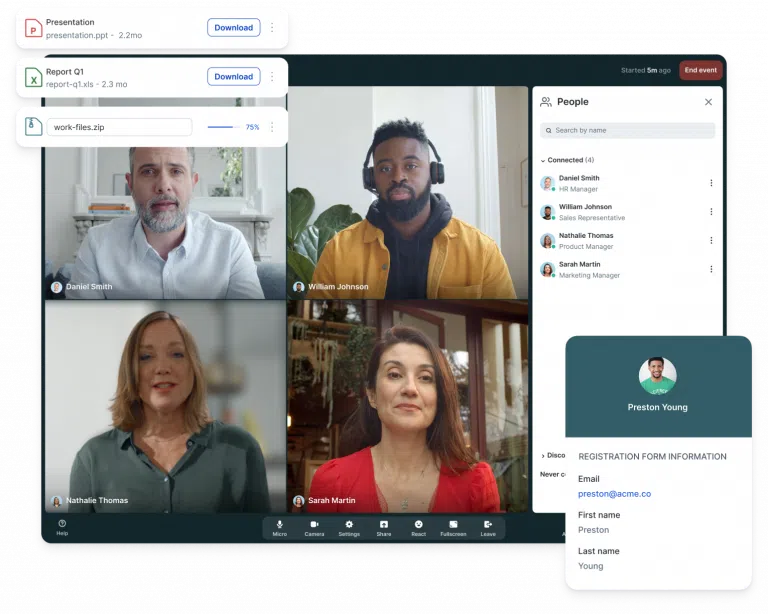
Livestorm has earned a strong reputation in European SaaS companies for one core reason: it is genuinely frictionless for the attendees.
The platform handles live webinars, virtual events, and on-demand sessions with a consistent engagement toolkit: live chat, polls, Q&A, emoji reactions, and a clean analytics dashboard.
What distinguishes Livestorm in the interactive webinar space is its per-attendee engagement scoring system, which goes well beyond simple attendance data. Each attendee receives a score based on chat participation, poll responses, questions asked, and session duration.
Livestorm also has a unique pricing model based on attendee credits rather than seat licenses.
Pros
- Entirely browser-based with no downloads for hosts or attendees: Livestorm runs in any modern browser on desktop or mobile with zero installation. This is a genuine differentiator that reduces support requests, lowers no-show rates, and is particularly valuable for regulated industries where attendees cannot install third-party software.
- Per-attendee engagement scoring for immediate post-event follow-up: Each attendee receives a calculated score based on how actively they participated during the session. This score is exportable and maps directly to your CRM, enabling sales teams to rank and prioritize outreach within minutes of an event ending.
- Unlimited team members do not consume attendee credits: Unlike Zoom, which charges based on licensed users, Livestorm only counts external audience members against your plan. Internal team members, moderators, and co-hosts join sessions freely.
- Automated and on-demand webinar formats with full engagement feature support: The same polls, Q&A, and chat tools available in live sessions work in Livestorm’s automated format, so recurring or evergreen sessions deliver a consistent interactive experience without requiring live host presence.
- Strong native integrations with HubSpot, Salesforce, Marketo, and Pardot: Registration and engagement data sync bi-directionally with major CRM and marketing automation platforms, enabling seamless lead nurturing without manual data handling.
Cons
- Attendee-based pricing becomes expensive as event attendance scales.
- The free plan is too restricted for meaningful real-world testing.
Pricing: Pro plan starts at $99/month for up to 100 attendees (billed monthly); free plan available.
5. BigMarker
Best for Large-Scale Virtual Conferences and Summits
A friend who runs events for a B2B software association needed to host a three-day virtual conference with 14 concurrent tracks, a virtual expo hall, and individual sponsor booths that attendees could walk in and out of.
“The other platforms wanted me to treat it like a very long webinar,” she told me. “BigMarker understood it was an event.”
BigMarker is a feature-rich platform for multi-session virtual and hybrid events. Think of it less as a webinar tool and more as a convention center you build in a browser. The virtual lobby greets attendees with an interactive floor plan.
Multi-track sessions let attendees choose their own agenda. Breakout rooms within sessions allow small-group discussions, which is one of the most requested interactive features for workshops and training events.
Pros
- Virtual lobby, expo halls, and multi-track session support: BigMarker’s virtual event infrastructure goes far beyond standard webinar hosting. The lobby experience, sponsor booths, and parallel session tracks create an event atmosphere that genuinely mirrors an in-person conference for online audiences.
- Breakout rooms within live sessions for small-group interaction: Hosts can divide large audiences into smaller breakout groups for discussion, collaborative exercises, or workshop activities. Breakout rooms are one of the most engagement-boosting features available, and BigMarker’s implementation is among the most polished on the market.
- White-label capability for fully branded event experiences: The entire platform, including registration pages, the event lobby, session rooms, and email communications, can be custom-branded. Agencies and enterprise clients can deliver fully white-labeled events under their own domain and brand identity.
- Supports 1,000 attendees on entry-level plans: BigMarker’s base capacity is significantly higher than most interactive webinar platforms’ starting tiers, making it a practical choice for organizations that regularly host events with large audiences without needing to upgrade immediately.
- Comprehensive post-event analytics including attendee journey data: BigMarker tracks where attendees went, which sessions they attended, how long they stayed in each, which sponsor booths they visited, and what resources they downloaded. This multi-touch engagement data is invaluable for event ROI analysis.
Cons
- Interface complexity can feel overwhelming for simple, one-off webinars.
- Pricing is custom and non-transparent.
Pricing: Custom pricing.
6. GoToWebinar
Best for Established Enterprise Training Teams
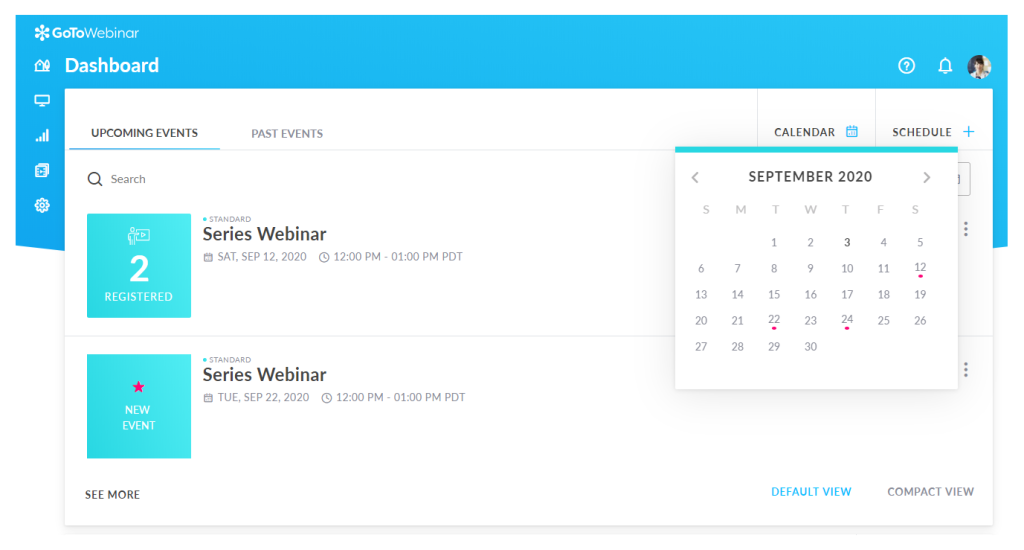
GoToWebinar has been around since before most interactive webinar platforms were a concept.
It has a good engagement dashboard, which shows real-time attendee attention indicators, poll response rates, and Q&A volume during a live session, and is one of the most actionable interactive analytics interfaces I have seen.
Hosts can actually see when audience attention is drifting and course-correct mid-session. The handout feature lets you push downloadable resources directly to attendees at any point, and the source tracking tool lets you see which registration links drove the most actual attendees, not just registrations.
For training and enablement teams that run recurring internal webinars, GoToWebinar’s unlimited cloud storage on Pro and Enterprise plans and its automated webinar capabilities make it a dependable workhorse.
Pros
- Real-time engagement dashboard showing live audience attention indicators: The engagement meter gives hosts immediate visual feedback on audience participation level. This is a rare and genuinely useful feature that helps presenters adjust pacing, add a poll, or call out a question when attention starts to drop.
- Polls, Q&A, raised hands, and handouts are available on all plans: Every GoToWebinar plan, including the most basic Lite tier, includes the full interactive feature set. You do not need to upgrade to access polls or Q&A, which is a customer-friendly approach not universal across competitors.
- Source tracking to identify highest-converting registration channels: GoToWebinar’s source tracking lets you create unique registration links for different promotional channels and then compare which channels drove the most actual attendees, enabling more efficient webinar marketing spend.
- Automated webinar capabilities for evergreen content delivery: Pro and Enterprise plan subscribers can run pre-recorded webinars that feel live, complete with timed polls and simulated Q&A responses. This is ideal for onboarding sequences, product training, and content that needs to run at scale without a live host.
- GoToMeeting included at no extra charge on Standard plans and above: For teams that need both webinar and internal meeting functionality, the bundled GoToMeeting license adds meaningful value to the subscription without requiring a separate purchase.
Cons
- Dated user interface that lags behind modern competitors.
- Registration confirmation emails frequently trigger spam filters.
Pricing: Plans start at $49/month per organizer (billed annually) for the Lite plan.
7. ON24
Best for Enterprise B2B Demand Generation at Scale
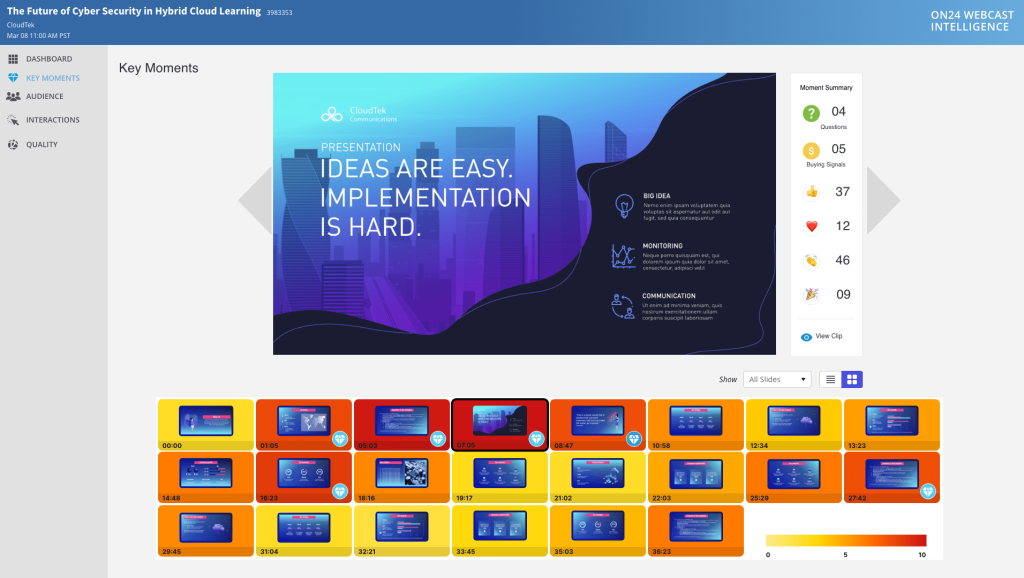
ON24 is not a webinar tool. It is a digital engagement platform, and that distinction matters. Where most webinar software gives you a room with chat and polls, ON24 gives you a widget-based console that you build from scratch for each event.
You can place a live video window, a social feed, a resource download center, a survey widget, a CTA button, and a competitive comparison document all inside the same attendee-facing experience, all without the attendee opening a new tab.
That level of customization comes with a matching enterprise price point. The platform’s lead scoring engine ingests every content interaction, tracks dwell time on specific widgets, and produces account-level engagement scores that can flow directly into Salesforce, Marketo, or Eloqua.
The on-demand experience is equally strong: ON24 can turn any live webinar into a persistent content hub that continues generating leads weeks after the live event.
Pros
- Fully customizable widget-based console for attendees: ON24’s event interface is built from modular widgets, meaning every event can have a completely unique attendee experience. Video players, Q&A panels, resource libraries, polls, and CTAs can be arranged in any configuration to match the event’s content strategy.
- Deep lead scoring that tracks interaction with every content element: ON24’s engagement score goes beyond attendance duration. It tracks whether an attendee opened a resource, how long they watched a specific video segment, which survey questions they answered, and whether they clicked a CTA. This granular data feeds directly into CRM lead scoring models.
- On-demand content persistence for continuous post-event lead generation: After a live event, ON24 automatically converts the session into an always-available on-demand experience. The same engagement tracking applies to on-demand viewers, so webinars continue generating qualified leads long after the live date.
- Native integrations with Salesforce, Marketo, Eloqua, and Microsoft Dynamics: ON24’s integration depth with enterprise marketing and CRM stacks is class-leading. Data flows bi-directionally, enabling real-time lead alerts, automated nurture enrollment, and pipeline attribution at the account level.
- Global language support and live captioning for international events: ON24 supports multi-language events with live captioning, translated registration pages, and localized email communications, making it one of the strongest options for enterprise organizations with global webinar programs.
Cons
- Very high minimum contract cost, typically starting around $10,000 per year.
- Steeper learning curve and more complex setup than most of the other interactive webinar platforms.
Pricing: Custom enterprise pricing.
8. Cisco Webex Webinars
Best for Secure Large-Scale Enterprise Events
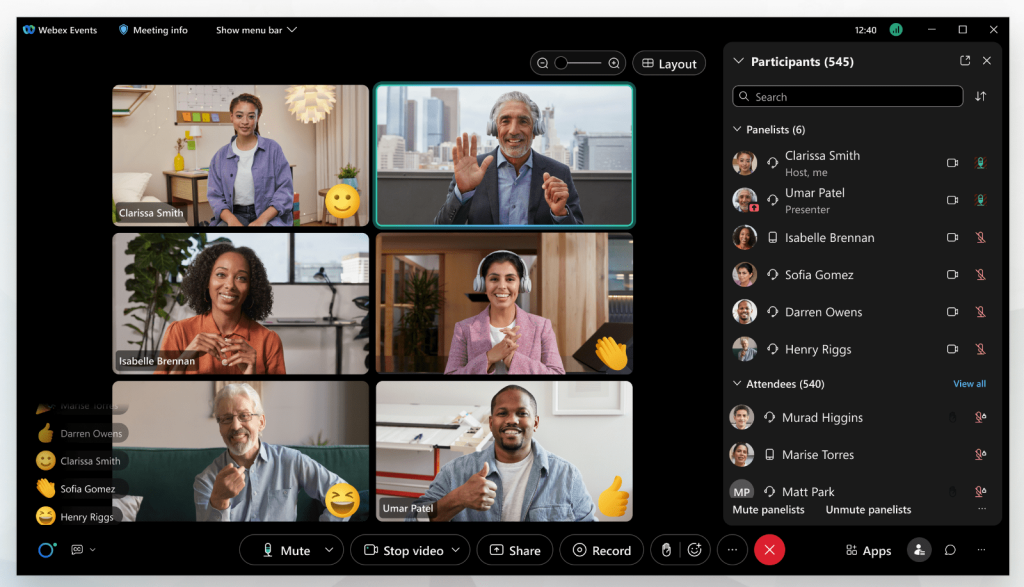
Cisco Webex Webinars sits in an interesting position: it is the platform enterprises choose when scale, security, and live translation matter more than marketing funnel features.
A colleague who manages internal communications for a financial services firm moved to Webex specifically for the live translation feature. “We had team members in Tokyo, Frankfurt, and São Paulo on the same call,” she told me. “Running a live-translated webinar so that every person could follow along in their own language was something none of the marketing-focused platforms could match. It changed the meeting entirely.”
So, if you are running a 10,000-person all-hands meeting with attendees in 15 countries, Webex’s combination of HD video, simultaneous live translation, and enterprise-grade security architecture makes it a genuinely differentiated choice.
The interactive feature set includes breakout rooms, raised hands, Q&A, polling, and real-time attention tracking. What sets Webex apart is the Webex Assistant, its AI-powered tool that generates real-time transcriptions and post-event summaries automatically.
Pros
- Live simultaneous translation for multi-language global events: Webex’s real-time translation capability supports multiple target languages simultaneously, enabling a single live event to serve a genuinely global audience without scheduling separate regional sessions.
- Enterprise-grade security including HIPAA compliance and end-to-end encryption: For industries with strict data handling requirements, Webex’s compliance certifications (SOC 2, ISO 27001, HIPAA, FedRAMP) and end-to-end encryption options provide a level of security that consumer-focused interactive webinar platforms do not offer.
- Breakout rooms within webinar sessions for collaborative group work: Webex supports in-session breakout rooms where attendees can be divided into smaller groups for discussion or collaborative exercises, then returned to the main session. This makes Webex practical for training workshops that require both broadcast and small-group formats.
- AI-powered real-time transcription and automated post-event summaries: The Webex Assistant automatically transcribes live sessions and generates searchable post-event summaries. This reduces the manual work of creating follow-up documentation and makes recorded sessions accessible to attendees who are hearing-impaired.
- Scales comfortably to 10,000+ attendees with stable video performance: Webex’s infrastructure, built on Cisco’s enterprise network backbone, handles very large concurrent audiences without the quality degradation that affects some consumer-grade webinar platforms at high attendance.
Cons
- Not designed for marketing-focused use cases.
- Setup and administration complexity is higher than consumer-grade alternatives.
Pricing: Custom enterprise pricing.
9. EasyWebinar
Best for Content Creators and WordPress Users
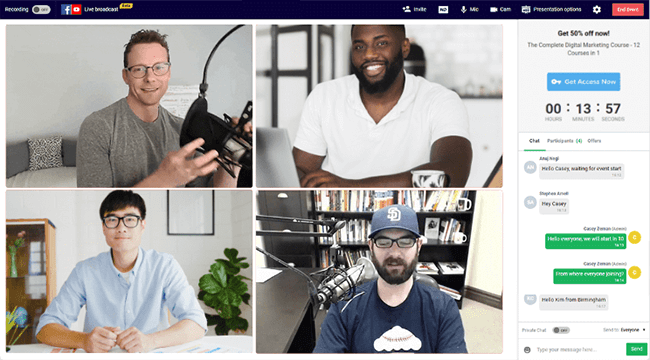
A YouTube creator I know had been running live Q&A sessions through YouTube Live and kept running into the same limitation: once the stream ended, her ability to follow up with viewers was essentially zero.
No email list, no replay access control, no lead capture. She switched to EasyWebinar and, within two months, had a list of 4,300 registered webinar attendees with opt-in emails, all captured through the platform’s registration forms. “I went from broadcasting into the void,” she told me, “to actually building a business around my audience.”
EasyWebinar is built for creators, coaches, course instructors, and bloggers who want to use webinars for education and sales without navigating enterprise-level complexity. Its most distinctive feature is EasyCast, which allows hosts to simultaneously stream a live webinar to Facebook Live, YouTube Live, or both, expanding the audience well beyond registered attendees.
The WordPress plugin integration is a genuine differentiator for bloggers and course creators who run their business on WordPress.
Pros
- EasyCast feature for simultaneous streaming to Facebook Live and YouTube Live: While running a registered webinar, EasyWebinar can simultaneously broadcast to social media platforms. This lets creators reach their existing social audiences while also capturing formal registrant data from people who find the event in the webinar room.
- Native WordPress plugin for seamless integration with WordPress sites: EasyWebinar’s WordPress plugin lets you embed registration forms, replay players, and attendee dashboards directly into your WordPress site. This is unique among interactive webinar platforms and eliminates the need for external landing page tools for WordPress-native businesses.
- Live and automated webinar formats with replay and on-demand access: All EasyWebinar plans include both live and pre-recorded automated webinar formats, enabling creators to build evergreen content funnels where their best webinars continue enrolling and converting new attendees indefinitely.
- Real-time interactive chat, polls, and Q&A built into every plan: EasyWebinar’s interactive toolkit is consistent across plans. Live chat includes emoji reactions and private messaging, and polls can be launched and closed in real time without interrupting the presentation flow.
- Unlimited webinars on all paid plans with no session caps: EasyWebinar does not restrict the number of webinars you can run per month. For creators who host frequent live sessions or run multiple automated funnels simultaneously, this unlimited access is a meaningful practical advantage.
Cons
- The user interface is less polished than newer competitors.
- Analytics are less detailed than marketing-focused platforms.
Pricing: Plans start at approximately $66/month (billed annually) for the Standard plan.
10. WebinarJam
Best for High-Converting Sales Presentations
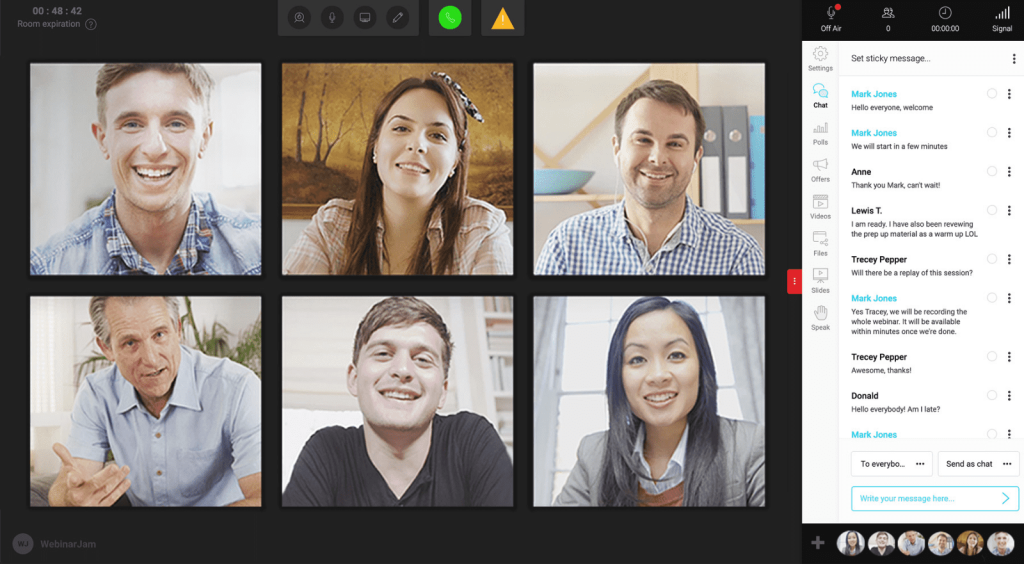
My friend Marcus runs live sales webinars for a digital education company and generates a meaningful portion of his annual revenue through a single 90-minute Thursday evening session that he repeats each week.
When he switched from Zoom to WebinarJam, his first comment was about the Replica Replay. “It’s creepy in the best way,” he said. “People who watch the replay experience the exact same interactive elements we ran live, including the poll at minute 22 and the offer that popped up at minute 54. The replay converted almost as well as the live.”
The interactive toolkit includes live chat, Q&A, polls, clickable in-webinar CTAs, the ability to bring attendees on stage, and the standout Replica Replay feature, which records not just the video but every interactive element in sync so they fire at the same moments during replay playback.
The JamSession feature turns a one-directional broadcast into an open microphone session where attendees can join video.
Pros
- Replica Replay technology that mirrors all live interactive elements in the recording: Unlike standard replay recordings that play passive video, WebinarJam’s Replica Replay fires polls, CTAs, and timed offers at the same timestamps as the live session. Replay viewers experience a near-live conversion funnel rather than a passive video watch.
- Panic Button for instant server failover during live sessions: If the live session encounters technical difficulties, the Panic Button instantly creates a mirror of the session on a fresh server and redirects all attendees automatically. This near-eliminates the risk of a technical failure causing attendees to abandon a high-value live event.
- JamSession feature enabling two-way audio and video with attendees: WebinarJam can convert from a broadcast to a live conversation by inviting individual attendees on stage with video and audio. This is particularly effective for live Q&A segments where written chat answers are insufficient.
- In-webinar clickable product offers with countdown timers: Hosts can push timed product offers with visible countdown timers and direct purchase links into the webinar room at any point in the presentation. This feature is purpose-built for high-conversion sales sequences and is one of WebinarJam’s most effective revenue-driving tools.
- Supports up to 5,000 attendees with multi-presenter capability: WebinarJam handles large live audiences with multiple simultaneous presenters, making it suitable for panel-style sales events, joint ventures, and partner co-hosted sessions at meaningful scale.
Cons
- No free plan and requires an annual subscription upfront.
- Marketing automation features require EverWebinar as a separate purchase.
Pricing: Plans start at approximately $79/month (billed annually).
How I Chose These Interactive Webinar Platforms/My Evaluation Criteria
The evaluation of products for this article follows an unbiased, systematic approach that ensures a fair, insightful, and well-rounded review. Six key factors guided the selection and ranking process.
User Reviews and Ratings
I used direct experiences from users, including ratings and verified feedback from platforms like G2, Capterra, and TrustRadius, to provide a ground-level perspective on each platform’s real-world performance.
Essential Features and Functionality
The core evaluation question for each platform was: what does it actually enable you to do during a live session to keep an audience engaged? Platforms were assessed on the breadth and quality of their audience participation features, including live polls, Q&A, chat, breakout rooms, CTAs, and engagement analytics.
Ease of Use
An interactive webinar platform’s performance means nothing if the host cannot find the poll button mid-session. The user-friendliness of each platform was assessed from two perspectives: the host’s setup and management experience, and the attendee’s join-and-participate experience.
Customer Support
The quality of each platform’s customer support was examined across multiple dimensions, including response time, available support channels (live chat, email, knowledge base, onboarding webinars), and how well the support team helped users during live events.
Value for Money
Each platform’s pricing structure was evaluated in terms of what features were accessible at each tier, whether interactive tools were available on entry-level plans, and how costs scaled with audience size.
Personal Experience and Experts’ Opinions
This evaluation draws on direct personal experience using several interactive webinar platforms on this list, as well as conversations with colleagues and practitioners who have used each tool in production environments.
My Top 3 Most Interactive Webinar Platforms
After spending significant time evaluating all ten platforms against real audience engagement outcomes, these three consistently rose to the top for delivering genuinely interactive experiences that move attendees from passive viewers to active participants.
1. WebinarNinja
WebinarNinja earns the top position for its rare combination of feature completeness, ease of use, and genuine interactivity available at every plan level. Whether you are a solo coach running your first live webinar or a marketing team hosting hybrid events at scale, the platform’s polls, Q&A, timed offers, and automated email follow-ups work together in one dashboard without requiring third-party tools or technical expertise.
2. Demio
Demio is a strong choice for marketers who need their interactive webinar platform to generate measurable revenue outcomes. The featured CTA button, per-attendee engagement scoring, and direct CRM integrations transform webinar attendance data into actionable sales intelligence faster than any other platform on this list.
3. Livestorm
Livestorm’s browser-based architecture eliminates the single most common cause of webinar drop-off: the friction of joining. Combined with its engagement scoring system and clean analytics, it is the most dependable interactive webinar platform for global B2B teams that prioritize attendee experience and post-event data quality.
Ready to Pick the Most Interactive Webinar Platforms?
Choosing the right interactive webinar platform comes down to one question: what do you need your audience to do during the session? If the answer is watch and maybe ask a question, almost any tool will do.
But if you need them to answer a poll at the right moment, click a timed offer, stay engaged for 90 minutes, and walk away ready to make a decision, you need a platform that was built for interaction, not just broadcasting.
That said, if you are looking for a single platform that handles everything from engagement to marketing automation to analytics without requiring a stack of third-party integrations, WebinarNinja stands out from the field. Having used it directly, what stayed with me was how effortlessly the interactive tools, live polls, real-time Q&A, timed sales offers, and automated follow-up emails worked together as a single system.
The no-download experience means attendees actually show up, and the hybrid and series webinar formats mean a single piece of content can work in multiple formats over time.
Frequently Asked Questions

Which webinar platforms offer live polls and Q&A?
Most webinar platforms include live polls and Q&A. WebinarNinja, Demio, and Livestorm are particularly well-regarded for making these features intuitive to use mid-session. GoToWebinar includes them on all plans, including the entry-level Lite tier.
How do interactive webinars improve engagement?
Interactive webinars improve engagement by giving attendees something to do rather than passively watching. Polls, in particular, have been shown to re-engage attention that has started to drift.
Can I host interactive webinars on Zoom?
Yes. Zoom Webinars supports live Q&A with upvoting, polls, chat, and emoji reactions. However, Zoom lacks the built-in marketing tools, custom landing pages, and email automation that dedicated webinar platforms like WebinarNinja provide.
What is the best software for interactive webinars?
WebinarNinja is the best overall interactive webinar software for most businesses, offering the most complete combination of engagement tools, marketing automation, and scalable pricing in one platform.
Do interactive webinars help with lead generation?
Interactive webinars are one of the highest-converting lead generation formats in B2B marketing. Engagement data collected during the session, including which polls they answered and whether they clicked a CTA, helps sales teams prioritize follow-up with the highest-intent leads.
Are interactive webinar platforms easy to use for beginners?
WebinarNinja, Demio, and Livestorm are consistently rated as the most beginner-friendly interactive webinar platforms. All three offer browser-based setups, step-by-step onboarding, and intuitive dashboards that do not require technical expertise.
How many interactive elements should I include in a webinar?
There is no fixed number, but most high-performing webinars include an interaction every 5 to 10 minutes. This can be a poll, a question in chat, a quick reaction prompt, or a CTA. The goal is to maintain attention without overwhelming the audience. Too many interruptions can feel forced, while too few lead to drop-offs. A balanced rhythm keeps the session engaging and natural.
Can interactive features increase webinar conversion rates?
Yes, interactive features directly influence conversion rates. When attendees actively participate through polls, Q&A, or clicking in-session offers, they become more invested in the content. This involvement builds trust and keeps them attentive until your key message or offer is presented. Platforms that support timed CTAs and engagement tracking make it easier to convert attention into action.
What is the biggest mistake to avoid in interactive webinars?
The most common mistake is treating interactivity as an afterthought. Simply adding a poll or chat box is not enough. Interaction needs to be planned as part of the presentation flow, with clear intent behind each element. For example, a poll should lead into a discussion, and a question should connect to your next point. Without this structure, interactive tools feel random and fail to improve engagement.
Want to host a webinar for free?
Use WebinarNinja to teach, improve marketing, and grow your sales.