
Your webinar ended. Forty people attended. And that is all your platform told you.
I have been in that exact spot, refreshing a dashboard that just says “40 attended,” while my sales team is waiting to know who actually paid attention, who watched the replay at 11 pm, and who clicked the CTA before dropping off. A study by Kaltura in 2025 shows 48% of marketers say analytics dashboards are the feature most lacking in their current webinar technology. Finding the best webinar software with advanced analytics that actually connects audience behavior to your CRM takes more digging than it should.
This guide is based on real hands-on use and feedback from B2B marketing teams and trainers.
Whether you are a demand gen manager trying to prove ROI, a sales enablement lead building smarter follow-up sequences, or a corporate trainer who needs to know if your content is actually landing, there is a right tool for you in this list.
But before we begin, do check out this quick video that compares and reviews the best webinar software on the market:
What Are Advanced Analytics in Webinar Software?
Advanced analytics in webinar software go beyond tracking who attended. They tell you who engaged, who watched the replay, where people dropped off, and which campaign source drove your most qualified registrants, all feeding directly into your CRM for smarter follow-up.
Most webinar platforms give you a headcount. That is not analytics.
The platforms in this list fix that. Here is what advanced webinar analytics should actually cover:
- Engagement Tracking: Who attended, for how long, and where they dropped off
- Registration-To-Attendance Rate: How many sign-ups actually showed up
- Replay Watch Time: Who watched the recording, how many times, and for how long
- Source/Referral Tracking: Which marketing channel brought in each registrant
- Poll And Chat Reports: Exportable data from in-session interactions
- CRM Data Sync: Attendee behavior piped directly into HubSpot, Salesforce, or GoHighLevel
If a platform only offers headcount and a registration list, it does not qualify. Every tool in this list meets at least four of the six criteria above. If you want to go deeper on measuring and improving your results, the guide on webinar analytics covers the metrics that matter most across live and automated sessions.
If you prefer a quick visual walkthrough before diving into the tool reviews, this video breaks down exactly how to track webinar statistics and replays in practice.
If you want to go deeper on how to actually measure and improve your results, the guide on webinar analytics covers the metrics that matter most across live and automated sessions.
10 Best Webinar Software With Advanced Analytics Features
Before we get into the full reviews, here is a side-by-side snapshot of all 10 tools so you can quickly spot the right fit based on your use case and budget.
| Tool | Best For | Pricing |
|---|---|---|
| WebinarNinja | Generating leads, growing sales, and teaching better. | Starts at $0.30/attendee/month (includes CourseNinja worth $1200). |
| Demio | Browser-based marketing webinars | Starts at $49/month |
| Livestorm | Browser-first automation | Starts at $79/month |
| GoToWebinar | Reliable structured events | Starts at $49/month |
| ON24 | Enterprise marketing | Custom ($10K+/year) |
| BigMarker | White-label hybrid events | $99/month |
| WebinarGeek | GDPR-compliant analytics with strong conversion tracking | Starts at $19/month |
| Zoom Webinars | Scale and familiarity | Starts at $79/month |
| ClickMeeting | Meetings and Conferences | Starts at $26/month |
| EasyWebinar | Automated/evergreen webinars with always-on analytics | Starts at $78/month |
1. WebinarNinja – Best Webinar Software to Generate Leads, Grow Sales, and Teach Better
WebinarNinja is an all-in-one webinar platform that combines live, automated, series, and hybrid webinars with a clean analytics dashboard, making it one of the most complete options for generating leads, marketing, and training that needs real data, not just headcounts.
Right now, I use WebinarNinja for all our live and automated webinar programs, and what stands out is how the entire journey, from the first registration click to the post-event follow-up, runs as one connected system, making it much easier to host a webinar that you can measure and optimize with real data. The branded landing pages and custom registration forms capture richer prospect data from the start.
Inside the webinar, the engagement tools actually move the needle. Live chat, Q&A, polls, handouts, and timed offers keep attendees active throughout the session, and those same interactions feed directly into the analytics dashboard once the event ends.
The automated webinar capability makes it a real lead-generation engine rather than just a live-event tool. The funnel keeps running around the clock without losing consistency, and the analytics continue to track registrations, attendance, clicks, and engagement across every automated session.
Pros:
- Detailed attendee engagement reports, including watch time, drop-off points, and replay data
- Native integrations with HubSpot, GoHighLevel, Mailchimp, and Zapier for seamless CRM sync
- Source and referral tracking shows which campaign or partner link drove each registration
- Supports live, automated, series, and hybrid webinars from one dashboard
Cons:
- No on-premise or downloadable version available.
- Dark mode support is not available on the web.
Pricing:
A FREE 14-day trial is available. Paid starts at $0.30/attendee/month (includes CourseNinja worth $1200).
Real-world result: Gavin Tye, founder of Sales Market Fit, switched to WebinarNinja and converted a single webinar lead worth $20,000–$25,000, all while cutting down setup time significantly.
If you are building a follow-up system for the first time, this webinar follow-up email guide covers the exact sequences worth setting up once your analytics data starts flowing in.
2. Demio – Best for Browser-Based Marketing Webinars
Demio is a browser-based webinar platform built specifically for marketing teams, with individual-level engagement tracking, in-event CTAs, and direct integrations with HubSpot, Salesforce, and Marketo. When I first ran a demand generation webinar on Demio, the level of individual attendee data surprised me. After the session, I had a full breakdown of exactly who engaged with each poll, who clicked the featured CTA, and who dropped off before the product demo, all mapped to individual contacts, not just aggregate stats.
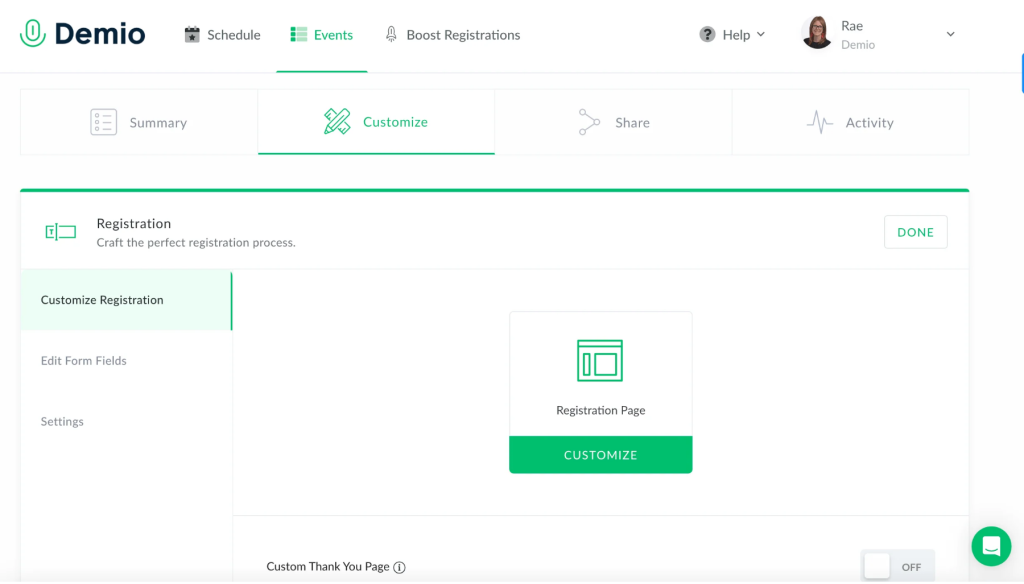
The integration with HubSpot was where it really paid off. Each attendee’s engagement data synced directly into contact records, which meant our sales team could prioritize follow-ups based on actual webinar behavior rather than blind outreach. Contacts who stayed through the entire presentation and clicked the CTA were tagged automatically. Understanding which engagement signals to act on is covered well in this breakdown of webinar lead generation strategies.
The interface is genuinely clean and modern, and because it runs entirely in the browser, attendee friction was minimal, no downloads, no plugins. The main thing I ran into was that the full CRM integrations are only available on the Growth plan and above, so the entry-level plan felt slightly limited for a B2B setup.
Pros:
- Individual attendee engagement tracking, including poll responses, CTA clicks, and watch duration
- Native integrations with HubSpot, Salesforce, and Marketo for automated lead routing
- Fully browser-based, no downloads required for hosts or attendees
- Automated email sequences for pre- and post-webinar follow-up
Cons:
- Automated webinars are only available on paid tiers, not the starter plan
- Video quality can feel slightly dated compared to newer platforms
Pricing:
Starts at $42/month (billed annually).
3. Livestorm – Best for Browser-First Automation
Livestorm is a video engagement platform that runs entirely in the browser and delivers effective per-attendee analytics, making it a strong pick for B2B SaaS teams running product demos and lead generation webinars. Running a product demo series on Livestorm was a smooth experience from the start. There was no friction for attendees, no downloads, no app installs which noticeably improved our show-up rate.
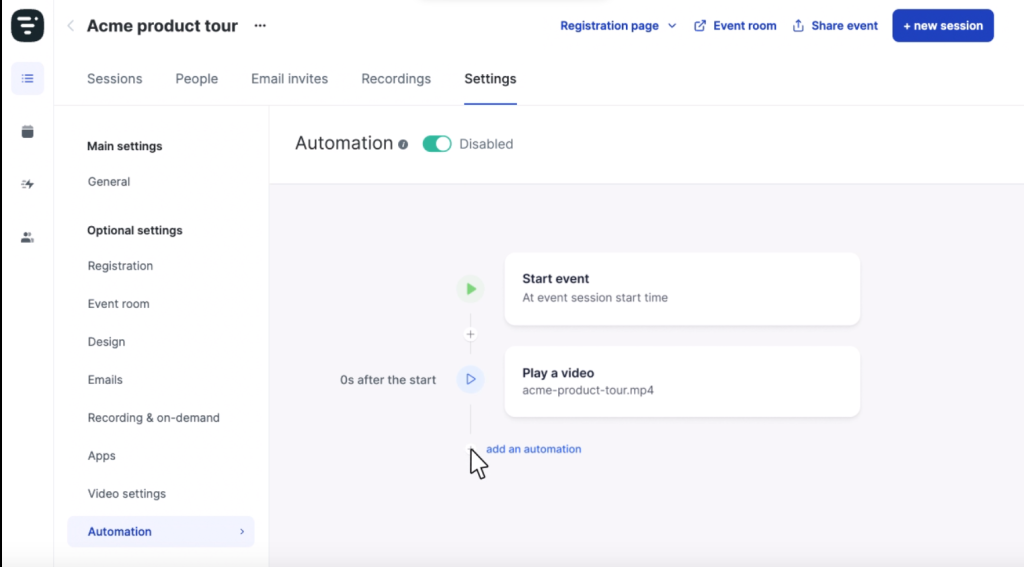
The CRM sync to HubSpot worked without any configuration issues, and the contact records were updated with webinar engagement data automatically. For teams running regular B2B demo programs, this level of automation is genuinely useful, you can set up the entire follow-up workflow once and let it run.
The one thing that tripped me up was the pricing model. Livestorm charges based on “active contacts” rather than a flat monthly fee, which means costs can scale quickly if you are running high-volume webinar programs. For smaller, recurring demo programs it made sense, but for large campaigns it required careful planning.
Pros:
- Zero-download browser-based experience reduces attendee drop-off significantly
- Per-attendee engagement analytics with native HubSpot and Salesforce sync
- Unlimited team members on all paid plans — no per-seat charges
- Built-in email automation for reminders, follow-ups, and replay notifications
Cons:
- Pricing based on monthly “active contacts” can become expensive at scale
- Free plan is limited to 20-minute sessions and 30 attendees
Pricing:
Starts at $79/month (billed annually) for 100 active contacts.
4. GoToWebinar – Best for Reliable Structured Events
When I ran a quarterly training series on GoToWebinar, the reporting features were genuinely comprehensive. The engagement dashboard showed real-time attention scores for each attendee during the live session, and the post-event analytics report covered registration vs. attendance rates, poll results, Q&A logs, and handout download tracking. Everything was exportable in a clean CSV format.
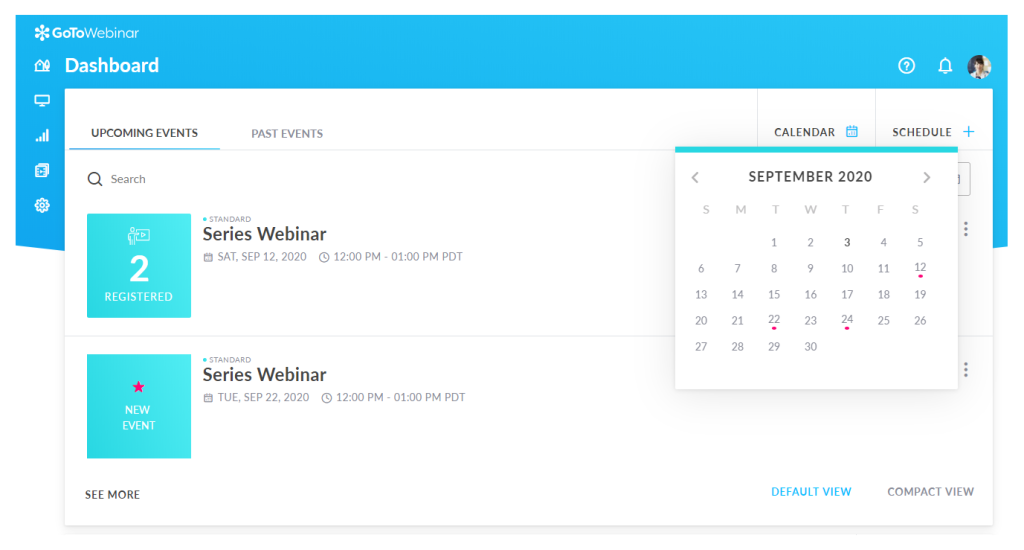
The native integration with Salesforce and Zoho made it easy to push webinar data into our CRM without going through Zapier. For a team that already had Salesforce as its primary tool, that direct connection saved a lot of setup time. The platform also handled large attendee numbers reliably, I never experienced a quality drop even at 500+ participants.
The main drawback I ran into was the interface, which felt noticeably dated compared to newer platforms. The setup flow required more steps than I expected, and customization options for registration pages were limited. But for teams that prioritize stability and reporting depth over design flexibility, GoToWebinar remains a solid choice.
Pros:
- Real-time engagement dashboard with per-attendee attention tracking during live sessions
- Comprehensive post-event reports including registration rates, poll results, and Q&A logs
- Native Salesforce and Zoho CRM integrations without requiring Zapier
- Reliable infrastructure for large audiences, tested at 500+ attendees without quality issues
Cons:
- Interface design feels dated compared to modern platforms like Demio or Livestorm
- Registration page customization is limited without developer support
Pricing:
Starts at $49/month (billed annually) for 250 attendees.
5. ON24 – Best for Enterprise Marketing
ON24 is an enterprise-grade digital engagement platform that goes beyond standard webinar analytics, it scores every attendee on an engagement index and pushes that data directly to Marketo, Salesforce, and HubSpot so sales teams know exactly who to prioritize. The analytics went well beyond attendance data, every attendee received an engagement score based on their in-session behavior, including time spent, content interactions, poll responses, and resource downloads.
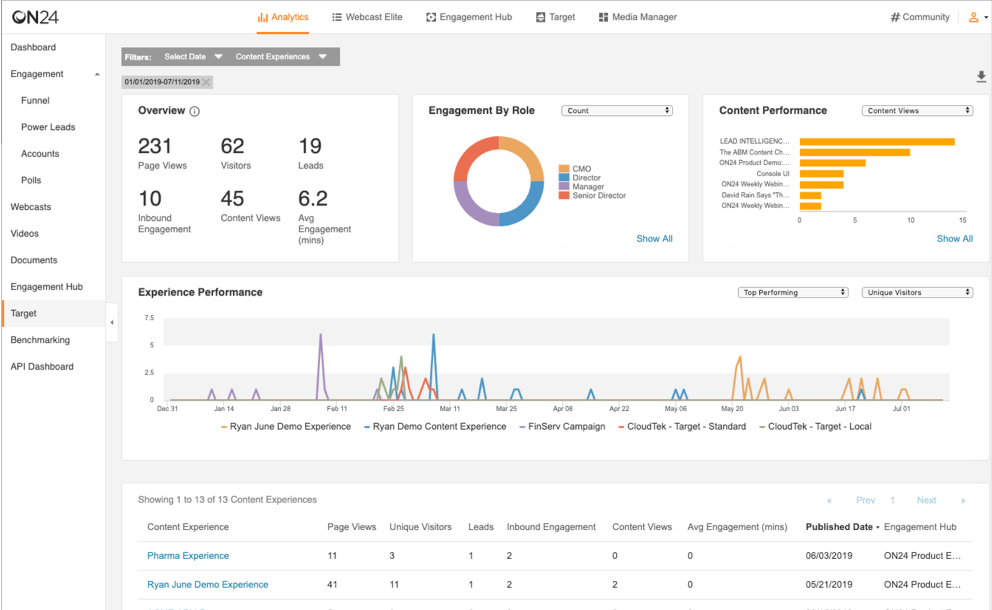
The widget-based attendee console allowed us to build a fully customized event experience adding resource hubs, Q&A panels, and CTA modules in any layout we chose. The AI-powered content repurposing tool also generated blog summaries and video clips from recorded sessions, which added real value for content teams working downstream.
The honest reality of ON24 is the cost and complexity. The setup process was significant, the learning curve was steep for new hosts, and the pricing often starting around $10,000 per year for enterprise contracts puts it out of reach for smaller teams. It is purpose-built for large B2B organizations with dedicated event marketing staff.
Pros:
- Engagement index scoring per attendee fed directly into Salesforce, Marketo, and HubSpot
- Fully widget-based customizable attendee console with content hub capabilities
- AI-powered tools to repurpose webinar recordings into blogs, clips, and ebooks
- Supports live, simulive, and on-demand formats from a single platform
Cons:
- Pricing typically starts around $10,000 per year, not suitable for small or mid-market teams
- Interface can feel clunky compared to modern lightweight platforms
Pricing:
Custom pricing. Enterprise contracts typically start around $10,000/year.
6. BigMarker – Best for White-Label Hybrid Events
The first time I set up a multi-day virtual summit on BigMarker, I was genuinely impressed by how much of the marketing workflow lived inside the platform. Email funnels, landing pages, attendee segmentation, and follow-up automation were all built in which meant I did not need to stitch together separate tools for each part of the campaign.
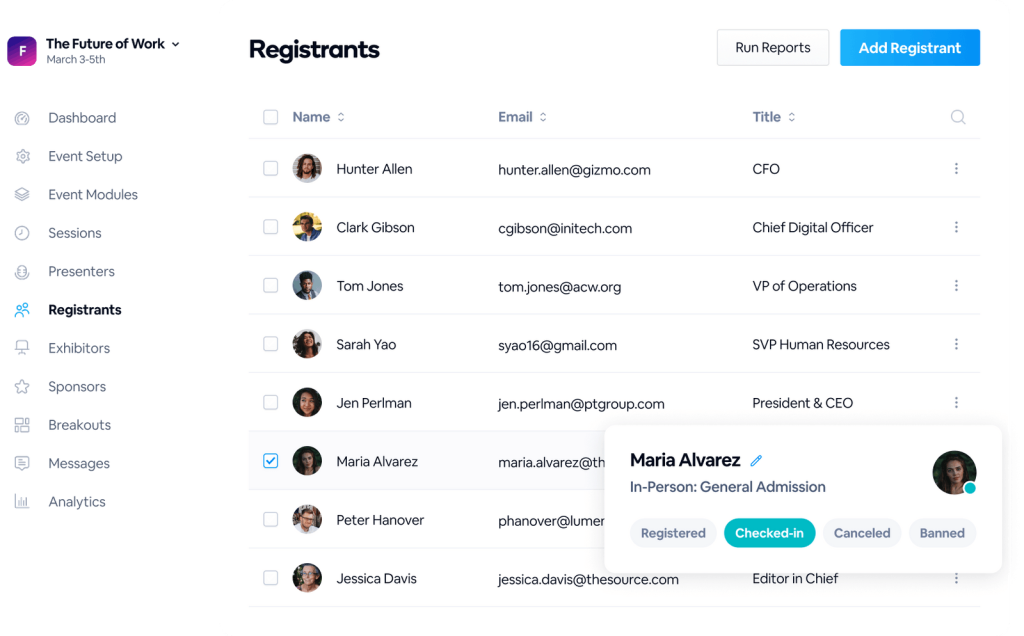
The analytics coverage was excellent for event scale. I could track session-by-session engagement across a multi-track event, see which sessions had the highest attendance, and export per-attendee reports that showed exactly which content each person engaged with. For sponsor reporting, this data was particularly valuable.
BigMarker operates on custom pricing, which made budgeting a bit opaque initially. The platform is clearly built for organizations running large, recurring event programs rather than single webinars. For smaller teams or one-off events, the feature set may feel like overkill relative to the investment.
Pros:
- Supports live, automated, simulive, and hybrid webinar formats from one platform
- Multi-session conference management with per-session attendance and engagement analytics
- Built-in email funnels, landing pages, and attendee segmentation without third-party tools
- Scales to 500,000 live attendees
Cons:
- Custom pricing model can make budgeting difficult for smaller organizations
- Some advanced marketing automation features require higher-tier plans
Pricing:
Custom pricing.
7. WebinarGeek – Best for GDPR-Compliant Analytics
After running a webinar series on WebinarGeek for a client in the EU, the GDPR compliance alone made the decision straightforward. The platform is fully European-hosted and privacy-compliant, which removed a significant legal overhead for the project. But what surprised me was how capable the analytics were beyond just the compliance angle.
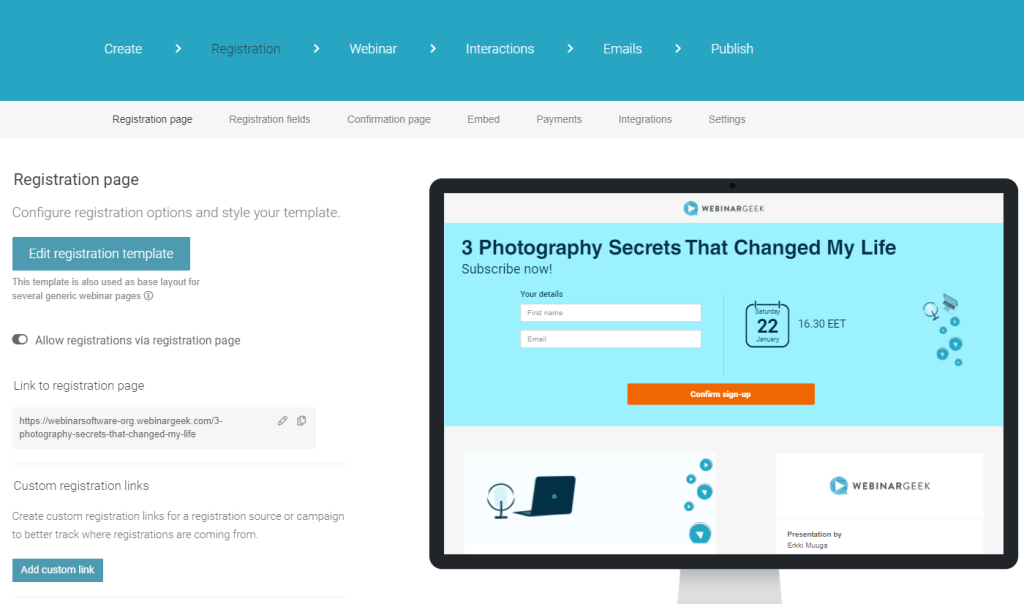
The conversion tracking dashboard showed exactly where in the registration funnel attendees dropped off, which emails drove the highest click-through, and how different landing page variants performed side by side. For a team focused on optimizing registration rates, this level of funnel visibility was genuinely useful.
The platform also handled the mix of live and pre-recorded webinars well, and the ability to customize registration fields gave me clean lead data without needing to use a separate form tool. The pricing was one of the most accessible on this list, making it a solid option for smaller teams or those just scaling up their webinar program.
Pros:
- Full GDPR compliance with European hosting, essential for EU-based organizations
- Conversion funnel analytics covering registration drop-off, email performance, and landing page optimization
- Supports live, automated, and hybrid webinar formats with recording included
- Customizable registration fields for detailed lead data collection
Cons:
- Advanced marketing integrations require higher-tier plans
- Interface is functional but less polished than Demio or Livestorm
Pricing:
Starts at $19/month (billed annually).
8. Zoom Webinars – Best for Scale and Familiarity
When I first moved a large internal training program to Zoom Webinars, the transition was easy because everyone already knew the interface. No attendee education was needed, the video quality was reliable, and scaling to 500+ participants did not cause any technical issues. For a team with tight deadlines and no time for platform onboarding, that zero-friction factor matters.
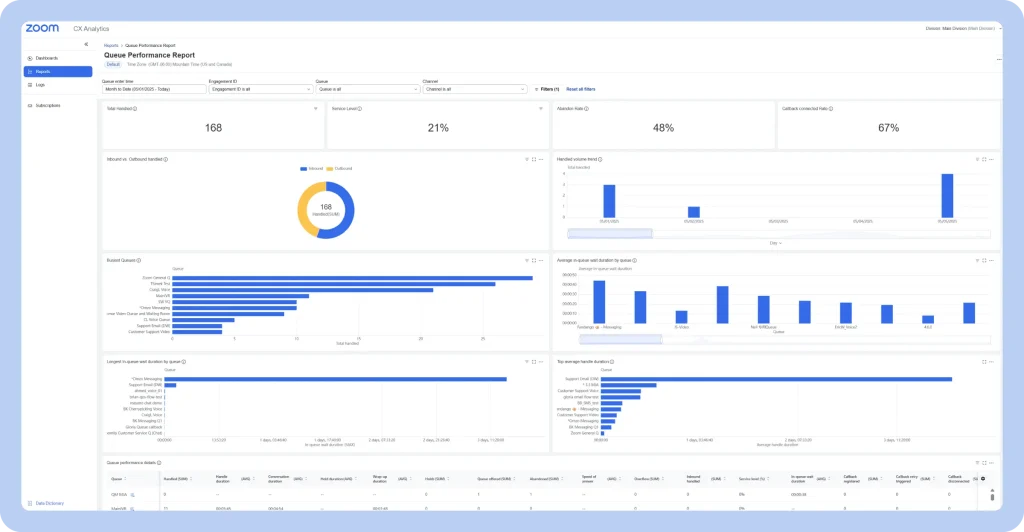
The reality of Zoom’s analytics, though, was a frustration I heard consistently from other marketers in my network, too, and it matched my own experience. The engagement data available on standard plans was limited to attendance counts, Q&A logs, and basic poll results.
Detailed engagement metrics like individual watch time, attendee drop-off curves, and replay analytics required upgrading to higher-tier plans that many small teams cannot justify. If your organization is already on Zoom and primarily needs a reliable broadcast tool for internal events or town halls, the platform works well.
Pros:
- Zero learning curve for attendees who already use Zoom for meetings
- Highly reliable infrastructure supporting up to 10,000 attendees
- Strong video quality even in low-bandwidth conditions
- Native integration with Zoom Meetings, Calendar, and Workspace ecosystem
Cons:
- Advanced analytics, including individual engagement data and replay metrics, require higher-tier plans
- No built-in sales or marketing features like pop-up CTAs or conversion tracking
Pricing:
Starts at $79/month as a Zoom add-on (billed annually).
9. ClickMeeting – Best for Meetings and Conferences
I tested ClickMeeting for a series of paid online workshops, and it handled the end-to-end workflow better than I expected at the price point. The registration system was clean, the payment integration with PayPal and Stripe worked without issues, and the post-event analytics report gave a solid breakdown of attendance, engagement duration, poll results, and Q&A activity.
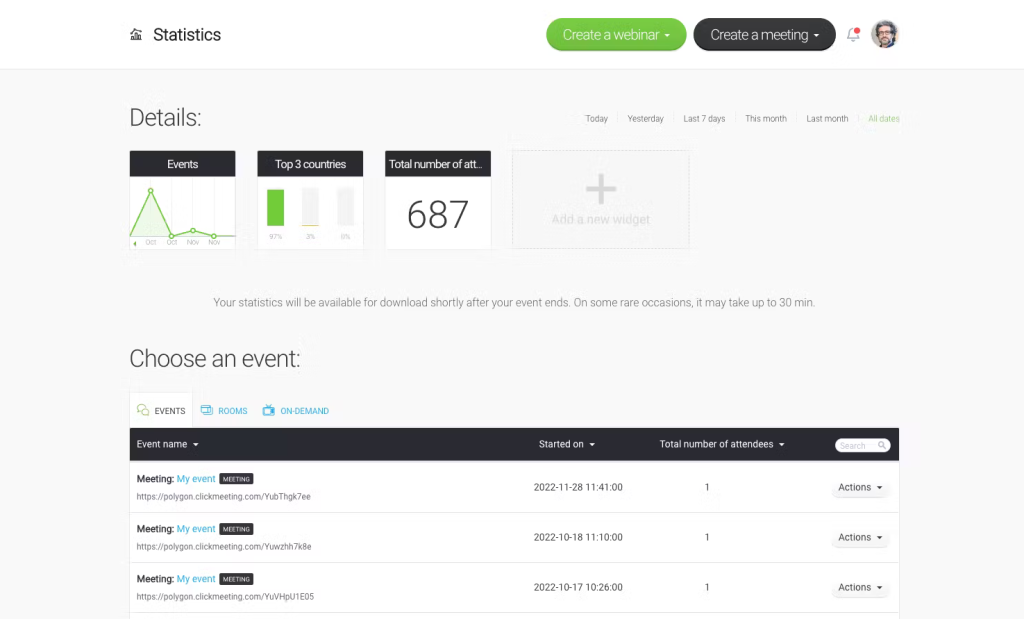
The statistics dashboard showed individual attendee data including join time, leave time, and engagement level scores which was more than I expected from an entry-level plan. The ability to set up both live and automated webinars from the same interface also made repurposing content straightforward.
ClickMeeting does not compete with ON24 or Demio on analytics depth or CRM integration sophistication, but for small marketing teams, training coordinators, or course creators who need real data without a large budget, it covers most of the key bases. The interface has improved significantly in recent years, though it still feels slightly dated compared to newer platforms.
Pros:
- Post-event analytics with individual attendee engagement scores and duration data
- Built-in payment processing via PayPal and Stripe for paid webinars
- Supports live and automated webinar formats with recording included
- Custom registration forms with branding options on all plans
Cons
- CRM integrations are limited compared to Demio or Livestorm
- Interface design lags behind modern platforms in polish and usability
Pricing:
Starts at $26/month (billed annually) for 25 attendees.
10. EasyWebinar – Best for Automated/Evergreen Webinars With Always-On Analytics
When I needed a platform to run a product demo on autopilot available to viewers at any hour without requiring a live host, EasyWebinar was the clearest solution I found. Setting up an evergreen webinar funnel that displayed a “just in time” start time was straightforward, and the simulated live environment kept viewer engagement higher than a standard on-demand recording.
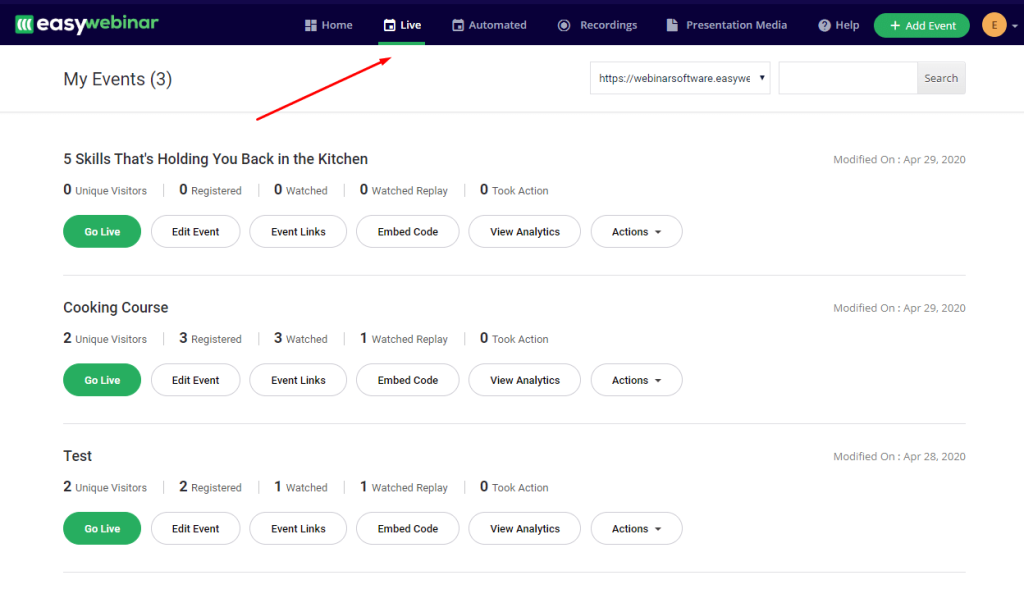
The analytics dashboard for automated webinars was where EasyWebinar genuinely stood out. I could see aggregate viewer behavior across all sessions’ average watch time, where viewers dropped off, which automated chat triggers drove the most engagement, and which call-to-action placements drove the highest click-through rates. For a funnel running 24/7, that optimization data was essential.
The platform works best when you are treating webinars as a long-running conversion asset rather than a one-off live event. For teams running regular live webinars without an automation component, the price point is slightly high relative to alternatives. But for B2B agencies and course creators building evergreen programs, the analytics depth justifies the investment.
Pros:
- Advanced analytics for automated webinars, including average watch time, drop-off data, and CTA click rates
- “Just in time” scheduling creates urgency and improves live webinar attendance simulation
- Supports both live and evergreen formats from one dashboard
- Strong chat automation with timed triggers that simulate live interaction
Cons:
- Higher price point compared to standard live webinar platforms at similar feature tiers
- Setup for evergreen funnels requires more time than basic live webinar configurations
Pricing:
Starts at $78/month (billed annually).
How I Evaluated These Webinar Platforms With Advanced Analytics
Every tool in this list was assessed using a consistent, six-point framework, not just feature checklists from vendor websites. My evaluation draws on direct platform testing, analysis of 200+ real buyer conversations with webinar users across industries, and verified feedback from communities including G2, Capterra, and active discussions on Reddit (r/marketing, r/b2bmarketing, r/edtech). Here is what went into each review.
- User Reviews and Ratings: I looked at verified user feedback on G2, Capterra, and community discussions on Reddit. Real frustrations like Zoom’s paywalled analytics or Demio’s CRM tier restrictions came directly from these sources, not vendor claims.
- Essential Features and Analytics Depth: Each platform was evaluated against the six advanced analytics criteria defined at the top of this guide: engagement tracking, registration-to-attendance rates, replay watch time, source/referral tracking, poll/chat reports, and CRM data sync. Tools that only covered two or three of these were ranked lower.
- Ease of Use: I assessed how quickly a new host could go from signup to running a live webinar with analytics configured, including setting up CRM integrations, tracking links, and post-event reports without developer help.
- Customer Support Quality: Response time, quality of documentation, and whether onboarding support was available at entry-level price points were all factored in. This matters especially for teams that do not have a dedicated IT resource.
- Value for Money: Pricing was evaluated relative to what analytics features you actually get at each tier, not just the headline price. A platform charging $42/month with full HubSpot integration may offer better value than one charging $29/month with CRM sync locked behind a $100/month upgrade.
- Personal Experience and Expert Insight: Each review reflects my direct, hands-on use of the platform, validated against insights from real buyer interviews. Where personal testing was not possible, I relied on community-sourced feedback and expert comparisons to fill the gap.
My Top 3 Picks for the Best Webinar Software With Advanced Analytics
After testing each platform across different team sizes and use cases, these three consistently delivered on the promise of webinar software with advanced analytics features — not just attendance numbers, but real, actionable data.
1. WebinarNinja
WebinarNinja is my top pick for those who want the best webinar software with advanced analytics without paying enterprise prices. The platform covers every analytics need that typically comes up in a B2B webinar program, like attendee engagement depth, replay watch tracking, source attribution, and CRM sync, all from a single dashboard. What makes it stand out is how it combines all four webinar formats (live, automated, series, and hybrid) with a clean reporting layer and transparent pricing.
2. Demio
Demio earns the second spot for B2B marketing teams that prioritize engagement-level analytics and clean CRM automation. The individual attendee data like tracking who engaged with each poll, who clicked the CTA, and who dropped off at the product demo is precisely the kind of webinar software analytics data that separates high-performing follow-up sequences from generic post-event blasts. The zero-download browser experience also consistently improves show-up rates, which is a real and measurable benefit.
3. Livestorm
Livestorm is the best choice for teams that need a browser-based platform with zero attendee friction and strong per-attendee CRM analytics. The per-attendee engagement data syncs cleanly into HubSpot and Salesforce, and the platform’s unlimited team member model makes it easier to scale webinar programs across multiple hosts without per-seat cost surprises.
Choose the Best Webinar Software With Advanced Analytics and Turn Every Event Into Revenue
The right webinar software with advanced analytics does more than track who attended. It tells you who was genuinely engaged, who watched the replay, where people dropped off, and which campaign drove the highest quality registrants. That data is the difference between a webinar that generates guesswork follow-ups and one that feeds your CRM with prioritized, behavior-qualified leads.
The platforms on this list, from budget-friendly options to enterprise solutions, all offer meaningful analytics above the basic headcount level. The best fit depends on your team size, CRM stack, webinar format, and budget. Start with the features that matter most to your program and match the tool to those needs, not the other way around.
If you want a platform that gets the analytics right without overcomplicating the setup, WebinarNinja is worth exploring as a starting point. There’s a free trial available, and the analytics dashboard is one of the first things worth testing. It brings together the reporting depth, CRM integrations, and multi-format flexibility that most marketing and training teams actually need, at a pricing model that does not require a procurement cycle to justify.
Frequently Asked Questions
Which webinar platform has the best replay analytics?
WebinarNinja and EasyWebinar offer the strongest replay analytics on this list. Both track who watched the recording, how long they watched, and whether they returned for a second viewing. This data is particularly useful for automated follow-up sequences, letting you target replay viewers differently from live attendees.
What webinar software integrates with HubSpot and GoHighLevel?
WebinarNinja, Demio, Livestorm, and EasyWebinar all offer native or Zapier-based integrations with HubSpot. WebinarNinja and EasyWebinar also support GoHighLevel directly, which makes them strong choices for marketing agencies using that CRM stack.
How do webinar analytics help with lead generation?
Webinar analytics identify your most engaged prospects based on behavior, who stayed the longest, who interacted with polls and CTAs, who watched the replay. That behavioral data enables your sales team to prioritize follow-up on high-intent leads rather than reaching out to every registrant equally. CRM-integrated platforms automate this process entirely.
What is attendee engagement scoring in webinar software?
Engagement scoring assigns a numeric value to each attendee based on their in-session behavior, time attended, questions asked, polls answered, resources downloaded, and CTAs clicked. ON24, WebinarNinja, and Demio are known for strong engagement scoring. Scores are typically pushed to your CRM to help sales teams prioritize outreach after each event.
What webinar analytics features should I look for before choosing a platform?
Look for six key capabilities: individual attendee engagement tracking, registration-to-attendance rate reporting, replay watch time data, source and referral tracking, poll and chat exports, and native CRM sync. Platforms like WebinarNinja cover all six in one dashboard, which means you are not piecing together data from multiple tools after every session.
Can I track webinar attendee behavior in my CRM automatically?
Yes, but only if the platform supports native CRM integration. WebinarNinja syncs attendee engagement data directly into HubSpot and GoHighLevel without requiring a manual export or Zapier workaround. Livestorm and Demio also offer native HubSpot sync, though CRM integrations on Demio are gated behind the Growth plan and above.
What is the difference between webinar analytics and webinar reporting?
Reporting gives you aggregate summaries after each event, things like total registrations, attendance count, and poll results. Analytics goes deeper, it tracks individual attendee behavior over time, maps engagement to pipeline stages, and surfaces patterns across multiple webinars. If you want to build smarter follow-up sequences and prove webinar ROI, you need analytics, not just reports. WebinarNinja provides both in a single post-event dashboard.
Which webinar software is best for teams switching from Zoom?
If you are moving away from Zoom because its analytics are too basic or paywalled, WebinarNinja is one of the most practical starting points. It offers a similar ease of setup, but adds engagement scoring, replay tracking, source attribution, and automated CRM sync that Zoom does not include on standard plans. Demio and Livestorm are also strong Zoom alternatives for marketing-focused teams.
Want to host a webinar for free?
Use WebinarNinja to teach, improve marketing, and grow your sales.