
You can run a solid webinar and still feel like your event marketing is stuck in first gear. Attendance is decent, engagement is okay, and then… the momentum fades. The fix is not “promote harder.”
The fix is designing an event marketing webinar like a modern growth system: personalized at the door, amplified across channels, multiplied through partners, and monetized (or nurtured) after the live moment.
So, in this blog, we will learn about the following new webinar event marketing strategies that increase registrations and ROI:
- Persona-based registration journeys
- Multi-channel promotion flywheels
- Partnership and speaker co-marketing
- Post-event nurture and repurposing systems
Before we jump into details, I want to set one expectation that keeps the whole strategy honest. A webinar is not just a date on the calendar; it is a content engine and a conversion moment rolled into one.
Why Webinars Are the Most Flexible Event Marketing Asset
If you are doing webinar event marketing today, you already know webinars can be “lead gen.” The bigger win is that webinars also work as a positioning tool, a relationship builder, and a conversion bridge from interest to action.
Here is how I frame online event marketing with webinars in a way that makes planning easier:
- Before the event, the webinar is a promise, so your job is to make that promise feel specific and valuable.
- During the event, the webinar is a guided experience, so your job is to earn attention and reduce friction.
- After the event, the webinar becomes a content library, so your job is to keep the conversation going.
One mindset shift helped me a lot: “registration” is not a form; it is the start of the attendee’s story. That is exactly why the first “new way” starts at the door.
Before we build the first system, it helps to recognize why “one-size-fits-all” event pages tend to underperform.
Once you see registration as a journey, the next step becomes obvious.
1) Persona-Based Registration Journeys
A persona-based registration journey is simply this: different audiences should experience different value, language, and next steps, even if they all end up in the same webinar room.
When I implemented this, I stopped asking “How do we get more registrants?” and started asking “How do we get the right registrants to feel like this webinar is for them?”
Seth Godin captures the core idea with a blunt reminder:

“The most important lesson I can share about brand marketing is this: you definitely, certainly, and surely don’t have enough time and money to build a brand for everyone. You can’t. Don’t try. Be specific. Be very specific.”
— Seth Godin
Author, This Is Marketing
Build Registration Paths That Make Each Persona Feel Seen
In practice, persona-based journeys usually include these building blocks:
- A segmented invite list (even lightweight segmentation is enough).
- A tailored landing page section, not necessarily a whole new page.
- One “persona question” on the registration form to confirm fit.
- A confirmation email that delivers a relevant quick win.
- A reminder sequence that reinforces the persona’s motivation.
To make this concrete, here is a simple mapping table you can adapt for your own event promotion using webinars.
| Persona | What They Care About Most | Landing Page Hook | Registration Question | Confirmation “Quick Win” | CTA During Webinar |
|---|---|---|---|---|---|
| Newbie / Explorer | Avoiding mistakes, clarity | “Start here: the simple path to X” | “What is your current level?” | 1-page checklist | “Use this starter template today” |
| Practitioner | Better systems, time savings | “A proven workflow to do X faster” | “What tool/process do you use now?” | Swipe file or SOP | “Try the framework with your team” |
| Decision Maker | ROI, risk reduction | “See how teams reduce costs and improve outcomes” | “What is your top KPI?” | ROI calculator | “Book a consult or pilot” |
| Champion / Internal Advocate | Social proof, buy-in | “Build a business case your boss will accept” | “Who else is involved in the decision?” | Pitch deck outline | “Share the replay internally” |
Use “Micro-Commitments” to Improve Webinar Show-Up Rate
Most webinar registration pages focus on “yes” or “no.” I prefer adding one tiny commitment right after signup that makes attendance more likely.
In most campaigns, small commitments like this increase attendance rates by 10 to 20 percent because they create psychological ownership before the event even begins.
Examples I have used successfully:
- “Add one question you want answered,” then promise to address it live.
- “Choose your track,” and show 2 to 3 options like “Beginner,” “Intermediate,” “Advanced.”
- “Pick your goal,” like “learn,” “compare,” “implement,” or “get buy-in.”
Do you really need multiple landing pages to do this well?
I usually do not. I have often gotten strong results using one landing page with dynamic sections (or a short persona selector at the top), and then using email personalization to do the heavier lifting based on the selection.
Example: Turning One Webinar Into Three “Versions”
Let’s say you are running a webinar on “How to Launch a Customer Community.” Same webinar content, three persona journeys:
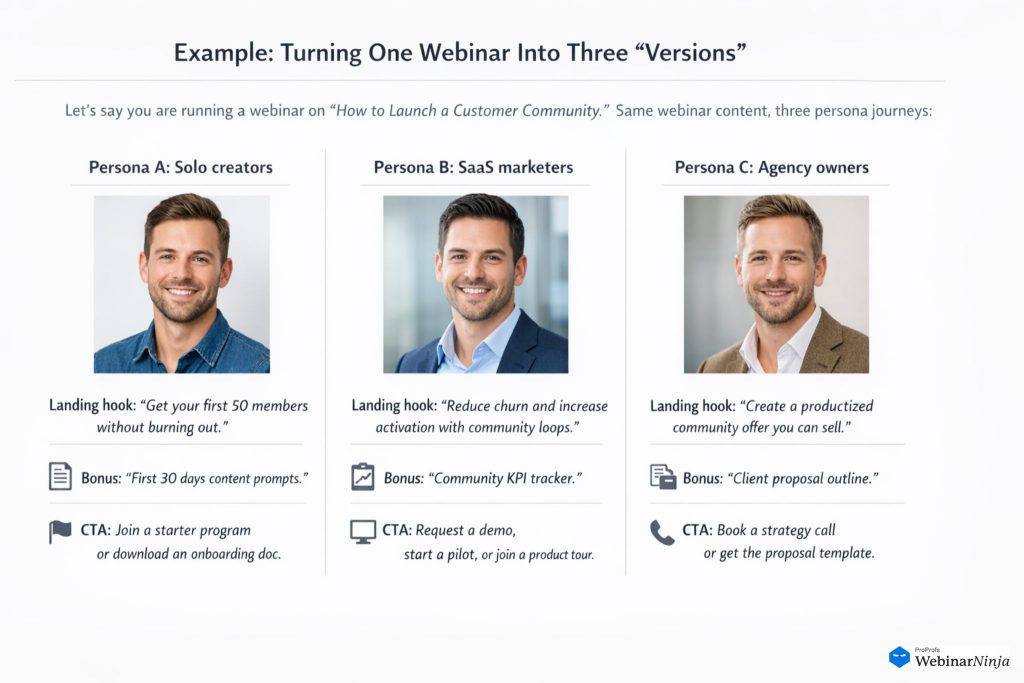
Persona A: Solo creators
- Landing hook: “Get your first 50 members without burning out.”
- Bonus: “First 30 days content prompts.”
- CTA: Join a starter program or download an onboarding doc.
Persona B: SaaS marketers
- Landing hook: “Reduce churn and increase activation with community loops.”
- Bonus: “Community KPI tracker.”
- CTA: request a demo, start a pilot, or join a product tour.
Persona C: Agency owners
- Landing hook: “Create a productized community offer you can sell.”
- Bonus: “Client proposal outline.”
- CTA: book a strategy call or get the proposal template.
The webinar is the same, but the promise, language, and next step feel tailored. That is the difference between “registrations” and “qualified registrations.”
Now that the right people are signing up, the next challenge is reach and repetition.
That is where the promotion flywheel becomes the unfair advantage.
2) Multi-Channel Promotion Flywheels
A multi-channel promotion flywheel is not a launch plan you rebuild each time. It is a repeatable system that turns one webinar into many “entry points” across email, social, community, partners, and paid channels, with each channel feeding the others.
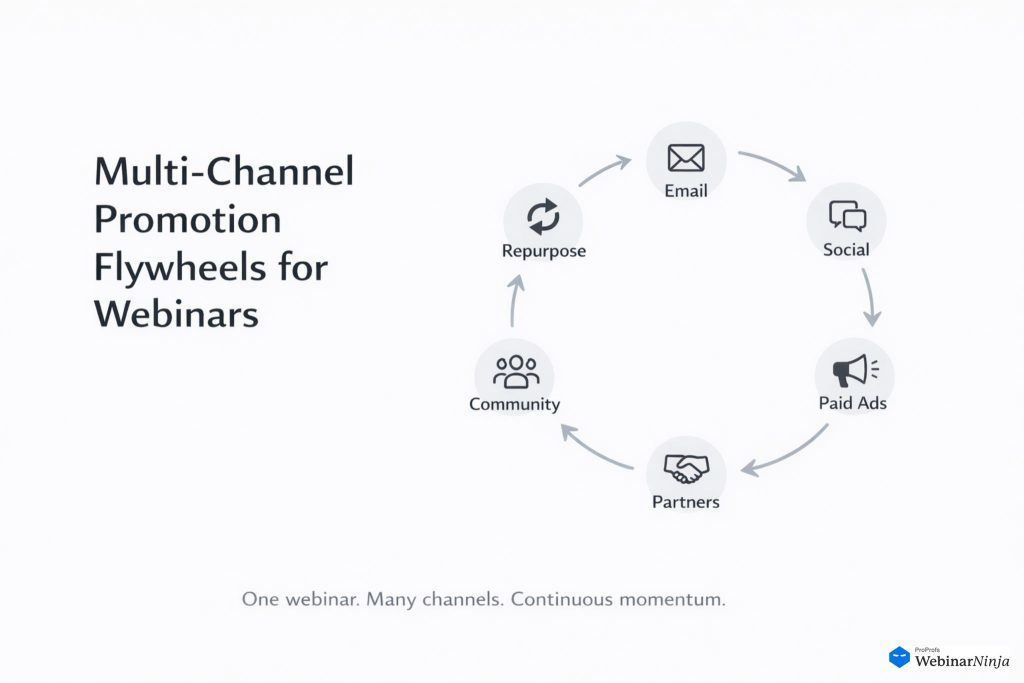
This is one of the most practical webinar event marketing strategies because it reduces the pressure on any single channel. It also matches how people actually decide to attend.
They see it once, ignore it, see it again, get curious, and then sign up on the third or fourth touch.
Campaigns that rely on coordinated multi-touch promotion often see significantly higher conversion rates than single-channel pushes, especially when audiences encounter the webinar three or more times before registering.
Design a Flywheel That Reuses the Same Core Message
Here is the simplest flywheel I have used for event marketing webinar promotion:
- Core asset: one strong webinar landing page with a clear promise and outcomes.
- Email: segmented invites + reminders + “last chance” message.
- Social: 5 to 7 short posts that highlight outcomes, objections, and social proof.
- Community: a discussion prompt that naturally leads to the webinar topic.
- Retargeting: ads to landing page visitors and video viewers.
- Referral loop: “forward this to a teammate” plus a small incentive (templates, worksheets, or bonus Q&A).
The goal is not “more posts.” The goal is coordinated repetition that does not feel repetitive.
Use a Weekly Content Rhythm Instead of One Big Blast
If you want this to feel sustainable, use a weekly rhythm:
- Week 3 to 4 before: announce the promise, ask a question, share a quick story.
- Week 2 before: share a framework teaser, post a short clip, run a poll.
- Week 1 before: publish social proof, share FAQs, increase reminders.
- Day of: “starting soon,” “we are live,” “last chance to join.”
- Day after: replay + highlights + next step.
When someone asks me, “Which channels should I focus on?” my honest answer is: the channels where you can be consistent for 6 months. Consistency compounds, and a flywheel is built for compounding.
A “Flywheel Pack” of Assets You Can Create in One Afternoon
To make this actionable, here is what I typically create for one webinar:
- 1 landing page
- 3 email invites (segmented by persona)
- 3 reminder emails
- 1 “Sorry, we missed you” email
- 7 social posts
- 2 short video clips (30 to 60 seconds)
- 1 carousel or slide post
- 1 community prompt
- 2 ad creatives (if you do retargeting)
Before you see that list and sigh 😅, here is the trick: most of these assets are the same message in different packaging. You are not writing 20 new ideas. You are distributing one strong idea.
Gary Vaynerchuk describes this distribution mindset clearly:

“In a volume-centric creative world, it’s about creating more context for the audience you’re trying to reach and more context on the platforms that you’re distributing on.”
— Gary Vaynerchuk
Entrepreneur and marketer,
from his article “How To Make 64 Pieces Of Content In A Day
Make Your Multi-Channel Promotion Measurable With Simple Tracking
If you want your webinar event marketing to improve every time, you need feedback loops. I keep it simple:
- Use UTMs (Urchin Tracking Module) for every channel.
- Track landing page conversion rate by persona source.
- Track show-up rate by segment.
- Track watch time or engagement moments (polls, Q&A, clicks).
- Track post-event action rate (demo requests, downloads, replies).
Do you need complicated dashboards to do this well?
In my experience, no. A spreadsheet with UTMs, weekly check-ins, and three KPIs (registrations, attendance rate, next-step conversions) is enough to spot patterns quickly.
Once your flywheel is working, you can multiply it without multiplying the workload. That is where partnerships and speakers become your leverage.
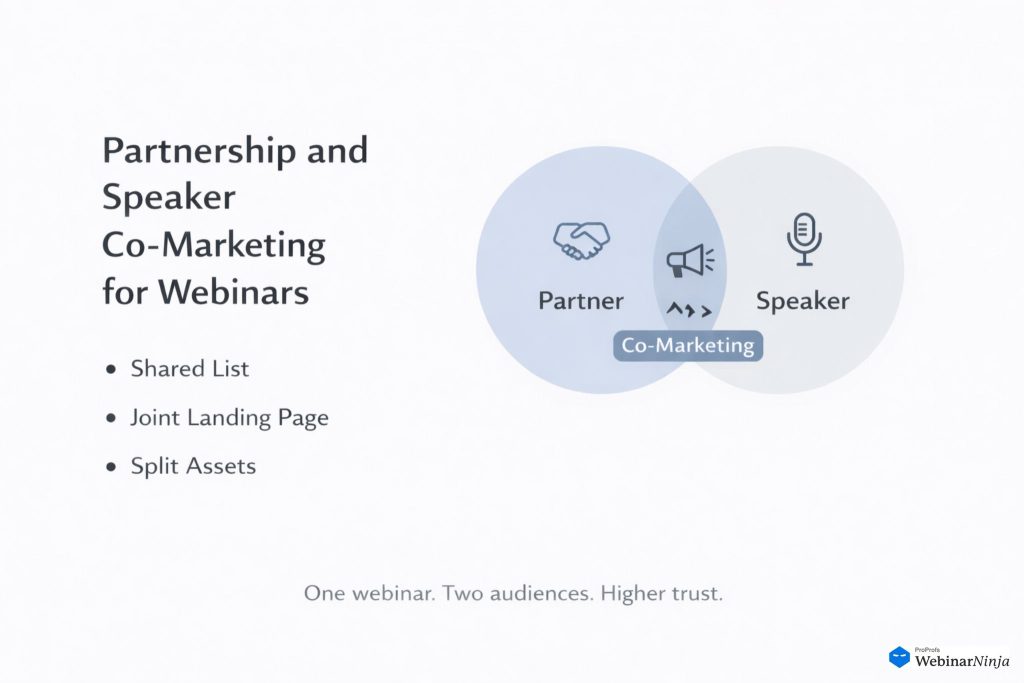
3) Partnership and Speaker Co-Marketing
Partnership and speaker co-marketing is one of the fastest ways to expand reach with higher trust. In practice, co-hosted webinars frequently outperform solo sessions in qualified registrations because borrowed trust shortens the decision cycle.
It also tends to improve content quality because your webinar stops being a monologue and becomes a conversation.
I look for partners and speakers who deliver one of these benefits:
- Audience overlap: they have the people you want, and you have the people they want.
- Credibility lift: They have authority that makes attendance feel “worth it.”
- Distribution strength: they have a channel you do not have (newsletter, community, podcast).
- Practical depth: they bring real-world stories and examples.
Build Co-Marketing Offers That Are Easy to Say Yes To
A common mistake is asking partners to “promote my webinar.” That sounds like work for them and value for you.
Instead, I offer a co-marketing package that is obviously beneficial for both sides:
- Co-branded landing page and assets
- Shared lead capture rules (be clear, be ethical, be compliant)
- A partner-only bonus for their audience
- A speaking role that makes them look good
- A post-event asset they can reuse (clip, quote card, mini blog)
This is one reason co-marketing works so well for event promotion using webinars. You are not borrowing attention; you are creating an event that both audiences actually want.
Create a Speaker Kit That Removes Friction
If speakers need to “figure out how to promote,” they will not. I send a speaker kit 10 to 14 days before the webinar with:
- 3 pre-written social posts (short, medium, long)
- 1 email blurb for their newsletter
- 2 images (square and vertical)
- 1 tracking link
- 3 “angles” they can choose from (pain, promise, proof)
- Key talking points so their promo matches the webinar promise
You are making it easy for them to help you. That is the whole game.
Example: Partnering With a Community or Association
Let’s say you sell to HR teams and you are hosting a webinar about onboarding.
Instead of a solo webinar, you partner with a niche HR community:
- Value for them: exclusive template pack for members, plus a guest expert.
- Value for you: access to a qualified audience and trust-by-association.
- Value for attendees: a webinar that feels curated, not generic.
I also like to include one “partner-only” live segment, like a 10-minute Q&A focused on their community’s questions. It makes the partnership feel real, not transactional.
Keep Partnerships Clean With a Simple Agreement
Even friendly partnerships need clarity. A one-page agreement can cover:
- Timeline and deliverables
- Lead sharing terms and consent
- Branding and approvals
- Recording usage
- Promotion responsibilities
Do partnerships always need complex contracts? Not always. I usually start with a simple written agreement and upgrade later if the partnership becomes recurring.
Now we have the right audience, amplified distribution, and shared credibility. The final “new way” is the one most teams underuse, even though it drives the real ROI.
4) Post-Event Nurture and Repurposing Engine
If your webinar ends when the live session ends, you are leaving value on the table. The post-event nurture and repurposing engine is how one webinar turns into weeks of demand generation, sales enablement, community engagement, and SEO content.
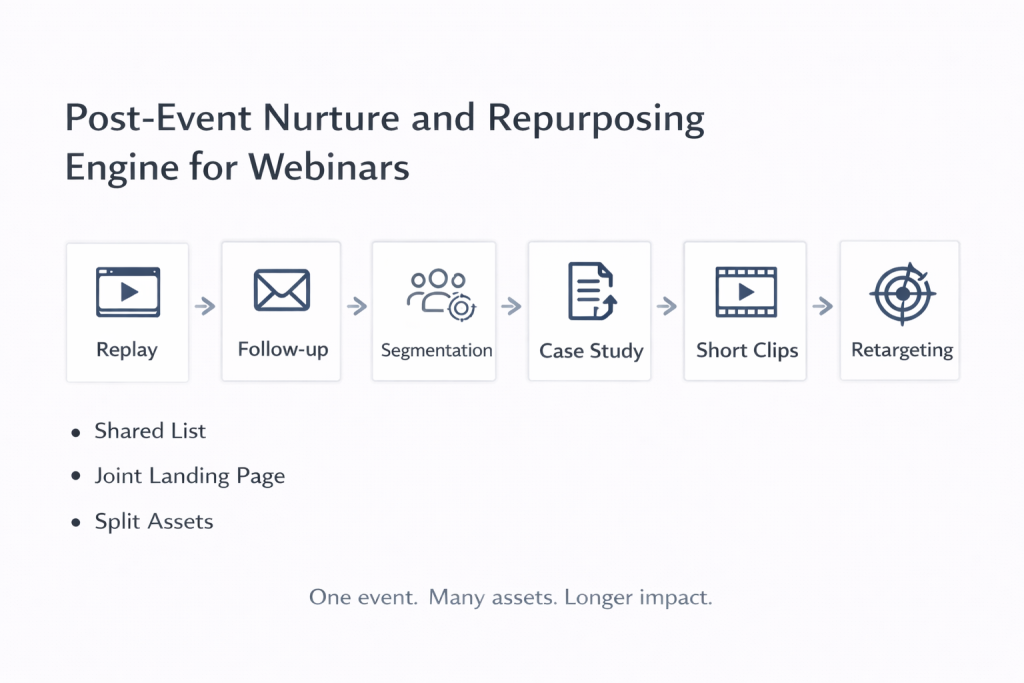
I treat the live webinar as the “content capture moment,” and the next 14 to 30 days as the “value distribution window.”
Build Two Nurture Paths: Attendees and No-Shows
Attendees and no-shows have different needs, so I split them immediately.
Attendee nurture (7 to 14 days):
- Day 0: thank you + key takeaway + resources
- Day 2: highlight clip + “here’s how to apply it”
- Day 5: case study or example
- Day 7: next step CTA (demo, trial, consult, download)
- Day 10: objection handling FAQ
- Day 14: “last chance” for bonus or offer
No-show nurture (7 to 14 days):
- Day 0: replay link + timestamps
- Day 2: “top 3 moments” summary
- Day 5: clip that addresses the most common pain point
- Day 7: second replay reminder + next step CTA
This is one of the easiest ways to lift outcomes in webinar event marketing strategies without changing your webinar at all.
Turn One Webinar Into 15 to 30 Content Assets
Repurposing works best with a system. Here is the repurposing matrix I use most often:
| Webinar Moment | Repurposed Asset | Channel | CTA | KPI to Watch |
|---|---|---|---|---|
| Strong opening story | 30 to 60 sec clip | LinkedIn, Instagram, YouTube Shorts | Register for next session | Video views, click-through |
| Framework section | Carousel slides | LinkedIn, Instagram | Download worksheet | Saves, shares |
| Audience Q&A | FAQ blog section | Blog, newsletter | Watch replay | Time on page |
| Demo or walkthrough | Product clip | Sales enablement | Book a call | Reply rate, meetings |
| Key takeaway list | Email lesson | Email sequence | Apply template | Clicks, replies |
| Poll results | Insight post | Social, community | Join discussion | Comments |
Notice how this supports both online event marketing with webinars and your broader content marketing strategy. The webinar becomes a reusable source of truth.
Add a “Next Webinar Bridge” to Keep Momentum
One of my favorite tactics is the “bridge” webinar. You end Webinar A by offering Webinar B as the next step, often 2 to 3 weeks later.
Example:
- Webinar A: “How to Build a Lead Magnet That Converts”
- Webinar B: “How to Turn That Lead Magnet Into a Nurture Sequence”
This creates a natural ladder and makes your event calendar feel like a learning journey, not isolated events.
Do people really attend back-to-back webinars from the same brand? Yes, each webinar solves a different step in the same problem. I have seen repeat attendance become a meaningful signal of purchase intent because it shows commitment, not curiosity.
Make Repurposing Easier With Timestamps and Content Notes
If you want a post-event repurposing engine that does not feel like a burden, assign someone to capture:
- 5 timestamps for key moments
- 3 audience questions that reveal intent
- 2 strong quotes from the speaker
- 1 story that illustrates the problem
- 1 clear “next step” moment
This can be done live, and it saves hours later.
Now, if you are hosting a podcast, here is a quick video with steps to launch, grow, and monetize it effectively:
At this point, you have four systems that work together. To make them stick, you need a few operational guardrails so quality stays high.
The “Don’t Forget These” Checklist for Webinar Event Marketing
You can have great ideas and still lose results to small leaks. These are the practical details I keep in mind every time I run an event marketing webinar.
1. Protect The Attendee Experience Like It Is the Product
A webinar is a promise. Keep the experience clean:
- Start on time.
- Set the agenda in the first 2 minutes.
- Use polls and Q&A to create participation.
- Show clear next steps near the end, not as a surprise.
2. Keep Your Messaging Outcome-First
I try to write my webinar pitch using this formula:
- “In 45 minutes, you will learn how to do X”
- “So you can achieve Y”
- “Without Z”
That structure works across landing pages, emails, and social, and it keeps your event promotion using webinars focused on benefits, not features.
3. Measure What Matters, Not What Looks Good
Here are the core metrics I recommend:
- Landing page conversion rate (by channel and persona)
- Attendance rate (show-up rate)
- Engagement signals (poll participation, questions asked)
- Next-step conversions (demo requests, downloads, replies)
- Cost per qualified attendee (if paid promotion is involved)
If you want one “north star” for webinar event marketing, I would pick: cost per next-step conversion. It keeps the focus on business impact, not vanity metrics.
If you are looking to market your webinar effectively, here are a few things that might help you:
Everything we covered so far is designed to turn webinars into a compounding asset. Now let’s wrap it up with a simple way to put these ideas into motion.
Put Your Event Marketing Webinar Strategy Into Motion
If you want your next event marketing webinar to drive more than a one-day spike, build it as a system:
- Use persona-based registration journeys so the right people feel instantly understood.
- Run a multi-channel promotion flywheel so every channel supports the others.
- Add partnership and speaker co-marketing so trust and reach multiply.
- Commit to a post-event nurture and repurposing engine so the webinar keeps working long after it ends.
If I were implementing this from scratch, I would start with one change this week: pick two personas and tailor your registration flow for them. That single shift often improves registration quality, attendance, and conversions, because it forces clarity.
And when you are ready to operationalize the whole flow, a platform like WebinarNinja can help you keep the moving parts organized, especially around registration, reminders, replays, and follow-up sequences, without turning your team into full-time webinar coordinators.
The best part is when your webinar event marketing starts feeling repeatable, because repeatable is what scales. 😊
Frequently Asked Questions

How many channels should I use to promote a webinar?
Use as many channels as you can manage consistently for several months. Most effective campaigns rely on at least three core channels: email, social media, and retargeting. The goal is not to be everywhere. The goal is coordinated repetition across a few reliable channels so your audience sees the webinar multiple times before deciding to register.
What are the best platforms for hosting webinar events with built-in marketing tools?
The best platforms combine registration pages, automated reminders, email sequences, replay hosting, and basic analytics in one place. Tools such as WebinarNinja are popular because they allow you to manage landing pages, reminders, live sessions, and follow-up from a single dashboard. When evaluating platforms, prioritize ease of use, automation features, integration options, and reporting clarity rather than just video quality.
Which software offers the best analytics for webinar attendee engagement?
Strong webinar platforms provide engagement tracking such as attendance duration, poll participation, chat activity, click tracking, and replay views. Look for software that shows drop-off points and engagement moments so you can refine future sessions. The most useful metric is not total registrations. It is the next-step conversion after the event, such as demo requests or downloads.
What are effective social media tactics for webinar promotion?
Short, outcome-focused posts work best. Instead of announcing the webinar repeatedly, share one insight, one objection, or one result the audience will gain. Use short video clips, polls, carousel posts, and testimonials to create variation. Consistency over several weeks typically performs better than one large promotional push.
What are the email marketing best practices for increasing webinar registrations?
Segment your list by persona when possible. Personalize webinar email subject lines around outcomes rather than generic reminders. Include one strong benefit in the first few lines. Limit the number of calls to action to one primary action. Send reminders at logical intervals such as one week before, one day before, and one hour before the session.
What are top webinar marketing strategies used by successful B2B companies?
High-performing B2B teams treat webinars as part of a system rather than standalone events. They segment audiences, collaborate with partners, run multi-channel promotion flywheels, and build post-event nurture sequences. They also measure cost per qualified attendee and cost per next-step conversion instead of focusing only on registration volume.
What paid advertising channels work best for promoting online events?
LinkedIn Ads perform well for B2B audiences due to job title targeting. Meta ads are effective for broader reach and retargeting. Google Display and YouTube ads work well for remarketing to previous site visitors. Paid campaigns typically perform best when used to retarget engaged audiences rather than completely cold traffic.
How do I use social media ads to boost webinar registrations effectively?
Start with a clear, outcome-driven message. Use short videos or static creatives that highlight a specific result attendees will achieve. Retarget website visitors, email subscribers, and past webinar attendees. Keep the landing page consistent with the ad message. Track cost per registration and cost per next-step conversion to measure success.
Are partnerships necessary for webinar growth?
They are not required, but they accelerate growth. Partnering with guest experts, communities, or complementary brands increases trust and reach at the same time. Co-marketing works especially well when both audiences overlap and when both sides promote the event actively.
How long should webinar follow-up sequences run?
Most effective follow-up sequences run between 7 and 14 days. Attendees should receive application-focused emails and next steps. No-shows should receive replay reminders and key highlights. The goal is to maintain momentum without overwhelming the audience.
What are the top-rated webinar platforms for small businesses?
Small businesses often benefit from platforms that combine simplicity with automation. Look for tools that offer built-in landing pages, automated reminders, replay hosting, and integrations with email marketing systems. Ease of setup and predictable pricing matter more than enterprise-level customization at this stage.
How do I measure the success of a webinar marketing campaign?
Track four core metrics: landing page conversion rate, attendance rate, engagement signals during the webinar, and next-step conversions after the event. For paid campaigns, monitor cost per qualified attendee and cost per next-step action. These metrics provide a clearer picture of business impact than registration volume alone.
Want to host a webinar for free?
Use WebinarNinja to teach, improve marketing, and grow your sales.