


If you were looking for a detailed guide on webinar branding, I have provided one that offers a deep dive into the topic.
Webinars have exploded in popularity as a go-to tool for marketers and educators alike – and for good reason. In fact, a large majority of marketers now consider webinars crucial to their strategy, with 51% of B2B marketers saying webinars produce the best results of any content channel, ranking second only to in-person events, according to Content Marketing Institute’s B2B Content Marketing research.
But while webinars can generate leads and build relationships, a poorly branded webinar can feel like a forgettable online lecture.
Many hosts often struggle with questions like:
- “How do I keep the visuals consistent?”
- “Are we conveying the right message?”
- “Why are people zoning out halfway?”
These are common pain points, and you’re not alone – roughly one-third of B2B marketing pros say they struggle to maintain a consistent brand identity in their content. In this blog, we’ll tackle these challenges head-on and show how to brand your webinars like a pro. Let’s dive in!
What Is Webinar Branding?
It’s easy to think branding stops at “put the logo on the slide.” It doesn’t. A truly branded webinar feels like your company, from the first invite email to the follow-up thank-you note, not like a generic session that happens to have your name attached.
Why Webinar Branding Matters (and Why Many Get It Wrong)
Webinar branding isn’t just an aesthetic exercise; it directly impacts trust, recall, and even conversions. Here’s why it matters so much:
1. First Impressions Count
Your webinar’s look-and-feel is the first thing attendees notice. If your slides, colors, and overall design scream “amateur hour,” you risk undermining credibility before you even speak. In industries like finance, a polished, professional appearance is non-negotiable – webinar attendees expect the same slick branding as your website or brochures. If your webinar looks outdated or off-brand, it can erode trust.
2. Trust and Credibility
Consistent branding for webinars builds familiarity. Over time, seeing your distinct brand elements repeatedly creates recognition and trust. Publishing well-branded webinars consistently helps establish credibility, making viewers more likely to view your content as reliable. Conversely, inconsistency can confuse your audience – if one webinar feels drastically different from another, attendees might wonder if it’s even the same company presenting.
3. Audience Recall:
Ever notice how a catchy jingle sticks in your head? Consistent branding is like the visual/audio jingle for your webinars. A well-branded webinar is far more memorable than a generic one – attendees will more easily recall your content and your company name afterward. This pays off because when it comes time to choose a solution or product, people tend to go with brands they remember and trust.
4. Conversions and ROI:
Ultimately, the goal of many webinars (especially in B2B) is to generate leads or sales. Strong branding supports this by instilling confidence. When your webinar feels cohesive and professional, attendees subconsciously feel like your company has its act together. They’re then more comfortable taking the next step, whether that’s signing up for a trial or requesting a demo.
Fun fact: The Content Marketing Institute’s B2B research found webinars rank as one of the top three most effective distribution channels for B2B marketers, trailing only in-person events, so making your webinars effective has a real payoff.
Common Webinar Branding Struggles (And Where You May Lack)
So why do so many get it wrong? Let’s quickly unpack the typical pain points that sabotage webinar branding:
- Inconsistent Visuals:
Visual inconsistency dilutes your professionalism and confuses the audience. (Don’t worry, we’ll cover how to fix this with templates and style guides.) - Off-Message or Boring Content:
A quirky, fun brand doing a dry, jargon-loaded webinar = brand disconnect. Likewise, a serious brand doing a meme-filled webinar could undermine credibility. - Low Audience Engagement:
Keeping people interactive and engaged is a huge challenge – one that directly ties to branding, because an engaged attendee will better absorb your brand’s message. - Lack of Credibility:
If your event has technical glitches, poorly designed slides, or inconsistent info, attendees may doubt your expertise.
Sound familiar? These pain points can be solved with a bit of strategy.
Before we get to solutions, let’s look at how webinar branding challenges can vary across different industries – because a tech startup’s webinar woes might differ from a healthcare organization’s.
Industry-Specific Branding Challenges: One Size Does Not Fit All
Every industry has its own unique wrinkles when it comes to webinar branding. Let’s shine a spotlight on a few sectors (tech, healthcare, finance, and education) to see what obstacles they face and how to brand a webinar according to the sector:
1. Tech Industry: Standing Out in a Crowded, Fast-Paced Market
Tech companies are the heaviest users of webinars – about 29% of all webinars are hosted by software/tech companies.
Why so many?
Because webinars are gold for educating users about complex products and showcasing thought leadership in fast-evolving niches. The challenge: standing out.
With so many tech webinars out there, audiences are a bit spoiled. They expect high production value (HD video, slick slides), interactive product demos, and cutting-edge insights. If you’re a SaaS or tech firm, your branding needs to scream innovation and expertise.
Pain points for tech webinars:
- Saturation & Differentiation:
If your space is crowded (say, another Kubernetes webinar, anyone?), your brand needs to differentiate the content. A generic title and bland visuals won’t cut it.
Tech marketers often struggle to find a unique angle or a bold visual identity that sets their webinars apart from competitors. It’s worth investing in creative themes or on-brand storytelling (for example, Atlassian might weave in team collaboration motifs, whereas a cybersecurity firm might use a “secure vault” visual theme).
- Complex Content:
Tech webinars often dive into highly technical content. The risk is that you overwhelm attendees with info overload, making the session dry or confusing.
Branding here means finding the right tone – are you the approachable teacher breaking down complex ideas (perhaps using a friendly, conversational brand voice) or the elite expert for a niche audience (more serious tone)?
Align the depth of content with your brand persona. Also, use branded visuals (icons, diagrams) to simplify concepts in a way that fits your style.
- Interactive Demos:
Tech audiences love demos and Q&A. Ensure your platform allows your brand to shine even during screen shares. For instance, customize the waiting room or use a branded overlay on demo videos.
Nothing breaks the immersion like switching to a totally unbranded interface mid-webinar.
Small touches, like a branded virtual background when showing a physical product or having the presenter wear company swag, can reinforce identity.
Example:
Think of Apple’s product event streams – while not exactly webinars, they exemplify tech branding: sleek, minimalist slides, consistent framing, and a confident tone aligned with Apple’s brand.
You might not have Apple’s budget, but you can ensure your webinar visuals and messaging are likewise consistent and reflective of your brand’s vibe (be it edgy, fun, or enterprise-serious).
HubSpot’s “Grow Better” webinar series is a strong tech-sector example. Every session carries the same color palette, typography, and upbeat-but-substantive tone as HubSpot’s broader marketing, so attendees know exactly whose webinar they’re in within seconds, no logo required.
We recorded this 16-minute video for you to understand how you can create highly converting webinar registration pages with your branding:
2. Healthcare & Pharma: Trust, Compliance, and Clarity Are Key
Healthcare, pharma, and biotech webinars operate in a high-stakes environment. These industries accounted for about 7% of webinars last year—a smaller slice than tech, but rapidly growing as more healthcare education and marketing move online.
Branding for a healthcare webinar is all about trust and authority.
If you’re a hospital, medical device maker, or health tech startup, your audience (be it doctors, patients, or researchers) needs to feel that you’re credible and caring.
Unique challenges:
- Regulatory Compliance:
Healthcare is strictly regulated by law. Branding can’t override compliance – your webinars must follow rules like HIPAA for patient privacy if applicable, or FDA guidelines if discussing treatments.
This means including necessary disclaimers (yes, even if they clutter your slide a bit) and using a webinar platform with secure features (encryption, etc.). For example, if you’re sharing patient case studies, all data must be de-identified and privacy-protected.
The challenge is to weave these compliance steps into your branding: you might have a consistent way your brand presents disclaimers or a trusted expert (with credentials displayed) handle any discussions of off-label use or sensitive info.
Bureaucratic? Yes. But absolutely essential for credibility in health webinars.
- Scientific Rigor & Clarity:
A healthcare webinar often involves complex, technical information (think clinical trial results or medical device demos). Your brand positioning should emphasize accuracy and expertise.
Slides need to be on-brand and scientifically sound. One strategy is to use your brand’s colors and design to highlight key data points (e.g., use your branded color palette to draw attention to important chart sections).
Also, consider bringing in guest experts – a respected doctor or researcher – whose presence you brand (introduce them with your branded slide template) to lend authority.

Audiences in healthcare expect evidence-based content; incorporating elements like properly cited data, graphs, or even 3D medical visualizations can boost engagement while reinforcing that you’re a serious, credible source.
Just ensure any visuals still align with your brand style (e.g., if your brand is known for simplicity, don’t overload a slide with microscopic text for the sake of one more data point).
- Empathy and Tone:
Branding in healthcare isn’t just about logos – it’s also about tone.
Is your webinar aimed at patients or the general public?
Then, it should embody your brand’s empathy and supportiveness, avoiding jargon and using a warm, reassuring style. If it’s aimed at clinicians, the tone can be more professional and efficient but still approachable.
Healthcare brands often struggle to find the balance between authoritative and approachable.
A tip: use storytelling. Perhaps open with a patient success story (with permission, of course) that humanizes the topic – it’s on-message for many healthcare brands that value patient-centric care, and it engages the audience emotionally before diving into data.
- Diverse Audience Levels:
One hospital webinar might attract doctors, nurses, admins, and patients. That’s a wide spectrum. Segmenting content is key – maybe have clearly labeled sections, and use your branding to create a consistent structure so people can follow along.
(For instance, a color-coded slide border or icon when a section is more general vs. highly technical.) This way your brand is helping guide the audience through content meant for different groups.
Mayo Clinic’s patient-education webinars are a good example of healthcare branding done right: consistent use of their blue-and-white visual identity, credentialed speakers introduced the same way every time, and a calm, reassuring tone that never shifts regardless of topic, which matters enormously when the subject matter itself can be stressful for attendees.
3. Finance & Banking: Conservatism Meets Engagement
In finance and banking, trust is everything.
We’re talking about people’s money, after all. Unsurprisingly, financial services firms host a ton of webinars (second only to tech, about 14% of webinars) to educate clients on markets, explain services, or establish thought leadership.
The branding challenge for financial webinars is marrying a conservative, professional image with engaging content.
You want to be seen as authoritative and trustworthy (buttoned-up enough that folks feel you won’t lose their money), but not so stiff that attendees fall asleep during your “2026 Market Outlook” webinar.
Key challenges and tips:
- Professionalism & Polish:
In finance, a polished look isn’t just for vanity – it signals reliability. Every detail, from the title slide to the sign-off, should reflect your brand’s professionalism.
Using a white-label webinar platform that supports your branding (logos, colors, fonts) is a must to avoid jarring your audience with third-party branding.
If your firm has strict brand guidelines (most banks do), apply them religiously: consistent fonts, appropriate use of logo, and slides that look like they came from the same design team.
It pays off – financial consumers rank brand trust above even product and price when choosing a provider. When your webinar visually and tonally matches the trustworthiness of your brand, it reassures viewers.
If it looks like a disjointed PowerPoint from an intern, kiss that trust goodbye.
- Thought Leadership vs. Sales Pitch:
Financial webinars often aim to educate (e.g., explaining a new regulation or investment strategy) rather than sell outright. Branding here is about positioning your company as a thought leader.
Use consistent messaging that aligns with your brand values – for instance, if your finance brand prides itself on transparency, make sure your webinar content is jargon-free and clearly explains risks and rewards.
Share insights freely to build credibility.
The more value you give, the more your brand is seen as the go-to resource. Avoid the bait-and-switch (promising an educational session but delivering a sales pitch) – it harms trust.
Instead, weave subtle branding cues about your services in a helpful way (like a case study of how you helped a client navigate a financial challenge, which plugs your service naturally).
- Engagement with a Cautious Audience:
Let’s face it, topics like compliance updates or retirement planning aren’t the most thrilling for many attendees.
Engagement is still crucial – remember, webinar attendees are willing to engage deeply, with an average viewing time of around 57 minutes, but only if you keep it interesting.
Incorporate polls and Q&A specifically to address audience concerns (a quick poll on the audience’s biggest concern). This not only breaks up the monotony but also makes clients feel heard and valued, strengthening their bond with your brand.
Finance brands have to be careful with humor or flashiness (you don’t want to seem flippant about serious matters), but you can still be engaging by being interactive, using real-world examples, and speaking to the audience (e.g., acknowledging the dry subject matter while promising a concrete payoff)
Every time an attendee interacts, they’re investing more trust in you.
Here’s a quick video to help you understand how to interact with your webinar attendees:
- Security & Compliance Messaging:
Similar to healthcare, finance webinars must often include compliance notes (think disclaimers like “This is not investment advice,” or data security reassurances).
Rather than seeing this as purely a headache, incorporate it into your branding as a signal of your transparency and integrity.
For example, a fintech webinar could have a brief, on-brand slide about how customer data is protected, turning a compliance requisite into a trust-building message.
Remind attendees that their privacy is valued – one tip is to briefly point it out loud, framing it as a deliberate part of your privacy commitment, not just an afterthought. This aligns with branding yourself as a trustworthy steward of clients’ information.
Fidelity’s investor-education webinar series consistently uses the same slide templates, disclosure formatting, and presenter framing across topics ranging from retirement planning to market outlooks, so even a first-time attendee immediately recognizes the level of polish and compliance rigor they should expect.
4. Education & Training: Keeping Learners Engaged & Aligned with Institutional Brand
Education-focused webinars – whether university lectures, online course previews, or K-12 teacher training sessions – come with their own branding puzzles.
About 11% of webinars are hosted in education or training contexts.
Here, the “brand” might be a school, an ed-tech company, or even an individual educator’s personal brand. The goal is often to share knowledge or train, but you also want to strengthen the institution’s reputation or the instructor’s authority.
The challenge: educational content can be dry, and educators aren’t always marketers by trade.
Challenges in education webinars:
- Academic vs. Accessible Tone:
Educational institutions value their academic image. Webinars need to reflect expertise and seriousness (you don’t want a university webinar to feel like clickbait).
However, purely academic lectures can lose viewers fast in an online setting. Striking a balance is key. Use your branding to set the tone: for instance, a university might use a formal intro with the school logo and music to establish gravitas, but then the professor can switch to a more conversational style for the content to keep it accessible.
The messaging should align with your educational brand – if your institution prides itself on innovation, include examples of innovative teaching or research.
If it’s known for tradition, maybe incorporate a little heritage (e.g., a school crest watermark on slides). Just remember to simplify jargon for broader audiences without dumbing down content – a fine line educators often walk.
- Visual Engagement in Learning:
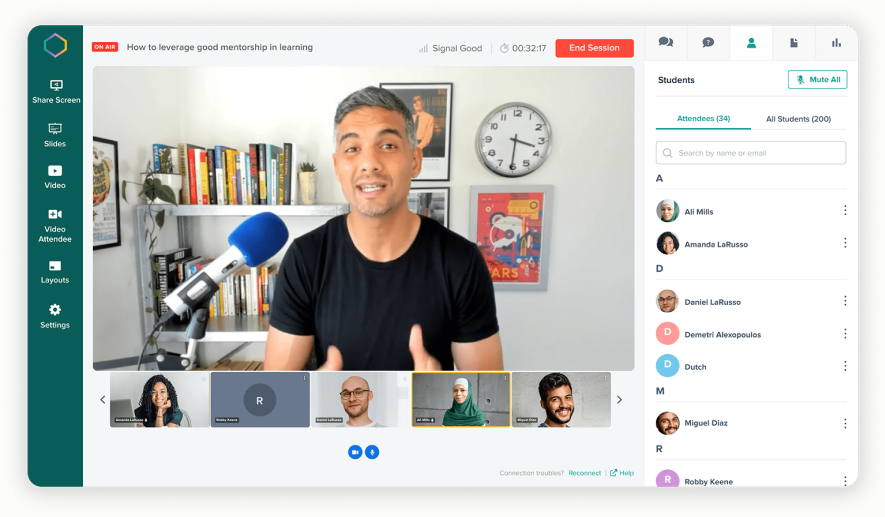
Let’s be honest: students (and adults!) have limited attention spans.
A block of text on a slide will send anyone straight to social media instead of paying attention. Use visuals liberally and consistently. Branded infographics, videos, or even just well-designed diagrams in your brand colors can make a huge difference.
If you’re an ed-tech company, maybe your brand is playful – leverage that with fun graphics or even memes that align with your identity to illustrate points.
If you’re a professional training firm with a slick corporate brand, perhaps incorporate short video testimonials from past trainees to break up the lecture – still on-brand, and adds social proof.
Interactivity is your friend: pose quiz questions (many webinar platforms allow quizzes or polls) to keep learners on their toes. Remember, 81% of webinars include Q&A sessions – in education webinars, this is prime time for reinforcing learning and showcasing your expertise by thoughtfully answering questions.
It also makes your webinar feel like a two-way classroom rather than a one-way speech.
- Branding for Multiple Stakeholders:
In education, your audience can vary widely – e.g., a college might hold a webinar for prospective students (branding to attract and impress them), and another for alumni (branding to reinforce pride and legacy).
Be clear on who the audience is and tweak the branding emphasis. Prospects might need more of the flashy success stats and school spirit visuals, whereas alumni might respond to nostalgic branding elements (like old campus photos in the slides).
The content and branding should always reflect the institution’s core values, but it can highlight different facets for different groups.
One consistent practice: always use your institution’s official templates and colors. Schools usually have strict brand guidelines – follow them, whether it’s the exact shade of blue or the proper logo placement.
This not only maintains professionalism but also legally protects trademarks etc. (Don’t accidentally use last decade’s logo or an off-brand font that some well-meaning faculty threw in!).
- Accessibility and Inclusion:
Many education organizations have a mission of inclusivity. Branding your webinar to be accessible (in terms of providing captions, using readable fonts, high-contrast slides for those with visual impairments, etc.) isn’t just good practice – it reflects on your brand’s values.
An ed webinar that’s inaccessible would contradict a message of inclusivity. So ensure your branding choices (colors, layouts) are accessible and that you perhaps state your commitment to that.
Even a brief spoken mention of your accessibility features reinforces a positive brand image.
Coursera’s partner-university webinars are a useful education-sector example: each session opens with the same branded intro sequence regardless of which university or instructor is presenting, which keeps Coursera’s identity consistent even while spotlighting a different academic brand each time, a good template for anyone co-branding educational content.
It can be as simple as: “We’ve made this session accessible with live captions – because everyone should be able to learn,” which reinforces a positive brand image.
Each industry has nuances, but notice a common thread: know your audience and align the webinar’s branding to their expectations and your brand’s promise. Now that we’ve explored the challenges, let’s get into solutions. How do you actually execute a well-branded webinar?
Grab a coffee, because we’re diving into best practices next!
Best Practices for a Well-Branded Webinar
Branding your webinar might sound like a juggling act – visuals, messaging, engagement, all at once. But a few key best practices can keep you on track. Consider these webinar branding tips as your checklist:
- Develop Clear Brand Guidelines for Webinars:
Don’t wing it each time. If your company already has brand guidelines (logo usage, color codes, fonts, tone-of-voice, etc.), extend those to webinars specifically.
Define things like slide template design, preferred imagery style (e.g., illustrations vs. stock photos), and even guidelines for presenters (should they use a friendly, conversational tone or stick to the formal script?).
Having a guide ensures a consistent experience across all webinars. It also saves time – anyone building a webinar deck or landing page can follow the blueprint.
Pro Tip: Include examples in your guide of a branded slide, a branded webinar platform background, and the email invite template so there’s no confusion. Consistency = professionalism, and it makes multi-presenter webinars feel cohesive.
- Use Branded Templates for Slides & Materials:
Create a master slide deck template that is pre-branded with your logo, colors, and fonts in place. Include layouts for title slides, content slides, Q&A sections, etc., all in line with your brand look.
This tackles the visual consistency pain point – presenters won’t be randomly changing font sizes or colors if the template is set.
Similarly, have branded templates for your webinar registration page and emails. The first touchpoint someone has is often the signup landing page or invite email, so make sure it looks like your company (and not a generic webinar service).
Many webinar platforms allow you to customize these registration pages – use that feature!
Also, branded handouts or resources (like a PDF of the slide deck with your logo/header) reinforce your identity, and attendees appreciate takeaways (viewers love being able to download slides and resources, so why not make those assets good-looking and brand-consistent?).
- Align Your Messaging and Content with Brand Voice:
This is huge and often overlooked. Your webinar’s content is part of your branding. If your brand is known for a no-nonsense, data-driven approach, a webinar full of fluffy motivational quotes will feel off.
Conversely, if your brand is fun and irreverent, don’t drown your webinar in corporate-speak. Carry your brand’s voice into the script and presentation style. For example, Neil Patel (THE marketing guru known for his approachable style) often uses simple language and personal anecdotes in webinars – it fits his brand.
You should do the equivalent.
This also means choosing webinar topics that make sense for your brand. A company branded around innovation should present forward-looking, trend-focused webinars, not last year’s news.
Everything from the webinar title to the examples you share should feel like it’s coming from your brand’s perspective. This alignment strengthens your brand identity and makes your content more credible.
One litmus test: if you removed your logo and name, would an attendee still maybe guess it’s your company’s webinar? If yes, you’ve nailed brand voice alignment.
- Prioritize Visual Consistency (Logos, Colors, Fonts):
We touched on templates, but it bears repeating: keep the visuals cohesive. Use your logo appropriately – usually a small one on each slide or a big one on the opening/closing slides.
Stick to your brand color palette for backgrounds, text, and accents. Same with fonts – if your brand font isn’t web-safe or available, find a close substitute and use it throughout.
This consistent design matters: brand consistency across touchpoints has been linked to meaningful revenue gains in industry surveys, thanks to the trust and recognition it builds, though the exact lift varies by study.
It’s also just less distracting; attendees focus on your message, not the sudden appearance of neon green Comic Sans text.
Consistency extends to the presenters’ environment, too: if on camera, perhaps have them use a branded virtual background or sit in front of something that subtly shows the brand (even a company poster on the wall). Small touches add up to a unified look.
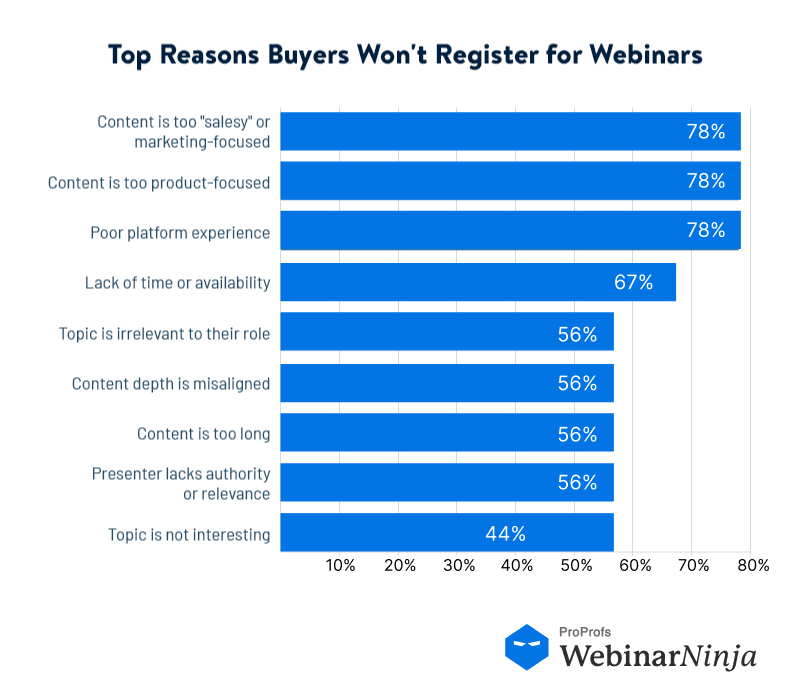
Against this, almost 78% of probable attendees won’t register for a webinar if the platform experience is poor.
- Engage Through Interactive Elements (Polls, Q&A, etc.):
A well-branded webinar isn’t just pretty to look at – it’s interactive and engaging. Branded engagement means designing interactions that feel on-brand.
For example, if you’re a playful brand, maybe your poll questions have a lighthearted tone. If you’re an academic brand, maybe your polls quiz the audience on key facts (pop quiz style).
Use polls, chat, Q&A, quizzes – whatever fits – to get people participating. It not only fights off audience fatigue, but it reinforces your brand’s values (like being responsive, community-building, etc.).
The data doesn’t lie: webinars with interactive elements see higher engagement and longer watch times. Yet many hosts don’t take advantage.
Also, have a plan for Q&A: if you brand yourself as very helpful, make sure to allocate ample time to answer questions thoughtfully.
Pro Tip: Seed a few questions if needed (“one question we often get is…”) to encourage others to contribute.
- Ensure Your Webinar Platform Reflects Your Brand:
If possible, choose a platform or software that lets you customize the experience. Some platforms allow you to use your own domain for registration pages, remove their logo from the webinar window, and use your brand colors in the interface.
This “white-labeling” can make a huge difference, especially for professional audiences.
Using a platform that supports custom branding ensures every element, logos, colors, fonts, layouts, reflects your brand identity; if your webinars look off-brand, you risk credibility.
With my experience, I can tell you that using a platform that supports custom branding ensures every element – logos, colors, fonts, layouts – reflects your brand identity, and if your webinars look off-brand, you risk credibility.
Also, consider technical settings: for instance, can you upload a branded holding slide or video for when attendees join and wait? Can you brand the webinar reminder emails? Explore these features in whatever tool you use.
Here’s a quick look at how a few popular platforms stack up on branding flexibility, so you know what to look for:
- WebinarNinja: custom-domain registration pages, branded email sequences, and white-labeled event rooms with no third-party logo.
- Zoom Webinars: branded registration pages and waiting rooms, though the core interface still carries Zoom’s own branding unless you’re on a higher-tier plan.
- Demio: custom colors and branded registration pages, with a simplified interface that limits some deeper visual customization.
- Riverside: strong brand-kit support for recording and studio-style webinars, particularly useful if you’re producing polished, pre-recorded content.
Whatever you choose, the questions to ask are the same: can you use your own domain, remove the platform’s own branding, and customize the registration page, waiting room, and follow-up emails all in one place?
- Practice What You’ll Preach:
Train your presenters or hosts on your brand guidelines. A charismatic presenter is great, but not if they start deviating wildly from your brand’s tone (imagine a calm, conservative brand’s rep suddenly cracking edgy jokes – yikes).
Include in your webinar prep some talking points that tie back to your brand’s messaging.
For instance, if your company’s mission is a core part of your branding, make sure the host reiterates that mission in the webinar introduction or conclusion. It should feel natural, not forced, like a brief, genuine nod to your company’s mission tied to the day’s topic.
This kind of consistency in what you say and how you say it further cements your brand in the audience’s mind.
By checking off these best practices, you set yourself up for a webinar that not only looks sharply branded but also feels like an extension of your broader marketing.
But branding doesn’t stop at visuals and messaging – it also influences how you engage and retain your audience during the webinar.
After all, even the prettiest slides won’t help if viewers drop off 10 minutes in. So, let’s turn to some engagement strategies that keep eyeballs on the screen and your brand on their mind.
Branding Your Webinar from Registration to Replay
Here’s something a lot of hosts miss: your webinar’s branding starts long before you hit “go live,” and it doesn’t end when you say goodbye. Attendees form an impression of your brand at every single touchpoint, so let’s walk through the full journey.
The Registration Page
This is often the very first thing a prospective attendee sees of your brand, before they’ve even decided to show up. A generic, unbranded signup form (or worse, one that looks like a totally different company’s page) creates friction before you’ve said a word. Use your logo, your colors, and your actual voice in the copy, not just a stock template with your name dropped in.
The Invitation and Reminder Emails
Every email leading up to the event, the confirmation, the reminders, is a branding touchpoint too. If your webinar platform sends its own generic reminder emails instead of yours, you’re handing off your brand identity right before the moment attendees need to remember who you are. Make sure these emails carry your visual identity and voice just as consistently as your slides do.
The Live Event Itself
This is the part most hosts already think about: slides, virtual backgrounds, lower thirds, the presenter’s tone. (We covered this in detail above.)
The Replay and Repurposed Content
And it doesn’t stop when the “live” light goes off. A huge share of webinar viewing now happens on-demand, so your replay page, your follow-up email, and anything you repurpose from the session (clips, blog posts, social snippets) all need to carry the same branding as the live event. An unbranded replay hosted on a generic link undoes a lot of the work you put into the live version.
Treat these four touchpoints as one continuous experience, not four separate tasks, and your webinar branding will feel far more intentional from the very first click to the very last one.
How to Keep Your Webinar Attendees Engaged (and Your Brand Remembered)
So you’ve attracted attendees to your beautifully branded webinar, now, how do you keep them glued to their seats (or at least their browser tabs)?
More importantly, how do you ensure they walk away with your brand imprinted in their memory? Here are some battle-tested engagement and retention strategies:
1. Start Strong with an On-Brand Hook
The first few minutes are critical. Instead of diving straight into a dry agenda slide, open with something that grabs attention and reflects your brand’s personality: a quick story, a bold claim, or a myth you’re about to bust. The idea is to jolt the audience awake and promise value, fast.
2. Use Storytelling and Real Examples
Humans remember narratives far better than isolated facts. Weave in stories that illustrate your points and feature your brand as a problem-solver or trusted guide.
For instance, an HR software company might tell a story: “Meet Alice, an HR manager who was drowning in paperwork,” and then show how a solution saved the day. Make sure the story matches your brand’s tone, uplifting if you’re a positive brand, cautionary if you’re positioning as a fixer of serious problems.
3. Keep Attendees Active and Personally Engaged Throughout
Don’t wait until the end for Q&A, and don’t treat engagement as a single moment. Sprinkle interactive elements like polls, chat prompts, and questions throughout the session, not just at the start.
A poll in the first 10 minutes turns passive viewers into active participants, and a quick recap halfway through (“So far, we’ve covered three key strategies, and up next, the trends shaping 2026”) re-focuses anyone whose attention drifted while teasing what’s coming.
Where you can, personalize the experience too. If you know attendees’ industries or roles, tailor comments accordingly (“If you’re in healthcare like some of you are, you might be thinking…”). Just keep it light, using individual names in a large webinar can feel invasive rather than attentive. Combined, these small touches make attendees feel like participants in a conversation rather than an audience watching a broadcast, and that feeling is what makes your brand memorable afterward.
4. Vary the Format, But Stay Branded
Alternate between slides, live camera segments, and screen-share demos to stave off visual fatigue. Just ensure each format stays on-brand: a subtle logo overlay during a webcam segment, a branded demo environment during a screen share. Consistency, even during variety, is what keeps your brand present no matter what’s on screen.
5. Keep It Tight
Attendee preferences skew shorter than most hosts assume, so if you’ve scheduled an hour, aim to wrap content by 45-50 minutes and leave the rest for questions.
A brisk, well-paced session keeps people from checking out before they catch your closing message. If you notice consistent drop-off around the 30-minute mark in past sessions, consider a shorter format or a multi-part series instead of one long event, which also builds brand familiarity over time.
6. Reinforce Branding During Transitions
Every time you move between sections or speakers, flash your branding, a quick “Q&A Time” slide in your brand style, or a short logo sting. It’s a subtle, repeated reminder of whose webinar attendees are in, and it costs almost nothing to build once.
7. Lead with Value, Not a Pitch
All the branding in the world won’t save a webinar that’s 30 minutes of fluff. Attendees who get real value from a session are far more likely to take the next step afterward, whether that’s requesting a demo, downloading resources, or sharing it with colleagues.
Focus on actionable insights and useful how-tos rather than a thinly veiled sales pitch; ironically, the less you oversell, the more action you’ll see once the webinar ends.
8. Close with a Memorable Bang
Summarize your key takeaways briefly, tie them back to your brand’s mission if it fits naturally, and end with one clear call-to-action. Keep the closing slide simple: your logo, a short link, and one instruction. Consider ending on a human note too, a genuine on-camera thank-you goes further than a generic sign-off slide.
Engagement and branding reinforce each other here: the more engaged an attendee is, the more they absorb your branding, and the more your branding resonates, the more engaged they stay.
Riding the Latest Webinar Trends (and Leveraging Them for Your Brand)
Webinars today aren’t the same as webinars in 2015.
The medium is evolving, and savvy brands are evolving with it. By tapping into the latest trends, you can make your webinars more impactful and further reinforce your branding as modern and audience-centric.
Here are some hot trends and how to leverage them:
1. On-Demand Webinars & Always-On Content
One of the biggest shifts is that a huge portion of webinar engagement now happens after the live event. In fact, 63% of webinar views are on-demand (watching the replay), and nearly half of viewers only watch the recording, not the live session.
This means your webinar branding needs to live beyond the live hour. Make sure the recording is just as branded – from the opening to the sign-off.
Consider adding a brief intro or outro on your webinar recordings specifically for on-demand viewers (“Hi there, thanks for watching the replay – we’ll skip the housekeeping we gave live attendees and dive right into the content…”).
Also, host the recording on a branded page (not, say, a generic YouTube link with ads for other companies). By treating on-demand viewers with the same branded experience, you capitalize on that 63%.
Some companies even create “evergreen” webinars – recorded webinars that feel live – to continuously generate leads. If you do this, keep everything branded and up-to-date (nothing worse than an “upcoming trends for this year” webinar still circulating today under your brand).
Bottom line: the trend is flexibility and convenience, so embrace on-demand, and brand the heck out of it.
2. Hybrid Events & Virtual Summits
Post-2020, many events went virtual, and now we’re seeing a blend – the hybrid webinar/event where some people attend in-person and others online.
If you host hybrid events, ensure brand consistency across both experiences.
For example, your physical stage and slides should match the graphics seen by virtual attendees.
And acknowledge both audiences to make everyone feel included (“Welcome to those of you here in New York and our viewers tuning in from around the world!”).
34% of event organizers plan to add hybrid elements to their events mix going forward.
For your brand, this is a chance to expand reach. Maybe you run a small in-person seminar but stream it as a webinar globally – you’ve now multiplied your branded impressions.
Just be mindful of technical quality; nothing hurts engagement like a bad stream. Test your AV thoroughly and perhaps have a moderator specifically for online questions so they’re not neglected.
By mastering hybrid, you show your brand as accessible and modern, meeting people wherever they are.
3. AI and Personalization
Platforms are using AI in webinars in various ways, from smart matchmaking of content to attendees, to AI chatbots answering simple questions, to AI transcribing and translating in real-time.
As a trend, AI can help make webinars more personalized and accessible. For example, AI might analyze a registrant’s behavior and recommend certain webinars or even tailor the content (in automated on-demand webinars, maybe skipping sections the user already knows).
Just be sure any AI use still feels human-controlled and doesn’t compromise quality. Also, AI can help in post-webinar repurposing – automatically creating short video clips or summary blogs.
This means one webinar can become many pieces of content.
That’s a trend of its own: repurpose your webinar into blogs, infographics, YouTube snippets, podcasts, etc. – each repurposing is another chance for branded content circulating out in the world.
4. Guest Speakers and Influencers
Webinars are increasingly featuring guest experts or industry influencers to draw crowds and add credibility. Having a well-known guest can boost attendance and engagement, and it reflects well on your brand (“Wow, they got that expert to speak with them!”).
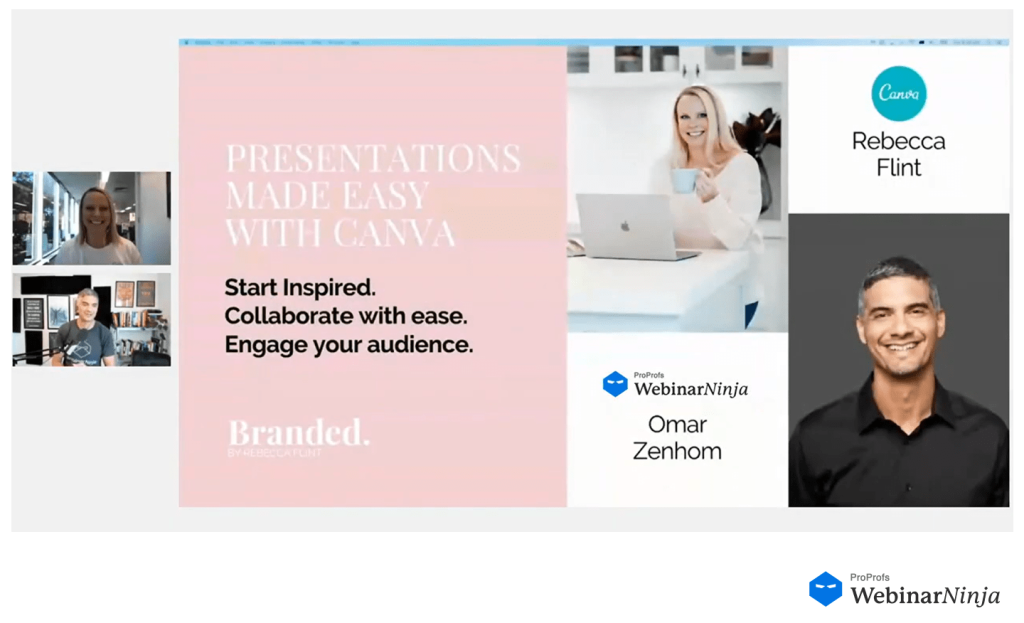
When you do this, co-brand the experience – promote both your brand and the guest’s brand in the marketing.
During the webinar, do a proper intro that associates the expert’s credibility with your brand (“We’re thrilled to host Dr. Smith – at [Your Company], we value expert insights and Dr. Smith is the foremost expert in….”).
According to industry trends, guest speakers will continue to be a big draw, increasing webinar credibility and excitement.
Guest speakers are one thing, but sponsored or co-branded webinars raise a slightly different question: whose brand takes the lead? A few ground rules keep this from turning into a logo pile-up. Set a clear hierarchy: your logo (or the host’s) stays primary, with sponsor or partner logos placed smaller or shown only during relevant moments, like a sponsor’s product segment.
Design a slightly more neutral slide template for co-branded sessions, since a template built for solo use, heavy on your own colors and iconography, can crowd out a partner’s identity awkwardly. And get sign-off from your co-host or sponsor on the final slides and graphics before the event, so nobody’s surprised by how their brand is represented alongside yours.
We’ve covered a lot of ground! Let’s wrap up with a final pep talk on why all this effort is worth it.
Your Brand, Center Stage – Time to Shine
Webinar branding might have a lot of moving parts, but here’s the payoff: when you get it right, the results can be transformational.
To sum it up, webinar branding is about intentionally designing an experience – from the moment someone sees your webinar invite to the follow-up email after it’s over – that consistently communicates who you are and why you matter.
It’s about sweating the details so that the colors, words, and interactions all tell a cohesive story. It’s about addressing those pain points (no more chaotic slides or dull monologues!) and turning them into moments that impress.
Yes, it takes effort and coordination, but the investment pays off in trust, recall, and ultimately, business results.
Also, don’t forget to use good webinar software. Many good webinar software like WebinarNinja offer extensive white-labeling features, along with branding and promotion options, to ensure absolute brand credibility. I have tried this tool, and its customizable registration and thank-you pages create a great impression.
Here’s a quick video to help you know if WebinarNinja is the apt webinar platform for you:
It’s time to take the virtual stage and shine. Your brand deserves the spotlight – make sure your webinars put it front and center. Good luck, and happy webinar-ing! 🚀
Frequently Asked Questions
What are some real-world examples of well-branded webinars?
The best examples share a few traits: consistent colors and fonts across every slide, a presenter who sticks to the brand's tone whether that's playful or formal, and a registration page and follow-up email that match the live event. Companies with strong content marketing programs, in SaaS, finance, and education alike, tend to treat their webinar series like a recurring show with a consistent look, rather than a one-off slide deck.
How much does it typically cost to brand a webinar professionally?
For most companies, branding a webinar costs little to nothing extra beyond what you're already spending on webinar software and a designer's time. Building a reusable slide template, a branded registration page, and branded email sequences is usually a one-time setup cost of a few hours to a few days, and platforms like WebinarNinja include registration page and email customization in standard plans, so you're not paying separately for a "branding" feature.
What's the difference between a "branded" webinar and a "white-label" webinar platform?
"Branded" refers to the content and design choices you make, your logo, colors, voice, and templates. "White-label" refers to the platform itself removing its own branding so only yours shows. You need both working together: a white-label platform gives you the blank canvas, and your branding fills it in.
Can I use a webinar platform's default template and still call my webinar "branded"?
Technically, no, not if it's unmodified. A default template with just your logo dropped in still carries the platform's fonts, layout, and visual style rather than yours. It takes only a little extra effort to swap in your own colors, fonts, and imagery, and that's the difference between a webinar that looks like "a webinar" and one that looks like your company.
Do attendees actually notice inconsistent branding, or does it not matter much?
They notice more than most hosts assume, even if they couldn't articulate exactly why something felt off. Mismatched fonts, an unbranded registration page next to a heavily branded slide deck, or a presenter whose tone doesn't match the company's usual voice all create a subtle sense that something isn't quite buttoned up, and that impression carries into how much attendees trust what's being presented.
How long does it take to put together webinar brand guidelines from scratch?
If your company already has general brand guidelines (logo usage, color codes, fonts), extending them to webinars specifically is usually a half-day to a day of work: deciding on slide layouts, an imagery style, and a few presenter tone guidelines. Building guidelines from nothing takes longer, since you're also defining the core brand elements at the same time.
Should every presenter in my company follow the exact same branding rules?
The visual elements, logo, colors, slide templates, should stay consistent across every presenter. Tone of voice can flex slightly person to person, since forcing every presenter into an identical speaking style tends to feel stiff, but the underlying brand values and messaging should stay aligned no matter who's presenting.
Can a small business or solo creator realistically brand their webinars without a design team?
Yes. The essentials, a consistent slide template, a branded registration page, and a presenter who sticks to a clear tone, don't require a designer. Most webinar platforms, including WebinarNinja, let you set your logo and colors once and reuse them automatically across future webinars, so the setup work only has to happen a single time.
What design tools can I use to create branded webinar slides if I don't have Photoshop or an agency?
Free or low-cost tools like Canva, Google Slides, or Microsoft PowerPoint are enough to build a solid branded template, especially if you already know your brand's colors, fonts, and logo files. The goal isn't elaborate design, it's consistency, and a simple, clean template used every time beats an elaborate one used inconsistently.
How often should I refresh or update my webinar branding?
Update it whenever your broader company branding changes (a new logo, a rebrand, a new product focus), and otherwise leave a working template alone. Constantly tweaking your webinar visuals actually works against the recognition and familiarity that consistent branding is supposed to build.
What's the biggest webinar branding mistake companies make?
Treating each webinar as a one-off event instead of part of a consistent series. Without a reusable template and a documented set of guidelines, every presenter or marketing hire ends up making their own visual choices, and the brand experience drifts from webinar to webinar until there's no real consistency left.
Can AI tools help with webinar branding today?
Yes, in a few practical ways: AI can help generate on-brand slide layouts faster, transcribe and repurpose a branded webinar into blog posts or social clips that carry the same messaging, and personalize follow-up emails while keeping the same branded template. It's a time-saver for execution, not a replacement for deciding what your brand should actually look and sound like.
Want to host a webinar for free?
Use WebinarNinja to teach, improve marketing, and grow your sales.