After two decades of running webinar programs, I have made every mistake in this guide personally.
I have sent the same “great seeing you” email to people who never showed up. I have watched a poll’s worth of gold-plated insight sit untouched in a dashboard for months. Consider this guide the shortcut around the scenic route I took.
Webinar data is not glamorous. It is rows of timestamps, click counts, and poll answers. But it is also the closest thing marketing has to a lie detector test, because it tells you what people actually did, not what they claimed they were interested in on a form.
This guide breaks down exactly what to track, how to segment it, and how to turn it into marketing that feels like it was written for one person, because in a very real sense, it was.
What Counts as Webinar Data (And What Doesn’t)?
Webinar data is every piece of information your webinar platform collects about a person, from the moment they register until long after the session closes. It is not one number sitting on a dashboard. It is a stack of five different signals, and here is the uncomfortable part: most marketers only ever look at the bottom one.
The Five Layers of Webinar Data
Not every number your platform hands you deserves a seat at the personalization table. Some of it is genuinely useful. Some of it is just noise wearing a nice chart.
Here is the honest breakdown, ranked from least to most useful.
| Data Layer | What It Captures | What It Actually Tells You |
| Registration | Name, email, company, job title, custom fields | Who is curious. Nothing about how curious. |
| Attendance | Showed up or didn’t | Who blocked calendar time for you, which is a bigger deal than it sounds |
| Engagement | Poll answers, chat, Q&A questions | What specific problem is on their mind right now |
| Watch behavior | Minutes watched, drop-off point, replay activity | How close they got to your best material before losing interest |
| Post-event action | Offer clicks, replay requests, calls booked | The closest thing to a raised hand you will ever get |
A Quick Gut Check
Before you move on, be honest with yourself about which layer your follow-up emails are actually built on.
- If your strategy stops at “sent to everyone who registered,” you are using layer one out of five.
- Layers two through five are where personalization actually lives.
- Most teams collect all five layers and act on one. That gap is the entire opportunity sitting in this guide.
This matters most if webinars are the engine behind your lead generation program, since every layer you ignore is a segment of that engine quietly running on autopilot.
Here’s a quick video to help you understand things better:
Start Tracking All 5 Layers of Webinar Data, Not Just Registrations
Why Webinar Data Is the Backbone of a Marketing Personalization Strategy
Here is a fair question. Why build an entire strategy around webinar data specifically, instead of just using whatever your CRM already has?
Let’s answer that with numbers first, then with common sense.
The Proof Is in the Data
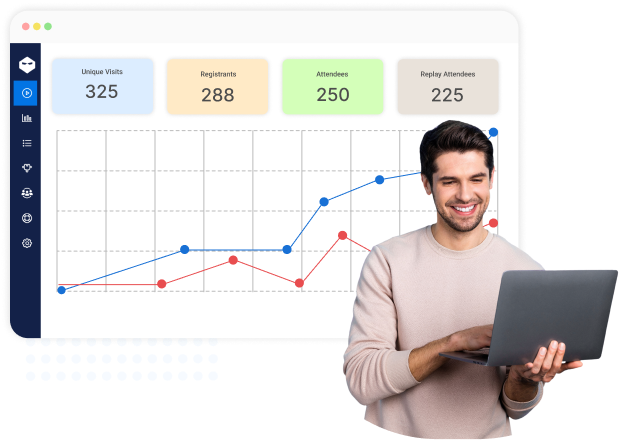
Segmented email campaigns consistently produce noticeably higher opens and clicks than unsegmented ones, according to HubSpot’s own analysis of campaign performance. That is not a small edge. It is the difference between an email that gets read and one that gets deleted on sight.
Webinar data is some of the richest segmentation material a marketer will ever get their hands on, and with a tool like WebinarNinja, it sits there for free the moment your event ends.
Why Webinar Data Beats Other Data Sources
A typical website visit tells you almost nothing about intent. Someone lands on a pricing page, stares at it for eight seconds, and leaves. Was that curiosity, confusion, or a wrong click? Nobody knows.
A webinar attendee, on the other hand, hands you real signals. A poll answer. A watch duration. Sometimes, a direct question typed in plain English about their exact problem.
That is a gift, not a data point, and treating it like a data point is how most of its value gets left on the table.
Who Actually Uses This
The use cases stack up fast, and they rarely stay contained to one team.
- Demand generation teams use it to decide who gets called first.
- Sales teams use it to skip the cold small talk and open with something specific.
- Enablement teams use it to train and communicate with new hires, since the same behavioral logic that works on prospects works just as well internally.
None of this works without solid tracking sitting underneath it, and this is where the platform choice starts to matter. A proper webinar reports setup is what turns “we ran a webinar” into “we know exactly who to talk to next, and why.”
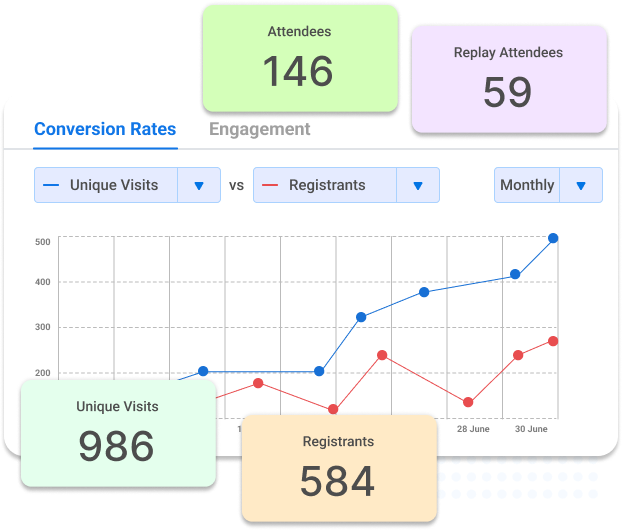
It also helps that modern webinar software has gotten smarter about doing the boring math for you. Some platforms, WebinarNinja included, now use built-in intelligence to flag which attendees engaged the most, so you are not squinting at a spreadsheet trying to guess who is worth a phone call.
Translation: the data is sitting there, the tooling exists, and most of your competitors have not gotten around to using either one properly.
That last part is the good news. Use it.
How to Personalize Marketing With Webinar Data: A Step-by-Step Framework
Personalization built on webinar data is not really a copywriting exercise, even though it looks like one from the outside. It is a plumbing exercise, and the clever copy only comes after the pipes are connected properly.
Here is the sequence, in the order it actually needs to happen, with the detail that usually gets skipped in shorter guides.
Step 1: Define Your Segments Before the Webinar, Not After
Decide which data layers will split your list. Usually, that means attendance, watch time, and the answer to one well-chosen poll question.
Build these into your registration form and platform settings ahead of time. Trying to reconstruct this after the event rarely works cleanly, and you will spend your Monday morning wishing you had planned ahead.
- Pick two or three segmentation variables at most. More than that, your follow-up logic collapses under its own weight.
- Write the poll question with the follow-up email already in mind. If you cannot picture the email each answer should lead to, rewrite the question until you can.
Step 2: Connect the Tagging to Your Email or CRM Tool
Your webinar platform’s data is only useful when it lives where your emails are actually sent from. This step is the one most marketers underestimate, and it is also the one that eliminates the most manual work once it is set up correctly.
- Confirm attendance status flows automatically as a tag, not a manual export you have to remember to run.
- Confirm poll answers map to individual contact records, not just a pretty aggregate chart nobody acts on.
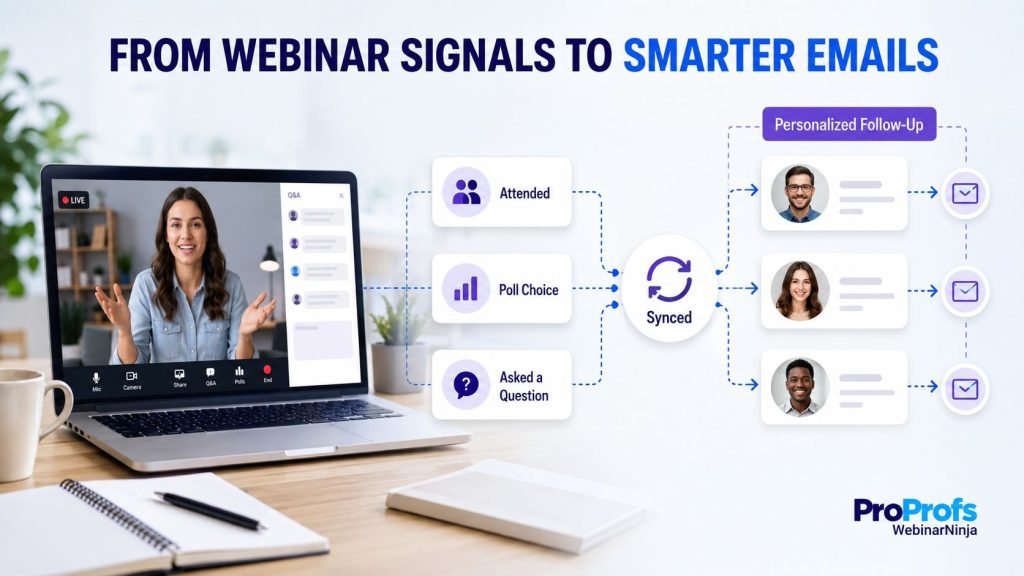
If you are already using a tool like WebinarNinja, you get built-in webinar sequences, from webinar invitation to follow-up.
Step 3: Run the Event and Let the Data Collect Itself
Whether you are hosting a live session or running a recurring webinar, the platform should quietly log attendance, watch time, and every click without anyone lifting a finger mid-session.
Your only job during the event itself is to run a good session. The tracking should be invisible.
Step 4: Trigger Distinct Follow-Up Sequences Within Hours
Interest generated during a live session decays fast, often within a single afternoon. A prospect who asked a sharp question and gets a same-day reply reads that as attentiveness. The same reply two days later reads as automation, even if a real human wrote it.
- No-shows get the replay plus a short summary, never an apology for missing it.
- Attendees who stayed for the offer get a direct, objection-handling message.
- Attendees who left early receive a re-engagement message tailored to what they actually saw before they clicked away.
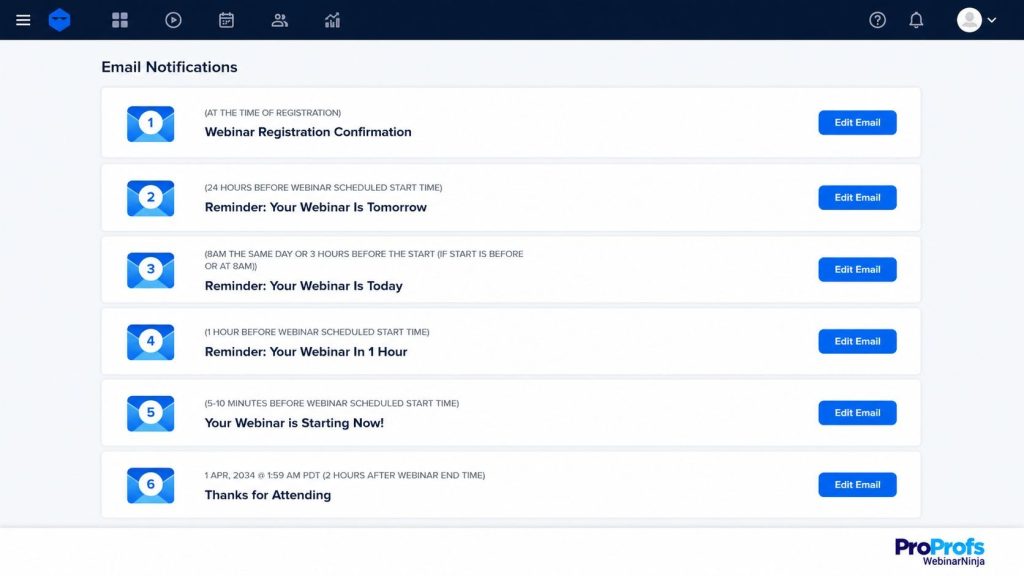
This is also where AI-assisted drafting earns its keep. A good webinar platform can pull the specific poll answer or question someone raised and use it to draft the first version of that follow-up automatically, so you are editing a relevant email instead of staring at a blank page.
Step 5: Review What Converted, Then Refine the Next Event
This is the step almost nobody does, which is exactly why it compounds the most over time. Businesses that credit personalization with real gains in lead generation are usually the ones treating every webinar as a data point for the next one, not a one-off event they never revisit.
A solid webinar management rhythm builds this review step directly into the calendar, the same way you would schedule the webinar itself. Skip it, and you are running the same experiment forever without ever reading the results.
Sounds good?
Now, here’s a quick video that will help you understand how to market your webinars like a pro:
Build Your Segmentation Framework Before Your Next Webinar Goes Live
Webinar Data for Marketing Personalization in Practice: Tactics That Move the Needle
The framework above is the skeleton. Here is where it turns into actual email copy, ad audiences, and sales calls.
The Tactics at a Glance
| Tactic | Data It Uses | What You Send |
| Attendance-based tracks | Attended vs. no-show | Different first line, different offer, different urgency |
| Watch-time segmentation | Minutes watched, drop-off point | Re-engagement for early exits, deeper content for finishers |
| Poll-driven branching | Which option they picked | A follow-up built around their stated challenge, not a generic recap |
| Offer-click retargeting | Clicked but didn’t convert | Friction-removal messaging, addressing the one objection that stalls people |
| Engagement-based lead scoring | Composite of attendance, clicks, questions | A prioritized list for sales, instead of alphabetical chaos |
A closer look at the tactics that consistently punch above their weight.
Attendance-Based Tracks
Split your list into at least three buckets: attended and engaged, attended and quiet, and never showed. Each bucket gets a different opening line, because nobody wants “thanks for attending” sitting in their inbox when they didn’t.
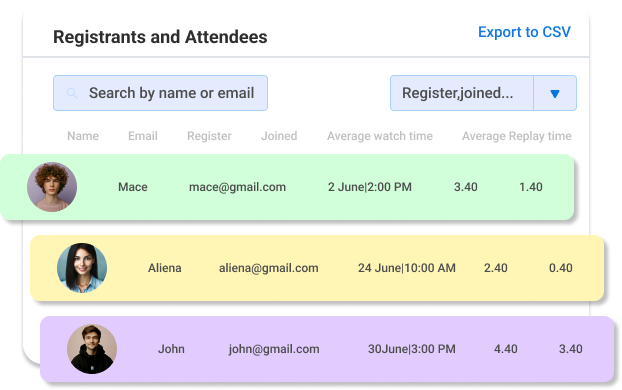
This one is simple to set up and almost always the first thing I recommend fixing, because it usually takes an afternoon and produces results within the very next campaign.
Watch-Time and Offer-Click Tactics
For automated or evergreen sessions, the drop-off point matters more than the attendance checkbox ever could. Someone who watched eight minutes is a different lead than someone who watched thirty-five, even though your dashboard might file them both under “attended.”
Anyone who clicked your offer but did not convert deserves a completely different message too, one built around removing whatever friction stopped them, rather than a generic “still interested?” nudge that restates the same offer they already saw.
Engagement-Based Lead Scoring
Give your sales team a simple point system instead of a flat spreadsheet sorted alphabetically. Attended: two points. Asked a question: three. Clicked the offer: five.
This is the backbone of any serious webinar lead scoring system, and it takes an afternoon to build, not a data science degree.
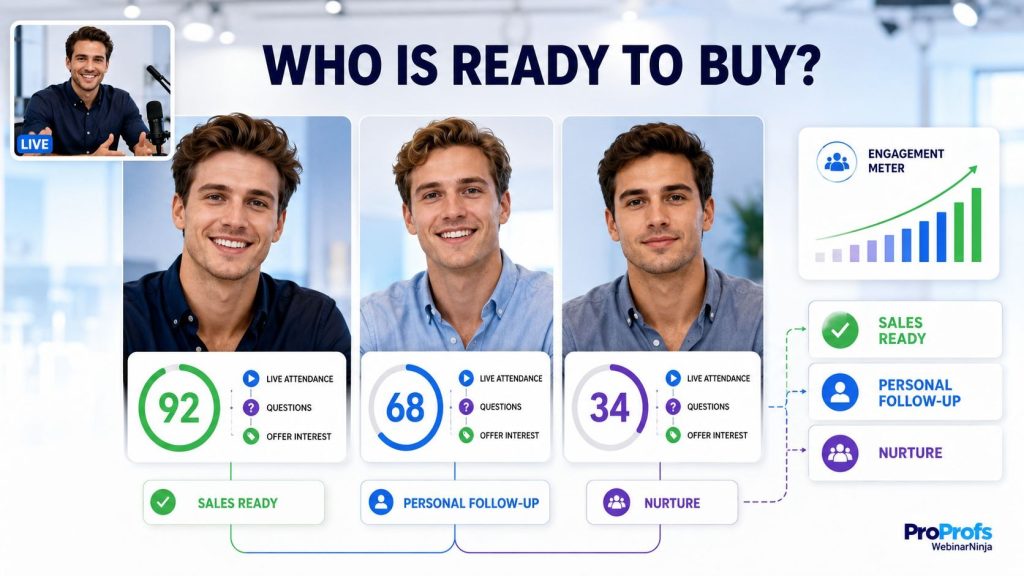
Most marketers still admit they cannot produce as much personalized content as their audience expects, which is exactly why a scored, prioritized list beats a generic blast even when your copywriting time is limited.
If your webinars exist to close deals rather than just fill a funnel, route your highest-scored segment straight into a sequence built to grow sales, not a generic newsletter track that treats a hot lead exactly like a cold one.
Score Every Attendee by Watch Time, Clicks, and Questions Asked
Mistakes That Waste Your Webinar Data
I have watched smart marketing teams sit on a goldmine and mine gravel instead. Here is the pattern, in order of how often I see it.
- Treating registration as intent. Half your registrants will not show up, so segment by attendance before you segment by anything else.
- Ignoring no-shows entirely. They are often your warmest not-yet-converted leads. Lead with the replay and one sharp takeaway; skip the apology.
- Collecting engagement data and never using it. A poll breakdown sitting in a dashboard changes nothing on its own. Route every answer into a tag that changes the next email.
- Personalizing the greeting instead of the argument. A first name is not a strategy. Change what the email argues, not just how it says hello.
- Sending behavioral triggers late. Interest decays within hours, not days. Automate the trigger so it fires the same day, ideally at the same hour.
- Building segmentation logic after the webinar ends. This shows up most in evergreen programs, where a properly configured on-demand webinar software setup should be handling segmentation automatically in the background, not waiting for someone to remember to check.
Fix even two of these and the upside is not hypothetical. Research from McKinsey pegs the realistic revenue lift from doing personalization well at 10 to 15 percent, with faster-growing companies capturing meaningfully more than that.
Do You Need a Data Team to Use Webinar Data for Marketing Personalization?
Short answer: no. Slightly longer answer: also no, but let me explain why without being glib about it.
The Old Way vs. The Better Way
- Tagging attendees vs. non-attendees. The old way was a manual export and a manual cross-reference. The better way is native platform tagging synced straight into your email tool.
- Watch-time segmentation. The old way was spreadsheet formulas and hope. The better way is built-in drop-off reporting per contact.
- Scoring leads. The old way was a gut feeling and a coffee. The better way is an automatic point system based on real behavior.
- Drafting follow-up copy. The old way was a blank page and a deadline. The better way is a first draft generated from what actually happened in the session, using AI that reads the transcript, the poll answers, and the questions asked, and then writes accordingly.
A well-run webinar marketing program increasingly leans on the platform to handle this heavy lifting, freeing the marketer to focus on judgment calls instead of formulas. WebinarNinja, for instance, builds a fair amount of this scoring and drafting work directly into its dashboard, which is a nice way of saying it does the boring part so you don’t have to.
If you host recurring sessions through automated webinars, this matters even more, since evergreen programs generate a continuous stream of watch-time data with nobody watching the dashboard in real time.
Three Questions to Ask Before You Choose a Platform
- Does it tag attendees separately from non-attendees automatically?
- Does it report watch time and drop-off at the individual level, not just in an aggregate chart?
- Does it help draft or prioritize follow-up based on what actually happened, ideally using some form of built-in AI to do the first pass?
Three yeses, and you have removed almost every manual step described in this entire guide.
Put Your Webinar Data to Work and Start Seeing the Revenue Lift
The Bottom Line on Webinar Data and Marketing Personalization
Webinar data is not a report you glance at once, nod approvingly at, and file away. It is the raw material for every single message you send after the event ends, and treating it as anything less is how good webinars turn into forgettable ones.
If there is one thing to take from two decades of doing this, it is that the marketers who win are rarely the most creative writers in the room. They are the ones who bothered to look at what their audience actually did, then wrote to that, instead of writing to a guess.
Pick two layers you are currently ignoring, most likely watch time and engagement scoring, and build your next webinar’s setup around capturing them properly before you worry about anything else.
This is precisely the gap a platform like WebinarNinja is built to close. Attendance, watch time, poll answers, and offer clicks are tracked automatically from the moment someone registers, synced straight into your email or CRM tool without a manual export in sight, and increasingly handed off to built-in AI that scores your most engaged attendees and drafts the first version of your follow-up before you have even finished your post-webinar coffee. None of that replaces good judgment. It just clears away the busywork so your judgment has somewhere useful to go.
Do this consistently, whatever tools you use to do it, and your webinar program will stop producing a list. It starts producing revenue.
Frequently Asked Questions
How long should I keep webinar attendee data before acting on it?
Most of the value fades after 90 days, since people's interest cools off fast. Try to act on engagement and watch-time data within the first two weeks, and clean up older records based on your data retention policy.
Is using webinar engagement data for personalization GDPR compliant?
Yes, as long as attendees agreed to it when they signed up and you use the data the way you said you would. A clear privacy notice on your registration page covers you here, and most platforms, including WebinarNinja, let you add one right at signup.
How many webinars do I need before my segmentation data becomes reliable?
Three to five webinars with consistent tagging is usually enough to spot real patterns instead of noise. You can still act on smaller samples, just hold your conclusions loosely until you have more data.
Should B2B and B2C webinar audiences be personalized differently?
Yes. B2B works best around role, company size, and where someone is in the buying process. B2C responds more to interests and past purchases. The framework stays the same either way, only the segments change.
Who should own webinar data segmentation on a small team?
Usually whoever runs email marketing, since they decide what gets sent next. On tiny teams, that is often the same person hosting the webinar, which is exactly why letting your platform, WebinarNinja, for example, handle the tagging automatically matters so much.
Does mobile attendance affect the quality of engagement data?
A little. People on mobile are less likely to answer polls or type in chat, so their engagement can look lower than it really is. Lean on watch time more than clicks or chats when a lot of your audience joins from their phone.
Can webinar data be used for paid ad retargeting, and is that compliant?
Yes, as long as your registration disclosures mention advertising use and you follow the ad platform's own rules. Build your retargeting audiences from attendance or watch-time segments rather than the full registration list for better results.
What is a realistic timeframe to see ROI from this approach?
Most teams notice better replies and conversions within one or two webinars, since it's a targeting fix, not a traffic fix. The bigger pipeline impact usually shows up over a full quarter, once sales get used to working a prioritized list.
Do live and evergreen webinars need different personalization timelines?
Live webinars need same-day follow-up since the moment is time-bound. Evergreen or automated webinars, like the ones you can run in WebinarNinja, need always-on triggers instead, since people watch on their own schedule.
How do I combine webinar data with website behavior for a fuller picture?
Connect both to the same CRM or customer data tool using a shared identifier, usually an email address. Give webinar engagement more weight than page views, since it's a much stronger signal of real interest.
How often should I refresh my segmentation logic as my program grows?
Revisit it every quarter or after every five to ten webinars, whichever comes first. Your audience and offers change, and a scoring system built for your first campaign will quietly stop working if you never touch it again.
What skills should a marketer build to get better at this over time?
Knowing your email tool's automation builder and basic CRM tagging matters more than any stats course. Deciding which behavior deserves a different message is a marketing skill, not a data science one.
Want to host a webinar for free?
Use WebinarNinja to teach, improve marketing, and grow your sales.