Here’s an uncomfortable truth about your last webinar: most of the people who registered will never buy from you.
Not because they weren’t interested. Because nobody followed up as they mattered.
If your entire follow-up strategy is a single “thanks for attending” email, you didn’t run a lead-generation event. You ran an expensive, well-produced webinar that nobody will remember by Friday.
After two decades of watching webinar programs either compound into a real pipeline or quietly fizzle out, I can tell you the webinar itself is the easy part. The real work, and the real revenue, happens in the days and weeks after the “You’re Live” banner disappears.
This guide walks you through exactly how to nurture webinar leads, step by step, with real examples along the way, so you’re not left guessing what “nurturing” is supposed to look like in practice. Let’s get started.
What Is Webinar Lead Nurturing?
Webinar lead nurturing is the process of following up with registrants, attendees, and no-shows after your event. The goal is simple: move each person a little closer to buying, based on what they actually did during and after the session.
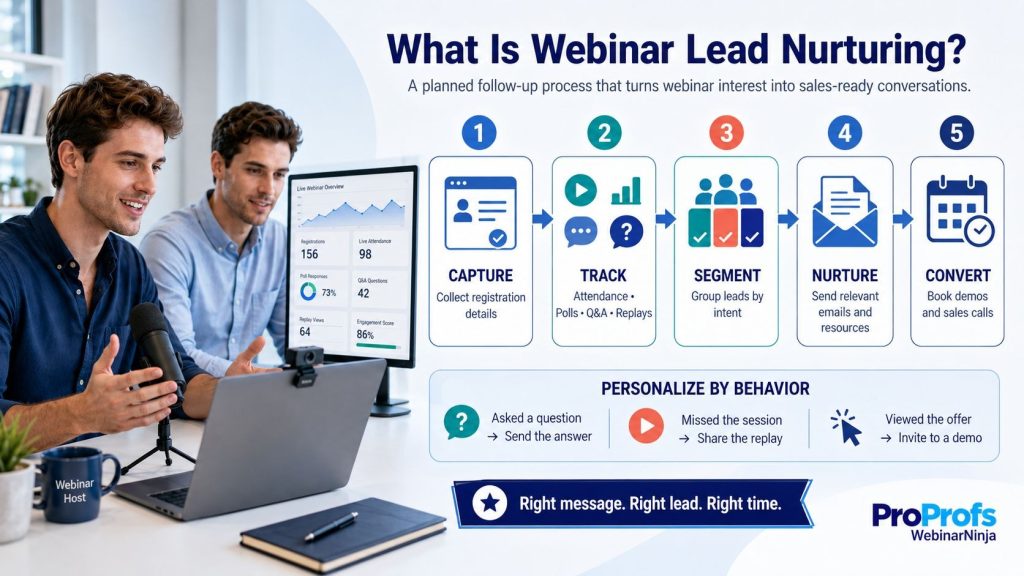
It typically includes:
- Sorting leads by attendance and engagement
- Scoring leads by how “ready” they seem
- Sending a sequence of relevant, timed emails
- Handing your hottest leads to sales, fast
- Reusing the webinar content to keep the conversation going
Here’s a quick example to make this concrete. Say you host a webinar called “How to Cut Onboarding Time in Half.”
Two hundred people register. Ninety show up live. Twelve ask a question during the session. Without nurturing, all 200 get the same “thanks for registering” email, and most of them never think about you again.
With nurturing, those 12 engaged askers get a personal note from sales within a day, and the 110 no-shows get a replay link instead of being ignored entirely.
Skip the process, and you’re basically hosting a great party and forgetting to get anyone’s number.
Now, if you are looking for a quick guide on lead generation, here is a video I recorded for you:
Stop Sending One Email to All. Start Nurturing Webinar Leads by Segment
How to Nurture Webinar Leads: Step by Step
Here’s the actual process, broken into eight steps you can start using on your very next webinar.
Each step below includes a real example, so you can see exactly what “good” looks like instead of just being told to “follow up more.”
Step 1: Get Your Data House in Order Before the Webinar Even Ends
You can’t nurture what you can’t see, so this step happens before your event, not after.
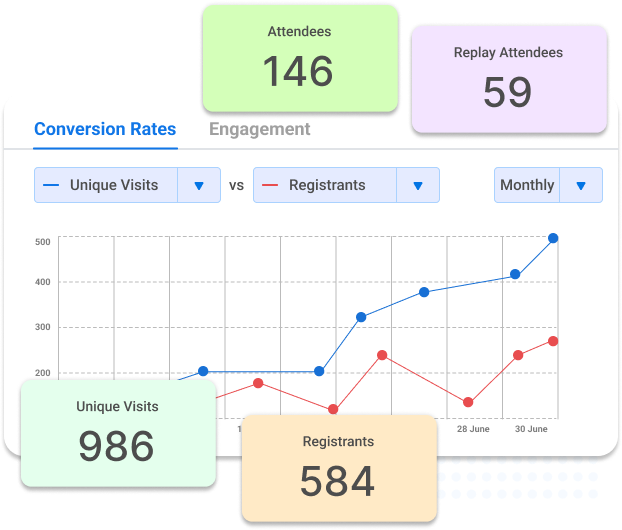
Before you send a single follow-up, make sure you’re capturing:
- Registration details (name, email, company, job title)
- Live attendance duration
- Poll answers and chat questions
- Offer or CTA clicks
Example: A mid-size HR software company used to run webinars with one tool, track attendance in a second tool, and manually copy everything into a spreadsheet before emailing anyone.
By the time the spreadsheet was ready, three days had passed, and half the urgency was gone.
If this data lives in three different spreadsheets, fix that first. A webinar tool with solid CRM integrations saves you hours of copy-pasting and at least one Excel-induced headache.
Step 2: Segment Your Leads Within 24 Hours
Not all registrants deserve the same email, so this step is about sorting people into groups before you write a single word of copy.
| Segment | Who They Are | First Message Focus |
| Full attendees | Stayed 75%+ of the session | Recap, replay, and a related resource |
| Partial attendees | Dropped off early | Replay plus a “here’s what you missed” hook |
| No-shows | Registered, never logged in | Replay link, front and center |
| High-intent responders | Asked a question or clicked an offer | Personal outreach, not a template |
Example: Going back to our “Cut Onboarding Time in Half” webinar, imagine two attendees: Raj, who stayed for the full session and asked about pricing tiers, and Priya, who registered but never logged in.
Raj gets a short, personal email from a sales rep referencing his exact question. Priya gets the replay link with a one-line note about the biggest takeaway.
Treat these four groups the same, and you’re wasting your best signal on people who already told you exactly how interested they are.
Step 3: Score Leads So You Know Who to Call First
Lead scoring is just a fancy way of saying “who’s actually interested,” turned into a number your team can act on.
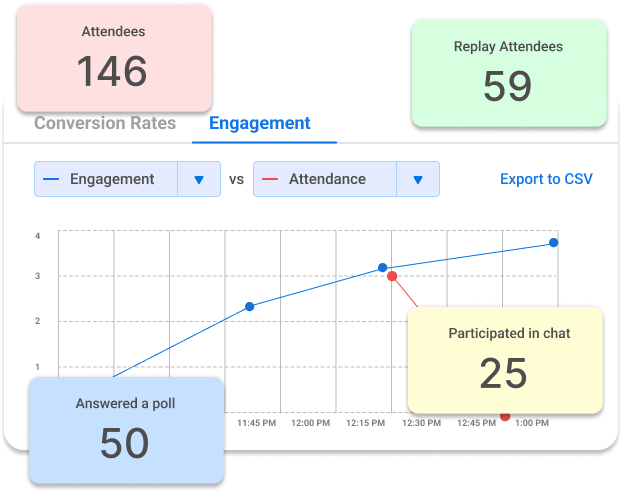
A simple starting model:
| Behavior | Points |
| Full attendance | 10 |
| Asked a chat question | 15 |
| Clicked a pricing or demo offer | 20 |
| Positive survey response | 10 |
| Opened 2+ follow-up emails | 5 |
Example: Maria attended 40 of the 45 minutes, asked a question about integration timelines, and clicked the demo link at the end.
That’s 10 plus 15 plus 20, which adds up to 45 points, comfortably above a 30- to 40-point threshold.
Anyone crossing that threshold goes straight to sales. Everyone else stays in the nurture sequence a little longer.
Real-time chat gets messy fast during a live session, and busy hosts miss the good questions buried in a wall of comments. Features built into an AI webinar creator can catch and answer repeated questions on the spot, which keeps hosts focused and makes your scoring data far more accurate.
Step 4: Send Your Immediate Follow-Up Within Two Hours
Speed matters here more than polish, so keep this email short and send it fast.
Keep it short. One replay link, one next step.
Don’t write a novel. Nobody wants your webinar summarized back to them in 800 words two hours after they lived it.
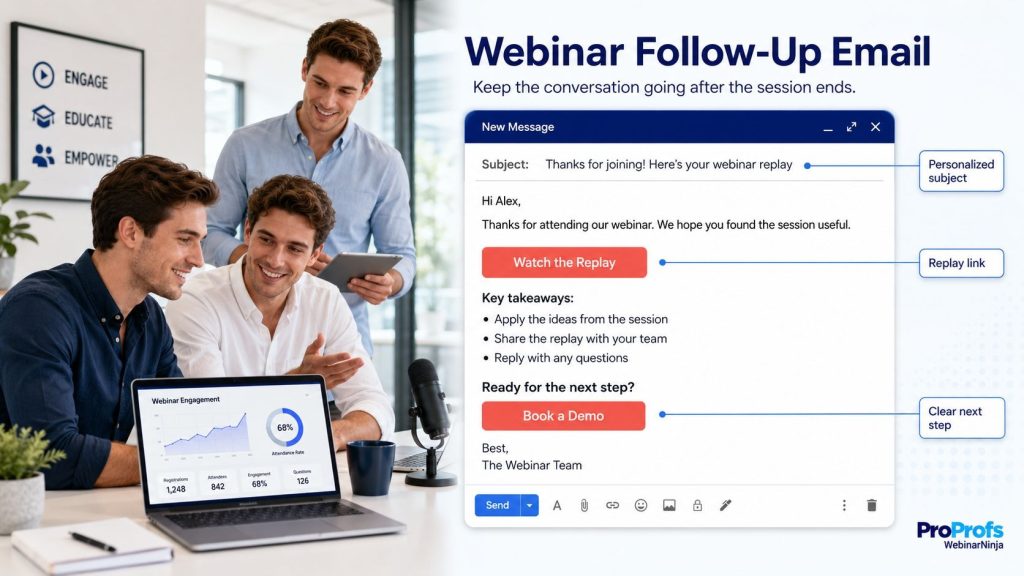
Example subject line for attendees: “Here’s your replay plus the slide you asked about.”
Example subject line for no-shows: “You missed it, here’s the replay (5 min read).”
For no-shows, lead with the replay. For high-intent leads like Raj from our earlier example, skip the template entirely and have a human write two sentences instead. And if you want more info, you can follow this guide on webinar follow-up emails.
Step 5: Build a 25- to 30 Day Nurture Sequence
One email isn’t a strategy, so this step spreads your follow-up across several weeks with a clear purpose behind every send.
Here’s a cadence that actually works, not one pulled from a decade-old marketing textbook.
| Day | Email Focus |
| Day 0 | Thank you, replay link |
| Day 1 | One key takeaway, plus a resource |
| Day 3 | Case study or proof point |
| Day 7 | Direct offer (demo, trial, consult) |
| Day 14 | Address a common objection |
| Day 21 | Softer offer with light urgency |
| Day 30 | Final, honest check-in |
Example: For the onboarding webinar, Day 3 might feature a case study titled “How a 200-Person Team Cut Onboarding From Six Weeks to Three,” directly reinforcing the webinar’s core promise.
Day 14 could tackle the objection “we don’t have the internal resources to change our process,” since that’s usually the real reason someone stalls.
Every email needs exactly one call to action. Two is a maybe. Three is a mess nobody clicks.
If your team runs webinars monthly, consider running them as a webinar series instead of one-offs. It gives you repeat touchpoints without starting the relationship over each time.
Step 6: Give No-Shows Their Own, Shorter Sequence
Roughly half your registrants won’t show up live, so this step treats that reality as a plan rather than a disappointment.
That’s not a failure. That’s just Tuesday.
Give them:
- One email with the replay
- One email highlighting the best insight from the session
- One lighter offer, like a checklist or guide
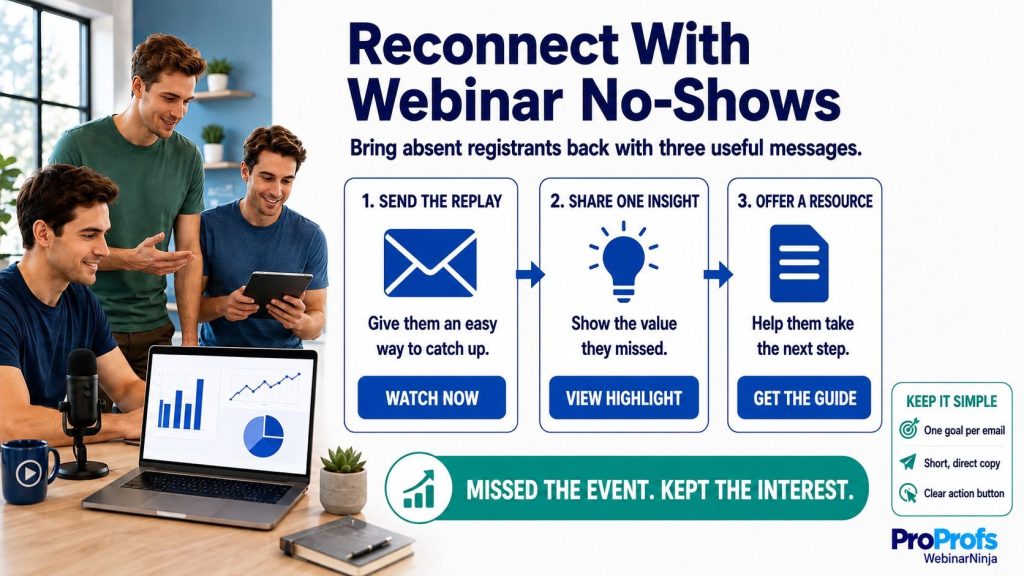
Example: Priya, our no-show from Step 2, gets the replay on Day 0, an email on Day 4 highlighting the single most useful onboarding metric from the session, and a lightweight checklist on Day 10 instead of a demo pitch.
Don’t hit her with the full seven-email sequence meant for people who actually attended and already know your brand.
Pairing this with evergreen webinars gives no-shows a second, low-pressure chance to experience the content on their own schedule, weeks or even months later.
Step 7: Hand Sales Warm Leads, With Context
A generic handoff wastes everything you just built, so this step is about giving reps the specific details they need to sound human.
A hot lead deserves more than “Thanks for attending, want a demo?”
Give reps the specific details: what the lead asked, clicked, or answered.
Example: Instead of a template, Raj’s rep sends: “I saw you asked about integration timelines yesterday. Want me to walk you through exactly how that works for a team your size?”
That single sentence, referencing something real, beats a generic template every single time.
Sales teams that want to grow sales without adding headcount get there faster when reps aren’t guessing what a lead actually cares about.
Step 8: Repurpose the Webinar to Keep the Conversation Going
The webinar you just recorded is a content goldmine, so this step is about not letting it die after one live showing.
One webinar can be repurposed to become a blog post, a few social snippets, and a bonus follow-up email.
Do this within the first week, while the topic is still relevant and the transcript is fresh. And if you have an AI webinar tool like WebinarNinja, you can create blogs, social media posts, and other content in just a few seconds using AI.
Example: The onboarding webinar becomes a blog post titled “5 Onboarding Bottlenecks Killing Your Time to Value,” three LinkedIn snippets pulling specific stats from the session, and a bonus “Nurture Tip Tuesday” email sent to anyone still in the sequence on Day 21.
Turning a live session into an ongoing educational track, similar to how CourseNinja packages content for continued learning, keeps the relationship alive well past day 30.
Nurtured Leads Convert at 50% More, Start Building Your Sequence Today
Why Nurturing Beats Pitching on Day One
Before we get into the how, it’s worth understanding why this works better than a hard sell right after the webinar ends.
Most attendees aren’t ready to buy the second the webinar ends. Some are still deciding if they even liked you. Pitch too hard, too early, and you’ll get unsubscribed faster than you can say “limited time offer.”
Nurturing works better because it:
- Matches the message to where the lead actually is in their decision
- Builds trust before it asks for anything
- Gives sales better, warmer leads to work instead of cold names
- Recovers value from no-shows instead of writing them off entirely
A study by Forrester Research, published on HubSpot’s blog, found that companies skilled at lead nurturing generate 50% more sales-ready leads at 33% lower cost than those who don’t nurture at all.
That’s not a rounding error. That’s a program working exactly as it should.
Applied specifically to webinars, the same logic holds. A webinar lead generation program that pays for itself looks nothing like one that quietly bleeds budget every quarter, and the difference almost always comes down to what happens after the live event ends.
Think about it from the attendee’s side for a second. They just spent 45 minutes of their workday with you.
The absolute fastest way to lose that goodwill is a same-day sales call asking them to buy something they haven’t even had time to think about.
Sounds good?
Now, if you are a consultant, this video is tailor-made for you:
Common Webinar Lead Nurturing Mistakes to Avoid
Even good teams fall into these traps. I’ve watched every single one of them quietly tank an otherwise solid webinar program.
Sending the Same Email to Everyone
Attendees and no-shows are not the same audience, yet many teams still blast a single generic email to the entire list.
This wastes your best signal. The person who asked a pricing question during the session deserves a different message than someone who never logged in.
Waiting Too Long to Follow Up
Interest fades fast. A follow-up sent 48 hours or later lands after the excitement has already cooled off.
Aim for two hours for your first touch, and reserve same-day outreach for anyone flagged as high-intent.
Handing Sales a Name With Zero Context
A lead score without any supporting detail is barely more useful than a cold list.
Reps need to know exactly what a lead asked or clicked; otherwise, they’re stuck opening with the same tired script everyone else uses.
Running the Sequence Forever
A nurture sequence with no end date leaves leads in limbo and clutters your sender reputation with emails nobody’s opening anymore.
Set a firm 25- to 30-day window, then move unconverted leads to a general nurture list instead of webinar-specific messaging.
Never Repurposing the Content
You paid for the production time, the promotion, and the host’s prep work. Using it once and archiving it wastes most of that investment.
A single webinar can realistically fuel a blog post, several social snippets, and at least one bonus nurture email.
Measuring Success by Registrations Instead of Customers
A packed registration list feels like a win on the day of the event, but it means nothing if nobody converts afterward.
Six hundred registrants with no follow-up strategy will underperform 150 registrants with a disciplined nurture sequence, every single time.
Now, here’s a quick, short video that helps you understand how to make webinar leads buy from you:
Track Open Rates, Scoring, and Conversions in One Dashboard
How to Know Your Nurturing Is Actually Working
Vanity metrics won’t tell you the truth, so this section covers the four numbers that actually matter and what to do when they slip.
Open and Click Rates by Segment
Don’t look at one blended open rate for your whole list. Break it down by the four segments from Step 2.
If full attendees open at 40% but no-shows open at 12%, your no-show subject lines probably need work, not your whole sequence.
Percentage of Leads Crossing the Scoring Threshold
Track what share of each webinar’s audience actually earns enough points to reach sales.
If that number is consistently low, your scoring thresholds might be set too high, or your webinar isn’t attracting people with real buying intent in the first place.
No-Show Recovery Rate
Measure how many no-shows go on to watch the replay, click a follow-up link, or engage with your shorter sequence.
Even a modest recovery rate here is pure upside, since these are leads who cost you nothing extra to re-engage.
Registrant-to-Customer Conversion Over 60 to 90 Days
This is the number that actually matters to your CFO, so track it over a long enough window to be meaningful.
If open rates crash after Day 3, sharpen your subject lines. If “hot” leads feel cold on sales calls, your scoring threshold is too generous and needs tightening.
Sounds good?
Now, here is a small case study that shows how Sales Market Fit experienced 200% growth in qualified leads with ProProfs WebinarNinja, with one session bringing in $20,000-$25,000
Start Nurturing Today and Turn More Webinar Leads Into Customers
Nurturing webinar leads isn’t glamorous work. It’s segmenting, scoring, and following up, over and over, with a little more precision each time.
But it’s also the difference between a webinar that pays for itself once and one that keeps paying you back for months.
The good news is that none of the eight steps above require a massive team or a complicated tech stack. They require a clear process and the discipline to actually run it every single time you host a webinar.
Start with segmentation. Everything else in this guide gets easier once that’s in place, because every later step depends on knowing who you’re actually talking to.
None of this has to be a manual grind either. A platform like ProProfs WebinarNinja handles most of the heavy lifting behind these steps automatically: tracking attendance and engagement in one dashboard, sending segmented follow-up emails without manual list-building, and, using AI, pulling ready-to-edit blog posts and social snippets straight out of your session the moment it ends.
That frees your team to spend time on the conversations that actually need a human, instead of the busywork that doesn’t.
Frequently Asked Questions
1. How soon after a webinar should I send the first email?
Within the first couple of hours is ideal, while the session is still fresh in the attendee's mind and they can still recall exactly which parts resonated with them. Waiting until the next day usually means lower open rates, since attention has already moved on to whatever else is filling their inbox and their calendar by then.
2. What should the subject line of a follow-up email say?
Keep it simple and specific, mentioning the replay link or a key topic covered in the session rather than something generic. Vague subject lines like "Following Up" or "Thanks for Joining" get ignored far more often because they give the recipient no real reason to open the email over everything else competing for their attention that day.
3. Is it okay to call a lead instead of emailing them?
Yes, especially for smaller lists or higher-value prospects where a personal touch matters more than automated reach. A quick phone call after a webinar often gets noticed more than another email sitting in a crowded inbox, particularly if you reference something specific the person said or asked during the live session itself.
4. How many people usually attend live compared to those who register?
It varies by industry and topic, but somewhere between 35% and 50% of registrants typically show up live for most B2B webinars. The rest become your no-show group, which is exactly why a solid replay strategy matters so much. Platforms like ProProfs WebinarNinja make that replay available within seconds of the session ending, so no-shows aren't waiting around for access.
5. What's the easiest way to know who to follow up with first?
Start with anyone who asked a question, clicked a link, or stayed for the entire session, since they've already shown you clear signs of interest without you having to guess. These are the leads who deserve a faster, more personal response instead of sitting in a generic queue with everyone else who simply registered.
6. Should I mention pricing in my first follow-up email?
Not usually. The first email works better as a simple thank-you paired with the replay link, since jumping straight to pricing can feel premature to someone who hasn't fully processed the session yet. Pricing and direct offers tend to land better once you're a few emails into the sequence, after some trust has been built.
7. What if someone registers but their email bounces?
Check for a typo in the registration form first, since that's the most common cause, and try reaching out through another channel like LinkedIn if you have that connection available. A bounced email is a common, low-stakes issue and generally isn't worth spending excessive time chasing down for every single registrant on your list.
8. How do I know if my follow-up emails are too long?
If it takes more than 30 seconds to read, it's probably too long for most webinar audiences. People tend to skim follow-ups rather than read them closely, so shorter, more scannable emails with one clear point usually perform better than a detailed recap trying to cover everything discussed during the session.
9. Can I nurture leads using just my regular email inbox?
For a very small list, yes, but it gets messy fast once you're tracking who opened what and when to send the next touch. Most teams move to basic email automation once they're running more than one webinar a month, and tools like ProProfs WebinarNinja that connect attendance data directly to your email platform make that shift much smoother.
10. Should the same person always send the follow-up emails?
It helps. Leads tend to respond better when the sender feels consistent and familiar, rather than getting a different name in their inbox with every touch, which can feel disjointed or overly automated. Consistency in who's "talking" to the lead builds a small but real sense of relationship over the course of the sequence.
11. What day of the week gets the best email open rates?
Tuesday through Thursday generally perform best for B2B audiences, since inboxes are less cluttered with weekend catch-up and end-of-week wind-down messages. Mondays often compete with a backlog of unread emails, while Fridays tend to see lower engagement overall as attention shifts toward wrapping up the week.
12. Is it normal for most webinar leads to never respond at all?
Yes, and that's expected across almost any webinar program, regardless of how polished the content or follow-up sequence is. Not every lead is ready to buy, and a portion of any list will stay quiet no matter what you send. The goal isn't a 100% response rate, it's making sure the leads who are ready don't slip through unnoticed.
Want to host a webinar for free?
Use WebinarNinja to teach, improve marketing, and grow your sales.