Here is a twist few lawyers saw coming: your next client may have already asked a chatbot about their legal problem. According to Clio’s 2025 Legal Trends Report, more than half of consumers have used or would consider using AI to answer a legal question, and 28% of those who did were told to contact a lawyer. A growing majority also says they would look for their next lawyer online.
That makes education your best marketing. The best webinar software for law firms helps you teach, earn trust, and turn curious viewers into booked consultations, without adding hours to your week.
Below are the top webinar platforms for law firms, compared in terms of features, pros, cons, and official prices to help you pick the best tool for your law firm.
10 Best Webinar Software for Law Firms and Attorneys
A legal webinar can wear many hats. On Monday, it is a lead magnet for estate planning. But on Wednesday, it is a CLE-style session for associates. On Friday, there is a client briefing on new employment rules. The trick is matching the platform to the job.
That is exactly how this list works: each tool is paired with the legal use case it handles best.
| Tool | Best For | Best Features for Law Firms | Starting Price |
| ProProfs WebinarNinja | Generating leads, growing sales, and teaching better | Lead-capturing registration pages; HubSpot, Mailchimp, and Zapier integrations; consultation booking offers; AI funnel builder; live, automated, series, and hybrid webinars; mobile and browser joining; paid sessions with no platform fees | $0.30/attendee/month; 14-day free trial |
| Zoom Webinars | Polished client briefings and firm town halls | One-click join, Q&A and polls, AI smart chapters | $66.67/month, billed annually |
| eWebinar | Evergreen estate planning seminars on autopilot | On-demand webinars with chat, full-page website embeds | $99/month |
| Adobe Connect | CLE-style training with quizzes and captions | GLBA, HIPAA, and SOC compliance; native quizzes; persistent rooms | $190/host/year |
| Livestorm | Multilingual seminars for international firms | 24 languages, GDPR and ISO 27001, pay-per-attendee credits | €2.50 per attendee credit, annual pack |
| Contrast | HubSpot-driven legal marketing teams | Native HubSpot sync, consent fields, Repurpose AI | Free plan; Pro from $99/month, billed yearly |
| Microsoft Teams | Firms standardized on Microsoft 365 | Registration and reporting, Bookings, Copilot | $23.50/user/month, paid yearly |
| BigMarker | Large legal summits and industry conferences | 1,000-attendee rooms, pop-up offers, white-label options | Custom quote |
| Wistia | Building a gated legal video library | Simulive, attendee-level analytics, and automatic video library | $429/month, billed annually |
| Riverside | Studio-quality legal podcasts and panels | Separate speaker tracks, HubSpot integration | $79/month, billed annually |
Now, let’s put each of these webinar software for law firms under the microscope:
1. ProProfs WebinarNinja
Best for Generating Leads, Growing Sales, and Teaching Better
ProProfs WebinarNinja is an all-in-one webinar platform that helps law firms turn legal education into qualified leads and booked consultations.
Lead generation starts at sign-up. Every webinar gets its own registration page on a custom-branded URL, so you capture a prospect’s details the moment they register for your “Wills vs. Trusts” seminar. Confirmation and reminder emails go out automatically, and reports show who registered, who attended, and who engaged. During the session, a timed offer puts your consultation booking link on screen.
Your leads then flow straight into the tools you already use. ProProfs WebinarNinja integrates directly with HubSpot, Mailchimp, ActiveCampaign, Constant Contact, Infusionsoft, ConvertKit, AWeber, GetResponse, and Drip, connects to 1,000+ more apps through Zapier, and accepts payments through Stripe.
The AI works as a complete webinar funnel builder. It writes titles and talk outlines, reviews your pitch for clarity and offer placement, answers repeated chat questions, and turns each session into follow-up emails, blog posts, and social posts.
You can run live, automated, series, and hybrid webinars on one plan. Need a panel with a fellow attorney and a CPA? Add them as co-presenters. Clients join from any browser or phone with no downloads. Hosting, pages, emails, offers, analytics, payments, and courses all sit in one dashboard, which is exactly why it is called all-in-one webinar software for law firms.
Pros
- Every webinar gets a registration page on a custom-branded URL that captures leads, tracks attendance, and sends reminders automatically.
- Direct integrations with HubSpot, Mailchimp, ActiveCampaign, Constant Contact, and Drip, plus 1,000+ apps via Zapier, keep leads flowing.
- Timed offers place a consultation booking link on screen mid-session, right when attendees are ready for personal legal advice.
- The AI Webinar Creator drafts titles and outlines, coaches your pitch, answers chat FAQs, and repurposes sessions into marketing content.
- Live, automated, series, and hybrid webinars on one plan let an estate planning seminar run weekly without an attorney present.
- Clients join from any browser or mobile device with no downloads, backed by 24/7 phone, chat, and email support.
- Sell paid CLE-style sessions through Stripe with no platform fees, and package on-demand lessons into courses with CourseNinja.
Cons
- No downloadable or on-premise version.
- Dark user interface option not available.
Pricing: A FREE 14-day trial is available. Paid starts at $0.30/attendee/month (includes CourseNinja worth $1200).
Case Study:
Check how ProProfs WebinarNinja helped a Compliance-Focused HR Consultancy generate leads on autopilot

2. Zoom Webinars
Best For: Polished Client Briefings and Firm Town Halls
Few names carry less friction than Zoom, and that familiarity is its biggest asset for law firms. Clients, corporate legal teams, and referral partners already know the interface, and attendees can join with a single click without creating a Zoom account.
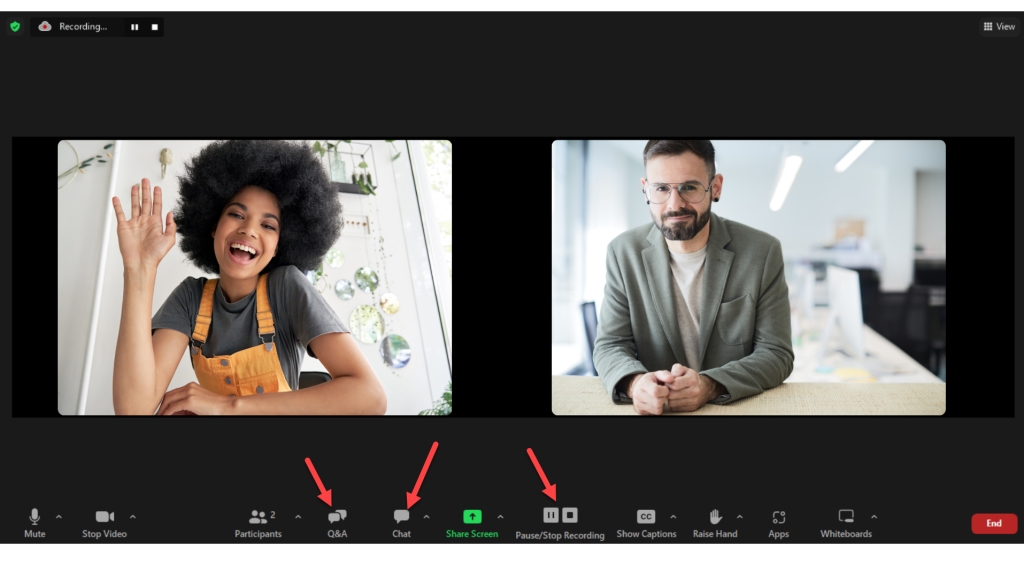
The Webinars plan layers a presenter-led structure on top: Q&A, polls, quizzes, reactions, live transcription, and interpretation in 35+ languages. Afterward, AI-generated smart chapters and a webinar summary let a busy general counsel skip straight to the segment on the new regulation.
Zoom scales to 100,000 attendees across its plans, supports 30-hour sessions, and lists SOC 2 Type 2 and GDPR compliance. It is the safe, sensible choice. Just do not expect a full marketing engine.
Pros
- One-click joining with no Zoom account required, ideal for corporate and individual clients.
- Q&A, polls, quizzes, and live transcription keep briefings interactive and accessible.
- AI smart chapters and summaries help clients find the exact segment they need.
- Lists SOC 2 Type 2 and GDPR compliance, which helps with firm security reviews.
- Native HubSpot, Salesforce, and Marketo integrations, plus 300+ marketplace apps.
Cons
- Simulive sessions, backstage, and breakout rooms require Webinars Plus at $82.50 monthly.
- Landing pages and reminder emails are basic, and standard video runs at 720p.
Pricing: The Webinars plan starts at $66.67 per month, billed annually ($89 per month).
3. eWebinar
Best For: Evergreen Estate Planning Seminars on Autopilot
Estate planning seminars follow a familiar script: wills versus trusts, probate pitfalls, powers of attorney, and a gentle nudge to book a consultation. eWebinar lets you record that script once and run it as an on-demand webinar with chat, so prospects can watch at 9 p.m. on a Sunday and still ask a question.
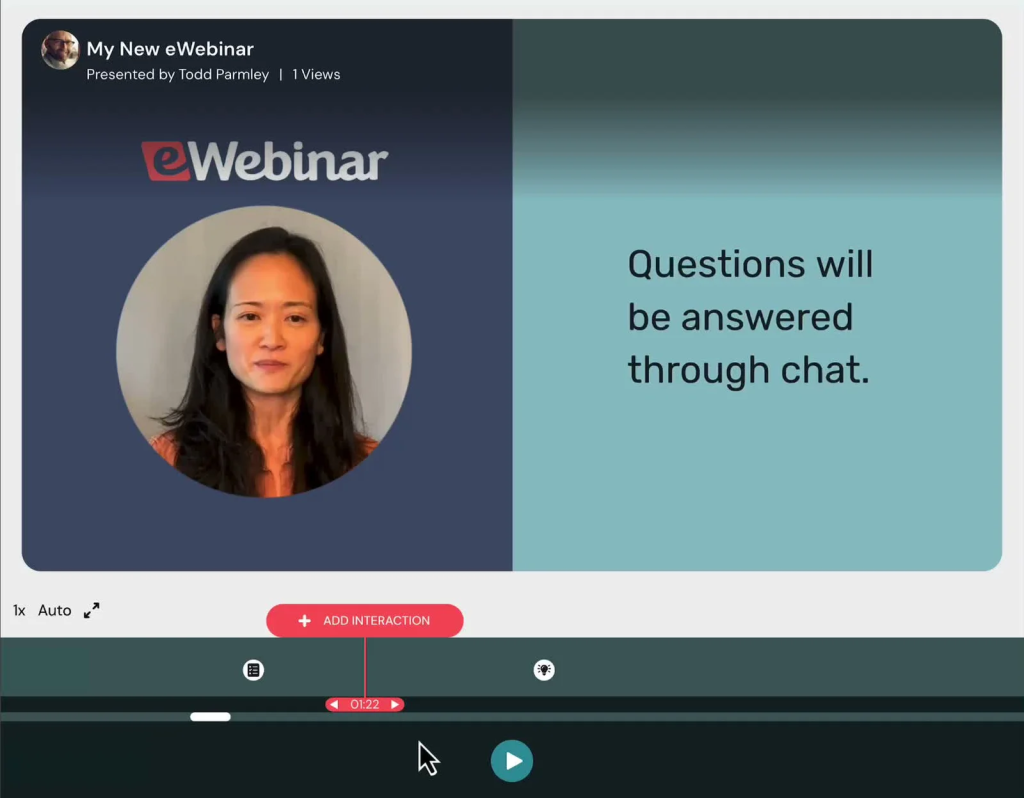
Every plan includes unlimited recurring sessions and unlimited team members, and you can embed the entire webinar experience on your practice-area page.
An AI script generator helps draft the presentation, while integrations reach your CRM, Slack, Twilio, and thousands of apps through Zapier. With SOC 2 and GDPR credentials listed, it is a tidy way to keep the intake pipeline humming even when the office is closed.
Pros
- Records your seminar once and runs it on demand, any day, any hour.
- Built-in chat lets prospects ask estate planning questions while they watch.
- Embeds the full webinar on your practice-area page, not just a sign-up form.
- Unlimited recurring sessions and unlimited team members come with every level.
- Includes an AI script generator for drafting your presentation faster.
Cons
- Level 1 allows only one active eWebinar, so multiple practice areas cost more.
- Registrant caps start at 1,000 per month on Level 1.
Pricing: Level 1 starts at 99/month (1,010 billed annually) and includes a 14-day free trial.
4. Adobe Connect
Best For: CLE-Style Training With Quizzes and Captions
When the goal is teaching lawyers rather than marketing to clients, Adobe Connect earns its reputation. It is designed for structured virtual classrooms, which suit firms and legal organizations running CLE-style programs, associate onboarding, or recurring practice-group training. Persistent rooms keep layouts, materials, and breakout activities saved, so the next session is ready before you sign in.
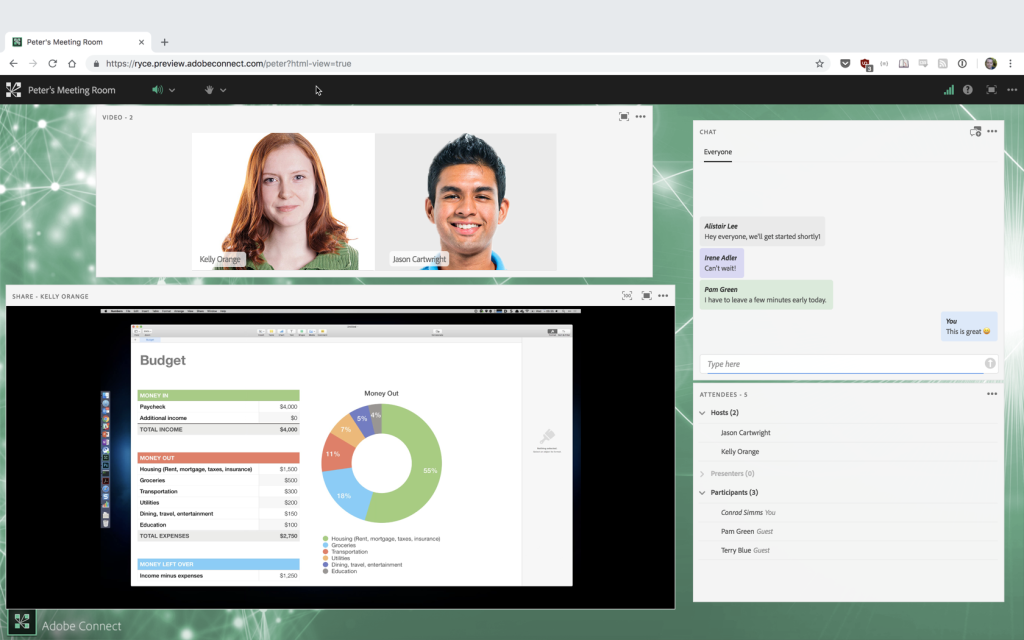
Inside, you get polls, moderated Q&A, chat, whiteboards, a native quiz, an engagement dashboard, and a recordings editor, all reachable through an HTML browser client. Automated transcription and closed captions are standard.
For risk-conscious firms, the headline is compliance: Adobe lists GLBA, HIPAA, FERPA, and SOC compliance on every plan. Just confirm CLE accreditation requirements with your state bar separately.
Pros
- Native quizzes and an engagement dashboard help show that attendees actually participated.
- Persistent rooms save layouts and materials for recurring training sessions.
- GLBA, HIPAA, FERPA, and SOC compliance are listed on every plan.
- Automated transcription and closed captions support accessible legal education.
- Open API and HTML SDK allow custom integrations with firm systems.
Cons
- Standard rooms seat 100, and a 500-seat upgrade costs $2,200 per host yearly.
- Branding requires a Premium or a Webinar Pro Pack at $600 per host yearly.
Pricing: Standard starts at $190 per host per year (100-attendee room, 1 to 5 host licenses).
5. Livestorm
Best For: Multilingual Seminars for International Law Firms
Cross-border practices face a problem domestic firms rarely consider: the same immigration update or data privacy briefing has to land in several languages. Livestorm handles this gracefully, offering emails, registration pages, and the event room in 24 languages, all within a browser-based platform that is GDPR-compliant and ISO 27001-certified.
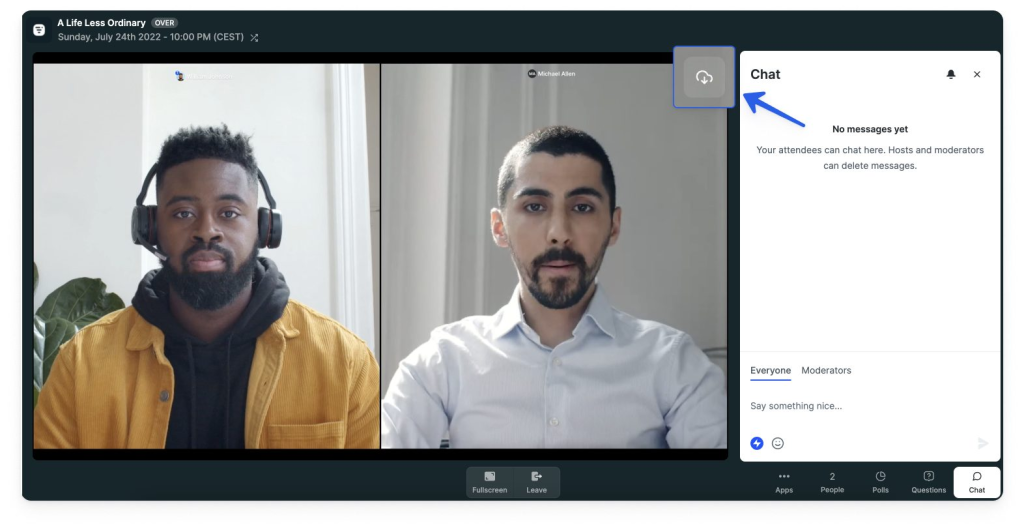
Its billing model is pleasantly lawyer-friendly, too: one credit per unique attendee per session, with no-shows and your own team never counted.
On the Pro plan, events host up to 3,000 live attendees, with question upvotes, polls, file sharing, and up to 25 video streams for panel discussions. On-demand and multi-session events, unlimited email cadences, and AI content repurposing round out a well-tailored package.
Pros
- Registration pages, emails, and the event room run in 24 languages.
- GDPR compliance and ISO 27001 certification ease firm security reviews.
- No-shows and internal team members never consume paid attendee credits.
- Question upvotes surface the most pressing legal questions first.
- Multi-session events allow a single registration to cover an entire seminar series.
Cons
- Salesforce, Marketo, Pardot, and Dynamics integrations require the Enterprise plan.
- Prepaid yearly credits run out, and new attendees cannot join until you upgrade.
Pricing: Pro starts at €2.50 per attendee credit, purchased as an annual credit pack.
6. Contrast
Best For: HubSpot-Driven Legal Marketing Teams
Growth-minded firms with an in-house marketing team often run everything through HubSpot, and Contrast was built with that stack in mind. Its native HubSpot integration syncs registrations, watch time, poll answers, and CTA clicks in real time, so intake staff can see who stayed for the full presentation on business succession planning.
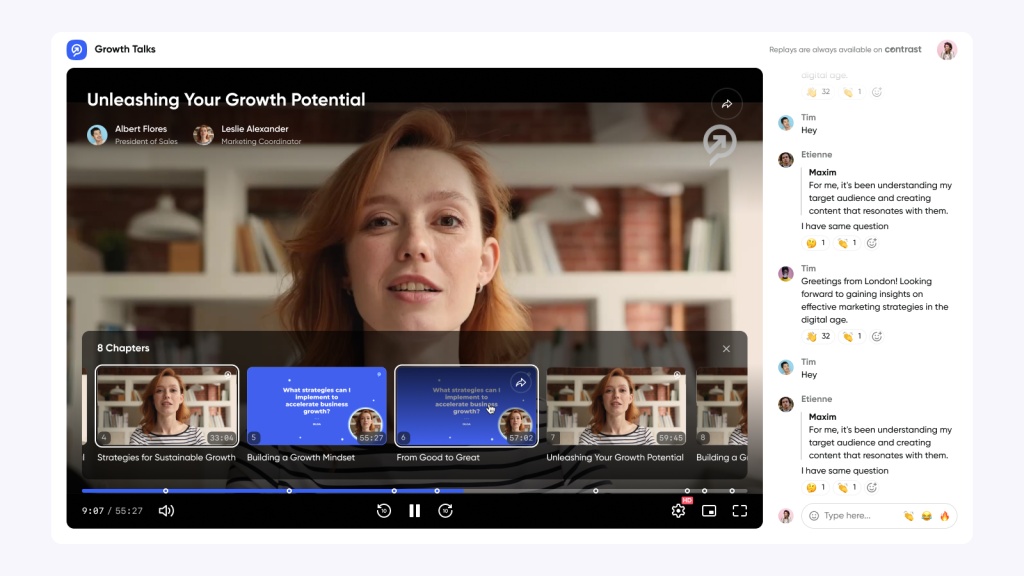
Registration forms include opt-in and terms-and-conditions fields, a thoughtful touch for firms that document consent before following up. Polls can keep results private, and CTAs keep working on replays.
Repurpose AI then turns a single webinar into blog posts, newsletters, and LinkedIn posts, while Clip AI produces subtitled clips. Modern, browser-based, and easy for presenters who would rather argue a motion than troubleshoot software.
Pros
- Real-time HubSpot sync tracks watch time, poll answers, and CTA clicks per contact.
- Opt-in and terms fields help document consent before your firm follows up.
- Repurpose AI turns webinars into blog posts, newsletters, and LinkedIn posts.
- Replays keep CTAs and polls active for on-demand viewers.
- Unlimited team members and SOC 2 Type II certification come standard.
Cons
- The free plan caps webinars at 30 minutes and 30 registrants monthly.
- Salesforce integration is a paid add-on reserved for higher tiers.
Pricing: Free plan available; Pro starts at $99/month, billed yearly.
7. Microsoft Teams
Best For: Firms Standardized on Microsoft 365
Law firms run on Word and Outlook, so many already pay for Microsoft 365. If yours does, Teams webinars may be hiding in plain sight. Microsoft 365 Business Standard with Copilot includes webinar hosting with attendee registration and reporting, alongside business email, desktop Office apps, and 1 TB of cloud storage per user.
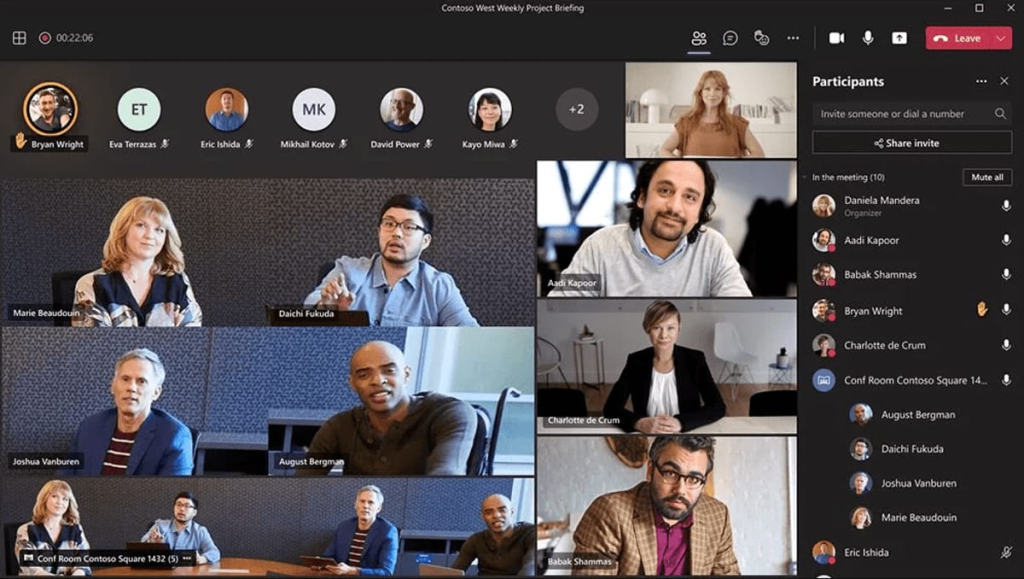
The supporting cast is useful. Bookings turns webinar interest into scheduled consultations, Forms handles intake questionnaires and feedback surveys, and Clipchamp trims recordings into shareable clips.
Copilot, available across Teams, Outlook, and Word, speeds up follow-up drafting. Firms handling sensitive matters can move to Business Premium for advanced threat protection and sensitive data protection. Convenient, familiar, and already part of many firms’ daily routine.
Pros
- Webinar registration and reporting come bundled with Business Standard.
- Microsoft Bookings converts interested attendees into scheduled consultations.
- Microsoft Forms supports intake questionnaires and post-webinar feedback surveys.
- Copilot speeds up follow-up emails and summaries in Outlook and Word.
- Business Premium adds advanced threat protection and sensitive data protection.
Cons
- Per-user, yearly billing means costs climb as your firm adds staff.
- Webinars arrive bundled with a full suite, overkill for webinar-only needs.
Pricing: Webinars are included in Microsoft 365 Business Standard with Copilot, starting at $23.50/user/month, billed annually.
8. BigMarker
Best For: Large Legal Summits and Industry Conferences
Some firms do not host webinars so much as produce events: annual employment law updates for HR leaders, cross-practice summits, or multi-day conferences for an industry the firm serves. BigMarker is the webinar software for law firms built for that scale. Even its Basic plan supports up to 1,000 live attendees, nine webcams for panel discussions, live and on-demand webinars, and streaming to Facebook and YouTube.
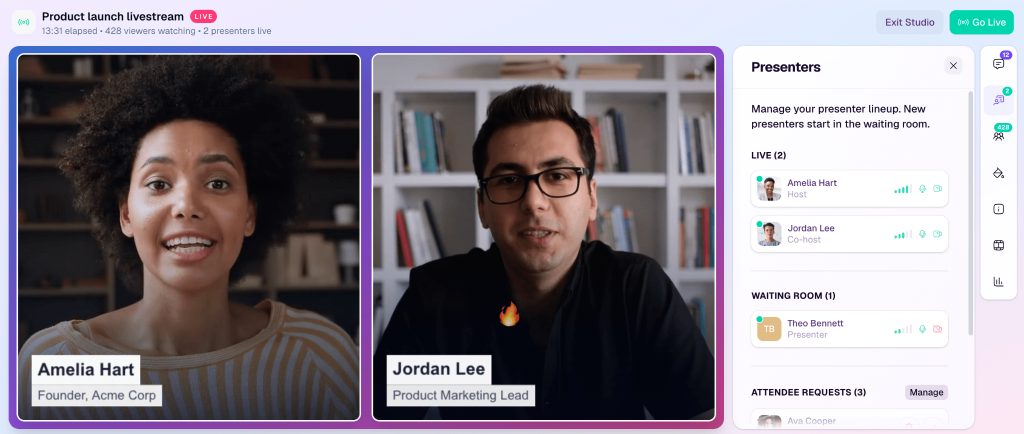
Pop-up offers, handouts, post-session surveys, and full-service registration come standard.
Enterprise adds evergreen and 24/7 webinars, series, ticketing, breakout rooms, and certificates of completion, while Enterprise+ reaches 500,000 attendees with white-labeled domains, live translation, and SSO. Add SOC 2 certification, and you have a platform ready for the firm’s flagship event.
Pros
- Basic supports 1,000 live attendees and up to nine webcams for panels.
- Pop-up offers and post-session surveys capture leads and attendee feedback.
- Enterprise adds certificates of completion, useful for formal training programs.
- Enterprise+ offers white-labeled domains, live translation, and SSO.
- SOC 2 certification and AES, SSL, and HTTPS encryption protect event data.
Cons
- No public pricing; every plan needs a quote and renews yearly.
- Evergreen webinars require Enterprise, and paid tickets carry a 5% fee.
Pricing: Custom pricing on all plans; request a quote from BigMarker’s sales team.
9. Wistia
Best For: Building a Gated Legal Video Library
A webinar on recent changes to non-compete law is valuable the day you present it, and arguably more valuable over the following year. Wistia leans into that reality. Every webinar automatically lands in your Wistia video library, ready to edit, clip, gate, and embed across your website.

The Webinars plan supports live and simulive sessions for up to 500 attendees and up to nine on-screen presenters, plus built-in registration pages, embedded registration forms, and automated follow-up.
Analytics go granular, with attendee-level data, heatmaps, engagement graphs, and source and UTM tracking. Marketing automation connects with HubSpot, Marketo, and Pardot. Think of it as a law library, rebuilt for marketing.
Pros
- Every session automatically joins your video library for editing, clipping, and gating.
- Live and simulive webinars support up to 500 attendees and nine presenters.
- Heatmaps and attendee-level analytics show exactly which segments held attention.
- Source and UTM tracking reveal which channels bring serious prospects.
- Extra attendees bill at $0.20 each instead of being turned away.
Cons
- At $429 per month billed annually, it is pricey for solo practitioners.
- Site embeds, simulcasting, and branding removal need Webinars Plus at $829 monthly.
Pricing: The Webinars plan starts at $429/month, billed annually, with a 14-day free trial.
10. Riverside
Best For: Studio-Quality Legal Podcasts and Panels
Plenty of attorneys build authority through conversation: a monthly panel with a CPA and a financial advisor, or an interview-style breakdown of a landmark ruling. Riverside, which began as a studio-quality recording platform, makes those conversations look and sound produced.
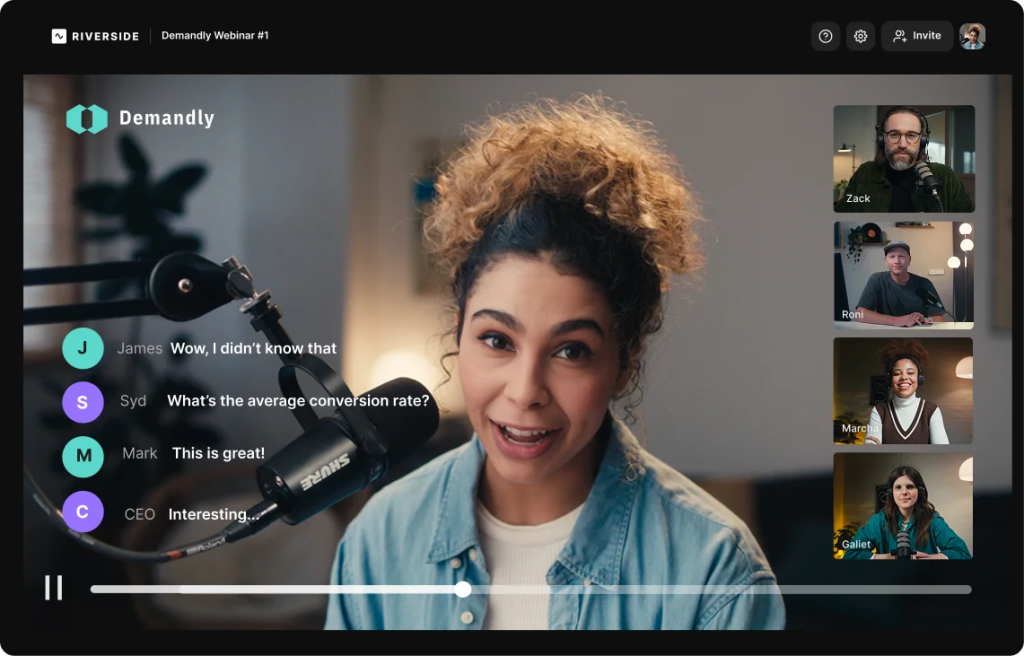
Its Webinar plan includes 25 hours per month of separate track downloads, meaning individual audio and video files for each speaker, which makes cutting clips for LinkedIn or YouTube far easier.
The same plan adds audience registration, Q&A, polls, automated email reminders, webinar analytics, recurring webinars, and the option to embed sessions on your website. A native HubSpot integration sends registrants into your CRM. Small room, big polish.
Pros
- Separate audio and video tracks for each speaker make editing panels painless.
- Registration, Q&A, polls, reminders, and analytics are included on the Webinar plan.
- HubSpot integration routes registrants straight into your intake pipeline.
- Recurring webinars suit monthly panels with referral partners.
- Sessions can be embedded directly on your firm’s website.
Cons
- The Webinar plan caps sessions at 100 registrants.
- Pro and Grow plans lack registration, Q&A, polls, and HubSpot.
Pricing: The Webinar plan starts at $79 per month, billed annually (billed at $ 99 per month).
What Should a Law Firm Look for in Webinar Software?
A law firm should look for webinar software that runs on-demand or hybrid seminars, supports multiple presenters, captures intake details, and moves attendees toward a booked consultation. Before you commit, run through this checklist:
- On-demand or hybrid formats, so one seminar keeps working after hours and during holiday closures.
- A consultation booking button that appears mid-session, while attendees are most engaged.
- Support for multiple presenters, from co-counsel to referral partners like CPAs and financial advisors.
- Registration forms that capture what your intake team needs, plus documented consent.
- Clear analytics on registrants, attendance, watch time, and poll responses.
- Browser-based joining, because many people will not install software for a free seminar.
- A CRM connection so every attendee gets a timely follow-up.
- Solid security credentials, plus a quick check against your state bar’s attorney advertising rules.
How I Chose These Webinar Software for Law Firms
Every platform here was assessed through an unbiased, systematic process shaped by what law firms need most: more qualified consultations, professional client experiences, and less time lost to technology. Six factors decided the final ranking.
User Reviews and Ratings
Real-world feedback on trusted review sites like G2 and Capterra reveals how a platform behaves once the sales demo ends. I looked for recurring themes in ratings and comments, especially session stability, attendee experience, and the frustrations professional services firms mention most.
Essential Features and Functionality
Features decide whether a platform earns a place in a legal practice. I examined registration and intake fields, reminders, on-demand and hybrid formats, multi-presenter support, consultation offers, analytics, CRM connections, and AI tools to judge how well each one converts legal education into new matters.
Ease of Use
Attorneys bill by the hour, so a steep learning curve is expensive. I evaluated the setup process, interface, and navigation for hosts, along with how easily attendees can join, ideally from a browser with zero downloads.
Customer Support
A frozen screen five minutes before a client seminar is nobody’s idea of fun. I reviewed how quickly and effectively each vendor helps with onboarding, answers questions, and resolves technical problems, including support channels and availability.
Value for Money
I weighed each platform’s quality, performance, and features against its starting price and the limits behind it, such as attendee caps, registrant limits, seat-based billing, and features locked to higher tiers. The aim is to show whether you would get your money’s worth.
Personal Experience and Expert Opinions
Finally, I combined my own testing with findings from legal industry research. Clio’s 2025 Legal Trends Report shows that more and more people start their legal search online, often with AI tools. So I gave extra weight to features that make it easy for clients to find a webinar, join it, and hear back from the firm afterward.
My Top 3 Webinar Software Picks
Ten platforms is a long list when you also have filings, client calls, and billable hours competing for your attention. If you only shortlist three, start with these.
1. ProProfs WebinarNinja
ProProfs WebinarNinja takes the top spot among webinar software for law firms because it covers a law firm’s entire seminar funnel on one plan. Live, automated, series, and hybrid webinars, built-in registration pages and reminders, consultation booking offers, and AI that plans, coaches, and follows up mean one presentation can fill your consultation calendar for months.
2. eWebinar
eWebinar is the pick for practices that want an evergreen seminar running around the clock. On-demand sessions with chat, unlimited recurring sessions, and full-page website embeds turn an estate planning or business formation talk into a steady source of inquiries, even when the office is closed for the holidays.
3. Adobe Connect
Adobe Connect wins for firms focused on teaching lawyers rather than marketing to clients. Native quizzes, an engagement dashboard, captions, persistent rooms, and GLBA, HIPAA, FERPA, and SOC compliance on every plan make it a dependable home for CLE-style programs, associate training, and recurring practice-group sessions.
Ready to Pick the Best Webinar Software for Law Firms?
Choosing webinar software comes down to what your firm wants from each session. If you want new clients, focus on registration pages, reminders, and a booking link. But if you train lawyers, look for quizzes, captions, and recordings.
If you brief corporate clients, a familiar and reliable room matters most. Shortlist two tools, test them with a real seminar, and count the consultations that follow. That number will point you to the best webinar software for your law firm.
Having said that, if I had to choose one tool out of the list, it would be ProProfs WebinarNinja. It runs live, automated, series, and hybrid seminars on one plan, handles landing pages, reminders, and replays, surfaces your consultation offer at the right moment, and adds AI that plans, coaches, and follows up. Less tech juggling, more signed engagements.
Frequently Asked Questions
What is the best webinar software for law firms?
ProProfs WebinarNinja is the best webinar software for most law firms because it combines live, automated, series, and hybrid webinars with registration pages, reminders, consultation-booking offers, and AI tools on a single plan. eWebinar suits evergreen estate planning seminars, Adobe Connect suits CLE-style training, and Zoom Webinars suits polished client briefings.
How do law firms use webinars to get new clients?
Law firms use webinars to educate prospects on common legal problems, such as writing a will or forming a business, and then invite them to book a consultation. In ProProfs WebinarNinja, a timed offer can display your booking link mid-session, right after you explain why professional advice matters. Follow-up emails and replays then nurture anyone not ready yet.
What webinar topics work best for law firms?
Topics that answer everyday legal worries perform best. Popular options include wills versus trusts, avoiding probate, forming an LLC, protecting a small business, new employment rules for employers, immigration pathways, and divorce basics. Practical, plain-English sessions build more trust than technical deep dives, and a clear next step, such as a free consultation, turns interest into inquiries.
Can lawyers run automated webinars for estate planning?
Yes. Record your estate planning seminar once and schedule it as an automated or on-demand webinar. ProProfs WebinarNinja runs automated webinars on a schedule with timed booking offers, and eWebinar adds on-demand sessions with chat that can be embedded on your website. Many firms keep a live version for Q&A and an evergreen version for steady lead flow.
Can I host CLE webinars with webinar software?
Yes, but accreditation comes from your state bar, not the software. Adobe Connect offers native quizzes, an engagement dashboard, and captions, and BigMarker Enterprise issues certificates of completion. ProProfs WebinarNinja supports paid on-demand sessions through Stripe and packages lessons as courses with CourseNinja. Always confirm your jurisdiction's approval and attendance-verification requirements before launching CLE content.
Do clients need to download software to join a legal webinar?
Not with browser-based platforms. ProProfs WebinarNinja runs entirely in the browser, so clients join with one click and no downloads, which helps with older audiences. Adobe Connect offers an HTML browser client, and Zoom Webinars attendees can join without a Zoom account. Test the join link on a phone before every session.
Can multiple attorneys present in the same webinar?
Yes. ProProfs WebinarNinja supports unlimited co-presenters, which works well for multi-attorney panels or sessions with referral partners like CPAs and financial advisors. BigMarker's Basic plan allows up to nine webcams, Wistia supports up to nine on-screen presenters, and Livestorm can display up to 25 video streams at once.
Is webinar software secure enough for law firms?
Many platforms list strong security credentials. Adobe Connect lists GLBA, HIPAA, FERPA, and SOC compliance on every plan, Livestorm is ISO 27001 certified, and Zoom Webinars, Contrast, and BigMarker list SOC 2. Still, treat public webinars as public. Never discuss confidential client matters, and keep every example general or anonymized.
Are law firm webinars considered attorney advertising?
They can be, depending on the content and your jurisdiction. Educational webinars that promote your firm's services may fall under your state's attorney advertising rules, which can require disclaimers or specific disclosures. Review your state bar's rules on lawyer advertising and solicitation, add a clear "not legal advice" disclaimer, and avoid any promise of guaranteed outcomes.
How much does webinar software cost for a law firm?
Prices range from free to several hundred dollars a month. Contrast offers a free plan, ProProfs WebinarNinja starts at $0.30 per attendee per month, Microsoft Teams webinars come with Microsoft 365 Business Standard at $23.50 per user per month, eWebinar starts at $99 per month, and Wistia starts at $429 per month. Our guide tofree webinar software covers budget options.
How can AI help law firms create webinars?
AI can plan, polish, and repurpose your sessions. ProProfs WebinarNinja's AI suggests titles, outlines your talk, critiques your pitch, answers repeated chat questions, and turns each session into follow-up emails and blog posts. eWebinar offers an AI script generator, and Contrast's Repurpose AI creates newsletters and LinkedIn posts. Always review AI output for legal accuracy before publishing.
Can a law firm keep generating leads during holiday closures?
Yes. An automated or on-demand webinar keeps registrations coming when the office closes for the holidays or bad weather keeps people home. ProProfs WebinarNinja's automated webinars run on a schedule you set in advance, with reminders and replays handled automatically, while eWebinar offers on-demand viewing with chat. Many estate planning firms use this to keep inquiries flowing year-round.
Want to host a webinar for free?
Use WebinarNinja to teach, improve marketing, and grow your sales.