Webinar software for consultants allows them to register, host, record, and follow up with prospects or clients during live or automated sessions. Done right, it turns a 45-minute talk into a calendar full of discovery calls.
But here is the part nobody mentions in the brochures. A sharp presentation means very little if registrants never get a reminder, the replay link arrives two days late, and nobody gets a nudge to book a call. The right platform automates all three.
The stakes are real. In the Content Marketing Institute’s B2B Content Marketing Benchmarks, Budgets, and Trends: Outlook for 2025, 51% of 980 B2B marketers named webinars as one of the distribution channels that produce the best results, second only to in-person events at 52%.
Below are the best webinar platforms for client acquisition, workshops, and training. Each one comes with its key features, real pros, honest cons, and a starting price.
10 Best Webinar Software for Consultants and Consulting Businesses
Consultants never buy webinar software just to “host webinars.” You buy it to fill a pipeline, run a billable workshop, or brief a client’s leadership team without booking a flight. So each platform below is mapped to the consulting job it does best.
Use this table to shortlist two or three tools, then jump to the full reviews below. Every starting price comes from the vendor’s official pricing page.
| Tool | Best For | Best Features for Consultants | Starting Price |
| ProProfs WebinarNinja | Generating leads, growing sales, and teaching better | Live, automated, series, and hybrid webinars on one plan; built-in landing pages and email automation; timed sales offers; AI Sales Coach and AI chat co-host; paid webinars with no platform fees; no attendee downloads | $0.30/attendee/month; 14-day free trial |
| Zoom Webinars | Briefing clients who already use Zoom | One-click join, polls and Q&A, AI smart chapters | $66.67/month, billed annually |
| Livestorm | Polished browser-based client workshops | Pay-per-attendee credits, question upvotes, 24 languages | €2.50 per attendee credit, annual pack |
| Demio | Small-room marketing webinars for solo consultants | Featured Actions, engagement analytics, no-download room | $45/month, paid yearly |
| EasyWebinar | AI-built funnels for productized offers | AI Webinar Builder, checkout and EasyCRM on Growth | $44/month, billed monthly |
| WebinarJam | High-energy launches for paid programs | Live offer displays, A/B tested pages, email and SMS reminders | $39/month, billed annually |
| Crowdcast | Community Q&As and multi-session courses | Multi-session events, on-screen attendees, Stripe ticketing | $49/month, billed monthly |
| Riverside | Studio-quality thought leadership sessions | Separate studio-quality tracks, HubSpot integration | $79/month for the Webinar plan, billed annually |
| BigMarker | Large branded summits for consulting firms | 1,000-attendee rooms, pop-up offers, post-session surveys | Custom quote |
| Zoho Webinar | Firms already running on Zoho CRM | Free plan, native Zoho CRM and Campaigns integration | Free plan (100 attendees, 60-minute sessions) |
Let’s check out the features of these tools in detail:
1. ProProfs WebinarNinja
Best for Generating Leads, Growing Sales, and Teaching Better
ProProfs WebinarNinja is an all-in-one webinar platform built to help consultants turn their expertise into a steady stream of qualified leads and booked discovery calls. It earns the “all-in-one” label because everything a consulting webinar needs lives in one dashboard. That includes hosting, landing, and registration pages, email automation, reminders, timed sales offers, paid webinars, analytics, and live and on-demand courses through CourseNinja.
You never have to stitch together a page builder, an email tool, and a payment plugin. You can run live, automated, series, and hybrid webinars on a single plan, with unlimited webinars, registrants, co-presenters, and replays.
Its AI works as a complete webinar funnel builder. It writes high-converting headlines and script outlines, and it reviews your pitch for clarity, pacing, and call-to-action placement. During live sessions, it answers repeated chat questions. After each webinar, it turns the session into blog posts, follow-up emails, and social snippets.
Everything runs in the browser, so your executive clients join with one click and no downloads. For consultants, that means less tech, more trust, and more booked calls.
Pros
- Runs live, automated, series, and hybrid webinars on one plan, so one strategy talk keeps generating consulting leads around the clock.
- Built-in landing pages, registration forms, branded URLs, and email automation replace separate tools, cutting your software costs and setup time.
- AI builds your entire webinar funnel, from headlines and script outlines to post-webinar emails, blog posts, and social snippets.
- AI reviews your pitch to offer clarity, pacing, and call-to-action placement, helping you turn more attendees into booked discovery calls.
- During live sessions, AI instantly answers repeated chat questions, so you stay focused on delivering expert insights instead of moderating chat.
- Timed sales offers, handouts, polls, Q&A and other engagement features let you present your audit or strategy-call offer exactly when audience trust peaks.
- Paid webinars through Stripe carry no platform fees, CourseNinja hosts your courses, and 24/7 phone, chat, and email support backs you up.
Cons
- No downloadable or on-premise version.
- Dark user interface option not available.
Pricing: A FREE 14-day trial is available. Paid starts at $0.30/attendee/month (includes CourseNinja worth $1200).
Case Study:
Check how ProProfs WebinarNinja helped Sales Market Fit generate high-quality leads and revenue every single session.
2. Zoom Webinars
Best For Briefing Clients Who Already Use Zoom
Zoom Webinars brings the familiarity of Zoom to structured, presenter-led sessions, which makes it a natural fit when your clients already use Zoom every day. Attendees join with one click and do not need a Zoom account.
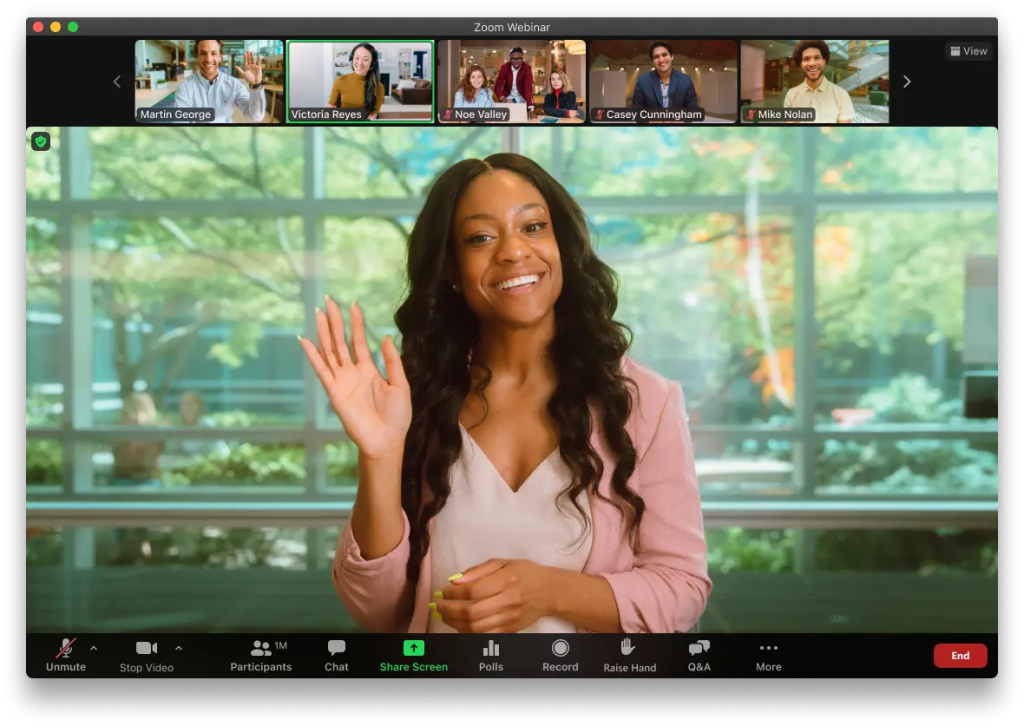
The standard Webinars plan includes chat, reactions, polls, quizzes, Q&A, live transcription, and language interpretation in 35+ languages. After the session, recordings arrive with AI-generated smart chapters and an AI webinar summary, so busy executives can jump to the segment they care about.
Zoom scales to 100,000 attendees across its plans, supports sessions up to 30 hours, and connects natively with HubSpot, Salesforce, Marketo, and Pardot. Polished? Yes. A full marketing engine? Not quite.
Pros
- Attendees join with one click and never need a Zoom account.
- Includes chat, polls, quizzes, Q&A, live transcription, and interpretation in 35+ languages.
- Recordings include AI smart chapters, and the plan includes an AI webinar summary.
- Scales up to 100,000 attendees, 1,000 video panelists, and 30-hour sessions.
- Connects natively with HubSpot, Salesforce, Marketo, Pardot, and 300+ marketplace apps.
Cons
- Simulive sessions, backstage, and breakout rooms require Webinars Plus at $82.50 per month.
- Landing pages and reminder emails are basic, and the standard-plan video runs at 720p.
Pricing: The Webinars plan starts at $66.67 per month, billed annually ($89 billed monthly).
3. Livestorm
Best For: Polished Browser-Based Client Workshops
Livestorm is a browser-based webinar platform built for polished, interactive sessions, which makes it ideal for client workshops and trainings. Its pricing model is refreshingly fair: you pay one credit per unique attendee per session, while no-shows and your own team members cost nothing.
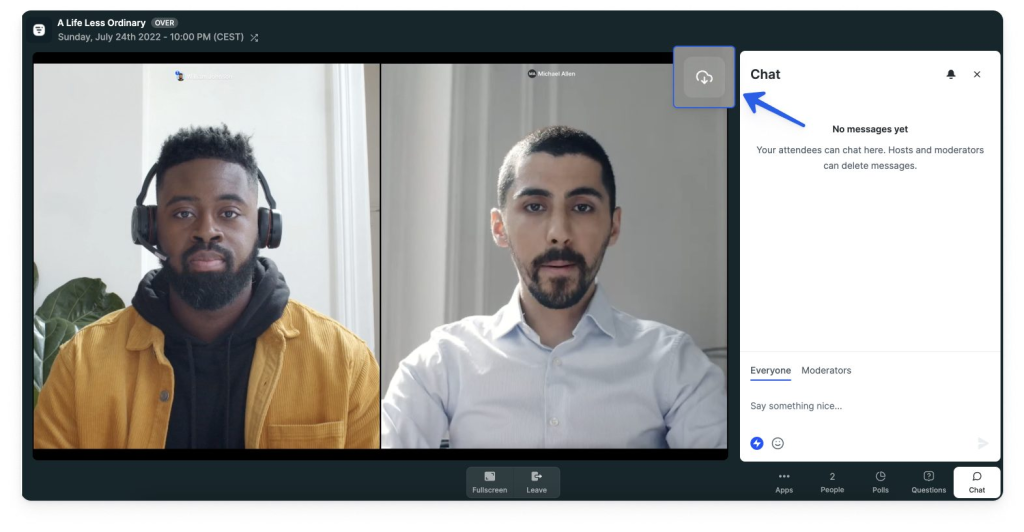
The Pro plan hosts up to 3,000 live attendees per event, displays up to 25 video streams at once, and supports polls, question upvotes, raise hand, file sharing, and PowerPoint embedding. On-demand events, event automation, multi-session events, and unlimited email cadences come included.
Add AI content repurposing, native HubSpot sync, assets in 24 languages, and GDPR and ISO 27001 credentials, and procurement teams tend to relax. Who doesn’t love a smooth security review?
Pros
- Charges only for real attendees, so no-shows and team members never consume credits.
- Emails, registration pages, and the event room are available in 24 languages.
- Question upvotes, polls, raise hand, and file sharing keep workshop participants active.
- Includes on-demand events, event automation, multi-session events, and unlimited email cadences.
- AI content repurposing turns transcripts into content, and HubSpot syncs natively.
Cons
- Salesforce, Marketo, Pardot, and Microsoft Dynamics integrations require the Enterprise plan.
- Credits are prepaid yearly, and new attendees cannot join once your quota runs out.
Pricing: Pro starts at €2.50 per attendee credit, purchased as an annual credit pack.
4. Demio
Best For: Small-Room Marketing Webinars for Solo Consultants
Demio is a no-download webinar platform focused on marketing webinars, with a clean room that keeps attention on your content. Every plan includes chats, polls, handouts, and Featured Actions, which let you surface a booking link or resource at exactly the right moment.
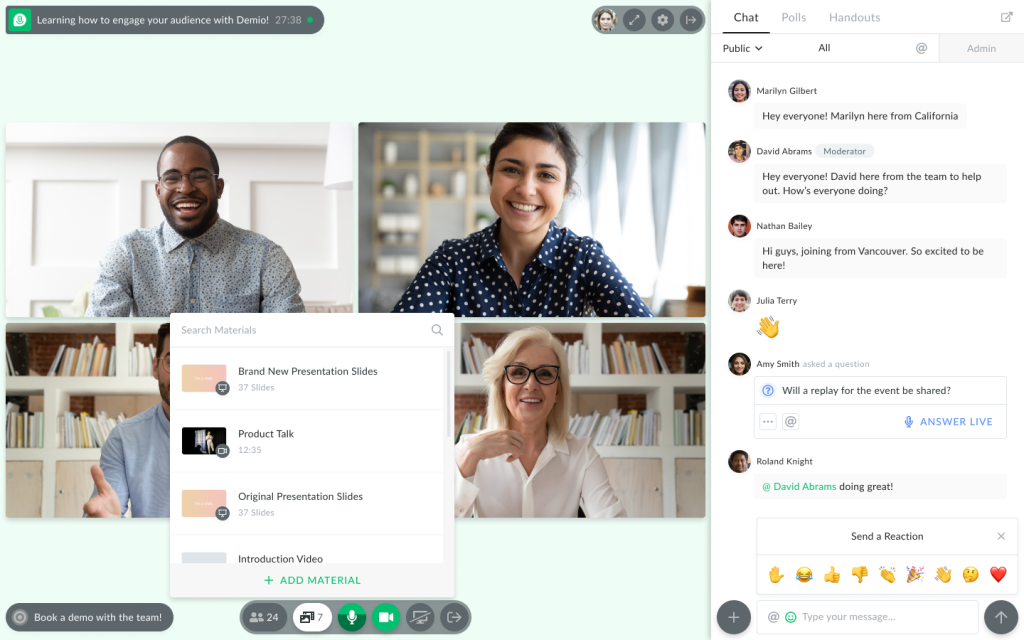
Engagement analytics come standard, so you can see who participated and prioritize follow-up. The Starter plan supports live webinars and event series, 3-hour sessions, up to 4 people on stage, and 15 event admins in a 50-attendee room.
Growth unlocks automated webinars, custom branding, and source tracking, while Premium adds Demio AI and CRM integrations. Small room, sharp tools. For solo consultants, that combination punches above its weight.
Pros
- Runs in the browser, so attendees join without installing any software.
- Chats, polls, handouts, and Featured Actions are included on every plan.
- Engagement analytics on all plans help you rank attendees for follow-up calls.
- Starter supports event series, 3-hour sessions, and up to 4 people on stage.
- The Boost add-on lets registrants promote your event to their own networks.
Cons
- Starter excludes automated webinars, custom branding, and custom registration form fields.
- CRM integrations and Demio AI require Premium, starting at $196 per host per month, paid annually.
Pricing: Starter costs $45 per month (paid yearly; $63 billed monthly) for 1 host and a 50-attendee room, with a 14-day free trial.
5. EasyWebinar
Best For: AI-Built Funnels for Productized Consulting Offers
EasyWebinar is a conversion-focused webinar platform that combines live, automated, and AI-built webinars with registration pages, email follow-up, and checkout.
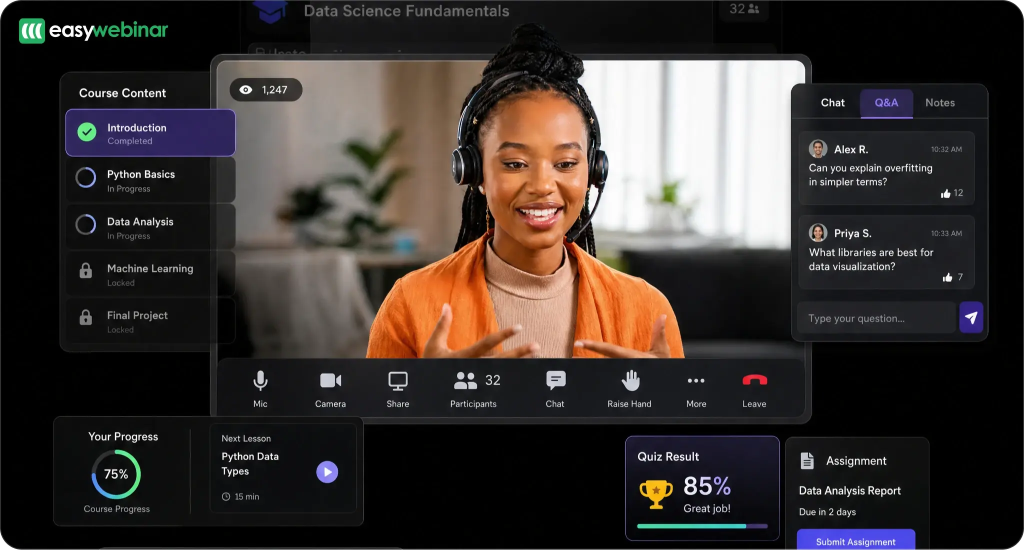
Its standout feature is the AI Webinar Builder, which creates a delivery script, registration page, thank-you page, email sequence, poll questions, and a timed call to action from a single prompt. The Launch plan covers live webinars, demos, and workshops with replays for up to 250 viewers.
Growth adds automated, simulive, and evergreen webinars, built-in checkout, and EasyCRM with lead scoring, while Pro adds an AI Moderator that answers attendee questions from your uploaded files. For consultants selling a productized offer, that is a lot of copywriting handled before your coffee cools.
Pros
- The AI Webinar Builder drafts your script, pages, emails, polls, and call to action.
- Launch includes 2 AI funnels per month plus 200 credits for refinements.
- Growth adds evergreen webinars, paid checkout, and EasyCRM with lead scoring.
- Pro’s AI Moderator answers attendee questions using PDFs and files you upload.
- Lists SOC 2 Type II, GDPR-aligned practices, and a 7-day full-access trial.
Cons
- Launch is live-only, with 50 attendees, 2-hour sessions, and up to 5 webinars.
- Native HubSpot and Salesforce Pardot sync starts on Pro at $198 per month.
Pricing: Launch starts at $44 per month, billed monthly (annual billing gives 2 months free), with a 7-day full-access trial.
6. WebinarJam
Best For: High-Energy Launches for Paid Programs
WebinarJam is a live webinar platform built for selling, with tools that make a launch feel like a broadcast event. Live offer displays push your enrollment box onto every screen at the right moment, while polls, surveys, an on-screen whiteboard, and video injections keep energy high.
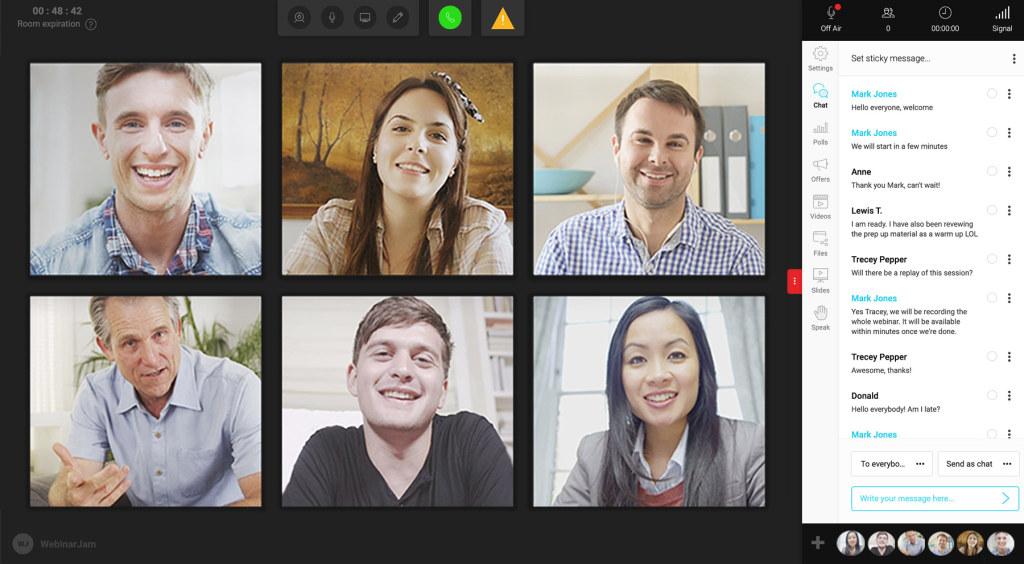
The page builder includes professional templates and A/B split testing, and the built-in email and SMS system sends reminders through two channels. Attendee Spotlight brings participants on stage, and the panic button gives you a backup when a broadcast misbehaves.
Automated webinars run through EverWebinar and are included in the Basic plan. If your consulting offer has a launch calendar, WebinarJam speaks that language fluently.
Pros
- Live offer displays show your enrollment offer on every attendee’s screen mid-session.
- The page builder includes templates and A/B split testing for registration pages.
- A built-in email and SMS system sends reminders through two channels.
- Attendee Spotlight, the panic button, and social broadcasting add real event polish.
- EverWebinar automation is included in Basic, backed by a 30-day money-back guarantee.
Cons
- Starter caps webinars at 100 attendees, 1 host, and 1 hour, without EverWebinar.
- WebinarJam recommends wired ethernet, 8 GB RAM, and spacing sessions 15 to 30 minutes apart.
Pricing: Starter costs $39 per month (billed annually; $49 per month), with a 30-day money-back guarantee.
7. Crowdcast
Best For: Community Q&As and Multi-Session Courses
Crowdcast is a community-first live video platform for webinars, workshops, and multi-session events. Registration is unlimited, and your plan counts only the people who show up live, with small overage fees instead of hard lockouts.
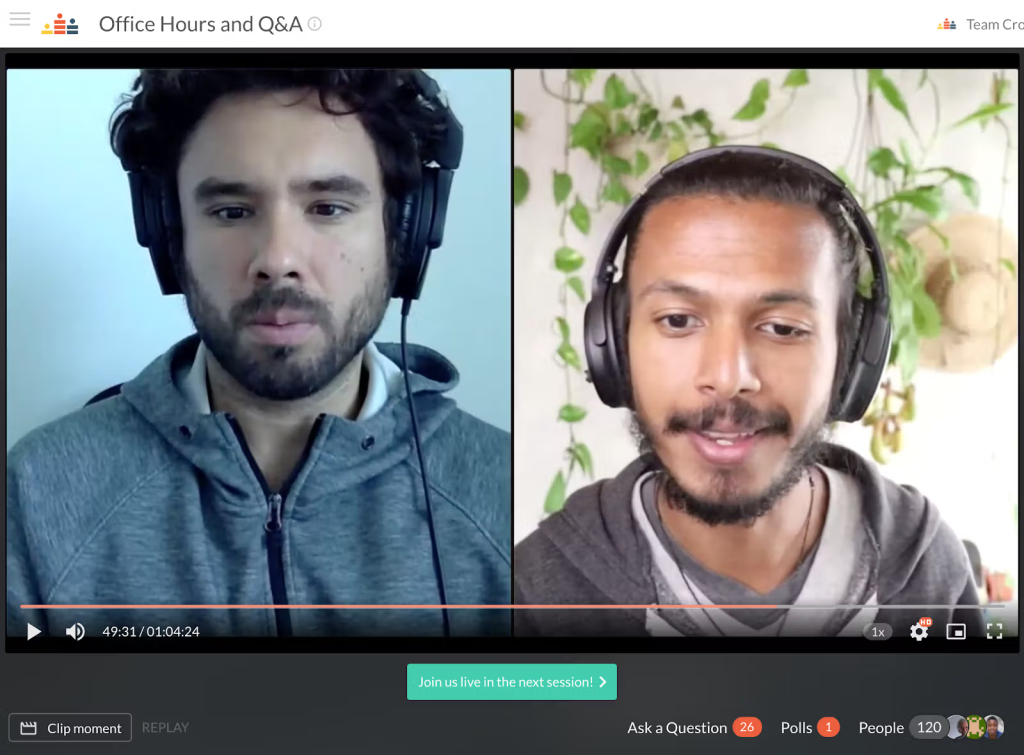
Attendees can join you on screen, upvote questions, and chat, while you timestamp answers so the replay becomes a searchable resource. Multi-session events group several sessions under one registration link, which suits live courses and office-hour series.
Built-in ticketing runs through Stripe with coupons and sliding prices, and the Studio adds overlays, slides, and video playback. RTMP mode connects OBS, Wirecast, and Ecamm Live. Want your webinars to feel like a club rather than a lecture? This is the room.
Pros
- Unlimited registrations, with billing based only on people who attend live.
- Attendees can join on screen, chat, answer polls, and see timestamped answers.
- Multi-session events bundle courses or office hours under a single registration link.
- Sells tickets through Stripe with fixed or sliding prices, coupons, and Patreon access.
- Zapier connects 1,500+ apps, and Lite includes unlimited replay storage.
Cons
- Lite includes only 10 streaming hours monthly, 2-hour sessions, and 1 team seat.
- Lite adds a 5% ticket fee, and support runs weekdays only, 9 to 5 Pacific.
Pricing: Lite starts at $49 per month, billed monthly (annual billing saves 30%), with a 14-day free trial.
8. Riverside
Best For: Studio-Quality Thought Leadership Sessions
Riverside started as a studio-quality recording platform and now offers a dedicated Webinar plan for hosting and repurposing sessions. Its core strength is recording quality: the Webinar plan includes 25 hours of separate track downloads per month, giving you individual audio and video files for each participant.
That makes clips and highlight reels far easier to produce. The plan adds audience registration, Q&A, polls, automated email reminders, webinar analytics, recurring webinars, and the option to embed webinars on your website.
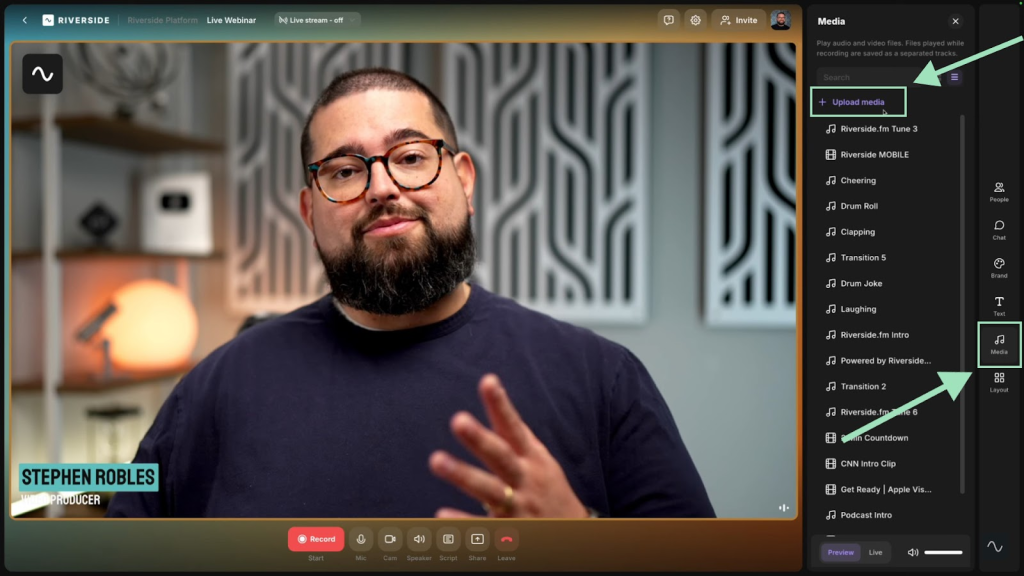
A native HubSpot integration sends registrants straight into your CRM. For consultants who build authority through polished content, Riverside turns a single conversation into weeks of shareable material. Boutique room, broadcast-grade output.
Pros
- Includes 25 hours monthly of separate audio and video tracks for each participant.
- Registration, Q&A, polls, automated reminders, and analytics are part of the Webinar plan.
- Native HubSpot integration sends registrants straight into your CRM pipeline.
- Supports recurring webinars and embedding sessions directly on your own website.
- Live streaming and multistreaming are available from the Grow plan upward.
Cons
- The Webinar plan hosts webinars with up to 100 registrants only.
- Cheaper Pro and Grow plans lack registration, Q&A, polls, and HubSpot integration.
Pricing: The Webinar plan starts at $79 per month, billed annually ($99 billed monthly).
9. BigMarker
Best For: Large Branded Summits for Consulting Firms
BigMarker is an enterprise-grade platform for webinars, virtual events, and hybrid events, which makes it a strong choice for consulting firms running flagship summits. The Basic plan supports up to 1,000 live attendees, up to 9 shared webcams, live and on-demand webinars, and streaming to Facebook and YouTube.
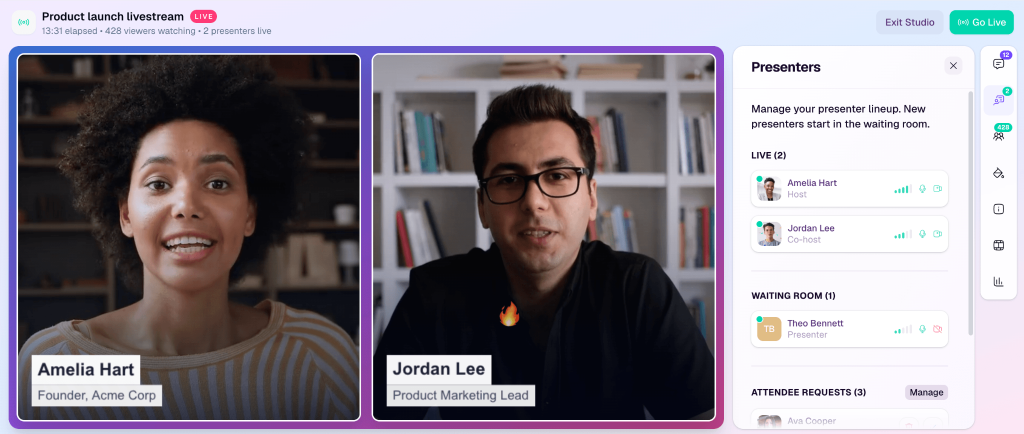
Chat, polls, Q&A, handouts, pop-up offers, full-service registration, and post-session surveys come standard. Enterprise unlocks simulive, evergreen, and 24/7 webinars, webinar series, ticketing, landing page templates, breakout rooms, certificates, and API access.
Enterprise+ scales to 500,000 attendees with white-labeled domains, live translation, and SSO. Big stage, big capabilities, and a sales process to match.
Pros
- Basic supports 1,000 live attendees, 9 webcams, and on-demand webinars.
- Pop-up offers, handouts, and post-session surveys capture leads and feedback.
- Enterprise adds evergreen webinars, series, ticketing, breakout rooms, and certificates.
- Enterprise+ supports 500,000 attendees, white-labeled domains, live translation, and SSO.
- SOC 2 certified, with AES, SSL, and HTTPS encryption across the platform.
Cons
- Every plan requires a custom quote, and subscriptions renew on a yearly basis.
- Evergreen webinars need Enterprise, and paid tickets carry a 5% transaction fee.
Pricing: Custom pricing on all plans; request a quote from BigMarker’s sales team.
10. Zoho Webinar
Best For: Firms Already Running on Zoho CRM
Zoho Webinar is a browser-friendly webinar tool that shines brightest inside the Zoho ecosystem. It connects natively with Zoho CRM, Zoho Campaigns, Zoho Calendar, Zoho Backstage, and Zoho Flow, so registrant data and follow-up campaigns stay in one place.
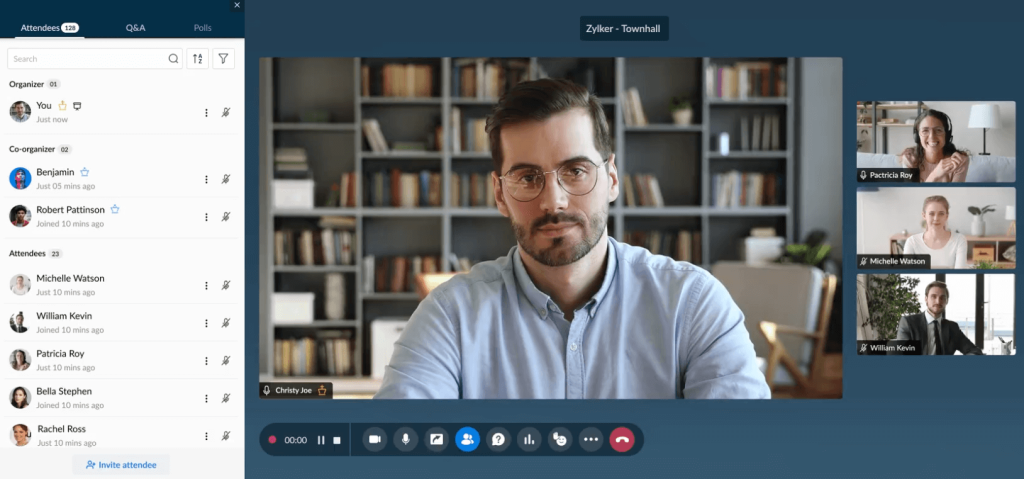
Attendees can join from any modern mobile browser without downloading software. Engagement tools include polls, Q&A, raise hands, emoji reactions, allow-to-talk, and make-presenter controls, and post-webinar redirection can send attendees to your booking page.
Webinar series and on-demand webinars are supported, and audio, video, and screen sharing are encrypted. The forever-free plan hosts up to 100 attendees. Already running on Zoho? Then the decision almost makes itself.
Pros
- The forever-free plan hosts up to 100 attendees for 60-minute sessions.
- Connects natively with Zoho CRM, Campaigns, Calendar, Backstage, and Flow.
- Attendees join from any modern mobile browser with no download required.
- Post-webinar redirection can send attendees straight to your booking or offer page.
- Supports webinar series and on-demand webinars, with encrypted audio, video, and screen sharing.
Cons
- The free plan stops at 60 minutes and allows only one co-organizer.
- Firms running HubSpot or Salesforce lose their main native-integration advantage.
Pricing: Free plan for up to 100 attendees with 60-minute sessions; paid plans are billed per organizer, with 15% off yearly billing and a 14-day free trial.
How I Chose These Webinar Platforms for Consultants
Every platform on this list was evaluated using an unbiased, systematic approach centered on what consultants need most: more booked calls, smoother client sessions, and fewer tools to manage. Six key factors shaped the final ranking.
User Reviews and Ratings
Direct feedback from users on reputable review sites like G2 and Capterra shows how a platform performs outside a sales demo. I looked for patterns in ratings and comments, especially around live-session reliability, attendee experience, and the problems consultants report most often.
Essential Features and Functionality
A webinar tool earns its place in a consulting business through its core features. I explored registration pages, email automation, in-session offers, automated and evergreen webinars, analytics, and AI capabilities to judge how well each tool turns expertise into leads and revenue.
Ease of Use
Consultants have no time for steep learning curves, and neither do their clients. I assessed the design, interface, and navigation for hosts, plus how easily attendees can join, ideally from a browser with no downloads.
Customer Support
When a client session starts in ten minutes, support quality matters. I examined how efficiently each vendor helps during setup, answers questions, and resolves operational issues, including the support channels and hours on offer.
Value for Money
I compared each platform’s quality, performance, and features against its starting price and plan limits, such as attendee caps, session lengths, and transaction fees. The goal is simple: to help you see whether you would get your money’s worth.
Personal Experience and Expert Opinions
Finally, I combined hands-on observations with the views of industry experts. As Ann Handley, Chief Content Officer at MarketingProfs, advises in Content Marketing Institute research, “Rethink off-the-shelf metrics (because there is no shelf).” That thinking shaped why engagement and conversion data carried more weight than attendance counts.
My Top 3 Webinar Platforms for Consultants
Ten options is a lot when you also have client deliverables due on Friday. If the list had to shrink to three, these are the platforms to recommend to any consultant or consulting firm.
1. ProProfs WebinarNinja
ProProfs WebinarNinja earns the top spot because it covers the entire consulting funnel on one plan. Live, automated, series, and hybrid webinars, built-in landing pages, email automation, timed offers, and an AI crew that drafts, coaches, and follows up mean one webinar can keep booking discovery calls long after it ends.
2. Livestorm
Livestorm is the pick for client-facing workshops. Its browser-only room clears strict IT policies, question upvotes keep sessions focused, and you never pay for no-shows or your own team. For multinational clients, the 24-language assets plus GDPR and ISO 27001 credentials make procurement conversations much easier.
3. Zoom Webinars
Zoom Webinars makes the list for one simple reason: your clients already trust it. One-click access, dependable polls and Q&A, AI smart chapters on recordings, and native HubSpot and Salesforce connections make it a safe choice for executive briefings. Just budget for a separate page builder and email tool.
Ready to Pick the Best Webinar Software for Consultants?
The best webinar software for consultants is the one that matches the job you need done. Some platforms keep client briefings familiar, some make multinational workshops run smoothly, and others build community, polish thought leadership, or handle large flagship events.
Before you commit, run one real session on a free trial, then check who booked a call afterward. That number tells you more than any feature list.
I still lean slightly toward ProProfs WebinarNinja. It runs live, automated, series, and hybrid webinars on one plan, builds your landing pages and email follow-ups, sells paid workshops without platform fees, and adds an AI crew that coaches your pitch and answers chat. For a consultant, that means fewer tools and more booked calls.
Frequently Asked Questions
What is the best webinar software for consultants?
ProProfs WebinarNinja is the best webinar software for most consultants because it combines live, automated, series, and hybrid webinars with built-in landing pages, email automation, timed offers, and AI tools on one plan. Zoom Webinars suits client briefings, Livestorm suits multinational workshops, and BigMarker suits large firm-wide summits.
What is the best webinar software for a consulting business on a tight budget?
Zoho Webinar offers a free plan for up to 100 attendees with 60-minute sessions. WebinarJam starts at $39 per month billed annually, and ProProfs WebinarNinja starts at $0.30 per attendee per month billed annually, so a small audience stays affordable while you still get automation and landing pages.
Which webinar platform is best for consulting companies with large audiences?
BigMarker supports up to 500,000 live attendees on Enterprise+, and Zoom supports up to 100,000 attendees across its plans. Livestorm hosts up to 3,000 live attendees per event on Pro. ProProfs WebinarNinja covers growing audiences and offers enterprise pricing for 1,000+ attendees through its sales team.
Can consultants run automated webinars to generate leads around the clock?
Yes. ProProfs WebinarNinja includes unlimited automated webinars on its single plan. EasyWebinar and Demio add automated webinars on their Growth plans, WebinarJam includes EverWebinar from Basic, and BigMarker includes evergreen webinars on Enterprise. Automated webinars replay a recorded session on a schedule, so prospects can register any day.
Do attendees need to download software to join a consulting webinar?
Not with most modern platforms. ProProfs WebinarNinja, Livestorm, Demio, and Zoho Webinar run in the browser, so attendees join without installing anything. Zoom Webinars uses a one-click link and does not require attendees to have a Zoom account, which helps with corporate clients.
Can I charge for consulting workshops through webinar software?
Yes. ProProfs WebinarNinja sells paid webinars and courses through Stripe with no platform fees. Crowdcast charges a 5% ticket fee on Lite and 2% on Business, and BigMarker keeps a 5% transaction fee. Stripe's own processing fees apply on top of any platform fee.
Which webinar software integrates with HubSpot?
Zoom Webinars and Livestorm include native HubSpot integrations, and Riverside connects to HubSpot on its Webinar plan. Demio reserves HubSpot sync for Premium, and EasyWebinar for Pro. ProProfs WebinarNinja connects to HubSpot and other email tools, plus hundreds more apps through Zapier.
Is Zoom good enough for consulting webinars?
Zoom Webinars works well for client briefings because attendees already know it. However, the standard Webinars plan lacks pre-recorded simulive sessions, backstage, and breakout rooms, and its landing pages and reminder emails are basic. Consultants focused on lead generation usually need a dedicated tool such as ProProfs WebinarNinja.
Is there a cheaper alternative to Zoom for consulting webinars?
Yes. Zoom Webinars starts at $66.67 per month, billed annually. ProProfs WebinarNinja starts at $0.30 per attendee per month, billed annually, which suits consultants who host small audiences. It also includes landing pages, email automation, and timed offers, features Zoom treats as basic or leaves out. WebinarJam starts at $39 per month, and Zoho Webinar offers a free plan for up to 100 attendees.
Can I replace Zoom, my email tool, and Zapier with one webinar platform?
Yes. All-in-one platforms like ProProfs WebinarNinja combine hosting, registration pages, email automation, reminders, timed sales offers, paid webinars, and analytics in one dashboard. You no longer need to build email workflows in one tool and connect them to your webinar software through another. Colleagues can also set up and present webinars without technical help.
Can I turn an existing Zoom recording into an automated webinar?
Yes. ProProfs WebinarNinja lets you upload a pre-recorded video and run it as an automated webinar on a schedule you choose. This is the fastest way for consultants to start evergreen lead generation. Reuse your best past session instead of recording a new one, and let registrations come in while you focus on client work.
How do I add a call to action at the end of an automated webinar?
Use a platform with timed offers. ProProfs WebinarNinja lets you schedule a sales offer to appear at a set moment, such as a "Book Your Strategy Call" button during your closing minutes. Demio offers Featured Actions, WebinarJam offers live offer displays, and BigMarker offers pop-up offers. Timing the offer right after your strongest insight usually works best.
Can I sell a paid webinar series as a consultant?
Yes. ProProfs WebinarNinja supports series webinars and paid webinars through Stripe with no platform fees. That makes it easy to sell a multi-week program, such as a four-part workshop, with replays for attendees who miss a session. Crowdcast also supports paid multi-session events, though its Lite plan charges a 5% ticket fee.
Can I host webinar registration pages on my own domain?
Yes, but plans differ. ProProfs WebinarNinja includes a custom branded URL for your webinar pages. Demio offers custom domains on its Premium plan, and BigMarker offers white-labeled domains on Enterprise+. Riverside lets you embed webinars directly on your own website. A branded domain makes your consulting webinars look more professional to prospects.
Is webinar software worth it for a solo consultant with a small audience?
Yes. Many consultants host webinars for fewer than 50 attendees, and small, engaged rooms often convert better than large ones. Choose a platform whose pricing scales with your audience. ProProfs WebinarNinja charges per attendee, and Demio's Starter plan covers a 50-attendee room. Start with live sessions, then reuse your best recording as an automated webinar.
Want to host a webinar for free?
Use WebinarNinja to teach, improve marketing, and grow your sales.