Adobe Connect has served corporate training teams, government agencies, and universities for over two decades. The persistent virtual room, pod-based layouts, and structured delivery model are genuinely well-built for teams running repeat training sessions.
But two problems keep coming up: the price and the complexity. Host-based annual plans, capacity upgrades, and add-ons can quickly drive costs up. Current individual plans start at $190/year per host for 100 participants, while a 1,000-person capacity upgrade costs $3,900/year per host.
For teams that need faster setup, easier external attendance, clearer pricing, lead-generation capability, and more usable post-session data, that overhead matters. These 10 Adobe Connect alternatives are evaluated against exactly those needs.
10 Best Adobe Connect Alternatives
Here is a quick look at how these Adobe Connect alternatives and competitors stack up before the full breakdown:
| Tool | Best For | Key Differentiator vs. Adobe Connect | Starting Price |
| ProProfs WebinarNinja | Generating leads, growing sales, and teaching better | AI-powered webinar tools: AI Sales Coach (pitch feedback), AI Engagement Lead (live chat FAQs), AI Editorial Lead (headlines), AI Content Strategist (post-event content), AI Funnel Builder (set up a webinar workflow) | $0.30/attendee/month |
| Demio | Marketing-led demand generation | Browser-based webinar experience with marketing-focused engagement | $45/month annually |
| Livestorm | B2B teams with CRM-heavy workflows | Attendee-credit model and connected marketing workflows | $1,200/year for 400 credits |
| GoTo Webinar | Large recurring webinar programs | Structured operations and reporting up to 3,000 participants | Plan-based |
| Zoom Webinars | Existing Zoom environments | Familiar registered webinar environment | Capacity-based add-on |
| eWebinar | Automated and evergreen training | Repeated interactive delivery without a live trainer each time | $99/month |
| BigMarker | Custom-branded webinar programs | White-label webinar rooms, pages, domains, and emails | Custom |
| ON24 | Enterprise demand generation | First-party engagement and enterprise content programs | Custom |
| Airmeet | Community and networking events | Networking plus broader virtual-event workflows | $167/month annually |
| Zoho Webinar | Zoho-centric webinar teams | Webinar delivery connected to the wider Zoho ecosystem | Plan varies by capacity |
Now, here is how each one actually holds up.
1. ProProfs WebinarNinja
Best for Generating Leads, Growing Sales, and Teaching Better
ProProfs WebinarNinja takes a simpler approach to webinar and training delivery than Adobe Connect’s persistent-room model. Adobe Connect is built for organizations that need maximum control over the virtual room: custom pod layouts, persistent room configurations, storyboarding for content structure, and granular participant management. For those specific use cases, that control is valuable. But it comes with setup complexity and technical overhead that many training and webinar teams may not need.
ProProfs WebinarNinja supports live, automated, series, and hybrid webinars from one account. Registration pages, emails, chat, Q&A, polls, offers, handouts, automatic recordings, replays, analytics, and integrations keep more of the webinar workflow together instead of treating the room itself as the center of everything.
The AI layer supports that workflow rather than replacing it. AI Conversion Writer helps with registration messaging; AI Sales Coach supports presenter preparation, and AI Content Strategist helps turn completed sessions into additional content. For teams evaluating webinar software for training, the appeal lies in the ability to simplify delivery without losing registration, engagement, replay, analytics, or follow-up.
Pros:
- Supports live, automated, series, and hybrid webinars without persistent-room setup.
- CourseNinja adds structured course delivery alongside webinar-based training programs.
- Built-in registration pages and emails simplify the setup of external training sessions.
- Chat, Q&A, polls, offers, and handouts support interactive instructor-led sessions.
- Automatic recordings and replays extend training beyond the scheduled session.
- AI assists with registration copy, presenter prep, attendee questions, and content reuse.
- HubSpot, Mailchimp, Stripe, and Zapier integrations connect wider business workflows.
Cons:
- No downloadable or on-premise version
- Dark user interface option is not available
Pricing: A FREE 14-day trial is available. Paid starts at $0.30/attendee/month (includes CourseNinja, worth $ 1,200).
Case study:
Doug Herman, Executive Director at Pacific Worlds Institute, used WebinarNinja to deliver and record educational sessions for learners across different locations. Pre-recorded sessions and replay access made it easier to revisit training, while registration and engagement data helped the team understand participation and improve future sessions.
2. Demio
Best for Marketing Teams Running Demand-Gen Webinars
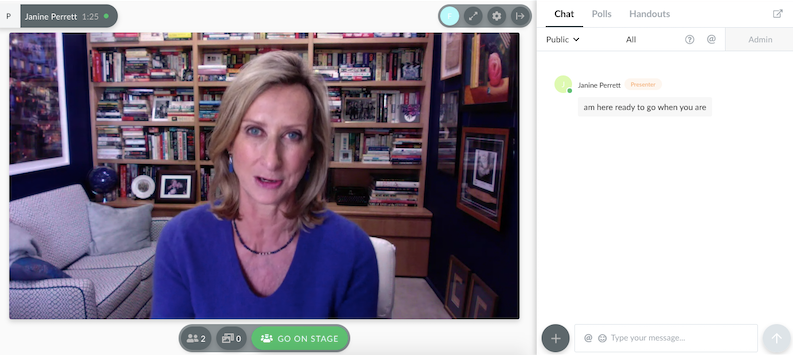
Demio is built around marketing-led webinars where a clean attendee experience and useful engagement data matter more than configuring a persistent virtual classroom. Attendees join through the browser, while polls, featured actions, handouts, chat, and engagement analytics give marketing teams more context around what happened during the session.
Adobe Connect’s interactive features are designed for structured training delivery: pods for content, chat, notes, and group exercises. That architecture serves instructor-led training well. Demand-generation teams usually need something different: a straightforward webinar experience with attendee behavior that can support follow-up.
Pros:
- Engagement analytics add context beyond registrations and attendance alone.
- Browser-based joining keeps the attendee experience straightforward.
- Event Series supports recurring webinar programs.
- Automated and On-Demand formats support evergreen campaigns.
- Marketing integrations connect webinar activity with follow-up workflows.
Cons:
- Starter supports one host.
- Higher capacities and broader capabilities require higher plans.
Pricing: Starter begins at $45/month when billed annually.
3. Livestorm
Best for B2B Teams With Active CRM Pipelines
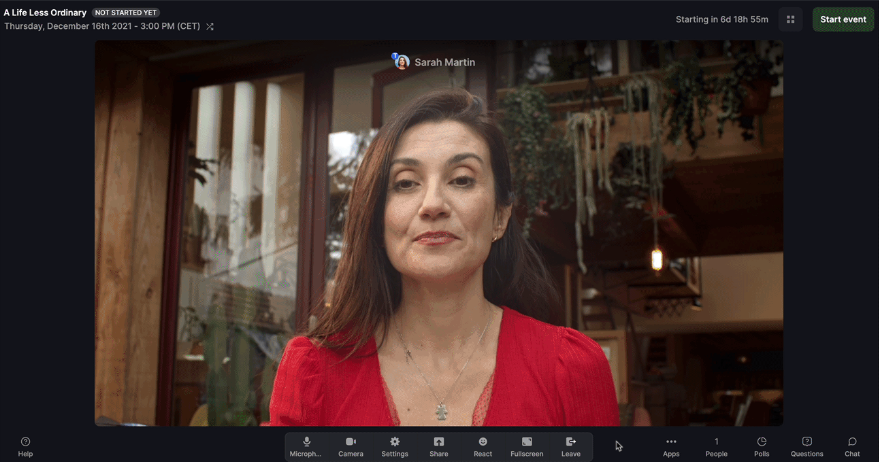
Livestorm is designed for B2B webinar programs where registration and attendee activity need to connect with the wider marketing and sales workflow. Its integrations and attendee-credit model make the webinar part of a larger campaign rather than an isolated virtual room.
Adobe Connect’s integration story has traditionally been closely connected to structured training and learning environments. That matters for formal education, but marketing and sales teams may care more about what happens to attendee information after the webinar.
That distinction becomes important when the webinar exists to feed a CRM pipeline rather than an LMS gradebook. The value is not simply running the session. It is keeping registration and engagement information useful once sales and marketing take over.
Pros:
- Attendee-credit pricing is based on actual participation rather than registrations.
- Unlimited events and team members are included on Pro.
- Browser-based attendance avoids a separate installation step.
- Standard integrations support broader B2B workflows.
- Enterprise adds advanced analytics and governance.
Cons:
- Credit usage needs to be forecast as event volume increases.
- Advanced analytics and deeper integrations move into Enterprise.
Pricing: Pro starts at $1,200/year for 400 attendee credits. Enterprise is custom.
4. GoTo Webinar
Best for Enterprise Teams Running Large-Scale Sessions
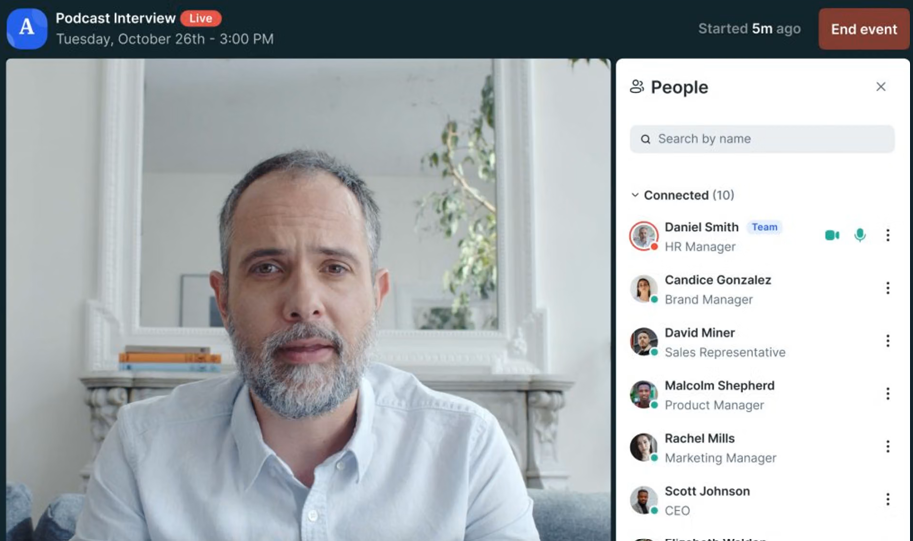
GoTo Webinar focuses on repeatable webinar operations at scale, with participant capacity, automated communication, Q&A, polls, recordings, and structured reporting built around recurring programs.
Adobe Connect’s enterprise positioning makes sense when persistent rooms, specialized training features, or deployment requirements justify the added architectural complexity. But some organizations are paying for that environment while mainly running fairly standard webinars.
For those teams, GoTo Webinar shifts the emphasis from room customization to operational consistency. Reach supports up to 500 participants, Elevate increases that to 1,000, and Complete supports up to 3,000, with additional reporting and event capabilities as the plans scale.
Pros:
- Reach supports up to 500 participants.
- Elevate increases capacity to 1,000 participants.
- Complete supports programs with up to 3,000 participants.
- Automated reminders and follow-ups are included across current plans.
- Polls, live Q&A, recordings, and reporting support recurring programs.
Cons:
- Advanced branding and recorded-as-live capabilities require Elevate or higher.
- Complete requires a custom package.
Pricing: Reach and Elevate use plan-based pricing; Complete is customized.
5. Zoom Webinars
Best for Organizations Already Standardized on Zoom
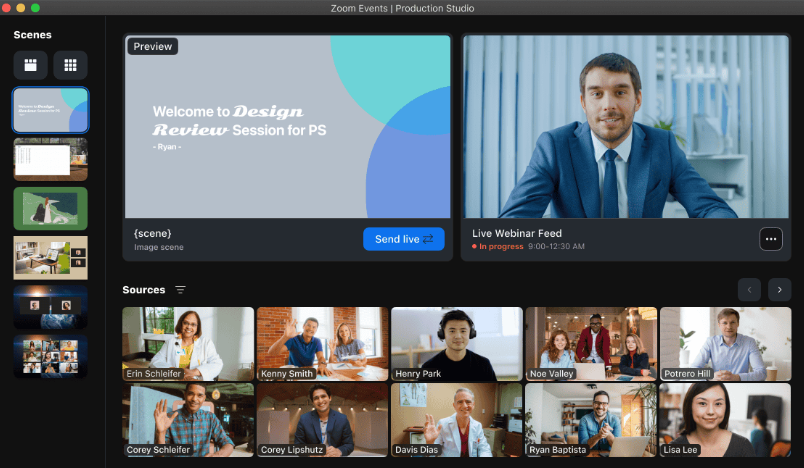
Zoom Webinars gives organizations already using Zoom a registered webinar environment without introducing an entirely unfamiliar platform to presenters and attendees. Teams can use registration, Q&A, polls, recordings, and larger webinar capacities within an ecosystem they may already use every day.
Adobe Connect’s persistent-room interface serves a different purpose. It gives training teams much deeper control over room structure, but the same environment may require more orientation for people who only join external sessions occasionally.
For organizations already standardized on Zoom, familiarity becomes the main advantage. The tradeoff is that teams needing Adobe Connect-style persistent layouts or a broader built-in marketing workflow may still need additional functionality elsewhere.
Pros:
- Familiar environment for organizations already using Zoom.
- Registration supports identified webinar audiences.
- Chat, Q&A, and polls support structured interaction.
- Capacity scales substantially for larger webinar programs.
- Recurring webinar formats support repeated delivery.
Cons:
- Requires a webinar license or add-on in addition to eligible Zoom access.
- Premium webinar features depend on the specific license type purchased.
Pricing: Capacity-based Webinar licensing is available through Zoom’s billing portal or sales.
6. eWebinar
Best for Teams Running Automated and Evergreen Training
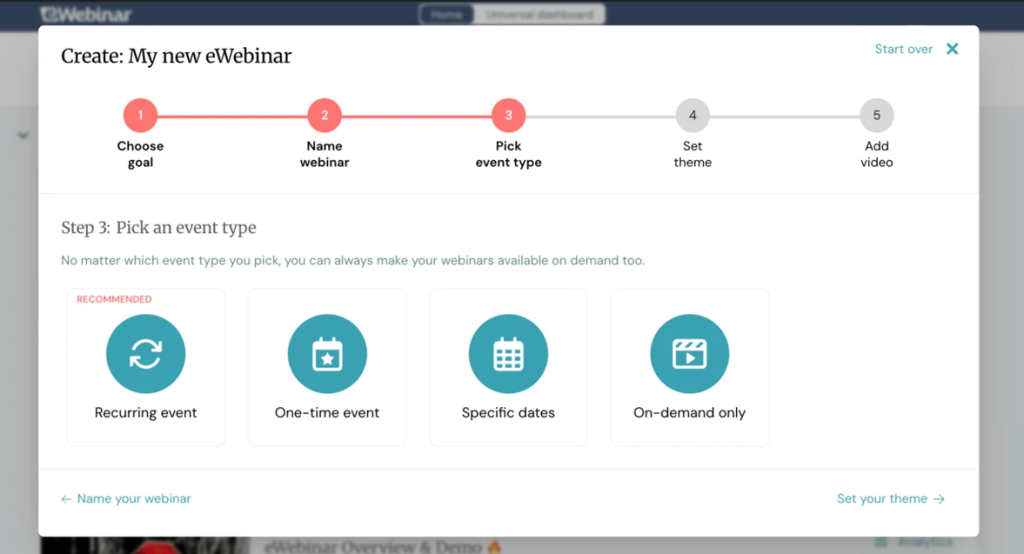
eWebinar turns recorded training into scheduled or on-demand interactive sessions that can run without bringing a live trainer back every time.
Adobe Connect requires a live host when a traditional live training session runs. For content that barely changes from one delivery to the next, that means a trainer may spend hours repeating the same material, or the recording ends up sitting in a library without much interaction around it.
eWebinar tackles that repetition directly. Learners can choose a convenient session while interactive elements and chat make the experience more participatory than simply pressing play on a recording.
Pros:
- Removes repeated live-host requirements from evergreen training.
- Unlimited recurring sessions are included.
- Attendees can choose from more convenient viewing times.
- Interactive elements make prerecorded delivery more participatory.
- Unlimited team members are included on standard levels.
Cons:
- Built primarily around automated rather than traditional live sessions.
- Interactive unattended experiences require upfront setup.
Pricing: Level 1 is $99/month, Level 2 is $199/month, and Level 3 is $299/month. A 14-day trial is available.
7. BigMarker
Best for Enterprise Teams Needing Customizable Rooms and White-Label Delivery
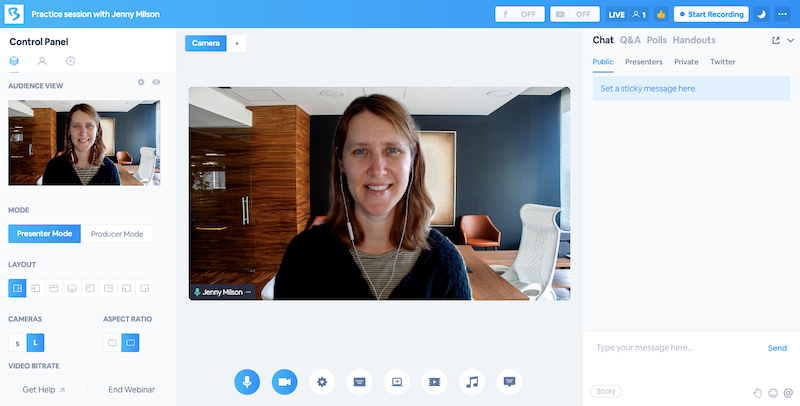
BigMarker gives enterprises and agencies deeper control over branded webinar environments, including custom domains, landing pages, webinar rooms, and attendee communications through its higher-level white-label offering.
That makes it particularly relevant to Adobe Connect users who do not want to give up environment control when they move away from persistent pods and reusable room configurations.
Adobe Connect’s strength lies in its ability to build structured rooms around the way trainers work. BigMarker approaches customization differently, but it still gives teams more room-level and attendee-facing control than many simpler webinar platforms.
Pros:
- White Label supports custom domains and branded attendee experiences.
- Custom webinar rooms provide more control over event presentation.
- Landing pages and emails can align with the organization’s brand.
- Supports webinar and broader virtual-event programs.
- Suitable for teams that need deeper experience customization.
Cons:
- White-label capabilities require a higher-level package.
- Deeper configuration can add setup complexity.
Pricing: White-label and enterprise pricing is custom.
8. ON24
Best for Enterprise Demand Generation and Content Repurposing
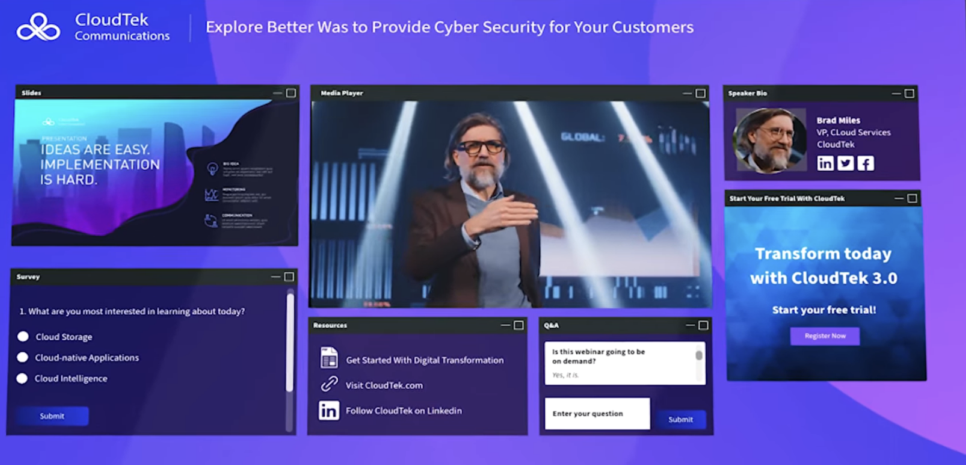
ON24 is built for enterprise marketing teams that want webinars to generate first-party engagement data, content, and follow-up opportunities rather than function primarily as virtual classrooms.
Adobe Connect’s analytics are closely tied to session participation and learning-oriented delivery. ON24 shifts the emphasis toward what attendees engaged with, what content interested them, and how those actions can support broader demand-generation workflows.
For teams currently using Adobe Connect mainly for marketing webinars rather than structured training, that difference is significant. The webinar becomes a source of engagement data and reusable content rather than simply a session that was delivered successfully.
Pros:
- First-party engagement data supports enterprise prospect analysis.
- Content reuse extends sessions beyond the live date.
- Designed around enterprise marketing and revenue programs.
- Webinar engagement can feed broader marketing workflows.
Cons:
- Pricing requires a sales conversation.
- Platform depth may be excessive for smaller training programs.
Pricing: Custom.
9. Airmeet
Best for Community and Networking-Driven Virtual Events
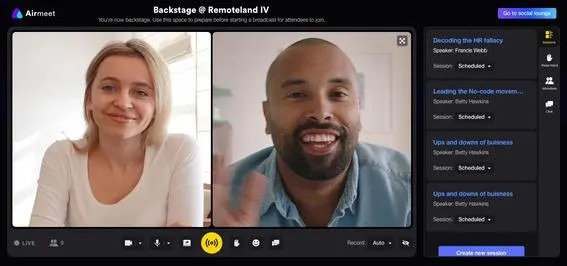
Airmeet is built around virtual events where attendees are expected to connect with each other, not simply listen to an instructor or presenter. Networking, audience engagement, and broader event workflows, therefore, sit much closer to the center of the experience.
Adobe Connect’s virtual room is designed around structured content delivery. The instructor presents, attendees interact through the defined environment, and the session follows a planned format. That serves formal training well.
Community events, partner summits, user conferences, and thought-leadership programs ask the platform to do something different. When attendee-to-attendee interaction matters as much as the presentation itself, Airmeet becomes much more relevant.
Pros:
- Networking features support community-led webinars and events.
- Supports live, simulive, and on-demand formats.
- Analytics and reporting support post-event review.
- CRM integrations connect attendee activity to wider workflows.
- Ticketing and sponsorship support monetized events.
Cons:
- Networking-heavy functionality can be more than structured training requires.
- Broader event programs introduce more operational complexity.
Pricing: Premium Webinars starts at $167/month billed yearly.
10. Zoho Webinar
Best for Teams Needing Simpler Webinar Delivery
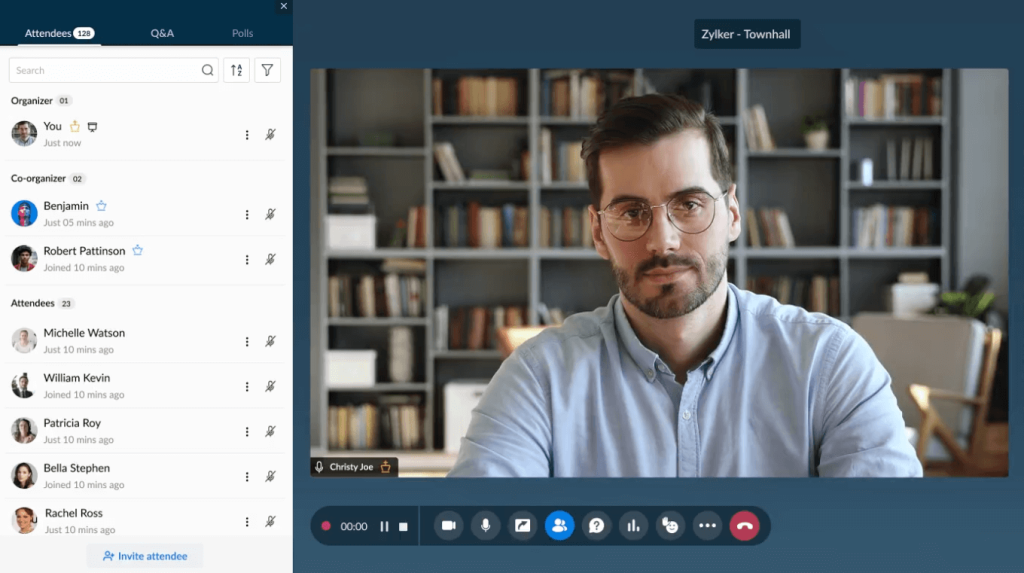
Zoho Webinar gives teams a simpler webinar setup that becomes especially useful when the surrounding organization already runs on Zoho CRM, Campaigns, or other Zoho products.
It covers the core webinar jobs without asking the team to recreate Adobe Connect’s persistent-room architecture.
Adobe Connect’s value is harder to justify when a team mainly needs straightforward webinar delivery rather than custom pods, saved layouts, specialized training architecture, or deployment flexibility.
Pros:
- Fits naturally into organizations already using Zoho products.
- Supports standard webinar delivery and audience interaction.
- Simpler setup than a persistent-room training environment.
- Native ecosystem connections reduce the need for additional integration work for Zoho users.
Cons:
- Third-party ecosystem breadth is narrower than some larger webinar platforms.
- Less suited to complex persistent-room training configurations.
Pricing: Zoho’s webinar pricing varies by organizer and attendee capacity. Confirm the current plan structure before purchase.
My Evaluation Criteria
Every tool on this list was assessed using a consistent framework based on current product documentation, pricing information, and independent buyer feedback.
User Reviews and Ratings:
Every entry here was checked against verified user feedback on G2, Capterra, and TrustRadius, rather than relying on vendor claims alone, including ProProfs WebinarNinja’s own 4.2-star rating across 200+ verified Capterra reviews.
Essential Features and Functionality:
I looked at what Adobe Connect users may actually need to preserve or improve: training delivery, webinar formats, registration, engagement, replay, analytics, integrations, and post-session workflow.
Ease of Use:
Both host setup and attendee access matter. Even a powerful platform can create friction if routine session preparation requires unnecessary administration.
Customer Support:
Live training and webinar programs leave little room for slow troubleshooting, so support around setup and delivery matters.
Value for Money:
Pricing was evaluated alongside attendee capacity, hosts, billing units, plan gating, and major add-ons, rather than relying solely on headline prices.
Industry Analysis and Expert Commentary:
Current product documentation and independent comparisons were used to understand how each platform differs from Adobe Connect’s persistent-room and training-first model.
How Does Leaving Persistent Rooms Change the Workflow?
Adobe Connect was built for a very particular way of delivering virtual training: configure the room, arrange the pods, save the layout, and bring people back into the same environment again and again. That is still useful.
But leaving Adobe Connect usually means changing the operating model, not just replacing one webinar room with another.
The Room Stops Being the Center of the Workflow
In Adobe Connect, the room itself can support much of the training structure.
Modern webinar platforms often move that structure outward:
- Registration happens before the session
- Emails manage reminders
- Engagement happens inside the webinar
- Recordings and replays extend delivery afterward
- Analytics and integrations move data into the next system
The workflow becomes less about preserving the room and more about connecting each stage around it.
Less Setup Can Mean Less Room-Level Control
That tradeoff matters. A team moving away from pods and saved layouts may gain faster setup, but lose some of the room architecture that trainers have built their programs around.
That is why a simpler platform should not automatically be treated as a better replacement.
External Training Can Become Easier to Operate
For customer education, partner training, product sessions, or lead-generation webinars, the advantages can be more noticeable.
Registration, emails, replay, analytics, and follow-up often matter more than recreating the exact same room layout.
Following strong webinar best practices, therefore, starts with deciding which parts of the Adobe Connect model still serve the audience and which are simply inherited from the old workflow.
How Do You Migrate Adobe Connect Training Content?
For organizations that have been on Adobe Connect for several years, migration is not purely a platform evaluation question. There is existing content to consider: recorded sessions, room templates, presentation materials, and attendee history that may need to be carried forward.
Recordings
Export the recordings the team still needs and decide whether each belongs in a replay library, an evergreen webinar, an LMS, or an archive. Do not migrate years of content simply because it exists. Do not migrate years of content simply because it exists. A clearer webinar content strategy helps separate material worth reusing from recordings that no longer support the current program.
Room Templates and Layouts
Adobe Connect’s pod-based layouts do not transfer cleanly into most webinar platforms. Document what each layout actually accomplishes before rebuilding it. A “Q&A layout,” for example, may require only chat, Q&A, slides, and moderator controls in the new platform, rather than recreating every visual element.
Attendee and Registrant History
Export historical attendee information that still has business value and move it into the CRM, LMS, or new platform where appropriate. The important part is preserving useful history, not copying every old record.
Transition Timing
Run the new workflow alongside Adobe Connect for one real training or webinar cycle before the final cutover. That exposes missing content, permissions, reporting gaps, or workflow dependencies while the old environment is still available.
My Top 3 Adobe Connect Alternative Picks
1. ProProfs WebinarNinja
ProProfs WebinarNinja is the strongest fit when the priority is simpler webinar and training delivery with multiple formats, registration, engagement, replay, integrations, AI assistance, and CourseNinja in the same broader workflow.
2. BigMarker
BigMarker is the clearest choice when custom-branded webinar rooms, white-label delivery, and broader enterprise event experiences matter more than keeping setup minimal.
3. Zoho Webinar
Zoho Webinar is the practical choice when the team wants a simpler webinar setup and already relies on the Zoho ecosystem for surrounding customer or marketing workflows.
Ready to Simplify Your Adobe Connect Setup?
Replacing Adobe Connect is not a feature checklist exercise. The right platform removes what your team no longer needs while keeping what it still depends on: structured training delivery, external-facing webinars, recurring education programs, or enterprise-scale sessions.
Start by mapping which Adobe Connect capabilities are actually in use. Persistent rooms, specialized deployment, learning workflows, registration, replay, analytics, and integrations do not carry equal weight across all programs. Identifying what matters before evaluating alternatives prevents swapping one set of trade-offs for another.
When several lifecycle gaps appear together, ProProfs WebinarNinja covers the broadest scope in this comparison. Live, automated, series, and hybrid formats combine with built-in registration, email sequences, engagement tools, AI assistance throughout the session lifecycle, and CourseNinja for teams that also need structured course delivery, all in one account.
Frequently Asked Questions
How Much Do Adobe Connect Alternatives Typically Cost?
Pricing varies because these platforms use different billing models. WebinarNinja starts at $0.30/attendee/month; Demio starts at $45/month; Livestorm Pro starts at $1,200/year for 400 attendee credits; and eWebinar starts at $99/month. Adobe Connect itself now starts at $190/year per host for a 100-person room, with separate capacity upgrades.
Do Adobe Connect Alternatives Require Attendees to Download Software?
Many alternatives use browser-based attendee experiences, including WebinarNinja, Demio, Livestorm, and several others. The exact join process still depends on the platform and event type, so teams should verify attendee access during evaluation rather than assuming every product handles it the same way.
Which Adobe Connect Alternative Works for Corporate Training?
WebinarNinja is relevant when corporate training also needs live, automated, series, or hybrid webinars, while CourseNinja supports structured course delivery alongside them. Adobe Connect may remain more suitable when persistent-room architecture or specialized deployment is a hard requirement.
Is There an Adobe Connect Alternative With Similar White-Label Control?
BigMarker is worth evaluating when branding control is central. Its White Label offering supports custom domains, landing pages, webinar rooms, and emails, making it more relevant to teams that need the attendee experience to remain strongly branded.
Can I Keep Adobe Connect Only for Specialized Training?
Yes. A full replacement is not always necessary. Some organizations can retain Adobe Connect for persistent-room, regulated, or specialized training while moving external webinars, marketing programs, or recurring education to another platform.
Which Adobe Connect Alternative Works for Automated Training?
eWebinar specializes in automated delivery when the same recorded training needs to run repeatedly. WebinarNinja is broader in scope for teams that need automated webinars alongside live, series, and hybrid formats.
What Should I Prioritize Before Leaving Adobe Connect?
Start with the workflow that cannot break. That may be persistent rooms, learning integration, deployment requirements, attendee registration, replay, or post-session reporting. Once that requirement is clear, comparing alternatives becomes much easier than evaluating every feature equally.
Can Adobe Connect Alternatives Simplify Webinar Follow-Up?
Yes. ProProfs WebinarNinja can handle confirmation emails, reminders, replay delivery, and post-webinar follow-up within the same workflow. That can reduce the need to move attendee data between separate tools when the session is part of a lead-generation, training, or customer-education program.
Want to host a webinar for free?
Use WebinarNinja to teach, improve marketing, and grow your sales.