Microsoft Teams Webinar already handles registration, audience participation, and reporting inside Microsoft 365. For teams whose events fit that environment, keeping it can be the right decision. Microsoft Teams Webinar alternatives become relevant when the work around each session takes more effort than the session itself: building an external audience, delivering repeatable content, connecting engagement with a CRM, and following up while interest is fresh.
According to TwentyThree’s State of Webinars 2026 research, 80% of surveyed webinar makers expect to maintain or increase their webinar budget over the next year. That describes the survey respondents, rather than every company. Sustained spending makes the workflow worth examining: what happens before people join, while they participate, and after they leave?
These 10 Microsoft Teams Webinar alternatives and competitors cover different answers, from branded live sessions to automated delivery and enterprise demand generation. The comparison uses product documentation, current pricing information, and independent reviews to help explain the experience.
10 Microsoft Teams Webinar Alternatives
Compare the jobs each platform handles before comparing its starting price.
| Tool | Best For | Practical Difference to Evaluate | Starting Price |
| ProProfs WebinarNinja | Generating leads, growing sales, and teaching better | Registration, engagement, automated delivery, AI assistance, and course delivery in one platform | $0.30/attendee/month |
| Univid | Branded external webinars with fast setup | Browser-based branded sessions with registrant-based plans | $99/month |
| Webex Webinars | Enterprise webinar production and administration | Dedicated webinar production within Cisco’s collaboration environment | $171-$225/user/month |
| LiveWebinar | Webinars with social streaming | Webinar delivery with streaming, branding, and configurable add-ons | $14-$18/month |
| Demio | Marketing webinars with engagement-based follow-up | Engagement analytics and supported marketing integrations | $42-63/month |
| Livestorm | B2B teams connecting webinars with CRM workflows | Browser-based delivery and eligible native CRM connections | $99/month |
| GoTo Webinar | Larger programs needing organizer-based event plans | Registration, event reporting, and plan-specific production tools | $59/user/month |
| BigMarker | White-label events and multi-session conferences | Branding and broader event production on eligible packages | $79/month |
| eWebinar | Automated and evergreen webinar programs | Recorded presentations with scheduled delivery and configured interactions | $99-299/month |
| ON24 | Enterprise demand generation and content reuse | Engagement data, content repurposing, and supported marketing-system connections | Custom ($25K+/yr) |
These prices use different billing units. Compare attendee capacity, registrants, attendee credits, hosts, and active webinars against your actual program. Annual rates require an annual commitment; integrations, automation, branding, and production tools may require a higher plan or add-on. Free plans and time-limited trials are different offers.
1. ProProfs WebinarNinja
Best for Generating Leads, Growing Sales, and Teaching Better
ProProfs WebinarNinja connects the work before, during, and after a webinar. Teams Webinar can already bring an audience into a session. The harder question is how registration, repeatable delivery, engagement data, and follow-up fit your program.
Registration pages capture attendee details; built-in emails handle reminders and scheduled follow-up. Chat, Q&A with upvoting, polls, offers, and handouts keep people involved. Automatic recordings provide replays, while analytics track registrations, attendance, watch time, and engagement. Marketing connections extend the sales workflow, depending on integration and configuration.
Live webinars support questions and demos; automated sessions deliver repeatable content; series enable deeper teaching; and hybrid formats blend recordings with live interaction. CourseNinja adds live and on-demand courses.
The AI supports the work around those sessions. AI Conversion Writer suggests registration headlines, the AI Webinar Co-Host helps answer recurring chat questions, and the AI Sales Coach reviews sessions for improvements. The AI Content Strategist drafts emails, blog posts, and social posts based on webinar content. Hosts retain control of the message, delivery, and final review.
Pros:
- Supports live, automated webinars, series, and hybrid sessions for sales, education, and training programs.
- AI assists with registration headlines, recurring questions, session review, and content repurposing.
- Built-in registration pages and emails connect sign-ups, reminders, and scheduled follow-up.
- Chat, Q&A with upvoting, polls, offers, and handouts give attendees useful participation options.
- Automatic recordings provide replay access; webinar analytics track attendance, watch time, and engagement.
- Included CourseNinja supports live and on-demand courses alongside the webinar program.
- Browser-based attendee access avoids the need to download an app before the session begins.
- Marketing connections, Zapier, and API access extend supported workflows; Stripe enables paid registrations.
Cons:
- No downloadable or on-premise version
- Dark user interface option is not available
Pricing: A FREE 14-day trial is available. Paid starts at $0.30/attendee/month (includes CourseNinja, worth $ 1,200).
Case study:
Amanda Haddaway, managing director of HR Answerbox, used ProProfs WebinarNinja alongside email and social media marketing to attract potential clients. Automated webinars let her keep a presentation running for a month, freeing up time for existing clients rather than hosting live sessions every day.

2. Univid
Best for Branded External Webinars With Fast Setup
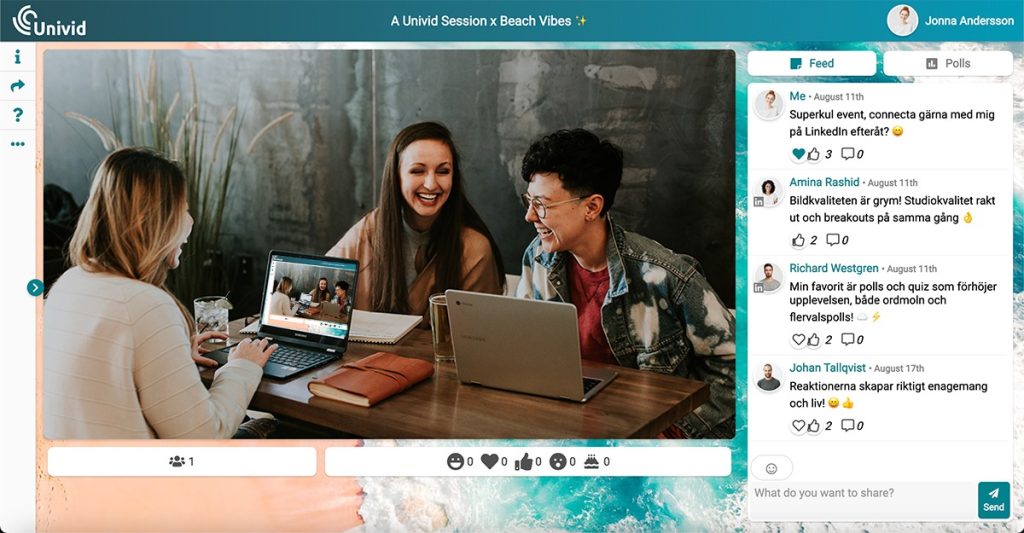
Univid gives marketing teams a browser-based environment for branded external webinars. Custom colors, logos, and themes help the event feel connected to the host’s brand, while a relatively focused setup keeps the production work manageable.
For teams moving from Teams Webinar, the useful comparison is the actual registration and viewing experience. Build the same event in both tools, then compare what an external guest sees from the invitation through follow-up. Teams also has customization options, so the decision should rest on the brand control your license and configuration actually provide.
Univid’s registrant-based pricing also changes the cost comparison. Instead of counting every colleague as another host license, check the number of unique registrations your program needs each month and which integrations are included.
Pros:
- Browser-based hosting and attendance keep the event accessible without requiring an app download.
- Branding options connect the registration and webinar experience with the host’s visual identity.
- Growth lists HubSpot, Zapier, and Make connections for supported marketing workflows.
- A free plan lets small teams evaluate the experience before selecting a paid tier.
Cons:
- Free access is limited to 20 monthly registrants, 10 live participants, and 20-minute sessions.
- Salesforce, SAML SSO, custom integrations, and broader service requirements sit within custom plans.
- Registrant limits need budgeting when campaigns attract more interest than the live room requires.
Pricing: Free plan is available with up to 10 live participants and a 20-minute session cap. Growth starts at $99/month for 100 participants.
3. Webex Webinars
Best for Enterprise Webinar Production and Administration
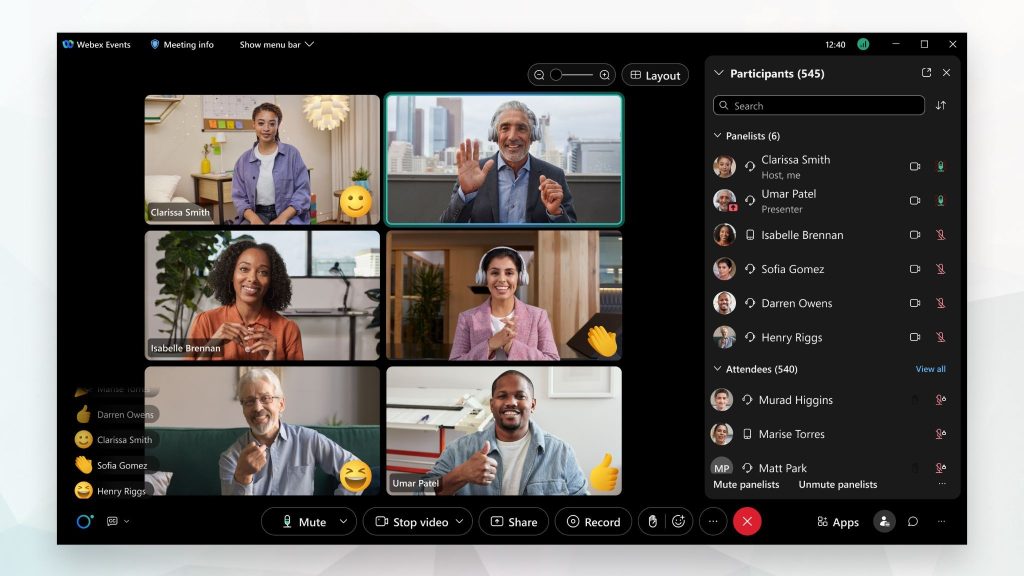
Webex Webinars supports enterprise presentation-style sessions with registration, rehearsal, presenter management, and audience engagement. For organizations already working with Cisco, the appeal is a dedicated webinar product within an environment their administrators may already manage.
The buying decision should separate webinar production from broader event management. Webex Webinars serves individual presentation-style events; Webex Events addresses wider conference needs such as multi-session programs and networking. Choose the product and license that fit the program, rather than assuming the names refer to interchangeable packages.
For regulated organizations, compare the specific security controls, retention arrangements, and deployment requirements with your current Microsoft setup. A familiar enterprise vendor helps procurement, but it does not establish that one platform meets every compliance need better than another.
Pros:
- Registration and rehearsal tools help teams prepare structured sessions for larger external audiences.
- Presenter management and audience engagement support organized delivery rather than an ordinary video call.
- Capacity options let enterprise teams select licensing around the intended audience and event format.
- Existing Cisco administration can make operational adoption more familiar for organizations using Webex.
Cons:
- Webinar licensing should be evaluated separately from the free Webex Meetings offer.
- Enterprise production and administration may involve more configuration than a small program needs.
- Capacity, storage, integrations, and optional features must be checked against the selected package.
Pricing: Standard runs around $225/user/month for up to 1,000 attendees. Webinars Professional runs around $171.88/user/month on an annual billing plan. Webex Events is custom-priced above that.
4. LiveWebinar
Best for Cloud-Based Webinars With Social Streaming
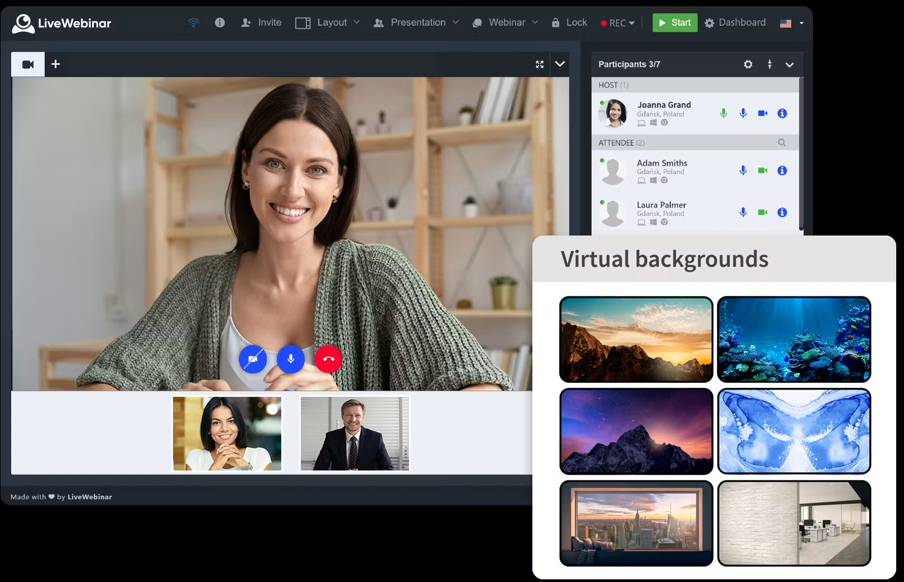
LiveWebinar combines webinar delivery with social distribution options. Teams that want a registered event and a wider broadcast can evaluate registration, audience participation, and streaming within the same platform.
Polls, surveys, Q&A, voting, and calls to action support audience interaction. Branding and embedded-event options can also help connect the session with the company’s website. The important detail is the package: streaming, automated delivery, and other capabilities may be included, purchased as add-ons, or reserved for a different tier.
That flexibility makes a realistic trial useful. Build the event you actually plan to run, including recording and distribution, then price that configuration rather than comparing only the entry subscription.
Pros:
- Supports webinar registration and engagement tools alongside configurable live-streaming options for wider distribution.
- Polls, surveys, voting, and calls to action give audiences ways to participate during sessions.
- Branding and embedding options can connect webinar delivery with the company’s own website.
- Free access allows initial testing without a time-limited trial or credit card requirement.
Cons:
- The free plan supports only five attendees and sessions of up to 30 minutes.
- Some streaming, automation, branding, and capacity requirements add costs beyond the entry package.
- CRM data coverage should be tested against the specific integration and fields your team needs.
Pricing: Pro starts at $14-$18/month, billed annually or monthly. Business runs $114-$143/month. Enterprise is custom-priced above that. Free plan available for up to 5 attendees.
5. Demio
Best for Marketing Webinars With Engagement-Based Follow-Up
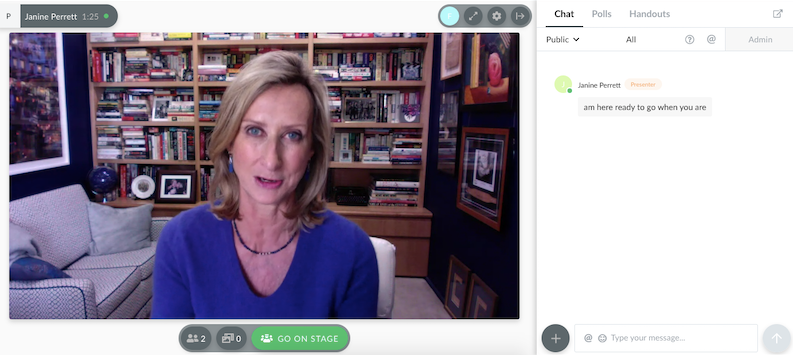
Demio helps marketing teams understand what happened during a webinar, beyond who joined. Poll responses, featured action clicks, questions, and attendance information can give the sales team more context for its next conversation.
Supported integrations can carry that activity into marketing workflows. The available fields and triggers depend on the connection, so run a trial with the segmentation your team actually uses. An engagement report becomes useful when someone can act on it without rebuilding the lead list.
Delivery formats also depend on the plan. Starter supports live sessions and event series. Growth and Premium add prerecorded on-demand and automated webinars, making those plans more relevant for repeatable demos or evergreen education.
Pros:
- Engagement analytics help teams shape follow-up around attendance, poll responses, and other session activities.
- Browser-based delivery keeps the registration and viewing experience accessible without an app download.
- Live events and series support recurring programs; eligible plans add automated and on-demand delivery.
- Supported marketing integrations connect webinar activity with configured follow-up workflows on the appropriate tier.
Cons:
- Automated and prerecorded on-demand webinars require Growth or Premium, not Starter.
- Premium integrations, including Salesforce and Marketo, require the appropriate plan.
- The Starter’s single-host limit restricts teams that need multiple simultaneous sessions.
Pricing: Starter runs about $42-$63/month for one host and a 50-attendee room. Growth starts at $75- $117/month and unlocks automation.
6. Livestorm
Best for B2B Teams With Active CRM Pipelines
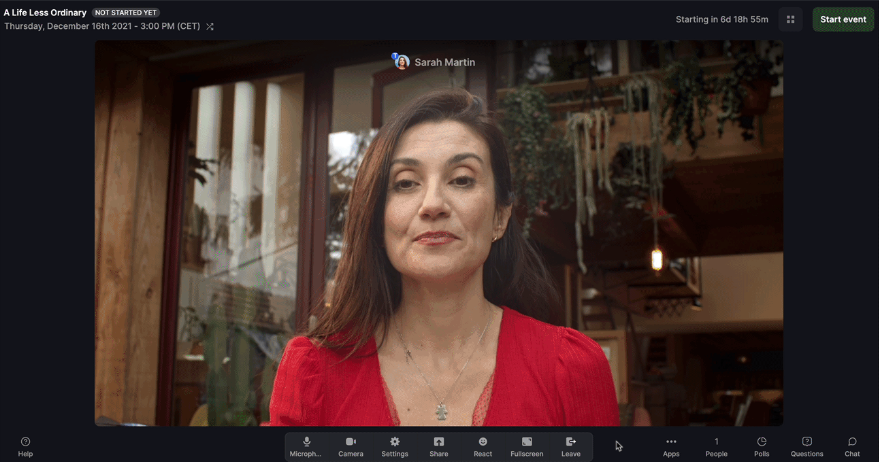
Livestorm connects browser-based webinar delivery with the follow-up work that happens in a CRM. For a B2B marketing team, the value appears after the session, when someone needs to know who registered, who attended, and what should happen next.
Native connections with HubSpot, Salesforce, and Pipedrive support different workflows and plan requirements. Salesforce requires Enterprise. Confirm which specific fields, activity records, and replay data each connection can transfer, rather than assuming every interaction automatically becomes a complete CRM record.
Its attendee-credit model also needs a different cost calculation. Credits are consumed when attendees join live sessions, replays, or on-demand events, rather than when they register. A program with repeated viewing should model that usage before choosing a credit allowance.
Pros:
- Browser-based attendance eliminates the need for prospects to install an additional application before joining.
- Eligible native CRM connections support handoff of registration and attendance without recurring manual CSV exports.
- Live and replay access let teams continue distributing useful sessions after the original event.
- Free access provides an initial way to test delivery before committing to annual attendee credits.
Cons:
- The free plan includes a small annual attendee credit allowance and a 30-minute event limit.
- Frequent attendance at live and replay sessions can consume credits faster than registration counts suggest.
- Salesforce and certain enterprise capabilities require Enterprise; additional features may have separate costs.
Pricing: Free plan is limited to 30 attendees and 20-minute sessions. Pro starts around $99/month, Premium around $299/month, and Enterprise is custom-priced above that.
7. GoTo Webinar
Best for Larger Programs Needing Structured Event Plans
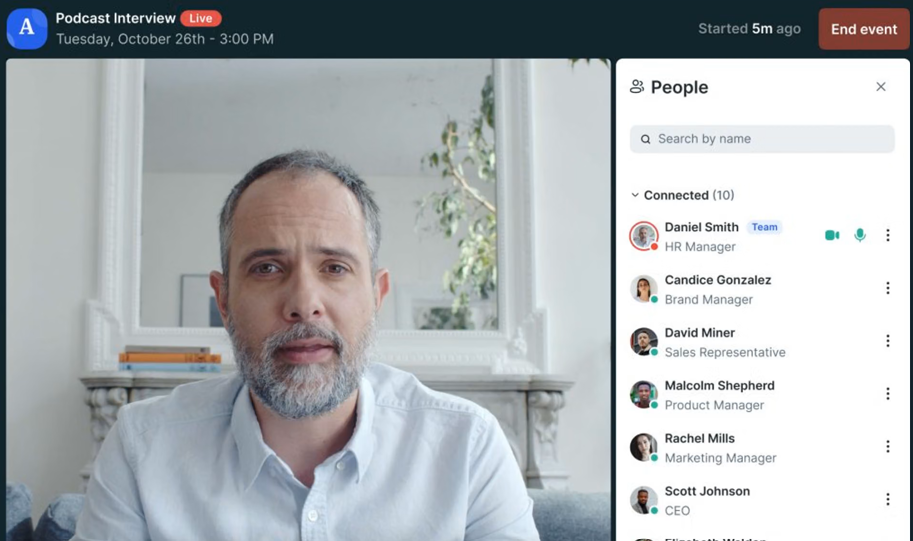
GoTo Webinar brings registration, audience participation, and reporting into a dedicated event environment. For teams running larger registered sessions, the useful comparison is the event workflow and organizer cost, rather than a claim that Microsoft does not publish prices.
The current plan lineup includes Reach, Elevate, and Corporate. Reach covers a smaller, organizer-led program, while higher plans add production, capacity, and administrative capabilities. Registration-source information and event reports can help stakeholders understand what brought the audience in and what happened during the session.
Rehearse the organizer setup and external join experience before a large event. Familiarity can help, but a reliable workflow still depends on the selected product experience, permissions, devices, and audience network.
Pros:
- Registration, reminder emails, and follow-up tools support organized delivery for recurring external webinar programs.
- Event reporting provides attendance and participation information for stakeholders reviewing results after a session.
- Capacity and production options let teams select plans around audience size and organizer requirements.
- Supported integrations can connect webinar records with the sales and marketing systems already in use.
Cons:
- Recording, automation, production, and administrative access depend on the plan and product configuration.
- Organizer licensing adds an additional cost when a program requires multiple independent hosts.
- A dedicated webinar subscription does not replace Teams channels, file collaboration, or internal meeting workflows.
Pricing: Plans start around $59/user/month for the Lite tier and scale to roughly $399-$499/month for Enterprise. A free trial is available.
8. BigMarker
Best for White-Label Events and Multi-Session Conferences
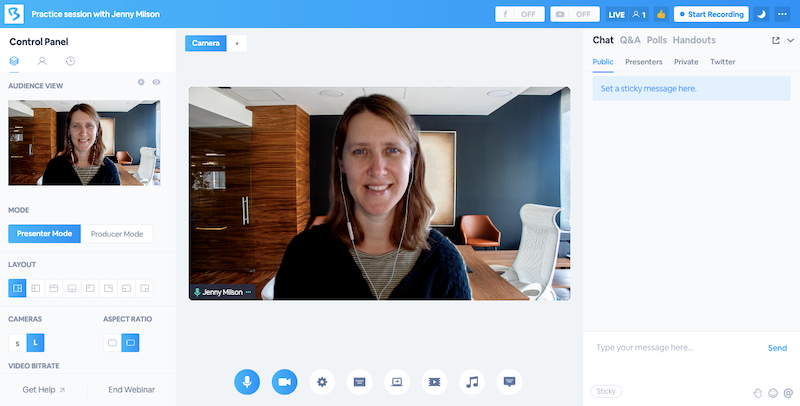
BigMarker gives teams broader control over branded webinars and conference-style programs. Its white-label capabilities are relevant when the company or client brand needs to carry through registration, event delivery, and related communications.
For agencies and enterprise marketing teams, that control can matter beyond the webinar room. A multi-session launch, paid conference, or reusable content destination involves more touchpoints than a single presentation. BigMarker’s wider event options help address those jobs, with the exact coverage depending on the package.
Separate basic branding from full white-label delivery during evaluation. Ask which pages, emails, domains, and attendee interfaces can be customized, then inspect the complete journey. The practical difference lies in what the audience encounters, rather than in an absolute claim that another platform offers no branding.
Pros:
- Eligible white-label packages give teams greater control over the external attendees’ branded experience.
- Webinar and event packages support programs ranging from individual sessions to multi-session conferences.
- Live, on-demand, and evergreen formats support both event delivery and later content reuse.
- Ticketing and payment capabilities on eligible packages help teams evaluate paid events and premium education.
Cons:
- Package pricing requires a quote rather than a simple published entry rate.
- White-label implementation and broader event production require configuration before the first session.
- Simulive, evergreen, CRM connections, and other advanced requirements must be matched to the appropriate package.
Pricing: Starter is around $79/month for 100 attendees, Elite around $299/month for 500 attendees, with custom Enterprise pricing above that.
9. eWebinar
Best for Automated and Evergreen Webinar Programs
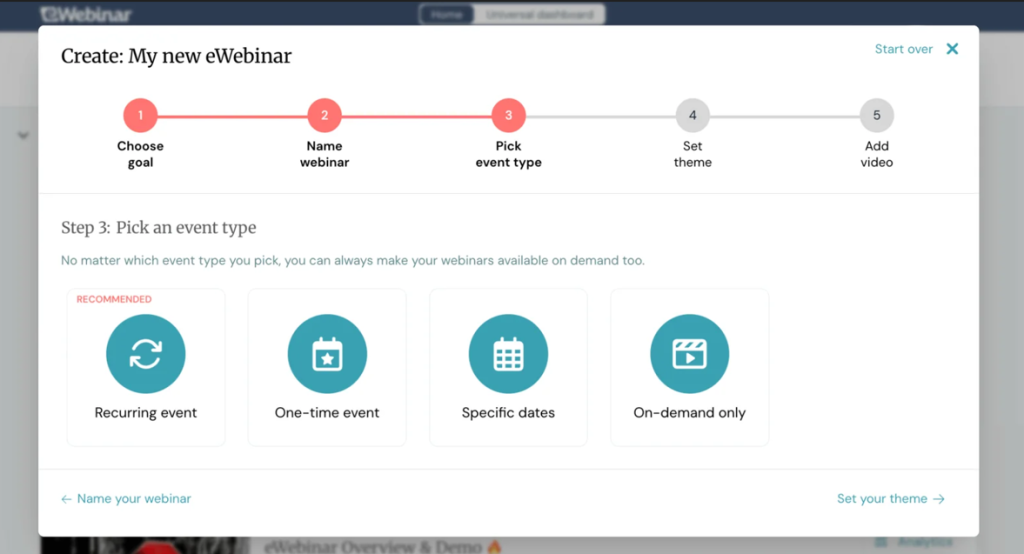
eWebinar turns a recorded presentation into a scheduled or on-demand interactive session. For product walkthroughs, onboarding, and recurring education, it eliminates the need for a presenter to deliver the same material each time someone watches.
Attendees view the recording and interact with configured questions, polls, or offers. Chat can be handled live or asynchronously; AI responses require the appropriate setup. The presentation can run without a live presenter, while the team still owns content accuracy, question coverage, and follow-up.
That distinction matters for a Microsoft-standardized team. Keep live discussions where people need to speak with each other, and evaluate automation for material that benefits from repeatable delivery. A recorded experience should still provide viewers with a clear way to find answers.
Pros:
- Recorded delivery reduces the need for repeated presentation work for evergreen demos, onboarding sessions, and educational programs.
- Scheduled and on-demand access give viewers more flexibility in choosing when to watch.
- Configured interactions help teams collect questions and responses during the presentation.
- Live or asynchronous chat separates presenter availability from the work of answering attendee questions.
Cons:
- It does not replace live webinars or meetings requiring open, two-way conversation.
- Chat coverage, AI configuration, and escalation expectations need to be planned before automated sessions are published.
- Recordings require updates when the product, offer, or underlying information changes.
Pricing: Starts at $99/month for a single published webinar and scales to $299/month for unlimited webinars.
10. ON24
Best for Enterprise Demand Generation and Content Repurposing
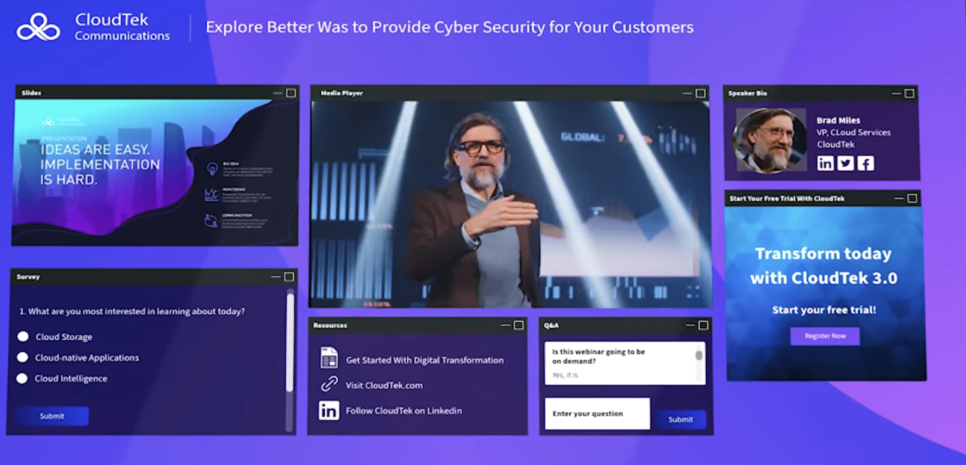
ON24 connects webinar engagement with enterprise marketing workflows. Resource downloads, questions, calls to action, and other supported audience activities can give demand generation teams more context for lead scoring and follow-up.
The value is strongest when webinars form an ongoing program across campaigns, audience segments, and business units. On-demand experiences and content-repurposing tools can extend a session into additional assets, while supported CRM and marketing-system connections help move activity into the team’s existing processes.
Compare the specific data your sales team needs, the integration work required, and how pipeline attribution will be measured. Neither an event report nor an integration logo establishes attribution on its own. Cvent completed its acquisition of ON24 in April 2026; evaluate the current product and contract rather than treating the transaction as pending.
Pros:
- Engagement reporting supports enterprise teams reviewing resource use, audience participation, and follow-up opportunities.
- Content-repurposing tools extend useful webinar material into additional campaign assets after the live session.
- Supported CRM and marketing-automation connections can carry event activity into configured enterprise workflows.
- Branded on-demand experiences support recurring content programs beyond the original broadcast date.
Cons:
- Custom contracts make the cost comparison dependent on your program and negotiated scope.
- Implementation requires time for integrations, permissions, reporting, and campaign configuration.
- A smaller occasional webinar program may not need the platform’s broader enterprise capabilities.
Pricing: Custom quotes only across Essentials, Standard, and Advanced tiers. Most organizations pay $25,000 to $100,000+ annually, with a median contract around $38,750.
My Evaluation Criteria
These platforms solve different problems. A branded live session, a recorded onboarding program, and an enterprise demand generation campaign should not be judged by the same feature count. Here is the framework behind the shortlist.
User Reviews and Ratings: G2 and Capterra feedback provides context for recurring experience issues such as setup complexity, joining friction, and support. Reviews do not establish current pricing or feature availability, and no rating-based ranking is claimed here.
Essential Features and Functionality: The comparison considers registration, audience participation, recordings, analytics, repeatable delivery, and integrations. Teams’ actual license-specific capabilities provide the baseline, rather than assuming its webinar functionality stops at attendance reports.
Ease of Use: Both sides of the event matter: the host’s preparation and the external guest’s route into the session. Browser access, permissions, registration steps, and recovery after a dropped connection are useful trial checks. This is a documentation-based comparison, not a claim that every tool was tested hands-on.
Customer Support: Published channels and access conditions help establish where teams can seek assistance. They do not prove responsiveness during a live incident. Check the support route and service terms for the plan you intend to buy.
Value for Money: Compare the complete workflow against the billing unit: hosts, organizers, registrants, attendee capacity, attendee credits, or active webinars. Existing Microsoft licenses, annual commitments, integrations, storage, add-ons, and implementation work affect the real cost.
Industry Analysis and Expert Commentary: Independent research and commentary provide context for how webinar programs operate. Official documentation remains the basis for product and licensing claims; unresolved prices and offer conditions are identified rather than supplied from older comparisons.
What Does Your Teams License Cover?
Before buying an alternative, find out what your organization already owns. A capability that appears to be missing may be restricted by licensing, tenant policy, or configuration rather than being absent from Teams altogether.
Microsoft’s April 2026 changes moved several former Premium event capabilities into Teams Enterprise. Current Teams events licensing documentation distinguishes foundational and advanced event features. Foundational licenses cover registration, attendance reporting, and core participation; advanced licenses add capabilities such as customized event emails, registration controls, production tools, and engagement reporting. Some features are still rolling out.
Start with the organizer’s exact license. Business plans and enterprise plans do not provide identical event coverage, and the old assumption that buying Teams Premium unlocks every advanced webinar feature no longer holds. Attendee capacity also varies by format and license rather than a single universal 1,000-person ceiling.
Then separate the three questions:
- What is already included? Ask IT to confirm event creation, registration, reminders, recordings, reporting, branding, and guest policies for the intended organizer.
- What needs configuration? Check how Outlook invitations, recording access, CRM connections, and follow-up are currently managed. Integration work is a separate question from event licensing.
- What requires a different delivery model? Repeatable recorded webinars with scheduled interactive delivery should be evaluated independently from hosting a live Teams event or sharing its recording afterward.
The useful comparison begins with your working configuration. Otherwise, an alternative can appear to solve a problem your organization has already paid to solve.
What Should a Microsoft Team Test?
A trial should prove that the new platform fits the systems your team uses every day. Run one complete external session, including the Outlook invitation, registration, audience participation, CRM handoff, and replay.
Start with Outlook and the guest invitation. Send the confirmation to an external Outlook mailbox and another common email service. Check time zones, calendar files, event changes, cancellations, and whether the correct join link stays visible. A polished registration page does little good if the guest invitation sends a prospect to the wrong session.
Test access under realistic tenant policies. Ask someone outside your Microsoft tenant to join using a managed device and a network similar to your audience’s. Inspect browser support, permissions, authentication, captions, and reconnection after a dropped call. Compare the actual steps with your existing Teams event rather than assuming that every external attendee struggles with them.
Check the CRM record after the session. Connect the tool to the system your sales team actually uses. Create test registrants, include a custom field, and compare live attendees, non-attendees, and replay viewers. Confirm which information arrives, where it lands, and whether an existing contact becomes a duplicate. Useful lead nurturing starts with a reliable record and a clear follow-up owner.
Run the follow-up rather than inspecting its settings. Test whether different audience groups can receive the messages you need them to. Check delivery timing, replay permissions, unsubscribe handling, and how a private conversation gets scheduled. Built-in emails are valuable when they reduce recurring work and give the recipient a clear next action.
Verify recording ownership and Microsoft retention obligations. Decide where the recording will live, who can retrieve it, and what the organization must retain. Compare permissions, storage, deletion, and export with your existing SharePoint, OneDrive, or approved archive workflow. Moving delivery outside Microsoft does not automatically move the responsibility for retention.
The trial succeeds when the handoff works from beginning to end. If someone still reconciles several attendee lists afterward, fix that process before increasing event volume.
My Top 3 Teams Webinar Picks
1. ProProfs WebinarNinja
My first pick when registration, live or automated delivery, engagement, replay access, and follow-up need to work together, with AI assistance and courses alongside the webinar program.
2. Univid
A focused choice when the priority is a branded browser-based external event, and the team wants a straightforward setup with registrant-based pricing.
3. eWebinar
The automation-focused choice when unchanged demos or educational presentations need to be scheduled, while your team manages questions and follow-up separately.
Ready to Improve Your Webinar Workflow?
Microsoft Teams Webinar earns its place when your Microsoft setup already supports the audience and event workflow. Check the organizer’s license, rehearse external access, and inspect what happens after the session before deciding to switch.
For programs that need repeatable delivery, registration, engagement tracking, replay access, and organized follow-up all in one place, ProProfs WebinarNinja is my top pick. Live, automated, series, and hybrid formats cover different sessions, while AI assistance and CourseNinja support the work behind the scenes.
Start a free trial or watch a demo, then run one complete event through registration, delivery, and follow-up. The useful test is what your team can do after the audience leaves.
Frequently Asked Questions
What Is the Difference Between Teams Webinar and a Dedicated Webinar Platform?
Teams Webinar provides event capabilities within Microsoft 365, with features depending on the organizer's license and configuration. Dedicated platforms may offer different workflows for registration, branding, recorded delivery, analytics, and follow-up. Compare the complete process rather than assuming Teams is limited to internal communication.
Do Alternatives Require Attendees to Download Software?
Several offer browser-based access, including ProProfs WebinarNinja, Livestorm, Demio, Univid, and LiveWebinar. The actual experience still depends on device, browser, permissions, and event configuration. Test the invitation with an external guest using a managed device rather than relying only on a no-download claim.
Which Alternative Works Best for Lead-Generation Webinars?
ProProfs WebinarNinja is my first pick when registration, audience participation, replay delivery, and scheduled follow-up need to work together. Demio and Livestorm also support marketing workflows. Choose the attendee information, CRM connection, and follow-up ownership your sales team needs, then validate that handoff during a trial.
When Should an Organization Keep Teams Webinar?
Keep it when the current license and configuration reliably support your audience, registration, reporting, recording access, and follow-up. Microsoft integration can be useful for internal and external events. Switch when a specific unresolved workflow justifies the cost and effort of introducing another platform.
Can These Alternatives Run Automated Webinars?
Yes. ProProfs WebinarNinja supports automated webinars that deliver prerecorded presentations without requiring a host to present live each time. Its built-in registration pages, automated emails, and engagement tools keep the workflow connected around each prerecorded session. Check scheduling, interactions, question coverage, and content updates to ensure viewers have a clear way to get answers.
Can Webinar Software Replace Microsoft 365 Record Retention?
A recording feature alone does not establish that your organization's retention requirements are met. Before changing platforms, confirm the responsibilities for storage, access, export, deletion, and archiving with IT or compliance. Keep historical Teams recordings retrievable while defining the approved process for sessions delivered elsewhere.
Can I Charge Attendees for Webinars?
Yes, if the platform supports paid registration. ProProfs WebinarNinja connects with Stripe to collect payments when attendees register. For paid workshops or expert sessions, check processing fees, refund handling, and replay access before publishing. Test the purchase process alongside registration so attendees know what their payment includes.
Which Teams Webinar Alternative Also Supports Courses?
ProProfs WebinarNinja includes CourseNinja for live and on-demand courses alongside webinars. This makes it relevant when a single presentation becomes a longer learning program. Evaluate course access, session recordings, learner participation, and payment options to see whether the setup fits how your team teaches.
Attract Leads, Teach Better & Turn Attendees Into Buyers
Start your 14-day free trial with full access to every feature, or book a free demo.
Real person, real walkthrough, no obligation.