Ask ten people how life insurance or Medicare actually works, and most will shrug. That knowledge gap is an opportunity for every agent.
According to LIMRA and Life Happens’ 2025 Insurance Barometer Study, 40% of U.S. adults, about 100 million people, say they need life insurance or need more of it. The same study found that adults aged 30 and younger overestimate the cost of a term policy by 10 to 12 times.
Webinars close that gap at scale. The best webinar software for insurance agents combines hybrid and automated seminars, one-click browser joining, built-in reminders, and timed booking offers that turn curious viewers into policy reviews.
Below are 10 platforms with key features, honest pros and cons, and starting prices to help you choose the best one.
10 Best Webinar Platforms for Insurance Agents and Agencies
Not every insurance webinar has the same job. A Medicare 101 seminar needs reminders and a simple join link. An IUL explainer needs patience and a booking button. A carrier training session needs quizzes and an audit-friendly setup.
So instead of ranking tools on features alone, each platform below is matched to the insurance job it handles best. Every starting price comes from the vendor’s official pricing page.
| Tool | Best For | Best Features for Insurance Agents | Starting Price |
| ProProfs WebinarNinja | Generating leads, growing sales, and teaching better | Live, automated, series, and hybrid webinars on one plan; built-in landing pages, reminders, and replays; timed booking offers; AI funnel builder, pitch coaching, and chat assistance; browser-based joining with no downloads | $0.30/attendee/month; 14-day free trial |
| EverWebinar | Evergreen Medicare and annuity seminar funnels | Just-in-time scheduling, hybrid live chat, email and SMS reminders | $79/month on the two-year plan |
| eWebinar | On-demand policy explainers with live chat | On-demand webinars with chat, website embeds, unlimited sessions | $99/month |
| Contrast | HubSpot-powered insurance marketing teams | Native HubSpot sync, consent fields, AI content repurposing | Free plan; Pro from $99/month, billed yearly |
| Microsoft Teams | Agencies already running on Microsoft 365 | Webinar registration and reporting, Bookings, Copilot | $23.50/user/month, paid yearly |
| Adobe Connect | Compliance-focused agent training and onboarding | GLBA, HIPAA, and SOC compliance; native quizzes; persistent rooms | $190/host/year |
| Wistia | Turning webinars into a video content library | Simulive, attendee-level analytics, automatic on-demand library | $429/month, billed annually |
| StreamYard | Live social Q&As for local audiences | Multistreaming, branded overlays, automatic recordings | Free plan available |
| Airmeet | Agent recruiting events and virtual summits | Branded stages, networking features, and CRM integrations | $167/month, billed annually |
| Univid | Simple branded webinars for European brokers | EU-based, AI-assisted setup, live and simulated webinars | Free plan available |
Here is a closer look at what each platform brings to an insurance practice:
1. ProProfs WebinarNinja
Best For Generating Leads, Growing Sales, and Teaching Better
ProProfs WebinarNinja is an all-in-one webinar platform built to help insurance agents turn policy education into a steady stream of qualified leads and booked appointments. It has everything an insurance seminar needs in one dashboard: hosting, landing, and registration pages, email automation, reminders, timed offers, replays, analytics, and live or on-demand courses through CourseNinja.
That matters when your audience is someone approaching 65 and comparing Medicare options, or a young family trying to understand term versus whole life. You can run live, automated, series, and hybrid webinars on a single plan, with unlimited webinars, registrants, co-presenters, and replays.
Hybrid mode is a natural fit for agents: your polished recording plays while you answer real questions in real time.
Its AI works as a complete webinar funnel builder. It writes high-converting headlines and script outlines, reviews your pitch for offer clarity, pacing, and call-to-action placement, answers repeated chat questions during live sessions, and turns each webinar into blog posts, follow-up emails, and social snippets.
Everything runs in the browser, so prospects join with one click and no downloads. For insurance agents, that means fewer tech hiccups, more trust, and more policy reviews on the calendar.
Pros
- Runs live, automated, series, and hybrid webinars on one plan, so one Medicare or IUL seminar can educate prospects daily.
- Hybrid webinars play your recorded presentation while you answer live questions, a format insurance agents frequently ask for.
- Built-in landing pages, registration forms, branded URLs, email reminders, and replays replace separate tools, cutting your software costs and setup time.
- The AI Webinar Creator builds your entire webinar funnel, from headlines and script outlines to follow-up emails, blog posts, and social snippets.
- AI reviews your pitch for offer clarity, pacing, and call-to-action placement, and answers repeated chat questions during live sessions.
- Timed offers, polls, handouts, Q&A and other engagement features let you share a booking link exactly when trust peaks, and poll results can stay private.
- Browser-based joining means prospects click once and start watching with no downloads, backed by 24/7 awesome phone, chat, and email support.
Cons
- No downloadable or on-premise version.
- Dark user interface option not available.
Pricing: A FREE 14-day trial is available. Paid starts at $0.30/attendee/month (includes CourseNinja, worth $ 1200).
Case Study:
Check how ProProfs WebinarNinja helped Financial Services Marketer Built a Steady Pipeline With Monthly Webinars

2. EverWebinar
Best For: Evergreen Medicare and Annuity Seminar Funnels
EverWebinar is a dedicated evergreen webinar platform, which makes it a natural home for the seminar you have already delivered fifty times. Record your best Medicare, final expense, or annuity presentation once, then let it run on a daily, weekly, or just-in-time schedule, with session times shown in each registrant’s local time zone.

Timed chat messages, polls, handouts, and offers appear at the exact moments you choose, and hybrid mode lets you or a teammate answer questions live while the recording plays. Built-in email and optional SMS reminders help lift show-up rates, and follow-ups can differ for people who attended, missed the session, or left early. Think of it as your best seminar, minus the lukewarm conference room coffee.
Pros
- Runs one recording on daily, weekly, or just-in-time schedules in each viewer’s time zone.
- Hybrid mode lets you answer live chat questions while the recorded seminar plays.
- Built-in email and optional SMS reminders help more registrants actually show up.
- Sends different follow-ups to attendees, no-shows, and people who left early.
- Every billing option includes all features, plus a 30-day money-back guarantee.
Cons
- Built for recorded sessions, so fully live seminars need a separate tool like WebinarJam.
- Annual and two-year plans charge the full amount upfront and renew automatically.
Pricing: Starts at 79/month on the two-year plan(1,896 billed upfront), with a 14-day trial for $1.
3. eWebinar
Best For: On-Demand Policy Explainers With Live Chat
Some insurance products need a patient explanation, not a hard pitch. Indexed universal life, living benefits, and supplemental coverage all fall into this camp. eWebinar turns a recorded presentation into an on-demand webinar with chat, so prospects can watch on their own schedule while a human connection stays one message away.

Every plan includes unlimited recurring sessions and unlimited team members, and you can embed the full eWebinar experience on any webpage, turning your agency site into a 24/7 education center.
Integrations cover your CRM and marketing tools, plus Slack, Twilio, and thousands more apps through Zapier. eWebinar also offers an AI script generator to help draft the presentation itself. Why repeat the same IUL explainer ten times a week when one great recording can do it for you?
Pros
- Turns one recorded explainer into an on-demand webinar viewers can watch anytime.
- Built-in chat lets prospects ask policy questions while they watch.
- Unlimited recurring sessions and unlimited team members are included on every level.
- Embeds the full webinar experience on any webpage, including your agency website.
- Lists SOC 2 and GDPR compliance, plus Zapier, Slack, and Twilio integrations.
Cons
- Level 1 allows only one active eWebinar, so multiple product explainers cost more.
- Registrant caps apply, starting at 1,000 registrants per month on Level 1.
Pricing: Level 1 starts at 99/month(1,010 billed annually), with a 14-day free trial.
4. Contrast
Best For: HubSpot-Powered Insurance Marketing Teams
Contrast is a modern, browser-based webinar platform with one of the deepest HubSpot integrations available, which makes it a strong fit for agencies whose marketing already runs through HubSpot. Registrant and engagement data sync in real time, including watch time, poll answers, and CTA clicks, so your team knows exactly who leaned in.
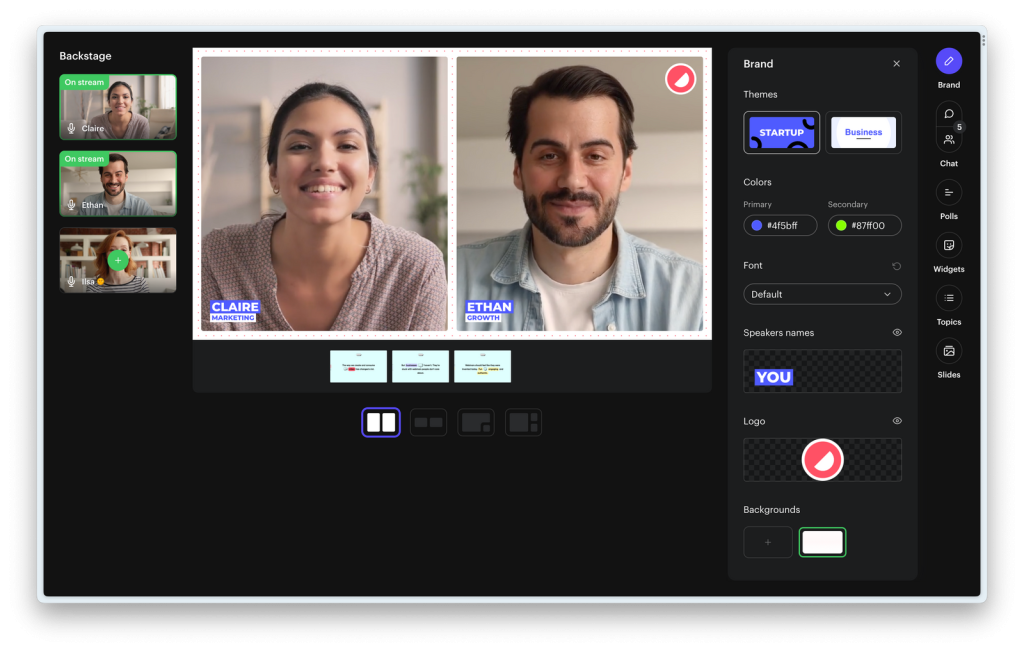
Registration forms support opt-in and terms-and-conditions fields, a useful touch when you need documented consent before contacting a prospect. During sessions, you get chat, Q&A, polls with private results, and CTAs that also work on the replay.
Afterward, Repurpose AI turns your webinar into blog posts, newsletters, and LinkedIn posts, while Clip AI creates subtitled clips. One seminar, a month of content. Not bad at all.
Pros
- Native HubSpot sync sends watch time, poll answers, and CTA clicks to contacts.
- Registration forms include opt-in and terms fields for documented prospect consent.
- Repurpose AI turns webinars into blog posts, newsletters, and LinkedIn posts.
- CTAs and polls also work on replays, so on-demand viewers can still convert.
- Includes unlimited team members, a browser-based studio, and SOC 2 Type II certification.
Cons
- The free plan limits webinars to 30 minutes and 30 registrants per month.
- Salesforce integration is an add-on, available only on higher tiers.
Pricing: Free plan available; Pro starts at $99/month, billed yearly.
5. Microsoft Teams
Best For: Agencies Already Running on Microsoft 365
If your agency already lives in Outlook, Excel, and SharePoint, Microsoft Teams webinars may already be sitting in your toolkit. Microsoft 365 Business Standard with Copilot includes webinar hosting with attendee registration and reporting, alongside business email, desktop Office apps, and 1 TB of cloud storage per user.
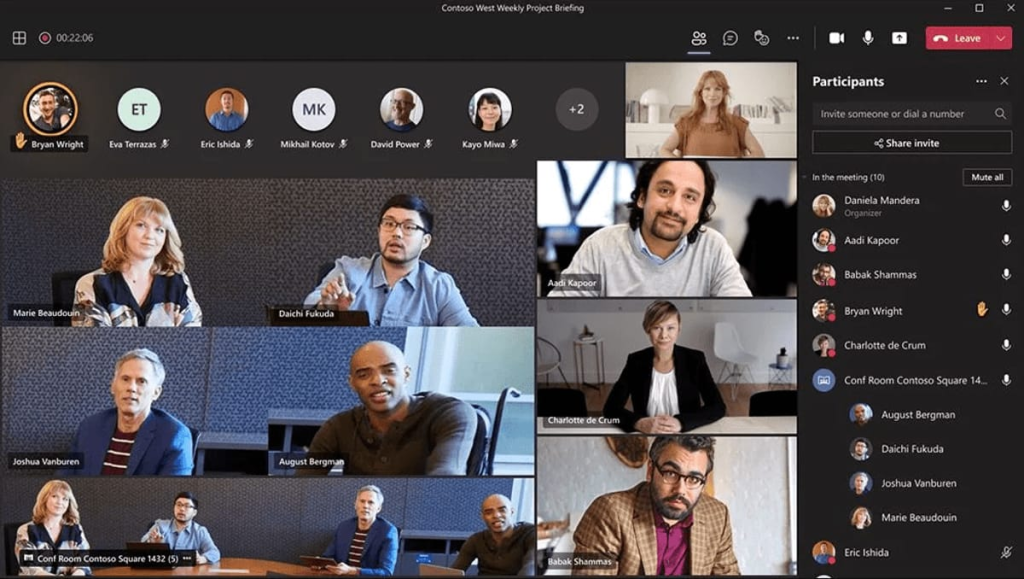
The surrounding apps do a lot of quiet work. Microsoft Bookings handles appointment scheduling after a session, Forms covers surveys and quizzes, and Clipchamp helps you trim recordings into short clips.
Copilot works across Teams, Outlook, and Word, which speeds up follow-up writing. Agencies handling sensitive client data can step up to Business Premium for advanced threat protection and sensitive data protection. Not flashy, but very hard to beat on convenience.
Pros
- Webinar hosting with attendee registration and reporting is included in Business Standard.
- Microsoft Bookings lets attendees schedule appointments after your session ends.
- Microsoft Forms adds surveys and quizzes for needs assessments and feedback.
- Copilot works inside Teams, Outlook, and Word to speed up follow-up writing.
- Business Premium adds advanced threat protection and sensitive data protection.
Cons
- Licenses are priced per user and billed yearly, so costs grow with headcount.
- Webinars come bundled with a full productivity suite, which is overkill for webinar-only needs.
Pricing: Webinars are included in Microsoft 365 Business Standard with Copilot, starting at $23.50/user/month, billed annually.
6. Adobe Connect
Best For: Compliance-Focused Agent Training and Onboarding
Adobe Connect is built for structured, repeatable virtual training, which fits agencies and carriers that onboard new agents or run product training on a schedule. Persistent rooms keep your layouts, content, and breakout activities in place, so next month’s session is ready before you even log in.
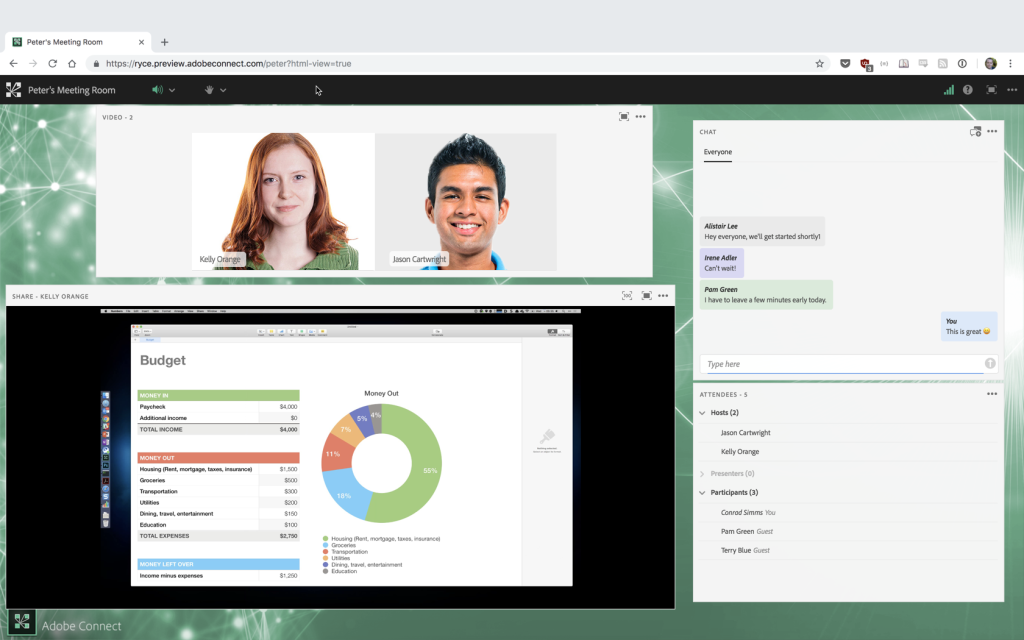
Rooms include live polls, chat, moderated Q&A, whiteboards, a native quiz, an engagement dashboard, and a recordings editor, all accessible through an HTML browser client. Automated transcription and closed captions support accessibility.
Here is the part compliance teams love: Adobe lists GLBA, HIPAA, FERPA, and SOC compliance on every plan, along with GDPR authorization and Section 508 accessibility conformance. For regulated training, that is a serious head start.
Pros
- Lists GLBA, HIPAA, and SOC compliance on every plan, including Standard.
- Persistent rooms keep layouts, content, and breakouts ready for recurring trainings.
- Native quizzes and an engagement dashboard help confirm agents are actually learning.
- Automated transcription and closed captions are included on all plans.
- Open API, HTML SDK, and a Marketo integration support custom workflows.
Cons
- Standard rooms hold 100 attendees, and a 500-seat upgrade costs $2,200 per host yearly.
- Custom branding requires Premium or a Webinar Pro Pack at $600 per host yearly.
Pricing: Standard starts at $190 per host per year (100-attendee room, 1 to 5 host licenses).
7. Wistia
Best For: Turning Webinars Into a Video Content Library
Wistia started as a video hosting platform, and its webinar product inherits that strength: every session automatically lands in your Wistia library, ready to edit, clip, gate, and reuse. For agencies building a library of explainers on Medicare enrollment, life insurance basics, or business coverage, that is a big deal.
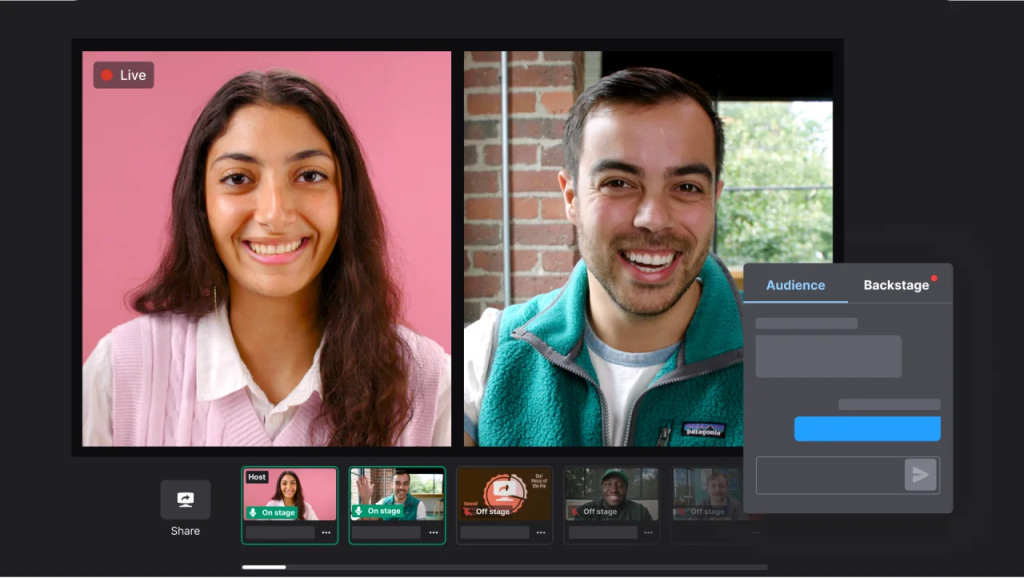
The Webinars plan supports live and simulive sessions for up to 500 attendees, up to nine on-screen presenters, built-in registration pages, embedded registration forms, and automated follow-up.
Analytics go deep, with attendee-level data, heatmaps, engagement graphs, and source and UTM tracking. Wistia’s marketing automation connects with HubSpot, Marketo, and Pardot. If your webinars should keep working long after the live audience leaves, Wistia earns a serious look.
Pros
- Every webinar automatically becomes on-demand content you can edit, clip, and gate.
- Supports live and simulive webinars for up to 500 attendees per event.
- Attendee-level analytics, heatmaps, and UTM tracking reveal your best lead sources.
- Embedded registration forms and automated follow-up are included on the Webinars plan.
- Overages bill at $0.20 per extra attendee instead of blocking registrants.
Cons
- Webinars start at $429 per month billed annually, steep for solo agents.
- Site embeds, social simulcasting, and branding removal require Webinars Plus at $829 monthly.
Pricing: The Webinars plan starts at $429/month, billed annually, with a 14-day free trial.
8. StreamYard
Best For: Live Social Q&As for Local Audiences
Plenty of insurance prospects will never register for a formal webinar, but they will stop scrolling for a live Q&A on Facebook or LinkedIn. StreamYard is a browser-based live streaming studio built for exactly that moment.
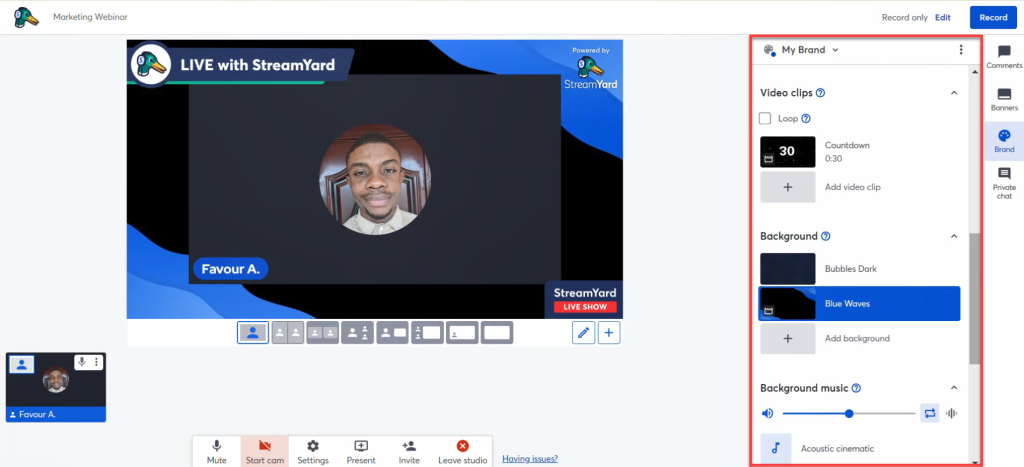
Paid plans stream in Full HD without the StreamYard logo, multistream to several destinations at once, and let you add your own logos, overlays, and backgrounds. The Core plan supports up to 10 on-screen participants, which is handy for a panel with an underwriter or a Medicare specialist, and every live stream is recorded for later.
On-Air webinars, starting on the Advanced plan, add a dedicated webinar experience for up to 1,000 viewers. Want to be the agent everyone in town recognizes? Show up live, and show up often.
Pros
- Multistreams one live Q&A to several social platforms at the same time.
- Logos, overlays, and backgrounds make a solo agent look broadcast-ready.
- Supports up to 10 on-screen participants on Core, ideal for expert panels.
- Records every live stream automatically for replays and short clips.
- A free plan lets you test the studio before committing.
Cons
- On-Air webinars require the Advanced plan, not the entry paid plan.
- Paid plan prices appear only after sign-up, which complicates budgeting.
Pricing: Free plan available; paid prices are shown after sign-up, and On-Air webinars start on the Advanced plan.
9. Airmeet
Best For: Agent Recruiting Events and Virtual Summits
Airmeet goes beyond the standard webinar room with immersive branded stages and networking features, which makes it a good pick for agencies, IMOs, and carriers running recruiting events, agent summits, or client appreciation sessions. Instead of a passive audience staring at slides, attendees can actually meet and mingle.
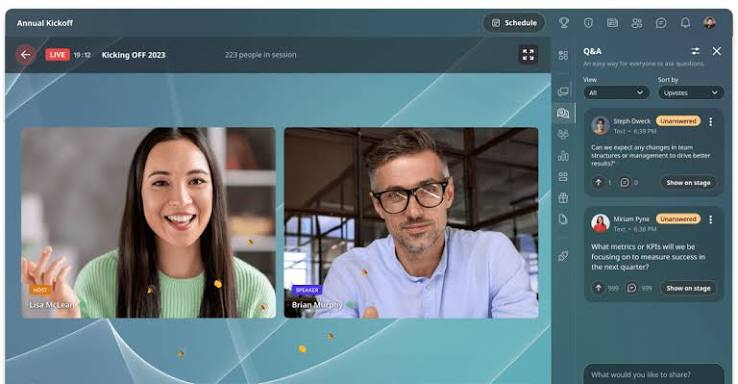
The Premium Webinars plan supports live, simulive, and on-demand formats, so you can broadcast a recruiting keynote live and keep it available on demand for late applicants.
HD streaming keeps presentations crisp, and CRM integrations help route new recruits and prospects into your pipeline. When the goal is building a community of agents rather than closing a single policy, Airmeet’s event-style approach makes a lot of sense.
Pros
- Immersive branded stages make agency events feel polished and professional.
- Networking features let attendees connect with each other, not just watch.
- Supports live, simulive, and on-demand formats on the Premium Webinars plan.
- CRM integrations route recruits and prospects straight into your pipeline.
- HD streaming and clear audio keep long presentations easy to follow.
Cons
- The entry plan offers a limited set of advanced features compared with higher tiers.
- A starting price of $167 per month is high for agents running small sessions.
Pricing: Premium Webinars starts at $167/month, billed annually.
10. Univid
Best For: Simple Branded Webinars for European Brokers
Univid is an EU-based, GDPR-compliant webinar platform, making it a practical pick for brokers and agencies in Europe that prefer a local vendor. Its biggest selling point is simplicity: you can design a branded webinar page with AI help, then run live, on-demand, or simulated sessions from one place.
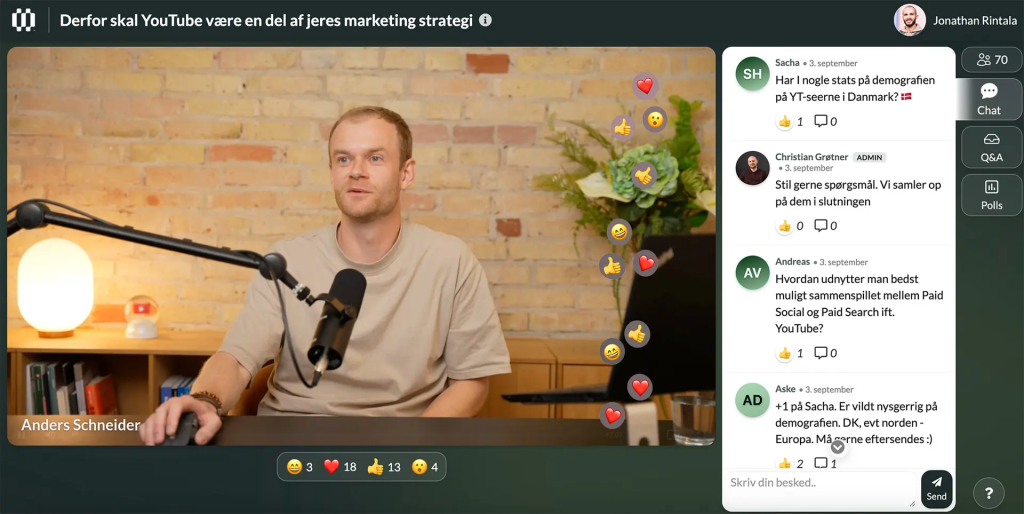
Attendees get live reactions, chat, Q&A, polls, and CTA buttons, while you get automatic recordings and a performance dashboard. Pricing follows monthly registrants rather than team seats, so you do not need a license for every colleague who presents.
Integrations connect to HubSpot, and custom plans add Salesforce and API access. For a small brokerage that wants professional webinars without a steep learning curve, Univid keeps things refreshingly uncomplicated.
Pros
- EU-based and GDPR-friendly, a plus for European insurance brokers.
- AI-assisted setup helps you design branded webinar pages quickly.
- Runs live, on-demand, and simulated webinars on one platform.
- Reactions, chat, Q&A, polls, and CTA buttons keep attendees engaged.
- Pricing follows registrants, not seats, so extra presenters do not add licenses.
Cons
- The free plan caps webinars at 20 minutes, too short for most seminars.
- Salesforce and custom integrations are reserved for custom plans.
Pricing: Free plan available (20-minute webinars); paid plans are priced by monthly registrants.
What Should Insurance Agents Look for in Webinar Software?
Insurance agents should look for webinar software that runs hybrid or evergreen seminars, captures the right registrant details, works in any browser, and moves attendees toward a booked appointment. Here is a quick checklist before you commit:
- Hybrid and evergreen formats, so you record your Medicare, IUL, or annuity seminar once and still answer questions live.
- Timed booking offers that turn interest into a calendar slot while trust is at its peak.
- One-click, browser-based joining, because many prospects will not download an app just to attend.
- Registration forms that collect what you need, such as phone numbers and documented consent.
- Automated reminders and replays that lift attendance and catch everyone who could not make it.
- A CRM connection, such as BIGContacts, so every attendee gets a timely follow-up call.
- Security credentials like SOC 2 or GDPR, and confirmation that your seminar follows your carrier, state, and Medicare marketing rules.
How I Chose These Webinar Software for Insurance Agents
Every platform on this list was evaluated through an unbiased, systematic approach built around what insurance agents need most: more booked appointments, smoother client seminars, and fewer tools to manage. Six key factors shaped the final ranking.
User Reviews and Ratings
Direct feedback from users on reputable review sites like G2 and Capterra shows how a platform performs outside a sales demo. I looked for patterns in ratings and comments, especially around live-session reliability, attendee experience, and the problems agents and agencies report most often.
Essential Features and Functionality
A webinar tool earns its place in an insurance practice through its core features. I explored registration forms, reminders, hybrid and evergreen formats, in-session offers, analytics, CRM integrations, and AI capabilities to assess how well each tool converts policy education into appointments.
Ease of Use
Agents have little time for steep learning curves, and their prospects have even less patience for complicated join links. I assessed the design, interface, and navigation for hosts, plus how easily attendees can join, ideally from a browser with no downloads.
Customer Support
When a seminar starts in ten minutes and the slides will not load, support quality matters. I examined how efficiently each vendor helps during setup, answers questions, and resolves operational issues, including the support channels and hours on offer.
Value for Money
I compared each platform’s quality, performance, and features against its starting price and plan limits, such as attendee caps, session lengths, registrant limits, and upfront billing. The goal is simple: to help you see whether you would get your money’s worth.
Personal Experience and Expert Opinions
Finally, I combined hands-on observations with the views of industry experts. Brian Steiner, Executive Director of Life Happens, says companies and financial professionals need to “meet consumers where they’re at with education and authenticity.” That is why education-friendly features, such as hybrid Q&A, replays, and clear follow-up, carried extra weight in this ranking.
My Top 3 Webinar Software for Insurance Agents
Ten options is a lot when renewals, quotes, and client calls already fill your week. If the list had to shrink to three, these are the platforms to recommend to any insurance agent or agency.
1. ProProfs WebinarNinja
ProProfs WebinarNinja earns the top spot because it covers the entire insurance seminar funnel on one plan. Live, automated, series, and hybrid webinars, built-in landing pages, email reminders, timed booking offers, and AI that drafts, coaches, and follows up mean one seminar can keep filling your calendar long after it ends.
2. EverWebinar
EverWebinar is the pick for agents who already have a seminar that works and want it running every day. Just-in-time scheduling, local time zones, hybrid live chat, and email plus optional SMS reminders make it a reliable engine for evergreen Medicare, final expense, and annuity education.
3. Contrast
Contrast makes the list for agencies that live inside HubSpot. Real-time sync of watch time, poll answers, and CTA clicks shows exactly which prospects are ready for a call, while consent fields and AI content repurposing turn every webinar into compliant leads and fresh marketing content.
Ready to Pick the Best Webinar Software for Insurance Agents?
The best webinar software for insurance agents is the one that matches how you sell. Some agents need a hands-off evergreen seminar, some need a compliance-ready training room, and others want a lively social Q&A or a full recruiting event.
Start with your most important session, run it once on a free trial, and then look at one number: how many attendees booked a policy review. That tells you more than any feature list ever will.
Having said that, I personally prefer and recommend ProProfs WebinarNinja. It runs live, automated, series, and hybrid seminars on one plan, builds your landing pages and reminder emails, pops a booking offer at the right moment, and adds AI that drafts, coaches, and follows up. Fewer tools, more appointments.
Frequently Asked Questions
What is the best webinar software for insurance agents?
ProProfs WebinarNinja is the best webinar software for most insurance agents because it combines live, automated, series, and hybrid webinars with landing pages, email reminders, timed booking offers, and AI tools on one plan. EverWebinar suits evergreen Medicare and annuity seminars, Contrast suits HubSpot-driven agencies, and Adobe Connect suits compliance-focused agent training.
Can insurance agents use webinars to generate Medicare leads?
Yes. Many agents run educational seminars for people turning 65, often promoted through direct mail and email. Hybrid and automated formats let one recorded session run on a schedule while you answer questions live. Before promoting any Medicare seminar, confirm that your content, registration process, and follow-up follow CMS marketing guidelines and your carriers' rules.
What is the difference between live, hybrid, and automated insurance webinars?
A live webinar is presented in real time. An automated webinar plays a pre-recorded presentation on a set schedule without you being present. A hybrid webinar plays a recording while you join the chat to answer questions live. Hybrid is popular with insurance agents because it combines a polished presentation with real human interaction. ProProfs WebinarNinja and EverWebinar both support hybrid webinars.
Do prospects need to download software to join an insurance webinar?
Not with most modern platforms. Browser-based tools let prospects join with one click, which matters for older audiences and busy families who will not install an app. Adobe Connect offers an HTML browser client, StreamYard runs its studio in the browser, and eWebinar can be embedded directly on your agency website. Always test your join link on a phone before going live.
Can I add a booking link for policy reviews during a webinar?
Yes. Most lead-focused platforms let you display a call to action during the session. ProProfs WebinarNinja schedules timed offers to appear at a set moment, such as right after you explain coverage options. EverWebinar shows timed offers in automated sessions, and Contrast CTAs work live and on replays. Link the button to your calendar so prospects can book instantly.
How can insurance agents increase webinar attendance?
Send several reminders, offer a replay, and pick times that suit your audience, such as daytime slots for retirees or evenings for working families. ProProfs WebinarNinja automates reminder emails and replays, while EverWebinar adds optional SMS reminders. Automated and just-in-time sessions also help, because prospects can watch when it suits them instead of missing a single live slot.
How should insurance agents promote a webinar?
Start where your prospects already spend time: email lists, direct mail for Medicare audiences, social media, and your agency website.LIMRA's 2025 research found that 62% of adults use social media to seek information on financial or insurance products. ProProfs WebinarNinja's built-in landing pages and email automation let you share one registration link everywhere and send reminders automatically.
Can AI help insurance agents create better webinars?
Yes. ProProfs WebinarNinja's AI drafts headlines and script outlines, reviews your pitch for clarity and call-to-action placement, answers repeated chat questions, and turns each session into follow-up emails and blog posts. eWebinar offers an AI script generator, and Contrast's Repurpose AI turns webinars into newsletters and LinkedIn posts. Always review AI-written content for accuracy and compliance before publishing.
Which webinar platforms help with insurance compliance needs?
Adobe Connect lists GLBA, HIPAA, and SOC compliance on every plan. Contrast holds SOC 2 Type II certification and supports opt-in and terms fields at registration. eWebinar and Wistia list SOC 2, and Microsoft 365 Business Premium adds sensitive data protection. No platform makes your marketing compliant on its own, so always review your carrier and state rules.
How much does webinar software cost for an insurance agency?
Costs range from free to several hundred dollars a month. Contrast, StreamYard, and Univid offer free plans. ProProfs WebinarNinja starts at $0.30 per attendee per month, Microsoft Teams webinars start at $23.50 per user per month, and EverWebinar starts at $79 per month. Our guide tofree webinar software covers no-cost options in more detail.
Can I turn my in-person insurance seminar into an automated webinar?
Yes. Record your seminar once, upload the video, and schedule it as an automated or hybrid webinar. ProProfs WebinarNinja, EverWebinar, and eWebinar all support pre-recorded sessions. Add a timed booking offer near the end so viewers can schedule a policy review while your explanation is still fresh in their minds.
Which webinar software integrates with HubSpot for insurance agencies?
ProProfs WebinarNinja offers one of the deepest native HubSpot integrations, syncing watch time, poll answers, and CTA clicks. Wistia connects with HubSpot through its marketing automation features, Univid integrates with HubSpot as well, and eWebinar connects to CRMs directly or through Zapier.
Want to host a webinar for free?
Use WebinarNinja to teach, improve marketing, and grow your sales.