Google Meet keeps browser-based calls fast and simple: open a link, join, share your screen, close the tab. No downloads, no setup, no friction. Google Workspace teams get internal team calls, client check-ins, and one-on-one conversations.
The gap appears when sessions need a pipeline. Free group calls stop at 60 minutes; recording requires eligible paid access. Webinar registration, attendee management, CRM handoff, and automated follow-up need another workflow.
According to TwentyThree’s State of Webinars 2026 report, the number of companies integrating webinars into their marketing technology stack grew by nearly 20%. That growth is being driven by teams who have realized that video calls generate presence while webinars generate pipeline. Google Meet handles the first. It was never designed to handle the second.
These 10 Google Meet alternatives and competitors offer better meeting features, dedicated platforms, or both. Google Meet alternatives for webinars are compared using pricing, product documentation, and G2 and Capterra reviews.
10 Google Meet Alternatives
Here is how these Google Meet alternatives compare before the full breakdown:
| Tool | Best For | Key Differentiator vs. Google Meet | Starting Price |
| ProProfs WebinarNinja | Generating leads, growing sales, and teaching better | AI-powered webinar tools: AI Sales Coach (pitch feedback), AI Engagement Lead (live chat FAQs), AI Editorial Lead (headlines), AI Content Strategist (post-event content), AI Funnel Builder (set up a webinar workflow) | $0.30/attendee/month |
| Zoom Webinars | Teams that need Google Meet’s familiarity with actual webinar infrastructure | Registered, identified attendees instead of anonymous meeting participants, with polls and Q&A built in | ~$66-83/month add-on + license |
| Whereby | Teams that want Google Meet’s browser simplicity with a permanent room link | No regenerating links, no downloads, permanent branded room URL every time | $10.99/host/month |
| Butter | Interactive workshops and facilitated sessions | Purpose-built for structured facilitation with timers, agendas, templates, and participation tools built into the session | ~$19/host/month |
| Demio | Marketing teams running behavior-based lead gen webinars | Behavioral attendee tagging that turns session actions into a segmented lead list automatically | ~$42-63/month |
| Livestorm | B2B teams with active CRM pipelines | Native HubSpot, Salesforce, and Pipedrive sync without middleware or manual export | ~$99/month |
| BigBlueButton | Education and training teams need a free, open-source webinar platform | Free, open-source virtual classroom with registration, breakout rooms, polls, and whiteboards | Free (self-hosted) |
| Microsoft Teams | Organizations standardized on Microsoft 365 | Full meeting, chat, and collaboration ecosystem for teams whose stack is Microsoft, not Google | ~$12.50/user/month (bundled) |
| GoTo Webinar | Enterprise teams running large-scale sessions | Proven webinar infrastructure at published pricing for programs that have outgrown Google Meet entirely | ~$59/user/month |
| eWebinar | Teams running automated and evergreen content | Record once, run forever with no live host required — a format Google Meet cannot support at all | $99-299/month |
Prices use different billing units. Annual rates require an annual commitment, and advanced features may require a higher plan. Butter and GoTo prices are described by their billing model because the current official starting rate cannot be confirmed.
1. ProProfs WebinarNinja
Best for Generating Leads, Growing Sales, and Teaching Better
ProProfs WebinarNinja covers the full lifecycle that lead generation requires. Google Meet gets people into a call. The harder job starts before they arrive and continues after they leave.
Google Meet supports identified participants and attendance reports on eligible plans, but registration campaigns and marketing follow-up need a separate workflow. ProProfs WebinarNinja brings those steps together. Registration pages capture attendee details, while automated emails manage reminders and follow-up. Chat, Q&A with upvoting, polls, offers, and handouts keep people involved. Automatic recordings give attendees replay access, while analytics track registrations, attendance, watch time, and engagement.
Live webinars support questions and demos; automated sessions handle repeatable content; series allow deeper teaching; and hybrid formats blend recordings with live interaction. Included CourseNinja extends teaching into live and on-demand courses.
The AI roles support the workflow: the AI Conversion Writer suggests registration headlines, the AI Webinar Co-Host helps answer recurring chat questions, the AI Content Strategist drafts blogs, emails & social posts, and the AI Sales Coach reviews sessions and suggests improvements.
Pros:
- Supports live, automated webinars, series, and hybrid delivery for different business sessions.
- AI assists with registration copy, recurring chat questions, session review, and content repurposing.
- Built-in registration pages, email sequences, automatic recordings, and replay delivery keep the core workflow together.
- Analytics track registrations, attendance, watch time, and engagement to guide follow-up and improve future sessions.
- Webinar engagement tools include chat, Q&A with upvoting, polls, offers, and handouts to keep attendees involved.
- Included CourseNinja supports live and on-demand courses at no extra platform cost.
- Browser-based attendee access avoids the need to download software before the session starts.
- Stripe supports paid registrations; marketing connections, Zapier, and API access extend the workflow.
Cons:
- No downloadable or on-premise version
- Dark user interface option is not available
Pricing: A FREE 14-day trial is available. Paid starts at $0.30/attendee/month (includes CourseNinja, worth $ 1,200).
Case Study:
Michael Lancto, an entrepreneur and coach, used ProProfs WebinarNinja to rebuild his training programs, using live Q&A, chat, and recordings to engage his audience while keeping costs manageable.
2. Zoom Webinars
Best for Teams That Need Webinar Infrastructure With Google Meet’s Familiarity
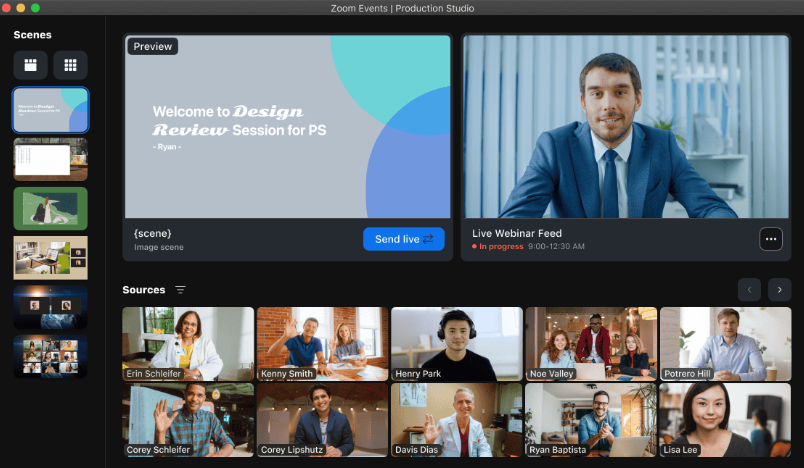
Zoom Webinars adds registration, presenter controls, and audience reporting to an interface many professionals already know. For teams moving beyond a regular meeting room, that familiarity makes the transition easier.
Hosts can require registration before joining, separate presenters from the audience, and use Q&A and polls to organize participation. Confirmation and reminder emails are built in. For audiences already familiar with Zoom, the join process may need less explanation, but it is still worth testing with external guests.
The distinction between Zoom Meetings and Zoom Webinars matters for how the format is set up and what the attendee experience looks like. Both run on the same infrastructure but serve different use cases.
Pros:
- Registration captures attendee information before the session rather than relying on meeting invitations
- A familiar interface can make the move from meetings to webinars easier
- Q&A, polls, and panelist management are built into the webinar format
- Attendee capacity scales with the selected license rather than a single fixed webinar limit
Cons:
- Webinar licensing is separate from free Zoom Meetings; confirm account prerequisites and capacity
- Advanced branding, production, and cross-event analytics require higher webinar or event tiers
- Registration page customization is limited compared to purpose-built webinar platforms
- More complex nurture workflows may need a connected marketing platform
Pricing: Requires a paid Workplace license, plus the Webinars add-on starting around $66-$83/month.
3. Whereby
Best for Teams That Want Google Meet’s Simplicity With a Permanent Room
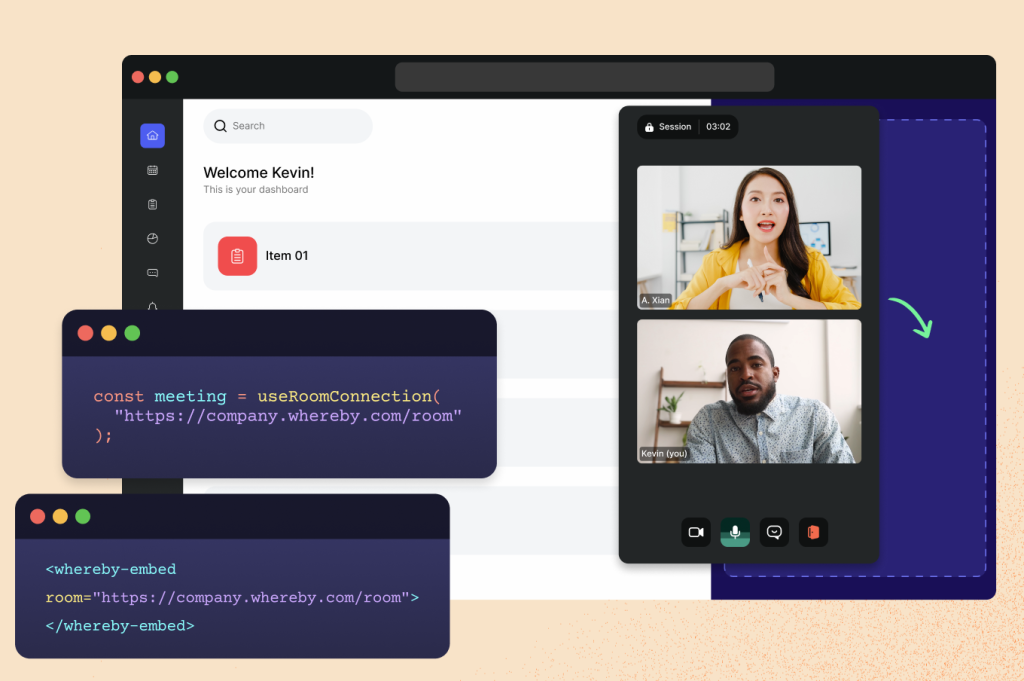
Whereby gives recurring client calls a simple home: a branded room URL guests can return to without creating an account or downloading an app. For small teams and freelancers, that room can feel more like a familiar front door than another calendar invitation.
Whereby gives users reusable room URLs, such as whereby.com/yourteam. Guests join in the browser, and paid plans add branding and recording. Google Meet can also reuse links, so the distinction is Whereby’s room-based experience and customization, rather than a capability Meet lacks entirely.
Pros:
- Reusable room URLs give recurring client calls a consistent destination
- Guests join through the browser without a required account or app download
- Free plan supports four attendees and meetings of up to 30 minutes
- Clean, minimal interface with no platform overhead
Cons:
- No webinar registration pages, CRM integration, or lead capture; this is a meetings tool, not a webinar platform
- Not suited to large-audience sessions or marketing webinar programs
- Advanced features, including recording and custom branding, require paid plans
Pricing: Paid plans start at $10.99/host/month, billed monthly. A free plan is available.
4. Butter
Best for Interactive Workshops and Facilitated Sessions
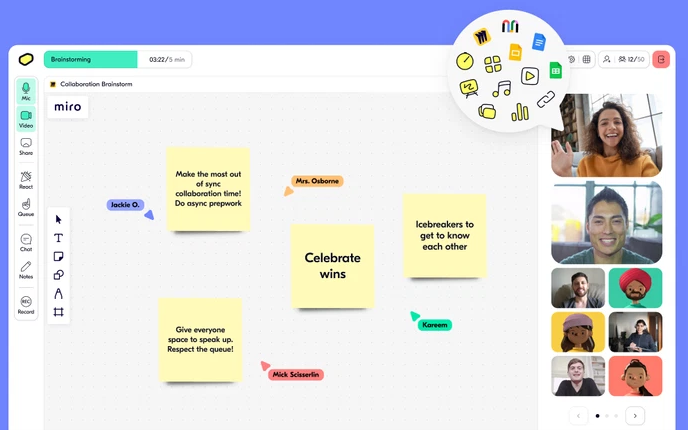
Butter provides facilitators with a structured environment featuring a session agenda, built-in timers, breakout rooms, collaborative templates, GIFs, polls, and participation tools that run in sequence rather than in parallel. For teams running workshops, training sessions, retrospectives, or facilitated group sessions where structure and engagement are the point rather than a video call backdrop, Butter is built for exactly that format.
Teams that have tried running workshops on Google Meet and spent half the session asking attendees to open the Google Doc or check the Miro board find that Butter consolidates those external tools into the session itself. The facilitator controls the flow, participants engage on the platform, and the session follows a deliberate agenda rather than drifting.
Pros:
- Built-in agenda, timers, and session templates give facilitators structural control
- Breakout rooms, collaborative templates, and engagement tools run inside the platform
- Browser-based with no download required for participants
- Facilitation tools support planned activities rather than an unstructured video call
Cons:
- Not suited to broadcast-style webinars or large audience sessions requiring registration and CRM integration
- Confirm current session limits, participant capacity, and paid-plan access before scheduling workshops
- Less suited to lead generation webinars than to structured facilitation and workshops
Pricing: Starter price was $19/host/month, or $14.25/host/month billed annually.
5. Demio
Best for Marketing Teams Running Behavior-Based Lead Generation Webinars
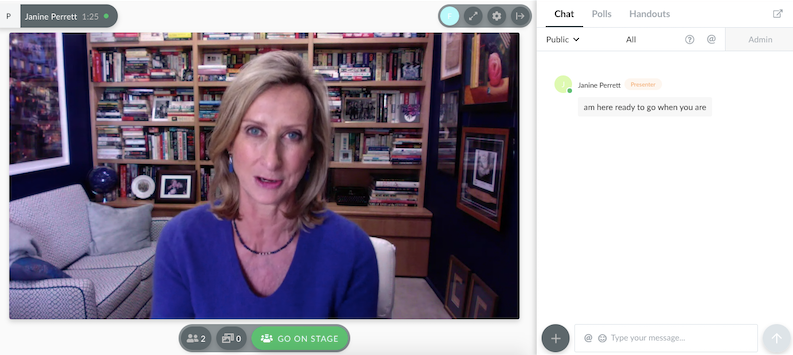
Demio connects webinar engagement with the follow-up work marketing teams need afterward. The useful question is not just who attended, but what they did while they were there.
Poll responses, featured action clicks, questions, and attendance data provide teams with more context for follow-up. Supported integrations can carry that information into marketing workflows, with the exact fields and triggers depending on the connection. For teams whose webinar goal is an actionable lead list, that behavioral layer changes the post-session workflow.
Pros:
- Engagement analytics help teams segment follow-up using what attendees did during the session
- Browser-based webinar delivery keeps registration, viewing, and participation in a connected experience
- Browser-based with no download required, attendees join in one click
- Marketing integrations connect webinar activity with supported follow-up workflows
Cons:
- Automated and on-demand webinars require Growth or Premium; Starter supports live events and series
- Premium integrations require the appropriate plan; check the specific CRM connection before buying
- Entry plan covers a single host only
Pricing: Starter runs about $42-$63/month for one host and a 50-attendee room. Growth starts at $75- $117/month and unlocks automation.
6. Livestorm
Best for B2B Teams With Active CRM Pipelines

Livestorm helps B2B teams move webinar registration and attendance data into their sales workflow. For teams whose programs exist to feed a pipeline, the value appears after the session, when someone needs to follow up without having to manually rebuild the attendee record.
Livestorm offers native connections with HubSpot, Salesforce, and Pipedrive. Salesforce requires Enterprise, and each integration has its own setup and data coverage. Once configured, supported registration and participation data can flow into the CRM without a recurring CSV export. That is less rebuilding before a Monday morning pipeline review, provided the fields your team needs actually arrive.
Pros:
- Native CRM integrations support registration and attendance data handoff on eligible plans
- Browser-based with no download friction for attendees
- Supported CRM workflows can distinguish live attendance from replay participation
- Free plan available for teams testing the platform before committing to a paid tier
Cons:
- Free access has a small annual credit allowance and a 30-minute event limit
- Credit-based pricing can escalate quickly at higher attendee volumes
- Salesforce and other enterprise integrations require the Enterprise rather than the entry-level paid plan
Pricing: Free plan is limited to 30 attendees and 20-minute sessions. Pro starts around $99/month, Premium around $299/month, and Enterprise is custom-priced above that.
7. BigBlueButton
Best for Education and Training Teams Needing a Free Open-Source Platform
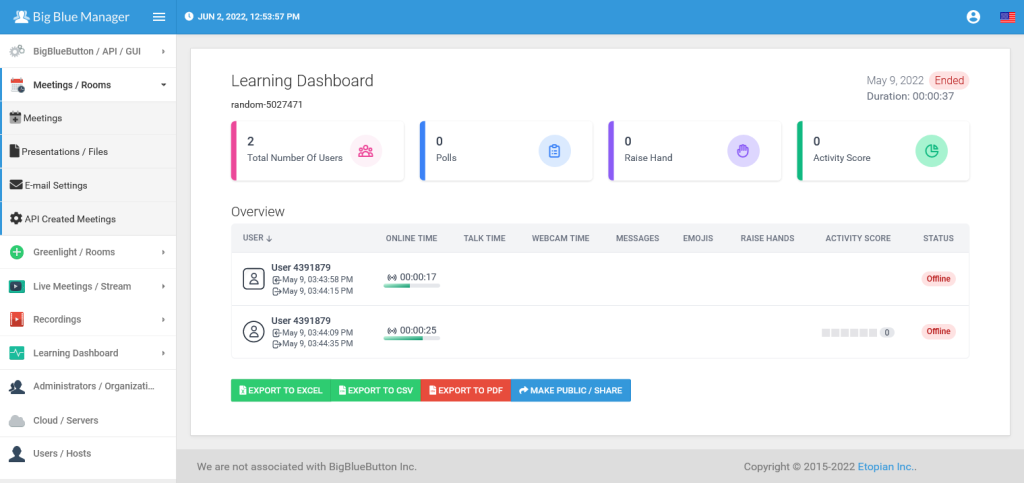
BigBlueButton is a free, open-source virtual classroom and webinar platform used by universities, schools, and corporate training teams worldwide. Its focus is interactive learning: it includes shared notes, multi-user whiteboards, breakout rooms, polls, hand-raising, and a presentation mode where participants are clearly separated from the presenter.
For educational institutions and training teams that want shared notes, whiteboards, and classroom activities in a single environment, BigBlueButton is built around the teaching workflow. Google Meet also supports hand-raising and, on eligible plans, breakout rooms. The distinction is the classroom design and deployment control. The software has no license fee, but self-hosting still requires infrastructure and maintenance.
Pros:
- Free and open-source with no per-user or per-attendee licensing fees on self-hosted deployments
- Built specifically for interactive learning: whiteboards, shared notes, hand-raising, and breakout rooms included
- Open-source deployment gives institutions control over their own virtual classroom infrastructure
- No download required for participants, browser-based joining
Cons:
- Self-hosted deployment requires technical setup and server maintenance
- Not suited to marketing webinars requiring registration pages, CRM integration, or lead capture
- Managed hosting adds a separate cost for teams that cannot maintain their own servers
Pricing: Free, open-source software with no license fee. Hosting, maintenance, and support costs vary by setup or provider.
8. Microsoft Teams
Best for Organizations Standardized on Microsoft 365
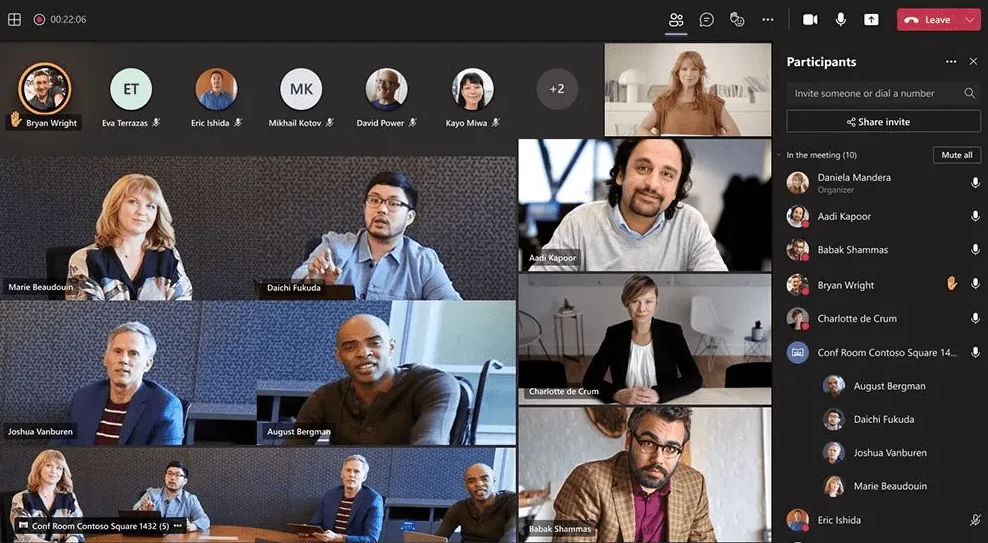
Microsoft Teams brings meetings, chat, and file collaboration into the Microsoft 365 environment. For teams whose daily work runs through Outlook, SharePoint, and the Office suite, the appeal is a connected workflow rather than another standalone video tool.
Teams combines video calling, persistent chat, file sharing, and meeting scheduling in one platform, with built-in connections to Outlook calendars and SharePoint document libraries. For organizations moving from Google Workspace to Microsoft 365, Teams is a natural destination because the change goes beyond the video-call tool.
Pros:
- Deep integration with Microsoft 365, Outlook, SharePoint, and the Office suite
- Combines meetings, persistent chat, and file collaboration in one platform
- Free plan available with core meeting functionality
- Large enterprise user base with strong IT administration and compliance controls
Cons:
- Webinar registration, reporting, and advanced event controls depend on the Teams license
- Interface complexity is higher than Google Meet for teams that only need simple video calls
- Marketing follow-up may require Microsoft ecosystem tools or separately configured integrations
Pricing: Core webinar hosting is included in Microsoft 365 Business Standard at around $12.50/user/month. Teams Premium, around $10/user/month, adds intelligent recap and advanced production features.
9. GoTo Webinar
Best for Enterprise Teams Running Large-Scale Sessions
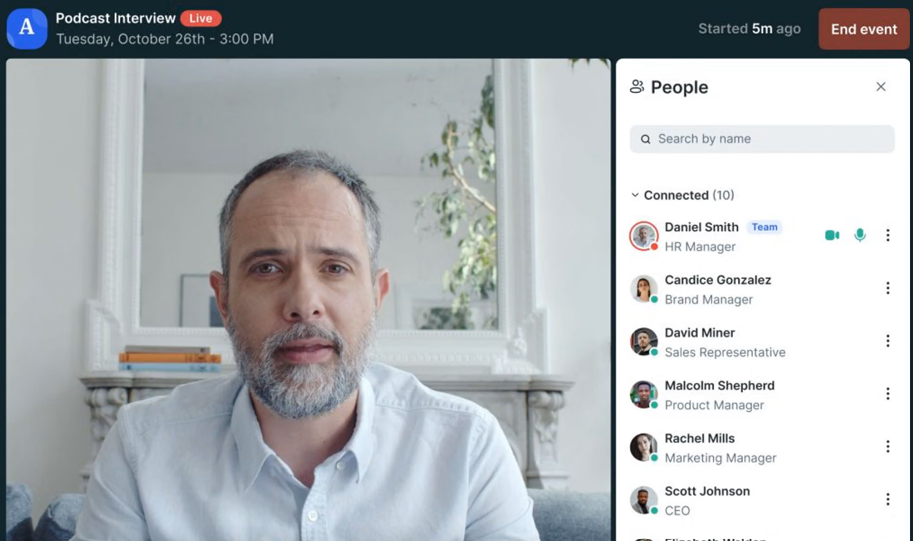
GoTo Webinar gives larger webinar programs structured registration and event reporting. When stakeholders need more than a recording and an attendance count, the reporting workflow becomes part of the buying decision.
For teams running sessions with large registered audiences, GoTo Webinar brings attendance, participation, and event reporting into a dedicated webinar environment. Source tracking can help identify which campaigns brought registrants in. That gives stakeholders a clearer picture of what happened, while the depth of reporting and available formats depend on the selected plan.
Pros:
- Attendee capacity varies by plan, letting teams size licensing around their audience
- Event reports provide attendance and participation data for stakeholder reviews
- Source tracking attributes registrations to specific campaigns or channels
- Integration options help connect event records with supported sales and marketing systems
Cons:
- Organizer setup and attendee access should be rehearsed before a large external session
- Recorded delivery, reporting, and automation capabilities vary by plan
- Not a Google Meet replacement for internal meetings, serves a completely different use case
Pricing: Plans start around $59/user/month for the Lite tier and scale to roughly $399-$499/month for Enterprise. A free trial is available.
10. eWebinar
Best for Teams Running Automated and Evergreen Content
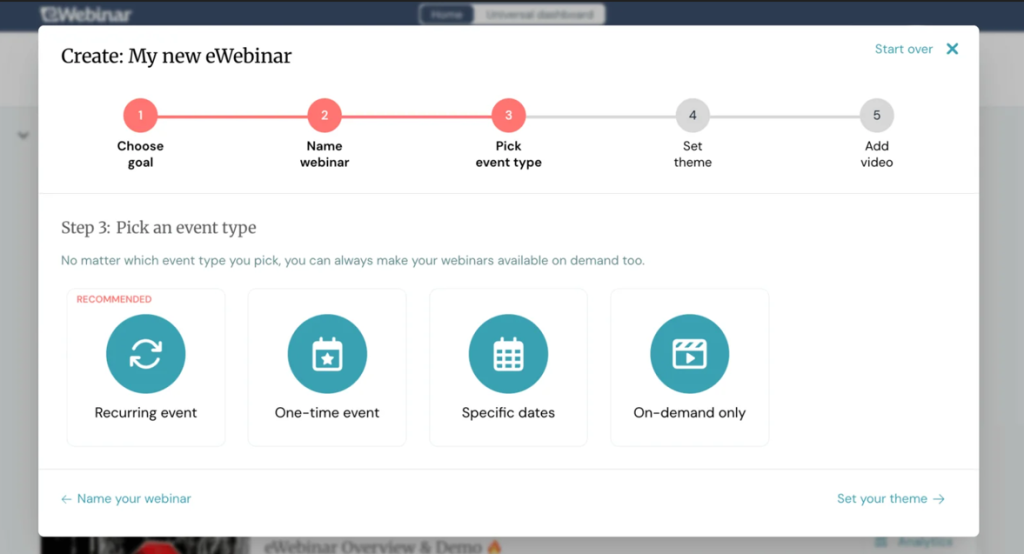
eWebinar turns a recorded presentation into a scheduled, interactive webinar. For training content, product walkthroughs, onboarding programs, and lead-nurturing sessions that deliver the same material repeatedly, this removes the need for a team member to present it live each time.
Attendees choose a scheduled or on-demand session, watch the recorded presentation, and interact with configured polls, questions, or offers. Chat can be answered live or asynchronously; AI responses require the appropriate setup. The presentation can keep running without a live presenter, while your team still owns the content, chat coverage, and follow-up.
Pros:
- Removes the live hosting requirement for evergreen content entirely
- Recorded delivery supports configured interactions and live or asynchronous chat
- Scheduled and on-demand access give attendees more ways to watch the same presentation
- Live presentation is separated from chat coverage, reducing repeated delivery work
Cons:
- Not suitable for live events, real-time Q&A-heavy sessions, or meetings requiring two-way conversation
- Automated or AI-assisted chat needs setup, clear response expectations, and a human escalation route
Pricing: Plans start at $99/month for one active eWebinar and scale to $199/month for five and $299/month for up to 15. A free 14-day trial is available.
My Evaluation Criteria
These Google Meet alternatives serve different jobs, so the comparison separates meeting tools, virtual classrooms, and webinar platforms. A permanent room and a complete registration campaign solve different problems. Here is the framework behind the shortlist.
User Reviews and Ratings: G2 and Capterra feedback can help identify recurring experience issues, such as setup complexity or support frustrations. Product capabilities, prices, and plan restrictions are verified against official documentation rather than established solely by a review. No rating-based ranking is claimed here.
Essential Features and Functionality: Meeting tools were considered for guest access, room management, facilitation, and ecosystem fit. Webinar platforms were considered for registration, audience engagement, recordings, analytics, integrations, and follow-up. Classroom tools were considered for teaching activities and deployment requirements.
Ease of Use: The comparison considers the host’s setup work and the attendee’s route into a session. Browser access matters, but so do registration steps, permissions, mobile usability, and what a guest sees when something goes wrong. These are documentation-based considerations, not a claim that every product was tested hands-on.
Customer Support: Published support options and access conditions matter most around setup and live delivery. Availability should be distinguished from responsiveness; a support channel on a feature page does not establish how quickly an urgent issue will be resolved.
Value for Money: Costs are compared by the job delivered and the billing unit involved: hosts, organizers, attendee capacity, credits, or active webinars. Existing Workspace licenses, annual commitments, integration access, recording storage, and infrastructure costs also affect the real cost of switching.
Industry Analysis and Expert Commentary: Independent comparisons and expert commentary are useful where they clarify meeting, classroom, and webinar workflows. They provide context rather than proof of a feature. Official product documentation remains the basis for capability and plan comparisons, with unresolved details identified rather than assumed.
What Should Stay in Meet?
Honest evaluation means acknowledging what Google Meet does well before deciding what to move forward with. For teams considering a switch, the real trade-offs matter more than a one-sided comparison.
Internal meetings and stand-ups fit naturally here. When everyone already works in Google Workspace, Calendar invitations and Meet links keep the session close to the tools people use every day. The session is the communication. There is no registration campaign to build afterward.
The same applies to one-on-one client conversations. Coaching sessions, interviews, and check-ins work well when both parties speak, share screens, and participate equally. Meet’s basic one-on-one limit is 24 hours, which leaves ample room for most business conversations.

For quick check-ins and informal collaboration, setup time is measured in seconds. A familiar browser-based meeting room is useful. Guests can join without a Google account in certain circumstances, though access and authentication depend on host and organization settings.
Education already organized in Workspace also has a reason to stay. Classroom and Meet can keep lessons connected to an existing Google workflow. Before changing platforms, check your current edition: hand-raising is available, while breakout rooms, recording, polls, Q&A, and attendance reporting are edition-specific.
The point is to preserve what already works. A webinar platform does not need to take over every conversation simply because the business needs better external sessions.
What Should Move to Webinars?
The gap appears when a session needs to produce an organized next step. A person can attend a useful call and still disappear from the follow-up process if no one has defined what happens afterward.
Three types of sessions make that gap especially visible:
- Public product demos and lead-generation sessions need a way to capture registration details, manage reminders, and connect participation with the next sales conversation. Forms and separate tools can assemble that workflow around Meet. A dedicated platform brings more of it into the event itself.
- Repeated onboarding and training presentations need replay access or automated delivery when the same material is presented repeatedly. Moving that presentation into a repeatable format frees the host to focus on questions that actually need a person.
- Sessions with an ongoing audience need more than a list of names. They need clear attendance records, relevant engagement data, and a follow-up owner. A 2026 study by ON24 reports a 60% registration-to-attendance conversion rate and 18% growth in total engagement per webinar in its platform benchmark. Those figures describe ON24’s dataset, not a guaranteed result from changing tools.
The practical lesson is the workflow: capture the audience before the session, give them ways to participate, and decide what happens next. That is where a webinar platform earns its place alongside a meeting tool.
My Top 3 Google Meet Picks
1. ProProfs WebinarNinja
My first pick for business sessions that need registration, engagement, replay delivery, and automated follow-up in a single workflow, with AI assistance and course delivery alongside webinars.
2. Whereby
A practical choice when the priority is a simple, branded room for recurring client conversations, without turning those calls into a webinar program.
3. BigBlueButton
The classroom-focused choice when an institution wants open-source teaching tools and has the technical support to manage hosting or a provider relationship.
Ready to Upgrade Your Sessions?
Google Meet earns its position for fast, browser-based calls inside Google Workspace. Keep it where that simplicity serves the job. For sessions that require registration, engagement tracking, replay delivery, and organized follow-up, choose a platform that supports the entire workflow. The useful test is what your team can do after the audience leaves.
ProProfs WebinarNinja is my top pick for that broader job, with live, automated, series, and hybrid formats, built-in emails, AI assistance, and CourseNinja alongside webinars. Its polls, Q&A, and offers give attendees ways to act while their interest is fresh. Replay access and automated emails help keep that conversation moving after the session closes.
Start a free trial or watch a live demo, then run one complete session through registration, delivery, and follow-up before deciding.
Frequently Asked Questions
What Is the Difference Between Google Meet and a Webinar Platform?
Google Meet centers on real-time conversation. A webinar platform adds an event workflow around that conversation: registration, audience management, engagement records, replay access, and follow-up. Meet offers several participation and reporting features on eligible plans, so compare the complete workflow rather than assuming it lacks audience tools.
Can Google Meet Be Used for Webinars?
Yes, especially for straightforward presentations to a known audience. Registration, marketing follow-up, and CRM handoff usually need separate tools or configurations. Attendees are not automatically anonymous. The practical question is whether assembling that workflow around Meet still makes sense for your event volume and goals.
How Much Do Google Meet Alternatives Typically Cost?
Compare the billing model and the starting rate. Meeting tools often charge per host or user; webinar platforms may charge by capacity, credits, or active webinars. ProProfs WebinarNinja displays promotional pricing from $0.30/attendee/month billed annually. BigBlueButton has no software license fee, but infrastructure still costs money.
Do Google Meet Alternatives Require Software Downloads?
Several offer browser-based attendee access, including ProProfs WebinarNinja, Demio, Livestorm, Whereby, and BigBlueButton. Access can still vary by device, browser, administrator settings, and event configuration. Test the actual invitation with an external guest, especially if your audience uses managed devices or restrictive workplace networks.
Which Google Meet Alternative Works Best for Lead Generation Webinars?
ProProfs WebinarNinja is my first pick when registration, live engagement, replay delivery, and automated follow-up need to work together. Demio and Livestorm also support marketing workflows. Choose the data your team needs, the CRM connection available on your plan, and who will own follow-up after each session.
Can Google Meet Alternatives Run Automated Webinars?
Yes. Platforms such as ProProfs WebinarNinja, and eWebinar can deliverrecorded presentations without a live presenter repeating the session. This works well for recurring product walkthroughs and onboarding content. Check scheduling, attendee interactions, and chat coverage so automation still gives people a clear way to get answers.
Can I Charge Attendees for Webinars?
Yes, if the platform supports paid registration. ProProfs WebinarNinja connects with Stripe to collect payments when attendees sign up. For paid workshops or expert sessions, check payment processing fees, refund handling, and replay access before publishing the registration page. The purchase experience should be as clear as the session itself.
Which Google Meet Alternative Supports Webinars and Courses?
ProProfs WebinarNinja includes CourseNinja for live and on-demand course delivery alongside webinars. That makes it relevant when a single training session becomes a longer learning program. BigBlueButton is another option for interactive classrooms, particularly when an institution wants open-source software and can manage the hosting requirements.
Attract Leads, Teach Better & Turn Attendees Into Buyers
Start your 14-day free trial with full access to every feature, or book a free demo.
Real person, real walkthrough, no obligation.