Sequel.io earns strong reviews for one specific architectural promise: webinars that run natively on your own website domain rather than sending attendees to a third-party platform URL. This can connect webinar and website activity, but pipeline reporting still depends on tracking permissions, contact matching, CRM integration, and attribution rules.
The friction shows up when teams compare cost and delivery requirements. Growth costs $833/month, billed annually, or $950/month; Business and Enterprise require quotes. Sequel supports simulive webinars, scheduled engagement actions, and on-demand content. Compare formats, integrations, and total cost against your program’s needs.
RevSure’s 2025 State of B2B Attribution research found that only 18.2% of surveyed marketers used integrated channel influence analysis. Closing that gap requires more than an embedded webinar room. It takes registration that captures leads, CRM-connected engagement data, behavior-based follow-up, and content repurposing.
These 10 Sequel alternatives and competitors cover pipeline-focused B2B webinars, automation, content repurposing, course delivery, and event management. A clear webinar strategy helps identify that gap before introducing another platform.
10 Best Sequel.io Alternatives
This breakdown helps you see which approach fits your team, and where website-hosted delivery still matters.
| Tool | Best For | Key Differentiator vs. Sequel | Starting Price |
| ProProfs WebinarNinja | Generating leads, growing sales, and teaching better | Four webinar formats, AI assistance, built-in emails, and CourseNinja | $0.30/attendee/month |
| Contrast | Modern engagement-first B2B webinars | Branded webinar studio with recording-to-content repurposing | $99/month, billed annually |
| Zuddl | ABM-driven B2B virtual events and webinars | Webinars and multi-session events within an account-based program | $10,000/year for 2 organizers |
| HeyStream | Live-first B2B webinar programs | Branded live broadcasts, audience CRM, and live/replay CTAs | $49/month, billed annually |
| Livestorm | B2B teams with active CRM pipelines | CRM-connected workflows, connectors, and data vary by plan | €2.50/attendee credit at 400 credits |
| Demio | Behavior-based lead generation webinars | Engagement analytics and integrations support segmented follow-up | $45/host/month, billed annually |
| BigMarker | White label and enterprise multi-session events | White label options and multi-track event support | Custom |
| eWebinar | Automated and evergreen webinar programs | Scheduled recorded presentations with interactions and chat | $99/month |
| GoTo Webinar | Enterprise teams comparing capacity and costs | Established webinar delivery with capacity-based plans | $62/organizer/month, billed annually |
| Zoom Webinars | Teams whose audiences are already Zoom-familiar | Familiar interface and high-capacity webinar packages | ~$66-83/month add-on + license |
Now, here’s how each one actually holds up.
1. ProProfs WebinarNinja
Best for Generating Leads, Growing Sales, and Teaching Better
ProProfs WebinarNinja brings registration, engagement, recordings, and follow-up into one account. Sequel also supports emails, CRM integrations, content repurposing, and simulive delivery. The useful comparison is what your team gains from ProProfs WebinarNinja’s four formats, AI assistance, and CourseNinja.
Registration pages capture leads; automated emails handle reminders and scheduled follow-up. Chat, Q&A with upvoting, polls, offers, and handouts reveal attendee interest. Automatic recordings support replay access, while analytics track registrations, attendance, watch time, and engagement. Supported integrations connect registrants with marketing and sales workflows; the available fields and actions depend on configuration.
The AI Conversion Writer suggests registration headlines, and the AI Webinar Co-Host helps answer recurring chat questions. The AI Sales Coach reviews sessions and suggests improvements to pitches. The AI Content Strategist drafts blog posts, emails, and social media content, supporting a webinar content strategy that extends the value of each session. Hosts retain control of the message and final review.
Pros:
- Covers all four webinar formats: live, automated, series, and hybrid from one account
- AI Conversion Writer suggests headlines; AI Webinar Co-Host helps answer recurring questions
- AI Sales Coach reviews presentations; AI Content Strategist drafts follow-up emails, blogs, and social posts
- Built-in registration pages and emails handle confirmations, reminders, follow-up, and replay delivery
- Chat, Q&A with upvoting, polls, offers, and handouts keep prospects involved during the session
- Automatic recordings with replay delivery, registration, attendance, watch-time, and engagement analytics
- HubSpot and Mailchimp connections, Stripe paid registration, Zapier, and API access support configured workflows
- Browser-based attendee access and CourseNinja live and on-demand courses at no extra platform cost
Cons:
- No downloadable or on-premise version
- Dark user interface option is not available
Pricing: A FREE 14-day trial is available. Paid starts at $0.30/attendee/month (includes CourseNinja, worth $ 1,200).
Case study:
Martin Bamford, founder of Bamford Media, used ProProfs WebinarNinja to reach financial planners while building his content marketing agency. He reported that monthly webinars brought a steady flow of inquiries, while straightforward scheduling, landing pages, and resource uploads made sessions easy to run.

2. Contrast
Best for Modern Engagement-First B2B Webinars
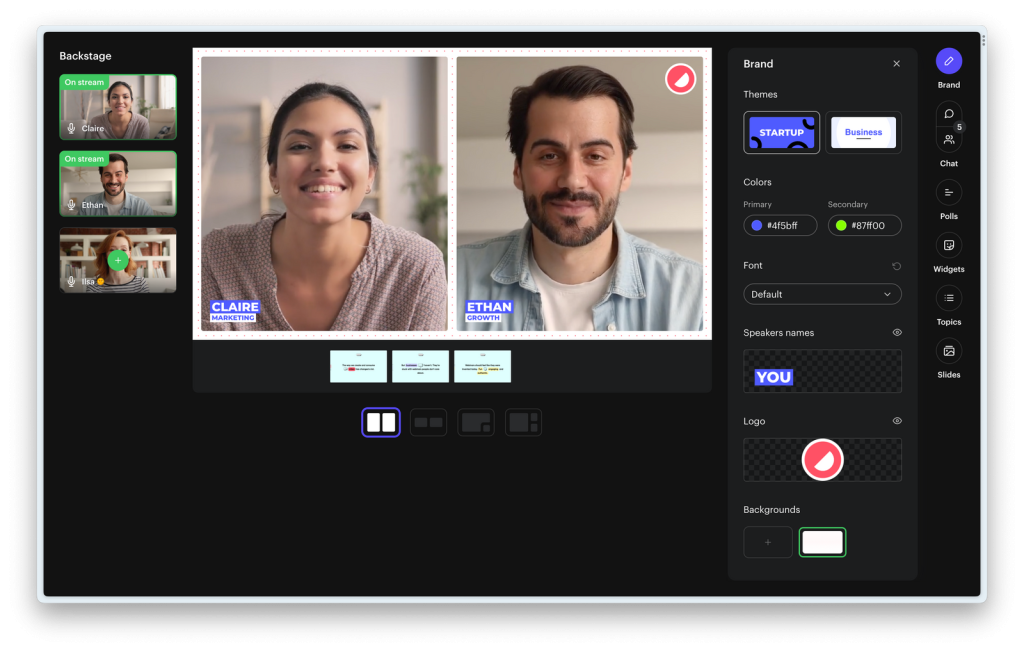
Contrast is a close Sequel alternative for modern, engagement-first B2B webinars. Both platforms target marketing teams running branded external webinars. Both emphasize engagement depth over broadcast scale. Both compete on the modern studio experience that separates them from older platforms like GoTo Webinar and Zoom.
Where Contrast differs is in its studio and content repurposing workflow. Pro starts at $99/month billed annually for 100 monthly registrants, with a free plan available for testing. After a session, clips, written content, and shareable replay pages extend its reach beyond the live date. Contrast’s HubSpot Leading Technology Partner status, named in 2026, provides useful context for teams evaluating its native connector.
Pros:
- Purpose-built for modern engagement-first B2B webinars with transparent published pricing
- Content channel and structured replay pages extend each session’s value after the live date
- Named a HubSpot Leading Technology Partner in 2026 for strong native integration adoption
- Free plan available for teams testing the format before committing to a paid tier
Cons:
- Prerecorded webinars are available; compare scheduling and interactions with your evergreen requirements
- Custom domains and some advanced customization options require higher plans or add-ons
- Smaller review base than established platforms makes independent validation harder at enterprise scale
Pricing: Pro starts at $99/month, billed annually, for 100 monthly registrants. Advanced and Enterprise require custom quotes. A free plan is available.
3. Zuddl
Best for ABM-Driven B2B Virtual Events and Webinars
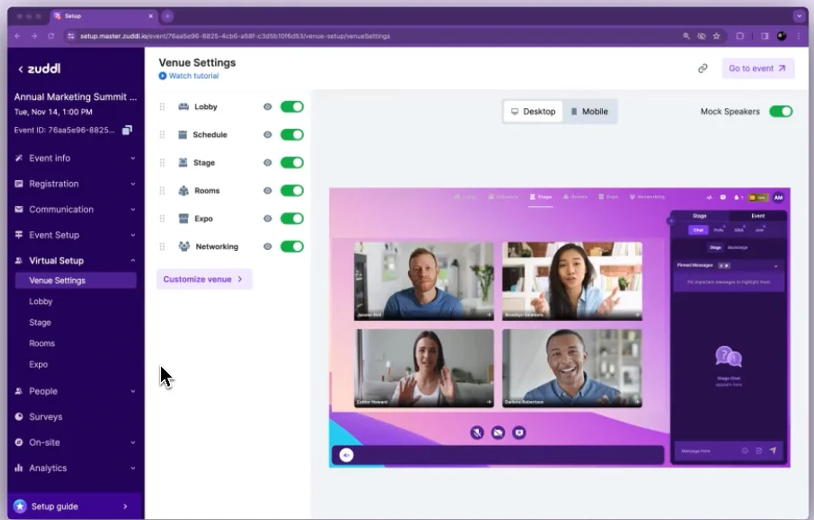
Zuddl is a modern B2B virtual events and webinar platform built specifically for marketing teams running pipeline-focused programs with account-based marketing workflows. It competes directly with Sequel on the branded external webinar use case while extending into multi-session virtual events and account-level engagement tracking within a broader event program.
For B2B teams that have started on Sequel for pipeline attribution and find they need account-level engagement aggregation across buying groups, multi-session event programs, or tighter ABM integration alongside their webinar schedule, Zuddl covers that scope. Test how its integrations aggregate engagement across contacts and accounts.
Pros:
- Built for pipeline-focused B2B marketing teams coordinating account-based event programs
- Covers both branded webinars and multi-session virtual events from one platform
- Account-level reporting supports buying-group analysis when CRM data and integrations are configured
- Purpose-built for modern B2B marketing rather than adapted from a general meetings tool
Cons:
- Attendee allowances, license scope, and add-ons need checking alongside the published entry price
- More complex than Sequel for teams whose program is a single live session per month
- Smaller review base and lower brand recognition than established platforms on this list
Pricing: Starts at $10,000/year for two organizers, including one collaborator. Confirm the relevant Digital, Digital + Field, or Unified license, attendee allowances, and add-ons with sales.
4. HeyStream
Best for Live-First B2B Webinar Programs
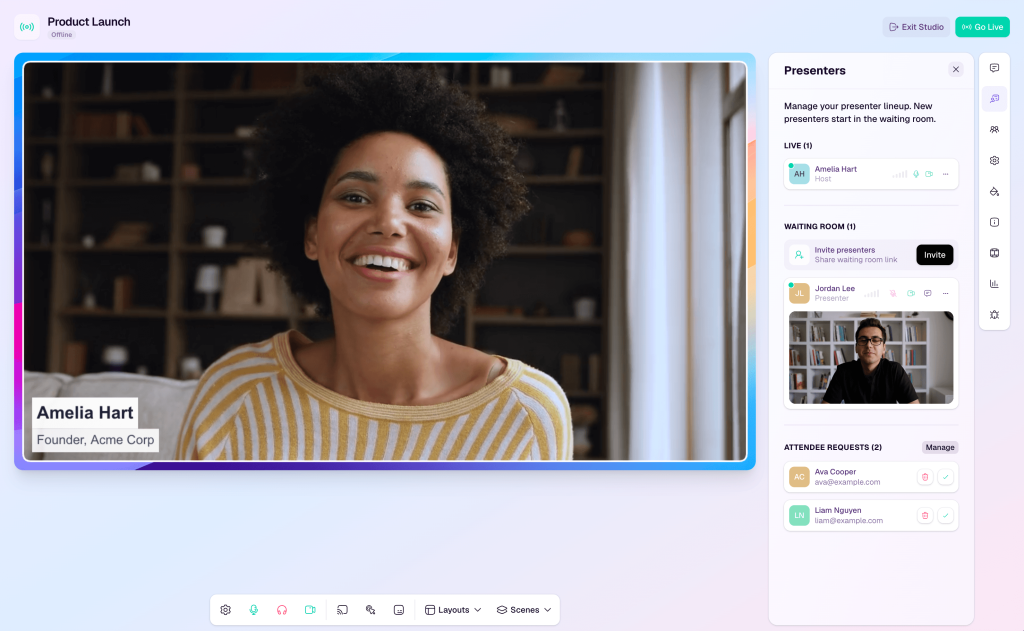
HeyStream is a B2B webinar platform that competes with Sequel in the live-session and pipeline-attribution use cases for marketing teams running regular demos, product launches, and recurring sessions with a clear next step for attendees. Its live-first workflow is relevant when the program centers on recurring broadcasts rather than a broader virtual conference.
For teams who find Sequel’s embedded architecture adds website integration complexity that their current tech stack cannot support without dedicated engineering work, HeyStream offers branded registration and watch pages, an audience CRM, and live/replay CTAs. External CRM and email connections start on Growth; test the handoff your sales team needs.
Pros:
- Built specifically for live B2B webinar programs with a pipeline-focused workflow
- Covers the same marketing team use case as Sequel without requiring website CMS integration
- Registration, engagement, and audience CRM records support the session lifecycle
- Positioned specifically for the B2B SaaS marketing audience, Sequel targets
Cons:
- External CRM and email integrations require Growth or above
- Teams needing Sequel-style website behavior tracking should validate the available embedding and analytics options
- Smaller platform scale and review base than established webinar platforms on this list
Pricing: Launch starts at $49/month billed annually for 100 live attendees. Growth is $149/month, and Scale is $399/month on annual billing. A 7-day trial is available.
5. Livestorm
Best for B2B Teams With Active CRM Pipelines
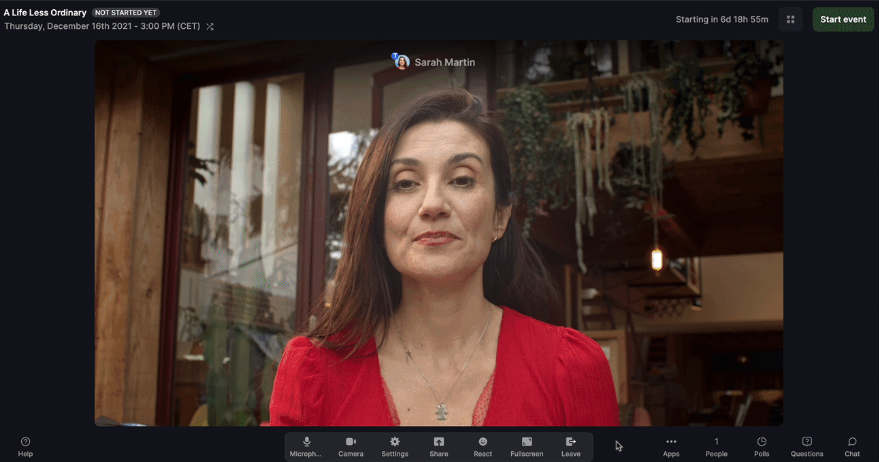
Livestorm connects webinar delivery with CRM-based attendee workflows. Sequel also supports CRM integrations, so compare connector availability, activity fields, and pricing at the plan your team needs. Livestorm’s attendee-credit model differs from Sequel’s published Growth rate and custom higher-tier quotes.
For B2B teams whose webinar program needs to feed a sales pipeline, contact profiles and engagement records matter before outreach begins. Test registration source, attendance, poll responses, and CTA activity against the actual connector. Salesforce and other advanced connectors require Enterprise; do not assume every CRM receives the same fields.
Pros:
- CRM integrations support attendee workflows, with connector availability depending on plan
- Per-attendee contact profiles are built from registration through replay engagement
- Browser-based with no download friction for attendees
- Attendee-credit pricing supports usage-based comparisons; Enterprise requires a quote
Cons:
- Advanced connectors, including Salesforce, require Enterprise
- Credit-based pricing can escalate quickly at higher attendee volumes
- Website embedding and cross-page tracking need to be evaluated separately from CRM integration
Pricing: Pro displays €2.50 per attendee credit at a 400-credit selection. A free trial is available. Enterprise pricing is custom.
6. Demio
Best for Behavior-Based Lead Generation Webinars
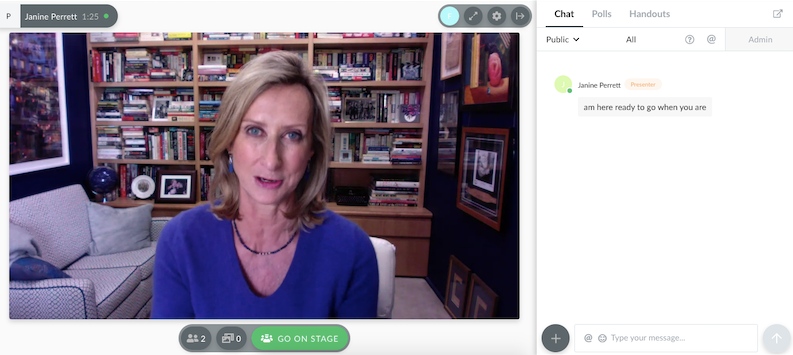
Demio tracks attendee behavior during webinars and connects it with follow-up through supported integrations. Sequel also captures engagement and connects with CRMs. The useful comparison is which session actions your sales team can use without manual sorting afterward.
Poll responses, featured-offer clicks, and attendance help teams identify interests and segment follow-up. Test which actions become fields, tags, or workflow triggers in your connected system. For B2B marketing teams seeking an actionable lead list from each session, the handoff matters more than the domain the room runs on.
Pros:
- Engagement analytics and supported integrations help segment attendee follow-up
- Browser-based session interface keeps registration and participation close together
- Browser-based attendee access avoids a software download on supported devices
- Strong automation integrations with HubSpot, Marketo, and ActiveCampaign
Cons:
- On-demand and automated delivery require an eligible plan beyond Starter
- Website hosting and continuous visitor tracking require checking the intended implementation
- Salesforce integration requires the higher-tier plan
Pricing: Starter begins at $45/host/month, billed annually, or $63/month, for 50 attendees and one host. A 14-day trial is available; automated formats and advanced integrations require higher plans.
7. BigMarker
Best for White Label and Enterprise Multi-Session Events
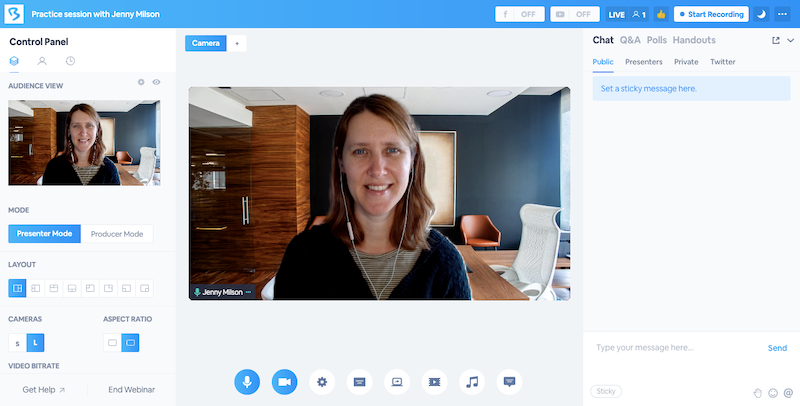
BigMarker offers white-label options for agencies and enterprises that need branding across a wider event program. Sequel’s embedded experience also keeps the website in view, but white label requirements should be checked touchpoint by touchpoint: registration, session room, emails, support, and replay access.
BigMarker supports white-label delivery according to the selected package. Confirm which attendee touchpoints can carry only the host’s brand. It also handles multi-track events, summits, and multi-session conferences alongside standard webinars, making it relevant when the program spans multiple broadcasts.
Pros:
- White-label options support client-branded and enterprise event programs
- Handles everything from single webinars to large multi-session virtual summits
- Strong monetization features for paid events and premium programs
- Multi-track support suits conference-style programs with several sessions and audiences
Cons:
- No published pricing, and a demo call is required to get a quote
- Platform complexity can be significant for teams running straightforward single-session webinars
- White-label configuration requires upfront setup investment before the first session
Pricing: Custom quotes; confirm capacity, white-label scope, and included features with sales.
8. eWebinar
Best for Automated and Evergreen Webinar Programs
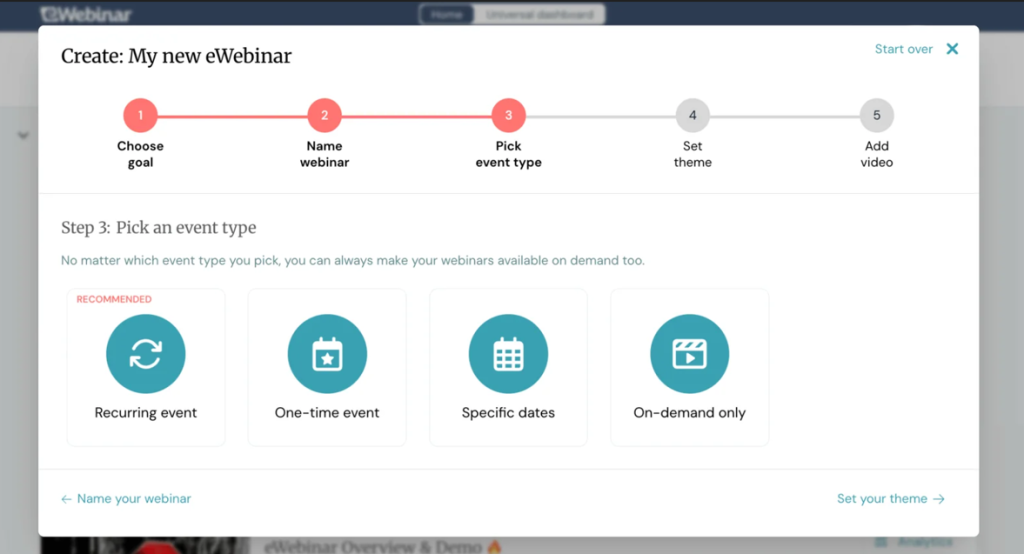
eWebinar is built around automated and evergreen delivery. Sequel also offers simulive playback and scheduled engagement actions, so the practical comparison is how each handles recurring availability, attendee-selected session times, and chat coverage for repeated training or product walkthroughs.
eWebinar makes recorded delivery the core workflow. Any recorded session becomes a scheduled, interactive webinar that runs without a live host present. Attendees choose a time that works for them, join an interactive, recorded presentation, ask questions via chat, and receive replies based on the team’s chat coverage and configured messages.
For B2B teams running always-on programs that need to generate a pipeline continuously without live hosting overhead, eWebinar is worth testing for its recording-first scheduling and interaction workflow.
Pros:
- Removes the live hosting requirement for evergreen content entirely
- Recorded presentations include scheduled interactions and chat
- Flexible scheduling lets attendees choose a session time that suits them
- Published plans distinguish active webinar and monthly registrant limits
Cons:
- Live presenter-led sessions require a separate delivery tool
- Website embedding and cross-page tracking require a separate implementation check
- Chat coverage and configured messages require planning, so varied questions receive useful answers
Pricing: Level 1 starts at $99/month for one active webinar and 1,000 monthly registrants. A 14-day trial is available; annual billing is discounted.
9. GoTo Webinar
Best for Enterprise Teams Comparing Capacity and Costs
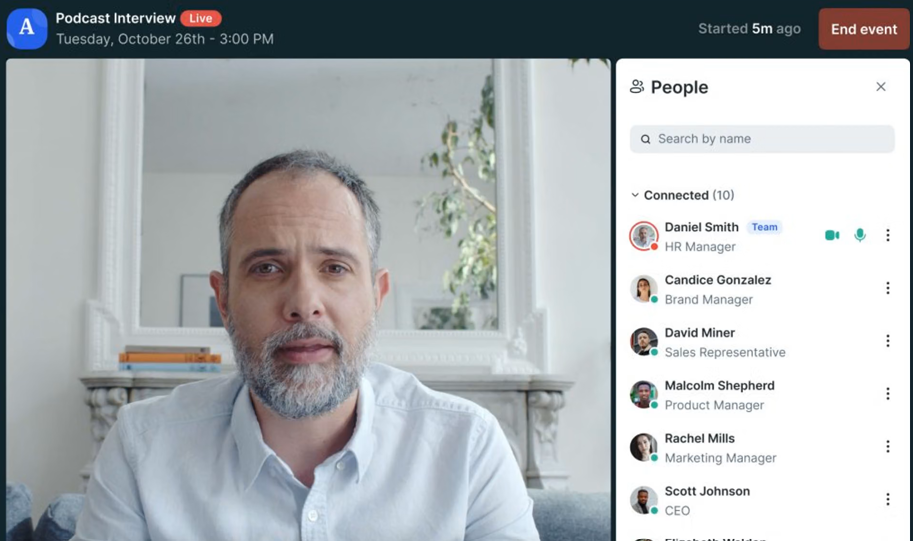
GoTo Webinar is an established option for enterprise teams, with capacity, reporting, and total cost. Sequel publishes Growth pricing and quotes its higher tiers. Compare the actual attendee tier and license requirements on both sides before treating price visibility as a reason to switch.
For teams running webinars with hundreds to thousands of registrants, GoTo Webinar’s reporting and long track record make it a relevant option on the shortlist. Reach includes one organizer and up to 500 participants, with a listed annual-billing rate of $62/organizer/month. Confirm higher-tier capacity and the features your program will actually use before committing.
Pros:
- Capacity-based plans give teams different options for their event requirements
- Higher-capacity plans serve larger programs; verify the selected tier’s attendee allowance
- Strong post-event reporting covering attendance, engagement, and registration source attribution
- Long track record with a broad integration library covering Salesforce, HubSpot, and Marketo
Cons:
- Interface is dated compared to newer platforms on this list, including Sequel
- Teams needing website-hosted sessions should validate embedding and cross-page tracking requirements
- Recorded delivery and advanced features need checking against the selected plan
Pricing: Reach is listed at $62/organizer/month billed annually, including one organizer and up to 500 participants. A free trial is available.
10. Zoom Webinars
Best for Teams Whose Audiences Are Already Zoom-Familiar
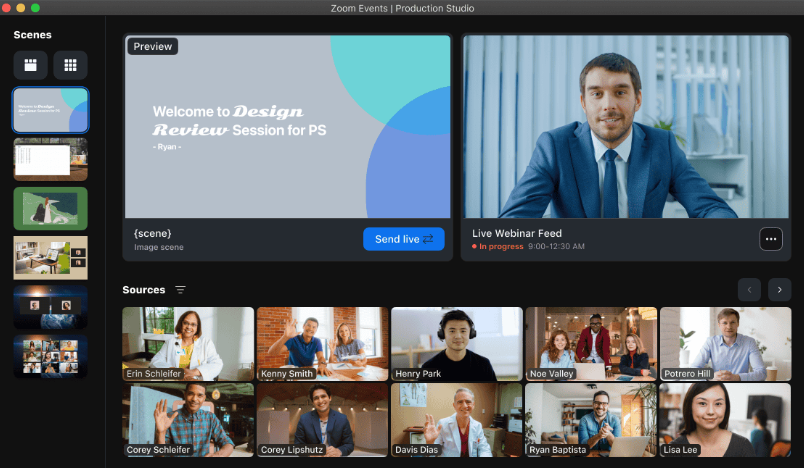
Zoom Webinars is relevant when your audience already uses Zoom for meetings, and the program needs a familiar join experience. That familiarity can simplify orientation, but attendance still depends on the actual invitation, device, and event setup.
Sequel emphasizes keeping the webinar on your website, while Zoom’s usual webinar experience runs in its own environment. For teams whose CRM workflow connects attendee activity with contacts and opportunities, that different hosting model may be workable. Zoom offers packages supporting up to 100,000 attendees, depending on product, capacity, and support arrangements.
Pros:
- Familiar attendee interface for audiences that already use Zoom
- Large capacity suitable for enterprise-scale events up to 100,000 attendees, depending on package
- Registration and attendee reporting support identified audience workflows when configured
- Strong recording and post-event replay options with automated transcripts
Cons:
- Email customization and segmentation need to be checked against the campaign’s follow-up requirements
- Does not keep attendees on your domain during the session: the core gap Sequel addresses
- Requires an add-on purchase on top of existing Zoom plans
Pricing: Requires a paid Workplace license, plus the Webinars add-on starting around $66-$83/month.
My Evaluation Criteria
This comparison uses a consistent framework drawn from public product documentation, pricing pages, and review sources, including G2 and Capterra. Here is what went into each review.
- User Reviews/Ratings: Public feedback on G2 and Capterra provides context for experience. Product capabilities and prices are checked against vendor documentation; they are not presented as conclusions from a hands-on trial or attributed to unnamed reviewers.
- Essential Features and Functionality: Each platform was assessed against two distinct use cases that Sequel users fall into when searching for alternatives: teams needing a direct Sequel alternative for pipeline-focused B2B webinars, and teams comparing webinar management across delivery formats, multi-session events, integrations, and pricing models.
- Ease of Use: Both the host-side setup experience and the attendee join experience. Sequel offers no-code embedding and CMS options; implementation depends on website permissions and requirements. Compare the time needed to prepare the session, invite guests, and connect the intended workflow.
- Customer Support: Published support options and available experience reports during setup and live events. Confirm response commitments before using a platform for a critical session.
- Value for Money: Feature coverage relative to price point, evaluated against Sequel’s published Growth price, custom higher tiers, and any website implementation work to give teams a realistic picture of total cost and setup investment compared to alternatives.
- Industry Analysis and Expert Commentary: Official documentation establishes feature scope; webinar analytics and independent research provide measurement context. Vendor comparisons describe positioning rather than proving superiority.
How Does Sequel Embedding Work?
The practical difference lies in where attendees watch and how your team connects their activity to the website and CRM records.
Hosted Webinar Rooms
Platforms such as Demio and Livestorm provide hosted webinar rooms. Attendees leave your website to join, so website analytics and webinar records sit in separate systems. Connecting them for attribution requires reliable identity matching and an agreed integration or tracking setup. Manual reconciliation becomes harder as event volume grows.
Sequel’s Website-Hosted Approach
Sequel’s embedded architecture changes the starting assumption. The webinar runs within your branded website experience. Attendees remain on a website page, which can make browsing, webinar engagement, and later site activity easier to connect. What is actually measured depends on consent, tracking settings, identity resolution, and the configured analytics and CRM connections.
What the Difference Means
If tracking breaks when attendees leave your domain, test Sequel’s website-hosted approach. If session data fails to reach your CRM, inspect the supported integrations. Neither domain choice nor a connector alone establishes revenue attribution.
What Should You Test First?
Run one complete test campaign to prove that the alternative supports your website, CRM, and delivery requirements. Check these four areas in order.
1. Inspect the CRM Records
Sequel combines website-hosted delivery with engagement data and CRM connections. Connect the alternative to your CRM and run a test session. Check each contact and account record afterward. Did poll answers, CTA clicks, and watch time arrive as separate activities, or only as an attendance summary? Inspect the actual webinar report and connected contact record. Data granularity matters, but opportunity matching and attribution rules matter too.
2. Test Recorded Delivery
Sequel supports simulive playback and scheduled engagement actions, so compare the specific automation your program needs. Test scheduled, interactive playback, and attendee-selected session times. If your program needs evergreen and live delivery, confirm that the alternative supports both.
3. Trace Registration to Pipeline
Create a registration page, promote it with UTM tracking parameters, and run the session. Then trace the registration source through attendance to the CRM opportunity record. This shows whether your configuration connects the full funnel that Sequel’s website-hosted approach aims to support.
4. Review Repurposed Content
Sequel includes AI-powered content repurposing that generates blog drafts, social clips, and transcripts from session recordings. Record a test session and time the alternative’s content repurposing. Review the resulting assets and editing effort. For frequent webinar programs, both speed and quality determine whether the AI saves useful time.
My Top 3 Sequel.io Alternative Picks
1. ProProfs WebinarNinja
My first pick when the program needs four formats, built-in emails, AI assistance, and CourseNinja together, with automated webinars alongside live delivery.
2. Contrast
A close alternative when a modern branded B2B studio already suits the program and recording-to-content repurposing is the main workflow to improve.
3. Livestorm
The option to test when CRM-connected attendee activity is the priority, provided its plan and connector deliver the information your sales workflow needs.
Ready to Improve Your Webinar Workflow?
Sequel earns its place for B2B marketing teams whose attribution model requires webinar sessions to run on their own website domain, linking website activity to webinar engagement and CRM records through the approved tracking setup. For those programs, the embedded architecture addresses a real workflow need.
For teams whose programs need a different delivery mix, course content alongside webinars, or a simpler cost model, compare the complete workflows. Sequel already supports CRM integrations, simulive delivery, content reuse, and a published Growth rate; the reason to switch should be a specific improvement your trial proves.
ProProfs WebinarNinja is my top pick when those needs include live, automated, series, and hybrid formats; built-in registration and emails; AI assistance; and CourseNinja in one account. Supported integrations extend follow-up; test the actual data handoff before treating it as pipeline attribution. Start your free trial or watch a live demo, then run one complete session through registration, delivery, and follow-up before deciding.
Frequently Asked Questions
What is the difference between Sequel.io and a standard webinar platform?
Sequel emphasizes webinar delivery on your website, alongside engagement tracking and CRM integrations. Many alternatives use their own webinar room or a hosted watch page. Domain choice can affect the attendee journey, but attribution still requires reliable tracking, identity matching, and CRM configuration on either platform.
How much do Sequel alternatives typically cost?
Compare billing units and rates. WebinarNinja displays promotional pricing from $0.30/attendee/month billed annually; Contrast Pro and HeyStream Launch start at $99/month and $49/month on annual billing. Demio starts at $45/host/month, billed annually; eWebinar at $99/month; and Zuddl at $10,000/year. GoTo Webinar lists Reach at $62/organizer/month billed annually. Livestorm uses attendee credits; confirm Zoom capacity pricing and BigMarker quotes.
Do Sequel alternatives require website CMS integration for attendees to join?
No. ProProfs WebinarNinja, Livestorm, Demio, and Contrast can provide hosted registration and attendee access without embedding the session in your CMS. Optional website forms or embeds still need to be implemented. Test the actual invitation on an external guest’s device; Sequel also offers no-code embedding options.
Which Sequel alternative works best for automated and evergreen webinars?
eWebinar is purpose-built for automated and evergreen delivery. ProProfs WebinarNinja combines automated sessions with live, series, and hybrid formats. Sequel also offers simulive and engagement automation. Compare recurring scheduling, attendee interactions, chat coverage, andevergreen content updates against your actual program.
Is there a Sequel alternative with published pricing and a free plan?
Contrast offers a free plan and publishes Pro for $99/month billed annually. ProProfs WebinarNinja publishes attendee-based pricing with a 14-day trial; HeyStream and Demio also publish prices and timed trials. Livestorm offers free testing. Keep a permanent free plan separate from trial access when comparing options.
Which Sequel alternative works best for pipeline attribution without website domain embedding?
ProProfs, WebinarNinja, and Livestorm are options for testing connected attendee follow-up. Confirm the supported connector, fields, opportunity matching, and attribution rules rather than assuming every engagement event syncs automatically. Reliable contact records and a clearfollow-up email workflow help your team act on the data.
Want to host a webinar for free?
Use WebinarNinja to teach, improve marketing, and grow your sales.