Ten attendees. Thirty minutes. One webinar at a time.
That is the entirety of what GetResponse’s Free plan permits before webinars stop being a feature and start being a negotiation, one that ends with the Creator plan or a paid add-on standing between you and an audience large enough to matter.
The arrangement is telling. Webinars sit inside GetResponse as a line on the features page rather than a discipline the company has built around, present enough to advertise, limited enough to require an upgrade almost immediately.
For marketers, coaches, and course creators who need webinars to perform reliably at scale, that limitation is usually the moment the search for GetResponse webinar alternatives begins.
This guide examines ten such GetResponse competitors for webinars, weighing capability against cost.
10 Best GetResponse Webinar Alternatives & Competitors
GetResponse positions webinars as a feature to unlock rather than a service to build a platform around, an approach the ten tools below were each built to reject. Several were developed by companies whose sole focus was webinar software long before webinars became a common addition to email marketing platforms.
The table below summarizes how these GetResponse webinar alternatives compare, with a more detailed review to follow.
| Tool | Best For | Starting Price |
| ProProfs WebinarNinja | Generating leads, growing sales, and teaching better | $0.30/attendee/month |
| LiveWebinar | Browser-based meetings and webinars | $32/month |
| ClickMeeting | Simple, affordable webinar marketing | $32/month |
| Crowdcast | Interactive, community-style webinars | $49/month |
| StealthSeminar | Automated, evergreen sales webinars | $69.95/month |
| Airmeet | Large-scale virtual events and networking | $167/month |
| ON24 | Enterprise demand generation programs | Custom pricing |
| Kartra | All-in-one funnels with webinars | $119/month |
| Systeme.io | Budget-friendly webinar funnels | $47/month |
| Webex Webinars | Corporate webinars on Cisco Webex | ~$68.75/license/month |
The sections that follow examine each platform in detail: its principal strengths, its limitations, and its current pricing.
1. ProProfs WebinarNinja
Best for Generating Leads, Growing Sales, and Teaching Better
ProProfs WebinarNinja is built for generating leads, growing sales, and teaching better, and it gives you every webinar format: live, automated, series, and hybrid, from a single dashboard the moment you sign up. GetResponse holds most of these back until you upgrade your plan or buy an add-on.
Landing pages and automated email sequences for confirmations, reminders, and follow-ups come built in, not as an extra. CourseNinja is included at no additional charge too, so hosts can sell live or on-demand courses to the same audience their webinars bring in, something GetResponse doesn’t really offer. The AI Webinar Creator adds a set of AI tools on top that help sharpen the pitch and turn each webinar into ready-to-use content afterward.
GetResponse makes you earn its better webinar features through an upgrade. WebinarNinja just gives them to you, which is exactly why it holds up as one of the best GetResponse webinar alternatives from day one.
Pros:
- Live, hybrid, series, and automated webinars operate from a single dashboard, with no separate purchase required to access a given format
- Built-in landing pages and automated email sequences are included as standard, rather than reserved for higher contact-list tiers
- CourseNinja is provided at no additional cost, enabling hosts to sell live or on-demand courses through the same platform
- Webinar replays are recorded automatically and are typically available within seconds, without a manual export step
- Native integrations with ConvertKit, Mailchimp, HubSpot, Stripe, and more than 1,000 applications through Zapier
- Built-in AI features, including an AI Sales Coach and AI Content Strategist, help refine your pitch and repurpose every webinar into ready-to-use content automatically
Cons:
- No downloadable or on-premise version available.
- Dark user interface option not available.
Pricing: A FREE 14-day trial is available. Paid starts at $0.30/attendee/month (includes CourseNinja worth $1200).
Case Study:
Check how ProProfs WebinarNinja helped Relayer Benefits maintain their sales even during the pandemic
2. LiveWebinar
Best for Browser-Based Meetings and Webinars
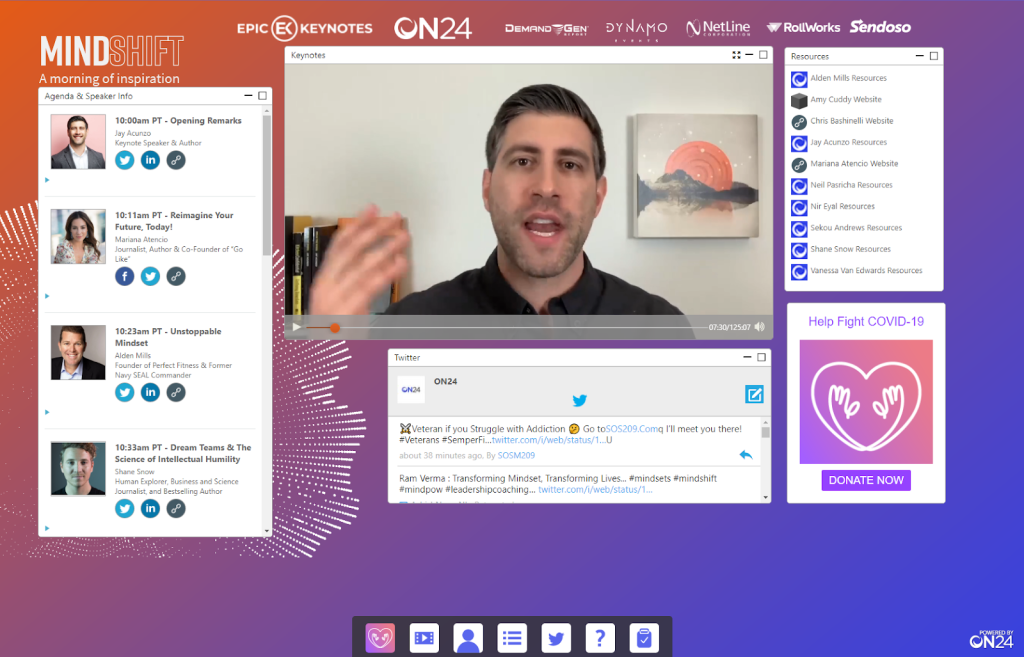
Organizations that prefer a single platform for both internal meetings and public webinars, rather than maintaining separate subscriptions for each purpose, are well served by LiveWebinar. Its browser-based design requires no download for either hosts or attendees.
Paid webinars, evergreen automation, and sessions extending up to twelve hours are available on higher-tier plans, alongside interactive whiteboards, adaptable room layouts, and direct broadcasting to Facebook, YouTube, and Vimeo. The free tier is sufficiently capable to support small meetings rather than serving only as a limited trial.
Where GetResponse’s webinar tool is confined to live sessions, LiveWebinar extends into evergreen automation and multi-platform broadcasting within the same subscription.
Pros:
- A genuinely functional free plan for small meetings permits evaluation before any payment is required
- Paid webinars and evergreen automation are available beginning with the Basic tier
- Direct broadcasting to Facebook, YouTube, and Vimeo removes the need for a separate streaming tool
- An interactive whiteboard supports presentations requiring real-time markup rather than static slides alone
- Sessions of up to twelve hours on higher tiers accommodate extended training sessions or conferences
Cons:
- Attendee capacity and exact plan pricing scale with a slider on the official site, so the final bill depends on the audience size you select
- The interface has a steeper learning curve than simpler, single-purpose webinar tools
Pricing: Paid plans start at $32 per month for the Basic tier.
3. ClickMeeting
Best for Simple, Affordable Webinar Marketing
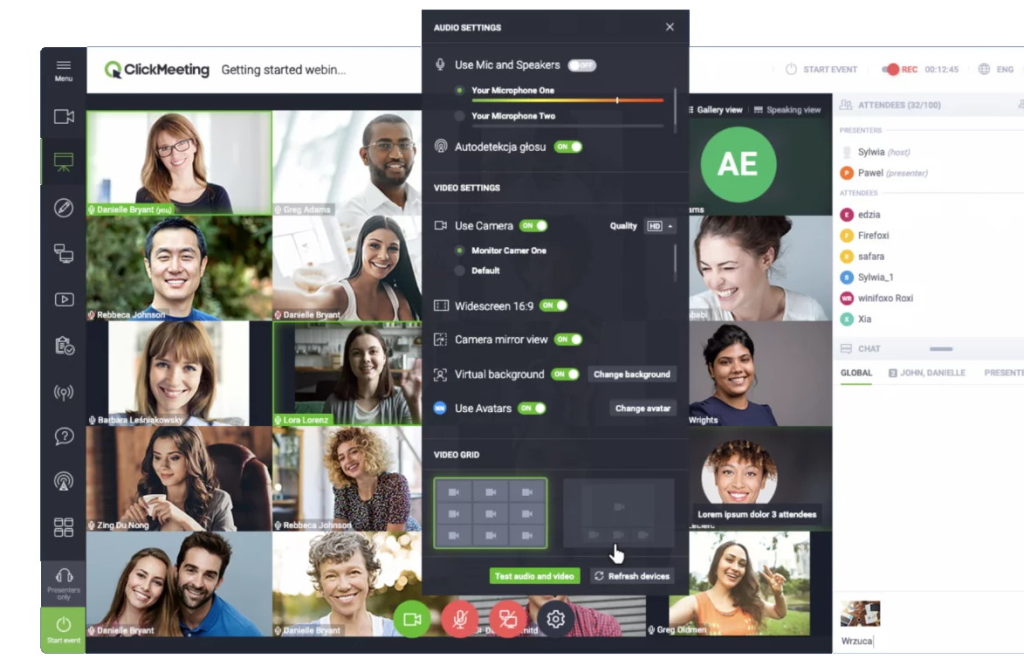
A notable point of context precedes any comparison of pricing: ClickMeeting was originally developed by the same parent company responsible for GetResponse, prior to the two products separating into independent offerings. This shared origin is reflected in ClickMeeting’s continued focus on webinar marketing specifically, rather than general video conferencing with webinars appended.
Live, automated, and on-demand formats are supported without additional configuration, alongside custom branding on higher-tier plans and toll-free dial-in numbers for attendees without reliable internet access. A built-in whiteboard, polls, and surveys extend the platform’s interactive capabilities, and events scale to 1,000 attendees on larger plans.
At a price close to GetResponse’s own webinar add-on, ClickMeeting provides automated formats and telephone access that GetResponse’s webinar tool does not offer.
Pros:
- Live, automated, and on-demand webinar formats included, unlike GetResponse’s more limited live-only setup
- Toll-free dial-in numbers let attendees join by phone when internet access is unreliable
- Built-in whiteboard and polls for interactive presentations and audience feedback
- Scales up to 1,000 attendees on higher-tier plans
- Founded by the same team behind GetResponse, giving it deep roots in webinar marketing specifically
Cons:
- Screen sharing requires a separate application rather than working natively in the browser
- The chat window cannot be fully hidden from the attendee view, which some hosts find distracting during presentations
Pricing: Starts at $32 per month for the Live plan.
4. Crowdcast
Best for Interactive, Community-Style Webinars
While most webinar platforms are designed for one-way broadcasting, Crowdcast is the GetResponse webinar alternative built around direct audience interaction. Questions are submitted and upvoted by attendees themselves, allowing hosts to address what the audience considers most relevant rather than relying on assumptions, and attendees may be invited on camera as guests during a session.
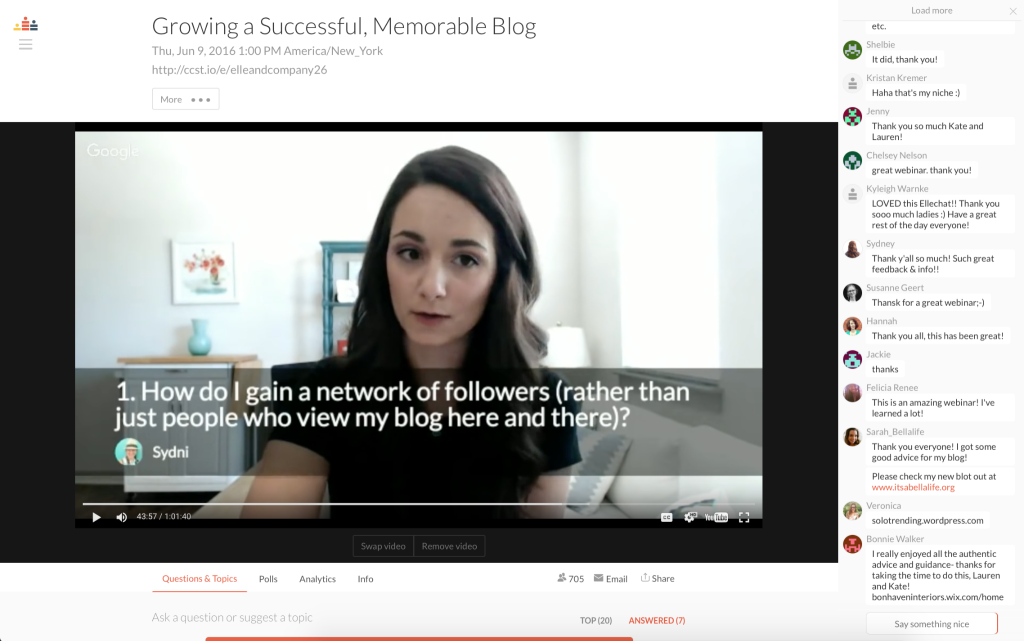
Event and session analytics track attendance and engagement automatically, and paid events can be sold directly through the platform without requiring a separate payment system.
GetResponse’s webinar tool offers no comparable mechanism for audience-driven interaction or native ticketed events, a gap Crowdcast was specifically designed to address.
Pros:
- Audience-submitted, upvoted questions allow hosts to prioritize the topics attendees consider most relevant
- Attendees may be invited on camera as guests, extending the format beyond standard presentation delivery
- Native paid ticketing is available without requiring a separate payment system
- Event and session analytics are included on all paid tiers
- Its focus on community-driven engagement suits ongoing series more than single, isolated broadcasts
Cons:
- A transaction fee applies to paid events on the lower tiers, which cuts into revenue from ticket sales
- Monthly hour limits on lower tiers mean frequent hosts may need to upgrade sooner than expected
Pricing: Starts at $49 per month for the Lite plan.
5. StealthSeminar
Best for Automated, Evergreen Sales Webinars
Businesses that rely on a single, repeatable sales presentation are the intended audience for StealthSeminar. Its Just-in-Time scheduling allows a visitor to register and begin viewing within minutes rather than waiting for a scheduled time, while automated chat simulates audience activity throughout the session.
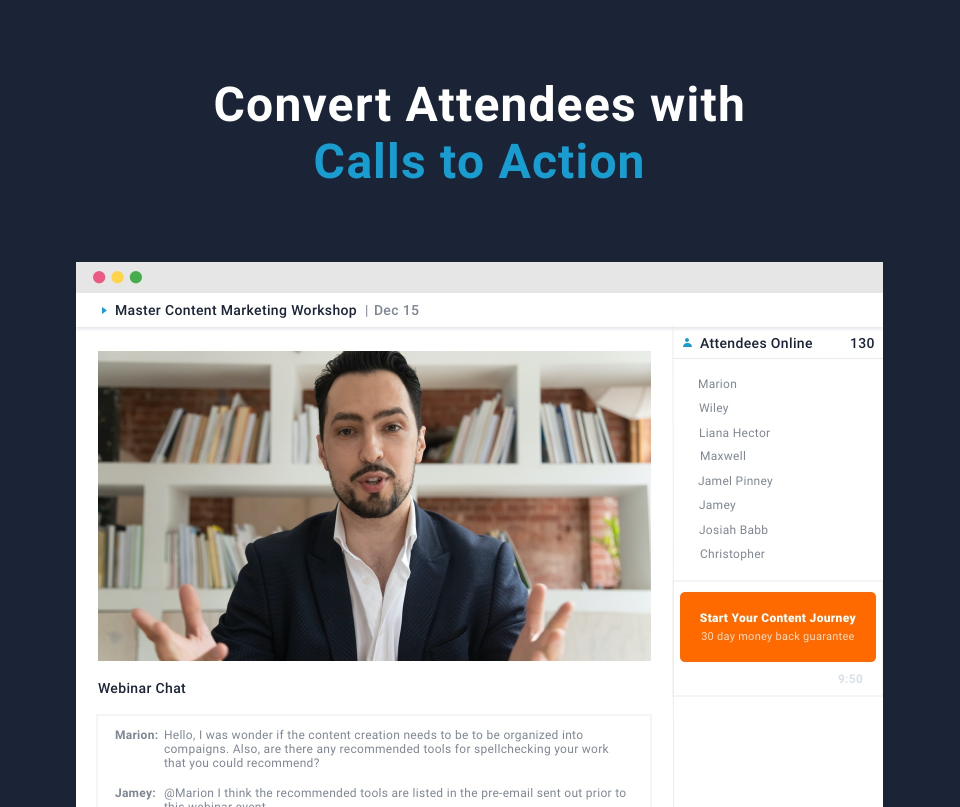
The platform is among the longest-established in automated webinar software, supported by an extensive collection of published customer case studies and built specifically around evergreen sales funnels rather than general meetings or live broadcasting.
GetResponse’s webinar tool is oriented primarily toward live delivery; StealthSeminar offers an automated, always-available approach that GetResponse’s own tool does not.
Pros:
- Just-in-Time scheduling starts a webinar within minutes of registration rather than forcing a fixed time slot
- Automated chat simulates live audience activity to keep the evergreen format feeling current
- One of the longest-established automated webinar platforms, with a large library of published customer case studies
- Native integration with ActiveCampaign for triggering follow-up automations based on attendance and watch time
- Purpose-built for evergreen sales funnels rather than general meetings, so the toolset stays focused
Cons:
- No free trial or free version is available, so testing the platform requires a paid commitment upfront
- The platform is narrowly focused on automated webinars, so teams also needing live hosting will need a second tool
Pricing: Starts at $69.95 per month.
6. Airmeet
Best for Large-Scale Virtual Events and Networking
A webinar room and a virtual event are not equivalent undertakings. Airmeet is designed for the latter, incorporating networking lounges, virtual tables, and dedicated spaces for one-on-one meetings alongside standard presentation capability.

Its free plan accommodates smaller events adequately for initial evaluation, while the Premium Webinars tier removes session-length restrictions and adds custom branding, expanded analytics, and capacity for up to 10,000 attendees. Multilingual captions and transcripts extend the platform’s suitability to audiences across multiple regions.
GetResponse’s webinar tool was not designed to support an event of this scale; Airmeet’s networking-oriented design and attendee capacity place it in a distinct category.
Pros:
- Free plan available for small events, letting teams test the platform before committing to a paid tier
- Networking lounges, virtual tables, and one-on-one meeting spaces built directly into events
- Multilingual closed captions and transcripts for reaching international audiences
- Supports up to 10,000 attendees on the Premium Webinars tier
- Deep analytics with dozens of tracked data points on attendee behavior and engagement
Cons:
- Pricing jumps sharply between tiers, so mid-sized teams may find themselves paying for enterprise-level capacity they do not need yet
- The platform’s networking-heavy feature set is more than a simple lead-generation webinar typically requires
Pricing: A free plan is available; Premium Webinars starts at $167 per month, billed annually.
7. ON24
Best for Enterprise Demand Generation Programs
ON24 is structured for organizations conducting webinars as an ongoing element of demand generation, rather than for a single company hosting occasional sessions. A searchable content hub retains recordings and supporting materials for continued use following each live event, while integrations with enterprise CRM and marketing automation platforms track engagement throughout the sales pipeline.
Its analytics dashboards provide considerably greater depth than typical small-business webinar tools, consistent with pricing and contract structures designed for organizations conducting events on a continual basis rather than occasionally.
GetResponse was not designed to operate at this scale, and ON24’s positioning reflects a fundamentally different budget and organizational requirement.
Pros:
- Content hub keeps webinar recordings and materials searchable and reusable long after the live event
- Deep CRM and marketing automation integrations built for enterprise demand-generation pipelines
- Advanced analytics dashboards track attendee behavior in far more depth than small-business webinar tools
- Built for high event volume, with contract structures designed around dozens of annual webinars
- Established enterprise reputation, making internal procurement approval easier at large organizations
Cons:
- No public pricing is listed anywhere on the official site, so every plan requires a sales conversation before you know the cost
- The scale and cost structure make it impractical for solo creators or small businesses running occasional webinars
Pricing: Uses custom, quote-based pricing.
8. Kartra
Best for All-in-One Funnels With Webinars
Kartra pursues an all-in-one strategy comparable to GetResponse’s, though oriented more heavily toward sales funnels and digital products than toward email list management. Webinars are integrated alongside landing pages, checkout forms, a helpdesk, and complete membership sites within a single dashboard, allowing a registration to proceed directly into a course purchase without an additional tool.
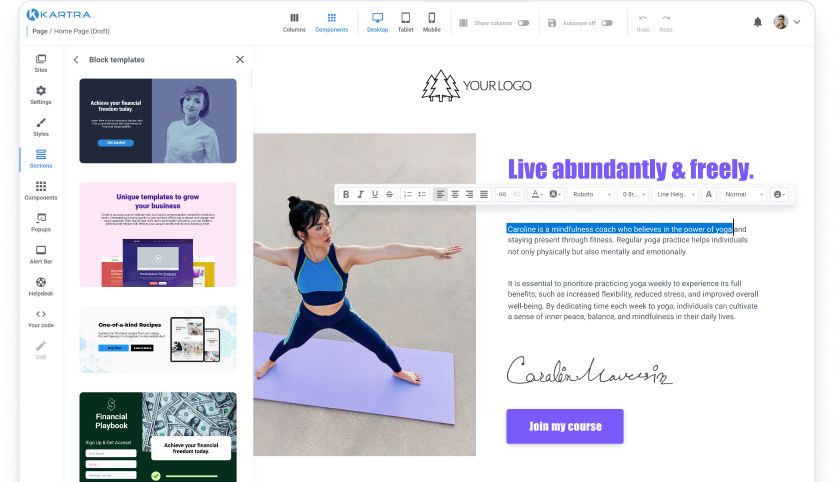
Webinar hosting becomes available beginning with the Growth tier, which also introduces affiliate management, a useful feature for course creators recruiting promoters for webinar-based launches.
Where GetResponse emphasizes email and contact management with webinars as a secondary feature, Kartra directs its infrastructure toward commerce, checkout, and membership functionality built around the webinar itself.
Pros:
- Webinar hosting is bundled with checkout, membership sites, and helpdesk tools in a single platform
- Affiliate management is included from the Growth tier, useful for recruiting promoters for webinar-based launches
- Real-time funnel analytics show exactly where registrants drop off before or after a webinar
- Unlimited pages, videos, and products included even on the entry-level plan
- 30-day money-back guarantee offered directly by the company on all plans
Cons:
- Webinar hosting is not available on the entry-level Starter plan, so businesses must budget for the Growth tier to access it
- The breadth of features can feel like more than a team needs if webinars are their only real requirement
Pricing: Starts at $119 per month for the Starter plan; webinar hosting is available from the Growth plan upward.
9. Systeme.io
Best for Budget-Friendly Webinar Funnels
Not every creator evaluating webinars is prepared to commit significant expenditure before establishing whether the format suits their business. Systeme.io addresses this through a dedicated Webinar plan, which incorporates evergreen, pre-recorded webinars alongside the platform’s existing funnels, email marketing, and course tools, without transaction fees on resulting sales.
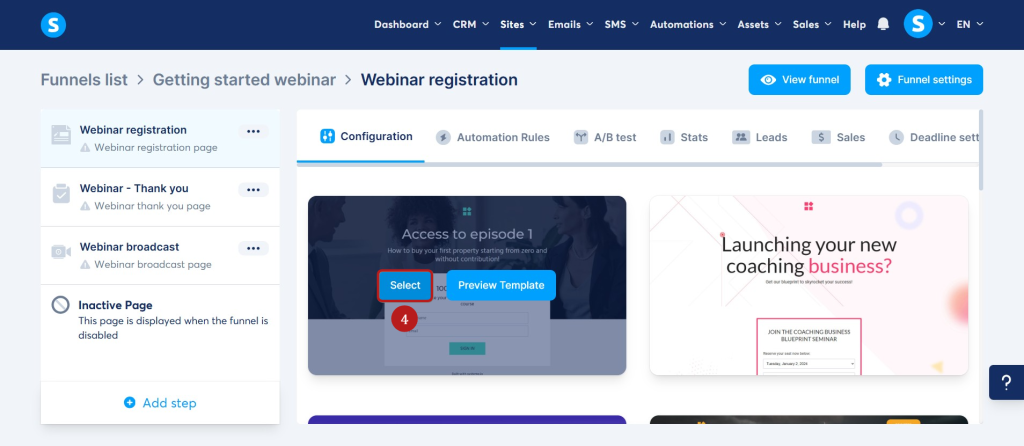
The free plan alone is sufficient to build a functional funnel and email list before any payment is required, although the evergreen webinar feature is reserved for the paid Webinar tier.
For those who evaluated GetResponse’s webinar add-on pricing and found it disproportionate to their needs, Systeme.io offers a comparable bundle at considerably lower cost.
Pros:
- Dedicated Webinar plan bundles evergreen webinars with funnels, email marketing, and courses at a low monthly price
- Zero transaction fees on sales made through funnels or webinars, unlike some competing platforms
- A genuinely permanent free plan, not just a time-limited trial, for testing the platform first
- Unlimited emails and unlimited students included on every plan, including the Webinar tier
- Built-in affiliate program tools for recruiting promoters without a separate integration
Cons:
- Webinars are evergreen and pre-recorded only, with no live-streaming capability included
- Design customization is limited compared to platforms built specifically around visual page building
Pricing: The Webinar plan starts at $47 per month.
10. Webex Webinars
Best for Corporate Webinars on Cisco Webex
For an IT department already operating on Webex throughout an organization, introducing a separate webinar tool from another vendor often creates more complexity than it resolves. Webex Webinars addresses this by hosting public-facing events on the same infrastructure already relied upon for internal meetings, supported by detailed attendee reporting and security credentials commonly required in regulated industries.
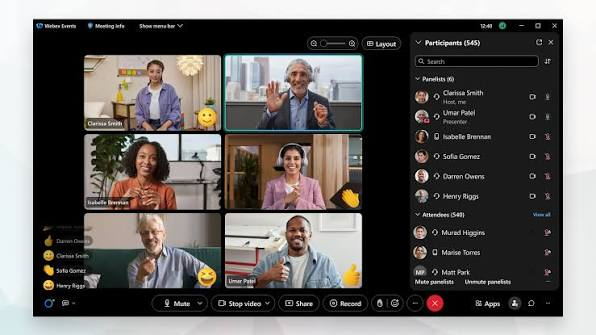
As an add-on to the broader Webex Suite, procurement proceeds through the same channel already used for existing video conferencing licenses, simplifying internal approval at larger organizations.
GetResponse’s webinar tool offers no equivalent to enterprise-grade infrastructure or compliance requirements at this level, which constitutes the primary rationale for Webex Webinars’ continued position in this category.
Pros:
- Runs on the same trusted Webex infrastructure many enterprises already use for internal meetings
- Detailed attendee reporting and analytics built for corporate training and compliance tracking
- Strong security credentials that appeal to regulated industries like finance and healthcare
- Integrates directly with existing Webex Suite licenses, simplifying procurement for IT departments
- Established enterprise reputation with a long track record in corporate video conferencing
Cons:
- Sold as an add-on to the broader Webex Suite, so the total cost includes licensing beyond just the webinar feature
- The interface and feature set feel built for corporate training rather than consumer-facing marketing funnels
Pricing: The Webinars add-on starts at around $68.75 per license, per month.
How I Chose These GetResponse Webinar Alternatives/My Evaluation Criteria
Picking a webinar platform on gut feeling alone is how businesses end up stuck paying for an add-on they never fully use. Since every entry on this list exists specifically to solve something GetResponse’s bundled webinar feature cannot, each one was measured against six practical factors before it earned a spot.
User Reviews and Ratings
Since GetResponse’s webinar tool is one feature inside a much larger email marketing platform, its alternatives had to prove they work for real hosts running real sessions as their primary job, not as an add-on. Ratings and reviews from reputable sites like G2 and Capterra were checked for each platform to see where ProProfs WebinarNinja, ClickMeeting, Crowdcast, and the rest consistently satisfy dedicated webinar hosts, and where any of them fall short.
Essential Features and Functionality
The whole reason to look beyond GetResponse’s webinar feature is that a bundled, gated add-on cannot always match a purpose-built platform. So each tool was evaluated on what it actually adds beyond what GetResponse’s Creator plan offers, whether that is ProProfs WebinarNinja’s course platform, StealthSeminar’s Just-in-Time automation, or Airmeet’s networking tools, to confirm it solves a genuine limitation rather than repackaging the same idea.
Ease of Use
A tool that promises more than GetResponse’s webinar feature only helps if a host can actually use that extra power without a steep learning curve. Each platform’s interface, setup flow, and day-to-day navigation were assessed to see how quickly a marketer, coach, or sales team could get a webinar running, since added functionality is worthless if it comes wrapped in a confusing dashboard.
Customer Support
Webinars go wrong in real time, in front of a real audience, which is a different kind of pressure than a delayed email send. So the quality of each platform’s customer support was factored in, looking at how well it helps hosts through setup, troubleshooting, and the live, in-the-moment technical issues that come with running an actual event.
Value for Money
Every tool here costs more thought to evaluate than GetResponse’s contact-based pricing, since each one bundles a different mix of live hosting, automation, funnels, or enterprise features. Pricing was weighed against exactly those capabilities to judge whether a business gets genuine additional value for stepping up from a bundled, gated feature, rather than just paying more for the same limited setup.
Personal Experience and Expert Opinions
Finally, this list draws on hands-on use of these platforms, alongside the opinions of other marketers and webinar hosts who have made the same move away from an email-platform add-on, so the picks reflect what actually works once webinars become a core part of the business rather than an occasional extra.
My Top 3 GetResponse Webinar Alternatives
Among the ten platforms discussed, three merit particular attention for the majority of readers evaluating a move away from GetResponse’s webinar feature.
1. ProProfs WebinarNinja
ProProfs WebinarNinja directly addresses the limitation that prompts most searches for a GetResponse alternative: generating leads, growing sales, and teaching effectively through live, automated, and hybrid formats available without a plan upgrade or paid add-on. The inclusion of CourseNinja at no additional cost, combined with a genuinely functional AI layer, extends its value well beyond its price point.
2. ClickMeeting
ClickMeeting warrants particular consideration among GetResponse webinar competitors, owing both to its shared origin with GetResponse’s parent company and its sustained focus on webinar marketing rather than general video conferencing. It provides automated and on-demand formats absent from GetResponse’s own webinar tool, at a price comparable to GetResponse’s webinar add-on alone.
3. Systeme.io
Systeme.io completes this selection for organizations attracted to GetResponse’s all-in-one structure but deterred by its webinar add-on pricing. Its dedicated Webinar plan combines evergreen webinars with funnels and email marketing at a considerably lower cost, providing a practical starting point for evaluating whether webinars merit a central role in a broader marketing strategy.
Ready to Pick the Best GetResponse Webinar Alternatives?
Each of the ten platforms examined addresses a specific limitation in GetResponse’s bundled webinar feature, whether that limitation concerns attendee capacity, the absence of genuine automation, or the cost of the add-on itself.
The appropriate choice depends on the underlying purpose of the webinar, whether to sell, train, network, or teach, and the scale the audience is expected to reach.
If a single recommendation were required, it would be ProProfs WebinarNinja. No other platform in this comparison combines live, automated, series, and hybrid webinars with a complete course platform in CourseNinja, integrated landing pages, and an AI layer capable of producing follow-up content automatically, all without requiring a second subscription or a paid add-on as requirements expand beyond what a bundled webinar feature can support.
Frequently Asked Questions
Why do businesses look for alternatives to GetResponse's webinar feature?
Because GetResponse treats webinars as an add-on to its email marketing platform rather than a core product, imposing attendee limits on lower tiers, restricting live and automated formats, and requiring an additional plan or paid add-on to access full functionality.
Is it necessary to abandon GetResponse entirely when switching webinar tools?
No. Many businesses continue using GetResponse for email marketing while hosting webinars on a dedicated platform, connecting the two through native integrations or a tool such as Zapier.
What should a business look for when evaluating a dedicated webinar platform?
Key considerations include whether the platform supports live and automated formats, how pricing scales with attendee volume, the depth of CRM and email integrations, and the quality of customer support during live events.
Are dedicated webinar platforms more expensive than an email marketing platform's built-in webinar feature?
Not necessarily. Several dedicated platforms, including Systeme.io and ClickMeeting, are priced comparably to or below what many email marketing platforms charge for a webinar add-on, while offering more complete functionality.
What is the difference between a live webinar and an automated, or evergreen, webinar?
A live webinar is hosted in real time by a presenter, while an automated or evergreen webinar replays a pre-recorded session on a schedule, often incorporating simulated chat and interaction to preserve the impression of a live event.
Can webinar software integrate with an existing email marketing platform?
Most dedicated webinar platforms offer native integrations or Zapier connections to major email marketing tools, allowing registrant and attendance data to sync automatically with existing lists and automations.
How much does dedicated webinar software typically cost?
Pricing varies considerably by platform and billing model, ranging from under $50 per month for entry-level plans to custom enterprise pricing for platforms designed around high-volume demand generation programs.
Is a free webinar platform sufficient for a small business?
A free plan can be adequate for testing the format or hosting very small sessions, though most free tiers impose strict limits on attendee count, session length, or available features that growing businesses tend to outgrow quickly.
What features distinguish an enterprise webinar platform from a small-business tool?
Enterprise platforms typically offer deeper CRM integrations, advanced analytics, higher attendee capacity, dedicated support, and contract structures suited to organizations running a high volume of events annually.
Do webinar platforms charge based on the number of attendees, organizers, or a flat fee?
Billing models vary by platform. Some charge per attendee or per attendee credit, others charge per organizer or license, and many use a flat monthly fee tied to a specific attendee cap.
Is it possible to run both live and automated webinars on the same platform?
Yes. Several platforms like WebinarNinja support both formats within a single account, though some tools specialize exclusively in one format or the other.
What role do webinars play in lead generation and sales funnels?
Webinars are commonly used to capture registrant information, demonstrate expertise or a product, and guide attendees toward a specific offer, making them a central component of many marketing and sales funnels.
How important is customer support when choosing a webinar platform?
It is significant, since technical issues during a live webinar occur in real time in front of an audience, and the availability and responsiveness of support can directly affect the outcome of an event.
Should a solo creator or small business choose an all-in-one platform or a dedicated webinar tool?
The decision depends on existing needs. An all-in-one platform consolidates webinars with funnels, email, and course delivery, while a dedicated webinar tool typically offers more specialized functionality for a lower initial cost.
Want to host a webinar for free?
Use WebinarNinja to teach, improve marketing, and grow your sales.