
You can host a webinar on almost anything these days. Getting people to pay for it, show up, and buy again is a different job, and that is where the best paid webinar platforms earn their subscription fee.
The timing matters too. HubSpot’s 2026 State of Marketing report found that live-streaming video ranks among the top three ROI-driving content formats, with 25% of marketers citing it. Yet the same report shows 30% of marketers still name lead generation as a top challenge, so the platform you pick has to do more than stream.
By the end of this guide, you will know what paid webinar platforms do, how the top 10 compare on use case and starting price, and which one fits your goal, whether that is selling tickets, generating leads, or training customers.
What Are Paid Webinar Platforms?
The phrase covers two jobs. Some people want paid webinar software, meaning a premium platform their business pays for. Others want a platform that lets them charge attendees for access. The best paid webinar platforms handle both.
Four things separate them from a free tool:
- Capacity priced by plan or by attendee, so you pay for the audience you actually reach
- Automated and evergreen sessions that run on a schedule without you on camera
- Built-in checkout, timed offers, and buy buttons inside the webinar room
- Integrations with your CRM, email platform, and Zapier
Price is also the most common reason buyers switch paid webinar tools. Many hosts said Zoom Webinars felt too expensive for someone just starting out, and others left Livestorm or WebinarJam as costs rose with their audience size. That is why this guide compares starting prices, attendee limits, and ticket fees side by side.
10 Best Paid Webinar Platforms in 2027
Here’s a list of the 10 best paid webinar platforms for hosting, selling, and following up on webinars.
| Tool | Best For | Starting Price |
| ProProfs WebinarNinja | Generating leads, growing sales, and teaching better | Free 14-day trial. $0.30 per attendee/month. |
| Zoom Webinars | Large branded broadcasts at scale | $66.67/month, billed annually |
| Demio | Marketing teams focused on engagement | $45/month, billed annually |
| Livestorm | Paying only for people who attend | €2.50 per attendee |
| WebinarJam | High-ticket live sales launches | $39/month, billed annually |
| EasyWebinar | Evergreen funnels with built-in checkout | $44/month |
| Crowdcast | Creators hosting ticketed community events | $49/month |
| eWebinar | Automated demos and customer onboarding | $99/month |
| Riverside | Studio-quality webinars you repurpose | $79/month, billed annually |
| StreamYard | Multistreamed live shows and webinars | $68.99/month, billed annually |
Let’s review these tools in detail to see which one fits the way you sell, teach, or market.
1. ProProfs WebinarNinja
Best for generating leads, growing sales, and teaching better
ProProfs WebinarNinja makes charging for a webinar simple. The host creates a paid webinar, sets a ticket price, and attendees pay when they register. Payments run through the host’s own Stripe account, which connects inside ProProfs WebinarNinja in a few clicks and accepts all major credit and debit cards. The tool charges no service fee, so the host keeps every ticket dollar, minus Stripe’s standard processing charge.
But is it secure? Well, the checkout runs on Stripe’s payment system. ProProfs WebinarNinja itself runs on AWS- and IBM-hosted servers that are SOC 2 Type 2 certified and backed by daily backups.
When it comes to automating your webinar creation process, the AI handles much of the setup work. From one line about the topic, it builds a complete webinar funnel: the registration page, the thank-you page, the invite, reminder, and no-show emails, a script, and polls. Everything stays editable. After the session, the AI turns the recording into blog posts, social snippets, and follow-up emails.
The tool supports live, automated, series, and hybrid webinars, all in one plan. Attendees join via a browser with no downloads required. CourseNinja, for selling live and on-demand courses, is included at no extra cost.
Pros
- Fee-free paid webinars: Stripe checkout at registration lets hosts sell webinars and courses with zero platform fees.
- AI funnel builder: One topic line produces the registration page, thank-you page, emails, script, and polls. The AI also answers repeated chat questions during live sessions, and it repurposes the recording afterward.
- Every format in one plan: Live, automated, series, and hybrid webinars come with unlimited webinars, registrants, co-presenters, landing pages, and replays.
- Selling tools inside the room: Timed sales offers, handouts, polls, Q&A, and anonymous webinars (where attendees can’t see one another) help convert attention into purchases.
- 24/7 awesome human support: Help is available by phone, live chat, and email around the clock, with a 1-on-1 onboarding call and a dedicated success manager.
Cons
- No downloadable or on-premises version.
- Dark user interface option not available.
Pricing: A FREE 14-day trial is available. Paid starts at $0.30/attendee/month (includes CourseNinja worth $1200).
Case Study:
Check how Sales Market Fit achieved 200% growth in qualified leads with ProProfs WebinarNinja, with one session bringing in $20,000-$25,000
2. Zoom Webinars
Best for Large Branded Broadcasts at Scale
Zoom Webinars is the platform your audience already trusts, and that familiarity is its quiet superpower. When a regional sales kickoff or an investor update needs to reach thousands without a single “how do I join?” email, Zoom delivers. Attendees don’t need a Zoom account, the room supports up to 100,000 people, and events can run for 30 hours.
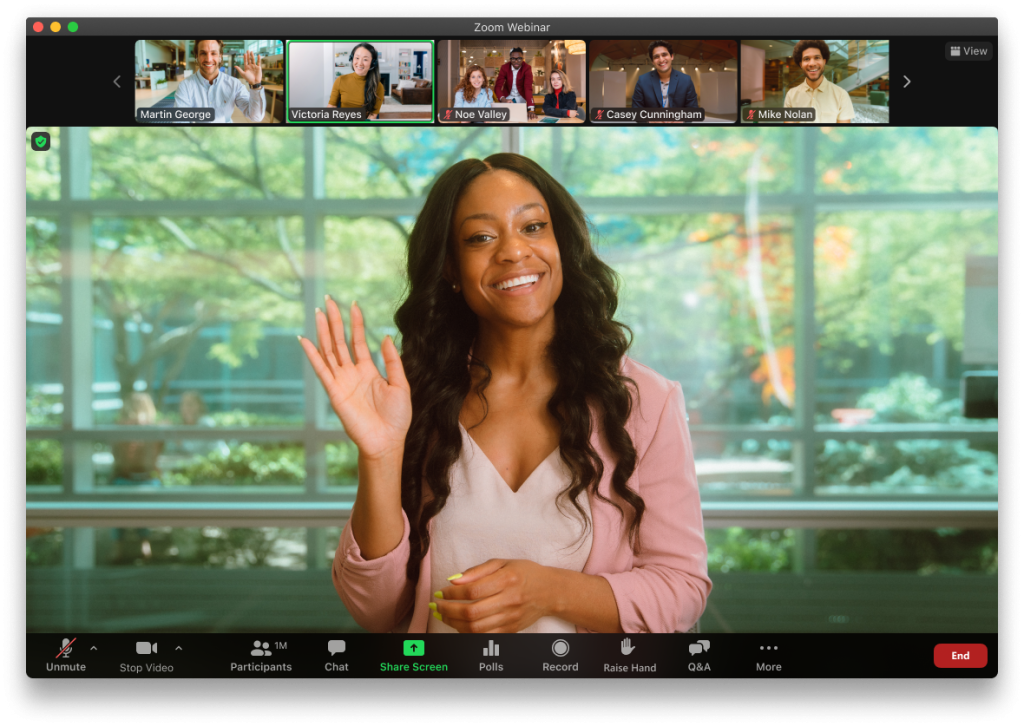
The standard Webinars plan keeps the format controlled: attendees watch, ask questions, vote in polls, and react, while you decide who gets a microphone. Recordings arrive with AI-generated smart chapters, and post-event reports plug into HubSpot, Salesforce, Marketo, Eloqua, and Pardot.
Can you charge for entry? Yes, through PayPal on the base plan. The catch is that the marketing extras sit higher up. Pre-recorded “Simulive” sessions, a backstage area, and 1080p video belong to Webinars Plus and above. Think of Zoom as a superb broadcast tower rather than a sales funnel.
Pros
- Capacity scales up to 100,000 attendees, and a single webinar can run for up to 30 hours, making it well-suited to all-day summits and global town halls.
- Attendees join without creating a Zoom account, and most already know the interface, so support requests stay low.
- Built-in engagement covers chat, Q&A, polls, quizzes, emoji reactions, live transcription, and language interpreter support.
- Native integrations with HubSpot, Salesforce, Marketo, Eloqua, and Pardot push registration and attendance data into your marketing stack.
- The platform carries SOC 2 Type 2 and GDPR credentials, with SSO via SAML 2.0 for IT teams that need tight access control.
Cons
- Simulive (pre-recorded sessions run as live) isn’t in the base Webinars plan, so automated events require Webinars Plus at $82.50 per month, billed annually.
- The base plan streams at 720p, offers only basic landing pages and ticketing, and supports PayPal but not Stripe for paid registration.
Pricing: Starts at $66.67 per month,billed annually (89 billed monthly.
3. Demio
Best for Marketing Teams Focused on Engagement
Demio is built for marketers who judge a webinar by what attendees do, not just how many show up. The room runs in the browser, so nobody wrestles with downloads, and the engagement tools sit front and center: chat, polls, handouts, and featured actions that push a call to action onto every screen at the right moment.
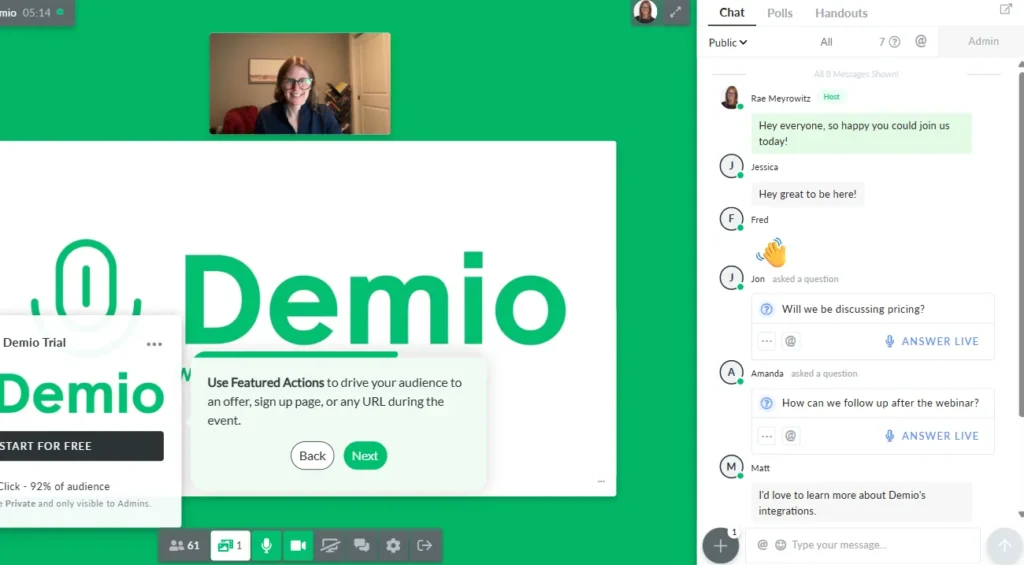
The Starter plan handles live and series events for one host and up to 50 attendees, with engagement analytics showing who stayed, clicked, and participated. That data matters when you hand leads to sales and want to say which ones leaned in.
Where does Demio get pricier? Automation. Automated and on-demand events, custom branding, and longer eight-hour sessions start on the Growth plan, which is billed per host. For a small team testing webinars, Starter is a tidy entry point. For an always-on evergreen funnel, budget for Growth from day one.
Pros
- The webinar room runs fully in the browser, so attendees join with one click and no software installs.
- Featured actions push a timed call-to-action to every attendee’s screen, which is handy for demo bookings and trial sign-ups.
- Handouts let you share files during the session, keeping lead magnets and slides tied to the moment they matter.
- Engagement analytics report attendance, participation, and interaction, giving sales a clearer read on lead intent.
- Series events on the Starter plan let one registration cover several connected sessions, which suits multi-part training.
Cons
- Starter is limited to one host, 50 attendees, and three-hour sessions, so growing teams outgrow it quickly.
- Automated and on-demand webinars require the Growth plan, which is priced per host and climbs with room size.
Pricing: Starts at $45 per month,billed annually (63 billed monthly.
4. Livestorm
Best for Paying Only for Real Attendees
Livestorm flips the usual pricing logic. Instead of buying a room size and hoping it fills, you buy a yearly pack of attendee credits and spend one each time a real person joins a session, whether live, on replay, or on demand. No-shows cost nothing, and your own team members never touch the credit balance.
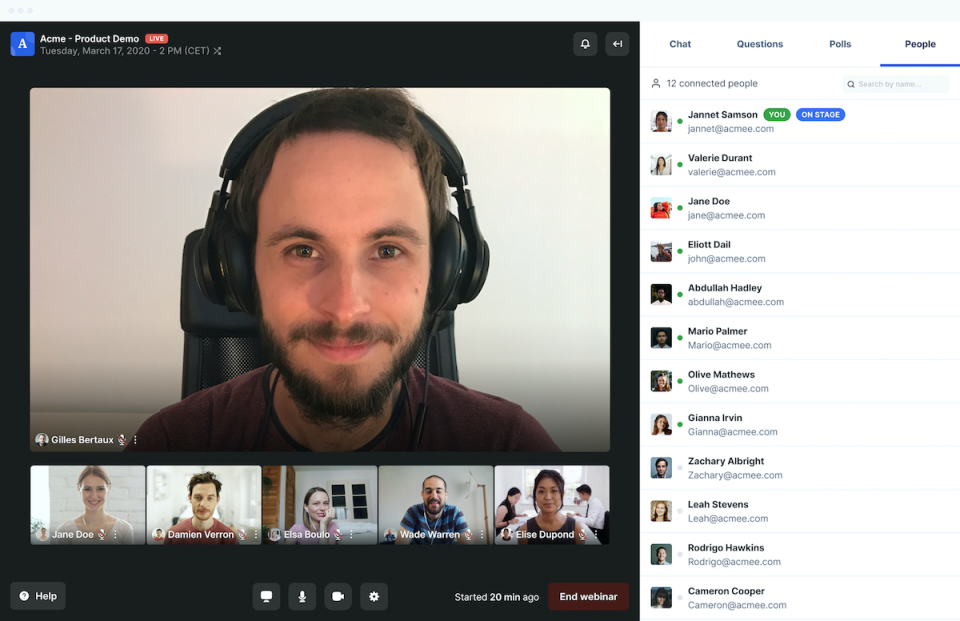
That model suits B2B teams with uneven calendars: a quiet month of product demos, then a packed customer conference. The platform itself is polished and browser-based, with up to 3,000 live attendees per event, 25 simultaneous speakers, and sessions up to four hours on the Pro plan.
Event automation, multi-session events, and on-demand webinars are all on the feature list, along with branded registration pages and email cadences. One more modern touch: the Livestorm MCP lets you create events and pull engagement data from Claude or ChatGPT. Selling tickets, though, isn’t part of the built-in toolkit.
Pros
- You only pay for people who attend, live or on replay, and registrants who never show up don’t consume credits.
- Team members are never counted as attendees, so internal rehearsals and trainings stay free.
- Each event supports up to 3,000 live attendees and 25 speakers on screen at once, which handles panels and larger launches.
- Event automation, multi-session registration, and on-demand events cover evergreen and recurring use cases on one plan.
- A free plan, ISO 27001 certification, GDPR compliance, and a native HubSpot integration make it easy to test and safe to adopt.
Cons
- Salesforce, Marketo, Pardot, and Microsoft Dynamics integrations are reserved for the Enterprise plan.
- The pricing page lists no built-in ticket checkout, so charging for access requires a separate payment tool.
Pricing: Starts at €2.50 per attendee, purchased as a yearly credit pack.
5. WebinarJam
Best for High-Ticket Live Sales Launches
WebinarJam is built for the moment when a webinar is really a sales event with slides. Its offers tool drops a buy button into the room at a time you choose, so attendees go straight to checkout while interest peaks. For course creators and coaches running launches, that single feature carries a lot of weight.
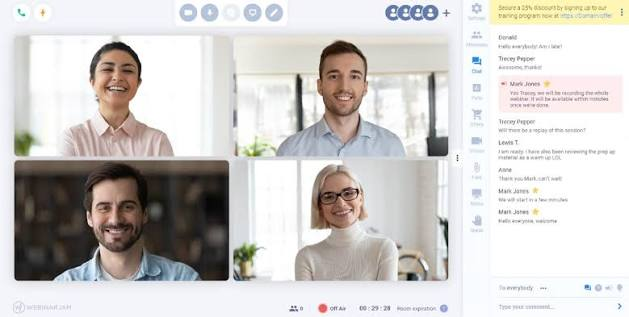
The plans scale by audience: Starter covers 100 live attendees and one host, Basic jumps to 500, Professional to 2,000, and Enterprise to 5,000. Registration pages come from a drag-and-drop builder, reminders go out by email, and SMS reminders run through Twilio.
What happens if your stream breaks mid-launch? On Professional and Enterprise, the Panic Button moves the session to a new room so you can recover. Automated sessions run through EverWebinar, which is included with WebinarJam’s Basic and higher plans. Want to test before committing? A $1 trial runs for 14 days.
Pros
- Timed offers place a click-to-buy button inside the webinar room at a moment you control, which shortens the path from pitch to purchase.
- Plans scale from 100 to 5,000 live attendees, so you can match capacity to launch size.
- EverWebinar for scheduled automated sessions is included with the Basic, Professional, and Enterprise plans.
- The Panic Button on Professional and Enterprise lets an admin move a troubled session to a new room during a live event.
- A $1 trial lasts 14 days at the Basic plan’s 500-attendee cap, and the pricing page advertises a 30-day money-back guarantee.
Cons
- Starter caps live attendance at 100 with one host and excludes EverWebinar, so serious launches usually need Basic or higher.
- The Panic Button and other higher-tier room controls sit on Professional at $229 per month, billed annually.
Pricing: Starts at $39 per month,billed annually (49 billed monthly).
6. EasyWebinar
Best for Evergreen Funnels With Built-In Checkout
EasyWebinar wants to replace your whole funnel stack, not just your webinar room. On the Growth plan, one subscription covers automated, simulive, and evergreen webinars, a built-in checkout for paid sessions, and EasyCRM for lead scoring and follow-up sequences. If you’re tired of paying for a webinar tool, a page builder, and an email tool separately, the pitch lands.
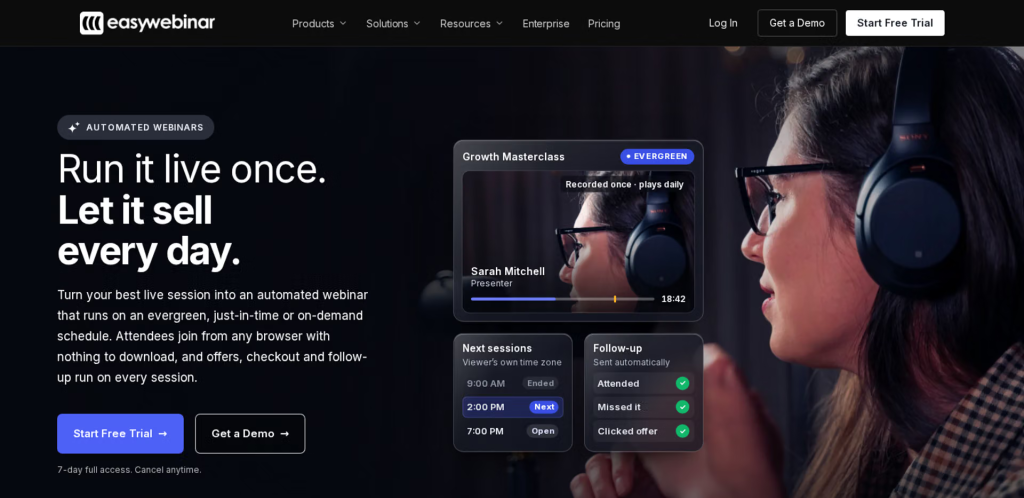
The AI angle is strong too. EasyWebinar AI drafts the webinar script, registration page, thank-you page, emails, polls, and the call-to-action from a single prompt, and every plan includes it. The live room supports up to eight people on stage, plus chat, polls, Q&A, and timed offers.
So what’s the catch? The entry Launch plan is live-only. Automation, paid webinars, and the CRM all start on Growth at $116 per month. Usage also runs on a monthly pool of live attendees, with extra live attendees billed beyond it.
Pros
- EasyWebinar AI builds a full webinar kit, including script, registration page, emails, polls, and CTA, from one prompt on every plan.
- Growth adds automated, simulive, and evergreen webinars alongside live sessions, so one tool covers both formats.
- Built-in checkout on Growth lets attendees pay for webinars without leaving the room.
- EasyCRM adds lead scoring, email sequences, and automated follow-up without a separate CRM subscription.
- SOC 2 Type II, GDPR-aligned data practices, and a 7-day full-access trial lower the risk of trying it.
Cons
- Paid webinars, automation, and EasyCRM all require the Growth plan, so the $44 Launch plan covers live webinars only.
- Live attendees beyond the monthly pool are billed at $0.78 each, which can surprise you after a strong launch.
Pricing: Starts at $44 per month for the Launch plan.
7. Crowdcast
Best for Creators Hosting Ticketed Community Events
Crowdcast feels made for creators who treat events as a product. Every event gets a ready-made page where people register, pay, watch live, and return later to the same link for the replay. No separate landing page, no recording upload, no “where’s the link?” emails.
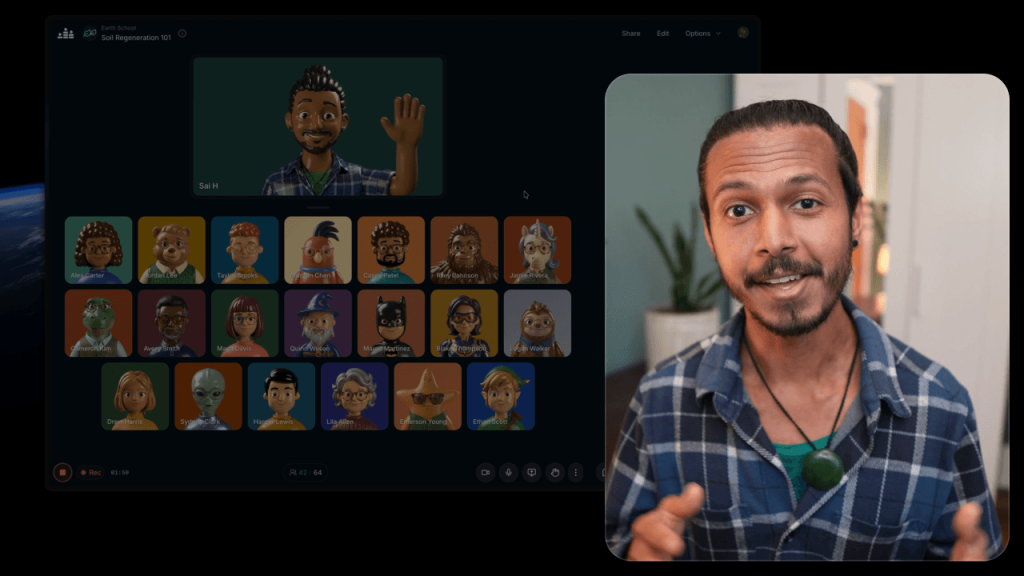
Ticketing runs through Stripe, and multi-session events let you sell a workshop series or a mini-conference under one registration. Producers who want broadcast polish can switch to RTMP mode and stream from OBS, Wirecast, or Ecamm Live.
The fine print deserves a careful read, though. Crowdcast takes a 5% transaction fee on paid events on Lite and Pro, dropping to 2% on Business. Plans also cap streaming hours each month, starting at 10 hours on Lite. For a creator selling occasional premium workshops, that trade-off can be fine. For a high-volume course business, those percentages add up fast.
Pros
- Each event page handles registration, payment, the live session, and the replay at one permanent link.
- Stripe integration lets you sell tickets directly, and multi-session events bundle a series under one purchase.
- RTMP mode supports professional broadcasts from OBS, Wirecast, Ecamm Live, and similar tools.
- Registrants are unlimited, and you only pay overage on live attendees above your plan, at $0.15 each.
- A 14-day free trial includes Business-level features, and Zapier plus data export connects it to your email list.
Cons
- Paid events carry a 5% transaction fee on Lite and Pro (2% on Business), on top of Stripe’s own processing fee.
- Lite caps streaming at 10 hours per month with two-hour sessions and one team seat.
Pricing: Starts at $49 per month for the Lite plan.
8. eWebinar
Best for Automated Demos and Customer Onboarding
eWebinar answers a very specific question: what if your best demo or onboarding session could run all day without you? You upload a recorded presentation, schedule it as recurring sessions, and let attendees join in a format that feels live, complete with chat. Customer success and SaaS teams use it to scale demos and training without adding headcount.
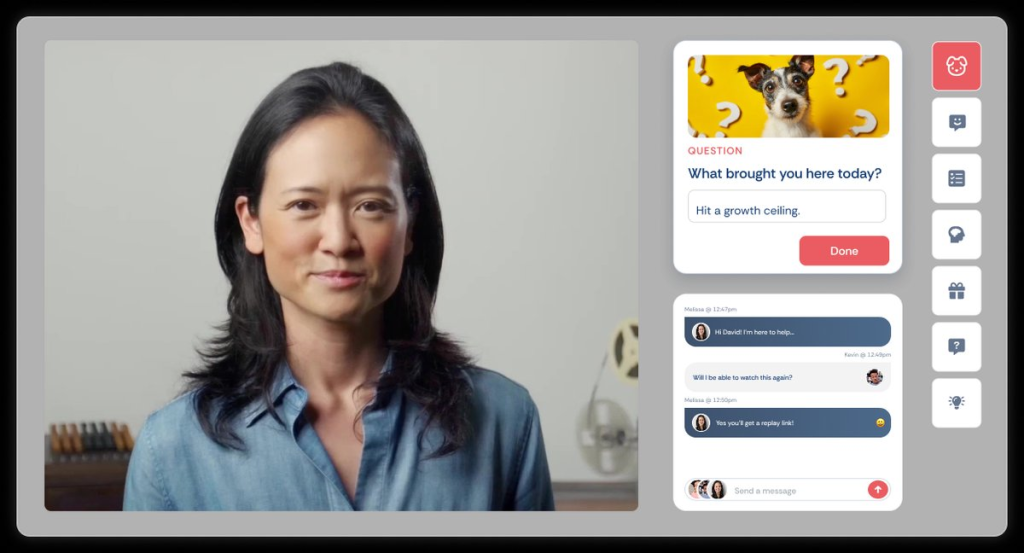
Pricing is refreshingly simple. Everyone starts at Level 1, which covers one active eWebinar, 1,000 registrants a month, unlimited recurring sessions, and unlimited team members. Publish more webinars and the plan adjusts to the next level, with a warning before any increase.
Is there a downside? eWebinar is built for pre-recorded delivery, so you’ll still need another tool for genuinely live events. The policies are strict too: there’s no free plan, no refunds, and an idle account still bills at Level 1 until you cancel.
Pros
- One active eWebinar can run unlimited recurring sessions, so a single demo can serve thousands of attendees a month.
- Unlimited team members can help manage the account, build eWebinars, and moderate chat at no extra cost.
- Self-adjusting pricing levels move with the number of active eWebinars, and the system warns you before moving you up a level.
- Level 1 includes 1,000 registrants per month, with extra registrants sold in blocks of 1,000 as an add-on.
- A 14-day free trial includes standard features and any add-ons you enable, and the company publishes SOC 2 and GDPR credentials.
Cons
- eWebinar has no free plan and offers no refunds, including on upgrades and add-ons.
- The platform focuses on pre-recorded sessions, so live webinars need a second tool.
Pricing: Starts at $99 per month, or $1,010 billed annually.
9. Riverside
Best for Studio-Quality Webinars You Repurpose
Riverside started life as a recording studio for podcasters, and that DNA shows in its webinars. Each speaker’s audio and video are captured on separate tracks, which means the recording you get afterward is clean enough to cut into clips, a podcast episode, or a polished YouTube video.
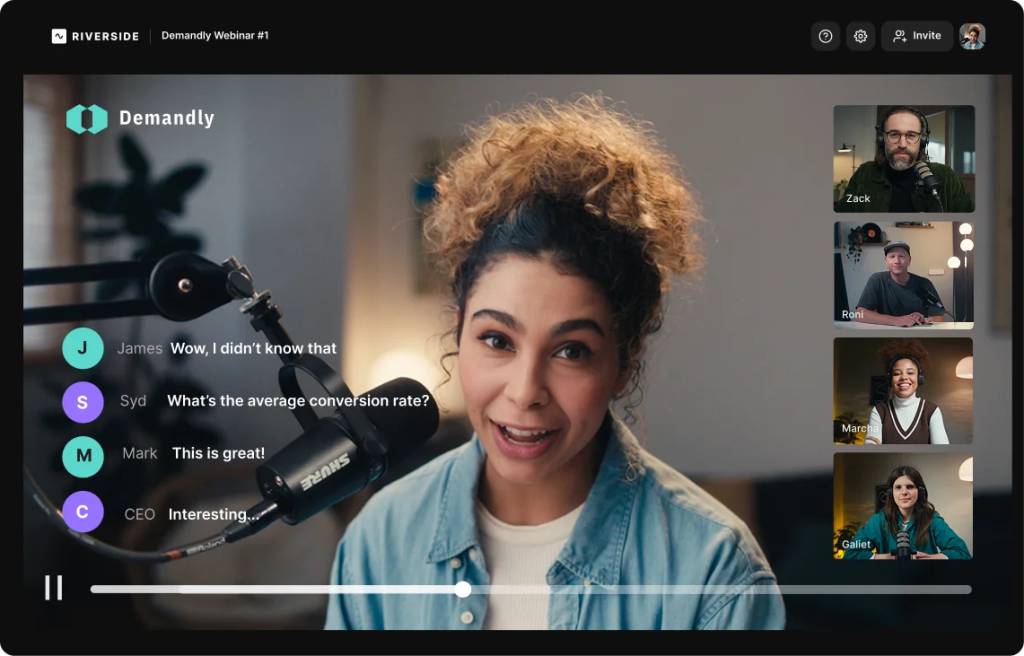
The Webinar plan adds the tools to plan, host, and repurpose sessions: registration for up to 100 people, recurring webinars, and the option to pre-record a session and stream it as if it were live. Live production extras include call-ins from the audience, live stream chat, custom overlays and lower thirds, and backstage control over which speakers appear on screen.
Content-led brands and creators who see every webinar as raw material for a week of content. If your priority is selling tickets or running a large lead-gen funnel, the 100-registrant cap and the lack of a listed checkout will feel tight.
Pros
- Separate audio and video tracks for each speaker produce recordings clean enough for editing and repurposing.
- The Webinar plan supports pre-recording a session and streaming it live, plus recurring webinars.
- Live call-ins and live stream chat let audience members join the conversation, not just watch it.
- Custom overlays, lower thirds, and backstage speaker management give broadcasts a produced look.
- Custom RTMP streaming and a 14-day free trial make it easy to test alongside your existing channels.
Cons
- The Webinar plan caps registration at 100 people, which limits large lead-generation events.
- The pricing page lists no built-in ticket checkout, so paid webinars need a separate payment tool.
Pricing: Starts at $79 per month for the Webinar plan,billed annually(99 billed monthly).
10. StreamYard
Best for Multistreamed Live Shows and Webinars
StreamYard is the browser studio many creators already use for live shows on YouTube, LinkedIn, and Facebook. Its On-Air feature adds proper webinars to that setup, so you can host a registered session and broadcast to social channels from the same studio.
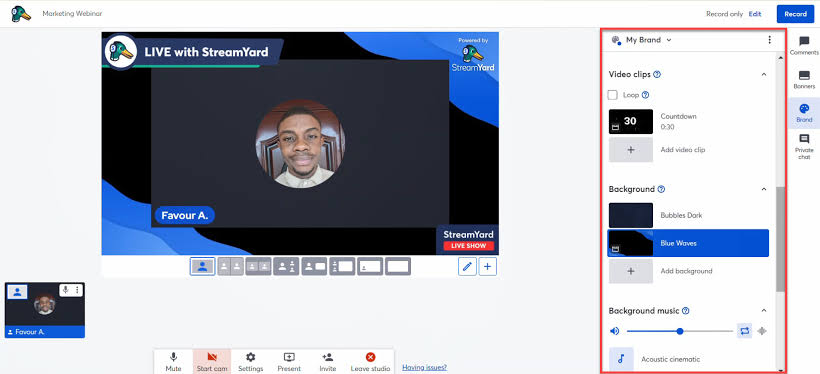
On the Advanced plan, you get On-Air webinars for up to 100 viewers, multistreaming to eight destinations, 4K local recordings, an extra camera, 15 backstage participants, and up to four hours of pre-recorded streams. Branding tools cover logos, overlays, backgrounds, and intro and outro videos, and AI clips help turn a session into short social posts.
Where’s the limit? Scale and licensing. The 100-viewer cap suits workshops and community sessions, not big launches. StreamYard also states that its Essential, Core, and Advanced plans are for individual use only, so companies need to talk to sales about a Business plan.
Pros
- On-Air webinars and multistreaming run from one browser studio, so a single session can reach registrants and social followers at once.
- The Advanced plan streams to up to eight destinations and records locally in 4K.
- Up to 15 backstage participants and an extra camera support interviews and panel formats.
- Pre-recorded streams of up to four hours let you schedule content that plays like a live show.
- A 7-day free trial and a 7-day money-back guarantee on the first charge reduce the risk of trying it.
Cons
- On-Air webinars on the Advanced plan are capped at 100 viewers.
- Essential, Core, and Advanced plans are for individual use only, so businesses need a Business plan quoted by sales.
Pricing: Starts at $68.99 per month for the Advanced plan, billed yearly (88.99 billed monthly.
How I Chose These Paid Webinar Platforms/My Evaluation Criteria
The evaluation of the tools in this article follows an unbiased, systematic approach that ensures a fair, insightful, and well-rounded review. I scored every platform on six factors, and I only listed a starting price when I could confirm it on the vendor’s own pricing page.
1. User Reviews and Ratings
Direct experiences from users, including ratings and feedback on reputable review sites such as G2 and Capterra, provide a ground-level view. I read reviews for recurring complaints about payment setup, replay quality, and surprise fees, since those are the problems that hurt a paid webinar most.
2. Essential Features and Functionality
I checked each platform for the features paid webinars depend on: ticket checkout, timed offers, registration pages, automated or evergreen sessions, replays, and integrations with email and CRM tools. Tools earned more credit when these features sat in the entry plan rather than behind an upgrade.
3. Ease of Use
I looked at how quickly a first-time host can build a registration page, connect payments, and go live, and how easily attendees can join. Browser-based rooms with no downloads scored higher, because every install step costs you, attendees.
4. Customer Support
A paid webinar that fails mid-session costs refunds and reputation. I compared support channels, hours, and onboarding help, giving extra weight to phone and live chat support during setup and live events.
5. Value for Money
I compared starting prices against attendee limits, feature access, and hidden costs such as ticket transaction fees and attendee overage charges. A cheap plan with a 5% cut of every ticket isn’t always cheaper over a year.
6. Personal Experience and Experts’ Opinions
This part of the evaluation draws on my own experience running webinars and on the views of industry practitioners. I have personally hosted sessions on WebinarNinja, and I paired that hands-on use with vendor documentation and published reviews for the other tools.
My Top 3 Paid Webinar Platforms
Ten options is a lot to weigh between meetings. If you want a shortlist for running paid webinars, these are the three I would start with.
1. WebinarNinja
WebinarNinja earns the top spot because it puts everything a paid webinar needs into one plan: Stripe checkout with zero platform fees, live, automated, series, and hybrid formats, timed offers, and four AI assistants. In my own sessions, setup took minutes, and attendees joined from a browser without a single download.
2. WebinarJam
WebinarJam makes the cut for launches where the webinar is the sales pitch. Its click-to-buy offers appear inside the room at the moment you choose, plans scale up to 5,000 live attendees, and EverWebinar automation comes bundled with the Basic plan, which saves you a second subscription.
3. Crowdcast
Crowdcast rounds out the top three for creators selling community events. One permanent page handles registration, Stripe payment, the live session, and the replay, so nothing gets lost between links. Just build its 5% ticket fee on the Lite and Pro plans into your pricing before you launch.
Ready to Pick the Best Paid Webinar Platform?
The best paid webinar platform is the one that matches how you earn from webinars. Zoom Webinars suits huge broadcasts, Livestorm suits uneven attendance, WebinarJam suits launch-day selling, and eWebinar suits always-on demos. Before you commit, run one real session on a free trial and check three numbers: the starting price, the attendee cap, and any fee taken from your ticket sales.
I lean slightly toward ProProfs WebinarNinja because it lets you keep 100% of ticket revenue through Stripe while bundling live, automated, series, and hybrid webinars, built-in landing pages and emails, CourseNinja, and four AI assistants in one plan. Add 24/7 human support, and it is the easiest paid webinar setup I have used.
Frequently Asked Questions
What Is the Difference Between Paid Webinar Software and a Paid Webinar?
Paid webinar software is a premium platform you subscribe to for hosting webinars. A paid webinar is an event attendees pay to join. Many of the top webinar platforms cover both, letting you run sessions on a paid plan while charging tickets through a payment integration such as Stripe or PayPal.
How Do I Charge People to Attend a Webinar?
Pick a platform with built-in ticketing, connect a payment processor, and set a price on the registration page. On ProProfs WebinarNinja, you connect your Stripe account, and attendees pay at registration. Zoom Webinars supports PayPal, while Crowdcast and EasyWebinar (Growth plan) offer their own checkout.
Which Webinar Platforms Charge No Fee on Ticket Sales?
ProProfs WebinarNinja charges zero platform fees on paid webinars and courses, so you only pay Stripe's standard processing fee. Fees elsewhere vary: Crowdcast, for example, takes 5% of ticket sales on its Lite and Pro plans and 2% on Business, on top of Stripe's charge.
Are Paid Webinar Platforms Worth It Compared With Free Tools?
Yes, if webinars drive leads or revenue. Paid platforms add registration pages, reminders, replays, analytics, automation, and checkout that free meeting tools usually lack. Free plans also come with strings: StreamYard's free plan, for instance, adds its logo to your streams and limits streaming, which looks out of place at a paid event.
Can I Run Automated Webinars That Sell Around the Clock?
Yes. ProProfs WebinarNinja, EasyWebinar (Growth plan), Demio (Growth plan), and WebinarJam (with EverWebinar on Basic and above) all run pre-recorded sessions on a schedule. Pair automation with timed offers so a buy button appears at the right moment, and the webinar keeps selling without you on camera.
Do Attendees Need to Download Software to Join?
Not on browser-based platforms. ProProfs WebinarNinja, Demio, Livestorm, and EasyWebinar all let attendees join from a web browser with nothing to install. That matters for paid events, because every extra setup step at login increases the chance of refund requests and support emails.
What Is the Cheapest Paid Webinar Platform?
It depends on how a platform charges. ProProfs WebinarNinja starts at $0.30 per attendee per month billed annually, WebinarJam at $39 per month billed annually, and EasyWebinar at $44 per month. Compare attendee caps, automation access, and ticket fees, not just the headline price.
Which Paid Webinar Platform Is Best for Small Businesses?
ProProfs WebinarNinja suits small businesses, coaches, and consultants who want one tool for live and automated webinars, landing pages, emails, and paid tickets. It includes 24/7 phone, chat, and email support plus a 14-day free trial, so you can run a real session before paying.
Can I Accept PayPal for Paid Webinars?
It depends on the platform. Zoom Webinars supports PayPal for paid registration on its base plan. ProProfs WebinarNinja and Crowdcast take payments through Stripe, which accepts all major credit and debit cards and supports many currencies. If most of your audience pays with PayPal, check payment options before you commit to a platform.
Attract Leads, Teach Better & Turn Attendees Into Buyers
Start your 14-day free trial with full access to every feature, or book a free demo.
Real person, real walkthrough, no obligation.