
Just wrapped up a stellar session? Nice. Now comes the part most teams rush, skip, or wing, and it is usually the part that decides whether your webinar becomes a real growth lever or just a “great event” people forget by next week.
Your webinar follow-up email is the bridge between attention and action. The webinar creates the spark, but the follow-up is what turns that spark into replay views, thoughtful replies, booked calls, and sales, without you having to chase people across platforms.
In fact, stats suggest that follow-up emails with a direct replay link get a 50% open rate.
Done well, it feels less like marketing and more like genuinely helpful momentum: “Here’s what you missed, here’s what matters, and here’s the next best step.”
Here’s what you’ll walk away with:
- A repeatable follow-up system you can run after every webinar
- High-performing subject lines and copy-and-paste templates for attendees, no-shows, and high-intent leads
- Practical “do this, get that” best practices that improve clicks, replies, and conversions
Also, if you want your webinar to drive replay views, replies, booked calls, or pipeline, send your first follow-up within 0 to 6 hours, segment attendees into no-shows, keep each email focused on one action, and use a short 4 to 5-email sequence over 7 to 10 days. The best-performing webinar follow-up emails are clear, skimmable, and behavior-based.
Let’s start with the fundamentals:
What Is a Webinar Follow-up Email & What Should It Include?
A webinar follow-up email is a post-event message sequence that turns webinar attention into the next action. It typically includes a thank-you, replay link, key takeaways, promised resources, and one clear call to action for attendees, no-shows, or high-intent leads.
A webinar follow-up email includes the message you send after the session to keep the conversation moving. It can be a thank-you note, a webinar replay delivery, a resource drop, an invitation to the next step, or a mix of those. The difference between “nice email” and “revenue email” is structure.
Seth Godin popularized the idea of permission marketing as communication that is “anticipated, personal, and relevant.” That is exactly the bar your follow-up needs to hit. Your audience has already raised their hand. Your job is to respect that hand-raise with relevance.
Build A Follow-up That Readers Can Skim In 10 Seconds
When people open a follow-up email, they are not looking for a long recap essay. They are trying to confirm they did not miss anything important, grab the replay link, and understand what you want them to do next.
If your email answers those three needs quickly, it will feel helpful even to someone who is busy, skeptical, or mildly distracted.
Here’s the structure I use most often:
- One clear subject line that matches the email’s job
- A short thank-you that feels human, not corporate
- Three takeaway bullets (benefit-focused)
- Replay link placed high (and repeated once at the end)
- Any promised resources (slides, worksheet, checklist, timestamps)
- One primary webinar CTA (watch, reply, book, download, register)
- A reply prompt that makes responding easy
- A simple signature from a real person
Make Your Email Feel Like A Conversation, Not A Broadcast
If you want better engagement, aim for replies, not just clicks. Replies tell you what the audience actually cares about, and they also create a natural opening for you to help them directly.
The biggest mistake I see is ending with a generic line like “Let me know if you have questions,” which forces the reader to do extra mental work. Instead, give them a low-effort prompt that makes replying feel as easy as tapping a quick response.
That is another reason I focus on prompts like:
- “Reply with A or B.”
- “What’s your biggest blocker right now?”
- “Want the template for your use case? Reply with your role.”
It turns your follow-up into a relationship-building moment instead of a one-way announcement.
Here’s an expert video from Matthew Kimberly on how to craft the most delightful webinar emails:
You now have the “what.” Next, let’s nail the “when,” because timing can make a good email look bad if it arrives too late.
How Do You Craft the Best Webinar Follow-up Emails?
The best webinar follow-up emails are short, useful, and behavior-based. They match the reader’s intent, use one clear CTA, keep the webinar replay or resource easy to find, and make replying feel effortless.
You can have great templates and still get mediocre results if the copy feels generic. The best webinar follow-up emails do three things well: they reward attention, reduce friction, and make the next step obvious.
Here’s how to get things right:
a. Write A Subject Line That Matches The Recipient’s Intent
Here are some stats that need your attention:
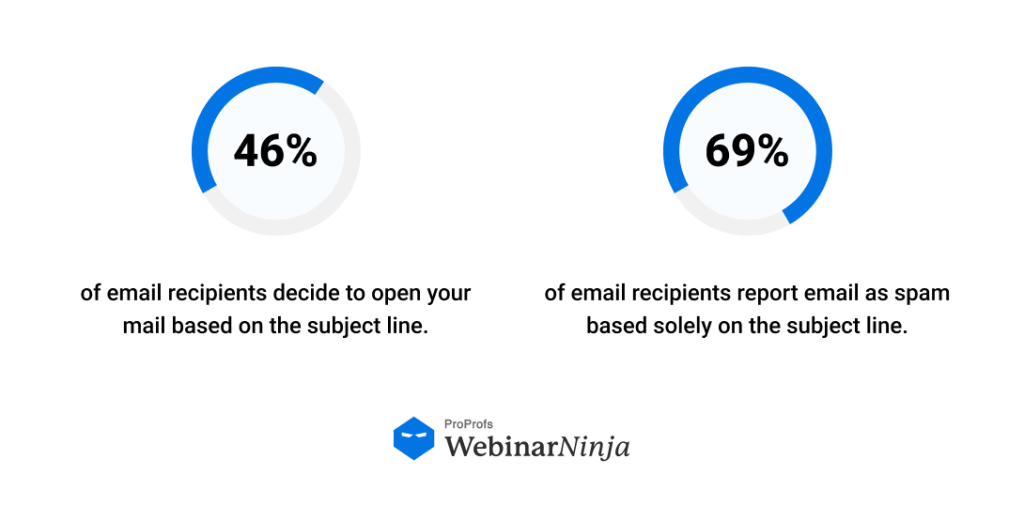
- 46% of email recipients decide to open your email based on the subject line
- 69% of those who receive emails mark them as spam based on the subject lines.
Your subject line should answer, “Why should I open this right now?” The easiest way to do that is to connect the subject line to a clear benefit that the reader already expects: replay access, a short recap, the promised resource, or the next step. When subject lines try too hard to be clever, they often become vague, and vague subject lines get ignored.
Here are subject line approaches that reliably earn opens because they are specific and expectation-matching:
- “Replay + resources”
- “Quick recap”
- “Your question”
- “Next step”
- “Bonus ends [date]” (only if true)
Here are subject line approaches that often underperform because they create skepticism or fatigue:
- Overhyped urgency
- Vague curiosity
- Clickbait formatting
You do not need to be clever. You need to be clear.
b. Keep The Body Plain-Text Style And Benefit-First
I often write in a plain-text style because it reads like a person, not a campaign. It also makes your message easier to scan on mobile. Plain-text style forces you to be direct, and direct language tends to convert because it reduces the mental effort required to understand what you are offering.
A quick measurement note: open rate is not a perfect metric because it is commonly tracked using an invisible tracking pixel, and many clients block images or prefetch them. That is another reason I focus on replies and clicks as primary success signals.
c. Use One CTA Per Email And Repeat It Twice
When you include multiple webinar CTAs, you unintentionally create decision paralysis. The reader does not know which link matters most, so they do nothing. Instead, choose one action you want them to take, and make that action easy to find. If you want a second action, save it for the next email in the sequence.
Instead:
- Put your primary CTA once near the top
- Repeat it once near the bottom
- Remove everything else
d. Add A Reply Prompt That Lowers The Effort To Respond
If your webinar email ends with “Let me know if you have questions,” you are putting the burden on the reader to invent a question. A better approach is to make the reply feel like a quick tap: a short answer, a one-word response, or a simple choice.
This is how you turn a webinar follow-up from “broadcast” to “conversation,” and conversations convert.
Make replying effortless:
- “Reply with A or B.”
- “Tell your role, and I’ll send the right template.”
- “Reply with your biggest blocker in one sentence.”
e. Personalize The Part That Actually Matters
I avoid “fake personalization” like stuffing first names everywhere. I focus on personalization that changes the meaning of the message. The most powerful personalization is not a token. It is relevant.
The moment your email reflects what the person did (attended, missed, asked, clicked), it feels like it was written for them.
- Refer to the webinar topic and outcome
- Check out their segment (attended vs no-show)
- Refer to the action you want next (watch, download, book)
That is enough to make the message feel relevant without sounding creepy.
We have the writing principles. Now I will give you an expanded swipe file of webinar follow-up email examples for specific use cases, so you do not have to rewrite everything from scratch.
Wish to get a better idea of this? Here’s a quick video I recorded to help you:
What Subject Lines Work Best For Webinar Follow-ups?
Subject lines should be short, specific, and aligned with your email’s job. Below is a swipe file you can adapt across industries.
Use These Subject Lines For Attendees
- Thanks for joining, here’s the replay + notes
- Your recap from [Webinar Title] (3 takeaways)
- Replay link + the resource you asked for
- One quick question after the webinar
- Next step if you want [Outcome]
You can Use These Subject Lines For No-shows
- Sorry, we missed you: Replay inside
- The 10-minute recap version (plus replay)
- You’re not behind: watch the replay here
- Highlights + timestamps for [Webinar Title]
- Your registration resources (replay included)
Use These Subject Lines For High-Intent Leads
- Want help applying this to your situation?
- The most common questions after [Topic]
- Quick follow-up on what you clicked
- Bonus ends [date] (if true)
- Should we keep this open for you?
If you want one “safe default,” use: “Replay + key takeaways from [Webinar Title]”
It is boring in the best way. It delivers on what people want.
Now your emails will get opened. Next, you need the body copy that converts. Let’s jump into templates and examples for every major follow-up scenario.
Webinar Follow-up Email Templates
Below are copy-and-paste templates you can adapt. I’ve kept them plain-text style and intentionally focused on one outcome each.
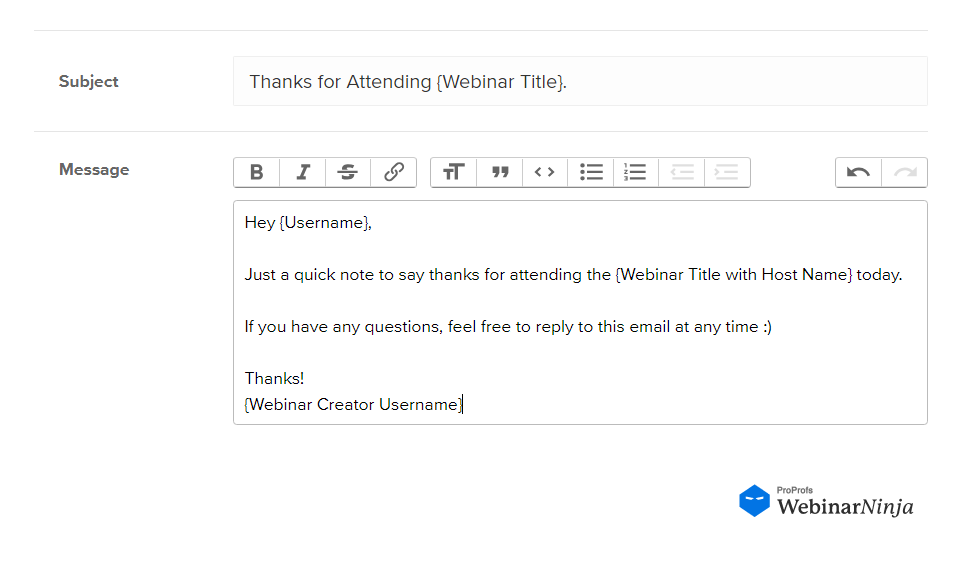
1. “Webinar Thank You Email” To Attendees
Use this as your thank you for attending the webinar email.
Subject: Thanks for joining, [First Name] — replay + resources inside
Hi [First Name],
Thanks for joining our webinar on [Webinar Title]. I’m glad you were there.
Here are the 3 biggest takeaways you can apply right away:
- [Takeaway] → [Benefit]
- [Takeaway] → [Benefit]
- [Takeaway] → [Benefit]
Replay: [Replay link]
Resources mentioned: [Resource link]
Quick question so I can help: are you focused on “getting more leads” or “improving conversions” right now?
Reply with one phrase, and I’ll send the most relevant next step.
Best,
[Your Name]
[Title]
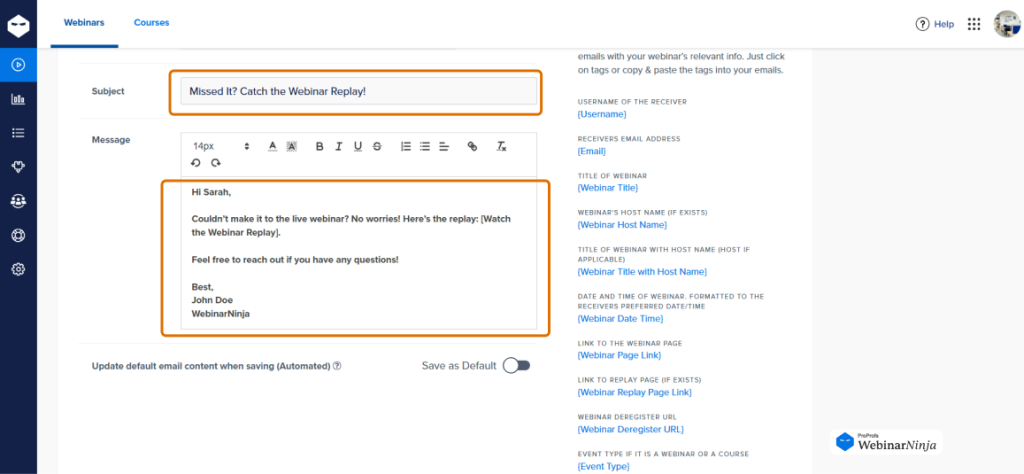
2. Post-Webinar Email To No-shows
This is your fastest “rescue” email.
Subject: [First Name], here’s the replay + the 2-minute recap
Hi [First Name],
We missed you at [Webinar Title], so I wanted to send the replay and a quick recap so you still get the value.
Highlights:
- [Key idea]
- [Key idea]
- [Key idea]
Replay: [Replay link]
Slides or worksheet: [Resource link]
If you watch, hit reply with your biggest question, and I’ll answer it.
Thanks,
[Your Name]
3. Webinar Follow-Up Email Template To Deliver A Resource
Use this when you promised a checklist, guide, or worksheet.
Subject: Your [Checklist/Template] from the webinar
Hi [First Name],
As promised, here’s the [Resource Name] that goes with the webinar.
Download: [Link]
It helps you:
- [Outcome]
- [Outcome]
- [Outcome]
If you reply with your role (for example: “Founder,” “Marketing,” “Sales”), I’ll tell you the best place to start.
Best,
[Your Name]
4. Follow-up Email After the Webinar To People Who Asked A Question
This one builds serious trust because it proves you noticed them.
Subject: Quick follow-up on your question, [First Name]
Hi [First Name],
Thanks again for your question about [Topic] during the webinar.
Here’s the short answer:
[1–2 sentence answer]
Here’s what I’d do next in your shoes:
- [Action] → [Outcome]
- [Action] → [Outcome]
- [Action] → [Outcome]
If you tell me your [industry/team size/goal], I’ll tailor this to your situation.
Reply here, and I’ll help.
Best,
[Your Name]
5. “Proof + Objections” Email To Move Fence-Sitters
Use this when people liked the webinar but hesitate.
Subject: The 3 questions I always get after this webinar
Hi [First Name],
After sessions like this, I usually get the same three questions. Here are the answers in one place.
1) “Will this work for a team like mine?”
Yes, as long as you have [condition]. If not, start with [simpler step].
2) “How long does it take to see results?”
Most people can implement the first improvement in a day. Results depend on volume, offer, and follow-through.
3) “What if I don’t have time for a big overhaul?”
Then do the smallest version: [small action]. It still moves the needle.
If you want help applying this to your exact situation, here’s the next step: [Primary link]
Best,
[Your Name]
6. Final “Close The Loop” Email So Leads Don’t Drift
This is the respectful nudge that many brands skip, and it costs them results.
Subject: Should I keep this open for you?
Hi [First Name],
Quick check. Do you still want to [desired outcome] after the webinar?
If yes, here’s the next step: [Primary link]
If not right now, reply with “later” and I’ll stop the reminders and only send the occasional resource when it’s genuinely useful.
Either way, thanks for being part of the webinar.
[Your Name]
Those templates cover the core scenarios. Now let’s make sure you’re not just sending emails, but improving them each time.
How to Set This Up in Any Email Tool (Fast)
You do not need a complicated automation stack to run an effective webinar follow-up sequence. In most cases, a simple setup with clean segments, five reusable emails, and a fixed send schedule is enough to turn one webinar into ongoing engagement and conversions.
The goal is to make your follow-up system easy to repeat. Once the structure is in place, you only need to update a few webinar-specific details each time.
Build Your Webinar Follow-up System in Five Steps
Here are the easy steps you can follow:
1. Create two starting segments: attended live and no-show.
Start with the two audiences that need the most different messaging. People who attended already have context, so they need a recap, replay, and next step. People who missed the webinar need a quick rescue email that helps them catch up fast.
Outcome: every follow-up feels more relevant immediately.
2. Build five reusable email drafts.
Create your core follow-up emails as separate templates so your team does not have to start from scratch after every event. For most webinars, these five are enough: attendee recap and replay, no-show replay and highlights, resource delivery, proof and objections, and a final close-the-loop email.
Outcome: your team can ship follow-ups faster after every webinar.
3. Schedule the send windows in advance.
Do not wait until the webinar is over to decide when emails should go out. Set the timing before the event so the sequence runs while interest is still fresh. A practical structure is Email 1 within 0 to 6 hours, Email 2 the same day or next morning for no-shows, Email 3 on Day 2 or 3, Email 4 on Day 4 to 6, and Email 5 on Day 7 to 10.
Outcome: the first email lands while interest is still high.
4. Use one primary link in each email.
Each message should focus on one action only. If the purpose of the email is to get replay views, make the replay link the main action. If the goal is to drive bookings, make the booking link the clear priority. This keeps the email simple, reduces decision fatigue, and makes the next step obvious.
Outcome: readers know exactly what to do next.
5. Save the sequence as a repeatable playbook.
Once the workflow is working, document it so your team can reuse it every time. In most cases, you only need to update the webinar title, the three main takeaways, the replay link, and any promised resource links. The structure, timing, and email logic can stay the same.
Outcome: future webinars take minutes, not hours, to follow up.
What This Setup Looks Like in Practice
A repeatable webinar follow-up system is not about sending more emails. It is about sending the right email to the right segment at the right time. When you build the process once and reuse it, your follow-up becomes faster, more consistent, and much easier to improve over time.
When Should You Send A Follow-up Email After A Webinar?
The best time to send a webinar follow-up email is while the event is still fresh. Most teams should send the first message within 0 to 6 hours, then use a short 7 to 10-day sequence based on attendance, interest, and intent.
Most follow-ups fail for a boring reason: they arrive after the momentum has died. People do not forget your webinar slowly. They forget it quickly.
I use a timing plan that is simple enough to repeat, but flexible enough to fit different webinar goals.
1. Send The First Email While The Webinar Is Still Fresh
The first email should land while the session is still top of mind, because that is when recipients are most likely to click the replay, share it with a teammate, or reply with a question.
If you wait two days, you are no longer following up on a webinar. You are interrupting someone’s week with a vague reminder of something they attended “sometime last week.”
Best window: within 0–6 hours after the webinar ends. If your team cannot hit 0–6 hours, aim for the same day.
Your first email should act like a neat “package” of everything the attendee hoped to receive when they registered. That usually means the replay, the main takeaways, and whatever resources were promised, so they do not have to hunt for anything.
- Replay link
- 3 takeaways
- Promised resources
- One CTA
2. Use A 7–10 Day Sequence Instead Of One Email
One email is a receipt. A sequence is a conversion path. The goal of a short sequence is not to “email more.” It is to help different people take the next step in different ways. Some people want the replay. Others want a checklist they can implement.
Some people want reassurance that this is worth doing. A short sequence gives you room to support all of those needs without cramming everything into one message.
Here is the schedule I recommend for most webinars:
- Email 1 (0–6 hours): Thank-you + replay + recap
- Email 2 (0–24 hours): No-show rescue (only to no-shows)
- Email 3 (Day 2–3): Value-add resource (checklist, template, timestamps)
- Email 4 (Day 4–6): Objections + proof + Q&A
- Email 5 (Day 7–10): Close the loop (final nudge or next event)
3. Segment Timing So You Stop Treating Everyone The Same
Timing changes based on behavior because attention changes based on behavior. Someone who attended live already has context and emotional momentum, so they need a fast recap and an easy next step.
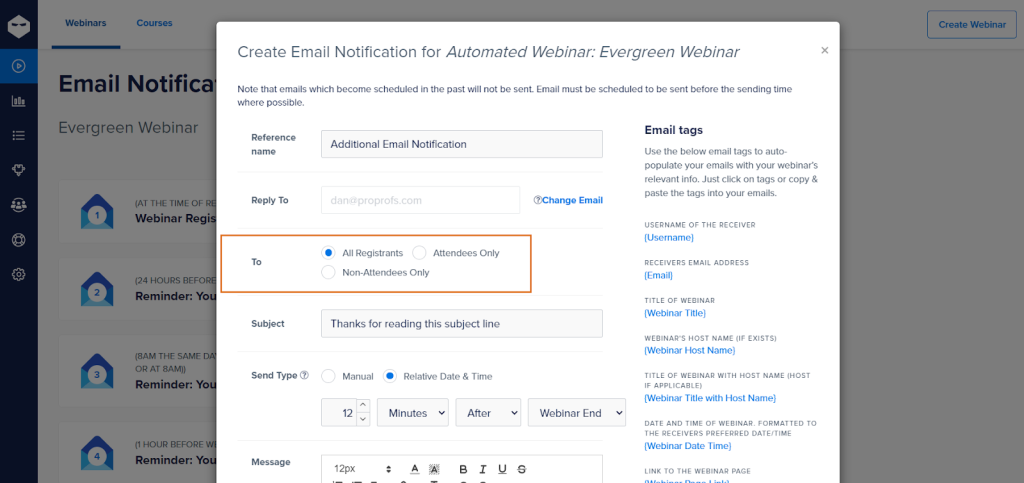
A no-show does not need a thank-you; they need a rescue and a reason to care. A high-intent lead often needs help choosing the right path, and a person who asked a question deserves a personal touch that proves you were listening.
- Attended live: fast recap and replay
- No-show: fast rescue, highlight version, timestamps
- High-intent leads: faster “next step” email (24–48 hours)
- Question askers: personal reply-style follow-up within 24–48 hours
If you take only one thing from this section, let it be this: speed is a feature. Your follow-up arriving quickly tells the reader you are organized, attentive, and worth listening to.
Now you know when to send what. Next, let’s write emails that feel personal, stay focused, and actually move people to take the next step.
What Metrics Should You Track After Sending Webinar Follow-ups?
If you only watch open rates, you can end up optimizing the wrong thing. Open rate is useful directionally, but it’s not a perfect measure because of how it is commonly tracked.
Instead, I track the reports and metrics that map to outcomes.
Prioritize These “Outcome Metrics” First
- Replies: Did your follow-up start conversations?
- Replay clicks: Did people actually go back to the content?
- Bookings or next-step conversions: Did they take the action you asked for?
- Resource downloads: Did your value add land?
- Unsubscribes: Did relevance drop for a segment?
Use Engagement Signals To Improve Your Next Webinar
Here’s the easiest improvement loop, and it works because it ties your metrics directly to a specific fix. When you see a weak number, you do not guess. You make the one change that usually causes that number to rise.
- If replies are low, your reply prompt is too vague.
- If clicks are low, your CTA is buried or competing with other links.
- If no-shows do not watch the replay, add timestamps and a highlight recap.
- If unsubscribes spike, tighten segmentation and reduce frequency.
Keep Your Emails “Human-Short” On Purpose
Another way to think about follow-up length is to consider how people actually answer emails today. Many replies are short, fast, and written on mobile, which means the emails that win are the ones that make responding feel easy. If your follow-up is long and dense, people postpone it. If it is clear and skimmable, they act.
You now have the strategy, the timing, the writing rules, the subject lines, and the templates. Let’s now check a simple system you can reuse for every webinar without reinventing the wheel.
How to Turn Your Webinar Follow-up Email Into A Repeatable System
If you want consistency, you need a checklist you can run even when you’re tired.
Here’s my “every webinar” process:
Set Up Your Follow-up In One Sitting
- Write your 3 takeaway bullets immediately after the webinar (while it’s fresh).
- Decide on the primary CTA for each email in the sequence.
- Draft Email 1 and Email 2 first. Those drive most of the results.
- Draft Email 3 as a resource that helps people implement.
- Draft Email 4 to answer objections and reduce hesitation.
- Draft Email 5 to close the loop politely.
Segment Simply, Then Get Smarter Over Time
Start with:
- Attended
- No-show
Then add segments later if you have the data. You can check data on people who:
- Clicked your offer
- Asked a question
- Watched replay
- High-fit roles
Sounds good? Now let’s bring everything together.
Turn Your Webinar Follow-up Email Into Consistent Conversions
A great webinar can spark interest, but a great webinar follow-up email is what turns that interest into momentum you can measure. Use the same repeatable sequence every time: send the recap and replay fast, tailor your message for attendees vs no-shows, add one genuinely useful resource, address the most common objections, and close the loop with a respectful final nudge.
If you’re running webinars in WebinarNinja, one practical advantage is that you can set up your replay and reminder emails once, then reuse the same follow-up framework webinar after webinar without rebuilding everything from scratch.
The goal is not to send more emails. It’s to send the right follow-up at the right time so your audience feels supported and guided.
Frequently Asked Questions

What should I include in a webinar replay email?
Put the replay link near the top, then add three takeaway bullets that point to outcomes. Include any promised resources like slides or a checklist. End with one clear next step and a reply prompt that is easy to answer in one line. If possible, include timestamps so busy readers can jump to the most relevant sections.
What is the best time to send a webinar replay email?
Send it within 0–6 hours after the webinar ends if the replay is ready. If it is not ready, send a same-day recap email with three takeaways and the promised resources, then send the replay the moment it is available. Speed matters because attention drops quickly after the event.
Should I send different follow-ups to buyers, trial users, and “just curious” attendees?
Yes. These groups need different next steps. Buyers want onboarding guidance, trial users want quick wins and setup help, and “just curious” attendees need more education and proof. Even basic segmentation by CTA clicks or poll answers makes your follow-up feel far more relevant.
How do I write follow-ups that do not feel salesy but still drive revenue?
Lead with outcomes and usefulness, not urgency. Give a recap, a practical resource, and a clear next step that solves a real problem. Use language like “If you want help applying this…” rather than “Don’t miss out.” When you focus on helping, conversions usually increase naturally.
What if my replay link is not ready right after the webinar?
Send a same-day email anyway. Share the 3 key takeaways, the promised resources, and tell them when the replay will arrive (“We’ll send the replay tomorrow at 10 AM”). This keeps momentum and reduces confusion. Then send the replay as soon as it’s ready.
How do I follow up with people who attended using a team email address or shared inbox?
Ask for the best direct contact in a simple reply prompt: “If this were a shared inbox, reply with the best email to send the replay/resources.” Also include a single link to a landing page where they can enter the right address to receive the sequence going forward.
How do I prevent my follow-up emails from landing in promotions or spam?
Keep the design light, avoid too many links, and send from a consistent domain with a real sender name. Encourage replies early, because replies can improve inbox placement. If you use webinar tools like WebinarNinja, keep notifications clean and personal rather than overly formatted.
Should I include the full webinar transcript in my follow-up email?
Usually no. Transcripts are long and can overwhelm readers. Instead, include a short recap plus a link to the replay page where the transcript lives, ideally with timestamps or a “jump to” section. This keeps the email skimmable while still offering depth.
How do I handle attendees who want the slides, but I do not share slides publicly?
Offer a “request access” workflow. In the email, say you can share slides on request and ask them to reply with their role or use case. This protects your content while creating a valuable conversation that helps you qualify interest without sounding pushy.
What’s the best way to follow up if the webinar had technical issues?
Acknowledge it directly and briefly, then over-deliver. Send the replay, add timestamps to the best sections, and provide a concise “best moments” summary. If audio or video was impacted, offer a short redo session or a Q&A office hours invite for anyone affected.
Want to host a webinar for free?
Use WebinarNinja to teach, improve marketing, and grow your sales.