Most webinars end with polite applause, a handful of screenshots, and zero sales. Webinars that convert do something different. They are built around one goal, one audience, and one next step.
A study by Forrester in 2024 found that webinars are the second-fastest-growing B2B event format, right behind small hosted in-person events. That growth is not an accident. Marketers noticed that a good webinar does the work of a salesperson, a product demo, and an email nurture sequence, all in one hour.
This guide breaks down 8 webinar types that convert, mapped to the exact stage of your funnel each one is built for.
By the end, you will know which webinar format fits your business right now, how each one actually works, and what to do the moment it ends so the leads do not go cold.
What Makes a Webinar Actually Convert?
Here is the difference in practice. A webinar titled “Everything You Need to Know About Email Marketing” asks the room to trust you, buy your course, and follow you on Instagram, all in the same closing slide.
A webinar titled “How We Cut Cold Email Bounce Rate From 12% to Under 2%” asks for exactly one thing: book a 15-minute audit call to see if the same fix works on your list.
Write your own closing line down before you build a single slide. If it is longer than one sentence, it is not one goal yet. That single-goal discipline is really the backbone of a winning webinar marketing strategy, more than any slide design or presentation skill.
How Does a Webinar Fit Into Your Marketing Funnel?
Every buyer moves through four stages before they become a loyal customer.
- Awareness. They learn you exist.
- Consideration. They start comparing you to alternatives.
- Purchase. They become a paying customer.
- Loyalty. They stick around, and start recommending you to others.
A webinar can serve any one of these stages, but rarely more than one at a time.
Try to sell in an awareness-stage webinar, and you will scare off an audience that just wanted to learn your name. Try to educate in a purchase-stage webinar, and you will lose the sale to a competitor who is more direct.
For example, a first-time host who opens a “meet the founder” Q&A with a pricing slide will usually watch half the room quietly leave. The same pricing slide, saved for attendee three or four in the funnel, closes deals instead of chat windows.
Matching the format to the stage is really what turns a one-off event into consistent lead generation, quarter after quarter, instead of a lucky one-time spike.
Now, before we move forward, here’s a quick video on how to build a high-converting webinar funnel:
Which Webinar Type Should You Use at Each Funnel Stage?
Here is the full lineup, mapped to funnel stage, primary goal, and the one CTA each format should carry.
| Webinar Type | Funnel Stage | Primary Goal | The One CTA |
| Open Q&A Webinar | Awareness | Introduce yourself, prove expertise | Join your email list |
| Idea Validation Webinar | Awareness to Consideration | Test demand before you build | Answer a short survey |
| Co-Hosted Webinar | Awareness | Borrow a partner’s audience | Follow or subscribe |
| Automated Webinar Lesson | Consideration | Scale one great lesson to unlimited leads | Download a related resource |
| Live Webinar Lesson | Consideration | Qualify leads, earn trust live | Book a call |
| Podcast-Based Webinar | Awareness to Consideration | Convert listeners into leads | Join a related webinar |
| Live Sales Webinar | Purchase | Close sales in real time | Buy now, time-bound offer |
| Automated Sales Webinar | Purchase | Sell around the clock | Buy now, evergreen offer |
| Paid Webinar | Purchase to Loyalty | Monetize the content itself | Purchase a ticket |
Keep this table open. Every section below expands one row.
One quick note before diving in. A lot of the manual work in the steps below (drafting a registration headline, reviewing a pitch for weak spots, catching repeat chat questions, or turning a recording into blog posts and social snippets afterward) can now be handled with AI-assisted tools rather than done by hand every single time. Worth knowing as you read, since it changes how much of this is actually “work.”
What Is an Open Q&A Webinar and When Should You Host One?
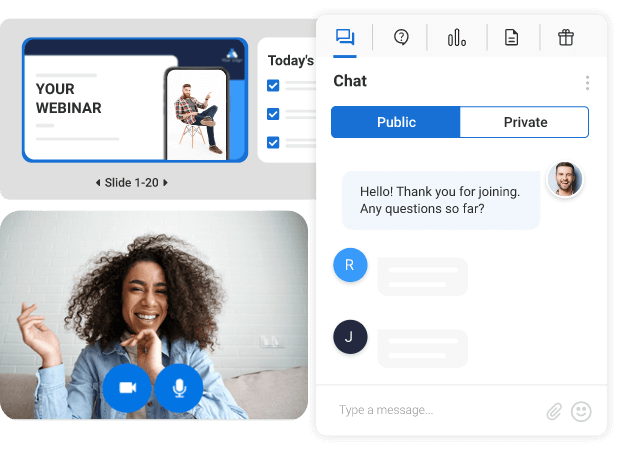
An Open Q&A Webinar is an unscripted, live session where you answer audience questions in real time, with no slides and no sales pitch.
It works because it removes every reason for someone new to distrust you. There is nowhere to hide behind a script.
When to use it:
- You are new to a market and nobody knows your name yet
- You want raw, unfiltered questions that reveal what your audience actually struggles with
- You are launching something and want to gauge interest before you build it
How it runs, step by step:
- Announce the topic loosely (a theme, not a rigid agenda).
- Open the floor immediately. Do not spend the first 15 minutes on your own story.
- Answer live. Let follow-up questions happen naturally.
- Close with a single, low-friction ask: join your email list for more of this.
The only con here is unpredictability. A quiet room can feel awkward. Prime it with 5 to 10 seed questions from your existing customers before you go live, so the first few minutes never fall flat.
Real seed questions work better than generic ones. Try something like “What’s the one thing you wish you knew before you started with [your category]?” or “What’s actually stopping you from doing this yourself?”
Promote the session with a plain, low-pressure line rather than a hard pitch: “I’m opening up an hour to answer whatever you’re stuck on, no slides, no sales pitch, just bring your questions.”
If this is your first time hosting anything live, it helps to walk through how to create and host a webinar once, end to end, before you go live in front of an actual audience.
How Does an Idea Validation Webinar Help You Build What Sells?
An Idea Validation Webinar tests whether an audience actually wants a product or service before you spend months building it.
How it works:
- Present the idea as a concept, not a finished product.
- Walk through the exact problem it solves and for whom.
- Ask directly: would you pay for this, and how much?
- Follow up with a short survey to quantify the interest.
This format saves founders from the single most expensive mistake in business: building something nobody asked for. If 60 attendees show up and 3 raise their hand to pay, that is data, not a rejection. Rework the pitch and test again.
Make the survey question specific enough to act on: “On a scale of 1 to 10, how likely are you to pay $49 a month for this?” gives you a real number, whereas “Would you find this useful?” does not.
A rough benchmark worth tracking toward: if 15 to 20% of attendees answer 8 or higher, the idea has enough pull to justify building it. Below that, the pitch needs work before the product does.
A registration page that clearly states what the idea is and who it is for tends to attract sharper, more honest feedback. Browsing a few real webinar landing page examples before you build your own is a fast way to see what that clarity actually looks like.
Looking to build a sales funnel for coaching and training? This quick video will help you in the process:
Why Should You Try a Co-Hosted Webinar to Grow Your Audience Fast?
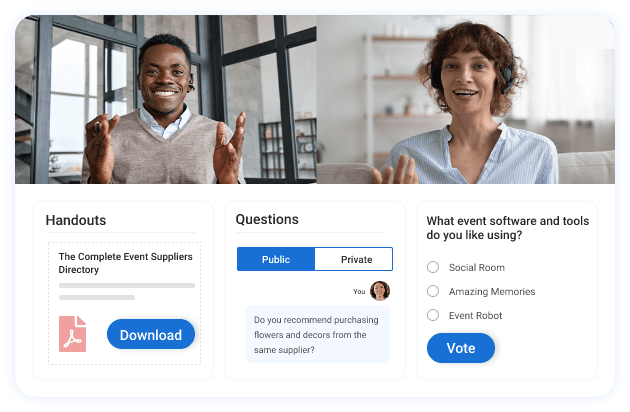
A co-hosted webinar pairs you with a partner who already has the audience you are trying to reach.
It works on a simple trade. Your partner brings credibility and reach. You bring content and expertise. Both of you walk away with new subscribers.
How to run one well:
- Choose a partner whose audience overlaps with yours, but who is not a direct competitor
- Split the promotion evenly. Both sides should push registration equally hard
- Divide speaking time so neither host dominates
- Each host gets their own CTA at the end, pointed at their own list
A joke that holds up in every co-hosting agreement ever written: somebody always thinks they talked for the “right” amount of time. Set a timer. Nobody argues with a timer.
A useful example: an email marketing consultant and a copywriter co-hosting “5 Subject Lines That Doubled Our Open Rate” reaches both audiences without either host competing on topic.
Send three promotional emails each, on the same schedule: an announcement 10 days out, a reminder 2 days out, and a same-day nudge an hour before the start time.
Promoting the session well matters as much as the session itself, and a look through solid webinar marketing tools will show you how much of that promotion push can run on autopilot instead of two people manually emailing their lists.
Live Webinars: Do They Actually Convert?
Let’s check some aspects of live webinars and how they help you convert the attendees into leads and prospective buyers:
How Does a Live Webinar Lesson Qualify Leads and Earn Trust?
A live webinar lesson teaches one specific, valuable skill in real time, with live chat, polls, and Q&A running throughout.
Unlike the automated version, the “live” part is the entire point. Attendees who show up and stay for a live session have already qualified themselves as serious.
How it works:
- Pick one narrow, specific skill. Not “marketing.” Something like “writing a subject line that gets opened.”
- Teach it fully. Do not hold back the good part for a pitch later.
- Use live polls to keep attendees engaged and to segment them by interest. A poll like “Which of these three is your biggest bottleneck right now?” doubles as both engagement and lead qualification.
- End with a single next step: book a call, not “check out our website.” A CTA like “Book a free 15-minute strategy call, I’ll personally look at your setup” converts better than a generic link.
The honest tradeoff: live lessons take real time and real hosting skills. If your hosting nerves are still shaky, run three practice sessions with your team before you go live with prospects watching.
A busy chat window can also pull your focus mid-lesson. Some platforms now scan the chat for repeat questions, like “will there be a replay,” and answer them automatically, so you never have to break your teaching flow to type a reply. Worth checking for when you compare live webinar tools.
How Do Live Sales Webinars Close Deals and Drive Revenue?
A live sales webinar teaches a real solution to a real problem, then presents a specific, time-bound offer before the session ends.
How it works:
- Teach the “what” and the “why” in full, holding nothing back.
- Transition clearly into the “how,” where your product or service becomes the logical next step.
- Present one offer with one deadline. Urgency only works when it is real, such as “the founding price closes in 48 hours” backed by an actual price increase after that window.
- Follow up by email for 3 to 5 days after the webinar to catch attendees who needed more time to decide. A subject line like “The recording (and that bonus I mentioned)” on day one outperforms a plain “Don’t miss out” reminder.
This is the format where the joke writes itself: nothing kills a live sales webinar faster than a host who is more excited about the slide transitions than the actual offer. Rehearse the pitch, not the PowerPoint.
A second set of eyes on the pitch helps too, whether that is a colleague or a tool built to check your session against proven, high-conversion frameworks and hand back specific fixes. Either beats a fourth run-through in front of the mirror.
Done well, this is the format that carries the heaviest load in a plan built to grow sales, since it is the only one asking directly for the purchase.
Can a Podcast-Based Webinar Turn Listeners Into Leads?
A Podcast-Based Webinar repurposes an existing episode or podcast-style conversation into a live or automated webinar format with a clear CTA attached.
Podcast listeners are a strange, wonderful audience. They already trust your voice. They just have never been asked to do anything beyond hitting play.
How it works:
- Identify your best-performing episode by listens or engagement. If one episode on pricing strategy pulled in three times your normal downloads, that is the one to rebuild, not your personal favorite.
- Rebuild it as a webinar, adding visuals, a live or recorded intro, and a CTA the original episode never had, such as a slide reading “Get the pricing worksheet from this episode, link in the registration confirmation.”
- Promote it to your existing podcast audience through the show itself.
- Route new registrants into your webinar funnel, not just your podcast feed.
Treat this as one more channel feeding the same webinar lead generation system you are already building, rather than a separate, one-off project.
Now, if you are looking to make your podcast work and generate leads, this quick session between Omar and John will be a great help:
Automated Webinars: Do They Really Work?
What do you think about automated webinars? Here are some aspects of automated webinars that can actually make a difference.
What Is an Automated Webinar Lesson and How Does It Multiply Leads?
An Automated Webinar Lesson is a pre-recorded session that plays on a schedule or on demand, without you needing to show up live.
Definition in one line: you record it once, and it works for you every day after that.
How it works:
- Record your best-performing live lesson, or write a new one from scratch.
- Set it to run on a recurring schedule, or make it available instantly on registration.
- Automate the reminder and follow-up emails around it.
- Track replay views, drop-off points, and offer clicks to refine the content over time.
The right platform makes this format genuinely low-effort. Good automated webinars run on a set schedule and replay for an unlimited number of attendees without any host involvement, which means a single well-built lesson can generate leads on a Tuesday at 3 a.m. while you are asleep.
Set it to play three times a day, say 9 a.m., 1 p.m., and 7 p.m., so it covers different time zones without you touching the calendar again.
Build the follow-up sequence around the replay itself: an email the moment it ends with the replay link, a case study two days later, and a last-chance reminder on day five before the related offer closes.
A study by HubSpot in 2026 found that 93.8% of marketers reported improved lead quality over the previous year, and personalization was the most cited reason why. An automated webinar lets you personalize the follow-up sequence without personalizing your Tuesday afternoon.
What Is an Automated Sales Webinar and How Does It Sell While You Sleep?
An automated sales webinar takes the exact structure of a live sales webinar and runs it on autopilot, on a schedule or on demand.
How it works:
- Record the sales webinar once, at your best delivery.
- Set it on a recurring or evergreen schedule.
- Recreate urgency artificially but honestly, using a real, enforced deadline for each individual viewer’s offer, such as a countdown timer set to close 72 hours after each person registers, not a fixed calendar date that resets every time someone new signs up.
- Automate the email follow-up exactly as you would for a live version.
Platforms built for this, like WebinarNinja, use case exist specifically to let a single recorded pitch run indefinitely, so a host doesn’t need to repeat the same 45 minutes every week. If the term is new to you, this guide on evergreen webinars is worth a quick read before you build one.
Should You Charge for Your Webinar? A Look at Paid Webinars
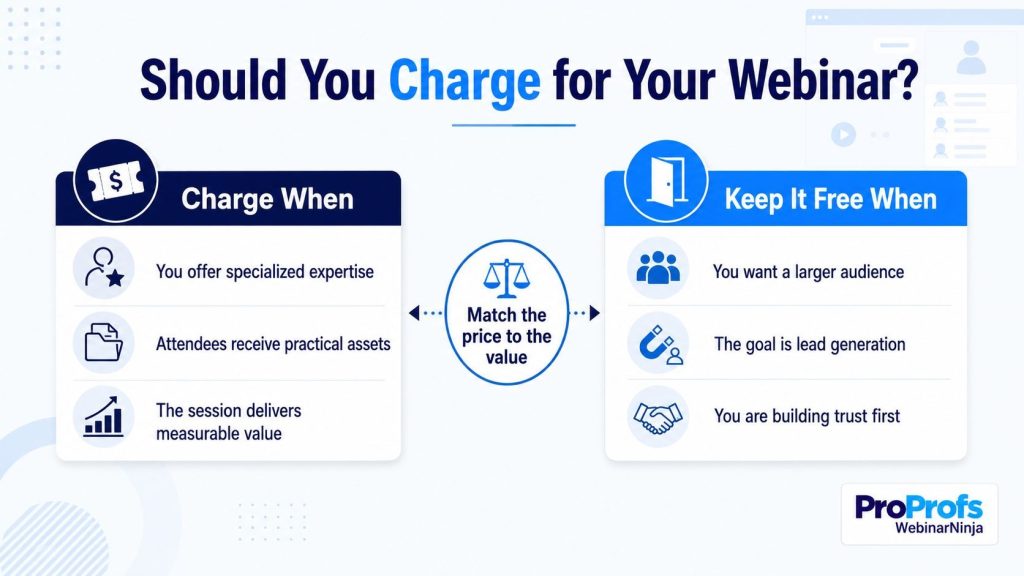
A paid webinar charges attendees for access to the content itself, turning the webinar into the product rather than the pitch for one.
When this makes sense:
- Your content alone is valuable enough that people would pay for it, separate from any product you sell
- You want to filter for serious, committed attendees only
- You are building or testing a course, and a paid webinar is the smallest possible version of it
How it works:
- Price the session based on the depth of what you are teaching, not on what feels comfortable to charge. If a private coaching hour normally costs $200, a 90-minute group session teaching the same core method at $49 a seat is an easy comparison for the buyer to make.
- Collect payment during registration, before the session starts.
- Deliver real, standalone value. A paid webinar that is secretly a 60-minute sales pitch will earn refund requests, not referrals.
- Offer the replay as a bonus, not the entire product.
Automating the payment step at registration removes a lot of the friction here, since attendees pay once and are dropped straight into the session without a separate checkout process. If you want a full walkthrough, creating and selling paid webinars covers the pricing and delivery decisions in more depth.
How Do Meeting Tools and Dedicated Webinar Platforms Typically Differ?
Every webinar type above needs the same underlying tools: registration, reminders, hosting, replays, and follow-up. Not every platform handles all five equally well.
| Criterion | Meeting-First Tools (e.g. Zoom Meetings) | Larger Event Platforms (e.g. GoToWebinar) | Dedicated All-in-One Webinar Platform (like WebinarNinja) |
| Automated or evergreen webinars | Usually requires a separate paid add-on | Limited, often gated to higher tiers | Typically included as a core feature |
| Built-in landing and registration pages | Not typically included | Included on higher tiers | Typically included, no extra tool needed |
| Attendee app download required | No, browser-based | Yes, in most configurations | Usually no, browser-based |
| Setup complexity | Straightforward for meetings, more involved for webinar-specific features | More setup steps, geared toward larger event teams | Built for same-day setup, minimal technical background needed |
| Support model | Primarily self-serve documentation on lower tiers | Business-hours support on most plans | Varies widely by vendor, ranging from ticket-only to 24/7 human support |
Zoom Meetings is an excellent tool for, well, meetings, but it genuinely was not built around evergreen, automated webinars, which is why so many people researching Zoom webinar alternatives are really just looking for that one missing feature. GoToWebinar handles large live events well, though that scale often comes with a steeper setup process than a solo coach or small team needs for a single lesson-based webinar.
The gap between those two extremes is exactly where dedicated, all-in-one webinar platforms tend to fit.
How Do You Choose the Right Webinar Type for Your Business?
Match the webinar type to where your audience actually sits today, not to where you wish they were.
| If Your Audience Is… | Start With |
| Cold. They have never heard of you | Open Q&A Webinar or Co-Hosted Webinar |
| Warm, but unsure you can help them | Live Webinar Lesson |
| Ready to buy, but need one final push | Live Sales Webinar |
| Too small a team to run frequent live sessions | Automated Webinar Lesson or Automated Sales Webinar |
| Already loyal customers | Paid Webinar, positioned as a premium resource |
If you only have time to launch one webinar type this quarter, pick the one that matches the stage where you currently have the most traffic, not the stage you find most exciting to talk about.
For example, a consultant with a large newsletter but few sales calls booked is sitting on warm, unconverted consideration-stage traffic. A Live Webinar Lesson, not another awareness-stage Q&A, is the better use of that list.
If the real goal is structured, ongoing teaching rather than a single session, it may be worth looking at how people create live online workshops instead of forcing that content into a one-off format.
What Problems Does a Webinar Funnel Actually Solve?
- “I get traffic but no leads.” An awareness-stage webinar (Open Q&A or Co-Hosted) gives cold visitors a reason to hand over their email.
- “I get leads but nobody trusts me yet.” A Live Webinar Lesson builds that trust in a single hour, live, with proof rather than promises. This is also the same instinct behind why teams use webinars to train and communicate with their team, not just external prospects.
- “I have leads sitting cold in my CRM.” A Live or Automated Sales Webinar gives you a reason to re-engage them with a real, time-bound offer.
- “My team is too small to host webinars every week.” Automated formats let one recorded session do the work of a dozen live ones, and a strong registration page is most of what it takes to increase webinar registrations and attendance without adding more live hosting hours.
Ready to Build Webinars That Convert?
You do not need all 8 formats running at once. You need one, built for the exact stage your audience is sitting at right now.
Pick the row from the funnel table that matches your traffic today. Build that single webinar. Give it one CTA. Run it before you touch a second format.
A realistic timeline: pick the format today, write the registration headline and the one CTA line tomorrow, and set the live date 14 days out so promotion has enough runway to actually fill the room.
Most people who go through this exercise end up starting with a Live Webinar Lesson or an Automated Webinar Lesson, since both formats fit neatly into an existing content calendar without demanding a full sales team to support them.
That is more or less the setup we run on ourselves at WebinarNinja. Registration pages, reminder emails, replays, and the small AI-assisted touches (a headline suggestion here, a batch of follow-up content there) all sit inside the same platform, which is really just one less set of tools to stitch together while you get the first webinar out the door.
Frequently Asked Questions
What does it mean for a webinar to convert?
A webinar converts when attendees take the specific action you designed the session around, whether that is joining an email list, booking a call, or completing a purchase. Conversion is measured against one clear goal, not general engagement or attendance numbers alone.
How long should a webinar be to maximize conversions?
Most high-converting webinars run between 45 and 60 minutes, long enough to teach something real and short enough to respect the audience's time. Sales-focused webinars often run closer to 60 minutes to leave room for a full pitch and live Q&A before the offer closes.
What is a realistic conversion rate to expect from a webinar?
Conversion rates vary heavily by webinar type and offer size, so there is no single universal benchmark. A small, highly targeted lesson-based webinar built around a clear next step will consistently outperform a broad, unfocused session with a vague call to action.
How many webinar types does a business actually need?
Most businesses only need two to three webinar types running consistently: one for awareness, one for consideration, and one for purchase. Running all 8 types at once usually spreads a small team too thin to execute any of them well.
How do you turn webinar attendees into email subscribers?
Registration itself is the easiest point to capture an email address, since most webinar platforms require it before anyone can join. A good platform captures this automatically at registration and syncs it straight to your email tool through existing integrations, without any extra manual export step.
What is an automated evergreen webinar?
An automated evergreen webinar is a pre-recorded session that runs continuously on a schedule or on demand, without a host present for each instance. It lets a single well-built webinar generate leads or sales around the clock, long after it was originally recorded.
Should you charge money for a webinar?
Charge for a webinar when the content itself is valuable enough to stand alone as a product, separate from anything you sell afterward. Free webinars work better when the goal is lead generation, since removing the payment barrier increases registration volume. For a deeper look at hosting paid webinars, pricing and delivery both deserve real thought before you charge anyone.
How does WebinarNinja differ from Zoom Webinars?
WebinarNinja includes automated webinars, built-in landing pages, and AI-assisted tools for headlines, pitch review, chat moderation, and content repurposing as standard features. Zoom Meetings requires a separate paid add-on for webinar-specific functionality and has no equivalent native toolset for those tasks. Both are browser-based and require no attendee download.
Can you run a webinar without any technical experience?
Yes, platforms built for non-technical users offer built-in registration pages, automated reminder emails, and one-click hosting that require no coding or design skills. Most first-time hosts can set up and launch a webinar the same day they sign up, and webinar recordings give a safety net for anything that goes wrong live.
How many webinars should you host per month to build a steady funnel?
One consistent, well-promoted webinar per month typically outperforms four rushed, poorly promoted ones. Consistency in scheduling and promotion matters more than raw frequency for building a predictable pipeline of leads.
What is the best day and time to host a webinar?
Midweek days, particularly Tuesday through Thursday, generally see stronger registration and attendance than Mondays or Fridays. Late morning slots tend to perform well across time zones, though the right time ultimately depends on where your specific audience is located.
Want to host a webinar for free?
Use WebinarNinja to teach, improve marketing, and grow your sales.