Most webinars have the shelf life of a banana.
They go live, they get some attention, and a week later they’re forgotten in a folder nobody opens again.
That’s not a webinar problem. That’s an SEO problem, and it’s a leads problem too.
I’ve spent decades watching marketers pour real budget into a single hour of live content, then treat the page hosting it like a paper flyer instead of a permanent lead generation machine.
A webinar page can rank in Google for months, keep converting strangers into registrants, and keep feeding your pipeline long after the live date has passed.
This guide isn’t just “how to rank.” It’s “how to rank, and then turn every one of those visits into a real lead.”
Every section below ends with a direct action step. No vague “consider optimizing” advice. Just the move to make, right now.
Let’s turn your webinar into a lead machine.
What Is Webinar SEO?
That’s the textbook version.
Here’s the real version: it’s making sure your webinar doesn’t disappear the moment the “Register Now” button stops making sense, and that every visitor who does find it has an obvious next step.
The Three Lives Every Webinar Page Lives Through
A webinar page isn’t one asset. It’s three, stacked on top of each other.
- Pre-event: A conversion page chasing commercial-intent keywords like “free [topic] webinar.”
- Live and near-live: The event itself, plus the 24 to 48 hours after, when you add the recording and a first-pass transcript.
- Post-event: An evergreen resource chasing informational keywords, once “register for [date]” stops being true.
Miss any of these three lives, and the page dies a little.
Miss all three, and congratulations, you’ve built a very expensive PDF.
Action Step: Audit your last three webinar pages right now. Note which of the three lives each one is missing, and fix the biggest gap first.
Want to host a webinar for free?
Use WebinarNinja to generate leads, improve marketing, and grow your sales.
Why Does Webinar SEO Actually Matter for Lead Generation?
Because paid promotion is a treadmill, and organic traffic is a lead source that keeps working while you sleep.
Every registrant from an ad or an email blast costs you something, every single time.
An organic registrant, once the page ranks, is basically a free lead landing in your pipeline on autopilot.
Website, blog, and SEO efforts were the top marketing channels driving ROI for B2B brands in 2024, according to HubSpot’s State of Marketing Report.
A well-built webinar page is still a page. It qualifies, and it converts.
What Skipping Webinar SEO Actually Costs Your Pipeline
- You pay for every single lead, forever. Stop the ads, stop the leads.
- Your best content becomes invisible in 30 days. The insight from your live call often beats your blog post on the same topic, yet the blog post keeps generating leads for years while the webinar goes quiet.
- A competitor’s page fills the demand gap and captures the lead that should have been yours. Search demand doesn’t wait for you to catch up.
Blog posts, for context, were among the top five highest-ROI content formats reported by marketers in 2025, per the same HubSpot State of Marketing research.
A properly built webinar replay page behaves exactly like a blog post once it’s structured correctly, meaning it keeps generating leads the same way a top-performing blog post does.
Action Step: Pull up your analytics and check how many of last quarter’s webinar registrants came from organic search. If that number is close to zero, this guide is your fix.
Talking about analytics, here’s how you can easily track webinar statistics and replay easily on WebinarNinja:
How Do You Research Keywords for a Webinar?
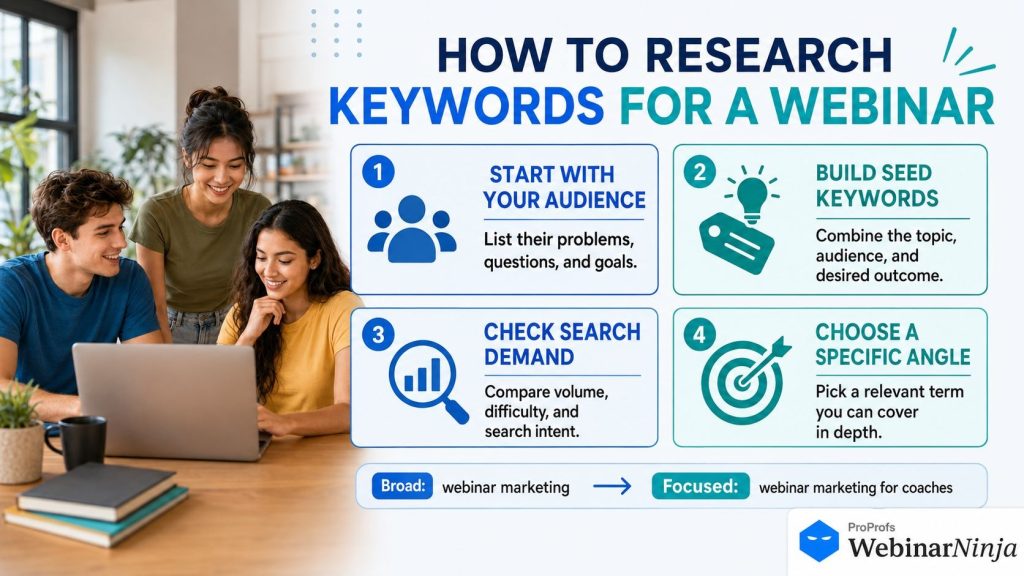
You map keywords to intent before you write a single headline.
Skip this step, and you’ll optimize a registration page for a keyword the searcher already moved past weeks ago. Awkward and expensive, since that’s a lead you’ll never see.
The Four Keyword Buckets You Actually Need
- Commercial/event keywords: “topic webinar,” “free topic training.” These live on the registration page and drive the most sales-ready leads.
- Informational keywords: “what is topic,” “how does topic work.” These live in your replay page and transcript, and warm up colder traffic.
- Long-tail, use-case keywords: “topic for coaches,” “topic for SaaS teams.” Lower volume, much higher lead quality.
- Comparison and format keywords: “live vs automated webinar.” These belong in supporting blog content that funnels back to your registration page.
Here’s a quick example of how that plays out for a single topic.
| Keyword Type | Example | Where It Lives | Lead Value |
| Commercial | Email deliverability webinar | Registration page | High, near-term |
| Informational | How to improve email deliverability | Replay page | Medium, needs nurture |
| Long-tail | Email deliverability for small teams | Supporting blog post | High, specific fit |
| Comparison | Live vs automated webinar for training | Companion blog content | Medium, research stage |
Every one of these pages should interlink. Think of it as a small, well-behaved neighborhood, not four strangers who’ve never met and definitely aren’t sharing leads.
If you want a deeper look at mapping a full journey from awareness to conversion, this breakdown of the webinar funnel walks through exactly where each keyword bucket fits along the way.
Action Step: Write down your next webinar topic, then assign one keyword from each of the four buckets to it before you build a single page.
How Do You Optimize a Webinar Landing Page for SEO and Conversions?
You build one page that satisfies two very different audiences at once, and gets both of them to hand over an email address.
Search engines want structure and keywords. Humans want a fast, obvious reason to register.
Sacrifice either one, and you’ve built half a page and lost half your leads.
The Landing Page Build Order
- Write a keyword-aligned H1. “Fix Your Sender Reputation in 45 Minutes” beats “Join Our Webinar” every single time, and it pulls in searchers who are ready to act.
- Front-load the value proposition. State what they’ll learn, when, and why, all above the fold, before anyone has a chance to bounce.
- Keep the form short. Name and email is usually plenty. Every extra field is a tiny act of self-sabotage against your own lead count.
- Add a speaker credibility block. A photo, a bio, a real credential. Trust converts.
- Include a short agenda. Three to five bullets. Gives humans a reason to commit and search engines something to chew on.
- Add social proof. A registrant count or a logo strip does a lot of quiet conversion work.
- Optimize the confirmation flow. A good thank-you page reduces no-shows, which improves both the engagement signals search engines pick up on and the number of live leads you actually get to talk to.
Landing Page Checklist
| Element | Why It Matters for SEO | Why It Matters for Lead Generation |
| Keyword-aligned H1 | Signals topic relevance | Confirms visitors are in the right place, so they don’t bounce |
| Above-fold value prop | Reduces bounce rate | Answers “what’s in it for me” before they leave |
| Short-form registration | Improves engagement metrics | Removes friction, raises signup rate |
| Speaker bio | Builds topical authority | Builds trust before the ask |
| Agenda or outline | Adds extractable text | Sets expectations, filters in the right leads |
| Social proof | Increases dwell time | Reduces perceived risk of registering |
| Fast page load | Direct ranking factor | Prevents drop-off before the form even loads |
If lead capture is the entire point of the session, it’s worth structuring the page around a proven lead generation webinar framework rather than reinventing the layout from scratch every time.
Action Step: Rebuild your next registration page using the seven steps above, in that order, before you write a single promotional email.
Don’t want to rebuild it from memory? We turned this exact process into a FREE checklist you can run against any registration page in under ten minutes.
Grab it once, use it for every webinar you launch after this one.
Also, if you are using WebinarNinja, you can do it easily in fewer steps. Here’s a quick video to help you:
How Do You Build a Registration Page That Converts and Ranks?
Same rules as the landing page, with three extra habits that separate the professionals from the hobbyists and separate a trickle of leads from a steady stream.
Registration Page Habits Worth Stealing
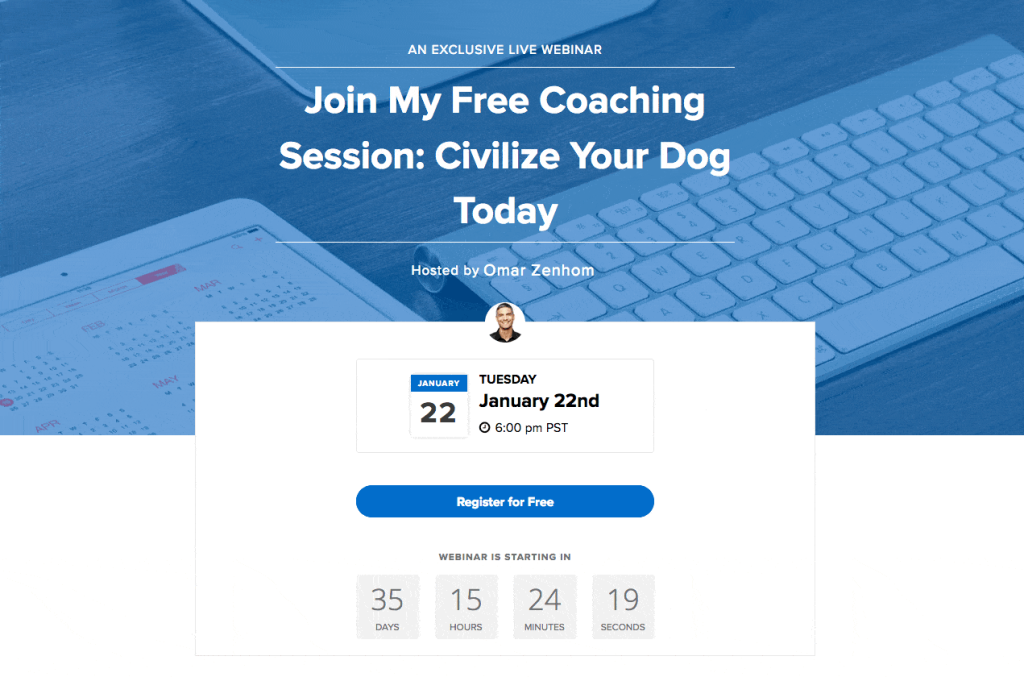
- State the format clearly. “Live, 45 minutes” or “watch anytime” tells humans and search engines what kind of page this is, so the right leads self-select in.
- Never let the page go stale. A page still promoting “March 3rd” in September is a small monument to neglect, and it’s leaking leads to anyone who bounces off it.
- Keep the URL permanent. A new URL for every recurring session resets your authority to zero, and every reset means starting your lead flow from scratch. Repeatedly. On purpose. Please don’t.
That last point matters more than it sounds.
A stable URL accumulates backlinks and rankings across every promotion cycle. A fresh URL starts from nothing, every single time, and so does your organic lead count.
If the webinar exists purely to move product, borrowing structure from a dedicated sales webinar approach tends to convert better than a generic template stretched to fit.
Action Step: Check your last five webinar URLs right now. If any topic repeats with a brand-new URL each time, merge them into one permanent page going forward.
Want to host a webinar for free?
Use WebinarNinja to generate leads, improve marketing, and grow your sales.
How Should You Write Webinar Titles and Meta Descriptions?
Same discipline as any other page on your site. No webinar-specific magic here, just the discipline that actually gets clicks.
Title and Description Rules That Actually Hold Up
- Lead with the outcome, not the format. “Cut Cart Abandonment in 30 Days” beats “Join Our Marketing Webinar,” and it pulls in people who are already motivated to convert.
- Mention the format only if it adds clarity. Don’t let “webinar” or “masterclass” crowd out the actual topic.
- Write the meta description as a direct answer. AI search tools extract these directly now. Curiosity hooks get skipped, and so do the leads behind them.
- Keep the title under 60 characters, the description under 155. Truncated titles look unfinished. Because they are.
Action Step: Rewrite your current webinar’s title tag and meta description using the outcome-first formula above, then check that both display in full in a search results preview tool.
How Do You Turn a Live Webinar Into an Evergreen SEO Asset?
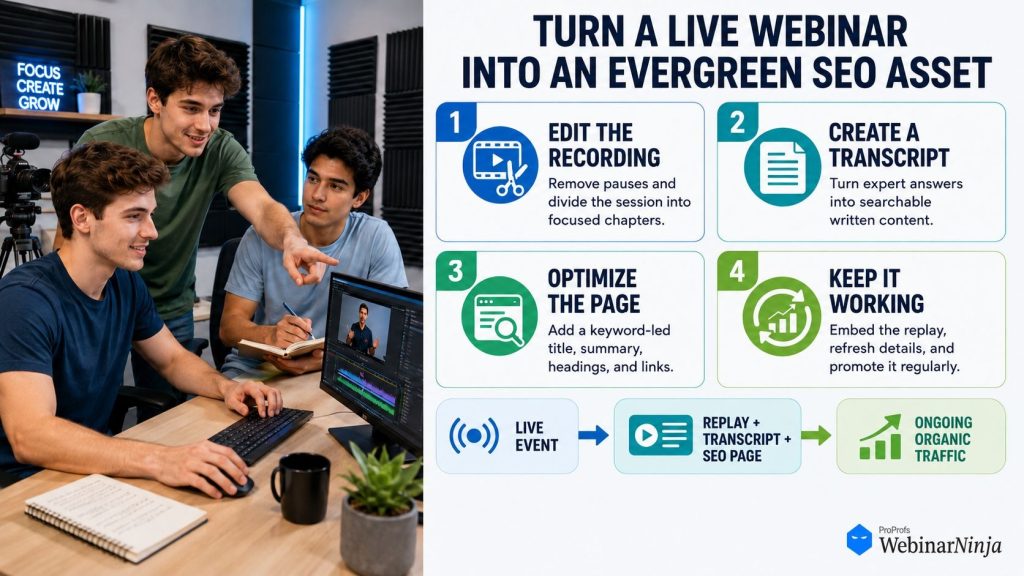
This is the step that separates a one-week traffic spike from a two-year lead generation engine.
Skip it, and your best content quietly retires the day after the event, taking its leads with it.
The Evergreen Conversion Checklist
- Publish the full transcript. Video alone gives search engines nothing to read. Crawlers can’t watch, and unindexed content can’t generate a single lead.
- Add a written summary above it. 200 to 400 words. Gives humans a fast way to judge relevance before they commit their email address.
- Break the transcript into subheadings. Creates standalone, extractable chunks that both Google and AI answer engines love, and love means visibility, and visibility means leads.
- Add video schema markup. Unlocks richer search result displays, which means more clicks before anyone even reaches your form.
- Interlink to related content. A hub of connected replays builds authority faster than isolated orphan pages, and keeps visitors moving toward your next offer.
- Keep it lightly gated, not fully hidden. Name and email is fine, and it’s a legitimate lead capture point. Hiding the entire transcript from crawlers defeats the point.
Grand View Research’s Enterprise Video Market report points to growing enterprise use of webinar and video software specifically for marketing and client engagement, which tracks with a broader shift toward treating recorded content as durable, not disposable.
Formats built to run indefinitely make this whole exercise easier, since the “this already happened” problem never shows up in the first place with a properly set up automated webinar.
Action Step: Take your best-performing past webinar and add a transcript and summary to it this week. That single fix often unlocks the fastest new lead volume of anything in this guide.
And if you have an automated webinar, here is a quick video to help you get that live feel:
What Technical SEO Elements Matter Most for Webinar Pages?
Webinar pages are heavier than a standard blog post. Video embeds, forms, countdown timers, all of it adds weight.
Weight slows pages down. Slow pages rank worse, and slow forms lose leads before they finish typing their email.
The Non-Negotiable Technical Checks
- Page speed. Use a click-to-load thumbnail instead of an auto-loading video player.
- Mobile responsiveness. A large share of registrations happen on a phone now. A clunky mobile form is a silent lead killer.
- Structured data. Use the Event schema pre-event, VideoObject or Article schema post-event.
- Clean, permanent URLs. Worth repeating a third time in this guide, because it’s genuinely that important to your long-term lead flow.
- Crawlable transcript text. Confirm it renders as real HTML text, not an image or a locked PDF.
Action Step: Run your webinar page through a free page speed test today. If it scores under 70, fix the video embed first, since that’s almost always the culprit.
How Do You Choose the Right Webinar Format for SEO and Lead Generation Goals?
Not every format serves search visibility or lead flow in the same way. Some are built for the moment. Some are built to keep generating leads long after you’ve stopped thinking about them.
Matching Format to Goal
| Format | Best For | SEO Behavior | Lead Generation Behavior |
| Live | Launches, timely topics, real-time Q&A | Strong initial spike, converts well into a replay | High-intent leads from real-time engagement |
| Automated | Ongoing lead generation, evergreen topics | Sustained visibility, no “past event” problem | Leads captured around the clock, no host needed |
| Series | Multi-part education, in-depth training | Each session targets a related, distinct keyword | Deeper engagement, higher-quality leads over time |
| Hybrid | Scaling across time zones with a human touch | Good middle ground between live energy and automation | Wide reach with a live touchpoint for objections |
Zoom Meetings, worth mentioning honestly, doesn’t support automated or on-demand webinar delivery without a separate paid Webinars add-on. That’s a real gap, not a dig, and it’s a real limit on how many leads you can capture without a live host present.
If turning a session into a paid, repeatable asset is the actual goal, running it through a good webinar platform like WebinarNinja keeps the registration, delivery, and payment pieces in one place instead of three, which means fewer drop-off points between a visitor and a paying lead.
Action Step: Pick one topic you’ve only ever run live, and turn it into an automated or evergreen version this month, so it can start generating leads without you in the room.
How Do You Convert Webinar SEO Traffic Into Leads?
Ranking gets people to the page. Converting is a separate job, and it’s the one that actually pays your bills.
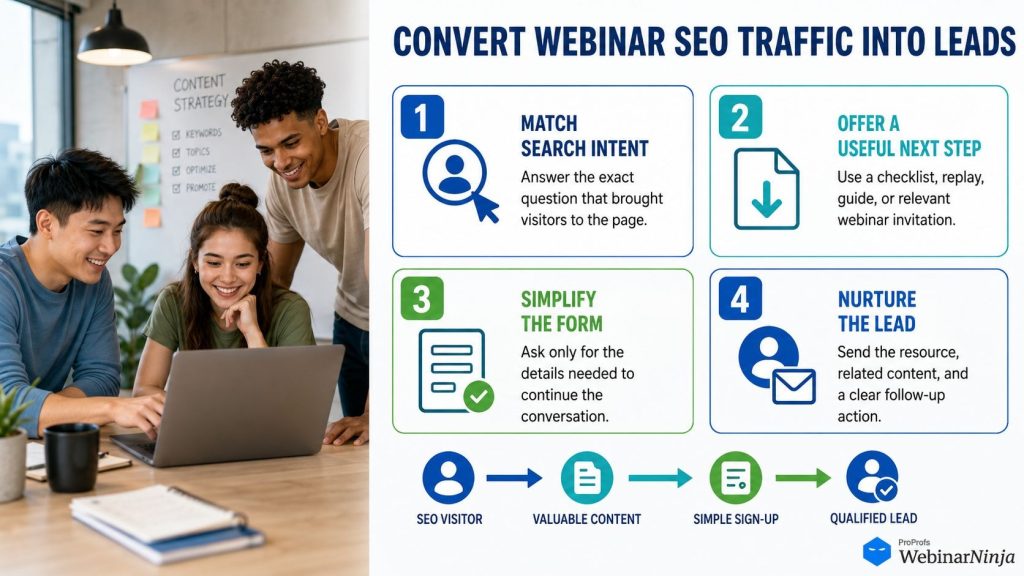
Here’s where the leads actually come from, once the traffic shows up.
The Lead Capture Playbook
- Gate the replay lightly. Providing a name and email in exchange for the recording is a fair trade that most visitors will happily accept.
- Offer a downloadable resource inside the session. A checklist, template, or slide deck tied to the topic gives organic visitors a second reason to hand over their details.
- Add a mid-content offer, not just an end-of-page one. A visible, relevant offer partway through the transcript catches people who never make it to the bottom.
- Segment your follow-up emails by behavior. Someone who watched the full replay is a hotter lead than someone who bounced after two minutes. Treat them differently.
- Retarget organic visitors who didn’t convert. A pixel on the page lets you bring them back with a second, more specific offer.
Action Step: Add one gated resource and one mid-content offer to your highest-traffic webinar replay this week, and watch your lead count move without a single dollar of new ad spend.
Want to host a webinar for free?
Use WebinarNinja to generate leads, improve marketing, and grow your sales.
How Do You Build Backlinks Around a Webinar?
When working on webinar SEO, you give other sites an actual reason to link, not a polite request to do so.
Nobody links to a favor. Everybody links to something useful, and every link is another door someone can walk through to become a lead.
Link-Earning Moves Worth Trying
- Co-host with someone who has an audience. They’ll often link from their own site or newsletter, sending you a fresh batch of warm traffic.
- Publish original data from the session. A poll result or survey finding is legitimate, citable material that pulls in backlinks on its own.
- Pitch the recap directly. A genuinely useful summary is real outreach material, not spam, and it puts your registration page in front of a brand-new audience.
Action Step: Identify one past webinar guest or partner with an audience, and pitch them a link exchange or a joint recap post this week.
What Mistakes Quietly Kill Webinar SEO and Your Lead Count?
Most of these aren’t dramatic failures. They’re small habits that compound into invisibility, and invisible pages don’t generate leads.
The Usual Suspects
- Letting the page die after the event date. “Register now” in August for something that happened in April is a red flag and a lead repellent.
- Over-gating the replay. Hiding the whole transcript blocks the exact content that would help you rank, and rank means reach, and reach means leads.
- Skipping keyword research. An internal joke of a title means nothing to a stranger searching Google, and strangers are exactly who become new leads.
- Creating a fresh URL every time. Resets authority instead of compounding it, taking your lead flow back to zero with it.
- Ignoring the mobile registration flow. Costs you sign-ups and search visibility at the same time, on the device where most of your traffic actually arrives.
- Forgetting the follow-up sequence. Weak reminders lower show-up rates, which quietly drag down both engagement signals and the number of leads you actually get to speak with live.
Action Step: Pick the one mistake above that sounds most familiar, and fix it on your single highest-traffic webinar page before you touch anything else.
How Do You Measure Whether Webinar SEO Is Working?
You separate organic performance from paid and email performance. Otherwise, you’re just guessing with extra steps, and guessing doesn’t scale a lead pipeline.
Metrics Worth Tracking Monthly
| Metric | What It Tells You |
| Organic sessions to the page | How much traffic is coming from search, not ads |
| Keyword ranking position | Whether your optimization work is actually moving the needle |
| Organic-attributed registrations | Real pipeline impact, not vanity traffic |
| Replay engagement (time on page, scroll depth) | Whether your transcript and summary are holding attention |
| Organic-to-lead conversion rate | Whether the page is turning visits into actual leads, not just views |
| Backlinks earned over time | Whether your outreach efforts are compounding |
Action Step: Build a simple monthly tracker with these six metrics, and review it on the same day you review your paid campaign numbers, so organic gets equal attention.
Build a Webinar SEO Program That Keeps Generating Leads After the Event Ends
A webinar’s job doesn’t stop when the live session does, and neither should its lead flow. Treat the registration page, the replay, and the transcript as three connected assets, each earning its keep at a different stage.
One good hour of content, built this way, can keep generating traffic and leads for years instead of days.
The right webinar software builds that foundation for you automatically, and increasingly with AI doing part of the work.
WebinarNinja can write and test your registration page headlines, turn a finished session into blog posts and social snippets, answer repeat chat questions live without pulling the host off track, and flag weak spots in your pitch against proven conversion frameworks. Add automated webinars that run on a schedule or on demand, instant replays, and built-in analytics that separate organic leads from paid ones, and most of the manual setup this guide covers is already handled.
Start with the page you already have. Add the transcript. Fix the stale date. Get started for free and see how much of that groundwork is already done for you.
Frequently Asked Questions
What is the difference between webinar SEO and regular content SEO?
Webinar SEO covers the same fundamentals as content SEO but adds a lifecycle problem regular content doesn't have. A blog post stays relevant indefinitely, while a webinar page has to transition from a pre-event conversion page to a post-event evergreen resource without losing rankings or lead flow along the way.
Do webinar registration pages need to rank in Google?
Yes. A registration page that ranks organically reduces how much you depend on paid ads and email for every future session's lead count. Even modest organic traffic compounds across multiple event cycles when the URL stays stable.
Should I gate my webinar replay behind a form?
A light form asking for name and email is reasonable, and it's a legitimate lead capture point. The transcript and a written summary should still be visible and crawlable by search engines. Fully hiding all text content blocks the exact material that would help the page rank and attract new leads organically.
How long should a webinar transcript be for SEO purposes?
There's no fixed word count, since length simply reflects the session itself. Structure matters more than length: subheadings and a concise summary make the transcript far more useful to both readers and search engines than one unformatted wall of text.
Can an automated or evergreen webinar rank as well as a live one?
Yes, and it often ranks more consistently because its registration page never needs a past-tense event date that signals the content is outdated. This is one of the clearest SEO and lead generation advantages of choosing a platform that supports automated formats natively.
What keywords should appear in a webinar title?
Lead with the specific outcome or topic a real searcher would type, placed near the front of the title, rather than an internal name that means nothing outside your own team. "Fix Your Email Deliverability in 45 Minutes" will consistently outperform "Q3 Growth Roundtable" for both clicks and leads.
How often should I update an evergreen webinar replay page?
Review it every quarter. Confirm the information is still accurate, refresh any outdated statistics, and add fresh internal links as newer related content gets published. A visibly maintained page tends to hold its rankings, and its lead flow, longer than one left untouched.
Does video length affect webinar SEO?
Not directly, but it affects how much transcript content is available for search engines to index, along with visitor engagement metrics like time on page. A well-structured 45-minute session generally gives you more usable, keyword-rich text, and more chances to place a lead capture offer, than a 10-minute recording.
What is the best webinar format for lead generation through search?
Automated and evergreen formats tend to perform best for search-driven lead generation specifically, since the registration page can run indefinitely without the "this already happened" problem limiting a one-off live event's long-term visibility and lead flow.
How do I optimize a webinar landing page for mobile search?
Keep the registration form to name and email only, make sure the page loads quickly on mobile connections, and place the value proposition and signup button above the fold without requiring a scroll. A large share of registrants, and leads, now sign up from a phone.
Should each webinar have its own dedicated URL?
For recurring topics, no. Reuse the same URL across multiple event cycles instead of replacing it each time. A stable URL accumulates backlinks, authority, and lead flow over repeated promotions, while a new URL resets all three back to zero.
How does webinar software help with webinar SEO specifically?
The right webinar software builds the SEO and lead capture foundation into every session automatically, including registration pages, instant replays, and analytics that separate organic leads from paid ones. That removes the manual setup work this guide describes and lets you focus on keywords and content instead of technical plumbing.
Want to host a webinar for free?
Use WebinarNinja to teach, improve marketing, and grow your sales.


![How to Create Product Demo Scripts that Convert [Checklist + Templates]](https://webinarninja.com/blog/wp-content/uploads/2025/05/Feature_WN_How-to-Create-Product-Demo-Scripts-that-Convert-Checklist-Templates.png)
![How to Create an Interactive Product Demo in 2026 [With Examples]](https://webinarninja.com/blog/wp-content/uploads/2024/07/Feature_WN_5-Interactive-Product-Demo-Examples_-What-Are-They-How-to-Create-One-in-2024_.png)